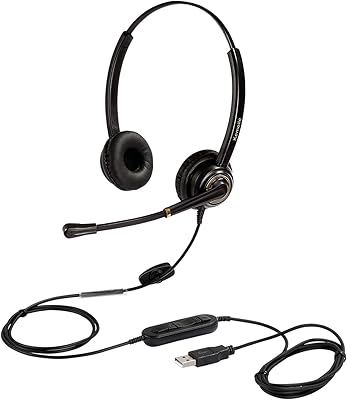
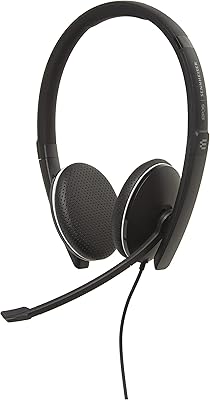
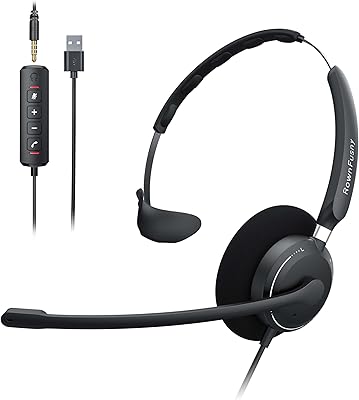
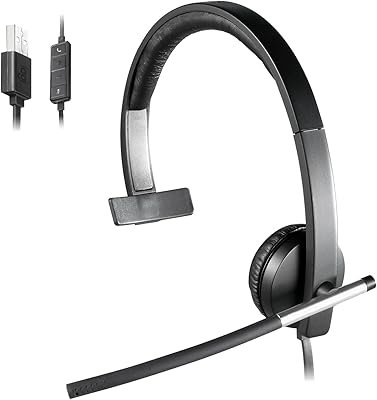
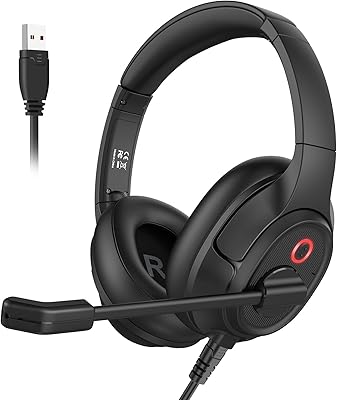
Overview

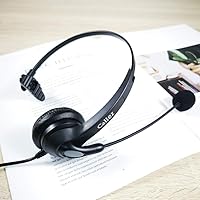
The Callez C500U2 USB Headset has quietly built a strong reputation as a serious office headset that doesn't ask you to spend Plantronics or Jabra money. It uses wideband audio with DSP noise cancellation — technology you'd normally find in pricier business gear — wrapped in a single-ear design with a flexible boom mic. Plug it into a USB-A port and it works immediately; no driver hunts, no IT tickets. With over 3,200 ratings and a 4.2-star average since its 2019 launch, it's not a new gamble — it's a well-tested option in a crowded budget category.
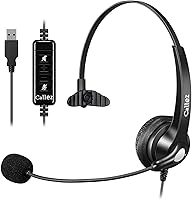
Features & Benefits

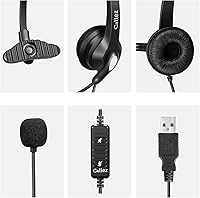
The noise-cancelling boom mic is where this call center headset earns its keep. DSP processing filters out ambient keyboard clatter and office chatter on your end, so callers hear your voice rather than your environment. Acoustic Shock Protection is a feature often skipped at this price point — it guards against sudden loud blasts during live calls, which matters if you handle inbound calls all day. The inline cable controls keep volume adjustments and muting at your fingertips without alt-tabbing away from your screen. At just 3.5 oz with a 6.56-foot cable, you can lean back, grab a coffee, or pace without yanking the plug from your laptop.

Best For

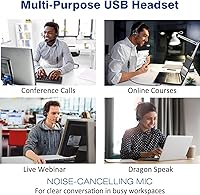
This USB office headset is a natural choice for remote workers and call center agents who live on voice calls — people for whom comfort over a long shift matters more than audiophile sound quality. It works with Skype, Zoom, and most softphone platforms right out of the box, making it practical for anyone moving from a desk phone to a computer-based setup. Dictation users and Dragon NaturallySpeaking regulars will appreciate the microphone clarity. One honest note: this is a monaural headset — one ear only. If you need stereo for multimedia, look elsewhere. But for focused voice call work on a tight budget, it covers the job confidently.

User Feedback

Across a broad base of reviewers, all-day comfort and microphone clarity are the two most consistently praised traits — people report that the soft ear cushion holds up through long shifts without leaving pressure marks. The mic pickup frequently surprises buyers who expected budget-level audio, with many calling it crisp and professional-sounding. The main concern is durability: some users report the mic boom loosens or wobbles after months of daily handling, so it rewards careful use. Compatibility is mostly smooth, though occasional hiccups surface with older UC environments. Worth knowing — the noise cancellation improves outbound clarity for your caller; it does not block surrounding sound for the listener.

Pros

  • Plug-and-play USB setup works instantly on Windows, macOS, and ChromeOS with zero driver installation.
  • The boom mic delivers surprisingly clear voice pickup that regularly exceeds expectations for its price tier.
  • At 3.5 oz, this call center headset is light enough to forget you are wearing it during long shifts.
  • DSP processing on the microphone reduces keyboard clatter and background noise noticeably for callers.
  • Inline controls put volume adjustment and mute within easy reach without touching the keyboard or screen.
  • Acoustic Shock Protection shields your hearing from sudden loud blasts during live inbound calls.
  • The 6.56-foot cable provides genuine desk freedom without yanking the connection loose when you move.
  • A two-year warranty with a 45-day money-back window provides solid coverage for a budget-category headset.
  • Broad compatibility spans Skype, Zoom, most softphones, and Dragon NaturallySpeaking right out of the box.
  • Soft leather ear cushion holds up comfortably through extended wear without causing pressure fatigue.

Cons

  • The mic boom joint loosens with repeated daily repositioning, often becoming noticeably wobbly after several months.
  • Noise cancellation only filters outgoing mic audio — the listener hears all surrounding office noise unfiltered.
  • Single-ear monaural design frequently surprises buyers who assume a headset means stereo audio.
  • The inline control buttons are small and hard to distinguish by touch alone, causing occasional wrong-button presses.
  • Not Microsoft Teams certified, which limits integration for enterprise UC deployments with strict hardware requirements.
  • Some users on larger heads find the headband extension maxes out before reaching a truly comfortable fit.
  • The USB-A connector means users with USB-C-only laptops need an adapter, which is not included.
  • Build materials feel adequate rather than robust — rough handling accelerates visible wear on plastic components.
  • Cable management is left entirely to the user, as no clip or organizer is included in the box.
  • Warranty claim resolution can be slow for wear-related defects that appear after the first few months of use.

Ratings

The Callez C500U2 USB Headset was evaluated by our AI rating system after processing thousands of verified global buyer reviews, with spam, incentivized, and bot-generated feedback actively filtered out. Scores for this call center and remote-work headset reflect real patterns across comfort, audio performance, build quality, and day-to-day usability. Both the strengths that make it a standout at its price tier and the pain points that push some buyers toward pricier alternatives are transparently represented below.
Microphone Clarity
84%
For a wired USB headset in this price range, the boom mic consistently surprises users with how clean their voice sounds to callers. DSP processing does a solid job of flattening out keyboard noise and background hum, which remote workers on back-to-back Zoom or Skype calls particularly appreciate.
In genuinely loud environments — open-plan offices with several people talking, or home setups near HVAC units — the noise filtering shows its limits. Callers still notice ambient sound bleeding through, so it performs best in moderately quiet conditions rather than truly chaotic ones.
Wearing Comfort
88%
At roughly 3.5 oz, this call center headset barely registers during a long shift. Users consistently report that the soft leather ear cushion stays comfortable through four- to eight-hour stretches without leaving the ear feeling sore or overheated, which is exactly what call center agents and support staff need.
The on-ear fit works well for most head sizes, but users with larger heads note the headband extension reaches its limit and can feel slightly snug after a few hours. The monaural design also means those who prefer full acoustic isolation will find it an imperfect solution.
Build Quality & Durability
63%
37%
The uni-body headband feels more solid than comparable plastic headsets in this category, and the metal mic boom adds a sense of sturdiness that cheaper alternatives skip entirely. For light-to-moderate daily use, many buyers report the unit holding up well through the first year.
The mic boom is where durability concerns cluster. A recurring pattern in longer-term reviews describes the boom joint loosening after several months of repeated repositioning — particularly for users who adjust it constantly throughout the day. The overall plastic construction also starts to show wear if handled roughly.
Audio Playback Quality
71%
29%
For voice calls and softphone audio, the 28mm speaker driver reproduces speech clearly and at sufficient volume. Users transitioning from cheap analog headsets or phone handsets frequently remark how noticeably cleaner their incoming call audio sounds.
This is not a multimedia headset, and the single-ear design makes that obvious quickly. Music playback feels thin and flat, and anyone expecting rich, full-range audio will be let down. It handles voices well; everything else is functional at best.
Noise Cancellation (Listener Side)
54%
46%
The headset does not claim active noise cancellation for the listener, and for pure call work, the open single-ear design actually helps users stay aware of their surroundings — a genuine advantage for office environments where colleagues need your attention.
Buyers who read the noise cancellation marketing and expect ANC-style isolation are routinely disappointed. The noise cancellation applies to the microphone output, not the listener experience. In a noisy open office, you will hear everything around you while on a call.
Ease of Setup
93%
Plug into a USB-A port and it works — no driver downloads, no system restarts, no IT involvement. Users consistently highlight this as a real-world strength, especially in corporate environments where software installs require admin approval. It just works on Windows, macOS, and ChromeOS.
A small subset of users report the headset not being recognized immediately on older USB hubs or certain ChromeOS Chromebook models. Connecting directly to the laptop or desktop port rather than through a hub resolves this in most cases, but it adds a minor friction point.
Inline Controls Usability
79%
21%
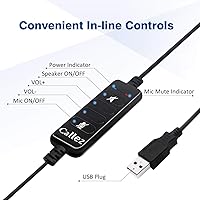
The in-line control box handles volume up and down plus mic and speaker mute without requiring the user to interact with the PC at all. For call center agents who mute and unmute dozens of times a day, having that control physically in hand is a genuine workflow improvement.
The buttons on the control box are small and not strongly differentiated by feel, which makes blind-feel operation unreliable at first. Users occasionally mute the wrong channel, especially during the early adjustment period before muscle memory kicks in.
Platform Compatibility
81%
19%
The Callez monaural headset works with the full range of major UC platforms out of the box — Skype, Zoom, most softphones, and browser-based calling tools all recognize it as a standard USB audio device without fuss. Dragon NaturallySpeaking users also report clean, low-error dictation results.
It is not Microsoft Teams certified, which means the Teams call button integration is absent. Some Lync or enterprise UC deployments with strict hardware whitelists have flagged compatibility issues, so IT-managed environments may require a quick compatibility check before rolling it out.
Cable Length & Management
82%
18%
The 6.56-foot cable gives desk workers real flexibility — enough to lean back, turn to a second monitor, or reach for documents without straining the connection. Most users find the length hits a practical sweet spot for a typical home office or call center workstation.
For users with desktop towers positioned far from their chair, even 6.56 feet can feel just barely adequate. The cable is not retractable, and without a cable clip or management system included, it tangles with desk clutter more easily than tidier setups would prefer.
Headband Adjustability
76%
24%
The sliding headband adjustment covers a wide enough range to fit comfortably on most adult head sizes. The mechanism feels smooth and holds its position throughout a shift, which matters when the headset gets passed between agents across different shifts.
Users on the larger end of head size report reaching the headband's maximum extension and still finding it a touch tight. The adjustment range, while adequate for most, is not as generous as higher-end business headsets where the design is more specifically engineered for diverse fit.
Value for Money
91%
This USB office headset punches well above its weight class when scored purely on functional call performance per dollar spent. For remote workers, students, or small businesses equipping a team without a large hardware budget, it delivers professional-grade audio results at a fraction of Jabra or Plantronics pricing.
The value equation weakens if durability becomes an issue inside the first year. Replacing a unit due to mic boom failure erodes the initial savings quickly. Buyers who factor total cost of ownership over two-plus years may find the value proposition less clear-cut than the sticker price suggests.
Acoustic Shock Protection
83%
ASP is a feature category that most buyers overlook until a sudden audio blast from a caller causes real discomfort. Having it built in at this price point is a meaningful differentiator, and inbound call handlers who deal with unpredictable caller environments specifically appreciate its presence.
There is no visible indicator or user-facing confirmation that ASP is actively functioning, so users largely have to take it on trust. Those who have experienced loud call spikes with other headsets tend to believe it works; others are skeptical without a way to verify it independently.
Warranty & After-Sales Support
77%
23%
A two-year warranty with a 45-day money-back window is notably generous for a budget-tier headset and signals reasonable confidence from the manufacturer. Buyers report the returns and replacement process being straightforward when legitimate defects surface early in the product lifecycle.
Customer service responsiveness is inconsistent, based on buyer accounts. Warranty claims that require back-and-forth communication — particularly for wear-related mic boom issues that appear after several months of use — can take longer to resolve than buyers expect given the coverage terms.

Suitable for:

The Callez C500U2 USB Headset is a natural fit for anyone whose workday revolves around voice calls rather than multimedia audio. Remote workers handling back-to-back Zoom or Skype sessions, call center agents clocking long shifts, and support staff transitioning from a desk phone to a computer-based setup will all find it does exactly what it promises without any setup friction. The plug-and-play USB connection means it works the moment it hits the port — a genuine advantage for people in managed IT environments where installing drivers requires approval. It also serves dictation users well, including those running Dragon NaturallySpeaking, since the boom mic captures speech cleanly and consistently. Small teams or individual professionals who want a reliable, business-grade audio tool without the overhead of a premium brand price will find strong value here.
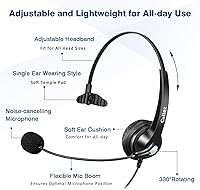
Not suitable for:

The Callez C500U2 USB Headset is not the right choice for buyers who need stereo sound — this is a single-ear monaural design, and people who purchase it expecting full headphone-style audio are consistently caught off guard. Anyone who wants to use one headset for both call work and music or video will likely find the audio experience limiting and flat outside of voice applications. Users working in genuinely loud open-plan environments should also temper their expectations: the noise cancellation targets outgoing microphone audio and does nothing to block ambient sound for the listener, so you will hear everything around you while on a call. Buyers on enterprise Teams deployments that require certified hardware should note this headset lacks Microsoft Teams certification, which may cause integration gaps. Finally, anyone expecting premium build longevity from years of heavy daily use may find the mic boom joint starts to loosen before the warranty expires, making it a better fit for moderate rather than extreme usage intensity.
Specifications

  • Model Number: This headset is identified by the model number C500U2, manufactured by Callez.
  • Connectivity: Wired USB-A connection with plug-and-play support; no drivers or software installation required.
  • Ear Design: Single-ear (monaural) on-ear configuration with a flexible, repositionable boom microphone arm.
  • Speaker Driver: 28mm speaker driver delivers voice-optimized audio reproduction tuned for call clarity rather than wide-range music playback.
  • Impedance: 32 Ohm impedance rating, consistent with standard USB audio device output requirements.
  • Microphone Type: Noise-cancelling directional boom mic with Digital Signal Processing (DSP) to reduce ambient background noise on the outgoing audio channel.
  • Acoustic Protection: Acoustic Shock Protection (ASP) is built in to limit sudden loud audio spikes that can occur during live inbound calls.
  • Weight: The headset weighs approximately 3.5 oz (99 g), making it one of the lighter options in the wired USB office headset category.
  • Cable Length: A 6.56 ft (2 m) fixed cable provides ample reach for standard desk and workstation setups.
  • Inline Controls: An in-line control module on the cable includes dedicated buttons for volume up, volume down, microphone mute, and speaker mute.
  • Busylight: An integrated busylight indicator signals to nearby colleagues that the user is actively on a call.
  • Ear Cushion Material: Ear cushions are constructed from soft synthetic leather designed for extended wear comfort during long shifts.
  • Headband: Adjustable uni-body headband construction accommodates a range of adult head sizes with a single sliding extension mechanism.
  • OS Compatibility: Compatible with Windows (XP through 11), macOS X and later, and ChromeOS without requiring additional drivers.
  • Platform Support: Works with major UC and softphone platforms including Skype, Skype for Business (Lync), Zoom, and most browser-based calling tools.
  • Dimensions: Product dimensions are approximately 6.69 x 5.51 x 1.97 inches when packaged, reflecting a compact single-ear form factor.
  • Warranty: Covered by a 2-year manufacturer warranty and a 45-day money-back guarantee from the date of purchase.
  • Teams Certification: This headset is not Microsoft Teams certified and does not include a dedicated Teams call button.
  • Bluetooth Support: No Bluetooth or wireless capability; the headset operates exclusively via its wired USB-A connection.
  • First Available: The C500U2 model was first listed for sale in November 2019 and has accumulated over 3,200 verified ratings since launch.

Related Reviews

MAIRDI M805DUC USB Headset
84%
88%
Microphone Clarity
79%
Noise Cancellation
82%
Comfort & Wearability
86%
Build Quality
77%
Audio Playback Quality
More
Logitech H390 USB Computer Headset
83%
86%
Microphone Voice Clarity
93%
Value for Money
97%
Ease of Setup
68%
Long-Term Comfort
82%
In-Line Control Tactility
More
Logitech H540
Logitech H540
78%
83%
Microphone Clarity
78%
Comfort & Fit
74%
Audio Quality
61%
Build Quality & Durability
94%
Plug-and-Play Convenience
More
Logitech H570e USB Headset
84%
87%
Audio Quality
91%
Comfort for Long Sessions
88%
Noise-Canceling Microphone Performance
94%
Ease of Setup
82%
Build Quality
More
KEMEILE KML02DUSB USB Headset
85%
88%
Audio Quality
91%
Comfort for Long Use
85%
Noise-Cancelling Performance
84%
Microphone Clarity
72%
Build Quality
More
Yealink UH37
Yealink UH37
79%
86%
Microphone Clarity
63%
Noise Cancellation
74%
Comfort for Extended Use
81%
Build Quality
91%
USB Compatibility
More
EKSA H12E USB Headset
77%
86%
Microphone Clarity
78%
Noise Cancellation Performance
83%
Wearing Comfort
61%
Build Quality & Durability
91%
Value for Money
More
Executive Pro Overture USB Headset
86%
88%
Sound Quality
92%
Noise-Canceling Effectiveness
85%
Comfort for Long Use
76%
Microphone Flexibility
90%
Build Quality and Durability
More
MKJ USB Headset
MKJ USB Headset
79%
83%
Microphone Clarity
88%
Wearing Comfort
67%
Build Quality
94%
Plug-and-Play Setup
91%
Platform Compatibility
More
Plantronics Blackwire 510 USB Headset
83%
88%
Comfort for Long-Term Use
91%
Audio Clarity during Calls
75%
Build Quality and Durability
92%
Compatibility with UC Applications
89%
Microphone Performance (Noise-Canceling)
More

FAQ

No, none at all. The Callez C500U2 USB Headset is fully plug-and-play on Windows, macOS, and ChromeOS. Just connect it to a USB-A port and your computer recognizes it immediately as a standard audio device. No driver downloads, no admin permissions, no restarts needed.
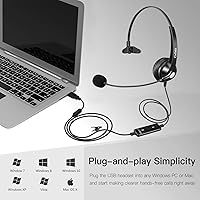
It works reliably with Zoom, Skype, Google Meet, and most softphone platforms right out of the box. Microsoft Teams will also recognize it as an audio device and it functions fine for calls — just note it is not officially Teams certified, so the dedicated Teams call button feature is absent. For standard call and mute control, the inline buttons handle everything you need.

No, and this is worth understanding clearly before you buy. The noise cancellation on this headset works on the microphone side — it filters background noise out of your outgoing voice so callers hear you more clearly. It does not block surrounding sound for the listener. You will still hear your environment normally while on a call, which is actually useful in offices where staying aware of your surroundings matters.

It covers one ear only — this is a monaural (single-ear) headset by design. That is standard for call center and professional business headsets because it keeps one ear free for awareness of your surroundings. If you need stereo audio for music or video content, this is not the right tool for that job. It is purpose-built for voice calls.

Most users find it genuinely comfortable for extended wear. At 3.5 oz it is light enough that you stop noticing it fairly quickly, and the soft leather ear cushion does not create the heat or pressure buildup that firmer foam cushions tend to. People with larger heads occasionally find the headband extension reaches its limit and feels slightly snug after a few hours, so that is worth considering if fit is a concern.

A small amount of flexibility in the boom arm is intentional, as it is designed to be repositioned to suit your preference. However, if the joint feels genuinely floppy or fails to hold its position, that is a durability issue that has been reported by users after extended daily use. If it develops within the warranty period, the two-year coverage should apply — contact the manufacturer directly with your purchase details.

The headset uses a USB-A plug, so you will need a USB-A to USB-C adapter to use it with a modern laptop that only has USB-C ports. An adapter is not included in the box, so factor that in if your machine lacks USB-A ports. Most inexpensive adapters work fine since this is a standard USB audio device.

It works on both without any issues. macOS recognizes this call center headset as a standard USB audio input and output device automatically. You may need to set it as your default audio device in System Settings after plugging it in, but beyond that one step, no additional configuration is required.

The busylight is a small indicator light on the headset that activates when you are on a call, signaling to nearby coworkers that you should not be interrupted. In an open-plan office or shared home workspace, it is a low-tech but practical feature. It is not app-controlled like premium busylights — it simply illuminates during active call audio.

For voice calls, the gap is smaller than you might expect. The DSP noise filtering does a solid job of cleaning up outgoing audio in moderately quiet environments, and callers consistently report that voice comes through clearly. In truly loud or acoustically challenging spaces, premium headsets with more sophisticated microphone arrays do pull ahead noticeably. But for a home office, call center desk, or standard office environment, this USB office headset performs well above what its price would suggest.