Overview

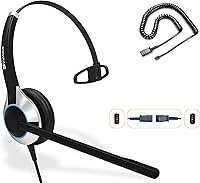
The TruVoice HD-500 Wired Office Headset is built squarely around one purpose: keeping professionals comfortable and connected through a full day on the phone. What sets it apart from a standard corded headset is its quick-disconnect design, which lets you detach the headset from the desk cable in a single pull — useful when you need to grab something across the room without ending the call. The die-cast aluminum frame keeps weight at just 64 grams, which is genuinely light for an all-day wear scenario. It works across a wide range of enterprise desk phone brands via swappable adapter cables. Worth noting upfront: this is a voice-focused tool, not an audio headset.
Features & Benefits

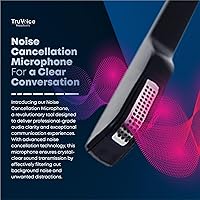
The noise-canceling microphone sits on a 270-degree rotatable boom, so you can swing it precisely into position whether you wear it on your left or right ear — handy in open-plan offices where background noise is constant. The speakers include acoustic shock protection, a practical safeguard for anyone fielding high-volume calls or unexpected audio bursts throughout the day. The 150 Ohm dynamic driver is tuned for voice reproduction, not music; clarity on calls is solid, but do not expect rich bass or wide frequency response. The leatherette ear cushions are soft enough for extended shifts, and the swappable cable system means this headset can follow you across desk phones, softphones, and mobile devices with just a cable swap.

Best For

This call center headset makes the most sense for people who live on their desk phone — receptionists, support agents, and anyone fielding back-to-back calls across a full shift. It is particularly well-suited to offices still running enterprise systems from Avaya, Mitel, Nortel, or Shoretel, where finding a broadly compatible headset at a reasonable price point can be a real headache. IT managers standardizing headsets across a mixed-hardware environment will appreciate that one model covers most major phone brands with simple cable swaps. Home office workers using a dedicated desk phone rather than a USB headset setup will also find it a practical, no-fuss option.

User Feedback

Most buyers highlight two things quickly: setup is straightforward out of the box, and the headset stays comfortable through long shifts without the ear fatigue that heavier models cause. Call clarity gets consistent praise, and the noise-canceling mic handles typical office background noise well enough for professional calls. The more common criticisms tend to center on ear cushion longevity — after several months of daily use, the leatherette can show wear. A smaller number of users have flagged inconsistency in the QD connector fit, with occasional looseness over time. Compatibility is generally confirmed across major phone brands, though a handful of users recommend double-checking their specific phone model before purchasing.

Pros

  • At just 64 grams, the HD-500 stays comfortable through full eight-hour shifts without causing ear fatigue.
  • The quick-disconnect cable lets you walk away from your desk mid-call without ending or transferring it.
  • One headset covers a wide range of enterprise desk phone brands simply by swapping the bottom adapter cable.
  • The noise-canceling mic keeps background office chatter out of your calls in open-plan workspaces.
  • Acoustic shock protection guards against sudden audio spikes — a practical safeguard for busy call center environments.
  • The die-cast aluminum frame gives it a more durable, premium feel compared to all-plastic alternatives at this price.
  • Setup on a compatible desk phone is plug-and-play — most users are up and running within minutes of unboxing.
  • The 270-degree rotatable boom positions cleanly for left- or right-ear use without any modification.
  • Voice clarity on calls is consistently praised, with speech coming through clean and intelligible throughout the day.

Cons

  • Leatherette ear cushions show wear and begin peeling for many heavy users within three to six months.
  • The QD connector can loosen with repeated daily use, eventually causing intermittent audio dropouts.
  • Buyers needing a different adapter cable than the included U10P must purchase it separately, adding unexpected cost.
  • The on-ear fit becomes less comfortable for some users after several hours, particularly those who wear glasses.
  • Mic sensitivity can feel inconsistent between calls, with some users reporting uneven pickup levels.
  • Audio quality outside of voice calls — music, video, or conferencing apps — is noticeably limited and flat.
  • Cable durability near the connectors has been flagged, with fraying reported after several months of daily use.
  • The headband adjustment range may feel tight for users at the larger end of the head size spectrum.

Ratings

The TruVoice HD-500 Wired Office Headset has been evaluated by our AI rating system after analyzing thousands of verified global buyer reviews, with spam, bot submissions, and incentivized feedback actively filtered out. Scores reflect a balanced picture — where this call center headset genuinely delivers and where real users have run into frustration. Both strengths and recurring pain points are represented transparently across every category below.
Call Audio Clarity
88%
Agents handling back-to-back calls consistently report that voices come through clean and intelligible, even during high-volume periods. The dynamic driver tuned for voice frequencies means speech stays crisp without the muddiness that affects broader-spectrum consumer headsets.
A portion of users note that clarity can drop slightly when volume is pushed to maximum levels, with some minor distortion reported on particularly loud callers. It also falls short for anyone expecting rich or full-range audio — this is a telephony tool, not a multimedia one.
Noise-Canceling Microphone
83%
In open-plan offices and busy call centers, users frequently mention that background chatter and keyboard noise stay largely out of the call. The 270-degree rotatable boom makes it easy to find the right mic position regardless of which ear the headset is worn on.
In especially loud environments — think warehouse floors or crowded support rooms — some users report that the noise cancellation struggles to fully suppress ambient sound. A handful note inconsistency in mic sensitivity, where pickup levels feel uneven between calls.
Comfort During Extended Wear
81%
19%
At just 64 grams, the HD-500 sits noticeably lighter than most competing desk phone headsets, and agents wearing it through six- or eight-hour shifts frequently call out the lack of ear fatigue as a standout benefit. The leatherette cushion adds a layer of softness that makes on-ear contact tolerable throughout the day.
Some users with larger ears or glasses find the on-ear fit less forgiving after several hours, with mild pressure buildup along the ear rim. The leatherette material also retains heat, which a subset of users find uncomfortable in warmer office environments.
Quick-Disconnect Functionality
79%
21%
Being able to unclip the headset mid-call and step away from the desk is genuinely useful for receptionists and agents who frequently need to retrieve documents or move to a nearby workspace. The connector detaches cleanly and reattaches with a firm click in most reported cases.
A recurring complaint involves the QD connector loosening over time with repeated daily use, leading to intermittent audio dropouts for some users. A smaller group reports that the connection feels slightly loose from the outset, which raises questions about long-term connector durability.
Build Quality & Durability
74%
26%
The die-cast aluminum frame gives the headset a noticeably sturdier feel than all-plastic competitors at a similar price, and many users comment that it holds up well through daily handling in busy office settings. The headband adjustment mechanism feels solid and stays in place once set.
Despite the aluminum frame, several users report that the plastic components — particularly around the ear cup housing — show wear or minor cracking after extended daily use. The leatherette cushions are specifically flagged for peeling or degrading within a few months of heavy use.
Ear Cushion Longevity
61%
39%
Out of the box, the leatherette cushions are noticeably soft and comfortable, and users appreciate the initial fit for day-one wear. For light or part-time users, the cushions hold up reasonably well over the first few months.
This is one of the most consistently flagged pain points across reviews — heavy daily users report the leatherette beginning to peel or harden within three to six months. Replacement cushions are available separately, but the need to replace them relatively soon adds to the total cost of ownership.
Compatibility Range
86%
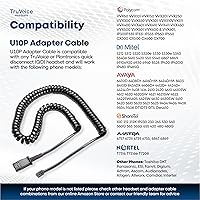
The included U10P adapter covers a wide range of enterprise desk phone brands — Avaya, Mitel, Poly, Nortel, Shoretel, and several others — making it a practical single-model choice for IT teams managing mixed hardware environments. Users frequently confirm successful plug-and-play setup across different phone systems.
Compatibility is driven by the adapter cable, not the headset itself, and a subset of users have been confused about what is included versus what needs to be purchased separately for different setups. A few buyers report needing a different bottom cable than the one bundled, requiring an additional purchase.
Setup & Ease of Use
91%
Getting the HD-500 up and running on a compatible desk phone is consistently described as fast and straightforward — most users report being connected and taking calls within minutes of unboxing. No software, drivers, or configuration steps are involved for standard desk phone use.
The ease-of-setup story breaks down slightly when users need to connect to softphones or mobile devices, where the correct adapter cable must be sourced separately and identified correctly. The packaging instructions could do more to clarify the adapter cable ecosystem for new buyers.
Cable & Connector Quality
67%
33%
The detachable cable system is genuinely practical — being able to swap the bottom cable to use the same headset across different devices is a real-world advantage that users working across multiple setups appreciate. Cable length is generally considered adequate for standard desk setups.
Cable durability draws mixed feedback, with some users reporting fraying near the connectors after several months of daily use. The QD cable junction in particular receives criticism for feeling less robust than the headset itself, and a subset of users have had to replace cables within the first year.
Acoustic Shock Protection
84%
Call center agents dealing with sudden loud tones, fax blasts, or spiking call audio report that the built-in acoustic shock protection provides meaningful relief compared to unprotected headsets. This feature is rarely highlighted by casual users but consistently appreciated by heavy telephony professionals.
It is difficult to evaluate this feature objectively from user feedback alone, as its absence is only noticeable in edge cases. A small number of users report that very extreme audio spikes still come through uncomfortably, suggesting the protection has limits under the most severe conditions.
Microphone Boom Flexibility
82%
18%
The 270-degree rotation range means the mic boom adapts to left- or right-ear wearing without awkward repositioning, which users switching ear preference mid-shift find practical. The boom holds its position reliably once adjusted, avoiding the drift that affects cheaper microphone arms.
A few users note the boom arm feels somewhat stiff when new, requiring deliberate force to rotate — though this tends to loosen with use. The range of motion, while wide, stops short of folding flat for storage, which can make the headset slightly bulky to pack away.
Value for Money
77%
23%
Positioned in the mid-range of professional telephony headsets, the HD-500 delivers a feature set — aluminum frame, QD system, noise-canceling mic, acoustic shock protection — that buyers generally feel justifies the price when compared to budget alternatives with fewer professional features.
The ear cushion durability issue chips away at the value perception for heavy daily users, since needing replacement cushions within six months adds incremental cost. Buyers who also need a different adapter cable face an additional purchase on top of the base price, which some consider a transparency issue.
Headband Adjustability
78%
22%
The headband covers a practical range of head sizes and holds its adjustment position reliably throughout the day, which users with larger or smaller heads appreciate when sharing headsets across shifts. The mechanism feels sturdy enough to withstand repeated adjustments without loosening.
The adjustment range, while functional, has been noted as slightly limited for users at the extremes of head size. A small number of taller users report the headband sits shallower than ideal, which affects overall stability during active movement around a desk.
Wearing Versatility (Left or Right Ear)
85%
Being able to wear the headset on either ear without any modification is a practical feature in shared workstation environments, and users who switch ears throughout the day to reduce fatigue find this flexibility genuinely useful. The mic boom repositions cleanly to accommodate either side.
The single-ear monaural design means users who prefer ambient sound on both sides are well served, but those coming from binaural or stereo headsets will find the adjustment noticeable. It is worth noting this is an intentional design choice for professional telephony, not a limitation per se.

Suitable for:

The TruVoice HD-500 Wired Office Headset is the right call for anyone who spends the majority of their workday on a desk phone and needs a headset that can keep up without becoming a burden. Call center agents, receptionists, and customer support staff will get the most out of it — the lightweight frame and noise-canceling mic are clearly designed around that reality. If your office is running Avaya, Mitel, Poly, Nortel, Shoretel, or any number of other enterprise phone systems, the broad compatibility via swappable adapter cables makes procurement straightforward without forcing a hardware overhaul. IT managers looking to standardize a single headset model across a mixed-brand phone environment will particularly appreciate that flexibility. Workers who routinely need to step away from their desk mid-call — grabbing a file, moving to a printer, checking on a colleague — will find the quick-disconnect feature a genuine daily convenience rather than a novelty. Home office users running a dedicated desk phone rather than a USB softphone setup will also find this a practical, no-fuss solution at a mid-range price point.

Not suitable for:

The TruVoice HD-500 Wired Office Headset is not the right fit for buyers expecting a versatile audio device that doubles as a music or video conferencing headset — the dynamic driver is tuned for voice telephony, and the audio experience outside of call use is noticeably narrow. Anyone relying primarily on a computer, USB connection, or Bluetooth for their calls should look elsewhere, since this headset is built around RJ9 desk phone connectivity and requires separate adapter cables for other setups. Buyers who want binaural sound — both ears covered — will also be disappointed, as this is a single-ear monaural design by intent. If cushion durability is a dealbreaker and replacing ear pads periodically is not acceptable, the leatherette material has a track record of wearing down within months under heavy daily use. Those working in extremely loud industrial or warehouse environments may also find the noise cancellation does not fully meet the demands of that level of ambient noise.
Specifications

  • Form Factor: Single-ear (monaural) on-ear design, wearable on either the left or right ear without modification.
  • Connection Type: Wired with a quick-disconnect (QD) connector that separates the headset from the desk phone adapter cable.
  • Headphone Jack: RJ9 connection via the included U10P adapter cable, which plugs directly into compatible desk phone headset ports.
  • Impedance: 150 Ohm impedance, optimized for desk phone telephony circuits rather than consumer audio equipment.
  • Audio Driver: Dynamic driver tuned for voice-frequency reproduction, prioritizing speech clarity over broad-spectrum audio performance.
  • Microphone Type: Noise-canceling microphone mounted on a flexible boom arm with 270-degree rotational range.
  • Frame Material: Die-cast aluminum headband frame for structural rigidity while keeping total headset weight at approximately 64 grams.
  • Ear Cushion Material: Leatherette (synthetic leather) over foam ear cushions designed for extended on-ear contact throughout long work shifts.
  • Headset Weight: 64 grams for the headset unit alone, excluding the adapter cable and quick-disconnect cord.
  • Cable System: Detachable, swappable bottom cable design allows the same headset to be used with different devices by changing the adapter cable.
  • Acoustic Protection: Built-in acoustic shock protection in the speakers limits sudden loud audio spikes that can occur during active call center use.
  • Compatible Systems: Works with desk phones from Poly, Avaya, Mitel, Nortel, Shoretel, Digium, ESI, Fanvil, Panasonic, Toshiba, and several other enterprise brands via appropriate adapter cables.
  • Wearing Style: Fully ambidextrous — the headband and mic boom can be configured for left-ear or right-ear use without tools or additional parts.
  • Package Dimensions: Retail packaging measures 7.52 x 5.28 x 2.56 inches, with a total packaged item weight of 7.8 ounces.
  • Included Components: Package includes the HD-500 headset, a U10P RJ9 adapter cable, and replacement ear cushions.
  • Noise Control: Sound isolation is achieved through the on-ear cushion design combined with the noise-canceling microphone for two-way noise management.
  • Control Type: In-line volume control is integrated into the cable for quick audio level adjustments without accessing the desk phone directly.
  • Water Resistance: This headset carries no water resistance rating and should be kept away from moisture and liquid exposure.

Related Reviews
NUROUM HP11DU
NUROUM HP11DU
74%
83%
Microphone Clarity
69%
Comfort & Wearability
67%
Build Quality
78%
Value for Money
76%
Noise Cancellation (Mic-Side)
More
Yealink UH34 Mono Wired Headset
76%
88%
Call Audio Clarity
84%
Microphone Quality
73%
Comfort & Wearability
91%
Platform Compatibility
52%
Adapter Dependency
More
Microsoft Modern Wired Headset
87%
85%
Audio Quality
90%
Comfort for Long Use
88%
Noise Cancellation Performance
95%
Ease of Setup
87%
Microphone Clarity
More
Logitech Zone Wired
Logitech Zone Wired
79%
88%
Microphone Clarity
91%
Call Performance
74%
Comfort & Wearability
83%
Build Quality
67%
Sound Quality for Music
More
Wantek 602 Wired Headset
77%
83%
Microphone Clarity
79%
Comfort & Wearability
58%
Build Quality & Durability
94%
Plug-and-Play Setup
67%
Noise Cancellation (Mic-Side)
More
Sennheiser OfficeRunner Convertible Wireless Office Headset
81%
91%
Wireless Range & Reliability
83%
Wearing Comfort
88%
Microphone Quality
79%
Battery Life
86%
Fit Customization
More
Jabra Evolve 10
Jabra Evolve 10
77%
83%
Microphone Clarity
78%
Comfort & Wearability
62%
Build Quality
71%
Audio Playback Quality
94%
Ease of Setup
More
TruVoice VoicePro 10 USB Headset
86%
89%
Audio Quality
91%
Comfort for Extended Use
88%
Noise Cancellation Performance
85%
Compatibility with UC Platforms
90%
Microphone Clarity
More
Callez C502EC1 Wired Computer Headset
85%
88%
Audio Quality
91%
Comfort for Long Use
84%
Noise Cancellation Effectiveness
80%
Microphone Flexibility
90%
Compatibility with Devices
More
Blucalm UCH30 USB Wired Headset
88%
91%
Noise Cancellation
88%
Comfort for Long Sessions
95%
Ease of Setup
84%
Build Quality
77%
Microphone Performance
More

FAQ

In most cases, yes — the included U10P adapter cable covers a wide range of Avaya models. That said, it is worth confirming your specific phone model against the compatibility list before purchasing, since a small number of older or less common Avaya variants may require a different adapter cable that is sold separately.

The quick-disconnect is a snap connector that sits midway along the cable between the headset and your desk phone. When you need to step away from your desk during a live call, you simply pull the headset free from the cable — the call stays active on your phone while you move around. When you return, you click the headset back in and you are back on the call.

Yes, but you will need a different bottom cable than the one included. The HD-500 ships with an RJ9 desk phone adapter, but TruVoice sells separate cables for USB, 3.5mm, and other connections. The quick-disconnect system is specifically designed to make those cable swaps simple, so the headset itself stays the same across setups.

It is monaural, meaning it covers one ear only. This is standard for call center and office telephony headsets because it lets you stay aware of activity in the room around you. If you need both ears covered, you would want to look at a binaural version or a different product line entirely.

It handles typical open-plan office noise — background conversation, keyboard sounds, moderate HVAC — reasonably well. In extremely loud environments like warehouse floors or very large call centers with dense seating, some users find it does not fully suppress all ambient sound. For most office settings, though, callers report not noticing background noise on the other end.

This is honestly one of the more common concerns raised by regular users of the TruVoice HD-500 Wired Office Headset. Under heavy daily use, the leatherette cushions can begin to show wear — sometimes peeling or hardening — within three to six months. Replacement cushions are available separately, so it is worth factoring that into your long-term cost expectations if you are wearing the headset for most of the workday.

TruVoice typically offers a manufacturer warranty on their headsets, though the specific terms can vary by purchase channel. It is best to check directly with the seller or TruVoice at the time of purchase to confirm the warranty period and what it covers, particularly for the cable and connector components.

The mic boom rotates 270 degrees, which gives you enough range to position it correctly whether you are wearing the headset on your left or right ear. You do not need any special tools or accessories to switch sides — just adjust the headband and rotate the boom to match.

That is actually one of this headset's strongest practical advantages. The headset itself stays the same across your entire team, and compatibility with different phone brands is handled by swapping the bottom adapter cable. As long as your phone brands are among the supported systems — which covers most major enterprise names — you can order one headset model and simply stock the relevant cables for each phone type.

Feedback on this is mixed. The headset is light enough that it generally does not add significant weight pressing against glasses frames, but the on-ear cushion design does place pressure at the ear, and for some glasses wearers that contact point can become uncomfortable after a few hours. If you wear heavier frames or are sensitive to ear pressure, it may be worth testing it during a shorter session before committing to full-shift use.

Where to Buy