Overview

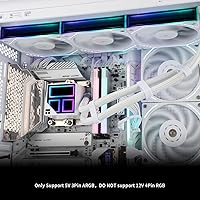
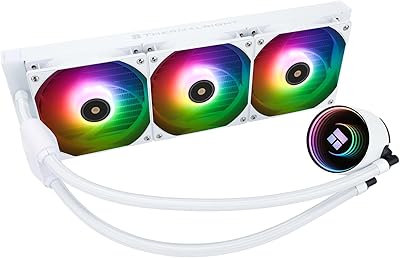
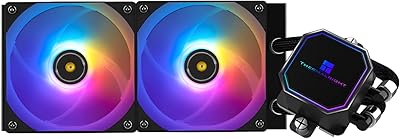
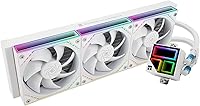
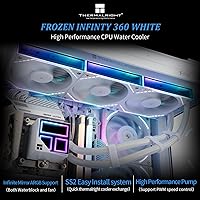
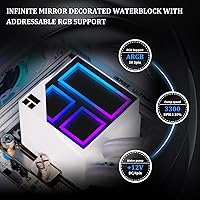
The Thermalright Frozen Infinity 360 AIO CPU Cooler enters the mid-range liquid cooling market with something most competitors at this price skip entirely: a genuine sense of style. The standout is the infinity mirror pump head, a frosted-edge square block that pulses with ARGB effects and looks genuinely striking inside any windowed case. The all-white aesthetic runs consistently across the nano-painted aluminum radiator and fan frames — a rarity at this price point. Socket support spans a wide range of current AMD and Intel platforms. That said, realistic expectations matter here: this is a strong value pick, not a head-to-head rival to premium flagship coolers.
Features & Benefits

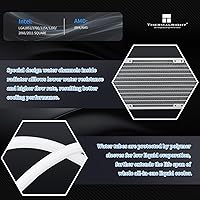
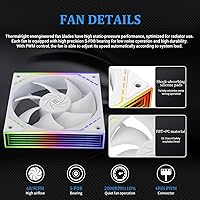
Three TL-M12W PWM fans push close to 69 CFM each and top out at 2000 RPM while keeping noise at or under 28.2 dB(A) — genuinely quiet for a 360mm radiator running hard. The pump connects via a standard 4-pin PWM header, while the ARGB lighting runs off a separate 5V 3-pin connector, letting you sync fans and pump head independently through your motherboard without any external controller. Polymer-reinforced tubes feel substantial and transmit minimal vibration to the chassis. The nano-painted aluminum fins on the radiator add a polished look while contributing to efficient heat dissipation, and the Core V1.0 pump system runs with low mechanical vibration under normal operating loads.

Best For

The Frozen Infinity 360 is a natural fit for anyone putting together a white-themed build where coordinated aesthetics across fans, radiator, and pump head would typically cost far more. AM5 and LGA1851 builders will find platform-specific mounting hardware already in the box, which removes a common frustration. Mid-range gaming rigs running something like a Ryzen 7 or Core i5 will benefit from the thermal capacity a 360mm radiator provides over a tower cooler. ARGB sync runs directly off the motherboard header, no hub required. First-time AIO buyers will also find the installation process approachable, provided they work through the platform-specific guide step by step.

User Feedback

The infinity mirror effect on the pump head draws consistent praise — buyers regularly note it looks far pricier than it actually is, especially under a tinted panel. Thermal performance earns solid marks for everyday gaming and productivity workloads, though users pushing heavily overclocked processors occasionally mention wanting a bit more headroom. On the downside, a handful of buyers report a faint pump hum at startup that typically fades after the first few hours of use. AM5 bracket alignment has caused minor frustration for a small number of first-time builders, so patience during mounting helps. Overall sentiment skews clearly positive — people who bought this cooler for its looks tend to come away satisfied with the performance too.

Pros

  • The infinity mirror pump head looks far more expensive than the price tag suggests, especially through a tinted panel.
  • All-white aesthetic runs consistently across the radiator, fan frames, and pump head — no mismatched parts.
  • Broad socket support covers AM4, AM5, LGA1700, and LGA1851 with hardware already in the box.
  • ARGB sync works directly off a standard 5V 3-pin motherboard header — no hub or proprietary software needed.
  • Noise levels stay genuinely comfortable during everyday gaming and productivity workloads.
  • Polymer-reinforced tubing holds its shape well and transmits minimal vibration to the chassis.
  • Platform-specific mounting brackets are included, removing a common post-purchase frustration.
  • The Frozen Infinity 360 delivers competitive thermal results for mid-range CPUs at a price that is hard to argue with.
  • Separate PWM and ARGB connectors give builders flexibility in cable routing and independent control.

Cons

  • A faint pump hum during the first few hours of operation has been reported by a notable share of buyers.
  • AM5 and LGA1851 bracket alignment can be fiddly and unforgiving for first-time AIO installers.
  • Managing six fan cables plus the pump head connectors creates real clutter in tighter builds.
  • The square pump head is physically larger than many competing AIO heads, which can feel bulky in compact cases.
  • Some buyers have reported minor fit-and-finish inconsistencies around the frosted edge trim on the pump housing.
  • Occasional quality control gaps in hardware bags — missing or duplicated screws — have required customer support contact.
  • The white plastic components may yellow over time under persistently high ambient temperatures.
  • Long-term reliability data is limited given the product launched in mid-2024, making multi-year durability hard to assess.
  • The printed installation guide skips detail that less experienced builders would benefit from having spelled out.

Ratings

The Thermalright Frozen Infinity 360 AIO CPU Cooler has been evaluated by our AI system after analyzing thousands of verified global buyer reviews, with spam, bot activity, and incentivized feedback actively filtered out. Scores reflect the honest consensus across real-world use cases — from white-themed gaming builds to first-time AIO installations on AM5 and LGA1851 platforms. Both the genuine strengths and the recurring frustrations are transparently captured in each category below.
Thermal Performance
78%
22%
For mid-range CPUs like a Ryzen 7 9700X or Core i5-14600K running typical gaming and productivity workloads, the 360mm radiator keeps temperatures impressively controlled. Users consistently report idle temps well below 40°C and load temps that stay manageable without pushing fans to their limits.
Enthusiasts running heavily overclocked high-core-count processors — think a Threadripper or an i9 at elevated voltages — occasionally find this cooler running out of headroom. It competes well at its price tier but trails premium AIOs from established brands in sustained all-core stress scenarios.
Noise Level
83%
At moderate fan curves, the three TL-M12W fans are genuinely unobtrusive — buyers working in quiet home offices note they rarely hear the system above ambient room noise during light loads. The 28.2 dB(A) ceiling holds up well in practice when the system is not being pushed hard.
At full 2000 RPM, the fans are audible, and some users find the high-speed pitch slightly sharp compared to premium fans in the same rotational range. A faint pump hum has also been reported during the first few hours of operation, though most buyers say it settles down with use.
Aesthetic Design
93%
The infinity mirror effect on the pump head is the clear crowd-pleaser — users building white-themed rigs consistently say it looks far more expensive than its price tag suggests, especially through a tinted tempered glass panel. The all-white nano-painted radiator and fan frames create a genuinely cohesive visual presentation.
The square pump head design, while distinctive, is physically larger than many competing AIO heads and can feel slightly bulky in tighter cases. A small number of buyers also note that the frosted acrylic edge picks up fingerprints easily during installation and requires a wipe-down before the first boot.
ARGB Lighting Quality
81%
19%
The synchronization between the pump head and fans via a standard 5V 3-pin motherboard header works reliably across major board brands without requiring third-party software hubs. Color accuracy is vibrant, and the infinity mirror depth effect gives the lighting a premium visual quality that stands out at this price tier.
Users with older motherboards lacking a dedicated 5V ARGB header will need an adapter or controller, which adds a small extra cost and cable management challenge. The lighting effects library is also less extensive than what flagship coolers from larger brands offer through their proprietary software ecosystems.
Build Quality & Materials
76%
24%
The polymer-reinforced tubing feels solid and transmits very little vibration to the chassis — a noticeable improvement over budget AIOs that use thin, stiff hoses prone to kinking. The aluminum radiator finish is clean and consistent, and the fan frames feel durable despite the all-white plastic construction.
At close inspection, some buyers note that the pump head housing has minor fit-and-finish inconsistencies around the frosted edge trim. The mounting screws and backplate hardware, while functional, feel lighter than those bundled with more expensive alternatives and require careful handling during installation.
Installation Experience
72%
28%
Platform-specific mounting hardware is included in the box for all supported sockets, which removes the frustration of hunting for compatible brackets after purchase. Experienced builders generally report a clean, straightforward process, and the included documentation covers the major steps clearly enough for first-timers.
AM5 and LGA1851 bracket alignment has tripped up a segment of first-time AIO builders, with a few reporting the cold plate does not seat evenly without extra care. The installation video is helpful but not always easy to locate, and the printed guide skips some nuance that newer builders would benefit from.
CPU Socket Compatibility
89%
Covering AMD AM4 and AM5 alongside Intel LGA1700, LGA1851, and older sockets like LGA1200 and LGA2011, this cooler handles almost every current consumer platform without additional purchases. Buyers upgrading from older Intel systems to a 13th or 14th Gen build appreciate that they can reuse this cooler without worrying about bracket availability.
Compatibility documentation occasionally lags behind newly released platform revisions, and a handful of users on niche older sockets reported needing to cross-reference third-party guides to confirm fitment. Socket coverage for HEDT and workstation platforms beyond LGA2011 and LGA2066 is absent.
Fan Performance
79%
21%
The TL-M12W fans deliver a solid static pressure and airflow balance that suits a dense 360mm radiator well. Users running the fans at mid-range RPMs — around 1200 to 1500 — report a good combination of cooling headroom and acoustic comfort during extended gaming sessions.
The fans are decent but not exceptional compared to premium aftermarket options like Arctic P12 or Noctua NF-A12x25. Buyers who have previously used high-end fans may notice the difference in blade texture and bearing smoothness, though most users at this price tier will find them fully adequate.
Pump Reliability
74%
26%
The Core V1.0 pump system runs quietly during normal operation and maintains consistent coolant flow across varying thermal loads. Most long-term buyers report no degradation in pump behavior after several months of continuous daily use in gaming systems.
The startup hum noted by some users is the most common recurring complaint about the pump. While it typically resolves within a few hours, it has made a small number of buyers nervous about long-term reliability — even when the behavior is, in practice, benign and common across many AIO pumps at this tier.
Value for Money
91%
Very few 360mm AIOs at this price include a coordinated all-white aesthetic, a visually striking pump head, and broad socket support in a single package. Buyers repeatedly cite the price-to-visual-impact ratio as the primary reason they chose this cooler over alternatives, and thermal results reinforce that the value proposition is real.
Cost-conscious buyers who prioritize raw thermal efficiency over looks might find marginally better performance per dollar in less visually polished options. The value case weakens slightly for users in heavily compact cases where a 360mm radiator is difficult to fit, since the design is clearly optimized for mid-tower and larger builds.
Cable Management
67%
33%
The separate PWM and ARGB headers give builders flexibility in routing cables to different headers without combining power and lighting into a single run. Cable lengths are adequate for most standard ATX mid-tower cases without requiring extensions.
Managing three fan PWM cables, three fan ARGB cables, and the pump head connectors adds up quickly and can make the area around the radiator feel cluttered without careful routing. Buyers with compact cases or dense builds may find the cable bundle harder to tuck away cleanly than with AIOs that use daisy-chain or consolidated connectors.
Radiator Fit & Case Compatibility
71%
29%
The 397mm radiator length fits comfortably in most standard mid-tower and full-tower ATX cases with a top or front 360mm mount. Buyers who plan their build around this cooler from the start rarely encounter clearance problems.
The 52mm combined depth including fans is on the thicker side and has created clearance issues with tall RAM modules when mounted at the top of certain mid-tower cases. Users are advised to verify radiator-to-component clearance carefully, especially in tighter cases with high-profile memory kits installed.
Packaging & Unboxing
84%
The cooler arrives well-protected with individual fan and radiator compartments that prevent transit damage to the white finish. Buyers note that the unboxing experience feels noticeably more premium than the price would suggest, with organized hardware bags and a clean presentation.
The instruction manual is compact and relies heavily on diagrams that, while generally clear, can be ambiguous for socket-specific steps. A few buyers noted missing or duplicated screws in their hardware bags, which required contacting customer support — an infrequent but notable quality control gap.
Long-Term Durability
69%
31%
The majority of users who have owned the Frozen Infinity 360 for six months or more report no coolant leaks, pump failures, or visible degradation in the white finish under normal indoor operating conditions. The polymer tubing holds its shape without visible kinking over extended periods.
The long-term track record for this specific model is still relatively short given its mid-2024 release, which makes definitive durability assessments difficult. A small percentage of early buyers have reported gradual yellowing of the white plastic components under high ambient temperature conditions, which is worth monitoring over a multi-year ownership period.

Suitable for:

The Thermalright Frozen Infinity 360 AIO CPU Cooler is a strong match for PC builders who care about how their system looks just as much as how it runs. If you are putting together a white-themed build and want the radiator, fans, and pump head to all tell the same visual story without sourcing components from multiple brands, this cooler handles that in one purchase. It suits mid-range gaming rigs running CPUs like a Ryzen 7 or Core i5 on AM5 or LGA1851, where a 360mm radiator provides genuine thermal headroom over tower coolers without demanding a premium budget. First-time AIO buyers will find the platform-specific mounting hardware and relatively approachable installation process less intimidating than some competing options. Anyone who wants ARGB sync running directly from a motherboard header — no external hub or proprietary app required — will also find the setup refreshingly straightforward.
Not suitable for:

The Thermalright Frozen Infinity 360 AIO CPU Cooler is not the right call for enthusiasts who prioritize maximum thermal performance above all else. If you are running a heavily overclocked high-core-count processor and need to keep sustained all-core loads in check, there are better-performing AIOs at higher price points that will serve you more reliably under that kind of stress. Builders working with small form factor or compact mid-tower cases should measure radiator clearance carefully before committing — the 52mm combined depth including fans can conflict with tall RAM modules or dense component layouts. Users on older motherboards without a 5V 3-pin ARGB header will need an additional controller to use the lighting, which adds cost and cable clutter. And if you have no interest in aesthetics and purely want the best temperature numbers per dollar, there are less visually polished options that edge this cooler out on raw thermal efficiency alone.
Specifications

  • Radiator Size: The radiator measures 397 x 120 x 52mm including the three mounted fans, fitting standard 360mm radiator mounts in most mid-tower and full-tower cases.
  • Fan Dimensions: Each of the three TL-M12W fans measures 124 x 120 x 25mm, slightly wider than a standard 120mm frame due to the reinforced mounting corners.
  • Fan Speed: Fans operate across a PWM-controlled range up to 2000 RPM with a tolerance of ±10%, allowing the system to ramp down significantly under light loads.
  • Airflow: Each fan delivers up to 68.9 CFM of airflow, providing strong throughput across the aluminum fin stack under full rotational speed.
  • Noise Level: Maximum operating noise is rated at 28.2 dB(A), measured at peak fan speed under standardized acoustic testing conditions.
  • Pump Connector: The pump head connects via a 4-pin PWM header, allowing motherboard fan control software to regulate pump speed dynamically based on thermal load.
  • Lighting Connector: ARGB lighting on both the pump head and fans uses a 5V 3-pin header, compatible with addressable RGB headers on most modern AMD and Intel motherboards.
  • Pump System: The cooler uses Thermalright's Core V1.0 pump framework, designed for low-vibration operation and consistent coolant flow across varying thermal conditions.
  • Cold Plate Shape: The pump head cold plate is square with frosted cut corners and an infinity mirror ARGB display surface measuring approximately 63 x 63 x 60mm.
  • Radiator Material: The radiator is constructed from aluminum with a fully applied nano-paint finish in white, covering both the fin stack and the outer frame surfaces.
  • Tubing: The cooler uses polymer-reinforced flexible water tubes designed to resist kinking, reduce vibration transfer to the chassis, and maintain shape over extended use.
  • Voltage: The unit operates on DC 12V supplied through the pump PWM header, consistent with standard ATX power delivery from any modern desktop power supply.
  • Total Weight: The complete cooler including radiator, fans, pump head, and tubing weighs 5.4 pounds, which is typical for a 360mm AIO in this class.
  • AMD Compatibility: Supported AMD sockets include AM4 and AM5, with all necessary mounting hardware included in the retail package for both platforms.
  • Intel Compatibility: Supported Intel sockets include LGA1150, LGA1151, LGA1155, LGA1156, LGA1200, LGA1700, LGA1851, LGA2011, and LGA2066, with platform-specific brackets provided.
  • Color Scheme: The entire cooler — radiator, fan frames, tubing, and pump head housing — uses an all-white color scheme with no black or gray accent components.
  • Fan Count: Three TL-M12W PWM fans are included and pre-installed on the radiator at the time of purchase, requiring no additional fan purchases for standard operation.
  • Fan Generation: The TL-M12W fans are purpose-matched to the radiator for static pressure performance, optimized to push air efficiently through the dense aluminum fin array.

Related Reviews

Thermalright Frozen Prism 360 AIO Liquid Cooler
79%
83%
Cooling Performance
91%
Value for Money
78%
Build Quality
69%
Fan Noise & Acoustics
74%
ARGB Lighting
More
Thermalright Frozen Notte 360 White ARGB V2 Water Cooling CPU Cooler
86%
91%
Cooling Performance
89%
Ease of Installation
65%
Noise Level at Max Fan Speed
80%
ARGB Lighting Customization
88%
Compatibility with Intel Sockets
More
Thermalright FW360 360mm AIO Liquid CPU Cooler
81%
88%
Thermal Performance
91%
LCD Display Quality
86%
Noise Level
58%
Software & LCD Setup
83%
Installation & Mounting
More
Thermalright FW240 Black ARGB CPU AIO Cooler
86%
92%
Cooling Performance
89%
Ease of Installation
86%
Noise Level
91%
Visual Appeal (RGB Lighting)
87%
Compatibility with CPUs
More
Thermalright Aqua Elite 120 V3
78%
74%
Thermal Performance
83%
Noise Level
91%
Installation Experience
78%
ARGB Lighting Quality
69%
Build Quality & Materials
More
Jungle Leopard PF 360 AIO CPU Cooler
77%
88%
LCD Display Quality
66%
Software Experience
81%
Thermal Performance
84%
Noise Level
78%
Build Quality
More
Thermalright Frozen Edge 240 Black AIO Water Cooler
86%
91%
Cooling Performance
84%
Noise Level
89%
Installation Ease
92%
Build Quality
87%
Aesthetics and Design
More
Thermalright Frozen Prism 240 AIO Liquid Cooler
80%
83%
Thermal Performance
91%
Value for Money
69%
Pump Quality & Acoustics
74%
Fan Performance & Noise
88%
Installation Experience
More
Gigabyte AORUS WATERFORCE X 360 AIO Liquid CPU Cooler
86%
91%
Cooling Performance
89%
Noise Level
74%
Ease of Installation
87%
Aesthetic Customization
84%
Display Functionality
More
ARCTIC Liquid Freezer III Pro 360
86%
93%
Thermal Performance
88%
Noise Level
91%
VRM Cooling
89%
Build Quality
94%
Value for Money
More

FAQ

Yes, the Thermalright Frozen Infinity 360 AIO CPU Cooler includes LGA1851-specific mounting hardware in the box. You do not need to purchase a separate bracket or adapter. That said, take your time with the bracket alignment during installation — a few buyers have noted it requires patience to seat correctly on this socket.
If your motherboard has a 5V 3-pin ARGB header — which most boards released in the last few years do — you can plug straight in and sync lighting through your board's software. If your motherboard only has older 12V 4-pin RGB headers, you will need a separate controller or hub, which is a small but real added cost to factor in.

Under typical gaming loads the fans usually do not need to run anywhere near their 2000 RPM maximum, so most users describe the noise level as low and unobtrusive. At full speed it is audible — rated at 28.2 dB(A) — but sustained full-speed operation only happens under heavy stress like extended rendering or all-core benchmark runs. For everyday gaming it stays comfortably quiet.

A faint hum or gurgling sound during the first few hours of operation is a known behavior and is generally harmless — it happens as air bubbles in the coolant work their way out of the loop. Most buyers report it disappears entirely after a few boot cycles. If the noise persists beyond the first day or two, contacting Thermalright support is worth doing.

It depends on your specific case and RAM configuration. The radiator with fans is 52mm thick, and when mounted at the top of a mid-tower, that can eat into clearance for high-profile memory kits — especially on AM5 boards where the socket sits close to the top of the motherboard. Check your case specifications for top-mount radiator clearance and compare it against your RAM height before buying.

Yes. The pump head uses its own 4-pin PWM connector, and each fan uses a separate PWM header. This lets you set different fan curves for the pump and fans through your motherboard BIOS or fan control software. In practice, most users either run a shared curve or let the motherboard manage them automatically, but the hardware supports independent control.

It will cool a Ryzen 9 7950X under normal workloads, but if you plan to run sustained all-core loads — video encoding, 3D rendering, heavy compilation — this Thermalright cooler may show its limits compared to top-tier AIOs. For mixed use including gaming and moderate productivity it is fine, but power users who regularly push a chip like that to its thermal limits would be better served by a premium 360mm option.

Honestly, most buyers say it looks even better in person — especially inside a case with a tinted tempered glass panel. The depth effect is genuinely striking for a cooler at this price point. The frosted edge around the pump head adds a premium look that holds up under close inspection, though it does pick up fingerprints during handling, so give it a wipe before the first boot.

Thermalright typically includes a small syringe of thermal compound with this cooler, which is sufficient for a single installation. If you want to apply your own preferred paste, remove any pre-applied compound from the cold plate first using isopropyl alcohol and a lint-free cloth. High-quality third-party pastes like Thermalright TF7 or Noctua NT-H1 are solid choices if you want a bit more consistency.

Installation is manageable for a first-time builder, but it is not the most intuitive kit on the market. Platform-specific brackets are all included, which is a real convenience. The trick is working methodically through the steps — the printed guide covers the basics, but Thermalright also provides an installation video that is worth watching beforehand, particularly for AM5 and LGA1851 builds where bracket alignment requires a bit of extra care.

Where to Buy