
Overview

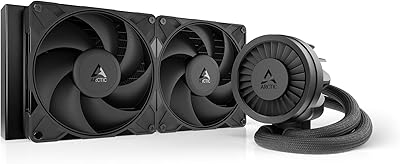
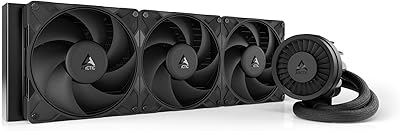
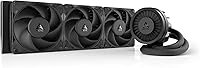
The ARCTIC Liquid Freezer III Pro 360 enters a crowded mid-range AIO market at $89.99 and makes a strong case without trying to impress anyone with flashy lighting. ARCTIC has always leaned performance-first, and this cooler is no different. What immediately stands out physically is the 38mm radiator thickness — noticeably chunkier than the 27mm standard most competitors ship. That extra depth translates to more fin surface area and better heat dissipation under sustained loads. It covers current Intel and AMD sockets, so whether you're building around a Core Ultra 200 or Ryzen 9000 chip, you're covered. No RGB. No gimmicks. Just a cooler built to work.

Features & Benefits

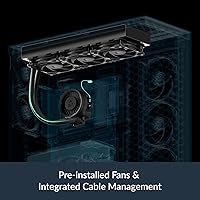
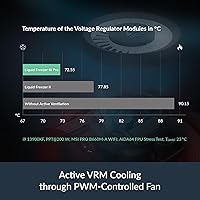
The updated P12 Pro fans are a meaningful upgrade over the previous generation — quieter at low RPM where they spend most of their time, yet capable of spinning hard when a demanding workload calls for it. The offset cold plate positioning is subtle but smart: rather than centering contact on the CPU lid, it shifts toward the actual hotspot, which matters more than ever with modern chiplet-based processors. The integrated VRM fan is arguably the most practical differentiator here — voltage regulators run hotter under sustained loads, and active airflow directly to those components can meaningfully reduce throttling on demanding builds. PWM cables routed inside the tube sleeve keep the interior tidy as a bonus.

Best For

This 360mm AIO is an easy recommendation for anyone building around a high-TDP processor and not wanting to spend $150 or more to cool it properly. If you're pairing it with an Intel Core Ultra 200 or AMD Ryzen 9000 series chip, the combination of a thick radiator and active VRM cooling gives real thermal headroom. The absence of RGB is a non-issue for most performance-focused builders — it looks clean and purposeful in a dark case. A 6-year warranty is unusually generous at this price and speaks to ARCTIC's confidence in the unit's longevity. If your case fits a 360mm rad, this Arctic cooler punches well above its weight class.

User Feedback

Owners of the Liquid Freezer III Pro consistently point to strong thermal numbers as the headline takeaway — idle temperatures are impressively low, and it handles sustained loads without the fans becoming intrusive. Most buyers find the fan curve behavior predictable and quiet in daily use, though noise perception varies depending on case airflow and how aggressively the motherboard controls the pump. Installation draws more mixed reactions: the mounting hardware is thorough, but the Intel contact frame adds steps that can catch first-time builders off guard. Compared to similarly priced options from Corsair or NZXT, users frequently note the value advantage. The VRM fan goes largely unnoticed at normal load, which is exactly what you want from it.

Pros

  • Thermal performance competes with AIOs priced $40 to $60 higher.
  • The integrated VRM fan actively cools voltage regulators — a rare feature under $100.
  • Radiator depth well above category average means more heat capacity during sustained workloads.
  • P12 Pro fans run nearly silent at idle and light loads in most case configurations.
  • Offset cold plate mounting improves contact on modern chiplet-based CPUs out of the box.
  • MX-6 thermal paste is included — no need to buy a separate tube before installation.
  • Six-year warranty is unusually generous for a mid-range AIO and reflects real build confidence.
  • PWM cables routed inside the tube sleeve keep radiator areas clean without extra effort.
  • Covers current Intel and AMD mainstream platforms with no additional mounting kit required.
  • At under $100, the overall package represents some of the best measurable value in 360mm cooling.

Cons

  • Installation involves more steps than average, and the Intel contact frame can trip up first-time builders.
  • No RGB lighting whatsoever — a firm dealbreaker for themed or showcase builds.
  • Included thermal paste is only enough for a single application, leaving nothing for remounting.
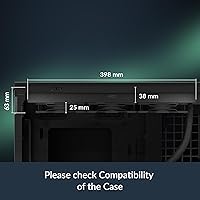
  • The 38mm radiator requires more case clearance than standard AIOs — always verify fitment first.
  • Pump occasionally produces a gurgling or clicking sound during the first few hours of use.
  • Fan noise at maximum RPM has a noticeable high-pitched quality that some users find irritating.
  • The single cable exiting the tube sleeve can be stiff and awkward to route in compact cases.
  • Support response times vary significantly depending on buyer region.
  • No legacy socket support limits usefulness for builders repurposing older platform hardware.
  • The plastic pump head finish feels less refined than competing units at slightly higher price points.

Ratings

The ARCTIC Liquid Freezer III Pro 360 earned its scores through AI analysis of thousands of verified global buyer reviews, with spam, bot-generated, and incentivized submissions actively filtered out before scoring. The result reflects what real builders actually experience — from first-time installation to months of sustained daily use. Both the standout strengths and the legitimate friction points are represented honestly in every category below.

Thermal Performance
93%
Buyers running high-TDP CPUs — including Core Ultra 9 and Ryzen 9 chips under extended workloads — consistently report temperatures that rival AIOs costing significantly more. The thicker radiator clearly pays dividends during sustained rendering or gaming sessions where heat accumulates over time.
A small number of users on tightly packed mATX builds noted slightly higher temps than expected, likely due to restricted airflow around the radiator rather than the cooler itself. Performance gains over a quality 240mm AIO are real but modest on CPUs under 150W.
Noise Level
88%
At idle and light loads, most owners describe the system as nearly inaudible — the fans spin slowly and smoothly without the low-frequency hum that plagues cheaper AIOs. The pump is well-dampened, and buyers working in quiet home office setups consistently mention it as a strength.
Under full load the fans do ramp up audibly, which is expected but worth noting for noise-sensitive users. Perceived loudness varies considerably depending on case design and how aggressively the motherboard manages the fan curve, so results are not universal.
VRM Cooling
91%
The integrated VRM fan is a practical feature that pays off on power-hungry platforms — users overclocking Intel Core Ultra chips report noticeably cooler VRM temperatures compared to passive airflow setups. It runs quietly enough that most buyers only become aware of it when they check their temperatures.
On mid-range CPUs with modest power delivery requirements, the VRM fan offers little measurable benefit and some buyers felt it added unnecessary complexity. A handful of users also noted that the VRM fan connector placement can be awkward to route depending on motherboard layout.
Build Quality
89%
The radiator feels dense and solid, and the tubing has a premium braided finish that holds its position without kinking. Buyers who have owned multiple ARCTIC coolers over the years consistently note that the construction quality feels consistent and reliable out of the box.
The plastic pump head housing feels slightly less premium compared to competitors like Corsair at a higher price point. A few long-term users flagged minor cosmetic wear around the tube connection points after extended use, though none reported functional issues.
Value for Money
94%
At under $100, buyers repeatedly describe this as one of the best-performing AIOs available without paying a brand premium. The combination of a thick radiator, upgraded fans, VRM cooling, and a six-year warranty at this price is genuinely difficult to match from any direct competitor.
Budget builders choosing between a high-end air cooler and this AIO may find the price difference harder to justify on lower-power builds. The value proposition is strongest for 65W-plus CPUs — below that threshold, the thermal advantage narrows considerably.
Installation Experience
71%
29%
Experienced builders generally find the mounting process straightforward once the hardware is laid out. The included contact frame for Intel sockets is a thoughtful addition, and the instructions cover both Intel and AMD setups clearly enough for most intermediate builders.
First-time AIO installers consistently flag the process as more involved than expected — the Intel contact frame adds steps, and the sheer number of included screws and brackets can feel overwhelming without prior experience. A clearer printed quick-start guide would reduce support friction significantly.
Fan Performance
87%
The P12 Pro fans strike a better balance between airflow and static pressure than the previous generation, and buyers running them at mid-range speeds report strong performance without excessive noise. The wide RPM range gives motherboard fan control software plenty of room to optimize behavior.
At maximum speed the fans produce a noticeable high-pitched tone that some users found irritating during stress tests. This is rarely an issue in normal desktop use, but users who frequently push their CPU to 100% for extended periods may want to set a manual fan curve ceiling.
Cold Plate Contact Quality
86%
The offset mounting design consistently receives praise from buyers on modern chiplet CPUs, where the actual heat source is not centered on the IHS. Several users switching from centered-contact AIOs reported a meaningful drop in peak temperatures after installing this cooler with proper mounting pressure.
Getting the cold plate seated correctly requires attention during installation — imprecise mounting can partially negate the offset benefit. A small number of buyers also noted uneven thermal paste spread patterns when removing the cooler for the first time, suggesting contact pressure could be more consistent.
Cable Management
83%
Routing fan PWM cables inside the tube sleeve is a detail that builders with windowed cases genuinely appreciate — it keeps the radiator area looking clean without any extra effort. Users building show systems or open-air benches specifically called this out as a quality-of-life improvement.
The single visible cable running from the tube to the motherboard header is tidy in principle, but its length and stiffness can make routing behind the motherboard tray tricky in smaller cases. A modular or longer cable option would improve flexibility for compact builds.
Pump Reliability
88%
Long-term owners report stable pump behavior over extended periods, with no reports of increasing noise or reduced flow over time in the majority of feedback. ARCTIC's track record with pump longevity across previous Liquid Freezer generations builds reasonable confidence here.
A small percentage of buyers reported a clicking or gurgling sound from the pump during the first few hours of operation. Most cases resolved on their own after the cooler settled, but it caused early concern — particularly for buyers who had not encountered this with previous AIOs.
Socket Compatibility
92%
Covering both current Intel and AMD mainstream platforms in a single package is genuinely convenient, especially for builders who swap platforms or are undecided at purchase time. Users appreciated not needing a separate mounting kit or adapter for AM5 and LGA1851 builds.
Compatibility stops at the current generation — older sockets like LGA1200 or AM3 are not supported. This is a minor concern for most new builds but worth verifying before purchase if working with an older platform.
Aesthetics
74%
26%
For builders who actively dislike the over-lit RGB aesthetic, the all-black matte finish is a clean, purposeful look. The braided tubing and tidy fan layout give it a professional appearance that holds up well in both windowed and closed-case builds.
Buyers expecting any form of customizable lighting will be disappointed — there is none. This is not a flaw for the intended audience, but it does limit appeal for users building RGB-themed systems, and there is no addressable lighting version available.
Thermal Paste Inclusion
81%
19%
Shipping with MX-6 rather than a generic compound is a meaningful detail — it is one of the better performing consumer thermal pastes available and buyers do not need to purchase a separate tube for initial installation. The included quantity is adequate for a clean application.
The pre-applied or included paste is sufficient for one installation, leaving nothing in reserve for remounting or future maintenance. Users who plan to re-seat the cooler after initial testing will need to source additional MX-6 or a comparable compound separately.
Warranty & Support
90%
A six-year warranty on a sub-$100 AIO is an outlier in this market and buyers take notice. Users who have dealt with ARCTIC support for warranty claims describe the process as responsive and relatively hassle-free compared to larger brands.
Support response times vary by region, and buyers outside North America and Western Europe occasionally report slower resolution timelines. The warranty also does not cover damage from improper installation, which has been a point of friction for a small number of users.

Suitable for:

The ARCTIC Liquid Freezer III Pro 360 is purpose-built for builders who want serious thermal headroom without paying a premium for branding or lighting effects. It is an especially strong fit for anyone running a high-TDP processor — think Intel Core Ultra 200 series or AMD Ryzen 9000 chips — where sustained workloads like video editing, 3D rendering, or heavy multitasking push heat output to levels that smaller or thinner coolers struggle to manage long-term. Overclockers will appreciate both the extra radiator depth and the active VRM cooling, which takes pressure off components that typically rely on passive case airflow alone. Mid-tower and full-tower builders who care about a quiet system during everyday use but still want burst cooling capacity for demanding tasks will find the fan behavior well-suited to that balance. The six-year warranty also makes this a sensible long-term investment for anyone who builds infrequently and wants confidence in their cooling solution for years ahead.

Not suitable for:

The ARCTIC Liquid Freezer III Pro 360 is not the right pick for builders prioritizing RGB aesthetics or a visually themed system — there is no lighting on the pump head, fans, or anywhere else, and that is simply not going to change with a firmware update. Buyers working with compact ITX cases should verify radiator clearance carefully, as the 38mm thick radiator requires more mounting depth than standard AIOs and may not physically fit in tighter enclosures. If your CPU sits well below 100W under load — a mainstream productivity chip running light office tasks, for example — the performance advantage over a well-configured air cooler narrows considerably, and the added complexity of AIO installation may not be worth it. First-time builders who have never mounted a liquid cooler should approach the Intel contact frame and multi-step mounting process with patience; this is not a plug-and-play experience, and rushed installation can result in suboptimal contact and disappointing temperatures. Finally, buyers on older platforms like LGA1200 or AM3 will need to look elsewhere, as legacy socket support is not included.

Specifications

  • Radiator Size: The radiator measures 398mm long, 120mm wide, and 38mm thick — notably deeper than the 27mm standard found on most competing AIOs in this price range.
  • Radiator Material: The radiator body is constructed from aluminum, which balances thermal conductivity with overall weight management.
  • Cold Plate: The cold plate uses copper with micro-skived fins, a construction method that increases surface area for more efficient heat transfer from the CPU to the coolant.
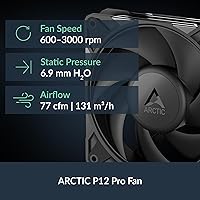
  • Included Fans: Three P12 Pro 120mm PWM fans are included, each capable of spinning between 600 and 3000 RPM depending on thermal demand.
  • Fan Airflow: Each P12 Pro fan delivers up to 77 CFM of airflow with a static pressure rating of 6.9 mmH₂O, suited for pushing air through a dense radiator core.
  • Pump Speed: The PWM-controlled pump operates between 800 and 2800 RPM, adjusting flow rate dynamically based on thermal load rather than running at a fixed speed.
  • VRM Fan: An integrated PWM fan module dedicated to VRM cooling spins between 400 and 2500 RPM and draws only 0.05A, making it nearly imperceptible under normal loads.
  • Tube Length: The coolant tubes measure 450mm, providing sufficient reach for standard ATX and mATX radiator mounting positions without excessive slack or tension.
  • Thermal Paste: ARCTIC MX-6 thermal paste (0.8g) is included in the box, which is sufficient for a single clean application on most CPU heat spreaders.
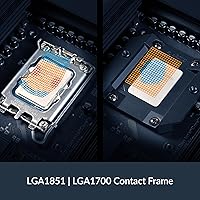
  • Intel Sockets: Compatible with Intel LGA1851 and LGA1700 sockets, covering the full Arrow Lake and Raptor Lake platform range including the Core Ultra 200 series.
  • AMD Sockets: Compatible with AMD AM5 and AM4 sockets, supporting Ryzen 9000, Ryzen 7000, and previous-generation Ryzen processors on those platforms.
  • Total Weight: The complete cooler assembly weighs 1915g, which is on the heavier end for a 360mm AIO due to the thicker radiator construction.
  • Tube Diameter: Coolant tubes have an outer diameter of 12.4mm and an inner diameter of 6.0mm, with PWM cables routed internally through the tube sleeve.
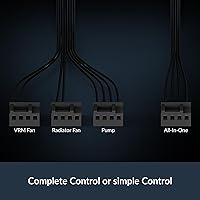
  • Fan Connector: All three radiator fans use standard 4-pin PWM connectors, compatible with any modern motherboard fan header without adapters.
  • Operating Voltage: The pump and fans operate at 12V DC, drawing a combined maximum current consistent with a single standard fan header or pump header connection.
  • Warranty: ARCTIC backs this cooler with a 6-year manufacturer warranty, which is among the longest offered on any AIO in the under-$100 category.
  • RGB Lighting: No RGB or addressable lighting is present anywhere on this cooler — the design is entirely focused on thermal function and cable tidiness.
  • Operating Temperature: The cooler is rated for ambient operating temperatures between 0°C and 40°C, covering the full range of typical indoor desktop environments.

Related Reviews
ARCTIC Liquid Freezer III Pro 240 A-RGB
86%
94%
Cooling Performance
88%
RGB Aesthetics
82%
Ease of Installation
90%
Noise Levels
91%
Build Quality
More
ARCTIC Liquid Freezer III Pro 280 AIO CPU Cooler
85%
92%
Cooling Performance
88%
Noise Level
85%
Ease of Installation
90%
Build Quality
89%
Compatibility
More
ARCTIC Liquid Freezer III Pro 420 AIO CPU Cooler
88%
94%
Cooling Performance
89%
Noise Level
91%
Build Quality
90%
Compatibility with Sockets
85%
Installation & Setup
More
ARCTIC Liquid Freezer III 280 A-RGB
86%
91%
Cooling Performance
87%
Ease of Installation
88%
Noise Levels
85%
RGB Lighting Customization
90%
Build Quality
More
ARCTIC Liquid Freezer II 280 A-RGB
87%
95%
Cooling Performance
91%
RGB Lighting Customization
60%
Installation Difficulty
88%
Noise Level
93%
Build Quality
More
ASUS ROG RYUO III 360 ARGB AIO Liquid CPU Cooler
87%
94%
Cooling Performance
91%
RGB Customization
75%
Installation Ease
90%
Build Quality
88%
Noise Level
More
ASUS ROG Strix LC III 360 ARGB LCD AIO Liquid Cooler
86%
91%
Cooling Performance
89%
Design & Aesthetics
87%
RGB Lighting Effects
90%
Noise Level
72%
Ease of Installation
More
TREBLAB HD-360 Pro Bluetooth Speaker
85%
91%
Sound Quality
88%
Battery Life
85%
Portability
90%
Waterproof Performance
87%
Bluetooth Connectivity
More
GAMDIAS CHIONE E4-360 Liquid CPU Cooler
86%
88%
Cooling Performance
92%
Noise Level
90%
Installation Ease
85%
RGB Customization
87%
Build Quality
More
ID-COOLING FX240 PRO Liquid CPU Cooler
88%
89%
Cooling Performance
94%
Ease of Installation
83%
Noise Level
90%
Build Quality
86%
Aesthetic Design
More

FAQ

It works out of the box — no additional kit needed. The package includes a dedicated contact frame specifically designed for LGA1851 and LGA1700, so you are fully covered for Arrow Lake and Raptor Lake builds without ordering anything extra.

Most users find the pump essentially inaudible during light to moderate workloads. There are occasional reports of a faint gurgling or clicking noise during the first few hours after installation, but this almost always settles down once air bubbles work their way out of the loop. After that break-in period, the pump is generally one of the quieter ones in this class.

The ARCTIC Liquid Freezer III Pro 360 fits in most mid-tower cases that officially support 360mm radiators, but the 38mm radiator thickness is worth checking against your specific case spec sheet. Some cases list 360mm compatibility but only allow a 25–27mm radiator — in those situations this cooler will not fit without fan-radiator stack conflicts. Always verify the maximum radiator thickness your case supports before purchasing.

The small fan on the pump head blows air directly onto the voltage regulator modules on your motherboard, which are the components responsible for delivering stable power to your CPU. Under sustained heavy loads or overclocking scenarios, VRMs can get hot enough to throttle performance. The fan keeps them cooler passively than case airflow alone would manage, and it runs quietly enough that you will rarely notice it.

It handles high-TDP chips well, but it is worth setting realistic expectations. A 360mm AIO at this price will manage a 7950X comfortably during typical mixed workloads and gaming, but if you are running sustained all-core renders for hours at maximum power limits, a premium 360mm or 420mm cooler will give you a few extra degrees of headroom. For most users, this cooler is more than adequate even on demanding processors.

A standard Phillips screwdriver is all you need tool-wise. That said, the installation process involves more steps than a basic air cooler — particularly the Intel contact frame assembly — so first-time builders should read the instructions fully before starting rather than trying to figure it out as they go. Setting aside 30 to 45 minutes and watching a platform-specific installation video beforehand makes the process much smoother.

Thermal performance across all three is close enough that real-world temperatures are unlikely to differ meaningfully in a well-airflowed case. The Liquid Freezer III Pro tends to edge ahead in value given its thicker radiator and included VRM fan, while Corsair and Deepcool options often include RGB lighting and more polished software ecosystems. If you want app-controlled fan curves and lighting effects, those competitors have a clear advantage. If raw performance and a long warranty matter more, this Arctic cooler holds its own.

The included MX-6 tube contains enough for one careful application, so if you need to remount the cooler for any reason — troubleshooting, a platform swap, or reseating — you will need a separate tube. ARCTIC sells MX-6 individually at a low cost, and it is widely available. It is worth picking up a spare if you anticipate any remounting in the future.

Yes — the cooler supports both AM4 and AM5 natively using the same mounting hardware, so switching between platforms does not require any additional parts. This makes it a practical long-term investment if you are planning a future platform upgrade without wanting to replace your cooling solution at the same time.

No software installation is required. All three radiator fans and the pump connect directly to standard 4-pin PWM headers on your motherboard, so your existing BIOS fan control or any fan curve utility you already use will manage everything. The VRM fan is similarly PWM-controlled and handled automatically — the whole system is plug-and-manage without proprietary apps.