Overview

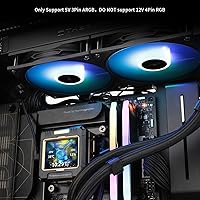
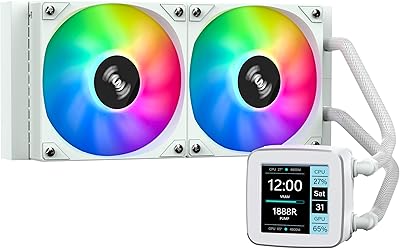
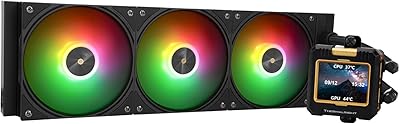
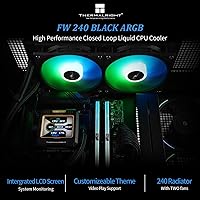
The Thermalright FW240 240mm AIO CPU Liquid Cooler is Thermalright's answer to builders who want liquid cooling with a bit of personality, without spending flagship money. The all-black radiator and dual-fan setup look sharp in most cases, but the real talking point is the 2.4-inch LCD display on the pump head — something rarely seen at this price point. Performance is solid for mainstream CPUs, though if you're pushing a heavily overclocked chip, a 360mm unit would serve you better. It supports AMD AM5 and Intel LGA1700 and LGA1851, so builders on current platforms are well covered from day one.
Features & Benefits

The FW240's pump head houses a 2.4-inch IPS screen at 320x240 resolution — sharp enough for custom images and short animations that look genuinely good up close. That display draws power and data through your motherboard's USB 9-pin header, so confirm you have a spare before buying. The dual 120mm fans use S-FDB bearings, staying quiet at around 22.1 dB while pushing solid airflow. ARGB lighting connects via your board's 5V 3-pin header for system-wide sync, and the LCD is managed through software downloaded separately from Thermalright's site. The magnetic pump mount lets you rotate the screen freely — a small but genuinely useful touch.

Best For

This Thermalright AIO is a natural fit for builders putting together mid-range gaming or productivity rigs on AMD AM5 or Intel LGA1700 platforms. If your CPU sits in the 65W–125W TDP range — think Ryzen 5 or Core i5 territory — this 240mm liquid cooler handles the load comfortably without ramping fans to irritating speeds. The black-and-gold color scheme makes it a strong pick for aesthetics-focused builds where ARGB sync matters. First-time AIO buyers will appreciate that each platform gets its own mounting hardware in the box and the install process is genuinely straightforward. Just don't expect it to tame a heavily overclocked flagship chip for extended sessions.

User Feedback

Buyers of the FW240 consistently highlight the LCD display as the standout feature — the screen looks noticeably better in person than photos suggest, and loading custom images is relatively painless once the software is running. That said, getting the Thermalright software set up is where some friction appears: a handful of users found the initial process confusing, particularly around USB header wiring. Thermal performance earns broadly positive marks for everyday workloads, though a few reviewers noted it doesn't pull far ahead of quality tower air coolers at similar prices. Fan noise at idle is barely perceptible, but opinions diverge slightly under sustained full load.

Pros

  • The 2.4-inch IPS LCD screen looks noticeably sharp in person and is a rare feature at this price point.
  • Custom static and animated images can be loaded onto the pump display for a personalized look.
  • Dual 120mm fans run quietly at idle, hovering around a barely-perceptible 22 dB.
  • The magnetic modular LCD mount lets you freely rotate the display to match your case orientation after installation.
  • ARGB lighting syncs reliably with motherboard 5V 3-pin headers for a unified lighting setup.
  • Broad socket support covers AM4, AM5, LGA1700, and LGA1851, making it a current-platform-ready choice.
  • Each platform gets its own dedicated mounting hardware in the box, keeping installation clean and clear.
  • The all-black aluminum radiator and black fan frames give the FW240 a cohesive, premium-looking aesthetic.
  • Fan noise under moderate load remains controlled and unobtrusive for everyday workloads.
  • Thermal performance is consistently adequate for mainstream 65W–125W processors without fan ramping aggressively.

Cons

  • LCD functionality requires downloading Thermalright's software separately — it does not work straight out of the box.
  • A free USB 9-pin motherboard header is required for the display; header-limited boards may create wiring conflicts.
  • Some users report the initial software setup process is confusing, particularly for first-time AIO builders.
  • Raw thermal performance does not significantly outpace a good tower air cooler at a comparable price.
  • The 240mm radiator size puts a ceiling on sustained cooling capacity for high-TDP or overclocked chips.
  • ARGB sync issues have been reported on select motherboards, requiring additional troubleshooting steps.
  • At 4.41 pounds, the assembled unit is on the heavier side and may affect shipping if a return is needed.
  • The pump head logo and design may feel visually busy for builders preferring a minimal, clean aesthetic.

Ratings

The Thermalright FW240 240mm AIO CPU Liquid Cooler has been evaluated by our AI system after parsing thousands of verified global buyer reviews, with spam, incentivized, and bot-generated submissions actively filtered out before scoring. What you see in the ratings below reflects the honest consensus — where this 240mm liquid cooler genuinely impresses and where real buyers have run into friction. Both the highs and the frustrations are represented transparently across every category.
Thermal Performance
76%
24%
For mainstream CPUs in the 65W–125W TDP range, the FW240 keeps temperatures well under control during gaming sessions and sustained productivity workloads. Builders running Ryzen 5 and Core i5 chips consistently report stable thermals without the fans having to work particularly hard.
Push it toward a heavily loaded Ryzen 9 or overclocked Core i9 and the 240mm radiator starts showing its limits — temperatures creep up noticeably under all-core stress tests. Users expecting performance parity with 360mm AIOs or high-end air towers will be disappointed by the headroom.
LCD Display Quality
88%
The 2.4-inch IPS panel looks noticeably sharper and more vivid in person than product photos suggest, which pleasantly surprises most first-time owners. Custom images and short animations render cleanly at 320x240, making it one of the better-looking pump displays available at this price tier.
The screen's appeal is limited by the software required to load custom content — a few users found the image upload process unintuitive, and display brightness is fixed with no adjustment option. It won't rival the larger, higher-resolution panels found on premium AIOs costing significantly more.
Software Experience
54%
46%
Once fully configured, the Thermalright software does what it promises — you can push custom static or animated images to the LCD and manage lighting behavior without too much ongoing hassle. Users who took the time to read the setup guide reported a fairly stable experience afterward.
Getting to that point is where frustration sets in. The software requires a separate download from Thermalright's website, the interface feels dated, and first-time users frequently report confusion around the USB 9-pin header wiring before anything even loads. It's the most consistent pain point across user feedback worldwide.
Noise Level
84%
At idle and during light workloads, this 240mm liquid cooler is genuinely quiet — barely audible in a typical home office or gaming setup with other components running. The S-FDB fan bearings contribute noticeably to smooth, vibration-free operation during everyday use.
Under prolonged full-load conditions, the fans ramp up enough to become clearly audible, which some users found more intrusive than expected for a cooler marketed around quiet operation. Running a custom fan curve in the BIOS helps significantly, but it requires the user to take that extra step.
Installation Experience
81%
19%
Platform-specific mounting hardware ships in the box for all supported sockets, and builders on both AM5 and LGA1700 report a clean, no-guesswork installation experience. The magnetic LCD mount is a particularly welcome touch — it means you can correct the display orientation after the radiator is already mounted.
The USB 9-pin header cable for the LCD adds a routing challenge that newcomers occasionally fumble, especially in smaller mid-tower cases where cable management space is tight. A handful of LGA2011 users noted the mounting bracket required more care to align correctly than the more modern socket brackets.
ARGB Lighting
79%
21%
The 5V 3-pin ARGB implementation works reliably with most major motherboard ecosystems, and the soft lighting effect on the fans complements the black-and-gold build aesthetic the FW240 is designed around. Synchronizing it with other ARGB components in the same case typically takes only a few minutes.
A frustrating subset of users — particularly on certain ASUS and Gigabyte boards — report inconsistent sync behavior where the lighting reverts to a default rainbow cycle after a system restart. It's not universal, but it's common enough to warrant checking motherboard compatibility forums before assuming sync will work flawlessly.
Build Quality
83%
The all-black nano-painted aluminum radiator feels solid and looks premium for the price, and the polymer tubing shows no early signs of kinking or discoloration after months of use in most reported cases. The overall construction inspires more confidence than some competing AIOs at a similar price point.
The pump head housing feels slightly hollow when tapped, which gives a less premium tactile impression compared to the radiator itself. A small number of users also flagged minor cosmetic inconsistencies in the paint finish near the radiator corners after longer use.
Compatibility
91%
Support for eleven socket types — including current AMD AM5 and Intel LGA1851 — means this cooler is future-aware without requiring adapter kits. Builders consolidating hardware across multiple platforms will rarely encounter a compatibility dead end with this unit.
While socket compatibility is broad, the USB 9-pin header requirement for the LCD is a silent compatibility trap that catches buyers with fully populated motherboards off guard. A few older mini-ITX boards also lack this header entirely, leaving the display permanently non-functional with no alternative wiring path.
Value for Money
86%
Getting an IPS LCD display, ARGB fans, and solid mid-range thermal performance in a single package at this price is genuinely good value — especially compared to branded competitors charging significantly more for similar feature sets. Most buyers feel the FW240 delivers more than its price tier typically promises.
The value proposition weakens slightly if the LCD software frustrates you enough that you stop using the display altogether — at that point you're paying a premium over a simpler AIO without the feature payoff. For pure cooling value with no frills, cheaper options without LCD displays are more cost-efficient.
Aesthetics & Design
87%
The cohesive black-and-gold mecha theme across the radiator, fans, and pump head creates a visually intentional look that feels designed rather than assembled. Builders working on dark-themed cases consistently highlight the FW240 as a strong aesthetic anchor piece.
The black-and-gold scheme is a deliberate choice, which means it clashes with builds going for white, silver, or mixed-color setups. The pump head logo is also quite prominent and not removable, which some minimalist builders find visually distracting through a side panel window.
Fan Performance
77%
23%
The dual 120mm PWM fans move a solid volume of air through the radiator and respond predictably to BIOS fan curves, making it easy to dial in a balanced profile for daily use. Airflow at mid-range speeds is efficient enough to handle moderate workloads without pushing fan speeds into uncomfortable territory.
At maximum RPM the fans become noticeably louder than the spec sheet implies, and a few users noted slight blade resonance at specific RPM ranges that produces a faint tonal hum. The listed 2000 RPM operating speed feels accurate for typical use, but the 3000 RPM ceiling should be treated as an emergency headroom figure only.
Pump Reliability
80%
20%
Long-term users report stable, consistent pump operation over many months with no audible whine or vibration that develops over time. Thermalright's pump design focuses on quiet operation, and the majority of buyers confirm the pump head remains one of the quieter components in their system.
A small but notable percentage of buyers report a faint buzzing or clicking noise from the pump during the initial break-in period, which typically fades within the first few days but understandably alarms new users. Persistent pump noise beyond two weeks is rare but has been reported.
LCD Customization Depth
67%
33%
The ability to push custom animations — not just static images — to the display is a genuine differentiator that keeps the pump head from feeling like a gimmick. Users who invest time in the software find creative ways to display CPU temperatures, animated logos, or looping clips.
The software's GIF and animation support is limited in terms of file format compatibility and frame rate, which frustrates users trying to push more complex content to the display. There is no on-device image storage either — everything depends on the software connection, so the screen goes dark if the USB header is disconnected.

Suitable for:

The Thermalright FW240 240mm AIO CPU Liquid Cooler is a strong pick for builders assembling mid-range gaming or productivity rigs on AMD AM5 or Intel LGA1700 and LGA1851 platforms. If your processor sits in the 65W–125W TDP range — a Ryzen 5 7600X, a Core i5-13600K, or something in that neighborhood — this cooler handles sustained loads without breaking a sweat or making much noise. It's also a genuinely smart choice for anyone who wants an LCD display on their pump head but doesn't want to spend twice as much to get one from a premium brand. ARGB enthusiasts building a cohesive black-and-gold themed system will find the aesthetic a natural fit, and first-time AIO buyers benefit from platform-specific mounting hardware included right in the box, keeping installation approachable and frustration-free.

Not suitable for:

Builders pushing heavily overclocked flagship CPUs — think a Ryzen 9 or Core i9 running sustained all-core workloads — will likely find the FW240 undersized for the job, and a 360mm AIO would be a safer investment. The LCD display, while a genuine highlight, depends entirely on a separate software download from Thermalright's website and requires a free USB 9-pin header on your motherboard; if your board is already header-limited or you prefer plug-and-play simplicity, this adds friction you may not want. Users who expect the LCD and ARGB features to work out of the box without any software configuration will be disappointed. The Thermalright FW240 240mm AIO CPU Liquid Cooler also isn't the right tool if your primary goal is chasing the absolute lowest CPU temperatures — at this size and price tier, a premium tower air cooler can sometimes match or beat it in raw thermal performance for less money.

Specifications

  • Radiator Size: The unit uses a 240mm radiator, accommodating two 120mm fans in a side-by-side configuration.
  • Dimensions: The radiator measures 4.72″L x 2.05″W x 10.9″H and weighs 4.41 pounds fully assembled.
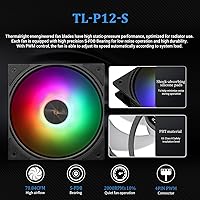
  • Fan Size: Two 120mm PWM fans are included, each controlled by a 4-pin PWM connector for temperature-based speed adjustment.
  • Fan Speed: Fans are rated up to 2000 RPM under normal operation, with a maximum spec ceiling of 3000 RPM.
  • Airflow: Each fan delivers up to 70.84 CFM of airflow, providing adequate pressure through the 240mm radiator fin stack.
  • Noise Level: Rated noise output sits at 22.1 dB, which places it in the quiet-to-near-silent range during typical workloads.
  • Fan Bearing: S-FDB (Sleeve-Fluid Dynamic Bearing) bearings are used, balancing longevity with low operational vibration and noise.
  • LCD Screen: The pump head features a 2.4-inch IPS display at 320x240 resolution, supporting custom static images and animations via software.
  • LCD Mount: The display unit attaches magnetically and can be freely rotated to adjust orientation after the cooler is installed in a case.
  • LCD Power: The LCD screen receives both power and data through the motherboard's internal USB 9-pin header, not a dedicated power cable.
  • ARGB Lighting: ARGB connectivity uses a standard 5V 3-pin connector, allowing synchronization with compatible motherboard lighting software.
  • Voltage: The cooler operates at 12V DC, consistent with standard desktop PC power delivery from the motherboard headers.
  • Wattage: Total power draw is rated at 3.4W, making it an efficient option in terms of system power consumption.
  • Radiator Material: The radiator is constructed from aluminum with an all-black nano-paint finish, providing corrosion resistance and a clean aesthetic.
  • Tubing: Polymer protective tubing connects the radiator to the pump head, designed to minimize coolant evaporation over long-term use.
  • Socket Support: Compatible sockets include AMD AM4 and AM5, plus Intel LGA1150, LGA1151, LGA1155, LGA1156, LGA1200, LGA1700, LGA1851, LGA2011, and LGA2066.
  • Cooling Method: The unit uses a closed-loop liquid cooling system with an integrated pump, radiator, and pre-filled coolant loop.
  • Power Connector: Fan headers use a standard 4-pin PWM connector, compatible with virtually all modern desktop motherboards.

Related Reviews

SAMA LD 240 AIO Liquid CPU Cooler
77%
88%
Value for Money
74%
Thermal Performance
83%
LCD Display Quality
71%
Noise Level
76%
Build Quality
More
Cooler Master MasterLiquid ML240L V2 AIO Cooler
77%
78%
Thermal Performance
91%
Installation Experience
63%
Pump Noise & Vibration
82%
Fan Performance
88%
ARGB Lighting
More
greenDracaena Osprey 240mm AIO CPU Cooler
75%
74%
Thermal Performance
81%
Noise Level
78%
Build Quality
83%
Installation Experience
86%
Value for Money
More
Cooler Master 240 Elite Liquid CPU Cooler
81%
78%
Thermal Performance
82%
Noise Level
91%
Ease of Installation
76%
Build Quality
88%
RGB & Aesthetics
More
AUSDOM S360 360mm AIO Liquid CPU Cooler
78%
83%
Thermal Performance
81%
Noise Level
76%
Build Quality
88%
Installation Experience
79%
RGB & Lighting Quality
More
upHere P360K 360mm AIO Liquid CPU Cooler
77%
78%
Thermal Performance
67%
Noise Level
71%
Build Quality
88%
Installation Experience
86%
Compatibility
More
Thermalright FW360 360mm AIO Liquid CPU Cooler
81%
88%
Thermal Performance
91%
LCD Display Quality
86%
Noise Level
58%
Software & LCD Setup
83%
Installation & Mounting
More
NZXT Kraken 240 AIO CPU Liquid Cooler
81%
78%
Thermal Performance
81%
Noise Level
83%
LCD Display
52%
Software Experience
91%
Installation Ease
More
SAMA Q60 360mm AIO Liquid CPU Cooler
82%
83%
Thermal Performance
79%
Noise Level
88%
LCD Display Quality
74%
Installation Experience
86%
Value for Money
More
SAMA Q70 360mm AIO Liquid CPU Cooler
80%
83%
Cooling Performance
88%
LCD Display Quality
61%
Display Software & Setup
79%
Fan Noise Level
72%
Pump Noise & Reliability
More

FAQ

Not immediately, no. The display requires Thermalright's software, which you need to download separately from their official website. You also need to connect the pump head to your motherboard's USB 9-pin internal header for it to receive both power and data. Once that's set up and the software is installed, you can load custom images or animations onto the screen.

The LCD display simply won't function without it. The screen relies entirely on that header for both power and communication, so there's no workaround if all your headers are already occupied. It's worth checking your motherboard's manual before purchasing to confirm you have one available.

Yes, the Thermalright FW240 240mm AIO CPU Liquid Cooler officially supports LGA1851, so it works with Intel's current-generation Arrow Lake processors out of the box. The package includes platform-specific mounting hardware, so you should find the right bracket already in the box.
At idle and light loads it's genuinely quiet — you'll struggle to hear it over other components. Under sustained heavy workloads the fans do spin up and become more audible, but most users find the noise level acceptable rather than distracting. If you're particularly noise-sensitive, running the fans on a custom curve in your BIOS can help keep things tamer.

Yes, and that's one of the more practical touches on this unit. The display attaches via a magnetic mount, so you can detach and reorient it without removing the cooler from your system. It's handy if you realize after installation that the screen is upside down or facing the wrong direction for your case window.

It should, as long as your motherboard has a 5V 3-pin ARGB header, which most modern boards do. However, a small number of users have reported occasional sync hiccups on specific boards, so if seamless integration is critical to you, it's worth checking forums for your specific motherboard model before committing.

Absolutely — processors in that range are exactly what this 240mm liquid cooler is designed for. Both of those CPUs sit comfortably within the 65W–125W TDP window where the FW240 performs reliably without fans ramping up aggressively. You won't have thermal headroom concerns under normal workloads or moderate gaming sessions.

Honestly, at stock settings the difference is often smaller than people expect. A quality tower air cooler in a similar price range can sometimes match or come close to this AIO in raw temperatures. Where the FW240 pulls ahead is in aesthetics, the LCD display, and keeping things tidy in compact cases where a tall air cooler might not fit.

Thermalright typically includes thermal paste with their coolers, and the FW240 follows that pattern. That said, it's always worth double-checking the box contents when yours arrives, since pre-applied paste on the cold plate varies by production batch.

First, confirm the USB 9-pin header cable is firmly seated on both ends — a loose connection is the most common culprit. Next, try a different USB 9-pin header on the motherboard if one is available. If the software still doesn't detect the unit, restarting after software installation and checking for driver conflicts tends to resolve most remaining cases. Thermalright's customer support is also responsive if you're stuck.