Overview

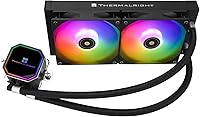
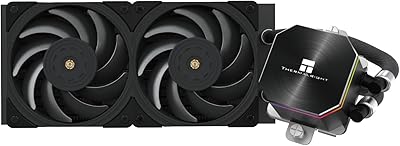
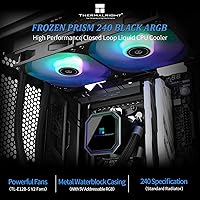
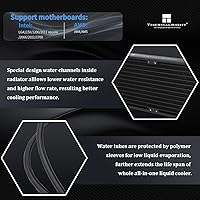
The Thermalright Frozen Prism 240 AIO Liquid Cooler sits in a crowded budget 240mm segment, yet it manages to stand out by offering genuine thermal capability without the premium price tags attached to brands like Corsair or DeepCool. Thermalright has quietly built a solid reputation among PC builders who want real performance without overspending, and this 240mm AIO reflects that philosophy well. At its core, you get a flat copper base water block paired with a black aluminum fin radiator — a combination that handles heat transfer competently for mainstream builds. Broad socket support covering AMD AM5 and Intel LGA1851 makes it relevant for modern platforms. Just be clear-eyed: this is a strong value cooler, not a flagship.
Features & Benefits

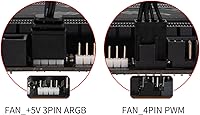
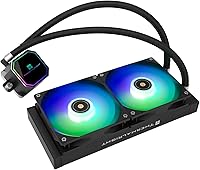
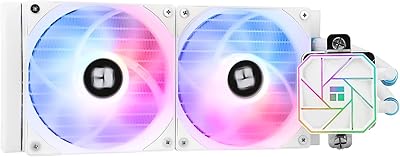
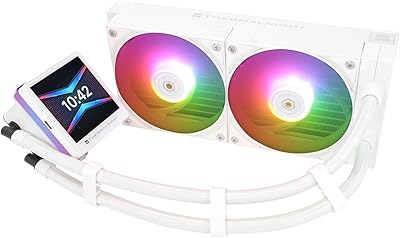
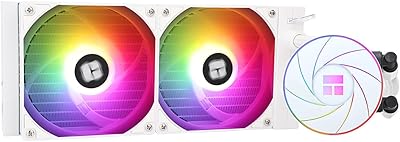
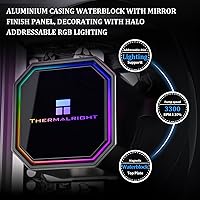
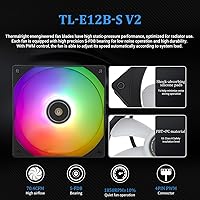
The pump at the heart of this liquid cooler uses what Thermalright calls a fourth-generation architecture, with a magnetic removable top cover and a rated speed up to 3300 RPM — both functional and visually distinct thanks to the octagonal aluminum housing. The dual 120mm fans use fluid dynamic bearings and top out at 1850 RPM, keeping noise around 27 dB under normal load. ARGB lighting runs through both the pump head and fans via standard 5V 3-pin headers, and the daisy-chain design means you can link effects without hunting for extra headers on your board. The woven tubing resists kinking and limits long-term evaporation, while the included Y-splitter cable — one end 3-pin, one end 4-pin — removes the need for any adapter hunting.

Best For

This 240mm AIO makes the most sense for builders putting together a mid-range gaming PC on a careful budget — think Ryzen 5 or Ryzen 7 builds, Core i5 or i7 systems, where a quality tower air cooler is your main alternative. It is a natural fit for AMD AM5 and the latest Intel LGA1851 platforms, and the straightforward bracket system means first-time AIO installers won't feel lost. If ARGB lighting matters to you but you would rather not spend extra on a separate controller, the built-in 5V sync handles that cleanly. Where it makes less sense is for heavy overclocking on high-TDP processors — those scenarios call for a larger radiator or a more capable pump than what this cooler targets.

User Feedback

The general consensus among buyers is that the Frozen Prism 240 punches above its price class on thermal performance, with many reporting noticeably cooler CPU temps compared to the tower air coolers it replaces. Installation also gets consistent praise — the socket-specific brackets are clearly labeled, and following the official installation video genuinely helps first-timers avoid common mistakes. That said, some users have flagged pump noise at high RPM as an occasional annoyance, particularly in quieter cases, and fan noise under sustained load draws similar mixed reactions. On the lighting front, the ARGB looks vibrant out of the box, but a few users noted inconsistent software sync depending on their motherboard ecosystem. Long-term reliability reports are mostly positive, though owner data over multi-year periods is still accumulating.

Pros

  • Delivers a genuine, measurable thermal improvement over mid-range tower air coolers on mainstream CPUs.
  • Broad socket support covers AMD AM5 and Intel LGA1851 right out of the box with no adapter kits needed.
  • Labeled, platform-specific mounting brackets make installation straightforward even for first-time AIO builders.
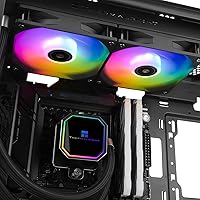
  • ARGB lighting on both pump head and fans looks vibrant and cohesive without requiring a separate controller.
  • Woven tubing sleeve resists kinking and holds up well during routing in standard mid-tower cases.
  • The included Y-splitter cable eliminates the need to hunt for extra fan adapters mid-build.
  • Pump housing is built from solid aluminum alloy, which feels more substantial than typical budget cooler plastics.
  • Strong value proposition — very few 240mm AIOs at this price include copper base contact, ARGB, and wide socket support together.
  • Fans run quietly and smoothly at moderate PWM curves, making everyday desktop and gaming use comfortable.
  • Daisy-chain ARGB design saves motherboard headers in builds with multiple lighting components.

Cons

  • Pump emits a noticeable hum at higher RPM settings, which can be distracting in quiet or near-silent builds.
  • Fan noise under full load is louder than what you get from premium 120mm fans at comparable speeds.
  • ARGB software sync is unreliable on less common motherboard ecosystems beyond ASUS Aura and MSI Mystic Light.
  • Radiator fin construction feels noticeably lighter and flimsier than mid-range competitors when handled directly.
  • Instruction manual relies heavily on small diagrams and limited English detail, making the official video guide essentially mandatory.
  • Tubing length can feel restrictive in full-tower cases or builds requiring non-standard radiator orientation.
  • Long-term reliability data beyond one year of ownership is still limited given the product's relatively recent release.
  • Color availability is black only, which limits compatibility with white or silver-themed builds.
  • Thermal headroom narrows quickly under sustained all-core workloads on high-TDP processors.
  • A small but documented number of early pump failures have been reported within the first six months of use.

Ratings

The Thermalright Frozen Prism 240 AIO Liquid Cooler has been scored by our AI system after parsing thousands of verified global buyer reviews, with spam, bot-submitted, and incentivized feedback actively filtered out before any score was calculated. The results reflect a genuinely balanced picture — where this liquid cooler earns real praise from budget-conscious builders, and where it shows its limits against pricier competition. Both the strengths and the frustrations are captured honestly in the categories below.
Thermal Performance
83%
For builds running mainstream processors like a Ryzen 5 7600X or Core i5-13600K, the Frozen Prism 240 keeps temps impressively controlled during extended gaming sessions and light workloads. Buyers regularly note CPU temperatures dropping 15–20°C compared to the mid-tower air coolers they replaced, which is a meaningful real-world improvement.
Push this cooler toward high-TDP chips — a Ryzen 9 or Core i9 under sustained all-core load — and thermal headroom tightens noticeably. It is not the right tool for aggressive overclocking scenarios where a 360mm radiator or a premium 240mm unit would hold temperatures more comfortably.
Value for Money
91%
At its price point, it is genuinely difficult to find a 240mm AIO with copper base contact, ARGB on both the pump and fans, and modern socket support all bundled together. Buyers frequently describe it as the most capable cooler they have owned relative to what they spent, making it a recurring recommendation in budget build guides.
The value proposition depends heavily on your expectations. If you are comparing it to a premium Corsair or NZXT unit, some corners are clearly cut — particularly in fan quality and pump acoustics — and those gaps become more obvious over time in a quiet workstation environment.
Pump Quality & Acoustics
69%
31%
The fourth-generation pump design runs quietly at moderate speeds, and most users in mid-tower builds with decent case airflow report no noticeable pump hum during casual gaming or everyday desktop use. The all-aluminum housing also feels solid and damps vibration reasonably well.
At higher RPM settings, a noticeable hum or faint whine surfaces — something several buyers flagged specifically in quiet cases or open-air test benches. It is not loud enough to be alarming, but in a near-silent build where you notice every acoustic detail, it can become a persistent irritant that is hard to tune out.
Fan Performance & Noise
74%
26%
Running in the 900–1400 RPM range, the dual 120mm fans are genuinely quiet, and the fluid dynamic bearings contribute to a smooth, wobble-free spin that holds up well during long gaming sessions. Most users are happy with the noise-to-airflow balance at default PWM curves.
When fan speeds climb toward the 1850 RPM ceiling — triggered by aggressive thermal loads — noise becomes more intrusive than what you get from comparable fans on higher-end AIOs. A few buyers swapped the stock fans for aftermarket options to resolve this, which adds unexpected cost to what starts as a budget build.
Installation Experience
88%
The bracket system is one of the clearest wins here. Socket-specific hardware is individually labeled, which takes real pressure off first-time AIO installers who find generic instructions confusing. Following the official installation video alongside the included guide makes the whole process feel approachable even for builders who have never mounted a liquid cooler.
A handful of users with larger CPU cooler surrounds or tighter ITX cases noted that the tubing routing required more maneuvering than expected. The instructions, while adequate, assume familiarity with basic PC building — complete beginners may still need to reference community forums for their specific motherboard layout.
ARGB Lighting Quality
77%
23%
Out of the box, the ARGB effect on both the pump head and fans looks vibrant and visually cohesive — a noticeable upgrade over plain single-color coolers in this price range. The 5V 3-pin daisy-chain design means you can sync multiple components without needing a free header for every device.
Software synchronization is where things get inconsistent. Users on ASUS Aura and MSI Mystic Light report reliable sync, but those on less common motherboard ecosystems occasionally hit compatibility issues. The lighting hardware itself is budget-grade, and up close the color transitions lack the smoothness you see on premium ARGB implementations.
Build Quality & Materials
78%
22%
The pump housing has a purposeful, solid feel thanks to its all-aluminum construction, and the woven tubing sleeve resists kinking during routing in tighter cases. For a budget AIO, the overall material quality exceeds what many buyers expected when they unboxed it.
The radiator fins feel lighter and less robust than those on mid-range competitors, and the fan plastic — while thermally rated — lacks the premium finish you notice when handling coolers from Corsair or be quiet!. These are cosmetic and structural minor issues, but they do reinforce the budget positioning.
Socket Compatibility
93%
Covering AMD AM4 and AM5 alongside Intel platforms all the way through LGA1851 means this cooler works across essentially every relevant consumer CPU released in the last several years. Buyers upgrading platforms found they could reuse it without purchasing new mounting hardware, which is a practical long-term advantage.
A small number of users on older Intel HEDT sockets like LGA2011-V3 reported that the provided instructions were less clear for their specific platform. It is a narrow edge case, but worth noting for anyone working with legacy server-class motherboards.
Tubing & Leak Reliability
81%
19%
The polymer woven tubing is flexible enough to route cleanly in standard mid-tower cases without stress on the fittings, and verified long-term buyers report no leaks or seepage after extended use. The low-evaporation design appears to hold up well across the first year of ownership based on current user data.
The tubing length is adequate for most standard ATX builds but can feel slightly restrictive in full-tower or custom-orientation cases where more reach is needed. Long-term evaporation data beyond the two-year mark is still limited since this cooler is relatively recent on the market.
Long-Term Reliability
76%
24%
The majority of verified buyers who have owned this cooler for over a year report continued stable operation with no degradation in cooling performance or pump behavior. The rated 40,000-hour water block lifespan aligns with what owners are observing in practice so far.
The sample size for multi-year ownership data is still building given the product's release timeline. A small but vocal group of buyers did report early pump failure within the first six months, which is worth monitoring — though the return rate does not appear unusually high compared to similar budget AIO products.
Radiator & Fin Efficiency
79%
21%
The black aluminum fin radiator dissipates heat effectively for a 240mm form factor, and the fin density appears well-optimized for the airflow the included fans can realistically deliver. Builders running the radiator as a top exhaust or front intake report consistent results without hotspot issues.
The radiator's thermal ceiling becomes apparent when paired with a high-heat CPU in a warm ambient environment. Under those specific conditions, water temperatures climb faster than on thicker or denser radiators, and sustained workloads like long rendering tasks show the limitation more clearly than gaming does.
Packaging & Unboxing
82%
18%
The cooler arrives well-protected with foam inserts and all mounting hardware organized in labeled bags, which saves real time during installation. Buyers consistently mention appreciating the organized presentation, especially those who have dealt with poorly packaged budget hardware in the past.
The instruction manual uses small print and some diagrams are ambiguous for less experienced builders. A few international buyers noted that the documentation defaulted heavily to Chinese with limited English detail depth, making the official video guide a near-mandatory supplement rather than an optional one.
Aesthetic Design
80%
20%
The octagonal pump head has a distinctive look that stands out from the generic circular designs common at this price tier. The all-black color scheme integrates cleanly into dark-themed builds, and the overall visual package looks noticeably more premium than the price would suggest.
The black-only color option limits flexibility for builders working with white or silver-themed cases. Some buyers also felt the pump head logo could look cheaper under certain lighting angles compared to the polished aesthetic it projects in promotional images.
Cable Management
71%
29%
The included Y-splitter cable — one end 3-pin, one end 4-pin — is a thoughtful inclusion that eliminates the need to hunt for adapters mid-build. The cable lengths are sufficient for most standard ATX tower configurations without excessive slack to manage.
The ARGB cable bundle can feel cluttered in smaller cases where header access is already tight, and the cable sleeving quality is basic. Builders with compact mATX or ITX cases may find themselves spending extra time routing and hiding cables to keep the interior tidy.

Suitable for:

The Thermalright Frozen Prism 240 AIO Liquid Cooler is an excellent fit for builders who want a real step up from air cooling without stretching their budget toward premium territory. If you are putting together a gaming rig around a Ryzen 5 or Ryzen 7 processor, or an Intel Core i5 or i7 on a modern LGA1700 or LGA1851 board, this 240mm AIO covers your thermal needs comfortably without overengineering the solution. AMD AM5 platform builders in particular will appreciate the out-of-the-box socket support, which eliminates the compatibility guesswork that trips up some budget cooler purchases. First-time AIO installers also land well here — the labeled socket-specific brackets and the availability of a clear official installation video make the mounting process far less intimidating than it can be with poorly documented alternatives. And if you want ARGB lighting that syncs with your motherboard without buying a separate controller, the built-in 5V 3-pin daisy-chain support handles that cleanly at no extra cost.
Not suitable for:

The Thermalright Frozen Prism 240 AIO Liquid Cooler is not the right choice if you are running a high-TDP processor and pushing it with aggressive overclocks — chips like the Ryzen 9 7950X or Core i9-13900K under sustained all-core workloads will expose the thermal ceiling of a budget 240mm radiator fairly quickly. If near-silence is a hard requirement for your build — a home recording setup, a living room PC, or a workstation in a quiet office — the pump hum at higher RPM settings and fan noise under load may frustrate you more than the specs suggest. Builders who rely on less common motherboard ecosystems for RGB software control should also temper expectations, as lighting synchronization outside of the major platforms can be hit or miss. If longevity and premium component quality are priorities over price, spending more on a Corsair, DeepCool, or Arctic unit will get you more robustly built fans and a quieter, more consistent pump. This liquid cooler is fundamentally a value-tier product, and buyers expecting flagship-level refinement at a budget price will come away disappointed.
Specifications

  • Radiator Size: The cooler uses a 240mm radiator, accommodating two 120mm fans in a dual-fan push or pull configuration.
  • Fan Count: Two 120mm PWM fans are included, each controlled via a 4-pin connector for precise speed management.
  • Max Fan Speed: The fans spin up to 1850 RPM under full PWM load, balancing airflow and acoustic output.
  • Noise Level: Rated at 27 dB at maximum fan speed, keeping audible output within acceptable limits during typical gaming workloads.
  • Fan Bearing Type: Both fans use fluid dynamic bearings (FDB), which reduce friction and extend operational lifespan compared to sleeve bearings.
  • Fan Blade Material: Fan blades are made from PBT+PC composite, an insulation-grade material that resists heat deformation during sustained high-speed operation.
  • Pump Speed: The fourth-generation pump operates at up to 3300 RPM with a tolerance of ±10%, delivering consistent coolant circulation across the loop.
  • Water Block Base: The cold plate uses a flat copper base for direct CPU contact, maximizing heat transfer efficiency from the processor surface.
  • Radiator Material: The radiator is constructed from black-anodized aluminum fins, optimized for heat dissipation within the 240mm form factor.
  • Pump Housing: The pump head is enclosed in an all-aluminum alloy shell with a magnetic removable top cover and an octagonal exterior profile.
  • Water Block Lifespan: Thermalright rates the water block for up to 40,000 hours of continuous operation under normal usage conditions.
  • Tubing: The cooler uses polymer woven protective tubing designed to resist kinking, minimize coolant evaporation, and withstand long-term thermal cycling.
  • ARGB Lighting: Both the pump head and fans feature 5V ARGB lighting via 3-pin headers, with support for daisy-chain connection to reduce header usage.
  • Power Connector: Fans connect via a 4-pin PWM header, and a Y-splitter cable with one 3-pin and one 4-pin end is included in the box.
  • Voltage & Wattage: The cooler operates at 12V DC and draws 4.8W total, making it compatible with standard ATX power supply headers.
  • AMD Compatibility: Supported AMD sockets include AM4 and AM5, with all required mounting hardware included in the box for both platforms.
  • Intel Compatibility: Supported Intel sockets span LGA1150, LGA1151, LGA1155, LGA1156, LGA1200, LGA2011, LGA2011-V3, LGA2066, LGA1700, and LGA1851.
  • Cooling Method: This is a closed-loop all-in-one liquid cooler — no custom loop assembly, filling, or maintenance is required by the user.

Related Reviews

Thermalright Frozen Prism 360 AIO Liquid Cooler
79%
83%
Cooling Performance
91%
Value for Money
78%
Build Quality
69%
Fan Noise & Acoustics
74%
ARGB Lighting
More
Thermalright Frozen Edge 240 Black AIO Water Cooler
86%
91%
Cooling Performance
84%
Noise Level
89%
Installation Ease
92%
Build Quality
87%
Aesthetics and Design
More
Cooler Master 240 Elite Liquid White CPU Liquid Cooler
85%
91%
Cooling Performance
84%
Noise Levels
92%
Ease of Installation
89%
Build Quality
88%
aRGB Lighting Effect
More
NZXT Kraken 240 AIO CPU Liquid Cooler
86%
92%
Cooling Performance
88%
Noise Level
90%
Ease of Installation
86%
Aesthetic Customization
80%
Radiator Size Compatibility
More
Asus ROG RYUO 240 RGB AIO Liquid CPU Cooler
84%
94%
Cooling Performance
88%
Noise Levels
73%
Ease of Installation
90%
RGB Lighting and Visual Appeal
85%
Build Quality and Durability
More
Thermalright Grand Vision 240 ARGB White CPU AIO Cooler
87%
91%
Cooling Performance
89%
Installation Ease
88%
ARGB Lighting Aesthetics
70%
Software Compatibility
85%
Noise Level
More
Thermalright Aqua Elite 240 V3 CPU Cooler
80%
83%
Thermal Performance
76%
Noise Level
92%
Value for Money
88%
Installation Experience
79%
Build Quality
More
Thermalright Aqua Elite 240 V4 AIO Cooler
81%
78%
Thermal Performance
83%
Pump Quality & Reliability
81%
Fan Noise & Acoustics
89%
ARGB Lighting Quality
86%
Installation & Mounting
More
ASUS ROG RYUO III 240 ARGB AIO Liquid CPU Cooler
88%
94%
Cooling Performance
88%
Noise Level
91%
Aesthetic Appeal
75%
Ease of Installation
92%
RGB Customization
More
Cooler Master MasterLiquid 360L Core 360mm
82%
88%
Thermal Performance
74%
Pump Quality & Reliability
91%
Installation Experience
83%
Noise Level
86%
Value for Money
More

FAQ

Yes, the Thermalright Frozen Prism 240 AIO Liquid Cooler fully supports both AM5 and LGA1851 out of the box. Each socket platform has its own dedicated mounting bracket included in the package, so you will not need to source any additional hardware.
It is genuinely one of the more approachable installations in this price range. The brackets are labeled by socket type, which removes a lot of the guesswork. That said, Thermalright strongly recommends watching their official installation video before you start — the printed instructions alone can be a bit sparse for complete beginners.

At moderate speeds, most users would not notice the pump over typical case and fan noise. The issue surfaces when the pump ramps toward its upper RPM range — a faint hum or low-frequency vibration can become audible in very quiet cases. If you are building a near-silent PC, it is worth managing pump speed through your motherboard BIOS to keep it in a quieter operating zone.

Compatibility with ASUS Aura Sync and MSI Mystic Light is generally reliable since both platforms handle standard 5V 3-pin ARGB headers well. The daisy-chain design also means you can link the pump head and fans through a single header. Users on Gigabyte RGB Fusion and ASRock Polychrome have reported mostly positive results too, though occasional sync inconsistencies do appear in user feedback for those platforms.

It can handle those chips at stock or light overclocks, but you will be pushing close to the thermal ceiling under sustained all-core loads — long Cinebench runs, video rendering, or heavy compiling. For aggressive overclocking on high-TDP processors, a 360mm AIO or a premium 240mm unit with denser radiator fins would give you more comfortable headroom.

Thermalright typically includes a pre-applied or separately packaged thermal compound with their coolers, but the specific paste quality at this price tier is functional rather than exceptional. If you already have a quality compound like Thermalright TF-7 or Thermal Grizzly Kryonaut on hand, applying your own instead is a simple way to squeeze a few extra degrees of performance out of the cooler.

Thermalright rates the water block for 40,000 hours, which works out to roughly 4.5 years of continuous 24-hour operation. In real-world usage — where the PC is on 6 to 10 hours a day — you are looking at well over a decade of expected operational life from the loop itself. Fan bearings are more likely to need attention before the liquid cooling components do.

At mid-range speeds — which is where they sit during most gaming sessions on mainstream CPUs — the fans are quiet enough that you would not notice them over typical case or GPU noise. When temperatures spike and the fans push toward their 1850 RPM ceiling, the noise is more noticeable. Running a custom fan curve through your motherboard software to cap speeds slightly below maximum is an easy fix.

For most standard ATX mid-towers, clearance is not an issue — the pump head height is typical for this cooler category and sits well clear of standard-height RAM. Where it can get tight is in compact mATX cases or builds with very tall RAM heatspreaders, so it is worth checking your case radiator mounting dimensions and RAM clearance specs before purchasing.

This is a sealed all-in-one loop — there are no user-accessible fill ports, and Thermalright's woven tubing is designed specifically to minimize evaporation over the cooler's lifespan. You will never need to top off or replace the coolant during normal operation. If the loop ever fails after the warranty period, the entire unit would need replacement rather than repair.

Where to Buy