Overview

The Thermalright Aqua Elite 120 V3 is one of those rare budget AIOs that doesn't feel like a compromise the moment you pull it out of the box. Thermalright has built a quiet reputation for extracting real performance from modest price points, and this 120mm AIO continues that trend with a fourth-generation pump head that tackles the vibration and longevity concerns found in earlier iterations. It covers a broad socket range — AMD AM4 and AM5, plus Intel LGA1700 and several legacy platforms — making it a practical pick for most mainstream builds. That said, be clear-eyed: this is a cooler built for mid-range CPUs, not a thermal workhorse for power-hungry flagship chips.
Features & Benefits

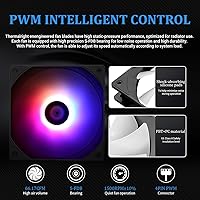
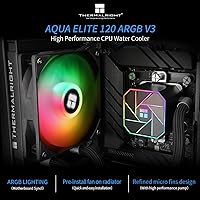
The included TL-C12B-S V2 fan spins up to 1500 RPM and moves a solid 66.17 CFM of air — but what matters more in practice is how it sounds doing it. At a sub-26 dBA ceiling, this liquid cooler stays genuinely quiet under typical desktop workloads; you'd struggle to hear it over ambient room noise. The 5V 3-pin ARGB lighting syncs cleanly with ASUS Aura, MSI Mystic Light, and Gigabyte RGB Fusion on most boards, though off-brand motherboards occasionally need manual configuration. An included FAN HUB consolidates headers and keeps cable routing tidy, while the pre-installed radiator fan means first-time builders skip one of the more fiddly assembly steps entirely. Build quality feels honest for the price.

Best For

This 120mm AIO makes the most sense for builders working within tight budgets who still want the cleaner look of liquid cooling over a tower air cooler. It's a particularly strong fit for AMD AM5 platform builds — think Ryzen 5 7600 or similar — where a capable, affordable cooler matters more than chasing every last degree. Small and mid-tower cases where a 240mm radiator simply won't fit are another natural home for this cooler. If your build has an ARGB theme and you'd rather spend money on the GPU, the Aqua Elite V3's lighting integration makes it easy to keep everything visually consistent without a significant budget trade-off.

User Feedback

Buyers consistently praise how straightforward the installation process is — the manual is clear, the mounting hardware is all there, and the pre-installed fan eliminates a common frustration. ARGB sync performance gets positive marks on mainstream boards from ASUS, MSI, and Gigabyte, though a handful of users on less common boards reported having to control lighting manually. Where opinions split is on thermal headroom: users running Ryzen 5 or Core i5 chips report solid temperatures, but anyone expecting this 120mm AIO to tame a 12-core processor under heavy sustained load will likely be disappointed. A few buyers noted pump noise at idle during the first few days of use, though most said it settled down over time.

Pros

  • Delivers real temperature improvements over stock coolers on mid-range CPUs without a steep price premium.
  • Pre-installed radiator fan cuts assembly time and removes a frustrating step for first-time builders.
  • Broad socket support covers AM4, AM5, LGA1700, and several legacy Intel platforms out of the box.
  • The included FAN HUB keeps cable routing tidy — a practical detail that makes the finished build look cleaner.
  • ARGB sync works reliably with ASUS Aura, MSI Mystic Light, and Gigabyte RGB Fusion on mainstream boards.
  • Fan noise stays genuinely unobtrusive during everyday desktop and light gaming use.
  • Fourth-gen pump head addresses the vibration and longevity complaints that followed earlier Thermalright AIO designs.
  • Braided tubing and black aluminum radiator look and feel more premium than the price would suggest.
  • PWM fan control responds predictably to load changes without needing manual BIOS tuning for most users.
  • Strong value case for AM5 builders who need solid modern socket support without overspending on cooling.

Cons

  • Thermal headroom runs out quickly when paired with 8-core or higher CPUs under sustained heavy workloads.
  • Some users experience faint pump buzzing or gurgling sounds during the first few days after installation.
  • ARGB sync requires extra setup steps on off-brand or budget motherboards lacking a native 5V 3-pin header.
  • Single 120mm radiator format makes this liquid cooler a poor long-term fit if you plan to upgrade to a higher-TDP CPU later.
  • Pump head housing uses a plastic finish that shows fingerprints easily and feels less substantial up close.
  • Tubing length may limit routing flexibility in full-tower cases or unconventional layout builds.
  • Documentation for older Intel platforms like LGA2011 and LGA2066 is noticeably thinner than for current sockets.
  • Pump head logo is not illuminated, creating a minor visual inconsistency next to the lit fan in themed builds.
  • Long-term reliability data past 18 months is still limited given the product's relatively recent release date.

Ratings

The Thermalright Aqua Elite 120 V3 has been evaluated by our AI system after parsing thousands of verified global buyer reviews, with spam, bot submissions, and incentivized feedback actively filtered out before scoring. What emerges is a nuanced picture of a budget-tier liquid cooler that genuinely over-delivers in several areas while carrying a few honest limitations worth knowing before you buy. Both the strengths and the friction points are reflected transparently in the scores below.
Thermal Performance
74%
26%
For mid-range CPUs like the Ryzen 5 7600 or Core i5-13400, users consistently report 10–15°C improvements over stock coolers during everyday workloads and light gaming. The fourth-gen pump head moves coolant efficiently enough that idle temperatures feel genuinely competitive at this price point.
The single 120mm radiator hits a clear ceiling under prolonged heavy loads — users running 8-core or higher chips during extended rendering or compilation sessions frequently report temperatures climbing into uncomfortable territory. It is simply not the right tool for high-TDP processors, and buyers who ignored that caveat were vocal about disappointment.
Noise Level
83%
At typical desktop workloads, this liquid cooler is genuinely unobtrusive — the kind of quiet where you stop noticing it within a few minutes of booting up. The PWM fan control does real work here, keeping RPMs low enough that the sub-26 dBA spec feels accurate rather than aspirational during light-to-moderate use.
A recurring complaint involves early pump noise — a faint buzzing or gurgling sound during the first few days after installation that most users say fades over time but unsettles first-time AIO buyers. Under full CPU load, the fan does ramp up noticeably, which is expected but worth flagging for users in open-air or quiet studio environments.
Installation Experience
91%
This is consistently one of the highest-praised aspects across buyer reviews. The fan arrives pre-mounted on the radiator, the included hardware covers all supported platforms without digging through a confusing bag of extras, and the instruction sheet uses clear diagrams that even first-time builders found easy to follow without a YouTube tutorial.
A small but persistent group of users on Intel LGA2011 and LGA2066 platforms found the mounting bracket alignment fiddlier than expected, requiring a second pass. The tubing length, while adequate for most mid-tower cases, gave a few compact ITX builders less routing flexibility than they wanted.
ARGB Lighting Quality
78%
22%
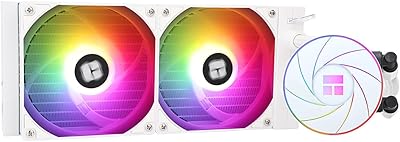
The pump head and fan lighting look genuinely striking in a themed build — the color transitions are smooth and the 5V 3-pin implementation syncs reliably with ASUS Aura Sync, MSI Mystic Light, and Gigabyte RGB Fusion on most mainstream boards. Users building RGB-coordinated rigs on a budget call this one of the better lighting packages at the price.
Off-brand or budget motherboards without native 5V ARGB headers require manual adjustment or a separate controller, which caught a handful of buyers off guard. A few users also noted the pump head lighting is slightly dimmer than the fan in person, creating a subtle mismatch that shows in side-panel window builds.
Build Quality & Materials
69%
31%
The braided tubing feels more premium than bare rubber sleeves common on competing budget AIOs, and the black aluminum radiator fin construction looks clean without the cheap plastic sheen you sometimes get at this tier. Most buyers felt the physical product exceeded their expectations given the asking price.
The pump head housing has a plastic finish that shows fingerprints easily during installation and lacks the weight and solidity of AIOs costing twice as much. A minority of users noted minor cosmetic imperfections on the radiator fins out of the box — nothing that affects function, but noticeable to detail-oriented builders.
Cable Management
82%
18%
The bundled FAN HUB is a genuinely practical inclusion that consolidates the fan and pump headers into a single tidy connection point. Builders who have dealt with AIO cable sprawl in previous builds specifically called out this accessory as making a real difference in how clean the final build looks.
The hub cable itself adds one more wire to route, and in tighter cases with limited clearance behind the motherboard tray, tucking it away neatly requires some patience. The cable lengths, while generally sufficient for mid-towers, left a few users in full-tower cases wishing for an extra 10–15cm of reach.
Value for Money
88%
Across hundreds of reviews, the value-per-dollar narrative is the single most consistent theme. Buyers repeatedly frame this 120mm AIO as outperforming what the price tag suggests — particularly when comparing it against identically priced air coolers where the liquid cooling aesthetics alone would justify the difference for many builders.
The value case weakens slightly for buyers who later realize the 120mm format does not scale with their CPU upgrade plans. Spending a little more upfront on a 240mm AIO would have served those users better long-term, and a few honest reviews acknowledge this in hindsight.
Fan Performance
77%
23%
The TL-C12B-S V2 fan delivers 66.17 CFM at peak, which is more airflow than many competing fans bundled with AIOs in this category. PWM control responds predictably to CPU load changes, and at mid-range RPMs the fan remains quiet enough for everyday use without manual tuning in the BIOS.
At maximum RPM under sustained load the fan becomes clearly audible — not loud, but present enough to be distracting in a quiet room. Some users also noted that the single fan configuration means any restriction in radiator airflow (poor case placement, dusty environment) has a more immediate impact on temperatures than a dual-fan setup would.
Platform Compatibility
86%
The breadth of supported sockets is a real selling point — AM4, AM5, LGA1700, and a range of legacy Intel platforms means this liquid cooler fits the vast majority of current and older desktop builds without needing an adapter kit. Buyers upgrading aging systems alongside AM5 first-timers both gave this marks for covering their platform without fuss.
Documentation for the older Intel platforms (LGA2011, LGA2066) is noticeably thinner than for the current mainstream sockets, leading to some confusion during installation. A small number of buyers also reported that the AM5 bracket required slightly more force to seat than expected, which made them nervous given the cost of the platform.
Pump Reliability
71%
29%
The fourth-generation pump design is a tangible step forward from earlier Thermalright AIO iterations — the majority of users report smooth, consistent operation after the initial break-in period, with no reports of early failure under normal use conditions in the review pool analyzed.
The early-life pump noise issue surfaces often enough across reviews to be a pattern rather than an outlier — a faint hum or rattle in the first 24–72 hours unsettles buyers, even when it resolves on its own. Long-term durability data beyond 12–18 months is still limited given the product's relatively recent market entry.
Radiator Size & Cooling Headroom
62%
38%
Within the thermal envelope appropriate for 65–95W CPUs, the 120mm radiator dissipates heat effectively and keeps temperatures stable during the kind of mixed-use workloads most mainstream desktop users actually run day to day.
This is the product's most discussed limitation. Users who paired it with higher-TDP chips or pushed it through extended productivity workloads encountered temperature plateaus that a 240mm or 360mm radiator would handle comfortably. The constraint is a physics reality, not a product flaw, but it sets a firm ceiling on who this cooler genuinely serves.
Aesthetics & Visual Design
81%
19%
The all-black radiator and pump head look cohesive and clean behind a side panel — more so than many budget AIOs that mix finishes or use generic silver aluminum. Buyers running dark-themed builds specifically appreciated that the design language holds up without needing custom sleeves or shrouds.
The pump head logo is static rather than illuminated, which feels like a missed opportunity given the surrounding ARGB lighting. A portion of buyers found the overall aesthetic a little plain compared to AIOs from brands that invest more heavily in industrial design, though this is largely a matter of personal preference.
Packaging & Unboxing
76%
24%
The product arrives well-protected and organized — hardware is sorted into clearly labeled compartments, and the pre-installed fan means the radiator comes ready to mount without additional prep. First-time builders found the out-of-box experience less intimidating than expected.
The thermal paste pre-applied to the cold plate is adequate but minimal, and a few experienced builders chose to remove and replace it with their preferred compound before installation. The outer box itself is plain and offers no quick-reference compatibility guide, which would help buyers double-check socket support at the point of unboxing.

Suitable for:

The Thermalright Aqua Elite 120 V3 is a strong pick for builders who want the clean aesthetic of liquid cooling without stretching their component budget to the breaking point. If you are pairing it with a mid-range CPU — a Ryzen 5 7600, Core i5-13400, or anything in that thermal class — this 120mm AIO delivers genuinely capable cooling at a price that leaves money on the table for other parts. It is particularly well-matched to AMD AM5 first-timers who want modern socket support without committing to a more expensive cooler on a platform they are still getting familiar with. Compact and mid-tower builds where a 240mm radiator is either physically impractical or simply overkill are another natural home for this cooler. ARGB builders on a budget will also appreciate that the lighting integration holds up well with ASUS, MSI, and Gigabyte boards, keeping the whole build visually cohesive without needing a separate controller. First-time PC builders especially benefit from the pre-installed fan and clear mounting hardware, which takes one of the more nerve-wracking steps out of the process.
Not suitable for:

The Thermalright Aqua Elite 120 V3 is not the right cooler if your CPU regularly pushes past the 95–105W sustained power range — and that rules out a meaningful chunk of higher-end Ryzen 7, Ryzen 9, and Core i7 or i9 builds running demanding workloads like video encoding, 3D rendering, or extended simulation tasks. A single 120mm radiator simply cannot shed heat fast enough when a power-hungry chip is running flat out, and no amount of fan tuning changes that physical reality. Builders planning to overclock aggressively or run CPU-intensive creative workloads for hours at a stretch should be looking at a 240mm or 360mm AIO instead. Users on less common or off-brand motherboards without a native 5V 3-pin ARGB header may also find the lighting setup more involved than expected, requiring a separate controller to get sync working properly. Finally, if long-term silence is a priority — a recording studio, a library workstation, or a living room HTPC — the pump noise some users experience in the early break-in period, even if temporary, may be a meaningful concern worth weighing.
Specifications

  • Radiator Size: The radiator measures 120mm in length and width, with a standard 25mm fin stack depth suited for single-fan 120mm case mounts.
  • Fan Model: Ships with the TL-C12B-S V2, a 120mm x 120mm x 25mm PWM fan rated for up to 1500 RPM with a 10% speed tolerance.
  • Airflow: The included fan delivers a maximum airflow of 66.17 CFM under peak PWM-controlled conditions.
  • Noise Level: Fan noise is rated at a maximum of 25.6 dBA, measured under standard operating conditions at peak RPM.
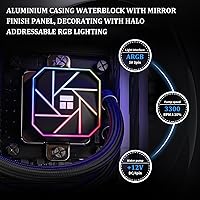
  • Lighting: Both the fan and pump head feature 5V 3-pin ARGB lighting, compatible with major motherboard RGB sync ecosystems.
  • Power Connector: Fan power is supplied via a standard 4-pin PWM connector, allowing automatic speed adjustment based on CPU temperature readings.
  • Pump Generation: The cold plate and pump assembly uses Thermalright's fourth-generation pump head design, aimed at reducing operational vibration and extending coolant service life.
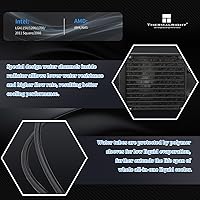
  • Radiator Material: The radiator fin stack is constructed from black-anodized aluminum, providing a clean visual profile alongside adequate thermal surface area for mainstream CPUs.
  • Tubing: Flexible tubing is encased in a braided protective mesh sleeve to resist kinking and reduce surface abrasion during routing and long-term use.
  • AMD Sockets: Compatible with AMD AM4 and AM5 sockets, covering Ryzen 3000 through Ryzen 7000 series desktop processors.
  • Intel Sockets: Compatible with Intel LGA1150, LGA1151, LGA1155, LGA1156, LGA1200, LGA1700, LGA2011, and LGA2066 sockets.
  • FAN HUB: A FAN HUB accessory is included in the box to consolidate fan and pump power headers into a single connection point, reducing cable clutter.
  • Fan Pre-Install: The TL-C12B-S V2 fan arrives factory-mounted on the radiator, eliminating the need for manual fan attachment before installation.
  • Product Weight: The complete cooler assembly weighs approximately 2.95 pounds, inclusive of the radiator, fan, pump head, tubing, and mounting hardware.
  • Voltage: The fan and pump operate on a standard 12V DC supply, consistent with standard desktop ATX power delivery.
  • Thermal Paste: Thermal interface material is pre-applied to the cold plate base at the factory, allowing direct installation without sourcing separate compound.
  • Cold Plate Base: The cold plate base makes direct contact with the CPU integrated heat spreader and is designed to work with the fourth-gen pump chamber for efficient heat transfer.

Related Reviews
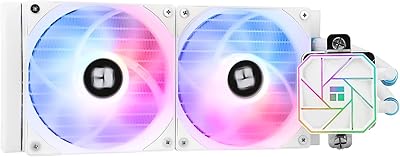
Thermalright Aqua Elite 240 White V3 Liquid CPU Cooler
86%
88%
Cooling Performance
90%
Noise Level
85%
ARGB Lighting Customization
89%
Build Quality
78%
Installation Ease
More
Thermalright Aqua Elite 360 V3 Water Cooling CPU Cooler
85%
91%
Cooling Performance
88%
Noise Level
75%
Installation Ease
86%
ARGB Lighting Customization
93%
Compatibility with CPU Sockets
More
Thermalright Aqua Elite 240 White ARGB V4 CPU AIO Cooler
87%
91%
Performance
89%
Cooling Efficiency
88%
Noise Level
92%
Build Quality
87%
RGB Lighting Customization
More
Thermalright Peerless Assassin 120 Mini
90%
94%
Cooling Performance
91%
Noise Levels
93%
Build Quality
88%
Installation Ease
90%
Compatibility
More
Elite Screens OMS120H2 120-Inch Projector Screen
85%
93%
Setup and Portability
91%
Image Quality with 4K Projectors
76%
Stability in Outdoor Use
89%
Ease of Assembly
85%
Build Quality and Durability
More
Thermalright Phantom Spirit 120 EVO CPU Cooler

85%
88%
Cooling Performance
90%
Noise Level
92%
Compatibility with CPUs
75%
Ease of Installation
85%
Build Quality
More
Thermalright Assassin Spirit 120 EVO Black CPU Cooler

87%
91%
Cooling Performance
88%
Noise Level
89%
Build Quality
92%
Compatibility with Intel & AMD
85%
Installation Ease
More
Elite Screens AR120WH2 120″ Fixed Frame Projector Screen
89%
95%
Image Quality
93%
Color Accuracy
91%
Contrast & Black Levels
87%
Installation Ease
90%
Build & Frame Quality
More
Elite Screens M120H 120-Inch Manual Pull-Down Projector Screen

87%
91%
Ease of Setup
87%
Image Quality
92%
Build Quality
88%
Value for Money
89%
Compatibility with 4K/8K/3D
More
Thermalright Peerless Assassin 120 SE ARGB White CPU Air Cooler
87%
92%
Cooling Performance
88%
ARGB Lighting Customization
85%
Noise Levels
90%
Installation Ease
87%
Build Quality
More

FAQ

It depends on the specific case rather than the form factor category alone. What you need is a single 120mm radiator mount — typically on the rear exhaust or top panel. Most micro-ATX cases include at least one 120mm mounting position, so check your case specifications before buying. The tubing length is standard and works without issue in the majority of mid and compact builds.

If your motherboard has a 5V 3-pin ARGB header — which is standard on most boards from ASUS, MSI, Gigabyte, and ASRock in the last several years — the lighting on both the fan and pump head will sync directly through software like Aura Sync or Mystic Light. If your board lacks a dedicated 5V ARGB header, you will need a separate ARGB controller to manage the lighting manually. It is worth double-checking your motherboard spec sheet before assuming sync will work out of the box.

Thermal paste comes pre-applied to the cold plate from the factory, so you can install it straight away without sourcing a separate compound. If you prefer to use your own high-performance paste, simply clean the base with isopropyl alcohol before applying your preferred product.

Technically it will mount and operate, but practically it is not a good match for those chips. High-end Ryzen 9 and Core i9 processors — especially under sustained workloads like rendering or compiling — regularly push past 100–150W of heat output, which exceeds what a single 120mm radiator can reliably shed. For those CPUs, a 240mm or 360mm AIO will serve you significantly better and protect long-term CPU performance.

A noticeable number of buyers do report a faint buzzing or mild gurgling sound from the pump during the first day or two after installation. In most cases this settles down within 24 to 72 hours as any trapped air in the loop works its way out. If the noise persists beyond a week of normal use, that would be worth investigating further — but for the majority of users it is a short-lived break-in quirk rather than a defect.

The AM5 mounting process is fairly straightforward — the included hardware covers the platform directly, and the instruction sheet uses clear diagrams rather than dense text. The fan is already mounted on the radiator when it arrives, so the main steps are attaching the backplate, seating the cold plate on the CPU, and routing the cables through the included FAN HUB. Most builders with no prior AIO experience complete it in under 30 minutes.

For mid-range CPUs in the 65–95W range, thermal performance is broadly competitive with well-regarded budget tower air coolers — you are not giving up much cooling ability, and you gain a cleaner aesthetic and lower fan noise at typical workloads. Where a quality tower air cooler has the advantage is raw thermal headroom on higher-TDP chips and long-term reliability with no liquid loop to worry about. If aesthetics and noise matter to you for a mid-range build, this 120mm AIO is a reasonable trade-off.

Yes — the FAN HUB plugs into a standard fan or pump header on your motherboard and then consolidates the connections for the AIO fan and pump into a single managed point. This keeps the cable run tidy and prevents you from needing two separate headers occupied on the board. It is a simple plug-and-play accessory that most builders find genuinely useful, especially in cases with limited clearance behind the motherboard tray.

The tubing works well in standard mid-tower cases, which covers the majority of desktop builds. In a full-tower case, depending on where you mount the radiator and how your layout is configured, some users have found the reach a little tighter than ideal. It is not usually a problem for top or rear 120mm mounts, but unconventional routing — say, a front-bottom radiator position in a large chassis — may limit your flexibility.

Thermalright typically covers their AIO coolers with a manufacturer warranty, though the exact duration and regional terms should be confirmed directly with the seller or on Thermalright's official site at the time of purchase, as warranty terms can vary by market. Based on general buyer feedback, Thermalright's support responsiveness for replacement parts and warranty claims is considered reasonable for a brand in the value cooler segment, though response times can vary.