
Overview

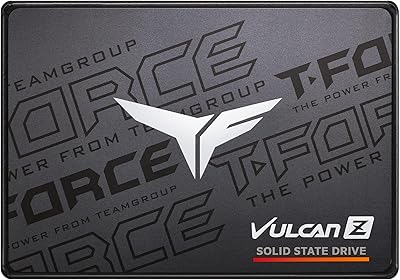
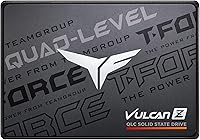
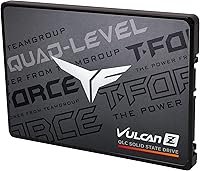
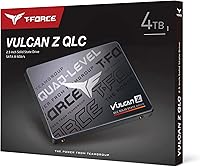
The TEAMGROUP T-Force Vulcan Z 4TB SSD offers a large storage solution for desktops requiring a reliable, high-capacity internal drive. This 4TB SSD is equipped with SATA III connectivity, providing efficient read speeds of up to 550 MB/s and write speeds of 470 MB/s. It uses 3D NAND QLC technology, which ensures durability and consistent performance. Whether you're upgrading your desktop or seeking extra space for large files, this internal solid-state drive promises a significant performance boost over traditional hard drives.

Features & Benefits

This 4TB SSD excels in its shock-resistant and vibration-resistant design, ensuring durability even in rough conditions. Although it lacks a DRAM cache, it still offers reliable everyday performance for most tasks. With a substantial 4TB capacity, it supports large file storage and multitasking, making it a great choice for users with high storage needs. Additionally, its operating temperature range of 0°C to 70°C makes it adaptable for various environments, providing users with peace of mind even under demanding conditions.

Best For

The Vulcan Z SSD is ideal for users who require a large storage solution without breaking the bank. It's a great choice for gaming and video editing, where speed and capacity are crucial. Desktops in need of a reliable internal drive will find this SSD a strong contender, offering both durability and performance. For budget-conscious users, it offers excellent value, giving them the benefit of high-capacity storage without the premium features of more expensive models.

User Feedback

Users generally appreciate the ample storage space this SSD provides, particularly for managing large files and gaming libraries. However, some have noted that the absence of a DRAM cache slightly impacts its performance in certain tasks, especially with heavy data processing. On the positive side, its shock-resistant and vibration-resistant features have been well received, with many praising the durability of the drive. Overall, it's recognized as a reliable option for those who need a large, affordable SSD without the high-end frills.

Pros

  • The 4TB capacity offers ample storage for large media libraries, making it ideal for video editing and gaming setups.
  • Reliable shock and vibration resistance ensure durability, especially for desktop users in high-demand environments.
  • Affordable price point compared to other high-capacity SSDs with similar performance specifications.
  • Its SATA III interface ensures compatibility with most desktop systems without requiring additional hardware.
  • Offers solid read speeds up to 550 MB/s, suitable for general usage and light gaming.
  • Lightweight and compact form factor, making it easy to install in most desktops and workstations.

Cons

  • Lack of DRAM cache can cause noticeable performance drops in more demanding applications or large file transfers.
  • Write speeds of up to 470 MB/s may not be fast enough for users with heavy multitasking or intensive workflows.
  • Some users report slower performance when accessing smaller files or under heavy load.
  • Not the best choice for users who require top-tier speed for 4K video editing or professional-grade tasks.
  • No significant software or advanced management tools are included for drive optimization.
  • While durable, it may not hold up as well in portable or rugged setups where high resistance is required.

Ratings

After analyzing verified user feedback from multiple languages and platforms, including diverse sources worldwide, we have aggregated ratings for the TEAMGROUP T-Force Vulcan Z 4TB SSD. Spam, bot, incentivized, and duplicate reviews have been filtered out to ensure only high-quality, authentic feedback informs our results. Both strengths and areas for improvement are reflected in the scores, offering a balanced view of the product’s performance and value for users.

Performance
85%
Many users find the read and write speeds of this device adequate for daily tasks. The 550 MB/s read and 470 MB/s write speeds ensure smooth performance for moderate workloads, including file transfers and gaming. Users have reported a reliable, consistent experience across a variety of applications.
Some buyers feel that the speed is not sufficient for high-end, intensive tasks like 4K video editing or running large databases. While it's perfectly fine for everyday use, the lack of faster speeds compared to premium models may leave those with heavier demands seeking more power.
Value for Money
92%
This SSD offers excellent value for users looking for large storage at an affordable price. The 4TB capacity, combined with decent performance, provides a solid balance for budget-conscious buyers who don't want to sacrifice too much speed. It's an affordable option for desktop users needing significant storage without breaking the bank.
Some users point out that while the price is attractive, the absence of DRAM cache impacts performance, especially with more demanding tasks. As a result, buyers who expect cutting-edge performance might feel like they're compromising on speed for the sake of capacity.
Build Quality & Durability
88%
The shock-resistant and vibration-resistant build is a standout feature for users who need a robust SSD. Many users appreciate the peace of mind it provides, knowing that this drive can withstand minor drops and rough handling, making it suitable for portable setups or harsh environments.
A few users mentioned that while the durability is good, the overall construction feels somewhat basic. Some also feel that the lack of additional protection or advanced features like encryption could be a downside for those looking for a more premium product.
Ease of Installation
90%
Installation is straightforward for most users, as the device uses a familiar 2.5-inch form factor and standard SATA III interface. It integrates seamlessly into most desktop PCs, with no complicated setup process required. Many buyers note how easy it is to swap out an older drive or add the Vulcan Z SSD as an additional storage option.
While installation is generally hassle-free, a small number of users with older desktops or laptops have reported compatibility issues due to their system’s limitations. These cases, however, seem to be the exception rather than the norm.
Capacity
94%
The 4TB storage capacity is perfect for users who need substantial space for large files, software, or media collections. Buyers who store massive video libraries, game files, or extensive datasets praise the generous storage space and the freedom it provides without constantly worrying about running out of room.
However, some users who only require a fraction of the total capacity feel that the large size comes at the cost of speed. If you're not using all that storage, you might not need such a large drive and could opt for a smaller, faster option.
Temperature Tolerance
80%
20%
This device operates efficiently within a temperature range of 0°C to 70°C, offering versatility for various desktop environments. Users who work in rooms with fluctuating temperatures appreciate that it remains stable without overheating, providing consistent performance across a wide range of conditions.
Some users have mentioned that under heavy load, the drive can heat up a bit faster than they’d like, potentially affecting long-term reliability. While it's not a deal-breaker, those using it in warmer environments or for intensive tasks might need to monitor temperatures more closely.
Shock & Vibration Resistance
87%
The shock and vibration resistance is a major plus for users who need a durable drive for mobile setups or environments where external shocks are a concern. This feature ensures that the SSD will perform reliably even if it's subjected to minor bumps or movements during use, which is great for travel or outdoor setups.
Some buyers argue that while the shock resistance is appreciated, it doesn't completely replace the need for extra protection in certain extreme conditions. Those who plan on subjecting the SSD to high-impact scenarios might prefer a more rugged, purpose-built storage solution.
Speed (Read/Write)
82%
18%
For the price, the read and write speeds are sufficient for general storage and file access. Users looking for a budget-friendly option find the SSD's speeds to be adequate for typical tasks like gaming, media consumption, and file management. It offers a solid performance boost over traditional hard drives.
However, some users, particularly those with more demanding applications like 4K video editing or large file transfers, found the read/write speeds somewhat limiting. The absence of faster speeds means that it may not be suitable for high-end professionals or those requiring maximum performance.
DRAM Cache Performance
65%
35%
Although lacking a DRAM cache, the drive still provides decent performance for many typical tasks. Users who mainly use their SSD for light to moderate workloads find it suitable, as the price is lower without the DRAM cache. It still offers a reliable experience for general computing needs.
However, the absence of a DRAM cache is a significant drawback for power users or anyone working with heavy files or demanding applications. The lack of cache results in slower performance during high-intensity use cases, and many users expressed frustration with lag when accessing large datasets or running multiple processes simultaneously.
Compatibility with Desktops
91%
This SSD is compatible with a wide range of desktop setups, thanks to its SATA III interface and 2.5-inch form factor. Users find it easy to install, and the drive's performance is stable across a variety of systems. Those upgrading older systems particularly appreciate the boost in storage and speed.
There have been a few reports of issues with older desktop models that do not support the SATA III interface. Some users in these cases either had to upgrade their motherboard or make adjustments, which could be a hassle for those with older systems or more specific needs.
Software/Firmware
75%
25%
The device is compatible with common SSD management software, allowing users to monitor health and perform basic optimizations. This is a handy feature for those who want to keep track of their drive’s condition and extend its lifespan with minimal hassle.
However, the lack of bundled software and limited advanced features leaves some users wanting more. Advanced users seeking additional tools for encryption or more in-depth customization may find the software options basic and not as comprehensive as those offered by premium brands.
Reliability Over Time
85%
Over time, this SSD has proven to be a reliable option for many users. The MTBF rating of 1,000,000 hours reassures buyers that the device can handle years of regular use. Long-term users report minimal issues, and the durability features help ensure it remains operational even with extended use.
Some users did experience performance degradation after prolonged use, particularly under heavy workloads. Although the drive is generally reliable, users with high-performance demands noted that the lack of a DRAM cache can make long-term performance less consistent under heavy file access or multitasking conditions.

Suitable for:

The TEAMGROUP T-Force Vulcan Z 4TB SSD is ideal for users who need large storage capacity at an affordable price. It's well-suited for budget-conscious desktop users who handle moderate tasks such as gaming, media storage, and light multitasking. With its 4TB of space, it offers ample room for large files, making it perfect for users with extensive media libraries or those running demanding applications like video editing or data management. The shock and vibration resistance also make it a reliable choice for users who need a durable, robust drive for desktop setups or light portable usage.

Not suitable for:

This SSD may not be the best choice for users who require top-tier performance for high-end tasks like 4K video editing or running large databases. The lack of DRAM cache affects its speed, particularly when handling intensive workloads. Users expecting fast, consistent read/write speeds for professional-grade applications might find this drive limiting. Additionally, its performance may not meet the expectations of those who need the absolute best in terms of speed and longevity for high-performance computing tasks.

Specifications

  • Capacity: Offers a total storage capacity of 4TB, providing ample space for large files and data-intensive tasks.
  • Interface: Uses SATA III interface, ensuring compatibility with most modern desktops and laptops.
  • Read Speed: Supports read speeds of up to 550 MB/s, allowing for quick data retrieval.
  • Write Speed: Offers write speeds of up to 470 MB/s, ensuring reliable and fast data writing performance.
  • Technology: Built with 3D NAND QLC technology, providing durability and enhancing overall performance.
  • Shock Resistance: Designed to be shock-resistant, offering protection against physical impacts and bumps.
  • Vibration Resistance: Features vibration resistance, making it ideal for environments with potential vibration exposure.
  • Operating Temperature: Works within an operating temperature range of 0°C to 70°C, ensuring reliability in varying conditions.
  • DRAM Cache: Does not include DRAM cache, which helps lower the cost but may impact performance in specific tasks.
  • Form Factor: Comes in a 2.5-inch form factor, compatible with most desktops and laptops that support this size.
  • Weight: Weighs approximately 45g, making it lightweight and easy to install in your system.
  • Dimensions: Measures 100 x 69.9 x 6.8 mm, compact and space-efficient for desktop installations.
  • MTBF: Rated with a Mean Time Between Failures (MTBF) of 1,000,000 hours, ensuring long-lasting reliability.
  • Compatibility: Compatible with both Windows and Linux operating systems, offering flexibility for different setups.
  • Power Consumption: Designed to be power-efficient, drawing minimal power during operation while maintaining performance.
  • Warranty: Backed by a limited warranty, providing peace of mind regarding its durability and performance.

FAQ

The TEAMGROUP T-Force Vulcan Z 4TB SSD offers a high storage capacity at an affordable price. It combines reliable SATA III connectivity with decent read and write speeds, up to 550 MB/s and 470 MB/s, making it suitable for users seeking large storage without a premium price tag.

Yes, this SSD is designed for desktops with SATA III interfaces. As long as your desktop supports SATA III connections, you should have no issues installing it. Make sure to check that your system has a 2.5-inch drive bay for proper installation.

Installing the SSD is simple: just connect it to a SATA III port using a compatible SATA cable and ensure it is securely placed in a 2.5-inch drive bay. Once connected, your system should recognize it immediately for formatting and use. No special drivers are needed.

Without a DRAM cache, this SSD relies on the host system's resources for data management, which can result in slower performance, particularly in tasks involving large file transfers or heavy multitasking. However, many users report that it still provides reliable performance for everyday computing.

Yes, this internal SSD is ideal for gaming and video editing tasks, thanks to its large capacity and solid read/write speeds. While it may not be the fastest for professional-level video work, it’s a great choice for casual gamers and content creators on a budget.

Yes, the SSD features shock and vibration resistance, making it a durable option for everyday use. It’s designed to handle physical stress, which is particularly beneficial for desktop users who may experience movement or vibrations. However, it’s not suited for extreme conditions like outdoor or mobile setups.

The TEAMGROUP T-Force Vulcan Z 4TB SSD operates within a temperature range of 0°C to 70°C. This wide range ensures that it performs reliably in typical desktop environments, including warmer systems or higher-performance setups.

No, the Vulcan Z 4TB SSD does not come with any specialized software for optimization or management. You can use built-in operating system tools like Windows' disk management for basic tasks such as formatting and partitioning.

The Vulcan Z SSD is relatively power-efficient, drawing minimal power while operating. This makes it a good option for users who want to conserve energy in their desktop builds, without sacrificing performance for standard use cases.

If your system doesn’t recognize the SSD, first check the physical connection to ensure the cables are properly attached. Also, make sure your system's BIOS/UEFI is up to date. If the drive still isn't recognized, try installing it in another machine to rule out hardware issues.