Overview

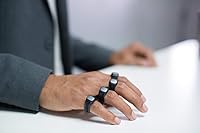
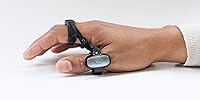
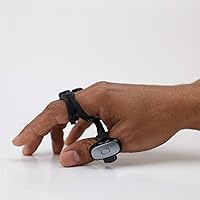
The Tap Strap 2 Wearable Keyboard & Mouse Controller is a finger-worn device that lets you type by tapping finger combinations against any surface — no physical keyboard required. Each unique combination corresponds to a letter or command, which is the chord-typing system that powers the whole experience. It pairs over Bluetooth with phones, tablets, PCs, and smart TVs, and works identically on either hand. That said, be upfront with yourself: mastering chord-typing takes weeks of practice, not an afternoon. This wearable keyboard is built for tech-forward adopters willing to commit to a genuine learning curve, not someone looking to swap out their desk keyboard without any friction.
Features & Benefits

Five accelerometers and a dedicated IMU track every tap and hand movement with solid accuracy, which is what allows the strap-on input device to double as a 1000 DPI mouse — just move your hand to control the cursor, no desk required. Air gesture support adds a layer of hands-free navigation that works especially well in VR environments, though real-world consistency can vary depending on how precisely you move. Bluetooth Low Energy 4.0+ handles connectivity, covering everything from Windows and macOS to iOS and Android. The TapMapper tool lets you remap keys and load custom language layouts, and a haptic unit in the thumb ring gives quiet confirmation that your tap registered.

Best For

This wearable keyboard makes the most sense for a fairly specific type of user. If you spend time in VR — typing search queries or messages inside an Oculus Quest, for example — this is one of the few input solutions that fits the use case without breaking immersion. Frequent device switchers will appreciate moving from phone to tablet to PC without touching a different peripheral. It also opens doors for users with mobility limitations who need an alternative to standard keyboards. Minimalist travelers will like the compact form. If you are a developer or power user ready to invest real time in learning, the payoff can be meaningful.

User Feedback

With a 3.6 out of 5 rating across more than 1,000 reviews, buyer opinion on the finger-tap controller is genuinely split. People consistently praise the build quality, the comfort of the soft TPU material, and the sheer ambition of the concept. Where things get rocky: many buyers underestimate how long it takes to reach a useful typing speed using chord combinations, and the frustration shows in lower ratings. The Micro USB port is another sore point — it feels out of step with modern devices. VR users, however, tend to be among the most satisfied. Battery life draws mixed marks too, with some finding ten hours sufficient and others wishing for more.

Pros

  • Replaces an entire keyboard and mouse combination with a single pocket-sized wearable.
  • Ambidextrous design works identically for left- and right-handed users with no reconfiguration needed.
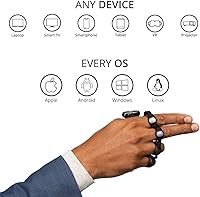
  • Broad OS support covers Windows, macOS, Linux, ChromeOS, iOS, and Android without needing drivers.
  • The TapMapper tool enables full key remapping and native language layout loading for non-English users.
  • Haptic feedback in the thumb ring helps build chord-typing muscle memory during the learning phase.
  • 1000 DPI optical mouse mode allows cursor control on any surface or mid-air — no desk required.
  • VR platform support spans Oculus Quest, HoloLens, HTC Vive, and Magic Leap One out of the box.
  • Soft TPU construction feels comfortable and holds up well under months of regular daily wear.
  • Bluetooth Low Energy 4.0+ keeps power consumption low during lighter usage sessions.
  • For committed learners, the finger-tap controller genuinely delivers a functional hands-free typing experience over time.

Cons

  • Chord-typing fluency realistically takes two to four weeks of deliberate daily practice to achieve.
  • Micro USB charging feels out of place on a premium device sold in 2021 and beyond.
  • Air gesture accuracy degrades noticeably during faster or less controlled hand movements.
  • Battery capacity is small enough that heavy combined typing and mouse use falls short of the rated runtime.
  • Reconnecting to a secondary Bluetooth device is slower than what buyers used to premium peripherals expect.
  • Pinky ring wear and mild finger fatigue emerge during sessions longer than two to three hours.
  • App and firmware update cadence has slowed, leaving some OS compatibility quirks unresolved.
  • Users with very small or very large hands report fitment issues that directly affect tap detection accuracy.
  • The learning investment makes it impractical as a backup or occasional-use device — it rewards daily commitment only.
  • At its price point, the value proposition collapses quickly if the chord-typing system never fully clicks for you.

Ratings

The scores below for the Tap Strap 2 Wearable Keyboard & Mouse Controller were generated by our AI engine after analyzing thousands of verified global purchases, actively filtering out incentivized, bot-submitted, and duplicate feedback to surface what real buyers actually experienced. Categories cover everything from day-to-day usability to niche strengths, so both the genuine advantages and the recurring frustrations are reflected honestly.

Build Quality & Materials
81%
19%
The soft TPU construction feels durable and skin-friendly during extended wear, and buyers consistently note that the device holds up well over months of daily use. The ring mechanism feels solid, not flimsy, which matters when you are paying a premium price.
A few users reported that the thumb ring shows wear faster than the finger rings after heavy use. The overall fit can feel slightly stiff during the first few days before the material breaks in properly.
Learning Curve & Onboarding
41%
59%
Users who committed two to four weeks of deliberate practice reported reaching functional typing speeds, and the companion app provides structured exercises that genuinely help. For those in the right mindset, the system does eventually click.
The chord-typing method is fundamentally unlike anything most buyers have used before, and the majority of negative reviews trace directly to this wall. Reaching even modest typing fluency takes far longer than the product marketing implies, and many buyers give up within the first week.
VR & AR Usability
78%
22%
For Oculus Quest and HoloLens users specifically, this wearable keyboard fills a real gap — typing inside a headset without removing it is a genuine quality-of-life improvement. Several VR users rated it highly precisely because no other wearable input competes in this niche.
Air gesture accuracy is inconsistent depending on hand positioning and environment, and some VR platforms require additional setup steps that are not well documented out of the box. It excels in seated VR use but struggles with more active movement scenarios.
Mouse & Cursor Control
67%
33%
The 1000 DPI optical mouse mode works surprisingly well for couch computing or tablet navigation, letting users control a cursor with hand movements on any surface or mid-air. Casual browsing and media control feel natural after a short adjustment period.
Precision tasks like photo editing or detailed document work expose the limits of gesture-based cursor control compared to a physical mouse. Sustained mouse use also drains battery noticeably faster than typing-only sessions.
Device Compatibility
84%
Broad HID protocol support means this strap-on input device pairs reliably with Windows, macOS, Linux, ChromeOS, iOS, and Android without driver installation headaches. Switching between a phone and a tablet mid-session is straightforward once initial pairing is set up.
Multi-device pairing is not instantaneous — users report a perceptible lag when reconnecting to a secondary device compared to premium Bluetooth peripherals. Some smart TV integrations required manual configuration that was not intuitive for non-technical users.
Comfort & Wearability
73%
27%
The ambidextrous design and soft TPU construction make it genuinely comfortable for sessions up to a couple of hours, and most hand sizes find an adequate fit using the sizing options. Left-handed users specifically appreciate that no configuration change is needed.
Longer sessions of three or more hours led some buyers to note mild finger fatigue, particularly on the pinky ring. Users with very small or very large hands reported fitment issues that affected tap detection accuracy.
Battery Life
62%
38%
The rated ten hours is achievable under light to moderate use, which covers most commutes, travel days, or VR gaming sessions without needing to recharge mid-activity. Standby drain is minimal, so leaving it on a desk overnight does not kill the battery.
Heavy combined typing and mouse use cuts the real-world runtime noticeably below the stated figure, and the 45 mAh capacity means a full workday of intensive use is a stretch. Users who rely on it for all-day office replacement scenarios found themselves recharging by mid-afternoon.
Charging & Port Choice
38%
62%
The Micro USB port does charge reliably and the cable is widely available, so finding a replacement is never an issue. Charge time from flat is reasonable given the small battery size.
Micro USB is a legitimate step backward in 2021 hardware, and nearly every critical review mentions it. Users traveling with otherwise all-USB-C setups now carry an extra cable purely for this device, which undercuts the minimalist appeal the product is designed to have.
Air Gesture Accuracy
54%
46%
In controlled seated conditions with deliberate movements, air gestures work well enough for basic navigation like scrolling, swiping, and play/pause controls. The novelty of waving your hand to interact with a screen is functionally useful in VR presentations.
Real-world accuracy drops significantly during casual or faster movements, and users report misfired gestures requiring correction more often than expected. The feature feels more like a bonus capability than a reliable primary input method at this stage.
Customization & TapMapper
76%
24%
The TapMapper tool is one of the stronger software components — remapping keys, loading alternate language layouts, and adjusting sensitivity are all genuinely accessible. Non-English speakers appreciated being able to load native character sets without workarounds.
The app interface is functional but not polished, and discovering advanced customization features requires digging through documentation that is not always current. Syncing custom maps occasionally requires repairing the device, which a few users found tedious.
Haptic Feedback
69%
31%
The thumb-ring haptic unit gives a reassuring confirmation tap that helps build chord-typing muscle memory, especially during the learning phase when visual confirmation is not always available. Users in VR found it particularly useful since they cannot look at their hands easily.
The haptic sensation is subtle enough that in noisy or physically active environments some users stopped noticing it entirely. There is no option to adjust haptic intensity, which left users with lower tactile sensitivity wishing for a stronger vibration.
Value for Money
57%
43%
For the small subset of users who fully master chord-typing and integrate it into a VR or multi-device workflow, the utility justifies the premium cost. Accessories like this have few direct competitors, which adds perceived value for committed buyers.
For the average buyer who struggles past the learning curve or uses it only occasionally, the price feels steep relative to the functional output achieved. A 3.6 average rating across over 1,000 reviews suggests that value satisfaction is far from universal.
Portability & Form Factor
83%
Slipping this wearable keyboard into a jacket pocket is genuinely effortless — it weighs almost nothing in practice and replaces an entire keyboard and mouse combination for travel scenarios. Digital nomads and frequent fliers consistently highlight this as the device's clearest win.
The five-ring form factor looks unusual in public, and a handful of reviewers mentioned self-consciousness using it in coffee shops or open offices. The packaging is also bulkier than the device itself, which does not reflect the ultra-portable nature of what is inside.
App & Firmware Support
61%
39%
Tap Systems has pushed firmware updates since launch that addressed some early connectivity bugs, and the community around the device is active enough that workarounds for common issues are discoverable online. The iOS and Android apps function as advertised for basic setup.
Update cadence has slowed noticeably and some users on newer OS versions report compatibility quirks that have not been patched. Customer support response times vary, and phone support in particular seems inconsistent based on buyer reports.

Suitable for:

The Tap Strap 2 Wearable Keyboard & Mouse Controller is genuinely well-suited for a narrow but passionate group of users who have a specific problem it solves better than anything else on the market. VR and AR enthusiasts are its strongest audience — if you spend meaningful time inside an Oculus Quest or HoloLens and hate breaking immersion to hunt for a physical keyboard, this wearable fills that gap in a way no traditional peripheral can. Frequent device switchers — say, a consultant who moves between a phone, tablet, and laptop throughout the day — will appreciate carrying one input device instead of three. Accessibility-focused users who find standard keyboards physically difficult or painful may find the chord-tap system a genuinely liberating alternative once the muscle memory is built. Minimalist travelers and digital nomads who prioritize packing light will value replacing a keyboard and mouse with something that fits in a jacket pocket. If you are a developer, power user, or anyone with the patience and curiosity to invest two to four weeks in deliberate practice, the payoff is a genuinely novel and portable input method.
Not suitable for:

The Tap Strap 2 Wearable Keyboard & Mouse Controller is a poor fit for anyone expecting to replace their everyday desk keyboard within a few days of unboxing. If your primary computing environment is a standard desktop or laptop setup where a physical keyboard is always within reach, there is almost no practical reason to adopt this device — the learning cost is real and the productivity benefit in that context is minimal. Office workers who need to type quickly and accurately from day one should look elsewhere, because chord-typing fluency takes weeks to develop, and most buyers significantly underestimate that timeline. Users who are particular about keeping a clean, all-USB-C charging setup will find the Micro USB port a persistent annoyance. Anyone hoping the air gesture controls will serve as a reliable, precise input method for detailed work like design or spreadsheet editing will be disappointed — gesture accuracy is useful for casual navigation, not fine-grained tasks. Finally, buyers expecting a ten-hour battery to cover a full intensive workday of combined typing and mouse use may find themselves recharging earlier than expected.

Specifications

  • Form Factor: Finger-worn strap with five individual rings designed to fit over each finger on one hand.
  • Material: Constructed from soft skin-grade thermoplastic polyurethane (TPU) for flexibility and extended wear comfort.
  • Connectivity: Bluetooth Low Energy 4.0+ using the HID Keyboard and Mouse input protocol for driver-free pairing.
  • Motion Sensors: Five independent accelerometers combined with one inertial measurement unit (IMU) detect tap patterns and hand orientation.
  • Mouse Resolution: Integrated optical mouse mode operates at 1000 DPI, enabling cursor control without a physical surface.
  • Battery Capacity: Internal rechargeable lithium-ion battery rated at 45 mAh.
  • Battery Life: Rated up to 10 hours of use on a full charge under typical mixed typing and navigation conditions.
  • Charging Port: Micro USB port used for charging; no USB-C support is included on this model.
  • Haptic Feedback: One haptic feedback unit located in the thumb ring provides tactile confirmation of registered tap inputs.
  • Keyboard Layout: Fully customizable chord-based layout configurable via the TapMapper companion application.
  • Handedness: Ambidextrous design functions identically whether worn on the left or right hand without any reconfiguration.
  • PC Compatibility: Compatible with Windows 8 and later, macOS Yosemite and later, Linux, and ChromeOS operating systems.
  • Mobile Compatibility: Supports iOS 9 and later on iPhone and iPad, and Android 4.2 and later on smartphones and tablets.
  • VR & AR Support: Officially compatible with Oculus Quest, Microsoft HoloLens, Windows Mixed Reality, Magic Leap One, and HTC Vive platforms.
  • Air Gestures: Built-in air gesture recognition allows basic navigation commands to be triggered by deliberate hand movements without surface contact.
  • Package Weight: Complete retail package weighs 10.5 ounces including the device, strap, and accessories.
  • Package Dimensions: Retail box measures 7.87 x 4.61 x 2.72 inches.
  • In the Box: Package includes one hand strap unit and one lithium-ion battery, which comes pre-installed in the device.
  • Customer Support: Tap Systems offers 24-hours-a-day, five-days-a-week support via email, live chat, and phone channels.
  • ASIN: Amazon product identifier for this listing is B09C2K7L73, first made available in March 2020.

Related Reviews
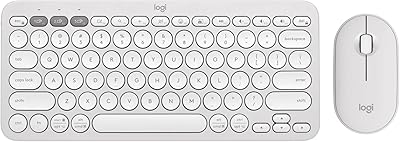
Vivefox MKTBA Wireless Keyboard and Mouse Combo
75%
88%
Value for Money
93%
Mouse Click Noise Level
79%
Keyboard Typing Feel
84%
Wireless Connectivity Stability
74%
Battery Life
More
Logitech Pebble 2 Combo Wireless Keyboard and Mouse
85%
94%
Battery Life
90%
Portability & Design
88%
Ease of Use
91%
Quiet Typing Experience
85%
Compatibility with Devices
More
MEETION Director-D-2 Ergonomic Wireless Keyboard and Mouse Combo
85%
88%
Ergonomic Comfort
91%
Wireless Connectivity
86%
Battery Life
89%
Mouse Precision (DPI Settings)
62%
Key Quietness
More
Rii RK707 3-in-1 Wireless Game Controller, Keyboard, and Mouse Combo
83%
86%
Ease of Use
80%
Build Quality
84%
Performance in Gaming
88%
Battery Life
65%
Ergonomics
More
AC Infinity Controller 2 Fan Thermostat and Speed Controller
85%
87%
Performance & Fan Control
91%
Ease of Setup & Installation
89%
Quiet Operation
85%
Build Quality & Durability
76%
Temperature Accuracy & Calibration
More
ANXQQ HDMI 2.1 KVM Switch 8K@60Hz 2 Port with Wired Control
86%
92%
Video Quality
89%
Ease of Use
87%
Value for Money
85%
Compatibility
91%
USB Support
More
FENIFOX Wireless Keyboard and Mouse
86%
88%
Ergonomics
91%
Quiet Typing Experience
85%
Battery Life
89%
Wireless Connectivity
84%
Build Quality
More
MOWUX Wireless Keyboard and Mouse Combo
88%
91%
Typing Comfort
89%
Mouse Responsiveness
94%
Wireless Connectivity
85%
Build Quality
88%
Keycap Durability
More
MEETION Wireless Keyboard and Mouse C4130
83%
88%
Ergonomics and Comfort
80%
Wireless Connectivity and Range
84%
Build Quality
93%
Ease of Setup
86%
Mouse Precision and DPI Settings
More
SABLUTE Wireless Keyboard and Mouse Combo
84%
88%
Typing Comfort
92%
Battery Life
85%
Ergonomics
73%
Connectivity Stability
80%
Backlighting Performance
More

FAQ

Most users reach a basic functional speed somewhere between two and four weeks of consistent daily practice, though hitting speeds comparable to a physical keyboard takes considerably longer for many people. The chord-tap system is genuinely unlike any input method you have used before, so the first week tends to feel slow and frustrating. If you go in expecting a gradual build rather than an instant switch, you will have a much better experience.

Yes, the finger-tap controller pairs with the Oculus Quest via Bluetooth and registers as a standard HID keyboard and mouse, so most VR environments that accept text input will recognize it without additional software. That said, some specific Oculus menu interactions work better than others, and you may need to experiment with placement and hand positioning to get consistent results in active gameplay scenarios.

The 1000 DPI mouse mode works well enough for casual browsing, media control, and couch computing, but it is not going to replace a precision mouse for detailed work like image editing or spreadsheet navigation. Think of it as a convenient complement to the typing function rather than a standalone mouse substitute.

Yes, it pairs with any iPhone running iOS 9 or later and any iPad running iPadOS, using the standard Bluetooth HID profile. Setup is straightforward through the iOS Bluetooth settings, and no special app is required just to pair and start using it.

Air gestures work reasonably well for simple commands like scrolling or swiping when you make deliberate, controlled movements. In faster or more casual situations, accuracy drops and you may trigger unintended inputs. It is best treated as a convenience feature for relaxed navigation rather than a precise control method.

It genuinely works the same on either hand with no settings change required — the device detects orientation automatically. Left-handed users have specifically called this out as a positive, since many wearable and peripheral devices treat left-hand support as an afterthought.

If your other devices all charge via USB-C, you will need to keep a separate Micro USB cable around specifically for this wearable, which is a real inconvenience for minimalist setups. The port itself charges reliably and quickly given the small battery, but the connector choice is a noticeable step behind for hardware launched in 2021.

Yes, the TapMapper app lets you load custom layouts for different languages and character sets, so non-English speakers are not locked into a QWERTY-only system. The process requires a bit of setup time, but users typing in non-Latin scripts have reported it works once configured correctly.

Under light to moderate use — occasional typing, some cursor control, and regular standby — most users get through a standard workday on a single charge. If you are using it heavily for extended typing sessions combined with active mouse mode, expect to plug in before the end of the day, since real-world drain under intensive conditions runs shorter than the rated figure.

It has been used as an accessibility tool by people who find conventional keyboards difficult or painful, and the fact that it only requires finger taps rather than full key presses can reduce strain for some users. That said, the learning curve is a real factor — the chord-typing system requires consistent practice regardless of the user, so it works best for motivated individuals with the patience to build new muscle memory over several weeks.