Overview

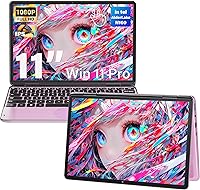
The Svikou HL110YP 11″ 2-in-1 Laptop 512GB is a compact convertible aimed squarely at students and light business users who want portability without a premium price tag. Svikou isn't a well-known brand, but that's par for the course in this market segment — what matters is whether the hardware delivers, and here it largely does. The 360° hinge lets you flip between laptop, tent, stand, and tablet modes without fuss, and the touchscreen responds reliably to touch input. At under three pounds, it disappears into a backpack. The pink finish sets it apart from the usual silver and black crowd, and Windows 11 Pro plus MS Office 2019 come pre-installed so you're up and running straight out of the box.
Features & Benefits

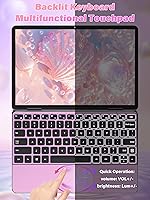
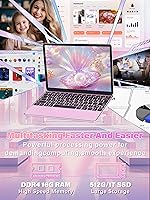
The Intel Celeron N100 is a capable 12th-gen chip with four cores reaching up to 3.4 GHz — comfortable for browsing, document work, and video calls, but be honest with yourself if you plan on video editing or running demanding applications. What genuinely impresses at this price point is the 16GB DDR4 RAM, which keeps multi-tab Chrome sessions and Office workflows from choking. The 512GB SSD boots Windows fast and holds a respectable amount of files and media. The 11-inch IPS panel runs at 1920x1200 in a 16:10 ratio, giving you a little extra vertical screen room that makes reading and writing noticeably more comfortable. The backlit keyboard, paired with an oval trackpad that handles volume and brightness gestures, adds a layer of everyday convenience that feels thoughtful for the price.

Best For

This mini convertible is a strong fit for college students who need a reliable, no-nonsense machine for notes, research, and assignments — just not for anyone running creative software or serious workloads. It also works well as a secondary travel laptop for remote workers who want something light for email, calls, and light editing without carrying their main machine everywhere. If your day mostly involves browsing, streaming, and living inside Microsoft Office, the performance ceiling here simply won't be an issue. The distinctive pink colorway and tablet mode flexibility also make it a genuinely thoughtful gift pick for a teen or first-year college student who wants something that stands out from the crowd.

User Feedback

Buyers of the Svikou 2-in-1 frequently call out the display quality and keyboard feel as pleasant surprises for the price, and the generous RAM gets credit for making the machine feel more responsive than expected. On the flip side, battery life is the most common frustration — Svikou doesn't advertise a rated figure, and real-world accounts suggest you may not clear a full school day without reaching for the charger. Some users have flagged that the pre-installed software bundle includes unwanted apps alongside Office. Hinge durability is harder to judge from early reviews alone, but touchscreen responsiveness earns broadly positive marks. Buyers cross-shopping with similarly priced Chromebooks consistently cite full Windows compatibility as the deciding factor in favor of this compact Windows laptop.

Pros

  • 16GB of DDR4 RAM is unusually generous for this price tier, keeping everyday multitasking genuinely smooth.
  • The 360° hinge works reliably, making tablet and tent modes practical rather than just a box-ticking feature.
  • At under three pounds, this mini convertible is one of the easiest laptops to carry daily without noticing the weight.
  • Windows 11 Pro and MS Office 2019 come pre-installed, so you can start working within minutes of unboxing.
  • The 1920x1200 IPS display delivers sharp, readable text with a 16:10 ratio that adds useful vertical screen space.
  • A 512GB SSD offers fast boot times and enough room for years of documents, downloads, and media.
  • The backlit keyboard is a practical upgrade for late-night studying or low-light work environments.
  • Dual-band WiFi and a solid port selection — including Type-C and mini HDMI — handle real connectivity needs without dongles.
  • The elliptical trackpad with volume and brightness gesture controls adds a layer of convenience that feels well thought out.
  • The pink colorway is genuinely distinctive, making the Svikou 2-in-1 stand out in a sea of identical black and silver budget laptops.

Cons

  • Battery life falls short of a full school or work day under typical mixed usage — plan on carrying the charger.
  • The Celeron N100 hits a hard ceiling fast; anything beyond light multitasking causes noticeable slowdowns.
  • Pre-installed bloatware requires a cleanup session before the system feels lean and organized.
  • The 2MP camera struggles noticeably in dim or variable lighting, making video calls in non-ideal settings look poor.
  • The plastic chassis flexes under pressure and may show wear faster than expected with daily rough handling.
  • Mini HDMI rather than a standard full-size port means most users will need an adapter for external displays.
  • Bluetooth 4.2 lags behind current standards and may cause minor pairing quirks with newer wireless accessories.
  • The 11-inch screen becomes a real constraint during extended sessions that involve working across multiple open windows.
  • Office 2019 is already dated compared to a live Microsoft 365 subscription, lacking cloud features many users now expect.
  • Svikou has a limited brand track record, making long-term reliability and after-sales support harder to assess confidently.

Ratings

The Svikou HL110YP 11″ 2-in-1 Laptop 512GB has been scored by our AI system after parsing verified global buyer reviews, actively filtering out incentivized, duplicate, and bot-generated submissions to surface genuine ownership experiences. Ratings reflect the full picture — where this mini convertible genuinely punches above its weight class and where real-world use exposes clear limitations. Both the wins and the frustrations are reflected transparently in every score below.

Value for Money
83%
For a Windows 11 Pro machine with 16GB of RAM and a 512GB SSD at this price tier, buyers consistently feel they are getting hardware that competes with options sold at notably higher prices. The pre-installed Office suite removes the need for an immediate software subscription, which students especially appreciate.
A few buyers note that the overall build materials feel proportionate to the price — meaning minor flex in the chassis and lid that reminds you this is not a premium-tier device. The value equation also depends heavily on whether you stay within the machine's performance limits.
Performance & Speed
71%
29%
Day-to-day tasks like writing papers, browsing 10-plus Chrome tabs, and running video calls hold up well thanks to the N100 processor paired with a generous 16GB of RAM. Boot times are fast, and the SSD keeps the system responsive when switching between Office apps and a browser.
Users who push beyond light workloads — running multiple large applications simultaneously or attempting any media encoding — hit the Celeron N100 ceiling quickly. It is not designed for creative or technical workloads, and buyers who underestimate that distinction tend to leave disappointed reviews.
Display Quality
78%
22%
The 11-inch IPS panel with a 1920x1200 resolution in a 16:10 ratio delivers noticeably crisp text and solid color reproduction that earns genuine praise for document reading and casual streaming. The slightly taller aspect ratio gives writers and students a bit more visible content per scroll compared to standard widescreen displays.
Outdoor and bright-room visibility is a recurring mild complaint, with some users finding the panel struggles against direct light. Maximum brightness is adequate for indoor use but not exceptional, which can be limiting for students who work near windows or in bright campus spaces.
Build Quality & Design
66%
34%
The pink colorway is consistently called out as a genuine differentiator — it looks more intentional and polished than expected for a budget device, and the slim profile at under 0.8 inches makes it feel refined at a glance. The hinge mechanism feels sturdy enough for daily mode-switching.
The plastic chassis flexes more than buyers raised on premium Ultrabooks would expect, and a handful of longer-term owners flag early wear on the hinge under frequent tablet-mode use. It is not fragile, but it does not feel built to absorb rough treatment in a packed bag.
Portability
89%
At just under three pounds with a footprint smaller than a standard hardcover notebook, this compact Windows laptop genuinely disappears into daily carry. Students commuting between classes and remote workers moving between home, coffee shops, and offices consistently cite portability as one of the strongest reasons they chose this machine.
The small chassis means a smaller battery, and a few users note the power adapter is an extra item to pack. For truly long travel days without outlets, the portability advantage can be partially offset by the need to carry charging gear.
Battery Life
54%
46%
Under light usage — document editing and occasional browsing with screen brightness kept moderate — some buyers report getting through a half-day comfortably without needing a charge, which is workable for shorter school sessions or focused work blocks.
Battery life is the most frequently cited complaint, with many users reporting real-world drain that falls well short of a full school day under typical mixed usage. Svikou does not publish a rated battery figure, which makes it hard to set expectations upfront, and the reality disappoints users who assumed all-day endurance.
Keyboard & Typing Experience
76%
24%
The backlit scissor-switch keyboard earns consistent compliments for key feel and responsiveness, especially from buyers accustomed to cheaper membrane keyboards on similarly priced machines. The backlighting is genuinely useful for late-night studying and not just a cosmetic feature.
Key travel is shorter than many typists prefer for extended writing sessions, and the compact 11-inch layout means some keys are smaller than full-size. Fast typists occasionally mention accidental key hits during long writing sessions until they adjust to the layout.
Touchscreen Responsiveness
77%
23%
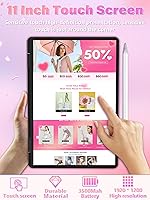
Touch input is consistently described as accurate and fluid for a budget device, handling swipes, taps, and pinch-zoom without noticeable lag during web browsing and light drawing in note-taking apps. Students using the tablet mode for annotating PDFs find it practical and intuitive.
A minority of users notice slight input lag when the processor is under moderate load, which makes precise stylus-style input feel less reliable. There is no active stylus included or officially supported, which limits the tablet mode for users who expected a pen-capable experience.
Trackpad Quality
69%
31%
The elliptical trackpad is a genuine point of interest — the gesture controls for adjusting volume and brightness are well-implemented and feel natural after a short learning curve. Buyers who rely primarily on the trackpad for navigation find the surface size adequate for an 11-inch machine.
The oval shape divides opinion; users migrating from standard rectangular trackpads sometimes find the edges less predictable for click-drag operations. Precision on small UI targets is occasionally inconsistent, and a few buyers prefer using a mouse for detailed work.
Connectivity & Ports
81%
19%
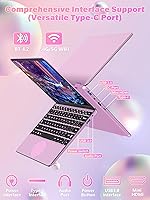
Having two USB 3.0 ports, a Type-C port, mini HDMI, and an audio jack on an 11-inch frame covers the everyday connectivity needs of most students and remote workers without requiring a dongle. Dual-band WiFi handles 5GHz networks reliably in typical home and campus environments.
The mini HDMI rather than full-size HDMI means most buyers will need an adapter for standard monitor connections, which is a minor but real friction point. Bluetooth 4.2 is functional but behind more current standards, which rarely causes issues but is worth noting for accessory pairings.
Software & Out-of-Box Experience
73%
27%
Windows 11 Pro and a working copy of MS Office 2019 pre-installed genuinely reduce setup time, which buyers — especially students setting up a laptop for the first time — cite as a tangible convenience. Having Pro rather than Home Windows gives added flexibility for work and school IT environments.
Several buyers report the machine arrives with additional pre-installed software beyond Office that they did not ask for, requiring a cleanup session before the system feels tidy. The Office 2019 version is also dated compared to a Microsoft 365 subscription, which is a notable gap for feature-conscious buyers.
Camera & Video Calls
58%
42%
The 2MP 30fps front camera is adequate for standard video calls in decent lighting — Zoom and Teams calls at home or in a well-lit office work without major complaints from buyers who rely on it for class or remote work check-ins.
Low-light performance drops off noticeably, and the 2MP resolution is below what many users now expect from even budget devices. Buyers who frequently take calls in varied or dim environments consistently flag the camera as the weakest hardware component on this otherwise serviceable machine.
Display Size & Usability
67%
33%
The 11-inch format is a deliberate trade-off that works well for on-the-go note-taking and light browsing, where compactness is the priority. Users who treat it as a secondary or travel-focused machine appreciate not carrying around the bulk of a 14-inch or 15-inch laptop.
For sustained productivity sessions — particularly anything involving multiple windows open side by side — the screen real estate becomes a genuine constraint. Buyers who primarily work at a desk often end up connecting an external monitor, which somewhat undermines the stand-alone use case.
Hinge Durability
63%
37%
In the short to medium term, the 360° hinge handles frequent mode-switching between laptop and tablet positions without obvious loosening or wobble, which is reassuring for users who actively use all four modes rather than leaving it in laptop position permanently.
Longer-term durability data is limited given the product's relatively recent launch, and a subset of early adopters report the hinge feeling slightly looser after several months of daily flipping. Buyers who plan to use tablet mode heavily on a multi-year horizon may want to treat the hinge with more care than they would on a premium device.

Suitable for:

The Svikou HL110YP 11″ 2-in-1 Laptop 512GB is a practical match for college students who need a capable, lightweight machine for writing papers, attending virtual lectures, and staying organized without stretching a tight budget. Its sub-three-pound weight and 360° hinge make it genuinely useful for anyone moving between environments throughout the day — think lecture halls, libraries, coffee shops, and dorm rooms. Remote workers who need a compact secondary device for email, video calls, and light document work will find it covers those bases without demanding premium-device money. Casual home users who live inside a browser and Office apps are also well-served here, since the 16GB of RAM keeps those tasks running smoothly. Parents shopping for a first laptop for a teen or young adult will appreciate that Windows 11 Pro and Office 2019 come ready to go, removing the friction of software setup. The pink colorway, tablet mode, and competitive specs relative to price make it a genuinely thoughtful gift option for design-conscious younger buyers.

Not suitable for:

Anyone expecting the Svikou HL110YP 11″ 2-in-1 Laptop 512GB to handle demanding workloads is likely to walk away frustrated — video editing, photo editing in professional software, gaming, and running multiple resource-heavy applications simultaneously are simply outside what the Celeron N100 was designed to do. Power users and creatives who need consistent sustained performance should look at machines with Core i5 or Ryzen 5 processors and dedicated graphics, even if that means spending more. The unconfirmed battery life is a real concern for anyone who needs to go a full eight-hour day without access to an outlet — the real-world reports suggest you will be hunting for a charger well before the day ends. Professionals who rely on their laptop as their sole primary workstation and need screen real estate for multi-window workflows will find the 11-inch display limiting over extended sessions. Buyers who prioritize long-term build durability or travel with a laptop in rough conditions may also find the plastic chassis less reassuring than they would like over a two-to-three year horizon.
Specifications

  • Screen Size: The display measures 11 inches diagonally with an IPS touchscreen panel supporting full 360° rotation.
  • Resolution: Native resolution is 1920x1200 pixels in a 16:10 aspect ratio, delivering sharper vertical content than standard 16:9 widescreen panels.
  • Processor: Powered by an Intel Celeron N100 (12th Gen) with 4 cores and 4 threads, reaching a maximum burst frequency of 3.4 GHz.
  • RAM: 16GB of DDR4 SDRAM is installed, providing headroom for browser-heavy sessions and simultaneous Office application use.
  • Storage: A 512GB solid-state drive handles both the operating system and user files, with no mechanical hard drive included.
  • Graphics: Intel integrated graphics are built into the Celeron N100 chip, sufficient for video playback and light image work but not discrete gaming.
  • Operating System: Windows 11 Pro comes pre-installed from the factory, with no additional OS purchase or activation required.
  • Bundled Software: Microsoft Office 2019 is pre-installed, covering Word, Excel, and PowerPoint without requiring a separate subscription at the time of setup.
  • Dimensions: The chassis measures 10.11 inches long by 6.95 inches wide by 0.78 inches thin when closed.
  • Weight: Total unit weight is 2.95 lbs, placing it among the lighter options in the 11-inch Windows convertible category.
  • Hinge Type: A 360° rotating hinge enables four usage configurations: laptop, tent, stand, and tablet modes.
  • Keyboard: A backlit scissor-switch keyboard with individually illuminated keys supports low-light typing without additional accessories.
  • Trackpad: An elliptical-shaped touchpad supports standard navigation gestures plus dedicated swipe zones for volume and screen brightness control.
  • Camera: A front-facing 2MP camera records and streams at 30 frames per second, suitable for standard video conferencing in adequate lighting.
  • WiFi: Dual-band 802.11ac wireless networking supports both 2.4GHz and 5GHz bands for faster, less congested home and campus connections.
  • Bluetooth: Bluetooth 4.2 is built in, compatible with wireless mice, headphones, and keyboards that support that standard or earlier versions.
  • Ports: The port layout includes two USB 3.0 ports, one USB Type-C port, one mini HDMI output, one DC power input, and one 3.5mm audio jack.
  • Color: The reviewed unit is finished in pink; other colorway availability may vary by retailer listing.
  • Power Source: The laptop is powered by an internal rechargeable battery charged via the included DC power adapter; battery capacity is not officially disclosed.
  • Wireless Standard: WiFi operates on 802.11ac (Wi-Fi 5) and legacy 802.11b/g/n protocols, covering most home routers and institutional networks in current use.

Related Reviews
BNCF NewBook 11 2-in-1 Laptop, 12GB RAM, 512GB SSD
84%
87%
Performance
82%
Display Quality
91%
Portability
65%
Battery Life
89%
Value for Money
More
CHUWI FreeBook 13.4″ 16GB/512GB
72%
83%
Build Quality
88%
Display Quality
76%
Touchscreen Responsiveness
67%
Performance (CPU & RAM)
61%
Stylus Experience
More
CHUWI MiniBook X N150 16GB/512GB
71%
84%
Display Quality
72%
Performance & Speed
93%
Portability & Form Factor
67%
Build Quality
58%
Battery Life
More
EYY Yoga 3200U 15.6″ 2-in-1 Laptop (16GB/512GB)
64%
78%
Value for Money
62%
Performance
83%
RAM & Multitasking
74%
Storage Speed
71%
Display Quality
More
Lenovo Thinkpad 11e 2-in-1 Laptop, 11.6-inch, Intel Celeron, 4GB RAM, 128GB SSD
80%
88%
Value for Money
75%
Performance
93%
Portability/Size/Weight
70%
Display Quality
80%
Battery Life
More
Lenovo IdeaPad Flex 5 14-inch 2-in-1 Laptop, Ryzen 7 5700U, 16GB RAM, 512GB SSD
85%
88%
Performance
93%
Display Quality
80%
Battery Life
75%
Portability/Weight
85%
Keyboard Comfort
More
HP OmniBook X Flip 14″ 2K Touch-Screen 2-in-1 Laptop, AMD Ryzen AI 7 3500U, 24GB RAM, 1.5TB Storage
86%
92%
Performance
90%
Display Quality
88%
Multitasking & RAM
94%
Storage Capacity
84%
Portability & Weight
More
NAMON 2-in-1 Portable Laptop Floor & Desk Stand
79%
88%
Height Adjustability
82%
Stability & Base Design
79%
Build Quality
83%
Tilt & Angle Flexibility
74%
Tray Size & Usability
More
ASUS Chromebook 16 2-in-1 Laptop
82%
91%
Value for Money
87%
Display Quality
88%
Battery Life
82%
Performance for Everyday Use
85%
Portability
More
VGKE B12 2-in-1 Touch-Screen Laptop
83%
91%
Value for Money
88%
Display Quality
94%
Portability/Size/Weight
83%
Performance for Everyday Tasks
79%
Battery Life
More

FAQ

It ships with MS Office 2019 pre-installed, so Word, Excel, and PowerPoint are ready to use without any extra purchase. Keep in mind that Office 2019 is a one-time license version rather than a cloud-connected Microsoft 365 subscription, so it lacks features like real-time collaboration and OneDrive integration that newer Office plans include.

Svikou does not publish an official battery life figure, which is worth flagging upfront. Based on buyer feedback, you can expect roughly four to six hours of mixed use — browsing, Office work, and occasional video — under moderate screen brightness. Heavy users or those who keep the screen bright will likely see less. Plan to carry the charger for full-day school or work sessions.

Light, older, or browser-based games are feasible, but do not expect this machine to handle modern titles. The Intel Celeron N100 uses integrated graphics, which simply does not have the processing muscle for anything graphically demanding. Minecraft at low settings or casual browser games are realistic; anything from the last few years with 3D graphics is not.

Svikou has not published upgrade documentation for this model, and at this price tier, RAM is commonly soldered directly to the motherboard, meaning it cannot be swapped out. The SSD may or may not be replaceable depending on the internal slot type, but opening the chassis yourself will almost certainly void any warranty. If storage is a concern, an external USB 3.0 drive is the safer expansion route.

The capacitive touchscreen works reliably for finger-based input — scrolling, tapping, and basic drawing in note apps all function as expected. However, there is no officially supported active stylus, so precision pen input is limited to passive capacitive styli, which are far less accurate than dedicated pen solutions. For PDF annotation or light sketching, it is usable; for detailed digital art or precise note-taking, it will feel limited.

The main advantage over a Chromebook at this price is full Windows compatibility — you can run any Windows desktop application, including the full Office suite, without browser-only workarounds. Chromebooks often have better battery life and a more streamlined experience for web-based workflows, but they hit a wall when you need local software. If your work is entirely browser and Google Docs based, a Chromebook might serve you better; if you need native Windows apps, this machine has the clear edge.

Buyer feedback generally confirms the pink finish matches promotional images reasonably well — it is a muted, rose-toned pink rather than a bright or neon shade, which most buyers find more versatile and mature-looking in person. Individual screen calibration on your monitor may make online photos look slightly different from reality, but significant color surprises appear uncommon based on reviews.

Yes, for standard video calls this mini convertible performs reliably. The 2MP camera is adequate in good lighting, the dual-band WiFi keeps the connection stable, and the processor handles a single active video call without strain. Where it can struggle is if you are running a heavy browser session simultaneously with a video call — closing unnecessary tabs before jumping on a call is a good habit on this hardware.

The listing states Windows 11 Pro is pre-installed and activated out of the box, and most buyers report no activation issues upon first use. That said, Svikou is a lesser-known brand, so it is worth verifying the activation status under Settings immediately after setup. If you see a watermark or an activation prompt, Microsoft Support can help clarify the license type — a precaution worth taking with any budget Windows machine from a newer brand.

Short-term feedback on hinge durability is broadly positive, with most buyers reporting that the 360° mechanism stays firm through regular daily switching between laptop and tablet modes. Longer-term data is still limited since the product launched in late 2024. A small number of users who use tablet mode very frequently have noted slight loosening over time, so if you plan to flip it multiple times per day, treating the hinge with reasonable care rather than forcing it will help preserve it over a longer ownership period.