Overview

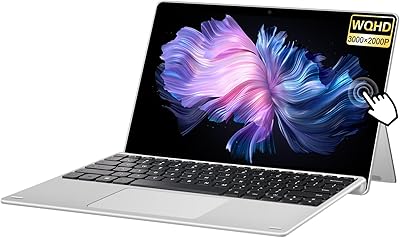
The BNCF NewBook 11 2-in-1 Laptop is a compact Windows device that targets students, remote workers, and casual users who want real laptop utility without the bulk. BNCF is not a household name, and that is worth acknowledging upfront — buyers should set measured expectations around long-term brand support. What separates this 2-in-1 tablet-laptop from cheaper alternatives at this tier is the aluminum chassis and the included magnetic keyboard, both of which signal a more considered build than you typically encounter here. The 11-inch form factor is a deliberate portability-first decision, not a spec-sheet shortcut.

Features & Benefits

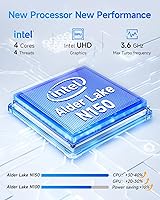
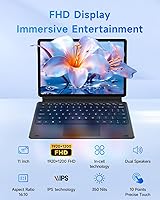
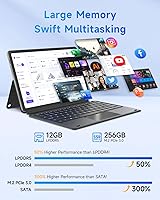
At the heart of the NewBook 11 is Intel's N150 quad-core chip, which handles browsing, document work, and video calls without noticeable hesitation — a fair expectation for this processor class. The real standout is the 12GB of DDR5 RAM, genuinely uncommon at this price point, making multitasking feel far less cramped than on most competing devices. Paired with a 256GB NVMe SSD, boot times are quick and app launches feel responsive rather than sluggish. The 1920x1200 IPS touchscreen adds useful vertical space over standard 1080p panels and is sharp and touch-friendly. Wi-Fi 6 and Bluetooth 5.0, dual Type-C ports, and micro HDMI cover most real-world connectivity needs without compromise.

Best For

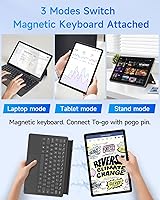
This compact Windows tablet makes the most sense for students who need a lightweight device for notes, research, and coursework — the detachable keyboard lets it shift from reading mode to typing mode in seconds. Frequent travelers and remote workers will appreciate how little bag space it demands while still running full Windows 11 Pro. Parents shopping for a capable school device will find the value-to-specs ratio difficult to argue with. That said, it is not built for heavy creative work, gaming, or anything requiring sustained processing muscle. If your priorities lean toward portability and flexibility over raw horsepower, this 2-in-1 tablet-laptop fits the brief well.

User Feedback

Early buyers of the NewBook 11 — it launched in late 2025, so review volume is still building — have settled around a 4.0-star average, a cautiously encouraging signal rather than a definitive endorsement. Recurring praise centers on the keyboard feel for the price, screen clarity, and the snappiness the NVMe SSD brings to everyday use. On the downside, some users flag battery life under sustained load, which is fair — a 34.2Wh cell will not comfortably last a full workday at high brightness. A handful of mentions around thermal throttling during longer sessions and questions about long-term durability also surface, making it worth monitoring as the review pool matures.

Pros

  • 12GB of DDR5 RAM is a genuine rarity at this price point and makes multitasking noticeably smoother than most rivals.
  • The included magnetic keyboard and kickstand case add real value without requiring any extra spending at checkout.
  • A 256GB NVMe SSD means fast boot times and snappy app launches — a clear step above slower eMMC-based competitors.
  • The aluminum chassis feels more substantial and durable than the plastic-bodied alternatives common in this segment.
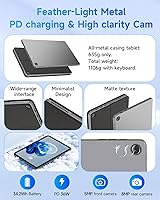
  • At 635g for the tablet alone, it is easy to carry all day without fatigue.
  • Wi-Fi 6 support keeps wireless performance future-ready for modern home and office networks.
  • The 1920x1200 IPS touchscreen provides more vertical screen space than standard FHD panels and looks sharp for its size.
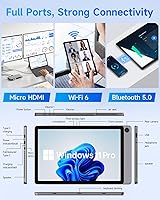
  • Dual Type-C ports plus micro HDMI and USB 3.0 cover most connectivity needs without needing a hub.
  • Windows 11 Pro is included out of the box, which is a step up from the Home edition found on many budget devices.
  • Early buyers report genuine satisfaction with the keyboard feel and screen clarity for the money spent.

Cons

  • The 34.2Wh battery is small and will likely require a mid-day charge under typical real-world use.
  • BNCF is a lesser-known brand with an unclear long-term support and warranty track record.
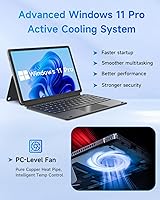
  • Thermal performance under sustained workloads has drawn early complaints, suggesting the cooling system has limits.
  • Review volume is still sparse given the late 2025 launch, making it harder to assess long-term reliability with confidence.
  • The micro HDMI port is less convenient than full-size HDMI for users who regularly connect to external displays.
  • Some buyers may encounter pre-installed software bloat that requires cleanup before the experience feels fully optimized.
  • The N150 processor, while capable for light tasks, offers limited headroom for anything beyond everyday computing.
  • At just over 1.1kg with the keyboard attached, it sits in an awkward middle ground for users wanting true ultralight portability.

Ratings

The scores below for the BNCF NewBook 11 2-in-1 Laptop were generated by our AI system after analyzing verified buyer reviews from multiple global markets, with spam, incentivized, and bot-generated feedback actively filtered out. Each category reflects the honest distribution of real user sentiment — strengths are credited where earned, and recurring pain points are not softened. This is a balanced, data-driven snapshot of how actual owners experience this device day to day.

Value for Money
83%
Buyers consistently highlight how much hardware they are getting relative to the asking price — 12GB DDR5 RAM, an NVMe SSD, an aluminum chassis, and an included keyboard in one package is genuinely hard to match at this tier. For students and budget-conscious buyers, it feels like an honest deal rather than a spec-sheet trick.
A handful of reviewers feel the value equation weakens slightly when factoring in BNCF's limited brand support infrastructure and the modest battery capacity. If you need long-term peace of mind alongside your hardware, the price-to-confidence ratio narrows a little.
Performance
74%
26%
For daily tasks — browser tabs, Office documents, video calls, and streaming — the N150 chip handles everything without obvious hesitation. Users working in education or remote office environments report that the combination of the processor and DDR5 RAM keeps things feeling responsive during typical workday sessions.
Push it harder — running multiple demanding apps simultaneously or keeping a large number of browser tabs open for extended periods — and users notice slowdowns. The chip was never designed for heavy lifting, and those expecting anything beyond competent everyday performance will find themselves frustrated fairly quickly.
Display Quality
79%
21%
The 1920x1200 IPS panel earns consistent praise for its sharpness and the extra vertical screen space it provides over standard 1080p displays of the same size. Reading documents, browsing, and watching videos all feel noticeably more comfortable than on competing budget devices with inferior panels.
Outdoor visibility under bright sunlight is a recurring complaint — the display can wash out significantly, making it less useful during commutes or in bright classrooms near windows. Color accuracy is also described as adequate rather than impressive, which matters if you do any casual photo work.
Build Quality
77%
23%
The aluminum chassis genuinely differentiates this 2-in-1 tablet-laptop from the sea of plastic-bodied budget devices it competes against. Buyers who have owned cheaper alternatives often comment that it feels noticeably more solid and well-constructed than its price would suggest.
A subset of early reviewers mention minor flex in the display panel and some unevenness in the keyboard attachment mechanism after extended use. Given BNCF's limited track record, it is difficult to assess how these small issues might develop over a two or three year ownership period.
Battery Life
54%
46%
The USB-C fast charging support is appreciated, giving users the ability to top up from a power bank or a standard USB-C charger without carrying a proprietary brick. For short-session users — a couple of hours of note-taking or casual browsing — the battery holds up reasonably well.
The 34.2Wh cell is simply small, and real-world battery life under mixed use regularly comes in below five hours for most buyers. Those who expected all-day portability without a charger are among the more vocal critics, and this is the single most common disappointment surfaced in user feedback.
Keyboard & Typing Experience
76%
24%
Given that the keyboard ships in the box at no extra cost, users are pleasantly surprised by how usable it is. Key travel is described as acceptable for a detachable, and the magnetic attachment mechanism works reliably for most buyers who use it daily for note-taking or document work.
Compared to a dedicated laptop keyboard, the flex and shallower key feel are noticeable, and touch typists working for long stretches will likely find it tiring. The trackpad on the keyboard case receives mixed marks — functional, but not precise enough for detailed navigation work.
Touchscreen Responsiveness
78%
22%
The In-Cell touchscreen technology means touch input feels direct and accurate rather than slightly offset, which buyers appreciate when annotating documents, scrolling, or using it in pure tablet mode without the keyboard. Pinch-to-zoom and swipe gestures respond cleanly in everyday use.
Multi-touch accuracy under rapid or complex gestures gets less consistent, and a small number of users report occasional missed inputs at the screen edges. There is also no confirmed stylus support, which limits the appeal for anyone hoping to use it as a digital notepad with a pen.
Portability
88%
At 635g for the tablet alone, the NewBook 11 is genuinely easy to carry all day. Students and commuters moving between locations multiple times daily find that it fits comfortably in most bags without adding meaningful weight, which is a real and recurring praise point from active users.
Once the keyboard case is attached, the combined weight of just over 1.1kg places it closer to a small lightweight laptop than a true tablet, which slightly undercuts the portability story for buyers who imagined something as effortless as a standalone tablet to hold for extended periods.
Connectivity & Ports
81%
19%
Having two USB-C ports, a USB 3.0 Type-A, micro HDMI, and a headphone jack on an 11-inch device at this price gives users real flexibility for peripherals, external displays, and accessories without immediately reaching for a hub. Wi-Fi 6 support also draws positive mentions for connection reliability and speed.
The micro HDMI port is a friction point — most buyers have full-size HDMI cables and monitors, requiring an adapter that does not come in the box. A full-size HDMI would have been a more practical choice for a device often recommended as a portable workstation.
Thermal Management
61%
39%
Under light everyday workloads the device stays quiet and cool enough that thermal performance is a non-issue. The active cooling system — a fan and dual copper heat pipes — does provide some tangible benefit over fanless designs when the processor needs to run at higher frequencies briefly.
During extended or moderately intensive sessions, thermal throttling becomes noticeable, with the device getting warm in the lower-center area and performance pulling back to stay within safe temperature limits. Users who leave multiple apps running for hours at a time flag this as a consistent frustration rather than an occasional edge case.
Camera Quality
58%
42%
The front 5MP camera is adequate for its intended purpose — video calls on Zoom, Teams, or Google Meet — and buyers using it primarily for conferencing report that image quality is acceptable under good indoor lighting. The rear 8MP camera handles document scanning reasonably well.
In anything other than bright, well-lit conditions, both cameras produce noticeably soft and noisy images. For anyone expecting a device that doubles as a capable casual camera for photos or video content, the output from this compact Windows tablet will disappoint fairly reliably.
Software & OS Experience
69%
31%
Windows 11 Pro is a legitimate differentiator — getting the Pro tier rather than Home means access to BitLocker, remote desktop, and better enterprise compatibility. For students or professionals who need these features, having them out of the box without an upgrade cost is a real benefit.
Some early buyers report pre-installed bloatware that requires manual removal before the system feels fully optimized, which is a frustration for less technical users. Windows 11 itself also has steeper resource demands compared to lighter operating systems, which occasionally makes the N150 feel more constrained than the raw specs would suggest.
Setup & Ease of Use
82%
18%
Most buyers describe the out-of-box experience as straightforward — the magnetic keyboard clicks into place immediately, the kickstand is intuitive, and Windows 11 setup is familiar to anyone who has used a Windows device before. Non-technical users including parents and older students report getting started without difficulty.
A portion of buyers with less technical experience encounter some friction during the initial Windows setup and driver configuration, particularly around ensuring all system updates are applied correctly. BNCF's limited self-service support resources mean that if something goes wrong early, finding clear guidance takes more effort than it would with a major brand.
Brand Confidence
47%
53%
Early feedback on the actual hardware experience is more positive than the brand's obscurity might suggest. Buyers who approached the purchase pragmatically — focusing on the specs rather than the logo — generally report satisfaction with what they received in the box.
BNCF's minimal presence in established markets means warranty claims, repair options, and long-term software support are all uncertain quantities. For buyers who place meaningful weight on knowing help is readily available if something goes wrong six or twelve months from now, this remains a genuine unresolved concern.

Suitable for:

The BNCF NewBook 11 2-in-1 Laptop is a strong fit for students who need a portable, capable device for note-taking, research, and light coursework without spending heavily. Its detachable magnetic keyboard and touchscreen make it genuinely useful in both lecture halls and dorm rooms, adapting quickly between reading and typing modes. Remote workers who travel frequently or work from varied locations will appreciate how little it weighs and how little bag space it demands, while still running full Windows 11 Pro with a real browser, Office apps, and video conferencing. Parents shopping for a reliable school device for kids will find that the aluminum build feels sturdier than plastic-chassis competitors in this price range, and the included keyboard means no extra purchases at checkout. For anyone who wants a genuine Windows experience in a small, flexible form factor without crossing into premium laptop territory, this 2-in-1 tablet-laptop punches meaningfully above its class.

Not suitable for:

The BNCF NewBook 11 2-in-1 Laptop is not the right call for buyers who need serious processing headroom. If your workflow involves video editing, 3D rendering, heavy spreadsheet modeling, or running multiple demanding apps simultaneously, the Intel N150 will hit its ceiling faster than you would like, and thermal throttling during prolonged workloads is a real consideration. Gamers should look elsewhere entirely — integrated UHD graphics are fine for casual media consumption, nothing more. The 34.2Wh battery is modest by any standard, and heavy users should expect to reach for a charger well before the end of a full workday. BNCF also remains a relatively unknown brand with a limited support track record, which may concern buyers who place significant value on long-term warranty reliability and established after-sales service. If you are looking for a daily driver that can handle everything you throw at it for years without compromise, this compact Windows tablet is simply not designed for that role.

Specifications

  • Processor: Powered by the Intel N150 quad-core CPU, clocking up to 3.6GHz Turbo, built on an efficient architecture suited for everyday computing tasks.
  • RAM: Equipped with 12GB of DDR5 memory, providing faster bandwidth than DDR4 and noticeably smoother multitasking headroom for a device in this price tier.
  • Storage: A 256GB NVMe SSD handles system storage, delivering significantly quicker boot times and file access compared to the eMMC drives commonly found in budget alternatives.
  • Display: The 11-inch IPS In-Cell touchscreen runs at 1920x1200 resolution, offering a sharper and taller viewing area than standard 1920x1080 panels of the same size.
  • Operating System: Ships with Windows 11 Pro pre-installed, providing access to the full Windows ecosystem including professional security features and remote desktop functionality.
  • Battery: Houses a 34.2Wh lithium battery with USB-C fast charging support, which is adequate for lighter sessions but should not be expected to last a full eight-hour workday under sustained load.
  • Build and Weight: The tablet body is constructed from an aluminum alloy chassis measuring 9.6mm thin and weighing 635g, rising to approximately 1106g when the magnetic keyboard case is attached.
  • Cameras: Features a rear 8MP camera for document scanning and casual photography, paired with a front-facing 5MP camera designed primarily for video calls and conferencing.
  • Graphics: Runs Intel UHD integrated graphics, which are capable of smooth HD video playback and light media tasks but are not designed for gaming or GPU-intensive workloads.
  • Wireless: Supports Wi-Fi 6 on both 2.4GHz and 5GHz bands alongside Bluetooth 5.0, ensuring reliable modern wireless connectivity at home and in the office.
  • Ports: Includes two USB-C ports for charging and data, one USB 3.0 Type-A port, one micro HDMI output, and a 3.5mm headphone jack for broad peripheral compatibility.
  • Keyboard: A magnetic detachable keyboard and protective kickstand case are included in the box, enabling quick transitions between tablet and laptop modes without additional purchases.
  • Form Factor: Designed as a 2-in-1 detachable, allowing the screen to function independently as a tablet or snap into the keyboard for a traditional laptop-style setup.
  • Dimensions: The tablet unit measures approximately 25.7 x 16.8 x 0.96 cm, making it compact enough to fit in most backpack sleeves and shoulder bags with ease.
  • Thermal System: Incorporates an active cooling setup with a fan and dual copper heat pipes intended to reduce thermal throttling during extended processing sessions.

Related Reviews
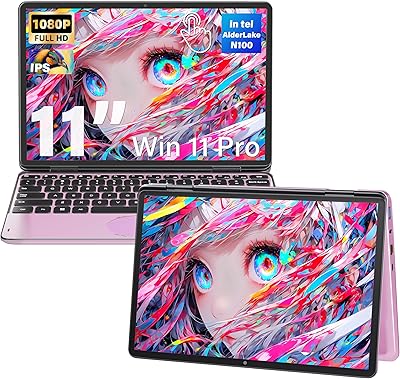
Svikou HL110YP 11″ 2-in-1 Laptop 512GB
72%
83%
Value for Money
71%
Performance & Speed
78%
Display Quality
66%
Build Quality & Design
89%
Portability
More
Lenovo Thinkpad 11e 2-in-1 Laptop, 11.6-inch, Intel Celeron, 4GB RAM, 128GB SSD
80%
88%
Value for Money
75%
Performance
93%
Portability/Size/Weight
70%
Display Quality
80%
Battery Life
More
HP OmniBook X Flip 14″ 2K Touch-Screen 2-in-1 Laptop, AMD Ryzen AI 7 3500U, 24GB RAM, 1.5TB Storage
86%
92%
Performance
90%
Display Quality
88%
Multitasking & RAM
94%
Storage Capacity
84%
Portability & Weight
More
ASUS Chromebook 16 2-in-1 Touchscreen Laptop
74%
88%
Display Quality
81%
Convertible Versatility
83%
Performance & Speed
79%
Battery Life
76%
Build Quality
More
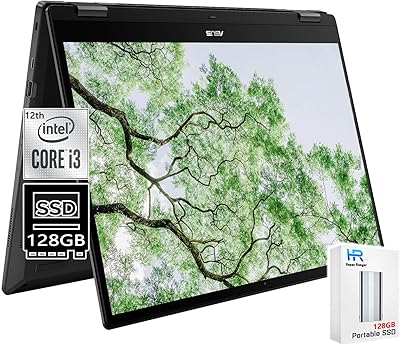
NAMON 2-in-1 Portable Laptop Floor & Desk Stand
79%
88%
Height Adjustability
82%
Stability & Base Design
79%
Build Quality
83%
Tilt & Angle Flexibility
74%
Tray Size & Usability
More
VGKE B12 12.3″ 2-in-1 Touchscreen Laptop
64%
88%
Display Quality
51%
Processor Performance
74%
Storage & Memory
69%
Portability & Design
53%
Battery Life
More
Lenovo Chromebook 300e Yoga 11.6″ 2-in-1
77%
88%
Build Quality & Durability
82%
Battery Life
61%
Display Quality
69%
Performance & Speed
84%
2-in-1 Versatility
More
Lenovo ThinkPad L13 Yoga 2-in-1 Laptop
77%
91%
Build Quality
88%
Keyboard Comfort
79%
Everyday Performance
61%
RAM Adequacy
58%
Storage Capacity
More
ASUS Chromebook Flip C434 2-In-1 Laptop
86%
91%
Build Quality
87%
Display Quality
90%
Battery Life
89%
Portability
83%
Performance (General Use)
More
Head & Shoulders Green Apple 2-in-1 Shampoo
81%
91%
Dandruff Control
67%
Conditioning Performance
88%
Scent Experience
86%
Value for Money
89%
Daily Usability
More

FAQ

The magnetic keyboard and kickstand case are both included in the box — no extra purchase required. It attaches magnetically and allows you to switch between tablet and laptop modes quickly.

Honestly, expect somewhere in the range of four to six hours under typical mixed use — browsing, document editing, and video calls at moderate brightness. The 34.2Wh cell is on the smaller side, so heavy users or those running the screen at full brightness will likely need to charge mid-day. The USB-C charging does help since you can top it up from most power banks on the go.

Yes, both work well on this device. The N150 processor and 12GB of RAM handle Word, Excel, Outlook, and browser-based apps like Google Docs without any real issues for everyday workloads.

It is a solid choice for both. The compact size and lightweight build make it easy to carry between classes, and the included keyboard means students are ready to type right out of the box. For younger kids, the aluminum chassis holds up better than plastic-bodied alternatives in the same price range.

Yes, the micro HDMI port lets you connect it to a monitor or TV directly. You can also use either of the USB-C ports with a compatible USB-C to HDMI adapter if you prefer that route.

The product listing does not confirm stylus or active pen support, and no pen is included in the box. While the touchscreen works fine with your fingers, buyers who rely on pen input for handwriting or drawing should verify compatibility before purchasing.

For most students and casual users, 256GB is workable — especially with cloud storage services like OneDrive or Google Drive taking the pressure off local storage. Whether internal storage is user-expandable depends on the hardware configuration, which BNCF has not clearly confirmed, so treat 256GB as your working limit for now.

Comfortably. The 5MP front camera and the N150 processor are well-suited for video conferencing, and Wi-Fi 6 keeps the connection stable. Do not expect broadcast-quality video, but for professional calls and virtual classes it performs reliably.

BNCF is a smaller, lesser-known manufacturer, and that is worth factoring into your decision. The hardware specifications are competitive and the build quality has drawn positive early feedback, but their long-term after-sales support and warranty reliability are harder to assess given their limited market presence. If brand reputation and established customer service matter a lot to you, that is a fair consideration to weigh.

Light editing in apps like Photos or basic work in Canva or similar browser-based tools is manageable. However, heavier software like Adobe Photoshop or Lightroom will push the N150 processor and integrated graphics toward their limits, so results may vary depending on how demanding your workflow gets.