Overview

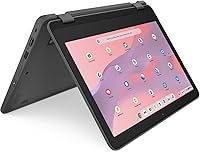
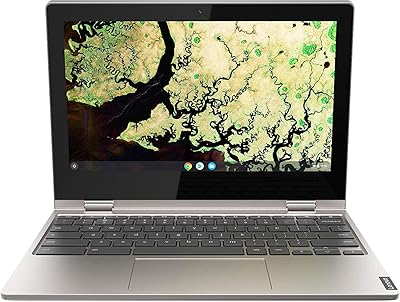
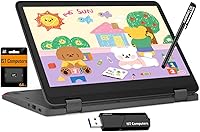
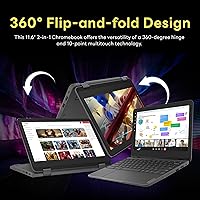
The Lenovo Chromebook 300e Yoga 11.6″ 2-in-1 is built from the ground up for students — not as a stripped-down afterthought, but as a genuinely ruggedized machine designed to survive the classroom. The 360-degree hinge lets you flip between Laptop, Tablet, Tent, and Stand modes depending on what the moment calls for. Chrome OS keeps things fast and lean, with built-in cloud backup and Google Assistant baked in. What stands out for long-term value is the software support running through June 2033 — meaningful if you are buying for a child with years of school ahead. Just be clear-eyed: this is a capable light-use device, not a do-everything workhorse.
Features & Benefits

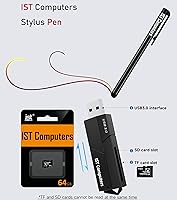
The 11.6-inch IPS touchscreen supports 10-point multi-touch and comes with an anti-fingerprint coating — small details that actually matter when a device gets passed between desks. Under the hood, the 8-core MediaTek Kompanio 520 handles Google Classroom, Docs, and video calls without complaint. The 96GB of eMMC storage is generous for a Chromebook, and since Chrome OS leans on cloud storage by design, local space rarely becomes an issue. Durability gets real attention here: the keyboard is water-resistant and the chassis is drop-resistant. The bundled IST stylus adds a practical note-taking option, and Wi-Fi 6 keeps things reliably fast on busy school networks.

Best For

The 300e Yoga is a strong pick for K-12 students who need a device that can take a knock and keep going. Teachers running stylus-based lessons or digital annotation workflows will appreciate having the pen included rather than sold separately. Parents buying for a child relying on Google Workspace, Zoom, or educational streaming will find this hits a practical sweet spot. It also works well as a lightweight secondary device for college students or adults in online courses. Where it falls short is for heavy multitaskers — 4GB of RAM is the hard ceiling, and you will feel it if several tabs or Android apps are open at once.

User Feedback

Buyers consistently praise build quality and battery endurance as standout strengths — most get through a full school day comfortably, even if the advertised 16-hour figure is optimistic under heavier use. The 2-in-1 versatility draws genuine appreciation, particularly from students using Tablet mode during lessons. That said, the 1366x768 resolution is a recurring sore point; the screen looks noticeably soft compared to higher-resolution competitors at a similar price. Several buyers also note that 4GB of RAM starts to feel tight when tabs pile up. Keyboard comfort earns positive marks overall, and the trackpad is rated as decent. The stylus gets mixed reactions — functional for notes, but nothing close to a premium active pen.

Pros

  • The rugged, drop-resistant build genuinely survives daily student use without requiring a protective case.
  • Software support through June 2033 gives this Chromebook a longer useful life than most budget laptops.
  • The 360-degree hinge enables four practical modes, including Tablet and Tent for flexible classroom use.
  • Wi-Fi 6 keeps connections stable even on crowded school or campus networks.
  • 96GB of eMMC storage is more generous than most competitors in this category.
  • The stylus pen is included in the box, saving buyers an extra purchase for note-taking.
  • Full-day battery performance holds up reliably for most typical school and light work schedules.
  • The port selection — USB-A, USB-C, HDMI — covers classroom and home connectivity needs without dongles.
  • Chrome OS boots fast and stays out of the way, keeping young students focused rather than troubleshooting.
  • The water-resistant keyboard adds real peace of mind around drinks and the general chaos of school environments.

Cons

  • Four gigabytes of RAM creates a hard performance ceiling that no update will ever fix.
  • The 1366x768 resolution looks noticeably soft compared to any modern 1080p display.
  • Real-world battery life under heavier workloads lands well below the advertised 16-hour figure.
  • The front-facing webcam struggles in low-light settings, producing grainy video during evening calls.
  • Holding the device in Tablet mode for extended periods becomes tiring at nearly 3 pounds.
  • The trackpad feels inconsistent with multi-finger gestures and slightly mismatched in quality to the keyboard.
  • The IST stylus pen lacks the precision and palm rejection needed for serious digital art or illustration work.
  • Only one USB-C port means choosing between charging and display output without an additional hub.

Ratings

The Lenovo Chromebook 300e Yoga 11.6″ 2-in-1 earns a nuanced scorecard built from AI analysis of verified global buyer reviews, with spam, bot submissions, and incentivized feedback actively filtered out. Across thousands of real-world impressions — from parents buying a first school laptop to teachers deploying classroom sets — both the genuine strengths and the recurring frustrations are reflected here without sugarcoating.
Build Quality & Durability
88%
Students who regularly toss this Chromebook into a backpack report surprisingly solid construction for the price tier. The reinforced chassis handles drops that would crack a typical budget laptop, and the rubberized edges give parents real confidence handing it to younger kids.
A few buyers note the plastic lid flexes more than expected under direct pressure, and the hinge — while functional — develops slight wobble after several months of heavy Tablet-mode use. It is sturdy, not indestructible.
Battery Life
82%
18%
Most students comfortably get through a full school day on a single charge, which is genuinely the bar that matters here. Light tasks like Google Docs, Meet calls, and YouTube keep the battery healthy well into the evening for many users.
The advertised 16-hour figure is optimistic; buyers doing back-to-back video calls or running Android apps report landing closer to 9 to 11 hours. That is still respectable, but set realistic expectations before relying on it through a long day without a charger.
Display Quality
61%
39%
The IPS panel delivers decent color accuracy for classroom presentations and video lessons, and the anti-fingerprint coating genuinely holds up against constant student touch. Viewing angles are wide enough for Tent mode sharing between two students.
The 1366x768 resolution is the most consistent complaint from buyers who have used any modern mid-range device before. Text and images look noticeably soft, and anyone coming from a 1080p screen will feel the downgrade immediately. Fine for schoolwork, but not for much else.
Performance & Speed
69%
31%
For the core use case — Google Classroom, Docs, Sheets, Zoom calls, and light web browsing — the 8-core Kompanio 520 keeps up without obvious lag. Boot times are fast, and switching between a handful of tabs feels snappy in day-to-day school tasks.
Four gigabytes of RAM is the real ceiling. Open more than eight or ten browser tabs, mix in a Google Meet call, and performance noticeably degrades. Running Android apps alongside web tools pushes the system hard, and that limitation will not go away with any software update.
2-in-1 Versatility
84%
The four-mode hinge is not a gimmick here — students genuinely use Tablet mode for reading and annotation, Tent mode for desk-sharing, and Stand mode for video watching. Teachers in particular appreciate being able to hand the device to a student in a natural tablet orientation.
At nearly 3 pounds, the 300e Yoga is on the heavier side for a tablet experience. Holding it in two hands for extended reading sessions becomes tiring, and younger students may find the weight awkward during sustained Tablet-mode use.
Keyboard & Trackpad
76%
24%
The keyboard layout is well-sized for an 11.6-inch chassis, and key travel is satisfying enough that students writing longer assignments do not feel immediately fatigued. The water-resistant design gives parents and teachers peace of mind around accidental spills.
The trackpad receives mixed reviews — tracking is accurate enough for basic tasks, but multi-finger gestures can feel inconsistent. A handful of buyers mention the surface feels slightly cheap compared to the keyboard, which creates a minor mismatch in overall input quality.
Stylus & Pen Input
67%
33%
Having the IST pen bundled in rather than sold as an add-on is a genuine plus, especially for students doing digital note-taking or art assignments. Most users find it responsive enough for handwriting and basic sketching without meaningful lag.
Anyone expecting Apple Pencil-level precision will be disappointed — palm rejection is imperfect, and the pen tip feedback on glass feels less natural than premium active styli. It serves its purpose for schoolwork, but creative students may find its limitations frustrating over time.
Webcam Quality
58%
42%
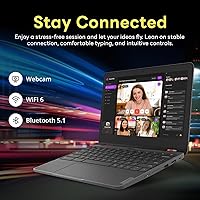
The front-facing 720p webcam handles standard Zoom and Google Meet calls acceptably in well-lit environments. For the core use case of remote learning check-ins and classroom video calls, most participants on the other end report a clear enough image.
In anything less than bright lighting — typical classrooms, bedrooms in the evening — the image gets noticeably grainy. There is no magic in a 720p sensor at this price, and students who frequently video-call in lower-light settings will notice the quality gap versus phones.
Software & Chrome OS Experience
86%
Chrome OS is genuinely fast on this hardware, and the automatic updates mean students are rarely interrupted by system maintenance. Google Workspace integration feels native, and the platform is simple enough that even younger students get productive quickly without any setup frustration.
Buyers who need specific Windows software or heavy local applications will hit a hard wall. Android app compatibility on Chrome OS is broad but inconsistent — some apps run perfectly, others feel clunky or crash unpredictably on 4GB of RAM.
Long-Term Software Support
91%
The Auto Update Expiration date running through June 2033 is a rare concrete advantage in this category. Buying a device that Lenovo and Google have committed to supporting for years means the security patches and feature updates keep coming well past when most budget laptops are forgotten.
AUE dates are a promise, not a guarantee of performance longevity. As Chrome OS grows more feature-heavy over the next several years, 4GB of RAM may start to feel genuinely limiting even on a fully updated system closer to 2030.
Connectivity & Ports
83%
The port selection is unusually complete for a student Chromebook — USB-A, USB-C with DisplayPort and Power Delivery, and HDMI means students can connect to classroom projectors, charge via any modern charger, and plug in accessories without dongles. Wi-Fi 6 performs reliably on congested school networks.
There is only one USB-C port, which means choosing between charging and connecting a display simultaneously unless the user has a hub. For a device targeting shared classroom environments, one more port would have been a practical improvement.
Portability & Form Factor
81%
19%
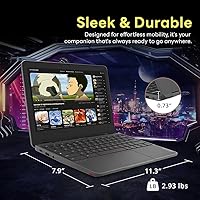
At 2.93 pounds and under an inch thick, the 300e Yoga fits into a standard school backpack without dominating the available space. Students carrying it across campus or between classrooms consistently find the weight manageable for a full day.
Compared to the lightest Chromebooks on the market, the ruggedized design does add a small weight and bulk penalty. It is a worthwhile trade for durability, but students with back or shoulder issues may notice the difference over a long day.
Value for Money
78%
22%
Considering the included stylus, rugged build, Wi-Fi 6 support, and long software update window, the overall package justifies the price for families buying a reliable school device with multi-year staying power. Competing devices at a similar price often cut more corners.
Buyers comparing raw specs — particularly RAM and screen resolution — will find cheaper or better-specced options if they look narrowly at numbers. The value argument depends on weighting durability and support over pure benchmark performance, which not every buyer naturally does.

Suitable for:

The Lenovo Chromebook 300e Yoga 11.6″ 2-in-1 is purpose-built for students and educators who need a device that survives real school life rather than just looking good in a product photo. K-12 students benefit most — the rugged chassis handles backpack abuse, accidental spills, and the occasional drop without demanding constant parental anxiety. Families deeply embedded in the Google ecosystem will feel right at home: Google Classroom, Meet, Drive, and Docs all run natively and smoothly without any workarounds. The bundled stylus makes it a natural fit for teachers who annotate lessons or students who prefer handwritten digital notes. Budget-conscious parents buying for a child with several school years ahead will appreciate that Chrome OS software support runs through June 2033, meaning this is not a device that becomes a security liability in two years. It also works as a capable secondary laptop for adults taking online courses or doing light productivity work from the couch or kitchen table.
Not suitable for:

Buyers expecting a general-purpose computer that handles everything will run into real limitations with this student laptop fairly quickly. The 4GB RAM ceiling is not a minor footnote — anyone who habitually works with ten or more browser tabs open, runs demanding Android apps, or needs to multitask between video editing and communication tools will feel genuine frustration. Creative students pursuing serious digital art or illustration should look elsewhere; the bundled stylus is adequate for notes but falls short for precision creative work. The 1366x768 screen resolution is also a legitimate dealbreaker for anyone who has spent time on a modern 1080p display — the visual difference is noticeable and not something you stop noticing after a few days. Students who rely on Windows-only software, local gaming, or anything beyond a browser and Android apps are simply buying the wrong tool. If raw performance or display sharpness are the top priorities, the 300e Yoga is not the right answer regardless of how competitive its other features are.

Specifications

  • Display: 11.6-inch IPS touchscreen with a 1366x768 resolution, anti-fingerprint coating, and 10-point multi-touch support.
  • Processor: MediaTek Kompanio 520 with 8 cores running at up to 2 GHz.
  • RAM: 4GB LPDDR4 system memory soldered to the motherboard and not user-upgradeable.
  • Storage: 96GB eMMC internal storage with no optical drive and no user-accessible expansion slot.
  • Operating System: Google Chrome OS with an Auto Update Expiration date of June 2033.
  • GPU: Integrated ARM Mali-G52 2EE MC2 GPU sharing system memory with no discrete graphics option.
  • Battery Life: Rated for up to 16 hours of use on a single charge under light workload conditions.
  • Webcam: 720p HD user-facing webcam positioned above the display for video calls and remote learning.
  • Wireless: Wi-Fi 6 (802.11ax) and Bluetooth 5.1 for wireless connectivity.
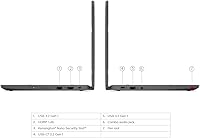
  • Ports: 2x USB-A 3.2 Gen 1, 1x USB-C 3.2 Gen 1 with DisplayPort and Power Delivery, 1x HDMI 1.4b, and 1x combo audio jack.
  • Display Output: Supports connection of up to two external monitors via USB-C DisplayPort and HDMI 1.4b simultaneously.
  • Hinge Design: 360-degree convertible hinge enables Laptop, Tablet, Tent, and Stand usage modes.
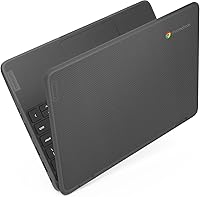
  • Durability: Drop-resistant chassis construction with a water-resistant keyboard designed for classroom environments.
  • Stylus: IST stylus pen included in the box, compatible with the touchscreen for handwriting and annotation.
  • Weight: 2.93 lbs (approximately 1.33 kg) with dimensions of 11.3 x 7.89 x 0.73 inches.
  • Security Slot: Kensington Nano Security Slot for physical locking in shared or institutional environments.
  • Warranty: 1-year limited manufacturer warranty from Lenovo covering hardware defects.
  • Color: Available in Gray with a matte finish on the lid and palm rest.

Related Reviews

Lenovo Yoga 6 13.3″ 2-in-1 Laptop - Ryzen 5, 8GB RAM, 256GB SSD
85%
85%
Performance
94%
Portability & Weight
92%
Battery Life
88%
Display Quality
90%
Build Quality
More
Lenovo Thinkpad 11e 2-in-1 Laptop, 11.6-inch, Intel Celeron, 4GB RAM, 128GB SSD
80%
88%
Value for Money
75%
Performance
93%
Portability/Size/Weight
70%
Display Quality
80%
Battery Life
More
Lenovo Chromebook C340-11 81TA 11.6″, Celeron N4000, 4GB RAM, 32GB eMMC
81%
90%
Value for Money
94%
Portability & Weight
85%
Battery Life
81%
Performance for Basic Tasks
65%
Storage Capacity
More
Lenovo ThinkPad L13 Yoga 2-in-1 Laptop
84%
86%
Overall Performance
72%
Display Quality
94%
Portability
85%
Battery Life
88%
Build Quality
More
Lenovo Yoga 7i 16″ 2-in-1 Laptop, Core Ultra 7 155U, 16GB, 1TB
74%
84%
Display Quality
82%
Performance & Speed
79%
Build Quality & Hinge
81%
Keyboard & Trackpad
67%
Battery Life
More
Samsung Chromebook 2 XE500C12-K01US 11.6-inch Laptop
81%
89%
Value for Money
85%
Battery Life
93%
Portability & Weight
80%
Build Quality
78%
Display Quality
More
EYY Yoga 3200U 15.6″ 2-in-1 Laptop (16GB/512GB)
64%
78%
Value for Money
62%
Performance
83%
RAM & Multitasking
74%
Storage Speed
71%
Display Quality
More
Lenovo N22-20 Chromebook, Intel Celeron N3050, 2GB RAM, 16GB Storage, 11.6″
79%
88%
Value for Money
94%
Portability
82%
Battery Life
74%
Display Quality
65%
Performance
More
Lenovo Flex 5 15.6-Inch 2-in-1 Laptop, Intel Core i5-8250U, 8GB RAM, 256GB SSD
84%
86%
Performance
89%
Battery Life
91%
Display Quality
84%
Portability
80%
Build Quality
More
JBL Stage 602 6-1/2″ 2-Way Coaxial Speakers
82%
88%
Sound Quality
85%
Bass Performance
83%
Treble Clarity
91%
Installation Ease
82%
Build Quality
More

FAQ

Yes, both work natively and reliably. Chrome OS is essentially built around Google Workspace, so Classroom, Docs, Meet, and Drive all run without any setup friction. Zoom has a dedicated Chrome OS app that handles video calls well under normal school workloads.

Not directly. This is a Chrome OS device, so it does not run Windows software. That said, the web versions of Word, Excel, and PowerPoint work fine through a browser, and Microsoft 365 has a usable Android app version available through the Google Play Store. If your child needs the full desktop Office suite, a Windows laptop would be the better fit.

For everyday note-taking, annotation, and basic sketching it does the job. Palm rejection is imperfect, so resting your hand on the screen while writing can cause occasional stray marks. Students who need precision for detailed artwork or design work will likely outgrow it quickly, but for school notes it is genuinely useful.

The Lenovo Chromebook 300e Yoga 11.6″ 2-in-1 is one of the more ruggedized options in its category, with drop resistance and a water-resistant keyboard that holds up to spills better than standard budget laptops. It is not military-grade, and the lid does flex under direct pressure, but for backpack transport and normal school handling it holds up well based on consistent buyer feedback.
Quite a bit for a Chrome OS device. Chrome OS itself is lean, and since most schoolwork lives in Google Drive, local storage is rarely a bottleneck. You could store a solid library of offline files, Android apps, and media without hitting the ceiling under typical student use.

After that date, Google will stop pushing automatic Chrome OS updates, security patches, and new features to the device. The laptop will still function, but running an unpatched operating system carries security risks. For a device bought today, that is roughly seven years of supported use — which is a genuinely long runway for a school laptop.

Yes, it supports up to two external displays simultaneously using the USB-C port with DisplayPort and the HDMI 1.4b port. For projector connections in classrooms, the HDMI port handles that directly without any adapter needed.

For standard school tasks — a handful of browser tabs, Google Meet, streaming video — 4GB is workable. Where it shows strain is when you push past eight or ten open tabs, especially while running a video call at the same time. It is not a dealbreaker for the target use case, but it is a real ceiling you will occasionally notice.

For light to moderate use — Docs, Classroom, some video streaming — most users consistently get through a school day on a single charge. The advertised 16 hours is measured under very light conditions; expect something closer to 9 to 12 hours under realistic mixed use. Still solid, but bring the charger if your child has a very long day ahead.

No. Both the RAM and storage are soldered and not user-accessible, which is standard for Chromebooks in this segment. What you buy is what you get for the life of the device, so it is worth thinking carefully about whether 4GB of RAM and 96GB of storage meet your needs before purchasing.