Overview

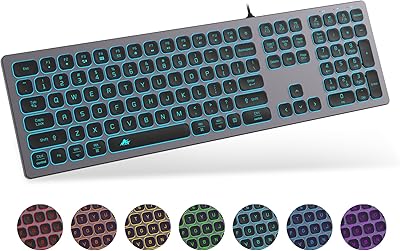
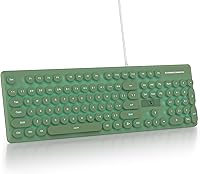
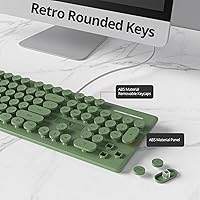
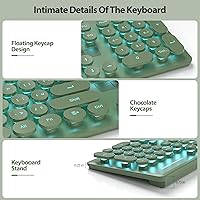
The Surmen Cute Quiet Keyboard is a full-size wired keyboard designed for those who value quiet typing without compromising on comfort. Featuring a unique retro-style with round keys, this keyboard offers a typewriter-like feel, making it perfect for those who want a nostalgic yet functional typing experience. Its slim profile and ergonomic tilt ensure you can work or type for long periods without discomfort. The customizable LED backlighting adds a touch of personality to the device, while its low-noise membrane switches make it ideal for shared workspaces or quiet home environments.

Features & Benefits

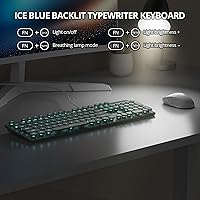
This quiet keyboard provides a seamless typing experience thanks to its low-noise membrane keys, which are perfect for shared spaces. The 12 multimedia function keys give you quick access to media controls, enhancing your productivity. It also features an anti-ghosting design, ensuring that no keystroke is missed during fast typing or gaming sessions. The adjustable LED backlighting can be turned off entirely, allowing you to reduce distractions when necessary. Additionally, the keyboard is plug-and-play, making it compatible with PCs, laptops, and Mac OS, with no need for additional drivers.

Best For

This full-size keyboard is ideal for professionals, students, and anyone in need of a quiet typing solution. Writers and bloggers will appreciate its ergonomic design, while home office workers will enjoy its combination of comfort and style. The retro-style keys make it a great choice for those who love a vintage feel, and the backlit design is perfect for low-light environments. Gamers, too, can benefit from the anti-ghosting feature, ensuring a smooth experience during gameplay. It’s a versatile option for anyone seeking an aesthetic yet practical keyboard.

User Feedback

Users have praised this keyboard for its quiet typing experience, especially in shared or noisy environments, where it reduces distractions. The retro design, with its round keycaps, has received positive feedback for its nostalgic appeal, making it a fun addition to any desk. However, some users wish for more customization options in the backlighting colors, as it only offers a single shade. A few have noted that the keys, while comfortable, feel a bit shallow compared to mechanical keyboards. Overall, it’s well-regarded for comfort and aesthetics, with a few minor limitations.

Pros

  • The quiet membrane switches make this keyboard ideal for shared workspaces or quiet environments.
  • Its retro-style round keys add a charming and nostalgic touch to any setup.
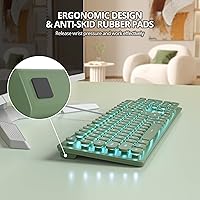
  • The ergonomic tilt and slim profile provide comfortable typing, even during extended sessions.
  • Adjustable LED backlighting allows for customizable aesthetics and can be turned off to reduce distraction.
  • Plug-and-play setup makes it easy to connect to PCs, laptops, and Mac OS with no software installation required.
  • The anti-ghosting feature ensures smooth typing without accidental key presses, especially useful for gaming.

Cons

  • Some users find the keys feel shallow compared to mechanical keyboards, lacking the tactile feedback they prefer.
  • The LED backlighting options are limited, with some wishing for more color choices.
  • The keyboard's overall build quality feels less premium than higher-end mechanical alternatives.
  • It may not be the best choice for gamers who require ultra-responsive switches for fast-paced gaming.
  • The membrane design might not appeal to users accustomed to the feel of mechanical switches.
  • At 1.28 pounds, it's a bit heavier compared to other compact keyboards, which could be less ideal for portability.

Ratings

After analyzing verified user reviews from multiple platforms and languages, the feedback on the Surmen Cute Quiet Keyboard reflects a balance of strengths and areas for improvement. This review accounts for only authentic, high-quality feedback, excluding any spam or incentivized responses. While the keyboard excels in areas like comfort and quiet typing, some users have expressed concerns regarding the backlighting and key feel, offering a well-rounded perspective from global users across different environments.

Typing Comfort
91%
Many users enjoy the comfortable typing experience, especially during long sessions. The ergonomic tilt and well-designed layout help reduce strain, making it ideal for work or study. The smooth key presses provide a natural feel, especially for those who type for extended periods each day.
Some buyers note that the key feel can be a bit too soft for their liking, which may not be ideal for users accustomed to mechanical keyboards. Additionally, a few people mentioned that the low-profile design could take time to adjust to, especially for those used to higher-key switches.
Quietness
94%
The keyboard’s membrane switches create a significantly quieter typing experience, which is particularly appreciated in shared office spaces. Users working in environments where noise is a concern find this a major benefit. It allows for focused work without disturbing others.
While the quiet typing is an advantage for many, a few users felt that the keys felt too 'mushy' and lacked the tactile feedback they were hoping for. This can be a downside for those who prefer a more responsive feel similar to mechanical switches.
Build Quality
86%
The keyboard's build quality is generally solid for the price, with users noting its sturdy construction. The plastic body feels durable, and the keys are responsive and feel reliable for daily use. Overall, it's a well-made keyboard that holds up under regular typing.
However, some users reported that the plastic housing feels a bit cheap compared to higher-end keyboards. There have also been mentions of slight flexing when pressing certain keys, especially if you type with force, which may detract from the overall premium feel.
Retro Design Appeal
88%
The vintage, typewriter-inspired design is a standout feature. Users who enjoy retro aesthetics praise the round keys, which add a nostalgic charm to the keyboard. It's a great fit for those who want a unique, visually appealing setup while typing.
Not everyone is a fan of the retro design; some users prefer more modern-looking keyboards. Additionally, the round keycaps, while visually appealing, can feel awkward to some, especially those who are used to standard key shapes or have larger hands.
Backlighting Customization
72%
28%
The adjustable LED backlighting adds a nice touch to the keyboard, allowing users to customize the look according to their preferences. The backlighting can be turned off, which is ideal for those who prefer minimal distractions or need to conserve energy.
A number of users expressed disappointment with the limited color options for the backlighting. Some hoped for a more dynamic color range or effects, as the current settings can feel basic. This is a common drawback for those seeking more advanced lighting features in their keyboards.
Ergonomics
89%
The ergonomic design, featuring an adjustable tilt, makes it easier to find a comfortable typing position. This feature is especially appreciated by users who spend hours typing, as it helps to alleviate wrist strain. Many users find the slim profile contributes to a more natural posture.
However, a few users reported that the keyboard's tilt isn't enough for them, especially for those who prefer more pronounced angles. While it's comfortable for most, more customization options for tilt could improve the experience for users with specific ergonomic needs.
Multimedia Keys Functionality
80%
20%
The inclusion of 12 multimedia function keys adds convenience, allowing users to easily control volume, playback, and other media functions without interrupting their work. This is especially useful for those who frequently switch between work and entertainment.
Some users found the multimedia keys to be somewhat redundant or less intuitive compared to other keyboards with more advanced customization options. A few also reported that they didn’t use these keys as much, making them less valuable for certain users.
Compatibility with Devices
93%
Users rave about the wide compatibility across different platforms, including PCs, laptops, and Mac OS. The plug-and-play functionality means that no additional software or drivers are needed, which simplifies the setup process and makes it versatile for different users.
A small number of users noted occasional issues when switching between devices, especially with Mac OS, where certain key combinations may require manual adjustments. However, these complaints were few and didn’t seem to affect most users.
Ease of Setup
97%
The keyboard is praised for its ease of use, with users appreciating the plug-and-play setup. There’s no need for additional software or complicated installation steps, making it a hassle-free option for anyone looking to get started quickly.
Some users were hoping for additional features that would require more complex setup options, such as software customization for the backlighting or key mapping. This simplicity might not appeal to those who prefer more configuration flexibility.
Durability
75%
25%
The keyboard generally holds up well to daily typing, and most users report no significant issues over time. Its solid construction provides a reliable feel for routine use in office or home environments.
However, a few users experienced key malfunctions or degradation in performance after extended use. Some noted that the keys started to feel less responsive, and a couple mentioned that the keycaps had a tendency to wear out over time.
Value for Money
90%
For its price, the keyboard offers excellent value, combining a quiet typing experience, retro aesthetics, and practical features like adjustable backlighting and multimedia keys. Many users feel it’s a great budget option for those seeking a quality keyboard without breaking the bank.
Some users felt that certain features, like the backlighting and key feel, could be improved for the price. Although it's a great value for the features it offers, those looking for high-end mechanical keyboards might find it lacking in some aspects.
Key Feel (Shallow vs. Mechanical)
68%
32%
For those who prefer a quieter, less tactile feel to their keys, this membrane keyboard offers a comfortable typing experience with minimal noise. It's a good option for people who don’t need the clicky feel of a mechanical keyboard.
However, many users who are used to mechanical switches found the key feel too shallow and unsatisfactory. The lack of tactile feedback can be a dealbreaker for those accustomed to the responsiveness and durability of mechanical key switches.

Suitable for:

The Surmen Cute Quiet Keyboard is ideal for writers, bloggers, and professionals who need a quiet, comfortable typing experience. Its low-noise membrane switches make it particularly well-suited for shared or open office spaces where minimizing distractions is important. Students or home office workers who spend long hours typing will also appreciate the ergonomic tilt and slim profile, which help improve comfort during extended sessions. Additionally, anyone who enjoys retro aesthetics will find the keyboard’s round keycaps charming, making it a great choice for those seeking a stylish yet functional tool.

Not suitable for:

However, this keyboard may not be the best fit for users who prefer mechanical switches or a more tactile typing experience. Those who need advanced key feedback might find the membrane keys too shallow and less responsive, especially compared to higher-end mechanical models. Additionally, gamers looking for a keyboard with quick key response and customizable features might feel limited by the lack of advanced key customization or higher-end backlighting options. The retro design, while appealing to some, may not suit users who prefer a more modern or streamlined look.

Specifications

  • Keyboard Type: Membrane switches for quiet and comfortable typing.
  • Key Design: Retro-style round keycaps inspired by typewriter aesthetics.
  • Backlighting: LED backlighting with adjustable brightness, allowing for a customized look.
  • Connection Type: Wired USB connection for reliable and stable performance.
  • Compatibility: Compatible with PCs, laptops, and Mac OS devices.
  • Special Features: Anti-ghosting and multimedia keys for smooth typing and media control.
  • Tilt: Ergonomically adjustable tilt for comfortable long-duration typing.
  • Key Count: 104 full-size keys for standard typing experience.
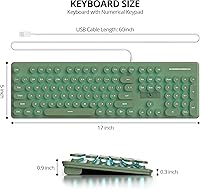
  • Dimensions: Measures 17.63 x 6.22 x 1.65 inches.
  • Weight: Weighs approximately 1.28 pounds, offering a solid yet portable build.
  • Color: Comes in a dark green color, providing a retro look.
  • Power: USB powered, requiring no batteries for operation.
  • Multimedia Keys: Includes 12 multimedia function keys for easy media control access.
  • Plug-and-Play: Ready to use out of the box with no additional drivers needed.
  • Warranty: Comes with a manufacturer's warranty for peace of mind.
  • Material: Constructed from durable plastic for long-lasting use.
  • Ergonomic Design: Slim profile with a slight tilt to improve typing posture and comfort.
  • Backlighting Control: Adjustable backlighting can be turned off for minimal distraction.
  • Key Travel: The keys offer a shallow yet responsive feel compared to mechanical switches.

FAQ

Setting up this full-size wired keyboard is easy—just plug the USB cable into a PC, laptop, or Mac, and it's ready to use. There's no need for any software installation; it's a plug-and-play device.

Yes, this quiet keyboard is compatible with both Windows and Mac operating systems. You just need to plug it into your device’s USB port, and it will work right away without requiring additional drivers or software.

Yes, the keyboard features adjustable LED backlighting, allowing you to customize the brightness and turn it off completely if needed. While the backlighting is limited to a few options, it can still add a unique touch to your workspace.

The Surmen Cute Quiet Keyboard offers a quiet typing experience thanks to its low-noise membrane switches. The keys are designed for comfortable, silent typing, making it ideal for shared or quiet environments where noise can be a concern.

While this keyboard features anti-ghosting and multimedia keys, it may not be ideal for high-performance gaming due to its membrane switches, which are less responsive than mechanical keys. It's best suited for casual gaming rather than fast-paced competitive play.

Yes, this keyboard's ergonomic tilt and slim profile make it comfortable for long typing sessions. The low-noise membrane switches also reduce finger strain, making it a good option for writers, bloggers, and office professionals.

Absolutely! The quiet typing experience provided by the low-noise membrane switches makes it perfect for environments where noise might be distracting, such as in open offices or shared workspaces.

While the keyboard has a solid build, its durability may not match that of mechanical keyboards. The membrane design and plastic construction make it more suitable for general office use and light typing rather than heavy-duty or long-term professional use.

Yes, the backlighting on this keyboard is adjustable, but some users have mentioned that there are limited color options available. If you're looking for a wider range of lighting choices, this may not fully meet your needs.

The Surmen Cute Quiet Keyboard features retro-style round keycaps that give it a nostalgic, typewriter-like look. The keys are designed to be quiet and comfortable for typing, with an ergonomic tilt for added comfort during long typing sessions.