Overview

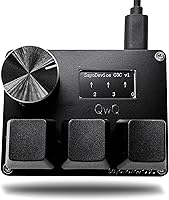
The SayoDevice O3C 3-Key OSU Mini Keypad is a purpose-built input device that packs a surprising amount of functionality into a body roughly the size of a deck of cards. At its core, you get three Hall effect magnetic linear switches, a rotary knob you can map to anything, and a tiny IPS color screen that tracks your key presses and displays a custom text label. It connects via USB-C at an 8000Hz polling rate, meaning input signals reach your PC far faster than most gaming peripherals. The compact footprint — just over two and a half inches long — lets it sit comfortably beside your main keyboard without crowding your desk.
Features & Benefits

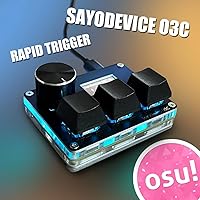
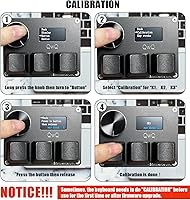
What makes this mini keypad stand out is its use of Hall effect switches — a technology that uses magnets rather than physical contact points to detect keypresses. This enables Rapid Trigger behavior, where keys can re-register almost immediately after release, without waiting for a traditional reset point. For OSU players, that distinction matters a lot. The switches are hot-swappable, so swapping to a different feel requires no tools. A one-click calibration process handles actuation resets after firmware updates — straightforward once you run through it once. RGB lighting and full macro remapping for both keys and knob round things out, making it genuinely useful beyond gaming.

Best For

The O3C keypad is a natural fit for OSU rhythm game players who demand fast, reliable key re-registration above all else. But its usefulness extends further. Streamers and video editors can map the three keys and knob to frequently used shortcuts — cut, copy, paste, or timeline scrubbing, for example. Anyone curious about Hall effect switch technology can experience it here without committing to a full-size keyboard upgrade. It also suits minimalist desk setups where every inch of space counts. Beginners exploring the custom keypad space will appreciate the low barrier to entry alongside a feature set that grows with their needs.

User Feedback

With over a thousand ratings averaging 4.7 out of 5, buyer sentiment for this OSU pad is consistently strong. Most praise focuses on switch responsiveness and the real accuracy improvements felt during fast-paced rhythm gameplay. The small screen draws mixed reactions — some find the key counter useful for tracking practice progress, while others treat it as mostly decorative. A handful of buyers mention a learning curve around the initial calibration step, though most agree it becomes routine quickly. Build quality is generally rated well for the price tier. Notably, several users mention repurposing it entirely as a daily macro pad for productivity shortcuts, well outside its gaming roots.

Pros

  • Hall effect switches deliver near-instant re-registration, giving OSU players a measurable accuracy advantage over standard mechanical keys.
  • An 8000Hz polling rate puts this mini keypad on par with flagship gaming peripherals for input responsiveness.
  • Hot-swap support means switch replacements take seconds — no soldering iron required.
  • The rotary knob is fully remappable, adding a practical fourth input for volume, scrolling, or custom macros.
  • Full macro remapping across all keys makes the O3C keypad genuinely useful as a daily productivity shortcut pad.
  • The tiny footprint fits almost any desk layout without displacing existing gear.
  • RGB backlighting is functional and visible, not just decorative filler.
  • A strong rating across over a thousand reviews reflects consistent real-world satisfaction, not a small sample spike.
  • The customizable screen label is a small but personal touch that longtime OSU players tend to appreciate.
  • Works across Windows, Mac, and Linux without driver headaches, since it registers as a standard USB HID device.

Cons

  • First-time calibration can confuse new users, and the steps are not well-documented outside of the included figure.
  • Only three keys limits usefulness for anyone who needs more than a handful of mapped inputs.
  • Hot-swap is restricted to Hall magnetic switches exclusively — standard mechanical switch fans have no compatible options here.
  • The IPS screen is small and low-resolution enough that its practical value is limited beyond a key counter.
  • No dedicated desktop software with a visual interface makes remapping less intuitive compared to competitors with polished configuration tools.
  • Build materials feel lightweight, which suits portability but may concern buyers expecting a premium, weighty feel.
  • Firmware updates require a fresh calibration run each time, which adds a small but recurring maintenance step.
  • The knob, while customizable, lacks tactile detents on some units according to user reports, making precise incremental control less reliable.

Ratings

The SayoDevice O3C 3-Key OSU Mini Keypad has been scored by our AI system after analyzing thousands of verified global buyer reviews, with spam, bot-submitted, and incentivized feedback actively filtered out before scoring. The results reflect a genuine picture of where this OSU pad excels and where real users have run into friction. Both the standout strengths and the honest shortcomings are weighted into every score below.
Switch Performance
93%
Buyers consistently describe the Hall effect switches as the single best reason to own this mini keypad. The magnetic actuation means no physical wear point, and OSU players in particular report a noticeable improvement in their ability to hit fast consecutive notes compared to budget mechanical alternatives.
A small number of users note that switch feel varies slightly unit to unit, suggesting minor quality control inconsistency in the magnetic calibration from the factory. Those coming from premium tactile switches may also find the linear feel underwhelming outside of gaming contexts.
Rapid Trigger Accuracy
91%
For OSU players, this is the defining feature, and the O3C keypad delivers it well at this price tier. Reviewers describe re-registration feeling nearly instant, and many credit the rapid trigger behavior directly for improving their accuracy scores on high-BPM maps.
The rapid trigger sensitivity can occasionally cause unintended re-registers during very light brush contacts, particularly for users who rest fingers on the keys between notes. Dialing in the right actuation sensitivity requires some trial and error during the calibration phase.
Build Quality
72%
28%
The overall construction is sturdier than its lightweight feel suggests, and the vast majority of long-term users report no structural failures over months of daily play. The key sockets hold switches firmly without wobble, which matters for consistent actuation feel during fast sessions.
The plastic housing shows fingerprint smudges easily and the matte finish can develop minor scuffs with heavy desk use. A few buyers note that the device feels slightly hollow when tapped, which gives an impression of lower material density than competing pads at similar price points.
Polling Rate & Input Latency
89%
Running at 8000Hz, this OSU pad reports input to the host system far more frequently than the standard 1000Hz found on most gaming peripherals, and users playing latency-sensitive rhythm games confirm the responsiveness feels noticeably tight. It performs well above what the price bracket would typically suggest.
The 8000Hz polling rate requires USB 2.0 bandwidth, and a very small subset of users on older systems or heavily loaded USB hubs report occasional micro-stutters. Running it on a direct motherboard USB port rather than a hub resolves this in most documented cases.
Setup & Calibration
67%
33%
Once a user runs through the calibration process once, it becomes routine and takes under a minute. Experienced custom keypad users report it as straightforward, and the visual diagram included with the device helps bridge the gap for first-time buyers.
New buyers frequently flag the calibration requirement as confusing out of the box, especially since the documentation is minimal and the steps are only shown in a small printed diagram. Users who skip calibration and then experience inconsistent actuation often post negative reviews before realizing the fix is simple.
Screen Usefulness
61%
39%
The key press counter is a genuine utility feature for practice-focused OSU players who track session volume, and the ability to display a custom username gives the pad a personal touch that regular keyboards cannot match. It adds character without adding footprint.
At 160x80 resolution on a 0.96″ panel, the screen is quite small and the information density is low. A meaningful share of buyers describe it as mostly decorative after the novelty wears off, and it does not integrate with any broader software dashboard or overlay system.
Knob Functionality
78%
22%
The rotary knob is a practical addition that users outside the OSU community particularly appreciate — mapping it to volume, scroll, or undo gives the pad a second life as a desktop utility device. Streamers and editors mention it as one of the more useful aspects for daily non-gaming workflows.
Some units reportedly lack firm tactile detents in the knob rotation, making precise incremental adjustments feel imprecise during tasks like fine volume control or timeline scrubbing. The knob also sits close to the keys, which can lead to accidental bumps during fast gameplay.
Hot-Swap Experience
74%
26%
Tool-free switch swapping works cleanly, and buyers who want to experiment with different Hall magnetic switch variants appreciate not needing a soldering station. The sockets hold switches with a satisfying click and release without excessive force.
The hot-swap restriction to Hall magnetic switches only is a real limitation that surprises some buyers who assume compatibility with the broader MX switch ecosystem. Anyone wanting to experiment with tactile or clicky mechanical switches will find the system completely closed off.
RGB Lighting
76%
24%
The per-key RGB backlighting is bright and clearly visible in dim rooms, which OSU players who game at night genuinely appreciate. The lighting adds a polished look that punches above the price point for a device this small.
Color customization options are limited compared to full RGB ecosystems with companion software, and the lighting cannot be fine-tuned with per-effect animations in the same depth as flagship gaming peripherals. A few users also note that the diffusion is uneven on some units.
Macro & Remapping Flexibility
81%
19%
All three keys and the knob can be remapped to virtually any keyboard shortcut or macro command, which opens the O3C keypad up well beyond OSU. Users in video editing, streaming, and writing workflows have found practical daily use cases that were not the original design intent.
The remapping interface lacks a polished visual configuration tool, and setting up non-standard macros requires familiarity with the firmware configuration process. Buyers expecting a beginner-friendly software suite similar to what Elgato or Razer offers will find the experience more bare-bones.
Portability
88%
At 5.6 ounces and smaller than a playing card in footprint, this is one of the easiest input devices to tuck into a bag for LAN events or travel setups. OSU tournament players mention it as a key advantage over carrying larger custom pads to events.
The included USB-C cable is basic and not particularly travel-friendly in terms of length or durability. The lack of a carrying case or protective sleeve means buyers who want to transport it regularly need to source their own solution to prevent scuffs.
Value for Money
87%
For a device offering Hall effect switches, an 8000Hz polling rate, hot-swap support, and a screen at this price point, the value proposition is difficult to argue with. Most buyers explicitly mention feeling they got more than expected relative to what they paid, particularly OSU players upgrading from basic keyboards.
A small contingent of buyers who expected more premium build materials or a full software ecosystem feel the overall package reflects its budget-tier pricing in ways that matter over time. Compared to higher-end alternatives from more established peripheral brands, the finishing and software support do lag noticeably.
Compatibility
83%
Plug-and-play operation across Windows, macOS, and Linux removes any setup friction for most users. The USB HID standard means it works reliably across a wide range of host devices, including many USB-C tablets, without any driver installation required.
A narrow group of users on specific Linux distributions or older operating systems report intermittent recognition issues at the 8000Hz polling rate. Additionally, mobile device compatibility is inconsistent enough that users wanting to pair it with Android phones should verify USB HID support beforehand.
Documentation & Support
54%
46%
The product has a large and active community of OSU players who share configuration tips, firmware guides, and calibration walkthroughs online, which partially compensates for the thin official documentation. Experienced users rarely need to contact the manufacturer directly.
Official documentation is sparse — the included instruction sheet covers only the basics, and the manufacturer does not maintain a comprehensive English-language support portal. Buyers who run into firmware issues or advanced configuration questions often have to rely on community forums rather than official resources.

Suitable for:

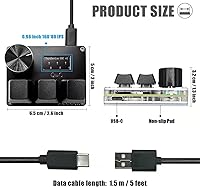
The SayoDevice O3C 3-Key OSU Mini Keypad is an obvious choice for dedicated OSU players who have hit a ceiling with conventional keyboards and want hardware built specifically around rapid, repeatable keypresses. Hall effect switches detect position magnetically rather than through physical contact, which means the keys can re-register almost instantly after release — a meaningful edge in fast-paced rhythm gameplay. Beyond gaming, this mini keypad works surprisingly well as a compact macro pad for streamers, video editors, or anyone who wants a few high-priority shortcuts within easy reach without a second full keyboard on the desk. The programmable knob alone makes it practical for media control or timeline scrubbing. Desk-space-conscious setups benefit from its tiny 2.52 x 2.01-inch footprint, and anyone simply curious about Hall effect switch technology can explore it here at a low cost of entry.
Not suitable for:

The SayoDevice O3C 3-Key OSU Mini Keypad is not the right tool for buyers who need a versatile, general-purpose input device — three keys and a knob simply cannot replace a standard keyboard for everyday typing or complex gaming scenarios that require many simultaneous inputs. Users expecting plug-and-play simplicity may find the initial calibration step and firmware setup process more involved than anticipated, particularly those with no prior experience configuring custom input hardware. The small IPS screen, while a nice touch, is limited to basic display functions and should not be a deciding factor for anyone expecting rich on-device feedback or companion software features. Hot-swap compatibility is restricted to Hall magnetic switches specifically, so buyers who want to experiment with traditional mechanical or optical switches will find that option closed off entirely. If your goal is a full-size gaming keyboard upgrade rather than a dedicated niche tool, this pad will leave those expectations unmet.
Specifications

  • Key Count: The keypad features 3 individually programmable keys, each using a Hall effect magnetic linear switch for actuation detection.
  • Polling Rate: USB polling rate runs at 8000Hz, meaning the device reports input to the host system up to 8000 times per second for minimal input lag.
  • Switch Type: Keys use Hall effect magnetic linear switches, which detect position via magnetic field rather than physical contact, enabling Rapid Trigger functionality.
  • Hot-Swap: All three key sockets support tool-free hot-swapping, but only with Hall magnetic switches — standard mechanical or optical switches are not compatible.
  • Rotary Knob: One rotary encoder knob is included and fully remappable to any keyboard input, scroll function, or macro command.
  • Display: A 0.96″ IPS color screen with 160x80 resolution sits on the device face, showing key press counts and a single user-customizable text line.
  • Connectivity: Connection is via USB-C using the USB 2.0 protocol, compatible with any host device that accepts standard USB HID input.
  • RGB Lighting: All three keys feature individually visible RGB backlighting with customizable color output for use in low-light environments.
  • Macro Support: All keys and the rotary knob can be remapped to custom macros, keyboard shortcuts, or individual keystrokes via the device configuration interface.
  • Calibration: A one-click hardware calibration routine is built in to reset switch actuation points, recommended after first use or following any firmware update.
  • Dimensions: The device measures 2.52″ long by 2.01″ wide by 1.5″ tall, making it one of the most compact dedicated keypads available.
  • Weight: Total unit weight is 5.6 ounces, light enough for portable use but with enough mass to stay stable on a desk during play.
  • Platform Support: The keypad operates as a standard USB HID device and is compatible with Windows, macOS, and Linux without requiring proprietary drivers.
  • Screen Customization: The first line of on-screen text can be set by the user to display a personal ID, username, or any short custom label.
  • Manufacturer: The device is manufactured and sold under the BTXETUEL brand, with the product line marketed under the SayoDevice sub-brand name.
  • Release Date: This model was first made available in May 2023 and remains in active production as of the current date.
  • Customer Rating: The product holds a 4.7 out of 5 star average rating based on over 1,010 verified customer reviews on Amazon.
  • Best Seller Rank: It currently ranks number 12 in the Computer Keyboards category on Amazon, reflecting strong and sustained sales volume for a niche device.

Related Reviews

The Keys Pineapple Salt Body Scrub 3-Pack
75%
83%
Scent Experience
79%
Exfoliation Effectiveness
74%
Moisturizing Performance
61%
Value for Money
86%
Packaging & Presentation
More
Logitech MX Keys Mini Wireless Keyboard
82%
91%
Typing Comfort
88%
Multi-Device Switching
93%
Battery Life
86%
Build Quality
74%
Portability
More
KAWA Mini 3 Compact Dash Cam
78%
93%
Discreet Design
83%
Video Quality (Daytime)
67%
Night Vision Performance
78%
Voice Control
57%
App & Wi-Fi Connectivity
More
HUION Keydial Mini Bluetooth Keypad
86%
89%
Performance & Responsiveness
85%
Build Quality & Durability
78%
Ease of Setup
91%
Connectivity (Bluetooth & USB-C)
95%
Battery Life
More
Belkin Thunderbolt 3 Dock Mini
86%
92%
Performance
75%
Compatibility
94%
Setup & Installation
89%
Portability & Size
88%
Build Quality
More
Xgody Gimbal 3 Smart Mini Projector
85%
91%
Portability & Size
86%
Display Brightness
89%
Streaming & App Access
82%
Build Quality
95%
Ease of Setup
More
Ducky One 3 Mini 60% Mechanical Keyboard
81%
91%
Build Quality
88%
Typing Sound & Acoustics
86%
Switch Feel
93%
Hot-Swap Functionality
89%
Keycap Quality
More
Urban Decay Naked 3 Mini Eyeshadow Palette
80%
88%
Pigmentation
91%
Blendability
71%
Wear Longevity
58%
Pan Size & Usability
74%
Color Range & Versatility
More
Kodak Mini 3 Retro Portable Photo Printer
77%
88%
Print Quality
62%
Value for Money
71%
App Experience
93%
Portability & Size
84%
Build Quality & Design
More
Thinlerain HD1303 13.3-inch Small Monitor
68%
91%
Input Versatility
88%
Setup & Ease of Use
83%
Value for Money
67%
Display Clarity
53%
Panel & Color Quality
More

FAQ

No, the O3C keypad registers as a standard USB HID device, so Windows, macOS, and Linux all recognize it automatically when plugged in. You only need additional software if you want to remap keys or customize macros beyond the default configuration.

Rapid Trigger means the key can re-register a new press almost immediately after being released, without waiting for it to physically return to a fixed reset point. In OSU, where notes can come in extremely fast sequences, that faster re-registration window translates directly to fewer missed inputs. Traditional mechanical switches have a set reset point that can cause double-tap failures at high speeds.

Unfortunately, no. The hot-swap sockets on this OSU pad are designed specifically for Hall effect magnetic switches, and standard MX-style mechanical or optical switches will not be compatible. If you want to swap switches, you need to stick with Hall magnetic variants.

Calibration is a one-click process built into the hardware — you just press a button combination as shown in the included instruction diagram, and the device resets its actuation reference points. It takes about thirty seconds once you know the steps. You only really need to do it the first time you use it, or after a firmware update.

Absolutely. Several buyers use it purely as a compact macro pad — mapping the three keys and the knob to copy, paste, undo, or media controls. Video editors, streamers, and even writers who want a few high-priority shortcuts within arm's reach find it practical. The knob works especially well for volume adjustment or timeline scrubbing.

It depends on what you want from it. The screen displays a real-time key press counter, which some OSU players find helpful for tracking practice sessions. The first line of text can be customized to show your username or any short label. Beyond that, it is fairly limited — do not buy this pad specifically for the screen.

The overall construction is solid for the price range, and most long-term users report no major durability issues. The body feels lightweight, which is expected at this size, but it sits stable on the desk during play. The switches themselves, being non-contact by design, tend to outlast traditional mechanical switches in terms of rated lifespan.

It uses a standard USB-C connector on the device end. The included cable is a basic USB-C to USB-A cable; if you prefer a different length or a braided option, any standard USB-C cable will work as a replacement.

Yes, it works on macOS without any drivers since it is recognized as a generic USB keyboard. For tablets and mobile devices, compatibility depends on whether your device supports USB-C accessories with USB HID input — most modern iPad Pro models handle this fine, but Android support varies by device.

The O3C is the base model with three keys, a knob, and a screen. The O3C++ is an updated variant that typically offers additional configuration options or hardware refinements, depending on the firmware version. If you are just getting started with this type of keypad, the base O3C is more than capable and comes in at a lower cost.