Overview

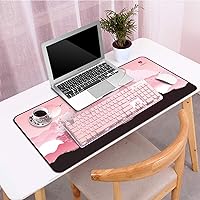
The LANGTU 104-Key Membrane Keyboard is a budget-friendly, full-size board aimed at home office workers and casual gamers who want a stylish desk setup without spending much. The pink colorway with LED backlighting makes it as much a visual accessory as a practical tool. One thing worth stating upfront: this is a membrane keyboard. The listing leans into the phrase mechanical feeling, but buyers should know the typing experience won't replicate true mechanical switches. What does stand out at this price is the aluminum alloy panel — a genuine build quality step above the all-plastic alternatives crowding the same budget range. Plug it in and it works immediately, no drivers needed.

Features & Benefits

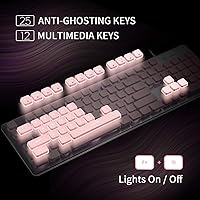
The hybrid metal-plastic build is the most immediately noticeable thing about this backlit office keyboard — picking it up, it feels denser than you'd normally expect at this price. The pink LED backlight offers adjustable brightness and a breathing mode with variable speed, and it can be switched off entirely if you prefer a cleaner look. Keycaps use double-shot injection molding, which means the legends stay legible long after cheaper pad-printed keys have worn down. There's basic 25-key anti-ghosting for light gaming, plus 12 multimedia shortcut combinations and splash resistance for everyday desk accidents. Nothing here is groundbreaking, but taken together these features make a solid case for the price.

Best For

This pink keyboard is a natural fit for students or remote workers building a pastel-themed desk setup without much budget to work with. If you're coming from a laptop keyboard and want a full 104-key layout with zero installation friction, this board delivers exactly that — plug in the USB-A cable and you're typing in seconds. It also works for casual gaming where basic multi-key combinations are enough. That said, it isn't the right choice for anyone who needs true mechanical response, extensive macro support, or wide-angle key rollover. Aesthetics and convenience are the main draw here, and for buyers who prioritize those over raw performance, it punches well above its price.

User Feedback

Buyers who've lived with the LANGTU membrane board for a while consistently praise the look — the pink backlight in particular gets positive mentions, with several calling it brighter and more even than expected. The aluminum top panel earns appreciation too, though some note it feels thinner than photos suggest. On the downside, a recurring complaint is that the typing feel falls short of true mechanical switches, which shouldn't surprise anyone who reads the specs carefully. A handful of users mention key wobble on certain keys and find the included cable only average in quality. The 12-month warranty and 30-day refund policy provide a reasonable safety net for first-time buyers.

Pros

  • Aluminum alloy top panel feels noticeably more solid than all-plastic budget competitors.
  • Pink LED backlight is bright, even, and adjustable — genuinely better than buyers expect at this price.
  • Double-shot keycaps mean legends will not fade, even with years of daily use.
  • Plug-and-play USB connection works immediately across Windows, Mac, and Linux with no drivers.
  • Splash-resistant build handles everyday desk spills without panic.
  • Full 104-key layout gives laptop users a proper numpad and function row from day one.
  • Breathing backlight effect and brightness controls allow easy customization to suit room lighting.
  • The membrane board ships with a 12-month warranty and a 30-day refund window for added peace of mind.
  • Lightweight at just one pound, making it easy to reposition or travel with occasionally.
  • 12 multimedia shortcut combinations reduce the need to alt-tab or reach for a mouse during media playback.

Cons

  • Typing feel is noticeably softer and less defined than even entry-level mechanical switches.
  • Spacebar and larger modifier keys exhibit wobble and a hollow rattle during normal use.
  • The included cable feels thin and stiff, with durability concerns after repeated repositioning.
  • Single-color pink LED means no RGB customization for users wanting a more dynamic setup.
  • The aluminum panel is thinner than it looks in product photos and shows scuffs with regular handling.
  • ABS keycap surfaces develop a shiny, worn appearance on high-use keys over several months.
  • Multimedia shortcut combinations are not labeled on the keys, requiring memorization or trial and error.
  • USB-A connector requires a separate adapter for modern laptops with USB-C-only ports.
  • Typing noise is audible enough to be disruptive in quiet shared workspaces or during calls.
  • Mac users may need to manually remap certain key functions through system preferences for full compatibility.

Ratings

The LANGTU 104-Key Membrane Keyboard was evaluated by our AI system after aggregating and filtering thousands of verified global purchases, actively excluding incentivized, bot-generated, and duplicate submissions. What follows reflects the honest distribution of buyer experiences — the genuine highlights as well as the recurring frustrations. Scores are calibrated against realistic expectations for a budget-tier full-size keyboard, not against premium alternatives.

Build Quality
74%
26%
The aluminum alloy top panel is the first thing most buyers notice when they take this keyboard out of the box — it genuinely feels more solid than the all-plastic boards competing at the same price. Several users noted it does not flex when typing, which builds early confidence in the product.
Closer inspection reveals the aluminum layer is relatively thin and the underside remains entirely plastic. A handful of longer-term owners reported the panel developing minor scuffs and a few noted the overall chassis felt less premium once the novelty wore off.
Typing Feel
61%
39%
For buyers coming from a standard laptop keyboard, the actuation feels noticeably crisper and more responsive. The membrane mechanism has enough tactile feedback to make extended typing sessions feel less fatiguing than a completely flat surface, and casual users often find it satisfying enough for daily work.
Anyone expecting genuine mechanical switch response will be disappointed — the feedback is softer and less defined than even entry-level mechanical boards. Enthusiasts and fast typists frequently flagged the lack of a distinct tactile bump as a dealbreaker, and the bottom-out feel can feel mushy under sustained use.
Backlight Quality
83%
The pink LED backlight is consistently one of the most praised aspects across verified reviews. Buyers highlight the even key-to-key illumination and the fact that legends remain clearly readable in dim environments. The breathing effect and adjustable brightness give users enough control to match their desk lighting preferences.
The backlight is single-color only — there is no RGB customization, which limits appeal for users wanting more dynamic setups. A small number of users also reported that the breathing effect speed options feel limited and that the lowest brightness setting is still fairly visible in a completely dark room.
Keycap Durability
79%
21%
Double-shot injection molding means the legends are physically part of the keycap structure rather than a surface print. Buyers who have used the board for several months consistently confirm that the letters show no visible fading, which is a meaningful advantage over cheaper single-shot alternatives in the same range.
The ABS plastic material is prone to developing a shiny, worn look on high-frequency keys like the spacebar and home row over time. A few users mentioned the keycap surface starts feeling slick after extended daily use, which can be noticeable for those who prefer a matte texture under their fingertips.
Value for Money
82%
18%
When assessed against comparable budget keyboards, this pink keyboard delivers a convincing combination of visual appeal, build materials, and everyday features that most buyers feel justifies the asking price. Users frequently describe it as a solid pick for aesthetic desk setups on a restricted budget.
The value proposition weakens slightly for buyers who discover the membrane typing experience does not match their expectations after purchase. If mechanical feel is a priority, the price difference to an entry-level mechanical board is small enough that some users wish they had stretched their budget.
Anti-Ghosting Performance
67%
33%
For casual gaming — think WASD movement combined with a couple of ability keys — the 25-key anti-ghosting coverage handles everyday combinations without dropped inputs. Users running older desktop setups and laptops found the rollover sufficient for the types of games they play at this keyboard tier.
Competitive or fast-paced gamers who require full n-key rollover will find 25-key coverage restrictive. Several gaming-focused buyers noted that complex simultaneous inputs exceeding the rollover limit caused missed key registrations, which became frustrating during intense gameplay sequences.
Noise Level
63%
37%
In a home office or private room, the typing noise is unremarkable and most users did not find it disruptive for personal use. The membrane mechanism naturally dampens some of the clatter associated with mechanical boards, which a portion of buyers specifically appreciated in shared living spaces.
The board is not quiet by office standards. Recurring feedback mentions a hollow, slightly clicky sound during rapid typing that can travel in open-plan environments. A few users also flagged some key rattle — particularly on larger keys like the spacebar — that adds to the overall noise profile.
Water Resistance
71%
29%
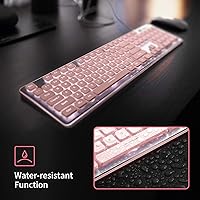
The splash-resistant design provides genuine peace of mind for desk use, and multiple buyers shared anecdotes about minor liquid spills — coffee, water — that the keyboard survived without any malfunction. For a work-from-home environment where drinks are nearby, this is a practical and appreciated feature.
The protection is rated for splashes and minor spills only — this is not a waterproof device. Users who tested the limits with more substantial water exposure reported issues, and the design does not include drainage channels, so prompt drying after any spill is still necessary.
Multimedia Shortcut Usability
68%
32%
The 12 multimedia key combinations cover the most common use cases — volume control, media playback, and brightness — which most office users and students find sufficient for day-to-day workflow. Buyers who primarily use the keyboard for writing or streaming appreciated not needing a separate media row.
The shortcuts require memorization since there is no labeling system to remind users which function key combinations do what. Several reviewers mentioned a learning curve and noted that the Fn layer layout feels somewhat arbitrary compared to more thoughtfully labeled competitors.
Setup & Compatibility
91%
Plug-in-and-go functionality is one of the most universally praised aspects of this backlit office keyboard. Buyers across Windows, Mac, and even Linux systems reported immediate recognition with zero driver installation required, making it one of the most friction-free setup experiences at any price point.
Mac users noted that a small number of key functions do not map intuitively out of the box and required manual remapping through system preferences. The USB-A connector also means users with newer laptops that only have USB-C ports will need an adapter, which is not included.
Cable Quality
54%
46%
The cable is long enough for most standard desk configurations, reaching from a tower or laptop placed on or beneath a desk without strain. Users with a straightforward desktop setup rarely mentioned the cable as a concern.
The cable is one of the more consistently criticized components in long-term feedback. Buyers describe it as thin and somewhat stiff, with braiding quality that feels noticeably below the rest of the product. A few users reported fraying near the connector after several months of daily repositioning.
Aesthetic Design
86%
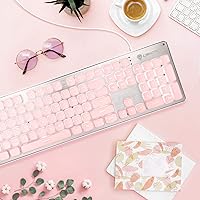
The pink colorway with matching LED backlight has a strong following among buyers building coordinated pastel or pink desk setups. User photos across review platforms consistently show the keyboard integrating well with mouse pads, monitors, and accessories in the same color family, and many describe it as looking more expensive than it is.
The aesthetic appeal is inherently niche — buyers who wanted a more neutral or dark colorway have no option with this model. The pink is also described by some as slightly more coral or rose-toned in person compared to product images, which occasionally surprised buyers expecting a more vivid bubblegum shade.
Key Stability
58%
42%
The majority of standard letter and number keys feel acceptably stable for casual typing, with enough mounting consistency that most everyday users did not flag wobble as a primary concern. For light office tasks, the key stability is generally adequate.
Larger modifier keys — particularly the spacebar and shift keys — frequently drew criticism for noticeable wobble and rattle during use. Several buyers mentioned the spacebar in particular as a weak point, with a hollow, slightly unstable feel that detracts from the overall typing experience.
Warranty & After-Sales Support
73%
27%
The 12-month quality guarantee and 30-day full refund policy give first-time buyers a reasonable safety net, and verified purchasers who contacted support described response times within the stated 12-hour window as largely accurate. For a budget product, having a responsive support channel is a genuine differentiator.
A small portion of users reported friction during the return or replacement process, particularly around shipping costs for defective units. The warranty terms are also limited to manufacturing defects, which leaves grey areas for issues like key rattle or aesthetic wear that develop over normal use.

Suitable for:

The LANGTU 104-Key Membrane Keyboard is a strong fit for students, remote workers, and casual desk users who want a visually appealing full-size keyboard without committing serious money to the category. If you are building a pink or pastel-themed workspace and need something that looks coordinated and well-lit without requiring any software setup, this board covers that specific brief well. It also makes sense for anyone upgrading from a laptop keyboard who simply needs more space, a numpad, and the convenience of a plug-and-play connection. Casual gamers who are not running competitive titles — think turn-based games, light RPGs, or browser-based gaming — will find the 25-key anti-ghosting sufficient for their needs. The splash resistance and double-shot keycaps add a practical durability layer that makes it a reasonable everyday workhorse for typical home office conditions.

Not suitable for:

The LANGTU 104-Key Membrane Keyboard is not the right choice for anyone who genuinely wants a mechanical typing experience — the board markets a mechanical feel, but it is a membrane keyboard, and fast typists or enthusiasts will notice the difference quickly. Competitive gamers who need full n-key rollover for complex simultaneous inputs will run into the hard ceiling of 25-key anti-ghosting under pressure. This backlit office keyboard is also not suited to users who need quiet operation in shared office environments, since the typing noise and occasional spacebar rattle can carry. Buyers with USB-C-only laptops should factor in the cost and inconvenience of an adapter, as the cable is USB-A only with nothing included to bridge the gap. Finally, if long-term tactile consistency and cable durability are priorities, the thin wiring and ABS surface wear may become frustrating within the first year of heavy use.

Specifications

  • Layout: Full-size 104-key layout including a dedicated numpad, function row, and standard modifier keys.
  • Switch Type: Membrane switches designed to mimic a mechanical feel, offering light tactile feedback without physical switch mechanisms.
  • Backlight Color: Single-color pink LED backlighting illuminates all 104 keys with uniform brightness.
  • Backlight Modes: Supports adjustable brightness levels and a breathing effect with variable speed control, plus the option to turn backlighting off entirely.
  • Anti-Ghosting: 25-key anti-ghosting allows simultaneous recognition of up to 25 key inputs without dropped registrations.
  • Connection: Wired USB-A connection with no driver installation required — fully plug-and-play on supported operating systems.
  • Top Panel Material: Aluminum alloy top panel provides a sturdier surface layer compared to standard all-plastic keyboards in the same price range.
  • Keycap Material: ABS plastic keycaps produced via double-shot injection molding to prevent legend fading over extended use.
  • Water Resistance: Splash-resistant construction offers basic protection against minor liquid spills on the keyboard surface.
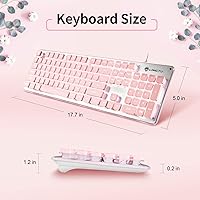
  • Dimensions: Measures 17.7″ long by 5″ wide by 1.2″ tall, fitting comfortably on standard desk setups.
  • Weight: Weighs approximately 1 pound, making it lightweight enough to reposition or transport without difficulty.
  • Multimedia Keys: Includes 12 Fn-layer multimedia shortcut combinations covering media playback, volume, and system functions.
  • OS Compatibility: Compatible with Windows XP, 7, 8, and 10, as well as macOS and Linux operating systems.
  • Chassis Material: Lower housing is constructed from ABS thermoplastic, complementing the aluminum top panel for a hybrid build.
  • Cable Type: Fixed USB-A cable that cannot be detached or replaced without modifying the keyboard.
  • Warranty: Backed by a 12-month quality guarantee and a 30-day full money-back return policy from the manufacturer.
  • Color Option: Available in a pink colorway designed to complement pastel and themed desk setups.
  • Driver Requirement: No software or driver installation is required — the keyboard is recognized automatically upon connection.

Related Reviews
Logitech MX Keys S
Logitech MX Keys S
81%
91%
Typing Feel & Key Response
93%
Multi-Device Connectivity
84%
Build Quality & Durability
94%
Battery Life
76%
Backlighting & Visibility
More
Logitech POP Keys Mechanical Wireless Keyboard
87%
88%
Overall Satisfaction
90%
Typing Comfort
85%
Customization Options
92%
Battery Life
75%
Bluetooth Connectivity
More
GUAZI STORE 83-Key Mechanical Keyboard
86%
91%
Typing Experience
88%
Build Quality
86%
Bluetooth Connectivity
89%
Backlighting Customization
80%
Ergonomics
More
Logitech MX Keys
Logitech MX Keys
80%
93%
Typing Experience
91%
Build Quality
88%
Multi-Device Switching
94%
Battery Life
92%
Cross-Platform Compatibility
More
ROCCAT Magma Silent Membrane Switch Gaming Keyboard
87%
92%
Typing Comfort
88%
RGB Customization
90%
Ease of Maintenance
78%
Durability
75%
Build Quality
More
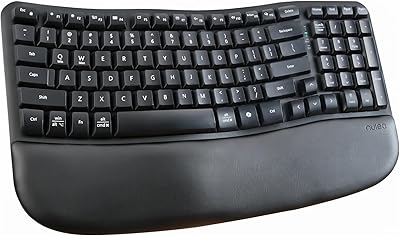
Nulea RT08 Wave Keys Wireless Ergonomic Keyboard
89%
95%
Typing Comfort
93%
Ergonomic Design
88%
Build Quality
91%
Wireless Stability
90%
Key Response Consistency
More
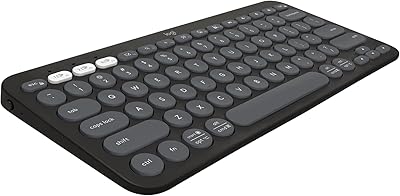
Logitech Pebble Keys 2 K380s
85%
93%
Multi-Device Switching
88%
Typing Comfort
91%
Portability & Form Factor
94%
Battery Life
89%
Key Noise Level
More
Logitech POP ICON Keys Wireless Bluetooth Keyboard
88%
88%
Typing Comfort
93%
Battery Life
91%
Multi-Device Compatibility
84%
Build Quality
86%
Portability & Size
More
Koolertron One Handed Mechanical Gaming Keyboard 48 Keys
86%
94%
Programmability & Macro Functionality
91%
Portability & Space Saving
72%
Build Quality & Durability
87%
Key Responsiveness & Accuracy
89%
User-Friendliness
More
Qisan Happy Deals 68-Keys Mechanical Gaming Keyboard Blue Switch
87%
92%
Portability
88%
Ergonomics
85%
Typing Experience
90%
Gaming Performance
87%
Build Quality
More

FAQ

Honestly, not quite — but it does feel better than a typical flat membrane board. The LANGTU 104-Key Membrane Keyboard uses membrane switches that add a bit of tactile response, so if you are coming from a laptop keyboard or a standard office keyboard, you will likely notice a satisfying improvement. That said, anyone who has used genuine mechanical switches will feel the difference immediately, so set expectations accordingly.

No, nothing at all. You just plug the USB-A cable into your computer and it starts working within seconds. This applies to Windows, Mac, and Linux — the keyboard is recognized automatically by all three operating systems without any additional setup.

It will work, but with a small caveat. The keyboard connects and functions normally, but some key labels do not directly correspond to macOS conventions. You may need to remap a few keys through System Preferences to get everything behaving as expected. Also keep in mind that newer MacBooks only have USB-C ports, so you will need a USB-A to USB-C adapter, which is not included.

Yes, the backlight can be switched off completely using the Fn key combination. You can also step through several brightness levels before turning it off entirely, so there is flexibility for different lighting environments.

This is one area where this pink keyboard holds up well over time. The legends are created using double-shot injection molding, which means the characters are physically molded into the keycap rather than printed on top. In practice, this means the letters will not fade or rub off even with heavy daily use.

The splash resistance is real and practical — several buyers have reported surviving coffee or water spills without any damage. That said, water resistant does not mean waterproof, so do not submerge it or let water pool inside the case. If you do spill something, flip it over and let it dry thoroughly before plugging it back in.

It depends on what you play. For casual gaming — movement keys, a few ability binds, and standard combos — the 25-key anti-ghosting handles things fine. If you play competitive titles that require fast, complex simultaneous key presses, the 25-key rollover limit will become a frustration. It is better suited to light gaming than to high-stakes competitive play.

It is not a quiet keyboard. The membrane construction dampens some noise compared to clicky mechanical boards, but the keys still produce an audible sound, and the spacebar in particular can have a slightly hollow rattle. In a private home office it is unlikely to bother you, but in a shared workspace or during video calls, it may be noticeable to others.

The cable is permanently attached and cannot be detached. A few users have noted it feels thinner and stiffer than expected, and there are some durability concerns for buyers who frequently move their keyboard around. If you plan to use it in a fixed desktop setup, it is unlikely to cause problems, but regular coiling and uncoiling may shorten its lifespan.

The manufacturer offers a 12-month warranty covering manufacturing defects, along with a 30-day full refund window for buyers who are not satisfied. LANGTU advertises a support response time of within 12 hours, and most verified buyers who contacted them report a reasonably prompt experience. Keep your order details handy if you need to reach out.