SunFounder Pironman 5-MAX Raspberry Pi 5 Case
SunFounder Pironman 5-MAX Raspberry Pi 5 Case — image 1
SunFounder Pironman 5-MAX Raspberry Pi 5 Case — image 2

SunFounder Pironman 5-MAX Raspberry Pi 5 Case — image 3
SunFounder Pironman 5-MAX Raspberry Pi 5 Case — image 4
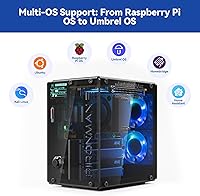
SunFounder Pironman 5-MAX Raspberry Pi 5 Case — image 5
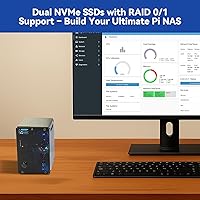
SunFounder Pironman 5-MAX Raspberry Pi 5 Case — image 6

SunFounder Pironman 5-MAX Raspberry Pi 5 Case — image 7

SunFounder Pironman 5-MAX Raspberry Pi 5 Case — image 8
SunFounder Pironman 5-MAX Raspberry Pi 5 Case — image 9
82%
18%

Overview

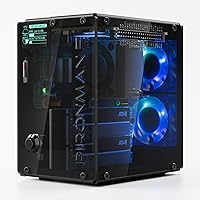
The SunFounder Pironman 5-MAX Raspberry Pi 5 Case is one of the few enclosures that treats the Pi 5 like a real PC rather than a hobbyist toy. Its dual NVMe M.2 slot design is what separates it from the crowd — virtually no competing case at this tier offers that. SunFounder has earned real credibility in the maker community through thorough documentation and responsive support, and this enclosure reflects that track record. The price sits firmly in the premium tier for Pi accessories, but for the right builder that spend is easy to justify. One hard caveat up front: the Raspberry Pi 5 board itself is not included, and this is a hands-on project build, not something you unbox and power on in ten minutes.

Features & Benefits

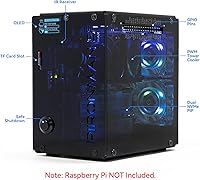
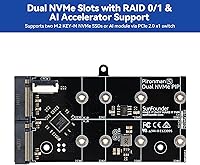
The two M.2 slots — bridged by a PCIe Gen2 switch — open up configurations most Pi cases simply cannot touch. Run RAID 0 for throughput if you are building a fast media server, or switch to RAID 1 if losing data is not an option. You can also pair one NVMe SSD with a Hailo-8L AI accelerator in the second bay, though getting that working takes real software effort. Cooling is a genuine strength: the PWM tower cooler and two RGB fans keep both the Pi and the drives stable under sustained workloads. The 0.96″ OLED display shows live CPU, temperature, memory, and IP data and wakes from sleep with a tap. Dual full-size HDMI ports and a clean USB-C power arrangement make the cable management noticeably tidier than most alternatives.

Best For

This Pi 5 enclosure hits its stride with builders who have a specific goal in mind. A compact home NAS with real RAID redundancy is the most natural use case — two NVMe drives, RAID 1, done, without any external adapters. AI hobbyists wanting to experiment with local inference via the Hailo-8L will find the dedicated slot useful, though the setup demands patience and Linux familiarity. Home Assistant power users will appreciate the RTC battery and safe shutdown protection for always-on reliability. It also suits anyone who wants a desk build that actually looks good — the transparent panels and RGB lighting deliver that without feeling cheap. SunFounder's tutorial ecosystem is a real differentiator for first-time builders on this platform.

User Feedback

The 4.5-star average across several hundred ratings reflects a genuine consensus rather than launch-day hype. Buyers consistently call out solid build quality, an OLED display that earns its place, and cooling that makes a measurable real-world difference compared to running the Pi bare or in a basic case. Assembly gets strong marks, with SunFounder's written guides doing most of the heavy lifting. The friction shows up on the software side: RAID configuration and OLED scripting can frustrate less experienced Linux users. Fan noise at full PWM is a recurring minor complaint — audible enough to notice if the unit sits on a desk. On value, opinion splits predictably: builders who actually need two drives find it well worth it; those who only need one SSD find the price gap hard to rationalize.

Pros

  • Dual NVMe M.2 slots with RAID 0/1 support is a rare and genuinely useful feature in the Pi case market.
  • The PWM tower cooler keeps the Pi 5 and both drives stable under sustained NAS or AI workloads without thermal throttling.
  • A 0.96″ OLED screen showing live CPU, memory, temperature, and IP data is a surprisingly practical daily convenience.
  • Two full-size HDMI ports support 4K output and eliminate the dongle hassle that plagues single-port alternatives.
  • The safe shutdown button and RTC battery backup make this Pi 5 enclosure well-suited for always-on deployments.
  • Build quality is consistently praised by buyers — the chassis feels solid and the transparent panels look premium on a desk.
  • SunFounder's tutorial library and responsive support genuinely reduce setup friction for complex configurations.
  • The external GPIO extender and IR receiver keep the expansion options open for tinkerers who want to go further.
  • Clear or smoked panel variants let you choose a look that fits your setup without paying extra for aesthetics.

Cons

  • The Raspberry Pi 5 board is sold separately, which significantly raises the real total cost of this build.
  • Configuring RAID or getting the OLED display scripts running requires solid Linux comfort — beginners will likely hit a wall.
  • At full PWM load the dual fans are audible enough to be distracting in quiet environments like bedrooms or small offices.
  • The PCIe Gen2 switch adds useful flexibility but introduces driver and compatibility nuances that can slow down initial setup.
  • Buyers who only need one NVMe SSD are paying a clear premium for dual-slot hardware they will never fully use.
  • The Hailo-8L AI accelerator configuration depends heavily on third-party software support that is still maturing.
  • At roughly 6 by 5 inches, the footprint is larger than minimalist Pi cases, which matters in tight desk or rack spaces.
  • RGB lighting customization, while nice, requires additional software setup that adds steps to an already involved build process.

Ratings

The scores below were generated by AI after analyzing verified buyer reviews for the SunFounder Pironman 5-MAX Raspberry Pi 5 Case worldwide, with spam, bot-generated, and incentivized submissions actively filtered out. Each category is grounded in real usage patterns drawn from hands-on builder feedback — reflecting both the aspects that make this enclosure stand out and the friction points that deserve honest scrutiny before you buy.

Build Quality
91%
The chassis feels noticeably more substantial than typical Pi enclosures — metal accents, tight panel fitment, and zero flex in the frame are qualities buyers mention repeatedly. People who have used cheaper plastic cases consistently say the Pironman 5-MAX feels closer to a small form-factor PC than a hobbyist accessory.
A handful of users noted that the transparent side panels can pick up light scratches during assembly if not handled carefully. The panel clips, while functional, require patience to seat correctly without forcing them — a minor frustration during what should be a clean first-build experience.
Cooling Performance
88%
Under extended NAS workloads and multi-hour stress tests, users consistently report that the Pi 5 stays well within safe thermal limits — something that bare-board or passively cooled setups simply cannot match. The PWM fan control means cooling scales up under load without running at full blast during lighter tasks.
At full cooling load — typically during intensive RAID rebuilds or sustained AI inference — the fans spin up audibly and can be distracting if the unit sits on a home office desk. A few users noted they wished the PWM curve was more easily configurable without editing config files directly.
Dual NVMe Storage
93%
Having two functional NVMe slots in a Pi enclosure is genuinely rare, and buyers building compact NAS setups repeatedly call this out as the single biggest reason they chose this case over alternatives. Whether running RAID 1 for home backup redundancy or pairing an SSD with a Hailo-8L accelerator, the flexibility is hard to find elsewhere at this size.
The PCIe Gen2 switch that enables both slots introduces a bandwidth trade-off — you are effectively splitting the Pi 5's single PCIe lane between two devices, which can limit peak throughput compared to a direct single-slot connection. Users running sequential read benchmarks noticed the difference, though for typical NAS and home server workloads it remains more than adequate.
Value for Money
74%
26%
For builders who actually need dual NVMe storage and RAID capability, the price makes sense — you are getting hardware that would otherwise require multiple adapters and compromised cable routing. The inclusion of the OLED display, RTC battery, and PWM cooling system means you are not paying solely for a decorative shell.
Buyers who only need a single NVMe slot find the price harder to rationalize against cheaper single-slot Pi 5 cases that cover the basics for significantly less. The Raspberry Pi 5 board not being included also affects perceived value — many first-time buyers are surprised by the total outlay once all components are added up.
Fan Noise
63%
37%
At idle and during light workloads, the PWM fans run at low speed and produce minimal noise — users running lightweight Home Assistant dashboards or basic tasks report the case is quiet enough for a shared living space or bedroom setup during inactive periods.
Under sustained heavy load — RAID rebuilds, continuous file transfers, or AI inference tasks — the fans ramp up noticeably and generate audible noise that multiple reviewers describe as distracting at desk range. For a 24/7 NAS or home office setup, placement in a closet or utility shelf can help solve this problem.
OLED Display
84%
The small screen punches above its size in everyday use — having CPU load, temperature, IP address, and disk status visible at a glance without SSHing into the machine genuinely speeds up monitoring workflows. The vibration wake-up feature is a clever touch that regular users say they rely on more than they originally expected.
Getting the OLED scripts running requires additional setup steps that are not straightforward on a fresh Raspberry Pi OS install, and this trips up less experienced users disproportionately. Display customization options exist but require editing configuration files, which limits accessibility for builders who want the feature but are not comfortable with terminal-level configuration.
Port Layout
89%
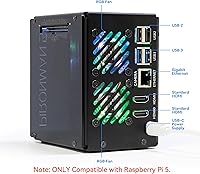
Having two full-size HDMI ports routed to the rear panel is a practical advantage that users with dual-monitor or display-plus-TV setups genuinely appreciate day to day. The USB-C power position also contributes to cleaner cable routing compared to competing cases where ports cluster awkwardly at the sides.
A small number of users noted that USB port access feels slightly tight with thick cables plugged in alongside the power connector, requiring some cable angle management. Buyers using this as a headless server may also feel that two HDMI ports add unnecessary bulk for a use case that never needs a display output.
Ease of Assembly
78%
22%
Physical assembly is consistently rated well, with SunFounder's printed guide and online documentation making the build process much more approachable than comparable open-frame or DIY solutions. Most experienced Pi builders report a satisfying, logical construction sequence where each component has a clearly designated location.
Builders installing both M.2 drives and the tower cooler in one session report that the process can feel cramped, with certain screw positions being hard to reach once some components are already installed. Absolute beginners occasionally mis-seat the PCIe riser or GPIO connections on the first attempt, requiring partial disassembly to correct.
Software & Docs
72%
28%
SunFounder provides a notably thorough documentation ecosystem including a dedicated wiki, video walkthroughs, and an active community forum — a meaningful differentiator from white-label Pi cases that ship with a folded paper insert and nothing else. Experienced Linux users typically find everything they need to get full functionality running within a reasonable amount of time.
The RAID configuration guide and OLED setup instructions assume a solid Linux baseline, which creates a frustrating experience for buyers more comfortable with consumer electronics than command-line tools. Some advanced features — particularly around software RAID management and the Hailo-8L integration — require consulting sources beyond SunFounder's own documentation.
Reliability & Uptime
87%
The combination of safe shutdown protection, an RTC battery for accurate timekeeping, and a robust cooling system gives this Pi 5 enclosure a meaningful reliability advantage over basic cases in always-on scenarios. Home Assistant and NAS users report stable multi-week uptime with no unexpected reboots or thermal-triggered shutdowns under normal operating conditions.
A small portion of users encountered reliability hiccups tied specifically to the PCIe switch during high-throughput dual-drive use, which occasionally required a reboot to restore normal drive recognition. These appear to be edge cases related to specific SSD and OS combinations rather than a systemic flaw, but they are worth noting for mission-critical deployments.
Expandability
83%
The external GPIO extender solves a real problem — most Pi cases effectively bury the GPIO header, forcing users to open the case every time they want to connect sensors or peripherals. Having it accessible outside the enclosure makes this case genuinely practical for automation and prototyping work without sacrificing the enclosed build.
The GPIO extender cable adds a degree of visual clutter to the exterior that minimalist builders may find unsatisfying, and the pin layout requires careful reference to documentation to avoid mis-wiring. Buyers expecting plug-and-play HAT compatibility may also find that not all Pi HATs fit cleanly alongside the tower cooler and panel layout.
Aesthetics & RGB
86%
The transparent panel design with addressable RGB lighting gives this Pi 5 enclosure a striking visual presence that plain acrylic or opaque cases simply cannot match, and buyers focused on desk aesthetics rate it highly. The smoked panel variant lets users enjoy the RGB ambiance without fully exposing the internal components.
Configuring the RGB lighting behavior requires running additional scripts rather than a simple toggle in a GUI, which adds setup friction for buyers who expected the lighting to work out of the box. Some users noted that the RGB adds a layer of visual busyness that looks less professional in a clean office setting compared to a solid-color build.

Suitable for:

The SunFounder Pironman 5-MAX Raspberry Pi 5 Case is built for makers who want their Pi 5 to do real work, not just run scripts in a plain acrylic shell. If you are planning a compact home NAS, the dual M.2 slots let you run two NVMe drives in RAID 1 for redundancy or RAID 0 for throughput — either way, that is functionality you simply cannot get from most Pi enclosures. Home Assistant enthusiasts running always-on automation setups will find real value in the RTC battery backup and the safe shutdown button, both of which protect against the kind of SD card corruption that plagues Pi home servers. AI hobbyists curious about local edge inference will appreciate having a dedicated M.2 bay for a Hailo-8L accelerator alongside a primary SSD, though that setup takes meaningful software effort to configure properly. Developers and educators who lean on SunFounder's documentation ecosystem will also feel at home here, since the brand provides structured tutorials that hold up well during complex builds.

Not suitable for:

If you are new to Linux or the Raspberry Pi ecosystem and expecting something close to a consumer appliance, the SunFounder Pironman 5-MAX Raspberry Pi 5 Case is likely to frustrate you before it impresses you. The RAID configuration, OLED display scripting, and PCIe switch setup all require hands-on Linux work that goes well beyond a basic install, and there is no shortcut around that. Buyers who only need a single NVMe SSD will also find it hard to justify the cost premium over simpler single-slot cases that perform the same basic function at a lower price. It is worth stating plainly that the Raspberry Pi 5 board is not included, which catches some buyers off guard and pushes the total investment noticeably higher. Anyone sensitive to fan noise should also take note: at full cooling load the dual RGB fans are audible, which makes a desk or bedroom setup less comfortable than a utility closet install.

Specifications

  • Compatible Board: Designed exclusively for the Raspberry Pi 5, supporting all RAM variants: 2GB, 4GB, 8GB, and 16GB.
  • NVMe Slots: Houses two independent NVMe M.2 SSD slots, both connected through an onboard PCIe Gen2 switch for simultaneous operation.
  • M.2 Form Factors: Each M.2 slot accepts drives in 2230, 2242, 2260, and 2280 form factors, covering virtually all common consumer NVMe SSDs.
  • RAID Support: Supports software RAID 0 (combined speed across two drives) and RAID 1 (mirrored redundancy), configured at the OS level.
  • PCIe Switch: An integrated PCIe Gen2 switch enables both M.2 slots to operate simultaneously from the Pi 5's single PCIe lane.
  • Cooling System: Includes a PWM-controlled tower cooler and two RGB fans that actively manage thermals for both the Pi 5 board and installed M.2 devices.
  • OLED Display: A 0.96″ OLED screen displays real-time system stats including CPU load, memory usage, temperature, IP address, and disk status.
  • Vibration Sensor: A built-in vibration sensor wakes the OLED display from auto-sleep mode when the case is lightly tapped, without requiring a button press.
  • HDMI Ports: Provides two full-size HDMI outputs, both supporting 4K video, routed to accessible rear-panel positions for cleaner cable management.
  • Power Input: Powered via USB-C at 5V/5A, matching the official Raspberry Pi 5 power specification for stable operation under load.
  • Shutdown Button: A metal power button triggers a safe software shutdown sequence, protecting the OS and file system from corruption on power-off.
  • RTC Battery: An onboard RTC battery keeps system time accurate across power cycles, which is especially useful for headless or always-on deployments.
  • GPIO Extender: An external GPIO extender exposes the Pi 5's GPIO pins outside the case, preserving hardware expandability without opening the enclosure.
  • IR Receiver: An integrated IR receiver allows remote control input, useful for media center or kiosk applications running on the Pi 5.
  • Panel Design: Dual transparent side panels are paired with addressable RGB lighting, available in either a clear or smoked tint finish.
  • Dimensions: The assembled case measures 6.1″ deep by 5.31″ wide by 3.66″ tall, making it compact but larger than minimalist Pi enclosures.
  • Weight: Fully assembled the unit weighs approximately 1.17 pounds, reflecting the metal and polycarbonate construction throughout.
  • Color Options: Available in two panel variants — clear for maximum RGB visibility and smoked for a more subdued, darker aesthetic.

Related Reviews
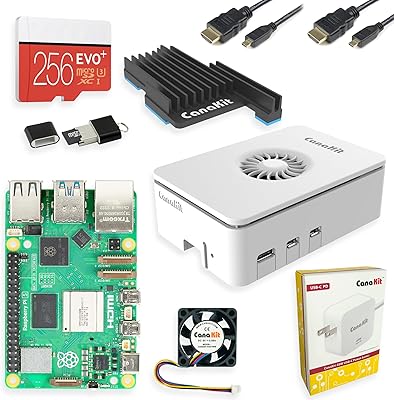
CanaKit Raspberry Pi 5 Starter Kit MAX 16GB 256GB
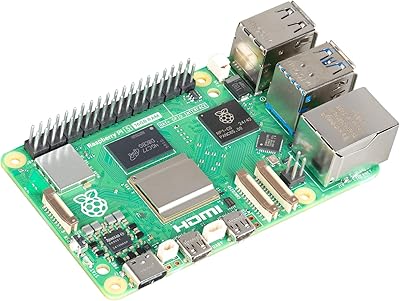
83%
93%
Bundle Completeness
78%
Value for Money
81%
Thermal Management
67%
Storage Performance
94%
Power Supply Quality
More
Raspberry Pi 5 4GB
Raspberry Pi 5 4GB
82%
93%
CPU Performance
91%
Storage & Boot Speed
78%
Value for Money
67%
Thermal Management
74%
GPU & Graphics Capability
More
Raspberry Pi 5 (16GB)
85%
93%
CPU Performance
91%
RAM & Multitasking
62%
Thermal Management
88%
Connectivity
86%
USB & Peripheral Support
More
RasTech Raspberry Pi 5 8GB Kit
84%
93%
CPU Performance
91%
Power Supply Compatibility
72%
Thermal Management
84%
Value for Money
88%
PCIe Expandability
More
SunFounder Raspberry Pi Pico Starter Kit
88%
88%
Build Quality
94%
Component Variety
90%
Ease of Setup
92%
Instruction Clarity
89%
Programming Language Support
More
Vilros Raspberry Pi 5 8GB Starter Kit
80%
93%
Ease of Setup
89%
Thermal Performance
91%
Build Quality
67%
Value for Money
88%
Cooling System Design
More
Vilros Raspberry Pi 5 4GB Starter Kit
82%
92%
Ease of Setup
89%
Cooling Performance
91%
Build Quality
84%
Value for Money
74%
RAM Adequacy
More
SunFounder Da Vinci Starter Kit for Raspberry Pi
86%
91%
Learning Experience
87%
Component Quality
94%
Video Tutorials
90%
Project Variety
85%
Compatibility
More
Raspberry Pi 5 8GB Starter Kit 64GB Edition
87%
88%
Performance
91%
Setup and Installation
83%
Cooling Efficiency
87%
Build Quality
92%
Value for Money
More
SunFounder Raspberry Pi Pico W Ultimate Starter Kit
81%
91%
Curriculum Quality
88%
Component Variety
78%
Beginner Accessibility
86%
IoT & Connectivity Features
84%
Value for Money
More

FAQ

No, it does not. The SunFounder Pironman 5-MAX Raspberry Pi 5 Case is an enclosure only — you need to supply your own Raspberry Pi 5 board separately. This catches some buyers off guard, so factor that into your total budget before purchasing.

The two M.2 slots accept NVMe drives in 2230, 2242, 2260, and 2280 lengths, which covers the vast majority of consumer SSDs available today. Standard M-key NVMe drives from brands like Samsung, WD, Kingston, and Crucial all fit without issue. Just make sure you are buying NVMe and not SATA M.2, as SATA M.2 drives are not compatible with the Pi 5's PCIe interface.

RAID 0 stripes data across both drives, effectively combining their speed — great for a fast media server or scratch storage where you can afford to lose data. RAID 1 mirrors the same data on both drives simultaneously, so if one drive fails you still have a complete copy — the right choice for anything you cannot afford to lose. For a home NAS storing important files, RAID 1 is almost always the smarter pick.

Yes, that mixed configuration is fully supported and is actually one of this enclosure's main selling points. You can run your OS and storage from one NVMe slot while the Hailo-8L occupies the second, giving you both local storage and hardware AI acceleration in one compact build. Keep in mind that configuring the Hailo-8L requires additional driver and software setup beyond a standard Pi OS install.

At idle or light loads, the fans run quietly enough that most people would not notice them across a room. Under sustained heavy workloads — like continuous NAS transfers or AI inference tasks — the fans spin up noticeably and become audible at close range. If this unit lives on your desk rather than in a closet or server area, fan noise at full load is worth factoring into your decision.

The physical assembly is well-documented and manageable for most people — SunFounder includes clear instructions and backs the product with online tutorials. Where things get harder is on the software side: setting up RAID, configuring the OLED display scripts, or getting the Hailo-8L running all require comfort with the Linux command line. If you are brand new to Pi and Linux, budget extra time for the software configuration steps.

Not out of the box on most setups — you typically need to run SunFounder's provided software scripts to enable the OLED readout. Once installed, it displays CPU, memory, temperature, IP address, and disk status in real time and enters auto-sleep after inactivity. The vibration wake-up feature is a nice touch once everything is configured, but the initial software setup is an extra step beginners should expect.

No — this enclosure is designed specifically around the Raspberry Pi 5 board layout, port positions, and PCIe connector. It will not physically fit or function correctly with the Pi 4, Pi 3, or any other board. If you are still on a Pi 4, you would need a completely different case.

Home Assistant OS runs on the Pi 5 just fine, and this Pi 5 enclosure is a popular choice for HA builds precisely because of the RTC battery, safe shutdown button, and GPIO extender. The OLED display and RGB features may require additional scripting since Home Assistant OS limits direct package installs by default. Many users run Home Assistant in a container or supervised setup on a standard Raspberry Pi OS image, which gives full access to all the case features.

The case uses a USB-C input at 5V/5A, which matches the official Raspberry Pi 5 power adapter specification. A power supply is not included, so you will need to provide your own — the official Raspberry Pi 27W USB-C adapter is the most reliable choice and is widely available. Using an underpowered adapter, especially with two NVMe drives installed, can cause instability or unexpected shutdowns.