Overview

The SunFounder Raspberry Pi Pico Starter Kit is one of the more practical options in the crowded microcontroller learning space — not because it overpromises, but because it covers the basics without leaving you hunting for extra parts. SunFounder has built a solid reputation in the DIY electronics community over the years, and this Pico starter kit reflects that experience. The board arrives with headers pre-soldered, which sounds minor until you have watched a beginner melt a breadboard trying to do it themselves. Online tutorials, a component-filled box, and the Pico itself all arrive together at a mid-range price that keeps it honest against the competition.
Features & Benefits

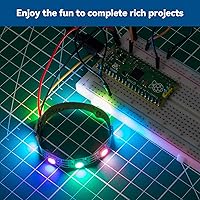
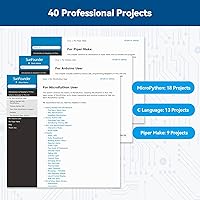
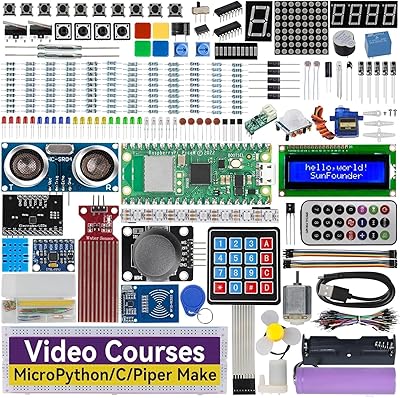
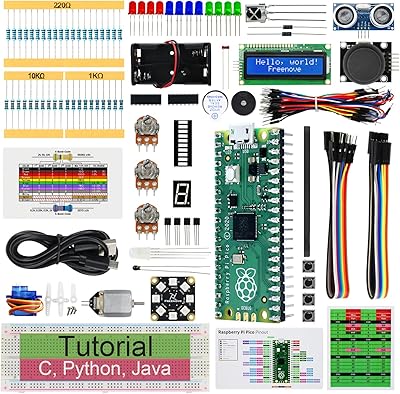
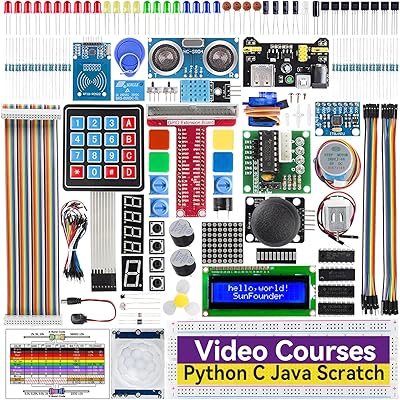
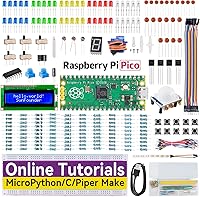
What sets this electronics learning bundle apart is the combination of breadth and structure. You get three programming lanes — MicroPython, C/C++, and Piper Make — the last being a Scratch-based visual option that meaningfully lowers the barrier for younger users. The 40 guided projects are sequenced intelligently, starting with blinking an LED and building toward Bluetooth communication, stepper motor control, and real-time clock projects. The component list is generous: a PIR motion sensor, WS2812 RGB LED strip, DHT11 temperature sensor, and an I2C LCD display are among the highlights. Tutorials live online, so they stay updatable in ways a printed manual never could.

Best For

This Pico starter kit suits a fairly specific buyer profile well. Students and self-directed learners will get the most out of it, especially those who prefer project-based learning over loose component bags with no guidance. It makes a strong gift for a tech-curious teenager — though younger beginners will lean on the Piper Make track, while older or more experienced users will gravitate toward MicroPython or C/C++. Hobbyists migrating from Arduino will appreciate the RP2040 dual-core processing power. One practical note: you will need a micro-USB cable and a computer to program the board, as neither comes in the box.

User Feedback

The SunFounder kit sits at a strong overall rating across a meaningful number of verified reviews, and the praise that comes up most consistently centers on tutorial quality and the sheer variety of components included. Buyers have shared real-world projects: home automation rigs, classroom electronics lessons, early robotics builds. On the flip side, a few reviewers have run into component quality issues — a defective sensor here and there — and complete coding newcomers sometimes find the C/C++ track less approachable than expected. Against comparable kits from Elegoo and Freenove, the SunFounder kit generally earns favorable comparisons, especially for the depth of its online documentation.

Pros

  • Pre-soldered headers on the included Pico board eliminate a fiddly first step that trips up many beginners.
  • Three programming language options let users choose a track that honestly matches their current skill level.
  • 40 sequenced projects create a real learning arc rather than a bag of isolated, disconnected experiments.
  • Online tutorials can be corrected and updated over time, which static printed manuals simply cannot offer.
  • Bluetooth capability via the HC-05 module opens up wireless project possibilities without sourcing extra hardware.
  • Component variety is impressive — a PIR sensor, servo motor, RTC module, and soil moisture sensor are all included.
  • The SunFounder kit holds its own against comparable offerings from Elegoo and Freenove at a similar price point.
  • Piper Make support meaningfully lowers the entry barrier for younger or non-technical learners.
  • The RP2040 dual-core processor provides genuine headroom for intermediate projects beyond basic LED blinking.

Cons

  • A micro-USB cable and a computer are not included, so out-of-box programming is not immediately possible.
  • The C/C++ track carries a steep learning curve for users with little to no prior coding experience.
  • Some buyers have reported receiving a defective component — typically a sensor — requiring a replacement request.
  • The fully online tutorial format depends on a reliable internet connection, which not all learning environments have.
  • The standard Pico lacks Wi-Fi; users needing wireless networking must upgrade to the Pico W separately.
  • Piper Make has limited long-term depth and learners will quickly outgrow it as a standalone programming track.
  • Managing 283 loose components can become disorganized fast without additional storage or labeling solutions.
  • No offline backup of tutorials is provided, leaving users dependent on the documentation site remaining accessible.

Ratings

The SunFounder Raspberry Pi Pico Starter Kit has been scored by our AI system after analyzing verified buyer reviews from around the world, with spam, bot submissions, and incentivized feedback actively filtered out before any scores were calculated. The ratings below reflect a genuine cross-section of real user experience — from enthusiastic beginners picking up a soldering-free board for the first time to seasoned hobbyists stress-testing the kit for intermediate builds — and do not smooth over the friction points actual buyers encountered. Both the standout strengths and the recurring limitations of this electronics learning bundle are represented transparently.
Tutorial Quality
88%
The step-by-step online tutorials are consistently the most praised aspect of this Pico starter kit, with buyers highlighting the clarity of circuit diagrams and the way each lesson builds genuine conceptual understanding rather than just walking you through copy-paste code. Students working through weekend projects report rarely feeling stranded when following the structured guidance.
A handful of users note that the tutorials occasionally assume a slightly higher baseline than advertised — particularly in the C/C++ track, where some explanations skip over foundational concepts that true beginners would need spelled out. Occasional code errors have also been flagged, though the online format at least allows for corrections over time.
Component Variety
86%
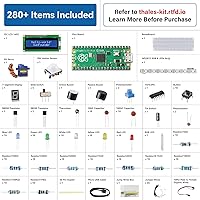
With 283 items covering everything from a PIR motion sensor and servo motor to a DS1307 real-time clock module and soil moisture sensor, the kit exposes learners to a genuinely broad range of electronics categories in one purchase. Buyers building home automation prototypes or school science projects rarely found themselves needing to order additional parts mid-project.
The sheer number of components can be disorienting at first — there is no pre-sorted compartmentalized tray, and keeping track of small passive components like resistors and capacitors requires personal organization effort from day one. A few buyers also wished the kit included spares for the most commonly damaged items, such as LEDs and small transistors.
Value for Money
83%
At a mid-range price that bundles the Pico board, 283 components, and 40 structured projects across three programming environments, the per-item cost is genuinely low compared to assembling an equivalent parts list independently. Users who compared it against Elegoo and Freenove kits at similar prices generally felt the SunFounder kit delivered equivalent or slightly better tutorial support.
Buyers who already own a collection of common components — breadboards, resistors, basic sensors — may feel they are paying for redundancy rather than net new value. The absence of a micro-USB cable is also a small but noticeable omission at this price tier, creating an immediate extra purchase for buyers who do not have one on hand.
Out-of-Box Experience
84%
The pre-soldered headers on the Pico board are a significant quality-of-life decision that most first-time kit buyers genuinely appreciate — plugging the board into a breadboard takes seconds rather than requiring a soldering iron and steady hands. New users report running their first working project within 20 to 30 minutes of opening the box.
The absence of a micro-USB cable and the need to install IDE software or MicroPython firmware means the experience is not entirely frictionless for every buyer. Complete beginners unfamiliar with development environments may spend a frustrating first hour on setup rather than on their first actual project circuit.
Project Depth & Progression
85%
The 40 projects are deliberately sequenced to build skills incrementally, starting with basic GPIO exercises and advancing toward Bluetooth communication, stepper motor control, and sensor-driven automation builds. Buyers who work through them in order consistently report a genuine sense of skill development rather than simply completing isolated, disconnected tasks.
Some intermediate users feel the project ceiling is not especially ambitious — the more advanced builds are interesting but do not push into truly complex territory. There is also no clear guidance on where to go once all 40 projects are complete, leaving learners to self-direct without a natural next step within the SunFounder ecosystem.
Board Quality
91%
The Raspberry Pi Pico is backed by the Raspberry Pi Foundation and its RP2040 dual-core processor delivers real headroom for projects that go well beyond simple LED blinking. Users working on robotics prototypes or multi-sensor builds report that the board handles concurrent tasks reliably without thermal issues or unexpected crashes.
The board itself draws very few complaints, but its 16 MB of flash storage can feel limiting when deploying more complex MicroPython programs with multiple imported libraries. The standard Pico also lacks Wi-Fi, a gap that becomes apparent when users want to explore connected or IoT-adjacent projects and must buy the Pico W separately.
Programming Flexibility
89%
Supporting three distinct programming environments in a single kit at this price point is genuinely uncommon — most competing kits lock you into one language. The ability to choose between MicroPython for rapid prototyping, C/C++ for performance-sensitive builds, and Piper Make for visual learning gives the kit a useful lifespan across different learning stages.
The three-language approach can create a fragmented experience for beginners who are unsure which track to start on and end up bouncing between them without making meaningful progress on any one path. The Piper Make track has notably limited depth, and most users outgrow it significantly faster than the other two options.
Online Documentation
82%
18%
The tutorials are hosted on a dedicated documentation site that is regularly updated, meaning errors get corrected and content can be expanded over time — something a printed manual is fundamentally unable to offer. Circuit diagrams are consistently clear, and the inclusion of both explanatory text and working code for each project reduces guesswork considerably.
Full dependence on an internet connection to access tutorials can be inconvenient in workshop or classroom settings with unreliable connectivity. A portion of users have also flagged inconsistent translation quality in certain technical passages — while the documentation is generally solid, some explanations read awkwardly and add confusion precisely when precision matters most.
Beginner Accessibility
78%
22%
The Piper Make track genuinely delivers on its beginner promise — the Scratch-style visual interface lets users with zero coding background interact with hardware and see real results almost immediately. Parents who worked through the kit with children aged 10 to 12 consistently praised how quickly their kids became engaged and self-directing.
Beginner-friendliness is largely confined to the Piper Make track; transitioning to MicroPython or C/C++ without prior coding knowledge is a significant jump that the tutorials do not always bridge gracefully. Absolute beginners who attempt those tracks without outside support often report frustration rather than the smooth learning curve the product description implies.
Component Reliability
67%
33%
The majority of users report that most components in the kit work correctly on first use, and for a bundle of this size and price, the overall pass rate is reasonable. Core items like the Pico board itself, the WS2812 RGB LED strip, and the servo motor consistently receive positive mentions in verified buyer reviews.
Isolated component failures are the most commonly cited frustration across reviews — a non-responsive sensor or a module that behaves inconsistently is particularly damaging for beginners who cannot yet distinguish a faulty part from a wiring mistake. The DHT11 sensor and certain passive components are mentioned most often in defective arrival reports.
Sensor & Module Quality
68%
32%
The majority of sensors perform reliably within typical project parameters — the ultrasonic module, PIR sensor, and HC-05 Bluetooth module in particular draw positive mentions for working accurately across a range of beginner and intermediate builds. For the price and quantity included, the overall performance compares favorably against similar budget-oriented electronics bundles.
Quality control consistency across production batches appears to be the core underlying issue, with some buyers receiving kits where one or two modules simply do not respond as expected from the outset. For newer builders, a dead sensor is not just an inconvenience — it creates genuine doubt about whether the problem is the part, the wiring, or their own code.
Intermediate Headroom
76%
24%
The RP2040 dual-core processor and the range of communication modules — including Bluetooth via HC-05 — give intermediate users meaningful hardware to grow into, and both MicroPython and C/C++ tracks provide enough depth to build genuinely functional prototypes. Hobbyists migrating from Arduino find the hardware ceiling comfortable and the transition manageable.
Once the 40 guided projects are completed, there is no clear structured path forward within the SunFounder ecosystem, leaving intermediate learners to self-direct without additional scaffolding. The lack of Wi-Fi support also becomes a notable gap for makers who want to move into IoT territory, requiring a separate board purchase to continue.
Packaging & Organization
71%
29%
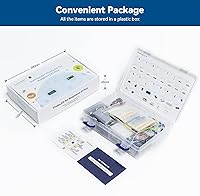
The outer box is compact and reasonably robust for ongoing storage, and components are initially separated into labeled bags that make first-time sorting manageable. The box dimensions are small enough to sit on a standard desk or shelf without consuming significant space between project sessions.
With 283 components spanning dozens of part types, the bagged approach becomes disorganized quickly once project work begins in earnest. There are no built-in compartments or a sorting tray, so buyers who do not invest in a separate storage solution early tend to end up with a jumbled collection that noticeably slows down project setup over time.
Customer Support
73%
27%
SunFounder's support team is generally responsive to defective or missing component reports, and most users who contact them receive replacement parts without needing to return the entire kit. An active online community and the brand's presence on GitHub also provide supplementary help beyond the official support channel.
Response times can vary, and buyers who discover a defective component mid-project — particularly those purchasing as a gift during peak periods — sometimes face delays that disrupt their build momentum. Support documentation is also not always synchronized with the most current kit version, which can create confusion during troubleshooting.

Suitable for:

The SunFounder Raspberry Pi Pico Starter Kit is a strong fit for anyone who wants a structured, hands-on introduction to microcontroller programming without having to assemble a parts list from scratch. Students from middle school through early college will find the tiered project structure genuinely useful — 40 projects that build on each other give a real sense of progression rather than a pile of disconnected experiments. The Piper Make track makes it accessible to younger learners around age 10 and up, while the MicroPython and C/C++ tracks give older or more technically inclined users real depth to grow into. Parents and educators hunting for a hardware kit that stays relevant beyond the first weekend will appreciate that the online tutorials are maintained and updatable, unlike a static printed guide. Hobbyists coming from Arduino who want to explore the RP2040 chip and MicroPython without sourcing sensors and modules separately will find this electronics learning bundle particularly convenient.
Not suitable for:

The SunFounder Raspberry Pi Pico Starter Kit is not the right pick for complete beginners who have zero coding background and expect to jump straight into C/C++ — that track assumes some familiarity with programming concepts, and the learning curve can feel steep without it. This Pico starter kit also will not satisfy advanced makers or engineers who already own a component library and just need the board itself, since paying for 280-plus parts you already have is poor value. The kit does not include a micro-USB cable or a computer, so buyers need to have both on hand before they can get started — a detail worth knowing before gifting it. Anyone specifically looking for built-in Wi-Fi should be aware that the standard Pico board does not include wireless networking; that requires the Pico W variant, which is not what ships in this bundle. If the primary goal is building a polished, consumer-grade finished product rather than learning, the form factor and component quality of certain included modules may feel limited.
Specifications

  • Brand: SunFounder is a well-established manufacturer specializing in DIY electronics kits and single-board computer accessories.
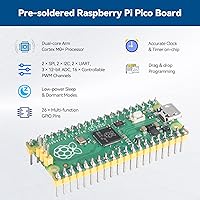
  • Included Board: The kit ships with a Raspberry Pi Pico board featuring an RP2040 chip and factory pre-soldered male headers.
  • Processor: The RP2040 uses a dual-core ARM Cortex-M0+ architecture capable of running at up to 133 MHz.
  • Storage: The Raspberry Pi Pico includes 16 MB of onboard flash memory for storing user programs and data.
  • Component Count: The kit contains 283 individual items spanning sensors, actuators, passive components, display modules, and communication modules.
  • Project Count: Forty structured projects are provided, progressing from basic input/output exercises to Bluetooth and motor control builds.
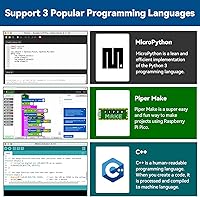
  • Languages: Supported programming environments include MicroPython, C/C++, and Piper Make, a visual block-based language based on Scratch.
  • Connectivity: The board exposes GPIO and I2C interfaces natively; Bluetooth connectivity is provided through the bundled HC-05 module.
  • Key Components: Notable included modules are an I2C LCD display, WS2812 RGB LED strip, servo motor, PIR sensor, DHT11 humidity sensor, DS1307 RTC, and ultrasonic distance sensor.
  • Package Weight: The complete kit weighs 1.15 pounds as shipped.
  • Package Dimensions: The retail box measures 9.8 × 8.58 × 2.36 inches.
  • Recommended Age: SunFounder recommends this kit for learners aged 10 and up, depending on prior coding exposure.
  • Tutorial Format: All tutorials are hosted online and include step-by-step written instructions, circuit diagrams, and working example code for each project.
  • IDE Support: The C/C++ track is compatible with the Arduino IDE; MicroPython projects can be developed using Thonny or any compatible MicroPython editor.
  • Header Status: Male headers on the Raspberry Pi Pico are pre-soldered at the factory, so no soldering tools or skills are required to begin.

Related Reviews

SunFounder Raspberry Pi Pico W Ultimate Starter Kit
81%
91%
Curriculum Quality
88%
Component Variety
78%
Beginner Accessibility
86%
IoT & Connectivity Features
84%
Value for Money
More
FREENOVE Super Starter Kit for Raspberry Pi Pico
85%
92%
Value for Money
88%
Ease of Use for Beginners
94%
Tutorial Quality
85%
Component Variety
90%
Project Range and Complexity
More
SunFounder Da Vinci Starter Kit for Raspberry Pi
86%
91%
Learning Experience
87%
Component Quality
94%
Video Tutorials
90%
Project Variety
85%
Compatibility
More
Vilros Raspberry Pi 4 4GB Starter Kit
81%
91%
Build Quality
88%
Thermal Management
84%
Ease of Setup
86%
Performance
89%
Power Supply Quality
More
Vilros Raspberry Pi 5 4GB Starter Kit
82%
92%
Ease of Setup
89%
Cooling Performance
91%
Build Quality
84%
Value for Money
74%
RAM Adequacy
More
Vilros Raspberry Pi 5 8GB Starter Kit
80%
93%
Ease of Setup
89%
Thermal Performance
91%
Build Quality
67%
Value for Money
88%
Cooling System Design
More
Raspberry Pi 5 8GB Starter Kit 64GB Edition
87%
88%
Performance
91%
Setup and Installation
83%
Cooling Efficiency
87%
Build Quality
92%
Value for Money
More
Vilros Pi Zero 2 W Starter Kit
78%
82%
Value for Money
88%
Build Quality
74%
Board Performance
63%
Out-of-Box Readiness
79%
Accessory Bundle
More
Vilros Raspberry Pi 4 Starter Kit 8GB
82%
93%
Out-of-Box Readiness
88%
Value for Money
84%
Thermal Management
86%
Accessory Completeness
89%
Power Supply Quality
More
CanaKit Raspberry Pi 3 B+ Starter Kit
83%
92%
Out-of-Box Experience
88%
Bundle Value
91%
Power Supply Quality
74%
Performance for Intended Use
86%
Storage & SD Card
More

FAQ

The headers are pre-soldered at the factory, so the board is ready to plug into a breadboard straight out of the box. This is a genuine convenience — soldering headers is a common stumbling block for beginners, and SunFounder has handled it for you.

You will need a micro-USB cable and a computer — Windows, Mac, or Linux all work fine. Neither is included in the kit, so have both ready before you open the box. Everything else you need for the guided projects is inside.

Start with Piper Make — it uses a visual, block-based interface similar to Scratch, so you can build working circuits without typing any syntax. Once you get comfortable with how the hardware responds, MicroPython is a natural next step and is generally much more readable than C/C++ for coding newcomers.

It can work well for that age group, but a lot depends on the child. A kid who has already played with Scratch or done any basic coding will adapt quickly using the Piper Make track. For a complete beginner at that age, having a parent or teacher involved in the early sessions makes a noticeable difference in how smoothly things go.

Yes, the C/C++ project track is built to work with the Arduino IDE. If you have used Arduino boards before, the toolchain will feel familiar. Just keep in mind that you will need to install the Raspberry Pi Pico board support package in the IDE first — it does not appear there by default.

No, the standard Pico board does not have built-in Wi-Fi. Bluetooth is available through the included HC-05 module, which covers a good range of wireless project types. If Wi-Fi is a hard requirement for your build, you would need a kit based around the Pico W variant instead.

Everything is online — there is no printed manual in the box. The upside is that the documentation can be corrected and expanded over time, which is something a physical book cannot do. You will need a reliable internet connection to follow along, so keep that in mind if you plan to work somewhere without consistent access.

The SunFounder Raspberry Pi Pico Starter Kit is generally considered competitive with both brands. SunFounder's main strength tends to be the depth and clarity of its online tutorials, while Elegoo and Freenove occasionally edge ahead on raw component quantity in certain bundles. If you can, check a sample of each brand's documentation online before deciding — the tutorial quality matters more than the parts count for most learners.

Contacting SunFounder's customer support directly is the fastest path to a resolution — most buyers report getting a replacement part sent out without needing to return the entire kit. It is worth testing each component early in the project sequence so you can flag any issues promptly rather than mid-build.

Absolutely. The board is a fully capable standalone microcontroller and is not locked to this kit in any way. Once you have worked through the structured projects, you can use it independently to build anything from a home temperature monitor to a small robotics platform. The components from the kit can all be repurposed freely for your own designs.