Overview

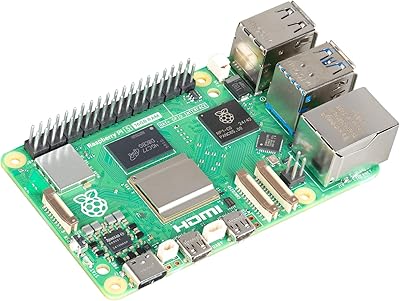
The CanaKit Raspberry Pi 5 Starter Kit MAX 16GB 256GB sits at the top of CanaKit's lineup — a fully loaded bundle built for anyone who wants to skip the parts-hunting exercise and get straight to building. With 16GB of RAM and 256GB of pre-loaded storage, it is the most capable configuration CanaKit offers for the Pi 5 platform. The Turbine White case gives it a distinctive visual identity that stands apart from a typical bare-board setup. Keep expectations grounded, though: this is a programmable compute platform, not a plug-and-play appliance. You still need a monitor, keyboard, and a clear project in mind before it becomes genuinely useful.
Features & Benefits

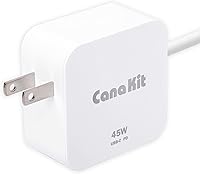
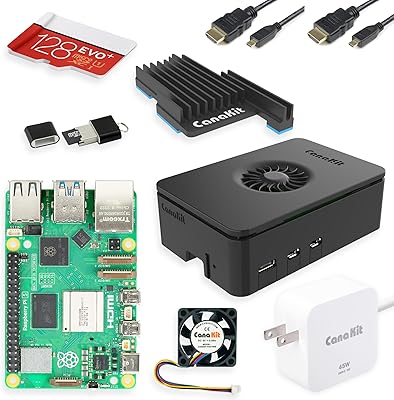
This all-in-one Pi 5 kit packs some genuinely thoughtful hardware decisions. The 45W USB-C power supply is a standout inclusion — Pi 5 boards are notoriously sensitive to underpowered adapters, and having a properly rated supply in the box removes a very common frustration. The 256GB Samsung EVO+ MicroSD arrives pre-loaded with 64-bit Pi OS, so first boot takes minutes rather than an afternoon of setup. Sixteen gigabytes of LPDDR4 RAM lets you run a browser, a terminal, and a containerized service simultaneously without hitting a wall. The low-noise bearing fan and large anodized heat sink handle sustained loads capably, and two 6-foot micro-HDMI cables mean a dual-display configuration is immediately within reach.

Best For

The CanaKit MAX bundle makes the most sense for people who want to avoid the compatibility guesswork that comes with sourcing Pi accessories one at a time. Students and developers building a capable Linux desktop on a constrained budget will find everything they need in one box. Home lab users running self-hosted services, lightweight containers, or network tools will appreciate the headroom 16GB provides. Educators deploying standardized classroom units benefit from the ready-to-boot configuration. Retro gaming and emulation builds also gain from the maxed-out RAM and fast storage. Experienced builders who already own a case and power supply, though, will likely find a board-only purchase the smarter financial call.

User Feedback

Across 163 ratings, this Pi 5 starter kit holds a 4.6 out of 5, and the buyer sentiment is fairly predictable in the best way. Bundle completeness and packaging quality attract the most consistent praise — people genuinely value opening one box and booting up within minutes. Thermal performance draws regular discussion: most users report the fan manages moderate workloads quietly, but it does become noticeable under heavy sustained use. A fair criticism from experienced builders is that the MicroSD card, while generously sized, cannot match NVMe speeds for storage-intensive tasks. Those needs would eventually require an NVMe HAT add-on. Dissatisfaction overall is rare and tends to come from buyers who already owned most of the included accessories.

Pros

  • Everything needed for a working Pi 5 setup ships in one box — no separate orders required.
  • The 45W USB-C power supply prevents the low-voltage warnings that plague cheaper adapter choices.
  • Pre-loaded Pi OS means most buyers reach a working desktop within 20 minutes of unboxing.
  • Sixteen gigabytes of RAM provides real headroom for multitasking, containers, and self-hosted services.
  • Two 6-foot micro-HDMI cables support a dual-monitor setup right out of the box.
  • The Turbine White case is more polished and better ventilated than most generic Pi enclosures.
  • A 256GB Samsung EVO+ card covers storage needs for the vast majority of Pi projects comfortably.
  • Bundle accessories are compatibility-matched to the Pi 5, not generic filler parts.
  • Strong community support for the Pi OS platform means help is easy to find when projects get complex.

Cons

  • MicroSD storage hits a performance ceiling quickly for database-heavy or high-write workloads.
  • The fan becomes audibly noticeable under sustained processing loads in quiet environments.
  • No NVMe storage solution is included despite the Pi 5 platform natively supporting it.
  • HAT expansion requires disassembling or replacing the included case, which interrupts ongoing projects.
  • Buyers who already own Pi accessories pay a bundled premium for items they do not need.
  • The kit format offers no option to swap or downgrade individual components at checkout.
  • MicroSD read/write speeds lag well behind what an NVMe HAT setup would deliver for the same board.
  • Regional buyers may find the power supply plug type incompatible without a separate adapter.

Ratings

The CanaKit Raspberry Pi 5 Starter Kit MAX 16GB 256GB has been evaluated by our AI rating system after analyzing verified buyer reviews from global marketplaces, with spam, bot-generated, and incentivized feedback actively filtered out. Scores reflect the honest consensus of real users — hobbyists, educators, developers, and first-time Pi builders alike. Both the standout strengths and the genuine frustrations are represented transparently in the breakdowns below.
Bundle Completeness
93%
Buyers repeatedly call this one of the few kits where nothing feels missing. Getting a power supply, case, cooling, cables, and a pre-loaded card in one box removes the parts-hunting process entirely, which first-time Pi users especially appreciate. The accessories are purpose-matched to the Pi 5 rather than generic fillers.
Veteran builders who already own a quality case and power supply from a previous Pi generation find the bundle format redundant and less cost-efficient than buying the board alone. The kit structure does not allow buyers to swap or downgrade individual components.
Value for Money
78%
22%
For newcomers, the per-component math tends to work out reasonably well — sourcing a quality 45W PD supply, a proper heat sink, and a 256GB card individually rarely comes out cheaper when factoring in compatibility research time. The top-tier RAM and storage configuration adds tangible longevity to the purchase.
Experienced users who already own accessories feel they are paying a premium for items they do not need. The MicroSD card, while generous in size, is not the fastest storage option available for the Pi 5 platform, which creates some friction for buyers expecting NVMe-level performance at this price tier.
Thermal Management
81%
19%
The combination of the large black-anodized heat sink and the bearing fan keeps the Pi 5 running at stable temperatures during moderate workloads like web browsing, light coding sessions, and media playback. Users running home automation dashboards and similar always-on tasks report no throttling concerns under normal conditions.
Under sustained heavy workloads — compiling code, running multiple containers, or prolonged emulation sessions — the fan becomes audibly noticeable. A subset of users in quiet environments, such as home offices or bedrooms, find the fan noise more distracting than expected for a device of this size.
Storage Performance
67%
33%
A 256GB Samsung EVO+ MicroSD card is a genuinely comfortable amount of space for most Pi projects, and arriving pre-loaded with 64-bit Pi OS means the first boot experience is smooth and fast. For general project storage, media files, and OS use, it handles day-to-day tasks without complaint.
The MicroSD interface is a known bottleneck on the Pi 5 platform, and users running database-backed applications or self-hosted services with heavy read/write cycles will feel the ceiling fairly quickly. Those workloads really benefit from an NVMe HAT solution, which is an additional cost not included here.
Power Supply Quality
94%
The 45W USB-C PD supply is one of the most praised individual components in the kit. Pi 5 boards are genuinely sensitive to underpowered adapters, and the low-voltage warning that plagues cheaper third-party supplies is essentially absent for users relying on this included unit. It powers the board confidently even with peripherals attached.
A small number of users in regions with less common outlet configurations note the lack of interchangeable plug adapters. The supply is otherwise difficult to fault — the only real critique is that its quality makes the rest of the kit feel like it should have cost more.
RAM & Multitasking
91%
Sixteen gigabytes of LPDDR4 is a meaningful upgrade over the 4GB and 8GB configurations for anyone planning to run a browser alongside development tools, or spin up lightweight virtual machines and Docker containers. Users building home lab environments with several simultaneous services consistently report that the memory headroom makes a practical difference.
For simple single-purpose deployments — a retro gaming box, a basic media player, or a single-service home automation hub — 16GB is more RAM than most tasks will ever consume. Buyers with narrowly scoped projects may find the 8GB configuration would have served them equally well at a lower price.
Case & Build Quality
83%
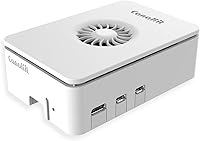
The Turbine White enclosure is noticeably more refined than standard snap-together Pi cases. It provides proper ventilation channels around the fan and heat sink while keeping the board securely protected. The overall aesthetic is clean enough that it sits comfortably on a desk without looking like a hobbyist prototype.
A few users note that accessing GPIO pins or adding HAT expansions requires disassembly, which is a real inconvenience for projects that rely on physical add-on boards. The case prioritizes a finished look over modularity, which is the right call for some buyers and the wrong one for others.
Display Output & Cables
88%
Two 6-foot micro-HDMI cables supporting dual 4K 60p output is a practical inclusion that most competing kits skip. Users setting up a proper desktop workstation appreciate being able to connect two monitors immediately without a separate cable purchase. The 6-foot length gives real flexibility in desk and TV setups.
Micro-HDMI connectors are less common in most households, so users who misplace or damage the included cables will need a specific replacement rather than reaching for a spare. The cables themselves are functional but a small number of buyers report the connector fit feels slightly loose on certain monitor ports.
Setup Experience
92%
The pre-loaded SD card and included quick-start documentation make the initial setup approachable for complete beginners. Most users report reaching a working Pi OS desktop within 15 to 20 minutes of opening the box, which is a sharp contrast to assembling components from scratch. CanaKit's setup guides have a solid long-standing reputation.
Users who want to start with a custom OS image or a 64-bit Lite install still need to re-flash the card themselves, which negates part of the convenience factor. The setup experience is clearly optimized for Pi OS with a desktop — anything outside that path requires manual work.
Cooling Noise Level
71%
29%
Under light to moderate workloads, the low-noise bearing fan is quiet enough that most users in typical living or office environments barely register it. For daytime use and interactive computing sessions, the noise profile is acceptable and noticeably better than generic fans used in cheaper third-party cooling solutions.
The fan does ramp up during sustained processing, and in genuinely quiet environments — late-night work, a bedroom setup, a library terminal — that ramp-up becomes a real annoyance. Some users have explored passive cooling modifications specifically to eliminate the fan noise, which suggests the noise floor matters more than the listing implies.
Accessory Quality
86%
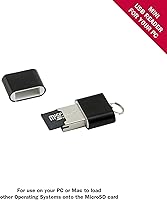
The included USB MicroSD card reader, display cables, and heat sink all feel like components chosen for actual compatibility rather than cost-cutting. Compared to third-party kit bundles that pad the accessory list with off-brand fillers, the CanaKit MAX bundle holds its own in terms of accessory thoughtfulness and fit.
None of the accessories are exceptional in isolation — the cables are standard, the card reader is basic, and the heat sink, while effective, is a fairly conventional design. Users with specific premium preferences will likely replace one or two items over time, but nothing is genuinely substandard.
Packaging & Unboxing
89%
Packaging is consistently highlighted in buyer reviews as a positive first impression. Components are organized, clearly labeled, and protected well for shipping. For gift purchases — a common use case given the product category — the presentation quality adds real perceived value and makes the kit feel like a complete, intentional product.
The packaging, while attractive, is not particularly eco-conscious, and a small number of environmentally minded buyers note the excess of plastic inserts and non-recyclable materials. It is a minor point but worth noting for buyers who factor sustainability into purchase decisions.
Expandability
62%
38%
The Pi 5 platform itself has solid expandability potential — NVMe HATs, camera modules, GPIO-based sensors, and dozens of community-supported add-ons work well with the board. For users whose projects will grow over time, the underlying hardware supports a meaningful upgrade path beyond what the kit includes.
The CanaKit Turbine case does limit HAT expansion without modification or replacement, and the kit includes no NVMe storage solution despite the Pi 5 natively supporting it. Users with expansion in mind will outgrow the included accessories fairly quickly, adding incremental cost that narrows the kit's value proposition.
Linux OS Compatibility
87%
The pre-installed 64-bit Pi OS is a polished, well-supported Linux environment with an active community and extensive documentation. For users new to Linux, it offers a low-friction entry point, and for developers, the Debian base means most standard toolchains and package managers work exactly as expected.
Pi OS, while capable, is not a drop-in replacement for a full desktop Linux distribution in every scenario. Users expecting Ubuntu-level software compatibility or those needing specific enterprise tools may hit friction points that require additional configuration time beyond what the kit's plug-and-play framing suggests.

Suitable for:

The CanaKit Raspberry Pi 5 Starter Kit MAX 16GB 256GB is the right call for anyone who wants to start building immediately without spending hours cross-referencing compatibility charts or waiting on multiple deliveries. First-time Pi buyers benefit the most — the included 45W power supply, pre-loaded SD card, and purpose-built cooling solution remove the three most common rookie mistakes in a single purchase. Students and developers setting up a capable Linux workstation on a limited budget will find 16GB of RAM genuinely useful once they start running a browser, a code editor, and a local server side by side. Home lab enthusiasts who want to self-host services like a media server, a VPN endpoint, or a lightweight container stack will appreciate the memory headroom and the stable thermal setup. Educators deploying standardized classroom units also benefit, since each kit arrives in an identical, ready-to-boot configuration that reduces setup time across multiple stations.
Not suitable for:

The CanaKit Raspberry Pi 5 Starter Kit MAX 16GB 256GB is a harder sell the moment a buyer already owns a quality Pi case, a proper USB-C power supply, and a spare MicroSD card from a previous build. For those people, the kit format means paying for accessories that will end up in a drawer, and the board-only purchase is the more rational choice. Users who need fast local storage for database-heavy applications or high-throughput self-hosted services will also run into the limits of MicroSD fairly quickly — the Pi 5 supports NVMe via a HAT expansion, but nothing in this kit gets you there. It is also worth being clear-eyed about what the Pi 5 platform is and is not: this is a capable single-board computer, but it is not a replacement for a dedicated workstation when it comes to heavy compilation, complex virtualization, or GPU-accelerated tasks. Buyers expecting a quiet, fanless device for a bedroom or library setup may also find the fan noise under load more disruptive than anticipated.

Specifications

  • Processor: The board uses a Broadcom quad-core 64-bit CPU running at 2.4 GHz, the same silicon found in all Raspberry Pi 5 units.
  • RAM: 16GB of LPDDR4 memory is installed directly on the Pi 5 board, representing the highest RAM configuration currently available for this platform.
  • Storage: A 256GB Samsung EVO+ MicroSD card is included and arrives pre-loaded with the 64-bit Raspberry Pi OS desktop environment.
  • Power Supply: A CanaKit 45W USB-C Power Delivery supply is included, rated to meet the Pi 5 board's increased power requirements without triggering undervoltage warnings.
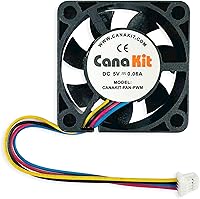
  • Cooling Fan: A low-noise bearing system fan is included and mounts directly onto the board to actively move air across the heat sink during operation.
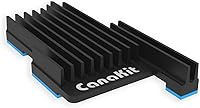
  • Heat Sink: A large black-anodized aluminum heat sink is included and designed to pair with the active fan for sustained thermal management under load.
  • Case: The CanaKit Turbine White enclosure houses the Pi 5 board and integrates ventilation channels to support airflow from the included fan.
  • Display Output: The Pi 5 board provides two micro-HDMI ports, both capable of driving displays at up to 4K resolution at 60 frames per second simultaneously.
  • Display Cables: Two 6-foot micro-HDMI to standard HDMI cables are included, one for each display output port on the board.
  • Card Reader: A USB MicroSD card reader is included to allow users to re-flash or back up the included storage card from any computer.
  • Operating System: The pre-installed OS is the official 64-bit Raspberry Pi OS, a Debian-based Linux distribution maintained by the Raspberry Pi Foundation.
  • USB Ports: The Raspberry Pi 5 board provides two USB 3.0 ports and two USB 2.0 ports for connecting peripherals such as keyboards, mice, and drives.
  • Networking: The Pi 5 board includes dual-band 802.11ac Wi-Fi and Bluetooth 5.0, along with a Gigabit Ethernet port for wired connections.
  • Package Weight: The complete kit package weighs 1.21 pounds, making it straightforward to ship and handle without specialized equipment.
  • Package Dimensions: The retail box measures 9.41 x 6.02 x 2.28 inches, sized to contain all included accessories in a single organized package.
  • Platform: The kit runs Linux exclusively; no native Windows or macOS support exists for the Raspberry Pi 5 platform at this time.
  • Processor Brand: The CPU is manufactured by Broadcom, specifically the BCM2712 system-on-chip designed for the Raspberry Pi 5 generation.
  • GPIO: The Pi 5 board exposes a 40-pin GPIO header for connecting sensors, HAT expansion boards, and other hardware peripherals.

Related Reviews

CanaKit Raspberry Pi 5 Starter Kit PRO (8GB RAM, 128GB)
87%
94%
Ease of Assembly
91%
Cooling Performance
93%
Processing Power & Speed
78%
Value for Money
96%
Multitasking Capability
More
Vilros Raspberry Pi 5 Starter Kit 4GB
86%
94%
Build Quality
91%
Cooling Performance
88%
Ease of Setup
90%
Included Accessories
85%
Performance under Load
More
Vilros Raspberry Pi 5 8GB Starter Kit
80%
93%
Ease of Setup
89%
Thermal Performance
91%
Build Quality
67%
Value for Money
88%
Cooling System Design
More
Raspberry Pi 5 8GB Starter Kit 64GB Edition
87%
88%
Performance
91%
Setup and Installation
83%
Cooling Efficiency
87%
Build Quality
92%
Value for Money
More
CanaKit Raspberry Pi 3 B+ Starter Kit 32GB EVO+ Edition
85%
92%
Value for Money
91%
Ease of Setup
72%
Wi-Fi Connectivity
85%
Build Quality
86%
Performance
More
iRasptek Raspberry Pi 5 Starter Kit 8GB RAM 128GB SSD Edition
85%
91%
Performance
88%
Build Quality & Durability
86%
Cooling & Thermal Management
94%
Ease of Setup
90%
Storage Speed & Reliability
More
SunFounder Pironman 5-MAX Raspberry Pi 5 Case
85%
94%
Cooling Performance
90%
Build Quality
72%
Ease of Setup
85%
NVMe SSD Installation
88%
System Monitoring Display
More
Raspberry Pi 5 (16GB)
85%
93%
CPU Performance
91%
RAM & Multitasking
62%
Thermal Management
88%
Connectivity
86%
USB & Peripheral Support
More
SunFounder Raspberry Pi Pico Starter Kit
88%
88%
Build Quality
94%
Component Variety
90%
Ease of Setup
92%
Instruction Clarity
89%
Programming Language Support
More
FREENOVE Super Starter Kit for Raspberry Pi Pico
85%
92%
Value for Money
88%
Ease of Use for Beginners
94%
Tutorial Quality
85%
Component Variety
90%
Project Range and Complexity
More

FAQ

You will still need a monitor, a keyboard, and a mouse — those are the only things missing for a complete desktop setup. Everything else is in the box: power supply, case, cooling, a pre-loaded SD card, and two display cables. Most buyers are genuinely surprised by how complete it is.

It comes pre-loaded with the 64-bit Raspberry Pi OS desktop, so you can plug it in and boot straight into a working Linux environment. If you want a different OS or a headless Lite image, you can re-flash the card yourself using the included USB card reader and the free Raspberry Pi Imager tool.

Yes. The Pi 5 board has two micro-HDMI ports, and the kit includes two 6-foot cables to match. Both ports support up to 4K at 60fps, so a dual-display desktop setup works right out of the box without any additional hardware.

Under light workloads like browsing or light coding, the fan is fairly quiet and most people do not notice it in a typical room. When the board is under sustained heavy load — compiling, running multiple containers, or extended emulation — the fan does ramp up and becomes audible. If absolute silence is a requirement, a passive cooling solution with a larger heat sink is worth investigating as an aftermarket swap.

It handles retro emulation very well. The 16GB of RAM is far more than emulation software typically needs, and the fast MicroSD card keeps load times reasonable. Systems up through PlayStation 1, Nintendo 64, and Dreamcast run smoothly, and many users have success with PlayStation 2 titles as well, though results vary by game.

Yes, but it requires an NVMe HAT add-on board, which is sold separately. The Pi 5 supports NVMe storage natively through its PCIe interface, and switching to an SSD makes a noticeable difference for database-heavy or high-write workloads. The included Turbine White case may need to be replaced or modified to accommodate an NVMe HAT, depending on the HAT form factor you choose.

Probably not the full kit. The Pi 4 power supply is not compatible with the Pi 5, which does need a proper USB-C PD supply, but if you are comfortable sourcing that individually along with an updated case, buying the board on its own is a more cost-efficient path. The CanaKit Raspberry Pi 5 Starter Kit MAX 16GB 256GB is really designed to shine for buyers who are starting fresh rather than upgrading an existing setup.
It is a real, capable Linux computer that handles a wide range of practical tasks. Developers use it as a daily Linux workstation for coding, students use it for learning programming and networking, and home lab users run self-hosted services like media servers, VPNs, and home automation platforms on it. It has real limits compared to a full desktop PC — heavy video editing or complex virtualization are not realistic use cases — but for the workloads it is designed for, it performs reliably.

CanaKit provides support through their website and is generally responsive to hardware issues with their included accessories. The Raspberry Pi 5 board itself is covered by the Raspberry Pi Foundation's standard warranty. For the specific terms, it is worth checking CanaKit's support page directly, as warranty coverage can vary by region and component.

It is actually one of the better platforms for learning to code. The pre-loaded Raspberry Pi OS includes Scratch, Python tools, and Thonny IDE out of the box, all aimed at learners from school age upward. The official Raspberry Pi Foundation also has a large library of free beginner projects and tutorials that pair directly with this hardware. The only caveat is that children will still need a monitor and keyboard, and some initial adult help getting oriented with Linux is useful.