Overview

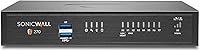
The SonicWall TZ270 Gen 7 Network Firewall is SonicWall's entry-level Gen 7 appliance built for small businesses, lean branch offices, and retail environments that need real security without enterprise-scale budgets. One critical detail buyers often miss: this listing covers the hardware only — no security subscription is included, and meaningful threat prevention features require a paid service plan on top. That said, the physical unit is genuinely compact — under two pounds, small enough for a desktop — yet it represents a meaningful step forward from older TZ-series hardware in both throughput and inspection depth. The balance here is real enterprise-grade protection architecture paired with deployment tools designed for lean IT teams.
Features & Benefits

At 2 Gbps of firewall throughput with 750 Mbps of active threat prevention, the TZ270 handles typical SMB traffic loads without becoming a bottleneck — even as cloud app usage and remote workers add strain. Eight Gigabit Ethernet ports give you genuine flexibility in network segmentation, and support for up to 64 VLANs means you can properly isolate guest networks, point-of-sale systems, and corporate traffic without hardware sprawl. Built-in SD-WAN and site-to-site VPN reduce reliance on costly dedicated links for multi-location setups. The TLS 1.3 decryption capability is worth calling out specifically — it inspects encrypted traffic that most SMB firewalls simply wave through. Zero-Touch Deployment lets remote offices come online without dispatching a technician.

Best For

This SonicWall appliance makes the most sense for small and mid-sized businesses that need enterprise-grade protection without the cost or complexity of larger platforms. Branch offices and retail locations benefit most — especially when IT staff are stretched thin and remote management is a necessity, not a luxury. Organizations already running older SonicWall TZ hardware will find the upgrade path familiar and relatively painless. Network admins who want VPN and SD-WAN consolidated into one compact desktop unit, without needing rack space, will appreciate the form factor. It is also a strong fit for businesses handling customer data or payment information where deep packet inspection is non-negotiable but throughput cannot be sacrificed.

User Feedback

Buyers consistently highlight how straightforward the initial setup is, particularly for those already familiar with SonicWall's ecosystem — Zero-Touch Deployment gets remote sites running faster than most comparable appliances. The recurring criticism, however, is hard to ignore: the hardware price is just the starting point. Without an active subscription, core services like intrusion prevention and content filtering are locked out, and that ongoing cost catches some buyers off guard. The SonicOS management interface draws mixed opinions — experienced network admins find it capable, while newcomers describe a steep learning curve. Compared to Fortinet FortiGate or Cisco Meraki, this Gen 7 firewall holds its own on specs but may require more patience to configure confidently.

Pros

  • Zero-Touch Deployment makes multi-site rollouts practical without sending IT staff to every location.
  • Eight Gigabit Ethernet ports offer genuine network segmentation flexibility that many competing SMB appliances cannot match.
  • Built-in SD-WAN and VPN consolidate two critical network functions into one compact desktop unit.
  • TLS 1.3 decryption lets this Gen 7 firewall inspect threats hidden inside encrypted traffic — a real differentiator at this tier.
  • Support for up to 64 VLANs allows proper isolation of guest, POS, and corporate traffic without adding hardware.
  • The compact form factor fits discreetly in a retail back office, server closet, or under a desk.
  • Existing SonicWall customers get a smooth upgrade path with familiar tooling and centralized management.
  • At 750,000 concurrent connections, the TZ270 has meaningful headroom for growing SMB environments.
  • Application inspection and IPS throughput hold up well under realistic mixed-traffic SMB workloads.

Cons

  • No security subscription is included — meaningful threat protection requires significant additional annual licensing costs.
  • Real-world inspected throughput drops noticeably below the headline 2 Gbps spec when full inspection and VPN run simultaneously.
  • SonicOS has a steep learning curve that can cost first-time deployers days of configuration time.
  • Official documentation has notable gaps, particularly around Gen 7-specific features introduced after launch.
  • No built-in PoE support means an external switch is required for PoE-dependent devices like access points or IP phones.
  • Access point support is capped at 16, which limits wireless expansion for growing office environments.
  • TLS inspection, while valuable, introduces certificate management overhead and can break compatibility with some internal applications.
  • The appliance-only listing format misleads buyers who assume the purchase price covers a functional security solution.
  • Advanced SD-WAN features are gated behind specific subscription tiers, adding cost for businesses that need full capability.

Ratings

The SonicWall TZ270 Gen 7 Network Firewall earns a nuanced set of scores based on AI analysis of verified buyer reviews sourced globally, with spam, bot-generated, and incentivized submissions actively filtered out. The ratings below reflect real-world deployment experiences from network admins, IT consultants, and SMB owners — not marketing benchmarks. Both the standout strengths and the recurring frustrations are represented honestly.
Threat Prevention Effectiveness
88%
Users running active security subscriptions consistently report strong protection against intrusion attempts and encrypted threat vectors. The inspection depth at this price tier surprises even admins who came from competing platforms, with several noting it caught threats that slipped past older hardware.
Without an active subscription, much of the threat prevention capability is essentially dormant. Buyers who did not factor in licensing costs upfront felt the hardware-only unit delivered far less than advertised protection out of the box.
Value for Money
62%
38%
The hardware acquisition cost sits comfortably within SMB budgets, and for organizations that already own a SonicWall service license, the TZ270 represents a solid generational upgrade without a painful capital outlay.
Once recurring subscription fees are factored in, the total cost of ownership climbs considerably. Several buyers expressed frustration that the appliance-only listing felt misleading — the unit is significantly less useful without paid services bolted on.
Setup & Deployment
83%
Zero-Touch Deployment is a genuine differentiator for multi-site businesses. Admins deploying to remote retail locations or branch offices praised the ability to bring sites online without sending a technician, saving meaningful time and travel costs.
The experience diverges sharply depending on prior SonicWall familiarity. First-time users and those migrating from consumer-grade routers reported that initial configuration required considerably more effort than expected, with some spending hours on basic policy setup.
Throughput Performance
86%
At typical SMB traffic loads — cloud apps, VoIP, video conferencing, and light file transfers running concurrently — the TZ270 handles traffic without becoming a bottleneck. Admins at offices with 30 to 80 users reported consistent, latency-free performance during peak hours.
Throughput drops noticeably when full threat inspection is enabled alongside VPN tunnels, which is how most production environments actually run it. The gap between the headline 2 Gbps figure and real-world inspected throughput can surprise buyers who took the spec sheet at face value.
Management Interface (SonicOS)
67%
33%
Experienced SonicWall administrators find SonicOS 7 a meaningful improvement over previous generations, with a cleaner dashboard layout and more logical policy organization. Those managing multiple TZ-series appliances centrally appreciate the consistency across the platform.
For admins new to SonicWall, the interface has a steep learning curve that documentation alone does not fully address. Several users described spending days configuring features that competing platforms like Meraki handle through guided wizards in under an hour.
Hardware Build Quality
81%
19%
The compact desktop chassis feels solid and professional, not plasticky. At under two pounds it is easy to mount discretely in a retail back office or small server closet, and the unit runs cool and quiet under sustained load.
The form factor, while convenient, lacks rack-mount options out of the box, which frustrated some admins who wanted cleaner cable management in structured environments. A few users also noted the console port placement made simultaneous access awkward.
Port Availability & Connectivity
84%
Eight Gigabit Ethernet ports is genuinely generous at this tier — most competing SMB appliances offer four to six. Combined with two USB 3.0 ports, the connectivity options give admins real flexibility for wiring segmented networks without adding a switch immediately.
There is no built-in PoE support, which limits direct attachment of PoE-dependent devices like access points or IP phones without an external switch. Buyers expecting PoE from the spec sheet were caught off guard when they discovered it was absent.
SD-WAN Capability
79%
21%
Built-in SD-WAN is a meaningful inclusion at this price point and works well for small multi-site businesses looking to optimize bandwidth across multiple ISP links. Admins managing hybrid work environments cited it as one of the primary reasons they chose this unit over alternatives.
The SD-WAN configuration is not especially intuitive for admins without prior SonicWall experience, and advanced SD-WAN features require specific subscription tiers. Users expecting plug-and-play WAN load balancing found the setup more involved than anticipated.
VPN Performance
82%
18%
Site-to-site VPN tunnels performed reliably for connected branch offices, with latency staying predictable even under moderate simultaneous tunnel loads. Several consultants deploying the TZ270 across retail chains praised how stable client VPN connections remained during business hours.
VPN throughput under 750 Mbps is adequate but not exceptional, and simultaneous active tunnels do create measurable performance headroom loss. Larger branch offices approaching the upper connection limits sometimes reported sluggishness during peak traffic windows.
Scalability
76%
24%
Support for up to 64 VLANs and 750,000 concurrent connections gives the TZ270 real room to grow as a business adds devices and cloud services. Admins planning for two to three years of organic business growth found the headroom reassuring.
The ceiling is real — organizations that grew faster than expected found themselves bumping against access point limits and connection thresholds sooner than anticipated. For businesses scaling aggressively, the TZ270 can start feeling constraining within two years.
Documentation & Support Resources
58%
42%
SonicWall does maintain a knowledge base and active user community that experienced admins find useful for troubleshooting edge cases. Buyers who had prior familiarity with the platform generally knew where to look for answers.
Multiple reviewers flagged that official documentation has gaps, particularly for Gen 7 features that were introduced after the platform launched. First-time deployers frequently reported that the printed quick-start guide was insufficient for anything beyond the most basic configuration.
Wireless Performance (TZ270W variant)
71%
29%
For buyers who opt for the TZ270W wireless variant, the integrated 802.11ac Wave 2 radio removes the need for a separate access point in very small offices, simplifying the overall network stack and reducing hardware cost.
The built-in wireless is best treated as a convenience feature rather than a primary connectivity solution. Range and throughput fall short of dedicated access points, and businesses with more than a handful of wireless clients quickly outgrow what the integrated radio can handle comfortably.
Encrypted Traffic Inspection
83%
TLS 1.3 decryption support sets this appliance apart from many competitors at the same tier — being able to actually inspect what is inside encrypted sessions matters more as threats increasingly hide inside HTTPS traffic. Admins in compliance-sensitive environments particularly valued this capability.
Enabling TLS inspection introduces additional configuration complexity and requires careful certificate management. Some users experienced compatibility issues with specific internal applications after enabling deep inspection, requiring rule exceptions that added to the administrative workload.
Ecosystem Integration
77%
23%
Organizations already running SonicWall switches, access points, or cloud management tools benefit from tight native integration. Centralized reporting and policy management across a unified SonicWall stack works smoothly and reduces context-switching for IT teams.
The value of ecosystem integration drops sharply for mixed-vendor environments. Admins trying to fit the TZ270 into an existing Fortinet or Cisco infrastructure found that some workflow advantages expected from a modern firewall required workarounds or simply were not available.

Suitable for:

The SonicWall TZ270 Gen 7 Network Firewall is a strong fit for small and mid-sized businesses that need real security infrastructure without the cost of enterprise-class hardware. It works particularly well for organizations running multiple locations — retail chains, professional services firms with branch offices, or franchises — where Zero-Touch Deployment makes remote rollout practical without dispatching IT staff to each site. Network admins already familiar with SonicWall's ecosystem will find the upgrade from older TZ-series hardware straightforward and immediately productive. Businesses handling sensitive customer data, payment information, or healthcare records benefit from the deep packet inspection and encrypted traffic analysis that this Gen 7 firewall provides at a tier where competing appliances often cut corners. It also suits lean IT teams that need SD-WAN and VPN consolidated into a single compact unit, avoiding the complexity and cost of separate dedicated appliances for each function.
Not suitable for:

The SonicWall TZ270 Gen 7 Network Firewall is a poor choice for buyers expecting a ready-to-use, fully protected appliance straight out of the box — because that is not what this listing delivers. The hardware ships without any security subscription, meaning core services like intrusion prevention, content filtering, and cloud sandboxing require additional ongoing licensing fees that can significantly increase the real cost of ownership year over year. Businesses with no dedicated IT staff or network admin experience should think carefully before committing, as SonicOS has a genuine learning curve that consumer-grade routers simply do not — this is not a device you configure in twenty minutes. Organizations that are scaling rapidly and expect to double their headcount or device count within a year or two may also find the TZ270 feeling constrained sooner than anticipated. Finally, buyers coming from simplified management platforms like Cisco Meraki, where cloud-based guided configuration is the norm, may find the transition to SonicOS frustrating enough to offset the hardware cost advantage.
Specifications

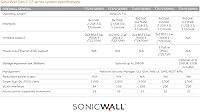
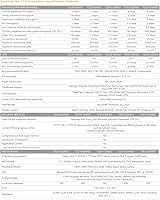
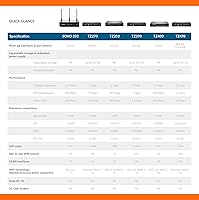
  • Firewall Throughput: The appliance delivers up to 2 Gbps of stateful firewall inspection throughput under standard traffic conditions.
  • Threat Prevention: Active threat prevention throughput, with full inspection enabled, reaches 750 Mbps — sufficient for most SMB workloads.
  • VPN Throughput: Site-to-site and client VPN connections are supported at up to 750 Mbps of aggregate VPN throughput.
  • IPS Throughput: Intrusion prevention system inspection runs at up to 1 Gbps, keeping latency low even under active threat scanning.
  • App Inspection: Application-layer inspection throughput reaches 1 Gbps, enabling granular traffic control without significant performance penalty.
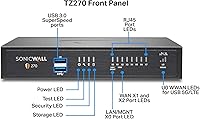
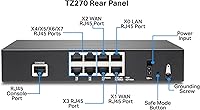
  • Interfaces: The unit includes eight 1GbE RJ45 ports, two USB 3.0 ports, and one dedicated console port for local management.
  • VLAN Support: Up to 64 VLAN interfaces are supported, allowing thorough network segmentation across guest, corporate, and operational traffic.
  • Concurrent Connections: The hardware supports up to 750,000 concurrent connections, providing headroom for growing device counts and cloud-heavy environments.
  • Access Points: A maximum of 16 SonicWall access points can be managed directly from this appliance.
  • Wireless: Built-in wireless is not available on this base model; the TZ270W variant adds dual-band 802.11ac Wave 2 (2x2) Wi-Fi.
  • SD-WAN: Native SD-WAN capability is built into the platform, enabling intelligent traffic steering across multiple WAN links without additional hardware.
  • TLS Decryption: The appliance supports TLS 1.3 decryption, allowing deep inspection of encrypted traffic that would otherwise pass through uninspected.
  • Zero-Touch Deploy: Zero-Touch Deployment is supported, enabling remote sites to come online without requiring an on-site technician during initial provisioning.
  • Dimensions: The unit measures 5.31 x 7.48 x 1.38 inches, making it compact enough for a desktop, shelf, or small server closet.
  • Weight: At 1.8 pounds, the appliance is lightweight and easy to position or relocate within a small office environment.
  • Generation: This is a Generation 7 SonicWall appliance, representing a significant architectural update from the prior TZ Gen 6 series.
  • Form Factor: The desktop compact form factor requires no rack space and fits discreetly in retail back offices or branch office environments.
  • Subscription Included: No security service subscription is included with this listing; advanced threat services require a separately purchased license.

Related Reviews
BOOX Go Color 7 Gen II
79%
91%
Display Quality (B&W)
67%
Display Quality (Color)
84%
Build Quality & Design
72%
Performance & Responsiveness
58%
Stylus Experience
More
BENIO Ring Gen 2 Smart Ring, Size 7
85%
87%
Health Tracking Accuracy
91%
Waterproof Performance
88%
Comfort & Wearability
82%
Battery Life
85%
Compatibility with Devices
More
Ubiquiti UDR7 Dream Router Wi-Fi 7
77%
94%
Ecosystem Integration
83%
Wi-Fi Performance
61%
Hardware Port Selection
58%
Setup Experience
72%
Value for Money
More
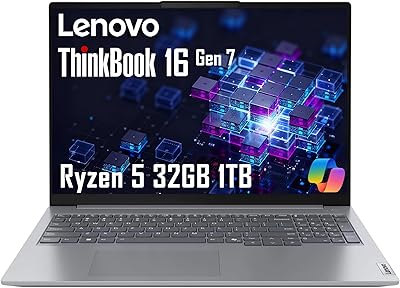
Lenovo ThinkBook 16 Gen 7, Ryzen 5 7533HS, 32GB RAM, 1TB SSD
87%
90%
Performance
88%
Battery Life
85%
Build Quality
92%
Display Quality
86%
Portability
More
Lenovo ThinkPad E16 Gen 2 (AMD Ryzen 7 7735HS, 32GB, 1TB)

81%
88%
Performance & Multitasking
91%
Memory & Storage
74%
Display Quality
93%
Keyboard & Typing Experience
76%
Build Quality & Chassis
More
Lenovo IdeaPad 1 Gen 7 15.6″ Laptop 24GB RAM 1TB SSD
84%
88%
Performance
91%
Multitasking Capability
94%
Storage Speed
85%
Display Quality
89%
Portability
More
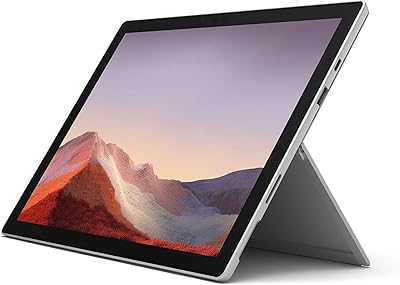
Microsoft Surface Pro 7 i5 16GB 256GB
79%
93%
Display Quality
91%
Build Quality & Design
82%
Performance & Speed
94%
Portability
67%
Battery Life
More
Lenovo ThinkPad E14 Gen 5 Business Laptop, 24GB RAM, 1TB SSD, AMD Ryzen 7 7730U
88%
92%
Performance
88%
Battery Life
90%
Display Quality
94%
Build Quality
84%
Portability
More
Lenovo ThinkPad E16 Gen 3 Business Laptop, Intel Core Ultra 7, 32GB RAM, 2TB SSD
88%
94%
Overall Performance
96%
Processing Speed
95%
Storage Capacity
89%
Display Quality
75%
Portability
More
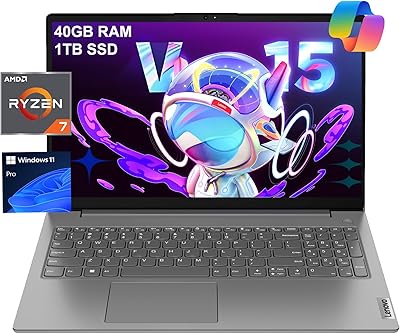
Lenovo V15 Gen 4 Business Laptop, 15.6″, AMD Ryzen 7 7730U, 40GB RAM, 1TB SSD
83%
91%
Performance
88%
Value for Money
90%
Build Quality and Durability
78%
Battery Life
85%
Display Quality
More

FAQ

The hardware ships with no subscription attached. Features like intrusion prevention, content filtering, and cloud sandboxing all require a separately purchased service license. This is the single most important thing to understand before buying — the appliance-only price does not reflect what you will actually spend to run it with full protection enabled.

Honestly, it takes some patience. This is not a consumer router with a guided setup wizard — SonicOS has real depth, and first-time users typically spend several hours getting baseline policies configured correctly. If you have managed enterprise firewalls before, you will get there. If this is your first business-grade firewall, budget time for learning and lean on the SonicWall knowledge base and community forums.

Zero-Touch Deployment lets you pre-configure a unit remotely through SonicWall's cloud management portal, then ship it to a remote site where a non-technical person simply plugs it in. It works well in practice — IT teams managing multiple branch locations consistently report it saves significant travel and labor time. The key is getting the cloud configuration right before the device ships.

Yes, you can manage it entirely through the local SonicOS web interface without any cloud subscription. Cloud-based management and centralized reporting are optional add-ons. For single-site deployments managed by an on-site admin, local management works fine.

Both are strong SMB firewall options in a similar tier. The TZ270 has an edge in port count and VLAN capacity, while FortiGate appliances are often praised for a more intuitive management interface and competitive subscription pricing. If your team already knows SonicWall, stick with it. If you are starting fresh, it is worth piloting both management interfaces before committing.

You can absolutely run it without TLS inspection — and many deployments do, especially smaller offices where the configuration overhead is not justified. The trade-off is that encrypted traffic passes through without being scanned, which is increasingly where modern threats hide. For environments handling sensitive data or operating under compliance requirements, enabling TLS inspection is worth the added setup complexity.

The base TZ270 does not include wireless — that is the TZ270W variant. If wireless is important to your deployment, make sure you are ordering the correct model. For anything beyond a handful of users, a dedicated access point will give you better range and performance than the integrated radio in the W variant anyway.

There is no hard user limit, but real-world deployments suggest the TZ270 comfortably handles 30 to 80 concurrent users running typical business traffic — cloud apps, email, VoIP, and video calls. Offices pushing heavier workloads or running active full-inspection policies will feel performance tighten faster. The 750,000 concurrent connection ceiling gives plenty of room for device-heavy environments like retail with lots of IoT endpoints.

Yes, the generational jump is meaningful. Gen 7 brings a faster processor, higher throughput across the board, TLS 1.3 inspection support, and a modernized version of SonicOS. If your older TZ hardware is approaching end-of-support or struggling with traffic volume, this is a natural and relatively painless upgrade path — the management paradigm is familiar enough that the transition does not require retraining.

There is no Power over Ethernet on the TZ270. If you need to power access points, IP phones, or cameras directly from the switch, you will need a separate PoE switch. This is a common sticking point for buyers who assumed PoE was included — it is not, so factor that into your total infrastructure cost.