

Overview

The Lenovo ThinkPad E14 Gen 5 1TB Laptop carries on a reputation Lenovo has spent years building with the ThinkPad line: tough construction, no-nonsense styling, and a focus on getting work done rather than turning heads. This isn't a flagship ultrabook chasing thin-and-light bragging rights — it sits comfortably in the mid-range business category, where solid performance matters more than spec-sheet flash. Under the hood, an AMD Ryzen 7 processor handles the heavy lifting, backed by enough RAM and storage to keep a typical workday humming along. Windows 11 Pro rounds things out, giving IT departments and small business owners the management tools they actually need. The all-black design won't win design awards, but that's sort of the point.

Features & Benefits

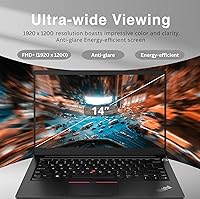
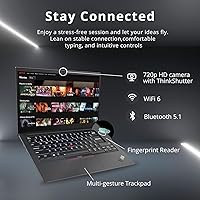
Performance-wise, this ThinkPad leans on an 8-core, 16-thread Ryzen 7 chip that handles multitasking without much complaint — multiple Office windows, a dozen browser tabs, and a video call running simultaneously won't bring it to its knees. The 24GB of RAM is the real unsung hero here; it's the kind of headroom that prevents the slowdown you'd notice on a machine with half that amount. Storage comes via a 1TB SSD, so boot times stay quick and there's plenty of room for project files, client folders, or a sprawling photo library. The 14-inch FHD+ display offers a bit more vertical space than a standard 1080p panel, which is genuinely useful for spreadsheets and long documents. Add a fingerprint reader, backlit keyboard, Wi-Fi 6, and a built-in Ethernet port, and this business laptop covers both wireless and wired office setups.

Best For

The E14 Gen 5 makes the most sense for office professionals whose day revolves around spreadsheets, email threads, and back-to-back video calls — the kind of workload where steady multitasking matters more than raw graphics horsepower. Remote and hybrid workers will appreciate the fingerprint login, since typing a password every time you wake the machine gets old fast. It's also a smart pick for anyone who wants generous storage and memory without venturing into premium-ultrabook pricing territory; you're getting workstation-adjacent specs at a business-laptop budget. IT teams managing a fleet of machines will likely lean on the management features baked into Windows 11 Pro, from device policies to easier provisioning. And if you're coming from an aging laptop that struggles with modern browser tabs, the jump in responsiveness here should feel immediate and obvious rather than marginal.

User Feedback

Owners tend to single out the keyboard first, which isn't surprising since comfortable typing has long been a ThinkPad calling card — deep key travel and good spacing make long writing sessions less tiring than on flatter laptop keyboards. Battery life gets mixed reviews; most people report a solid full workday of mixed use, though heavier video-call schedules will drain it faster. A handful of buyers mention the fan kicking in audibly under sustained load, which is fairly typical for a laptop in this weight class and isn't usually described as a dealbreaker. Screen brightness draws some criticism in well-lit rooms, so an anti-glare setup or a slightly dimmer office helps. On value, the consensus leans positive: most reviewers feel they're getting more memory and storage than competing laptops offer at a similar price.

Pros

  • 24GB of RAM keeps dozens of browser tabs and apps running without noticeable lag
  • 1TB SSD provides ample storage plus quick boot and load times
  • Ryzen 7 chip with 8 cores handles serious multitasking comfortably
  • Fingerprint reader makes secure login fast and genuinely convenient
  • Backlit keyboard known for comfortable, long-session typing, a classic ThinkPad strength
  • Wi-Fi 6 and built-in Ethernet cover both wireless and wired office setups
  • Windows 11 Pro gives IT teams useful device management and provisioning tools
  • FHD+ display offers a bit more vertical screen space than standard 1080p panels
  • Strong value for the memory and storage you get at this price tier

Cons

  • Integrated graphics aren't suited for gaming or heavy video editing work
  • Some users report the fan getting audibly loud under sustained heavy use
  • Screen brightness can feel lacking in well-lit rooms or near windows
  • At 3.7 pounds, it's heavier than dedicated ultrabooks built for constant travel
  • Battery life varies noticeably depending on workload and video-call frequency
  • Color accuracy on the display isn't ideal for photo or design-focused work
  • Black design is plain and won't appeal to buyers wanting a distinctive look
  • USB-A ports are limited to two, which may frustrate users with older peripherals

Ratings

Our AI rating engine breaks down what real owners actually experience with the Lenovo ThinkPad E14 Gen 5 1TB Laptop, drawing on verified buyer reviews from across the globe. Spam, bot activity, and incentivized reviews are filtered out before any score is calculated, so what you see below reflects genuine usage patterns. Both the strengths and the rough edges are scored transparently, without inflating categories to make this business laptop look better than it is.

Processing Power
86%
The 8-core Ryzen 7 chip handles everyday office demands without flinching, whether that's running accounting software, juggling video calls, or compiling reports. Users consistently mention it feels responsive even when several heavy programs are open at once.
It's not designed for rendering, 3D work, or other CPU-intensive creative tasks. A few reviewers running specialized engineering or data software noted occasional slowdown under sustained heavy load.
Memory & Multitasking
89%
24GB of RAM lets users keep dozens of browser tabs, spreadsheets, and chat apps open simultaneously without the dreaded freeze. Remote workers juggling video conferencing alongside document editing report a noticeably smoother experience than their previous laptops.
There's little public information on whether the memory is upgradeable later, which concerns buyers planning long-term use. A small number of users wished for clearer documentation on memory configuration before purchase.
Storage Speed
91%
The 1TB NVMe SSD delivers fast boot times and near-instant file transfers, which owners managing large client folders or media libraries appreciate daily. Several reviewers specifically praised how quickly the system resumes from sleep.
A few users noted that heavy, sustained file transfers can occasionally cause the drive to warm up. Storage itself isn't the issue; it's more a minor side effect tied to the laptop's overall thermal design.
Display Quality
74%
26%
The FHD+ resolution gives slightly more vertical room than a standard 1080p screen, which spreadsheet and document-heavy users find genuinely useful. Text clarity and sharpness for everyday office work earn consistent praise.
Brightness falls short in well-lit rooms or near windows, making outdoor or sunlit use frustrating for some. Color accuracy isn't strong enough for buyers doing any serious photo or design work.
Keyboard Comfort
88%
True to ThinkPad tradition, the backlit keyboard offers deep key travel and solid spacing that make long writing or data-entry sessions far less tiring. Reviewers who type for hours daily consistently call this a standout feature.
A small subset of users coming from ultra-slim laptops needed time to adjust to the deeper key travel. It's a minor adaptation period rather than a genuine flaw.
Battery Life
71%
29%
Most owners report getting through a typical workday of mixed tasks, including email, document editing, and moderate browsing, without needing to recharge midday. Light users doing mostly text-based work see even longer stretches between charges.
Heavy video-calling schedules or running multiple demanding apps simultaneously drain the battery noticeably faster. A handful of reviewers wished for stronger all-day performance compared to dedicated ultrabooks.
Connectivity & Ports
85%
Wi-Fi 6 plus a built-in RJ45 Ethernet port means this business laptop fits comfortably into both modern wireless offices and older wired networks. Owners switching between conference rooms and home setups value not needing a dongle for basics like HDMI or wired internet.
With only two USB-A ports, users with multiple older peripherals like printers or wired mice sometimes need a hub. It's a minor inconvenience but noted in several reviews.
Security Features
83%
The fingerprint reader makes logging in fast and painless, something remote workers handling sensitive client data particularly value. Pairing it with Windows 11 Pro's management tools gives small business owners real peace of mind.
A few users mentioned occasional fingerprint misreads, especially with slightly damp or dry fingers. It's an inconsistent rather than constant issue based on feedback patterns.
Graphics Capability
58%
42%
The integrated AMD Radeon graphics handle everyday tasks like video calls, presentations, and light photo viewing without any trouble. Casual users browsing or streaming video report no complaints whatsoever.
This isn't a laptop for gaming or video editing, and reviewers expecting otherwise have been disappointed. Anyone needing real graphics horsepower will outgrow this machine quickly.
Thermal & Fan Noise
67%
33%
During typical office workloads, the system stays quiet enough to use comfortably in meetings or shared spaces. Most day-to-day tasks don't trigger any noticeable fan activity.
Under sustained heavy multitasking, several owners report the fan becoming audible and occasionally distracting. It's not alarming, but it's noticeable enough to mention repeatedly across reviews.
Portability & Weight
72%
28%
At 3.7 lbs, it's manageable for daily commuting or carrying between meetings without feeling like a burden. Reviewers moving between home and office found it easy enough to live in a bag full-time.
Buyers used to ultralight 13-inch machines may find it noticeably bulkier in comparison. It prioritizes durability and ports over minimal travel weight.
Build Quality
81%
19%
The ThinkPad chassis feels sturdy and well-assembled, giving users confidence it can survive daily commuting and the occasional bump. Long-time ThinkPad owners specifically note the durability matches previous generations they've relied on for years.
The plain black design feels purely functional and won't appeal to anyone wanting a distinctive or premium look. It prioritizes resilience over aesthetics, which not every buyer values equally.
Value for Money
87%
Reviewers consistently point out that 24GB of RAM and a 1TB SSD are rare at this price point, making it feel like more laptop than the cost suggests. Small business owners outfitting multiple employees particularly appreciate the cost-to-spec ratio.
A few buyers expected slightly better display quality given the otherwise strong specs. It's a minor gap rather than a major letdown relative to the price.
Software Experience
79%
21%
Windows 11 Pro's business tools, like Group Policy and Azure AD integration, genuinely help IT teams managing multiple machines at once. Small business owners value the added control without needing third-party software.
Some personal users find the extra business-oriented features unnecessary for their needs and would have preferred the simpler Home edition. It's more a mismatch of audience than an actual software flaw.

Suitable for:

The Lenovo ThinkPad E14 Gen 5 1TB Laptop makes the most sense for office professionals who spend their day moving between spreadsheets, email, and video calls, where steady multitasking matters more than graphics power. Remote and hybrid workers will appreciate the fingerprint login and dependable Wi-Fi 6 connection, especially anyone tired of fumbling with passwords every time they wake the machine. It's also a strong fit for buyers who want generous memory and storage without paying premium-ultrabook prices, since 24GB of RAM and a 1TB SSD aren't common at this tier. IT teams managing a fleet of company laptops will benefit from the device-policy and provisioning tools built into Windows 11 Pro. Anyone upgrading from an aging, sluggish laptop should notice an immediate jump in everyday responsiveness rather than a marginal one.

Not suitable for:

This business laptop isn't built with gamers or video editors in mind, since the integrated AMD Radeon graphics handle office work fine but won't keep up with demanding 3D titles or heavy rendering projects. Buyers chasing an ultra-thin, feather-light machine for constant travel may find the 3.7-pound build a bit more substantial than what dedicated ultrabooks offer. People who prioritize a vivid, color-accurate display for photo or design work might also be underwhelmed, as screen brightness has drawn some mixed feedback. If all-day battery life on a single charge is non-negotiable, it's worth checking real-world run times before committing, since results vary with workload. The Lenovo ThinkPad E14 Gen 5 1TB Laptop is also overkill for someone who only needs a basic machine for browsing and email.

Specifications

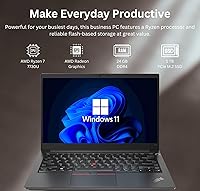
  • Processor: It runs on an AMD Ryzen 7 7730U processor with 8 cores and 16 threads for handling multiple tasks at once.
  • Clock Speed: Base clock speed is 2.0GHz, with Turbo Boost reaching up to 4.5GHz under load.
  • Memory: 24GB of RAM is installed to support smooth multitasking across apps and browser tabs.
  • Storage: A 1TB PCIe NVMe M.2 SSD provides fast read and write speeds along with ample file space.
  • Display: The 14-inch FHD+ screen has a resolution of 1920 x 1200 pixels for slightly more vertical viewing area than standard 1080p.
  • Graphics: Graphics are handled by integrated AMD Radeon graphics rather than a dedicated GPU.
  • Wireless Connectivity: Wi-Fi 6 (802.11ax) is supported for faster and more stable wireless networking.
  • Bluetooth: Bluetooth connectivity is included for pairing wireless mice, headsets, and other accessories.
  • Security: A built-in fingerprint reader allows for quick, password-free sign-in.
  • Keyboard: The keyboard is backlit and can be toggled using the Fn + Space shortcut.
  • Operating System: Windows 11 Pro comes preinstalled, adding business features like Group Policy and Azure AD support.
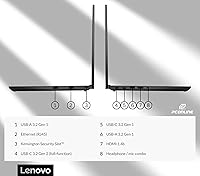
  • USB Ports: The laptop includes two USB 3.0 Type-A ports and two USB Type-C ports.
  • Video & Networking: An HDMI port and a built-in RJ45 Ethernet port are included for external displays and wired networking.
  • Audio: A combo headphone and microphone jack is provided for wired audio accessories.
  • Weight: The laptop weighs 3.7 lbs, putting it in the standard range for a 14-inch business laptop.
  • Dimensions: Physical dimensions measure 12.3 x 8.6 x 0.71 inches.
  • Power Source: It runs on both AC power and an internal battery, as is standard for laptops in this class.

Related Reviews
Lenovo ThinkPad E16 16″ Business Laptop
78%
88%
Build Quality
91%
Keyboard & Typing Experience
82%
Display Quality
77%
Performance & Processing
74%
RAM & Multitasking
More
Lenovo V15 Gen 4 Business Laptop, AMD Ryzen 5 5500U, 16GB RAM, 1TB SSD
83%
89%
Value for Money
91%
Performance (Multitasking)
82%
Portability & Weight
74%
Battery Life
85%
Display Quality
More
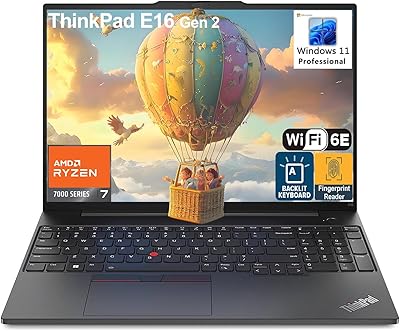
Lenovo ThinkPad E16 Gen 2 (AMD Ryzen 7 7735HS, 32GB, 1TB)
81%
88%
Performance & Multitasking
91%
Memory & Storage
74%
Display Quality
93%
Keyboard & Typing Experience
76%
Build Quality & Chassis
More
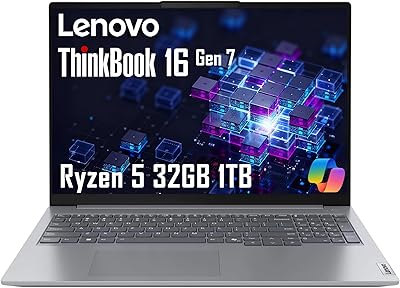
Lenovo ThinkBook 16 Gen 7 Business Laptop
74%
88%
Value for Money
84%
Performance
67%
Display Quality
58%
Battery Life
81%
Build Quality
More
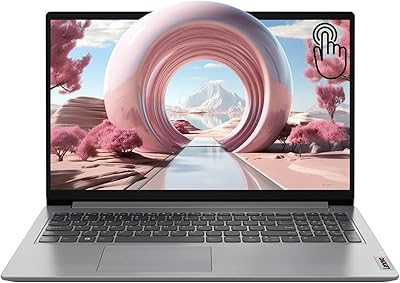
Lenovo IdeaPad 1 Gen 7 15.6″ Laptop
72%
91%
Value for Money
78%
Multitasking Performance
88%
Storage & Speed
67%
Display Quality
63%
Touchscreen Usability
More
Lenovo IdeaPad Slim 3 Business Laptop, Ryzen 5 5625U, 16GB RAM, 1TB SSD
86%
88%
Performance
90%
Multitasking Capability
85%
Display Quality
86%
Keyboard Comfort
65%
Battery Life
More
Lenovo V14 Gen 4 Business Laptop
74%
88%
Processing Performance
91%
RAM & Multitasking
86%
Storage Speed & Capacity
79%
Build Quality & Durability
62%
Display Quality
More
Lenovo ThinkPad E16 Gen 3 Business Laptop, Intel Core Ultra 7, 32GB RAM, 2TB SSD
88%
94%
Overall Performance
96%
Processing Speed
95%
Storage Capacity
89%
Display Quality
75%
Portability
More
Lenovo V15 Gen 4 Business Laptop, 15.6″, AMD Ryzen 7 7730U, 40GB RAM, 1TB SSD
83%
91%
Performance
88%
Value for Money
90%
Build Quality and Durability
78%
Battery Life
85%
Display Quality
More
Lenovo IdeaPad 1 15.6″ Touchscreen Laptop
73%
88%
Value for Money
91%
Storage & Speed
84%
Microsoft Office Inclusion
67%
Display Quality
73%
Touchscreen & Stylus
More

FAQ

The Lenovo ThinkPad E14 Gen 5 1TB Laptop ships with 24GB of RAM and a 1TB SSD already installed, which covers most users for years without needing an upgrade. That said, exact upgradability (whether memory is soldered or in an accessible slot) isn't specified in the listing, so it's worth confirming directly with Lenovo's official spec sheet before buying extra components.

Not really, no. It uses integrated AMD Radeon graphics rather than a dedicated GPU, so it can handle older or lightweight games but isn't built for modern, graphics-intensive titles. If gaming is a priority, you'd want to look at laptops with discrete graphics instead.

Real-world reports suggest it can get through a typical office workday of mixed tasks, though heavy video-calling or maxed-out brightness will drain it faster. Battery life always varies with usage, so think of it as solid rather than exceptional.

Some users have noted the fan becoming audible under sustained heavy multitasking or longer workloads. It's not unusual for laptops in this weight and performance class, and most buyers don't report it as a major issue.

Light photo editing in something like Lightroom should run fine. Video editing or anything graphics-heavy will be more of a stretch, since the integrated graphics aren't designed for that kind of sustained rendering work.

It has both. There's a built-in RJ45 port for a wired connection alongside Wi-Fi 6, so it works well in offices that still rely on Ethernet for stability.

Windows 11 Pro adds business-oriented tools like Group Policy management, Azure Active Directory integration, and Windows Update for Business. These features matter most if you're managing the laptop as part of a company fleet, less so for purely personal use.

At 3.7 lbs, it's reasonably portable but not in the ultralight category some travel-focused laptops occupy. Carrying it in a bag for commuting or occasional travel should be comfortable enough for most people.

This is usually a strong point for ThinkPad laptops, and feedback here is no different. The backlit keyboard has decent key travel and spacing, which makes longer writing or data-entry sessions noticeably less tiring.

It should include a standard Lenovo manufacturer warranty, as is typical for ThinkPad laptops sold through major retailers. Coverage terms can change, so it's a good idea to double-check the current listing or Lenovo's website for the exact length and details.