Overview

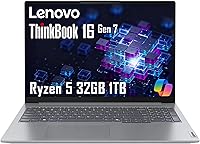
The Lenovo ThinkBook 16 Gen 7 Business Laptop occupies a smart spot in the mid-range market, offering specs that most similarly priced machines simply don't match. One important detail upfront: this unit has been reseller-upgraded with third-party RAM and SSD, meaning you get a split warranty rather than a single manufacturer guarantee — worth knowing before you buy. The MIL-STD-810H certification sets this ThinkBook apart from typical consumer options, suggesting it can handle the bumps and pressure changes of real travel. The 16-inch form factor is a deliberate trade-off: you gain screen real estate, but this isn't the lightest bag companion. And with integrated graphics only, GPU-intensive workloads are simply off the table.
Features & Benefits

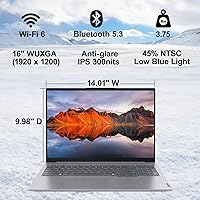
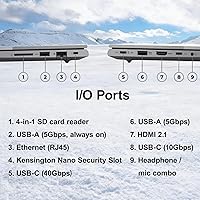
The AMD Ryzen 5 7533HS is a capable six-core processor that handles browser-heavy workdays, video calls, and spreadsheet marathon sessions without complaint. Where this Lenovo business laptop genuinely surprises is the memory: 32GB of DDR5 at 4800MHz is a spec you'd normally chase in a much pricier machine. Pair that with a 1TB NVMe SSD and applications open fast, file transfers don't drag, and storage anxiety largely disappears. The 16″ WUXGA IPS panel is crisp and comfortable during long sessions, backed by TÜV Low Blue Light certification. Connectivity is thorough — dual USB-C, dual USB-A, HDMI 2.1, Ethernet, and an SD card slot cover nearly every office scenario. The fingerprint reader and webcam privacy shutter round out a genuinely thoughtful security setup.

Best For

This ThinkBook makes the most sense for people who spend their days in productivity tools — remote workers juggling multiple browser tabs, video conferences, and cloud applications at once. The 32GB memory headroom means a heavy Chrome session with Slack running in the background won't slow things down. Students in data science or analytics programs will appreciate the processing and storage muscle without paying a premium-tier price. Small business owners benefit from Windows 11 Pro out of the box, which matters for BitLocker encryption and remote desktop access. If you regularly work from hotels or client sites, the military-grade durability adds genuine peace of mind. Just don't expect ultrabook portability — the 16-inch frame and 3.75-pound build make this a desk-first machine.

User Feedback

Buyers consistently highlight the performance-per-dollar story — for everyday productivity, the Gen 7 ThinkBook 16 runs rings around machines with half the RAM at a similar price. Keyboard feel earns positive marks too, which matters for anyone typing all day. That said, two complaints surface regularly. The 45% NTSC color gamut is genuinely limiting for designers or photo editors; it handles documents and presentations fine, but creative color work is a stretch. Battery life with the 45Wh cell is modest — heavy users report needing the charger by mid-afternoon. The 720p webcam draws routine criticism for looking dated. A handful of buyers also express unease about the split warranty structure, understandable even when the upgrade itself delivers clear value.

Pros

  • 32GB of DDR5 RAM at this price point is genuinely rare and future-proofs daily multitasking for years.
  • The 1TB NVMe SSD keeps boot times short and file transfers fast without needing to manage storage carefully.
  • MIL-STD-810H certification offers real-world durability assurance that most consumer laptops skip entirely.
  • The six-core Ryzen 5 processor handles heavy browser sessions, video calls, and office workloads without breaking a sweat.
  • Windows 11 Pro is included out of the box, a meaningful perk for small business and IT-managed environments.
  • The connectivity lineup — Ethernet, HDMI 2.1, dual USB-C, dual USB-A, and SD card — covers nearly every peripheral scenario.
  • TÜV Low Blue Light certification on the display makes long work sessions noticeably more comfortable.
  • The fingerprint reader and webcam privacy shutter are practical security features, not just checkbox additions.
  • Wi-Fi 6 support ensures the Gen 7 ThinkBook 16 stays fast on modern office and home networks.
  • Keyboard feel earns consistent praise from buyers who spend long hours typing throughout the workday.

Cons

  • The 45% NTSC color gamut is a genuine limitation for anyone who cares about accurate color on screen.
  • The 45Wh battery is small for a 16-inch machine — heavy users may need the charger by early afternoon.
  • The 720p webcam looks dated compared to the 1080p cameras now standard on competing business laptops.
  • RAM and SSD carry a separate reseller warranty, which adds complexity if a hardware issue arises later.
  • At 3.75 pounds with a large chassis, this is not a machine you will forget is in your bag.
  • Integrated graphics rule out any meaningful GPU workloads, including light video rendering or 3D modeling.
  • The display brightness of 300 nits is adequate indoors but can struggle in brightly lit or outdoor environments.
  • Buyers sensitive to warranty fragmentation may feel uneasy despite the three-year coverage on upgraded components.

Ratings

The scores below were generated by our AI review engine after systematically analyzing verified global buyer feedback for the Lenovo ThinkBook 16 Gen 7 Business Laptop, with spam, incentivized reviews, and bot activity actively filtered out before scoring. Each category reflects the honest distribution of real user sentiment — strengths and frustrations weighted equally — so you get a clear picture of where this ThinkBook earns its keep and where it falls short.

Value for Money
88%
Buyers consistently flag the 32GB DDR5 RAM and 1TB SSD combination as the headline win — specs that typically cost considerably more when purchased from a major retailer in a factory configuration. For remote workers and students trying to stretch a mid-range budget, the raw hardware-per-dollar ratio is hard to argue with.
The split warranty structure complicates the value calculation for some buyers, since reseller-upgraded units carry more administrative overhead if a component fails. A small but vocal group of reviewers felt the peace of mind of a clean factory warranty was worth paying more elsewhere.
Performance
84%
The six-core Ryzen 5 7533HS handles the kind of parallel workloads that define a busy professional day — dozens of browser tabs, Slack, a video call, and a local spreadsheet running simultaneously — without noticeable slowdown. The DDR5 memory bandwidth gives the processor room to breathe in a way that 16GB DDR4 systems in this class simply cannot match.
Users attempting anything GPU-reliant — video encoding, running machine learning models locally, or even sustained 3D rendering previews — hit the ceiling of integrated graphics fairly quickly. The Radeon 660M keeps up with casual tasks but is not a serious workhorse for creative production pipelines.
Display Quality
67%
33%
The 16″ WUXGA IPS panel is sharp and comfortable for extended document and spreadsheet work, and the anti-glare coating earns consistent praise from people working near windows or in mixed office lighting. The TÜV Low Blue Light certification is a real benefit for users who clock eight or more hours a day on screen.
The 45% NTSC color gamut is a recurring complaint and the single biggest display limitation — photos and design assets look noticeably flat and undersaturated compared to sRGB-calibrated panels. At 300 nits, outdoor use is also borderline uncomfortable in direct sunlight, which frustrates users who work from outdoor cafes or patios.
Battery Life
58%
42%
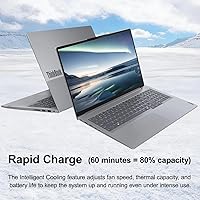
The 65W USB-C charging is fast enough that top-up sessions during lunch or a short break recover a meaningful amount of capacity, and the USB-C delivery format means users can share a single charger with other devices. Light-use scenarios like note-taking or reading documents do stretch runtime closer to the six-hour mark.
The 45Wh cell is undersized for a 16-inch business laptop, and buyers doing real work — video calls, local app usage, sustained processing — routinely report needing to plug in before the afternoon. This is the most frequently cited practical disappointment across reviews, particularly for users who move between meetings without reliable outlet access.
Build Quality
81%
19%
The MIL-STD-810H certification gives this ThinkBook a credibility advantage over standard consumer-grade plastics, and buyers who have used it on the road report that the chassis handles bag drops, temperature swings, and general travel stress without creaking or warping. The overall construction feels intentional rather than cost-cut.
A handful of reviewers noted that the plastic elements on the bottom panel feel less premium than the lid and top deck, which can undercut the first impression when the machine is picked up. Flex around the keyboard deck under deliberate pressure was mentioned occasionally, though it did not affect day-to-day use for most.
Keyboard & Trackpad
79%
21%
The keyboard is a genuine strong point for a laptop in this class — key travel is satisfying, actuation is consistent, and the numeric keypad is appreciated by anyone doing data entry or financial work regularly. Long typing sessions feel comfortable rather than fatiguing, which buyers working in writing-heavy roles specifically called out as a deciding factor.
The inclusion of the numeric keypad shifts the main key cluster slightly left of center relative to the display, which takes adjustment for touch typists used to a centered layout. The trackpad is functional but described as merely adequate — smooth enough for daily navigation but lacking the precision and gesture responsiveness of higher-end options.
Webcam
47%
53%
The physical privacy shutter is a practical and well-received feature, particularly among users in regulated industries or those who travel to shared workspaces where accidental camera activation is a genuine concern. The webcam handles brightly lit, controlled environments acceptably for internal team calls.
At 720p, the webcam looks noticeably outdated compared to the 1080p cameras now standard on competing business laptops at similar or lower price points. In dim conference rooms or home offices with imperfect lighting, the image quality degrades to a level that several reviewers described as embarrassing for client-facing calls.
Connectivity
91%
The port selection on this Lenovo business laptop is one of its most practical strengths — having Ethernet, HDMI 2.1, dual USB-C, dual USB-A, and an SD card reader built in means most users can dock at a desk without any adapter. The ability to drive up to three external displays is particularly valuable for users setting up a proper workstation.
Neither USB-C port supports Thunderbolt, which limits high-bandwidth peripheral options for users with Thunderbolt docks or eGPU enclosures. A small number of reviewers also noted that the port placement requires some cable management discipline to keep a desk setup tidy.
Wireless Performance
83%
Wi-Fi 6 support translates to noticeably faster and more stable connections on modern office and home routers, particularly in environments with many competing devices on the same network. Bluetooth 5.3 handles wireless peripherals and audio devices reliably without the pairing drops some older implementations suffer from.
A small subset of users reported inconsistent Wi-Fi signal strength in large open-plan offices or buildings with thick concrete walls, suggesting the antenna placement or tuning is not class-leading. These were isolated cases rather than a systemic complaint, but worth noting for users in challenging RF environments.
Security Features
86%
The fingerprint reader integrated into the power button is fast and accurate in real-world testing, making Windows Hello login a genuinely frictionless part of the daily routine rather than an afterthought. TPM 2.0 support and the webcam privacy shutter add layers of protection that IT administrators and security-conscious small business owners specifically called out as purchase drivers.
The Kensington Nano slot, while present, requires a proprietary lock format that is less universally available than the classic Kensington Standard slot found on older ThinkPads and many docking stations. A few enterprise buyers noted this as a minor but real logistics consideration.
Audio Quality
62%
38%
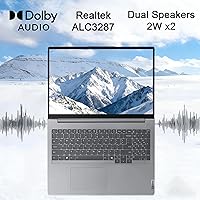
Dolby Audio processing adds some body and presence to the speaker output that bare-hardware laptop speakers at this size typically lack, and the dual 2W drivers are adequate for video calls, casual music listening, and presentation playback in a quiet room. The noise-canceling microphone array performs respectably on video calls.
At higher volumes the speakers lose low-end quickly and begin to sound thin, making movie watching or music enjoyment a secondary priority rather than a real feature. Users working in louder environments or who regularly play media without headphones found the output underwhelming compared to the visual quality of the display.
Thermal Management
73%
27%
During standard office workloads the system runs quietly and the surface temperatures stay comfortable for lap use, which is a genuine quality-of-life factor for users who work away from desks. The chassis does a reasonable job of channeling heat away from the keyboard area during moderate use.
Under sustained CPU load — extended compilation tasks, large file conversions, or prolonged video exports — fan noise ramps up noticeably and the underside gets warm enough to be uncomfortable on bare legs. Thermal throttling under the most demanding conditions was noted by a small number of power users pushing the processor consistently.
Software & OS Experience
77%
23%
Windows 11 Pro out of the box is a meaningful practical benefit — BitLocker encryption, Hyper-V, and remote desktop are all available without extra licensing fees, which matters for small business owners and IT-managed environments. The AI Copilot integration is genuinely useful for drafting, summarizing, and search tasks in day-to-day office work.
Some reviewers noted a modest amount of pre-installed Lenovo software that required manual cleanup before the system felt lean and fast. A handful of users also expressed skepticism about the long-term update support pathway for a reseller-configured unit versus a clean factory purchase.
Portability
63%
37%
The slim 0.69-inch profile means the Gen 7 ThinkBook 16 slides into a standard laptop sleeve or bag without drama, and the clean Arctic Grey aesthetic reads as professional rather than consumer in most work environments. The 16-inch chassis does not feel excessive on a desk or a standard airline tray table.
At 3.75 pounds the daily carry weight adds up noticeably over a week of commuting or travel, and the 16-inch footprint is simply larger than what fits comfortably in smaller bags or crowded economy class seat pockets. Users who prioritize portability over screen size consistently recommended looking at 14-inch alternatives instead.

Suitable for:

The Lenovo ThinkBook 16 Gen 7 Business Laptop is a strong fit for professionals whose daily workload revolves around productivity — think remote workers managing multiple video calls, cloud applications, and browser-heavy research simultaneously. The 32GB of DDR5 RAM means you can run demanding workflows without hitting a memory ceiling, which is a genuine advantage over most machines in this price bracket. Students in data science, business analytics, or design-adjacent programs will find the processor and storage combination capable enough to handle large datasets, development environments, and presentation work without compromise. Small business owners who need Windows 11 Pro for BitLocker encryption, domain connectivity, or remote desktop access get that functionality built in rather than paying extra for an upgrade. The MIL-STD-810H certification also makes this ThinkBook a reasonable companion for frequent travelers who move between offices, client sites, and coworking spaces without babying their gear. And if you regularly work with spreadsheets, multi-tab research, or side-by-side document editing, the 16-inch display delivers the workspace that 13 and 14-inch machines simply cannot.

Not suitable for:

The Lenovo ThinkBook 16 Gen 7 Business Laptop is a harder sell for buyers with specific needs that fall outside its core strengths. Graphic designers, video editors, and photographers will hit a real wall with the 45% NTSC color gamut — color-accurate work requires a much wider display, and no amount of RAM compensates for that limitation. Anyone expecting dedicated GPU performance for 3D rendering, video encoding, or even casual gaming should look elsewhere; the integrated AMD Radeon 660M handles everyday visuals competently but is not built for GPU-intensive tasks. If ultraportability is a priority, the 3.75-pound weight and 16-inch chassis will feel cumbersome next to thinner alternatives in a similar price range. Battery life is also a practical concern — the 45Wh cell is modest, and users who need to work unplugged for a full day without access to an outlet may find themselves rationing usage. Finally, buyers who strongly prefer a clean, single-manufacturer warranty should note that this is a reseller-upgraded unit, meaning the RAM and SSD carry a separate warranty from the base hardware, which introduces a layer of complexity if something goes wrong.
Specifications

  • Processor: AMD Ryzen 5 7533HS with 6 cores, 12 threads, a base clock of 3.3GHz, and a maximum turbo frequency of 4.45GHz, paired with 16MB of L3 cache.
  • RAM: 32GB of DDR5 memory running at 4800MHz, installed as a third-party upgrade rather than a factory-configured Lenovo option.
  • Storage: 1TB PCIe NVMe M.2 SSD, also third-party upgraded, providing fast sequential read and write speeds suitable for everyday productivity workloads.
  • Display: 16″ WUXGA IPS panel at 1920×1200 resolution, delivering 300 nits of brightness with an anti-glare coating and TÜV Rheinland Low Blue Light certification.
  • Graphics: Integrated AMD Radeon 660M graphics, sharing system memory, suitable for office tasks, video playback, and light visual workloads only.
  • Operating System: Windows 11 Professional 64-bit with AI-powered Copilot assistant included out of the box.
  • Battery: Integrated 45Wh lithium-polymer battery with a 65W USB-C power adapter supporting fast charging.
  • Webcam: HD 720p fixed-focus webcam with a physical privacy shutter that mechanically blocks the lens when not in use.
  • Connectivity: Two USB-C ports, two USB-A ports, one HDMI 2.1 output (supporting up to 4K at 60Hz), one RJ-45 Ethernet port, and a full-size SD card reader.
  • Wireless: Wi-Fi 6 (802.11ax, 2x2) with Bluetooth 5.3 for fast and reliable wireless connectivity on modern networks.
  • Security: Hardware security includes a fingerprint reader, TPM 2.0 chip, webcam privacy shutter, and a Kensington Nano Security Slot for physical locking.
  • Audio: Stereo speaker system with two 2W drivers, Dolby Audio processing, and a Realtek ALC3287 audio codec for voice and media playback.
  • Keyboard: Full-size English keyboard with a numeric keypad, backlit keys, and a dedicated fingerprint reader integrated into the power button.
  • Dimensions: The chassis measures 14.01 × 9.98 × 0.69 inches (approximately 356 × 253 × 17.5mm), keeping the profile reasonably slim for a 16-inch class machine.
  • Weight: Starting weight of 3.75 lbs (approximately 1.7 kg), which is typical for a business-oriented 16-inch laptop with a full port selection.
  • Durability: MIL-STD-810H military-grade certification covers resistance to shock, vibration, temperature extremes, humidity, and altitude stress.
  • Color & Build: Chassis is finished in Arctic Grey with a magnesium-aluminum alloy lid and top deck, giving a professional appearance without excessive bulk.
  • Warranty: One-year limited warranty from the original manufacturer covers base hardware; the reseller provides a separate three-year warranty on the upgraded RAM and SSD.

Related Reviews
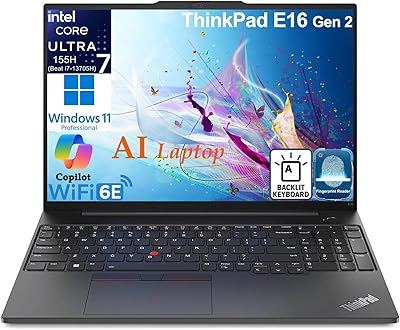
Lenovo ThinkPad E14 Gen 5 Business Laptop, 24GB RAM, 1TB SSD, AMD Ryzen 7 7730U
88%
92%
Performance
88%
Battery Life
90%
Display Quality
94%
Build Quality
84%
Portability
More
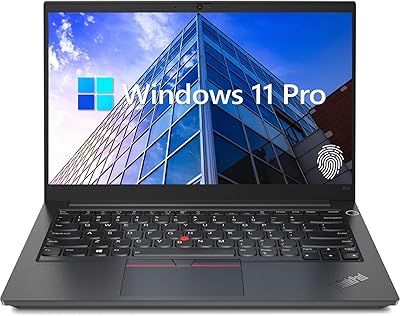
Lenovo ThinkPad E16 Gen 3 Business Laptop, Intel Core Ultra 7, 32GB RAM, 2TB SSD
88%
94%
Overall Performance
96%
Processing Speed
95%
Storage Capacity
89%
Display Quality
75%
Portability
More
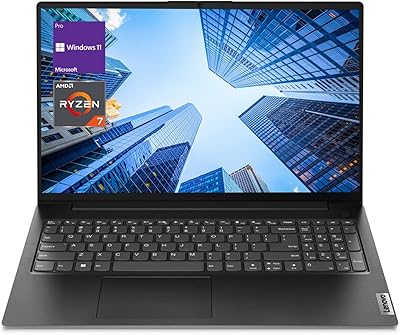
Lenovo V15 Gen 4 Business Laptop, 15.6″, AMD Ryzen 7 7730U, 40GB RAM, 1TB SSD

83%
91%
Performance
88%
Value for Money
90%
Build Quality and Durability
78%
Battery Life
85%
Display Quality
More
Lenovo IdeaPad 1 Gen 7 15.6″ Laptop
72%
91%
Value for Money
78%
Multitasking Performance
88%
Storage & Speed
67%
Display Quality
63%
Touchscreen Usability
More
Lenovo ThinkBook 16 G6 AMD Ryzen 7 7730U 32GB RAM 1TB SSD
86%
92%
Performance
88%
Display Quality
90%
Security Features
89%
Build Quality
84%
Battery Life
More
Lenovo V15 G4 ABP Business Laptop, AMD Ryzen 7 7730U, 16GB RAM, 512GB SSD
85%
88%
Performance
92%
Value for Money
85%
Build Quality
80%
Display Quality
83%
Battery Life
More
Lenovo V15 Gen 4 Business Laptop, AMD Ryzen 5 5500U, 16GB RAM, 1TB SSD
83%
89%
Value for Money
91%
Performance (Multitasking)
82%
Portability & Weight
74%
Battery Life
85%
Display Quality
More
Lenovo V15 Gen 4 15.6″ Business Laptop
70%
83%
Performance & Speed
78%
Value for Money
76%
Build Quality
81%
Keyboard & Input
61%
Display Quality
More
Lenovo Yoga 7i 16″ 2-in-1 Laptop, Core Ultra 7 155U, 16GB, 1TB
74%
84%
Display Quality
82%
Performance & Speed
79%
Build Quality & Hinge
81%
Keyboard & Trackpad
67%
Battery Life
More
Lenovo V15 Business Laptop 32GB RAM 1TB SSD
84%
87%
Value for Money
82%
Performance for Everyday Use
91%
Battery Life
88%
Build Quality
85%
Portability
More

FAQ

The base hardware is a genuine Lenovo ThinkBook unit built by Lenovo. What makes it different from a standard retail configuration is that a third-party reseller has replaced the factory RAM and SSD with higher-capacity components before selling it. The chassis, motherboard, display, and all other parts are original Lenovo hardware.

It means the RAM and SSD are covered by the reseller for three years, while the rest of the machine — motherboard, display, battery, chassis — is covered by Lenovo for one year. If your SSD fails, you contact the reseller. If the display or motherboard develops a problem, you go through Lenovo. It is a reasonable arrangement, but worth understanding before you buy so you know who to call if something goes wrong.

For basic editing tasks — trimming clips, light color grading in Lightroom, or working with smaller RAW files — the Gen 7 ThinkBook 16 will manage adequately. However, the display only covers 45% of the NTSC color gamut, which means the colors you see on screen are not particularly accurate. For serious color work, you would want a display with at least 100% sRGB coverage. The integrated GPU also rules out hardware-accelerated rendering in DaVinci Resolve or Premiere Pro at any meaningful scale.

The 45Wh cell is on the smaller side for a 16-inch machine. With moderate use — a mix of document work, video calls, and browser tabs — expect somewhere in the range of four to six hours. If you are running heavier workloads or keeping the brightness high, you may be reaching for the charger before the end of a standard workday. The 65W USB-C charger tops the battery up reasonably quickly, which helps.

Yes. You can drive up to three displays simultaneously using the HDMI 2.1 port and the two USB-C ports, assuming your USB-C hubs or docks support DisplayPort Alt Mode. This makes it a practical option for a desk setup where you want the built-in screen plus two external monitors for a wide workspace.

The ThinkBook 16 Gen 7 uses socketed DDR5 SODIMM slots rather than soldered memory, so upgrading is technically possible. That said, the unit already ships with 32GB in this configuration, which should be sufficient for most professional workloads for the foreseeable future. If you do upgrade later, be aware it may affect your warranty terms.

This is one area where the ThinkBook line generally earns good marks. The keys have a decent travel distance and a firm, consistent feel that most touch typists find comfortable over extended sessions. The inclusion of a numeric keypad is useful for anyone working with spreadsheets or financial data, though it does compress the main key layout slightly toward the left side of the chassis.

Yes, comfortably. With 32GB of RAM and a six-core processor, running one or two virtual machines alongside your regular workload is well within reach. Developers using Docker, WSL2, or tools like VirtualBox will find the memory headroom genuinely useful compared to machines running 8 or 16GB. Windows 11 Pro also supports Hyper-V natively, which adds another virtualization option without extra software.

It is functional but not impressive. The 720p resolution looks acceptable in good lighting, but in dim rooms or against a bright window it degrades quickly. If you do frequent client-facing calls and presentation quality matters, an external USB webcam is worth the small additional investment. The physical privacy shutter is a genuinely useful feature regardless of resolution.

It depends on the field of study. For business, law, data science, programming, or most STEM disciplines, this Lenovo business laptop offers excellent value — the memory and storage specs support demanding software and multitasking without the premium price. For fine arts, graphic design, or film students where display color accuracy is critical, the limited color gamut is a meaningful drawback worth factoring into the decision.

Where to Buy