Overview

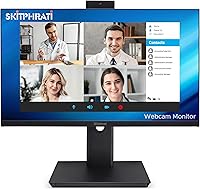
The SKitphrati HD-270 27-Inch Webcam Monitor is a business-focused display built for remote workers and hybrid office setups who want to consolidate their desk without sacrificing core functionality. SKitphrati is a relatively new name in the monitor space, so expectations should be calibrated accordingly — this isn't a Dell or LG, but that doesn't mean it underdelivers for its intended purpose. The 27-inch IPS panel runs at 1080p with a 120Hz refresh rate, which keeps scrolling and video playback smooth throughout a long workday. What separates it from a standard display is the combination of a built-in webcam, microphone array, and speakers — three peripherals folded into one tidy package at a mid-range price point.
Features & Benefits

The built-in 3MP webcam is adjustable, meaning you can tilt it to frame your face properly without repositioning the entire monitor — a small convenience that clip-on cameras can't match. It handles well-lit environments competently, though in low light it shows the expected limitations of any embedded camera; don't expect standalone webcam quality. The microphone array picks up voice clearly in quiet rooms but can struggle with ambient noise in busier spaces. Integrated speakers work fine for call audio without filling a room. The IPS panel at 120Hz makes daily computing noticeably smoother, and the matte surface handles glare well. One honest note: 1080p on a 27-inch screen can appear slightly soft if you sit close.

Best For

This conference-ready monitor makes the most sense for remote and hybrid workers who spend a significant portion of their day on Zoom, Teams, or Google Meet calls and want to cut down on desk clutter without purchasing a webcam, microphone, and speakers separately. It also suits compact home offices where space is genuinely tight. That said, it is not the right fit for everyone. If you are a designer who demands color accuracy, a photographer who edits images professionally, or someone primarily gaming, you will likely want a higher-resolution panel with stronger specs. Think of this as a focused productivity tool, not a versatile multi-purpose workstation display.

User Feedback

Buyers who have picked up the all-in-one business display consistently highlight how straightforward the setup experience is — plug it in and your video call station is ready without driver hunting or peripheral juggling. That convenience factor gets mentioned frequently. On the other hand, some users find the speaker volume modest, which feels limiting in louder or open-plan spaces. A handful of reviewers note that the stand feels lighter and less rigid than expected for a permanent desk fixture. Webcam performance draws mixed opinions in dim lighting conditions. Overall, buyers new to the brand tend to come away reasonably satisfied, which is a decent sign for a name still building its reputation.

Pros

  • All-in-one design eliminates the need to buy a separate webcam, microphone, and speakers for daily calls.
  • The adjustable built-in webcam lets you reframe your shot without repositioning the entire monitor.
  • A 120Hz IPS panel delivers noticeably smoother scrolling and more comfortable extended viewing than standard 60Hz displays.
  • Matte screen surface handles office glare well, reducing reflections during daytime use near windows.
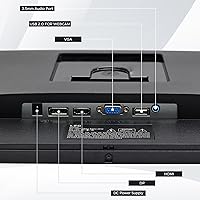
  • Wide connectivity with HDMI, DisplayPort, and VGA means it works with a broad range of older and newer devices.
  • Frameless design keeps the desk look clean and works well in dual-monitor configurations.
  • Setup is straightforward with no complex driver installation reported by most buyers.
  • Eye care features make it a reasonable choice for users clocking long hours in front of a screen daily.
  • At its price point, the peripheral consolidation offers genuine value for budget-conscious home office workers.

Cons

  • 1080p resolution on a 27-inch panel can look soft or slightly pixelated when sitting closer than arm's length.
  • The built-in 3MP webcam underperforms noticeably in dim or poorly lit environments.
  • Microphone array struggles to isolate voice clearly in rooms with ambient background noise.
  • Integrated speaker volume is modest and may feel inadequate in any space larger than a small private office.
  • SKitphrati is a new and largely unproven brand, which introduces uncertainty around long-term reliability and customer support.
  • The stand has been noted by some buyers as feeling light and less rigid than expected for a permanent desk setup.
  • Only one USB 2.0 port is included, which limits hub or peripheral expansion directly from the monitor.
  • No USB-C input is available, which is a noticeable gap for modern laptop users who prefer single-cable connectivity.
  • No adaptive sync or verified fast response time spec makes it a poor fit for any gaming use case.

Ratings

The scores below for the SKitphrati HD-270 27-Inch Webcam Monitor were generated by our AI rating engine after analyzing verified purchase reviews from buyers worldwide, with spam, bot activity, and incentivized feedback actively filtered out. Each category reflects the real distribution of praise and frustration reported by everyday users — remote workers, home office setups, and small business teams — not a curated highlight reel. Both the strengths that keep buyers satisfied and the pain points that generate returns are transparently represented in every score.

All-in-One Convenience
88%
Buyers consistently single out the integrated webcam, mic, and speakers as the main reason they chose this display over a standard monitor. For remote workers who previously managed a tangle of USB dongles and clip-on cameras, having everything consolidated into one unit with a clean desk result genuinely resonates.
A small number of users note that if any one integrated component underperforms, there is no easy way to swap just that part out. The all-in-one approach trades flexibility for tidiness, which is not the right deal for everyone.
Webcam Quality
67%
33%
In a well-lit home office during daytime hours, the 3MP adjustable camera produces a clean, stable image that holds up fine for Zoom and Teams calls. The physical adjustability is a practical advantage over fixed-position clip-on cameras that demand monitor repositioning.
Low-light performance is where user satisfaction drops noticeably. Evening calls or rooms without strong overhead lighting expose the sensor's limitations quickly, and buyers who expected near-standalone-webcam quality tend to come away disappointed compared to dedicated options like a Logitech C920.
Display Clarity
71%
29%
The IPS panel renders colors with solid consistency across viewing angles, and the matte coating handles reflections well in typical office lighting. For spreadsheets, documents, and video call backgrounds, the image looks clean and easy to work with throughout the day.
At 27 inches with a 1080p native resolution, pixel density sits around 82 PPI, which is noticeably lower than a QHD panel at the same size. Users who sit within 20 inches of the screen or work with fine typography regularly report that text lacks the crispness they expected.
Refresh Rate & Smoothness
84%
The 120Hz refresh rate is a genuine upgrade over the 60Hz panels common at this price tier. Scrolling through long documents or browser tabs feels noticeably fluid, and users who spend full workdays on the display report reduced eye fatigue compared to their previous monitors.
The 120Hz advantage is mostly felt during scrolling and cursor movement rather than high-framerate content, since the 1080p resolution limits appeal for gaming or video production. Buyers expecting a performance display for anything beyond productivity use may find the panel falls short.
Microphone Performance
63%
37%
In quiet personal workspaces, the microphone array captures voice clearly enough for daily conferencing without callers asking you to repeat yourself. It is a credible default for anyone upgrading from a laptop's built-in mic or a cheap headset.
Background noise pickup is a recurring complaint. Users in homes with ambient sound — traffic, household activity, air conditioning — note that call quality suffers noticeably, and the array lacks the directional filtering that dedicated USB microphones or conference speakers offer.
Speaker Volume & Quality
59%
41%
For call audio in a small, quiet room, the integrated stereo speakers are adequate — voice playback is clear and intelligible without needing headphones during a one-on-one meeting. The convenience of not needing an external speaker for light daily use is appreciated by buyers in compact setups.
Volume headroom is limited, and users working in anything larger than a small private office find the speakers underwhelming. Media consumption — music, training videos, or webinar audio — at room-filling levels is not what these speakers are built for, and buyers expecting otherwise are regularly let down.
Eye Care & Comfort
78%
22%
The combination of a matte surface, 120Hz refresh rate, and stated eye care technology makes this monitor noticeably easier on the eyes during long sessions compared to glossy or 60Hz alternatives. Users who log eight or more hours daily at a desk report less end-of-day strain.
The exact eye care technology used is not documented in the product specifications, making it difficult to verify whether it is hardware-level flicker reduction or a simple software filter. Buyers with medically sensitive vision or strong blue-light concerns may want more transparency before committing.
Connectivity
76%
24%
Having HDMI, DisplayPort, and VGA available simultaneously is genuinely useful for buyers connecting the display to older office PCs, newer laptops via docking stations, or switching between two machines. The breadth of legacy support is above average for this price range.
The absence of USB-C is a real limitation for modern laptop users who prefer single-cable connectivity. With only one USB 2.0 port available, peripheral expansion directly through the monitor is essentially non-existent, which feels outdated given current buyer expectations.
Build Quality & Stand
61%
39%
The frameless panel looks clean and modern on a desk, and the slim profile keeps the physical footprint manageable. For buyers who prioritize aesthetics in a home office or professional-looking video call background, the design holds up well visually.
The stand draws consistent criticism for feeling lightweight and slightly unstable, particularly on desks that are not perfectly level. There is no height adjustment, which limits ergonomic flexibility, and users who prefer monitor arms face uncertainty about VESA compatibility since it is not officially confirmed.
Setup Experience
86%
Plug-and-play behavior is one of the most consistently praised aspects across buyer reviews. Most users report the monitor is recognized immediately by Windows and macOS without driver installation, making the first-use experience unusually smooth for a lesser-known brand.
A small subset of buyers encountered issues getting the webcam or audio to initialize correctly, particularly on older operating system versions. These cases appear to be exceptions rather than the norm, but without robust brand support documentation, troubleshooting can feel uncertain.
Value for Money
82%
18%
For buyers whose primary goal is eliminating separate peripherals at a mid-range price, the math works out favorably. Getting a 27-inch IPS display, a working webcam, a functional microphone, and integrated speakers in one purchase offers genuine savings compared to sourcing each component individually.
The value proposition weakens if you already own a decent webcam or external speakers, since you would be paying for redundant features. Buyers who compare it directly against a slightly cheaper pure-display monitor from a reputable brand may question whether the peripheral integration justifies the premium.
Brand Reliability
57%
43%
For a brand that only entered the market in early 2025, the initial user satisfaction rate is encouraging. Buyers who went in with calibrated expectations about purchasing from a newer manufacturer report few immediate hardware failures in early ownership.
SKitphrati has a minimal track record and limited documented customer support infrastructure. Buyers considering this monitor as a long-term investment should weigh the uncertainty around warranty fulfillment and replacement part availability against the upfront cost savings.
Low-Light Webcam Use
48%
52%
In controlled conditions with a ring light or a bright desk lamp aimed at the user, the 3MP sensor can produce an acceptable image that reads as professional on a video call. Buyers who have supplemental lighting already in their setup report more satisfying results.
Without dedicated lighting, evening or dim-room performance is the most cited disappointment in user reviews. The sensor lacks the sensitivity to compensate for poor ambient light, and the resulting grainy, dark image is a frequent trigger for buyers switching back to a standalone camera.
Ergonomics
55%
45%
The adjustable webcam tilt is a small but genuinely appreciated ergonomic feature, allowing users to dial in framing without physically moving the monitor. The matte screen and eye care settings also contribute to a more comfortable extended-use experience.
The lack of height adjustment on the stand is a significant ergonomic gap for buyers who cannot or do not want to use a monitor arm. Sitting at a fixed display height for full workdays without the ability to raise or lower the panel runs counter to recommended workspace ergonomics.

Suitable for:

The SKitphrati HD-270 27-Inch Webcam Monitor is a practical fit for remote workers and hybrid employees who spend a good chunk of their day on video calls and want to simplify their setup without compromising core functionality. If you are working from a spare bedroom, a compact apartment desk, or a small private office, having the webcam, microphone, and speakers built directly into the display eliminates the cable clutter and peripheral juggling that comes with a piecemeal setup. It is especially well-suited for people upgrading from an older basic monitor who want to step into a more capable daily driver without separately budgeting for a webcam and USB speakerphone. The 120Hz IPS panel also makes it a solid choice for professionals who stare at text, spreadsheets, and browser tabs all day, as the smoother refresh and matte surface genuinely reduce visual fatigue over long sessions. First-time buyers exploring lesser-known monitor brands who prioritize all-in-one convenience over brand prestige will likely find this a worthwhile and sensible investment.

Not suitable for:

The SKitphrati HD-270 27-Inch Webcam Monitor is not the right tool for buyers who expect professional-grade audiovisual performance from their peripherals. If you are a content creator, graphic designer, or photo editor, the 1080p resolution spread across a 27-inch panel will feel noticeably soft at close viewing distances, and the color accuracy of an unverified IPS panel from a newer brand is unlikely to meet professional standards. Dedicated streamers or video professionals should stick with a proper external webcam, as a 3MP built-in camera simply cannot compete with standalone options in low-light or demanding recording environments. Gamers chasing competitive performance will also find this monitor lacking, given no mention of adaptive sync support or a fast response time specification. Anyone who works in a loud open-plan office should also temper expectations around the microphone array and speaker volume, both of which are calibrated for quieter personal workspaces rather than noisy shared environments.
Specifications

  • Screen Size: The display measures 27 inches diagonally, providing a spacious work area suited to multitasking and side-by-side application use.
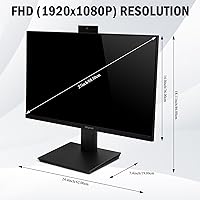
  • Resolution: Native resolution is 1920x1080 (FHD 1080p), which delivers clear visuals for everyday productivity and video conferencing tasks.
  • Panel Type: An IPS panel is used, offering wider viewing angles and more consistent color reproduction compared to TN-type displays.
  • Refresh Rate: The display runs at 120Hz, resulting in smoother scrolling, reduced motion blur, and a more comfortable experience during long working sessions.
  • Aspect Ratio: Standard 16:9 widescreen aspect ratio, compatible with virtually all modern operating systems, video conferencing layouts, and productivity software.
  • Screen Surface: The matte anti-glare coating reduces reflections from windows and overhead lighting, making it practical for typical office and home desk environments.
  • Built-in Webcam: A 3-megapixel adjustable webcam is integrated into the top bezel and can be physically tilted to adjust framing without repositioning the monitor.
  • Microphone: A built-in microphone array is included, designed to capture voice for video calls without requiring an external USB or analog microphone.
  • Speakers: Integrated stereo speakers provide audio output suitable for call playback and general media, eliminating the need for a separate desktop speaker for light use.
  • Eye Care: The monitor includes eye care technology intended to reduce flicker and lower blue light output, which is relevant for users working eight or more hours daily.
  • Video Inputs: Connectivity includes HDMI, DisplayPort, and VGA inputs, supporting a wide range of computers, docking stations, and legacy devices.
  • USB Ports: One USB 2.0 port is available on the monitor, which can be used for connecting peripherals directly to the display.
  • Design: The frameless, borderless-bezel design keeps the visual footprint minimal and makes the monitor suitable for use in dual-display configurations.
  • Dimensions: The monitor measures approximately 24.15 inches wide, 14.5 inches tall, and 1.5 inches deep, making it a relatively slim unit for a 27-inch display.
  • Weight: The unit weighs 12.23 pounds, which is on the lighter side for its size and may affect stand stability on some desk surfaces.
  • Model Number: The official model designation is HD-270, manufactured by SKitphrati.
  • Availability: This monitor was first made available in March 2025, making it a recent addition to the all-in-one business display category.

Related Reviews
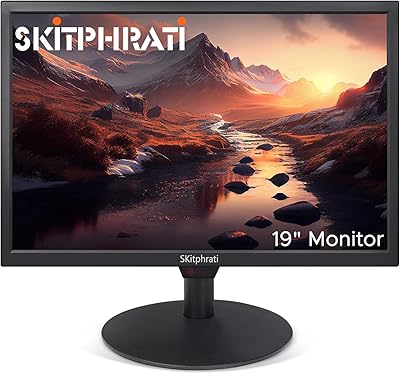
SKitphrati HD-190 19-Inch Monitor
66%
83%
Value for Money
91%
Port Variety
67%
Display Clarity
52%
Color Accuracy
63%
Build Quality
More
ASUS VA279HAE 27″ Full HD Monitor
75%
88%
Value for Money
91%
Eye Comfort
83%
Image Contrast & Blacks
41%
Stand & Ergonomics
67%
Display Sharpness
More
Philips 27E2N1510 27″ QHD Monitor
77%
91%
Image Clarity
84%
Color Accuracy
79%
Refresh Rate & Smoothness
88%
Eye Comfort
71%
Build Quality
More
ASUS VA27DQ 27-inch IPS Monitor
77%
83%
Image Quality
91%
Viewing Angles
47%
Ergonomics & Stand
71%
Refresh Rate & Gaming
88%
Eye Comfort
More
HP 27h 27-inch Full HD Monitor
76%
83%
Image Quality
81%
Build Quality
88%
Ergonomics & Adjustability
74%
Refresh Rate & Smoothness
58%
Built-in Speakers
More
ASUS VA27ECPSN 27-inch Docking Monitor
79%
91%
USB-C Docking Performance
93%
Connectivity Range
88%
Wired LAN Integration
61%
Display Sharpness
89%
Ergonomic Stand
More
ASUS VZ279HE 27-inch IPS Monitor
75%
91%
Value for Money
88%
Eye Comfort
74%
Build Quality
72%
Display Clarity
67%
Color Accuracy
More
Dell S2721HS 27-inch Full HD IPS Monitor
87%
94%
Display Quality
91%
Color Accuracy
85%
Build Quality
89%
Gaming Performance
92%
Design & Aesthetics
More
MSI Optix MAG274R 27-inch Full HD 144Hz Gaming Monitor
84%
93%
Display Quality
89%
Gaming Performance
91%
Color Accuracy
77%
Build Quality
94%
Response Time
More
Philips 27-inch Class Thin Full HD 100Hz Monitor 271V8LB
86%
92%
Value for Money
89%
Display Quality
87%
Ease of Setup
91%
Eye Care Technology Effectiveness
80%
Build Quality
More

FAQ

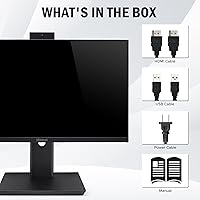
The webcam requires a USB connection to your computer to function — it does not activate through the HDMI or DisplayPort video signal alone. You will need to connect the included or a compatible USB cable from the monitor to your PC for the camera, microphone, and speakers to be recognized as devices.

It should work with a MacBook as long as your laptop has a compatible video output such as HDMI or DisplayPort via an adapter. The webcam and audio features rely on standard USB Audio and UVC protocols, which macOS supports natively, so no special drivers should be required.

Honestly, the built-in 3MP camera is convenient but not a match for a dedicated external webcam in image quality, especially in low-light conditions. A standalone webcam like the C920 will give you better low-light performance, sharper detail, and more control. The built-in option is best thought of as a solid default for daily calls rather than a premium camera replacement.

At a typical desk viewing distance of about 24 to 30 inches, 1080p on a 27-inch panel is functional but not razor-sharp. If you sit closer than that or have particularly sensitive eyes for pixel density, you may notice some softness in text and fine details. For video calls, spreadsheets, and general browsing, most users find it acceptable.

Yes, the frameless design actually makes it a reasonable candidate for a dual-monitor setup. You can connect it via HDMI or DisplayPort and use it independently or extend your desktop across both screens. Just keep in mind it shares a VGA port as well, which could be useful if your primary monitor occupies your laptop's HDMI port.

For calls in a quiet, enclosed space like a home office or small private room, the speakers are generally adequate. In louder environments or open-plan settings, the volume may feel limited. They are not designed for media playback at room-filling levels, so if audio quality matters to you beyond calls, a small external speaker would be a worthwhile addition.

VESA compatibility is not confirmed in the official product specifications, so it is worth contacting the seller or checking the current product listing before purchasing a monitor arm. Assuming VESA support without confirmation could result in an incompatible mount.

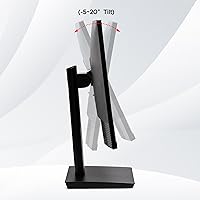
The stand is a fixed-tilt design and does not offer height adjustment based on the listed specifications. Some buyers have noted that the stand feels lighter than expected, which can mean minor wobble on less-than-flat desk surfaces. If ergonomic height positioning matters to you, pairing it with a monitor arm might be worth considering.

Eye care features like low blue light and flicker reduction do take the edge off for extended sessions, though the effect varies by individual sensitivity. If you already experience eye strain at the end of a long workday on a standard display, having these features built in is a genuine convenience. That said, taking regular screen breaks remains more effective than any hardware filter on its own.

SKitphrati is a newer brand and warranty terms are not prominently documented in the publicly available product listing, so it is advisable to confirm the warranty policy with the seller before purchasing. In the event the integrated webcam or microphone fails, your repair options may be limited since these components are embedded in the display rather than replaceable modules.