Overview

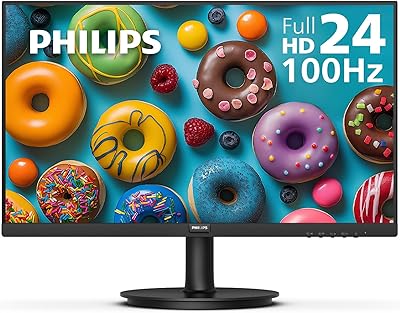
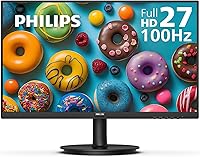
The Philips 271V8LB 27-inch Full HD Monitor is a straightforward, no-nonsense option for anyone who wants a large screen without spending a lot. What sets it apart at this price tier is the VA panel — a meaningful upgrade over TN displays in terms of contrast and color depth. The 100Hz refresh rate won't impress competitive gamers, but it's a noticeable improvement over the standard 60Hz experience for everyday tasks. Three-side near-borderless bezels keep the desk looking clean, and pairing two side by side is hassle-free. Perhaps most surprising is the 4-year advance replacement warranty, a level of coverage you'd typically expect from a higher-priced purchase.
Features & Benefits

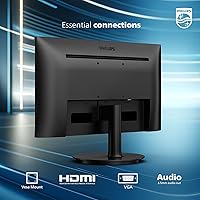
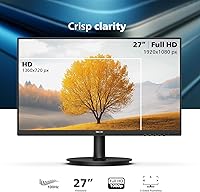
At 27 inches with a 1920x1080 resolution, the pixel density is noticeably lower than a QHD panel at the same size — text looks fine for most office work, but if you sit close or do detailed photo editing, you'll feel the difference. Where this 27-inch VA display genuinely earns its keep is contrast. Dark scenes look rich rather than washed out, and the 178-degree viewing angle keeps colors consistent even when you're not sitting dead-center. EasyRead mode is worth enabling if you spend hours on documents, as it reduces screen harshness noticeably. The HDMI and VGA ports let you connect a modern laptop or an older desktop without hunting for adapters.

Best For

This Philips monitor makes the most sense for home office workers who need screen real estate for spreadsheets, video calls, or keeping several windows open at once. Students and first-time buyers will appreciate how little setup it demands — plug it in and it mostly just works. The near-borderless design also makes it a practical pick for anyone building a dual-monitor station without a cluttered look. It handles everyday streaming and casual browsing well enough. If you work in a bright room, though, the glossy panel will catch overhead lights and windows, which can be distracting — a real consideration worth factoring in before buying.

User Feedback

Buyers consistently point to the size-to-price ratio as the main reason they chose the 271V8LB — getting a 27-inch VA display at this price feels like a solid deal, and most find the out-of-box color accuracy acceptable without manual calibration. Stand stability earns praise too, which isn't always a given at this price point. The most common criticism is that 1080p can look slightly soft at 27 inches, particularly for users coming from smaller, sharper screens. A handful of reviewers flag glare from the glossy surface in sunlit rooms. On the positive side, the 4-year warranty comes up repeatedly as a genuine confidence booster, and the OSD menu is widely reported as easy to navigate.

Pros

  • The 27-inch screen size delivers genuine desk presence and makes multitasking with multiple windows far more comfortable.
  • VA panel contrast produces noticeably deeper blacks than TN alternatives, especially in low-light environments.
  • The 4-year advance replacement warranty is a rare and meaningful safety net at this price tier.
  • Out-of-box color accuracy is solid enough for everyday use without any manual calibration required.
  • Both HDMI and VGA ports are included, covering a wide range of old and new devices without adapters.
  • The near-borderless three-side design keeps dual-monitor setups looking clean and professional.
  • EasyRead mode genuinely reduces screen fatigue during long document-heavy work sessions.
  • The 178-degree viewing angle means color stays consistent even when colleagues or family members glance at the screen from the side.
  • VESA compatibility allows wall mounting or third-party arm use for a more flexible desk setup.
  • Setup is straightforward and fast, with minimal fuss out of the box.

Cons

  • Pixel density at 1080p across 27 inches can look noticeably soft, especially for users accustomed to QHD screens.
  • The glossy panel surface picks up reflections easily in bright rooms or near windows.
  • The stand offers very limited ergonomic adjustment — no height, pivot, or swivel flexibility.
  • 100Hz falls short for fast-paced gaming, where higher refresh rates and faster response times are expected.
  • Color gamut coverage is average, making it a poor choice for any color-sensitive creative work.
  • The OSD button placement can feel awkward to navigate until you get used to the layout.
  • At 13.62 pounds, it is not particularly light, which matters if you plan to reposition it frequently.
  • Only a single HDMI port is available, which may require swapping cables if you use multiple HDMI devices.

Ratings

The Philips 271V8LB 27-inch Full HD Monitor has been evaluated by our AI rating system after analyzing thousands of verified global buyer reviews, with spam, bot-generated, and incentivized feedback actively filtered out to ensure the scores reflect genuine ownership experiences. The result is a transparent, balanced scorecard that surfaces both what this 27-inch VA display does well and where real users have felt let down. Whether you are considering it as a primary work monitor or a budget-friendly second screen, these ratings are designed to help you make a clear-eyed decision.
Value for Money
91%
Among all the feedback patterns, the size-to-price ratio is the single most celebrated aspect of this display. Buyers consistently describe the feeling of getting significantly more screen real estate than they expected for the money, making it a go-to recommendation among budget-conscious home office setups.
A small number of reviewers note that spending a bit more would land you at QHD resolution, which makes the value equation feel slightly less clear-cut for users who care about pixel density. At the entry-level price point, though, the compromise is widely accepted.
Contrast & Blacks
84%
The VA panel technology delivers noticeably richer contrast than TN alternatives at the same price, and users working in low-light or evening environments frequently comment on how dark scenes and black backgrounds look genuinely deep rather than washed out. For spreadsheet work and document editing, the added depth makes the screen easier on the eyes.
Some users note that the contrast advantage is less impressive in bright daytime conditions where ambient light competes with the display. Fast-moving dark content can also reveal mild smearing, a known characteristic of VA panels that a minority of buyers pick up on.
Screen Sharpness
63%
37%
For typical office tasks — reading emails, filling out documents, browsing the web — the 1920x1080 resolution is functional and most users report no complaints when sitting at a standard desk distance of two to three feet. The image looks clean and well-defined for everyday content.
This is the most consistently flagged limitation in user reviews. Buyers who have previously used QHD or higher-resolution panels notice the softness almost immediately, particularly when reading small text or looking at detailed graphics. At 27 inches, 1080p is a genuine visual compromise that prospective buyers should weigh carefully.
Warranty & Support
93%
The 4-year advance replacement warranty stands out as an unexpected and genuinely valued inclusion at this price level. Multiple reviewers specifically mention it as a deciding factor in choosing this monitor over competing options, and the advance-replacement structure — where a new unit ships before the faulty one is returned — earns particularly strong praise.
A few buyers note that actually initiating a warranty claim requires contacting Philips support, which some users describe as requiring patience. The process itself is covered, but the experience of getting there is not always frictionless.
Eye Comfort
78%
22%
EasyRead mode receives consistent positive feedback from users who spend long stretches reading documents or articles on screen. The reduction in bright-white glare during extended sessions is described as genuinely helpful rather than just a checkbox feature, and several reviewers mention reduced end-of-day eye fatigue.
The glossy screen surface partially undermines the eye comfort story, as reflections in well-lit rooms create a different kind of visual strain. Users in bright offices or near windows find themselves adjusting screen position frequently, which offsets some of the EasyRead benefit.
Build Quality
76%
24%
The stand is frequently highlighted as sturdy and stable — buyers appreciate that the monitor does not wobble during typing or light desk activity. The overall construction feels solid for a value-tier display, and the slim profile contributes to a tidy desk aesthetic.
The plastic finish, while functional, does not feel premium to the touch, and a handful of users note that the rear panel shows fingerprints easily. The stand's limited adjustability — no height or swivel — is the most common build-related complaint across reviews.
Glare & Reflections
54%
46%
In controlled or dim lighting conditions, the glossy surface actually rewards users with more vivid colors and better contrast perception compared to matte alternatives. Users with well-positioned desk lighting report minimal issues and appreciate the visual punch it provides.
In typical home or office environments with overhead fluorescent lighting or nearby windows, the glossy panel reflects light aggressively. This is one of the more polarizing aspects of the monitor, with a significant portion of reviewers mentioning it as an ongoing frustration rather than a minor inconvenience.
Color Accuracy
73%
27%
Out-of-the-box color accuracy earns solid marks from everyday users who do not require professional-grade calibration. Colors look natural and consistent for general productivity and streaming, and the 178-degree viewing angle means color does not shift noticeably when viewed from the side.
Users with a background in photo editing or design work find the color gamut coverage limiting. The display is not factory calibrated for color-critical work, and while average users will not notice, anyone accustomed to sRGB-accurate or wide-gamut panels will feel the gap.
Setup & Installation
88%
Nearly every reviewer who mentions setup describes it as fast and painless. The stand assembly is tool-free and clicks into place intuitively, and having both HDMI and VGA ports available means most users can connect immediately without hunting for adapters or dongles.
Cable management options behind the stand are minimal, and a few reviewers with tidier desk setups mention that loose cables are harder to route cleanly than expected. It is a minor issue but notable for users who care about desk aesthetics.
OSD & Controls
67%
33%
The on-screen display menu is logically structured and covers the essential settings — brightness, contrast, color temperature, and EasyRead mode — without overwhelming the user with unnecessary complexity. Most buyers figure it out quickly without consulting the manual.
The physical OSD buttons are located on the rear underside of the bezel, which many users find awkward to locate by feel alone, especially in the first few weeks of ownership. Several reviews specifically call out the button placement as unintuitive compared to competing monitors.
Multi-Monitor Compatibility
86%
The three-side near-borderless design works well in practice for dual-monitor configurations. Users who pair two units side by side report a narrow, visually unobtrusive gap between screens, and the slim profile makes cable routing between panels relatively clean.
There is no built-in USB hub or daisy-chain display output, so each monitor requires its own dedicated connection to the host device. For users building a dual-monitor setup, this means managing twice the cable clutter at the back of the desk.
Refresh Rate Performance
72%
28%
The step up from 60Hz to 100Hz is perceptible during everyday scrolling and light video playback — motion feels slightly smoother, and the difference is appreciated by users who spend significant time reading long pages or watching fast-moving content casually.
The 100Hz figure is well short of what gaming-oriented buyers expect, and there is no adaptive sync support noted, which limits its appeal for anyone hoping to use this display for even moderate gaming. The improvement over 60Hz is real but narrow in scope.
Ergonomics & Adjustability
47%
53%
Basic tilt adjustment is available and functions smoothly, allowing users to angle the screen back slightly for a more comfortable viewing position when seated at a standard desk height. For users whose setup already positions the monitor at the right level, this may be sufficient.
The absence of height adjustment, swivel, and pivot severely limits ergonomic customization. Users who are taller, use the monitor on a low desk, or need a portrait mode rotation will need to invest in a separate VESA arm to compensate — an added cost the default stand makes unavoidable.
Connectivity
79%
21%
Having both HDMI and VGA ports is genuinely practical for a wide range of buyers, particularly those connecting an older desktop PC alongside a modern laptop. It removes the need for an immediate accessory purchase and keeps the setup process simple for less tech-savvy users.
The single HDMI port can be a bottleneck for users who regularly switch between two HDMI-equipped devices, requiring manual cable swapping. The lack of DisplayPort or USB-C connectivity means this display will not grow well with newer, port-limited laptops over time.

Suitable for:

The Philips 271V8LB 27-inch Full HD Monitor is a well-matched choice for home office workers, students, and everyday users who want a large, comfortable screen without overcomplicating the decision. If your daily routine involves spreadsheets, email, document editing, or video calls, the 27-inch VA panel gives you plenty of visual breathing room and handles those tasks reliably. The strong contrast and wide viewing angle make it particularly comfortable in dimly lit rooms or shared workspaces where you're not always sitting perfectly centered. First-time monitor buyers will find setup refreshingly simple — both HDMI and VGA inputs are covered, so connecting an existing laptop or desktop is rarely an issue. Those building a dual-monitor workstation on a budget will also appreciate the three-side near-borderless design, which keeps the gap between panels minimal. And for anyone who has been burned by early hardware failures before, the 4-year advance replacement warranty offers a level of long-term reassurance that is genuinely uncommon at this price point.

Not suitable for:

The Philips 271V8LB 27-inch Full HD Monitor is not the right fit for buyers who prioritize sharp, pixel-dense visuals, because spreading 1080p across a 27-inch panel results in noticeably lower pixel density compared to QHD or 4K alternatives — something that becomes apparent when reading small text up close or working with fine detail in design or photo work. Competitive or enthusiast gamers will also find it lacking, as 100Hz and a VA response time fall short of what fast-paced gaming genuinely demands. The glossy screen surface is a real drawback for anyone working near windows or under bright overhead lighting, where reflections can become a persistent distraction. Users who need ergonomic flexibility — height adjustment, pivot, or swivel — will be disappointed, as the stand offers limited range of motion. Creative professionals who need accurate, wide color gamut coverage for video editing or color-critical work should look elsewhere, since this display is built for office utility rather than color precision.
Specifications

  • Screen Size: The display measures 27 inches diagonally, offering ample workspace for multitasking, documents, and media consumption.
  • Resolution: Native resolution is 1920x1080 Full HD, delivering clear visuals for everyday office tasks, web browsing, and streaming.
  • Panel Type: Uses a VA (Vertical Alignment) panel, which provides stronger contrast ratios and deeper blacks compared to TN panels.
  • Refresh Rate: Supports a 100Hz refresh rate, offering modestly smoother motion than standard 60Hz displays during scrolling and casual video playback.
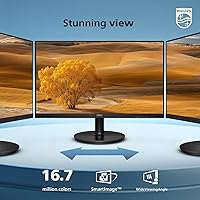
  • Viewing Angle: Rated at 178 degrees horizontally and 178 degrees vertically, ensuring consistent color reproduction from nearly any seated position.
  • Color Depth: Capable of reproducing 16.7 million colors, suitable for everyday content consumption and general office work.
  • Aspect Ratio: Features a standard 16:9 widescreen aspect ratio, compatible with the vast majority of video content and productivity layouts.
  • Screen Surface: The panel uses a glossy screen surface, which enhances color vibrancy but may produce reflections in brightly lit environments.
  • Connectivity: Includes one HDMI port and one VGA port, supporting both modern and legacy device connections without additional adapters.
  • Eye Care: Equipped with EasyRead mode, which adjusts the display to reduce eye strain during extended document reading sessions.
  • Bezel Design: Features a near-borderless design on three sides, making it practical for side-by-side dual-monitor configurations.
  • VESA Mount: VESA mounting is supported, allowing the monitor to be attached to compatible wall mounts or third-party monitor arms.
  • Warranty: Backed by a 4-year advance replacement warranty, meaning Philips will ship a replacement unit before the defective one is returned.
  • Weight: The monitor weighs 13.62 pounds with its stand attached, which is typical for a display of this size and build class.
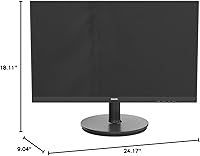
  • Dimensions: Overall dimensions with stand measure approximately 24.17 inches wide, 18.11 inches tall, and 9.04 inches deep.

Related Reviews
HP 27h 27-inch Full HD Monitor
76%
83%
Image Quality
81%
Build Quality
88%
Ergonomics & Adjustability
74%
Refresh Rate & Smoothness
58%
Built-in Speakers
More
ASUS VA27DQ 27-inch IPS Monitor
77%
83%
Image Quality
91%
Viewing Angles
47%
Ergonomics & Stand
71%
Refresh Rate & Gaming
88%
Eye Comfort
More
Philips 27E2N1510 27″ QHD Monitor
77%
91%
Image Clarity
84%
Color Accuracy
79%
Refresh Rate & Smoothness
88%
Eye Comfort
71%
Build Quality
More
Philips 241V8LB 24-inch Full HD Monitor
78%
93%
Value for Money
86%
Image Clarity & Sharpness
88%
Contrast & Panel Performance
79%
Refresh Rate & Motion Smoothness
84%
Eye Comfort & Fatigue Reduction
More
ASUS VA279HAE 27″ Full HD Monitor
75%
88%
Value for Money
91%
Eye Comfort
83%
Image Contrast & Blacks
41%
Stand & Ergonomics
67%
Display Sharpness
More
Philips 221V8LB3 22-Inch Full HD Monitor
82%
88%
Performance
92%
Display Quality
87%
Value for Money
81%
Ease of Setup
85%
Gaming Performance
More
ASUS VA27ECPSN 27-inch Docking Monitor
79%
91%
USB-C Docking Performance
93%
Connectivity Range
88%
Wired LAN Integration
61%
Display Sharpness
89%
Ergonomic Stand
More
ASUS VZ279HE 27-inch IPS Monitor
75%
91%
Value for Money
88%
Eye Comfort
74%
Build Quality
72%
Display Clarity
67%
Color Accuracy
More
Dell S2721HS 27-inch Full HD IPS Monitor
87%
94%
Display Quality
91%
Color Accuracy
85%
Build Quality
89%
Gaming Performance
92%
Design & Aesthetics
More
MSI Optix MAG274R 27-inch Full HD 144Hz Gaming Monitor
84%
93%
Display Quality
89%
Gaming Performance
91%
Color Accuracy
77%
Build Quality
94%
Response Time
More

FAQ

For most everyday tasks like browsing, documents, and video calls, 1080p on 27 inches looks perfectly acceptable. Text is clear and images look fine at a normal desk distance of around 2 to 3 feet. That said, if you sit very close or you are used to a QHD screen, the lower pixel density will be noticeable. It is a trade-off worth thinking about based on your typical use.

Yes, as long as your laptop has an HDMI output, the connection is straightforward. If your laptop only has USB-C or Thunderbolt ports, you will need a compatible USB-C to HDMI adapter, which is widely available and inexpensive. The VGA port is also there for older devices that lack HDMI.

It depends heavily on your room setup. In a dim or controlled-lighting environment, the glossy surface actually makes colors look more vivid and punchy. However, if you have a window behind you or bright overhead lights, you will notice reflections on the screen. Positioning the monitor away from direct light sources helps significantly.

Yes, the display is VESA compatible, so it works with standard wall mounts and third-party monitor arms. Removing the stand is straightforward, and using an arm can also help compensate for the limited height adjustment the default stand offers.

The stand supports basic tilt adjustment but does not offer height, swivel, or pivot adjustment. If ergonomic flexibility is important to you, pairing the monitor with a VESA-compatible arm is the practical solution.

It means that if your monitor develops a hardware fault within four years, Philips will send a replacement unit to you before you even have to return the defective one. This is notably more buyer-friendly than the standard one-year limited warranties common at this price level, and it removes the frustrating wait of being without a screen during a repair process.

It can handle casual gaming reasonably well — the 100Hz refresh rate and VA contrast make games like slower-paced RPGs or strategy titles look good. However, it is not designed for competitive or fast-paced gaming, where you would want a higher refresh rate, lower response time, and ideally a monitor with adaptive sync support. For anything serious in gaming, you would want to look at purpose-built gaming monitors.

Setup is about as simple as it gets. The stand attaches with minimal effort, the cables plug in cleanly, and the monitor powers on ready to use without needing to dig into settings. Most buyers report being up and running within a few minutes.

It is genuinely useful for extended reading sessions. EasyRead mode reduces the intensity of bright white backgrounds, which helps reduce eye fatigue when you are staring at long documents or dense text for hours. It is not a dramatic transformation, but it is a practical feature worth using if you do a lot of reading on screen.

Absolutely — the three-side near-borderless design was clearly built with dual-monitor setups in mind. The thin bezels mean the gap between two screens side by side is minimal, which makes the transition between panels feel much more natural during everyday work.