Overview

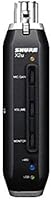
The Shure X2u XLR-to-USB Audio Interface solves a very specific problem: you've invested in a quality XLR microphone, but your computer has no way to accept that signal directly. This adapter has been around since 2009, which says something about its staying power in a market that churns out new gear constantly. Shure's reputation for building tough, reliable equipment carries over here — the unit feels solid in hand. Setup is genuinely simple; plug it in and most operating systems recognize it without any driver installation. It ships with a 3m USB cable and a padded zippered pouch. Just know going in: this is a single-channel solution, not a multi-input interface.

Features & Benefits

The built-in preamp is arguably what separates the Shure X2u from cheaper pass-through adapters. You get a physical microphone gain control on the unit itself, so you're not hunting through software menus to set input levels. Condenser microphone users will appreciate the onboard 48V phantom power, which many budget alternatives omit entirely. The 3.5mm headphone output enables zero-latency monitoring — you hear yourself in real time, with no distracting delay, which makes a genuine difference when recording vocals or spoken word. A monitor mix knob lets you blend your live mic signal against your computer's playback audio. And the whole thing fits in a jacket pocket.

Best For

This signal adapter is particularly well-suited to podcasters and voice-over artists who already have an XLR microphone and just need a clean, direct path to their computer. It also works well for musicians recording quick vocal or instrument demos — not a full production rig, but enough to capture ideas properly. Streamers moving up from a consumer USB mic to a proper XLR condenser will find the transition straightforward. Journalists and field recorders benefit from its compact footprint and the included carrying pouch. Anyone who specifically needs hardware-level gain control and real-time headphone monitoring — rather than wrestling with software settings — will feel right at home with this one.

User Feedback

With a 4.6-star average built from nearly 700 ratings, this XLR-to-USB adapter has clearly earned trust over a long run. Buyers frequently call out the audio clarity and preamp quality as standing out against cheaper rivals, and setup ease comes up repeatedly — most people are recording within minutes of unboxing. The build quality draws consistent praise too. That said, honest criticism does appear. A few users on newer operating systems have reported needing workarounds for driver recognition. Some note a slight noise floor at higher gain settings, which is worth knowing if you record in very quiet environments. And the single-channel limitation occasionally frustrates buyers who discover they need more inputs down the road.

Pros

  • Hardware gain control lets you dial in clean input levels precisely without touching any software settings.
  • Built-in 48V phantom power makes it compatible with condenser microphones straight out of the box.
  • Zero-latency headphone monitoring lets you hear yourself in real time with no distracting delay.
  • Plug-and-play setup works on most operating systems without any driver installation required.
  • The monitor mix knob lets you balance live mic audio against computer playback in real time.
  • Shure's build quality gives this adapter a clear durability edge over cheaper alternatives in this segment.
  • Comes with a padded zippered pouch and a 3m USB cable, so it is ready to use immediately.
  • Wide OS compatibility spans older Windows versions through current Mac systems, covering most users.
  • Compact and light enough to pack into a laptop bag without adding meaningful bulk.
  • A 4.6-star average across nearly 700 buyers points to consistently strong satisfaction over many years.

Cons

  • Only one XLR input is supported — recording two or more sources at the same time is not possible.
  • Some users on newer operating system versions have encountered driver recognition issues that require workarounds.
  • The noise floor can become audible at higher gain settings, which matters most in very quiet recording environments.
  • No quarter-inch instrument input means guitarists and bass players will need an additional adapter or DI box.
  • At 14.1 ounces, it is noticeably heavier than compact USB dongles, which occasional travelers may find inconvenient.
  • No MIDI connectivity makes it unsuitable for keyboard players or producers who rely on that functionality.
  • Long-term driver support for future operating system releases is uncertain given the product's 2009 launch date.
  • The single-channel limitation can frustrate buyers who later discover their recording needs have grown beyond one input.

Ratings

The Shure X2u XLR-to-USB Audio Interface earns a strong overall standing based on AI analysis of verified global buyer reviews, with spam, incentivized, and bot-generated feedback actively filtered out before scoring. Across nearly 700 ratings spanning more than a decade of real-world use, the data tells a consistent story — this adapter genuinely delivers on its core promise for the right buyer, while a handful of real friction points keep it from being a universal recommendation. Both the highlights and the limitations are reflected transparently in the category scores below.

Audio Quality
88%
Buyers consistently describe recorded audio as noticeably cleaner than what they got from budget USB mics or generic pass-through adapters. The signal comes through with good clarity and definition, which matters most for podcasters and voice-over artists where intelligibility and warmth are the priority. Many users report a genuinely meaningful step up in perceived quality.
At higher gain settings, some users detect a slight softness in transient detail that can be a limitation for music recording where precision matters more than in speech-only applications. It is not a high-end studio preamp, so demanding producers looking for the resolution of a dedicated interface will still find it falls short.
Ease of Setup
93%
Setup is about as frictionless as it gets — plug the XLR mic into one end, connect the USB to the computer, and most systems are recording within seconds. Beginners making the jump from consumer gear consistently describe the experience as a relief compared to wrestling with more complex interface configurations. There is almost no learning curve at all.
On a small number of the most recent operating system versions, some users have encountered an initial failure to recognize the device without manual troubleshooting or a support forum search. This does not affect the majority of users, but it does occasionally break the otherwise frictionless first-time experience that most buyers enjoy.
Phantom Power
91%
The +48V phantom power supply is reliable and consistent, with condenser microphone users reporting no power-related dropouts or instability even during extended recording sessions. For podcasters and home studio creators pairing this adapter with a condenser mic, it works exactly as expected without requiring any external power supply or workaround.
There is no physical indicator light to confirm phantom power is actively engaged, which creates real confusion for newer users who are not immediately sure whether their condenser microphone is receiving power. A simple LED would have been a practical and inexpensive addition at this price tier.
Preamp Quality
82%
18%
The integrated preamp punches noticeably above what budget USB adapters typically deliver, providing enough clean gain to work effectively with both dynamic microphones that need a stronger push and condensers that require less. The physical gain knob provides tactile, real-time level control that users consistently prefer over hunting through software input sliders.
The noise floor becomes more apparent as the gain dial is pushed toward its upper range, which is a practical concern when recording in quiet environments or working with highly sensitive condenser microphones. For music production specifically, a dedicated interface preamp remains a more appropriate investment at any serious level.
Zero-Latency Monitoring
89%
Hardware-based zero-latency monitoring is the feature buyers most frequently cite as the deciding factor when choosing this adapter over alternatives. Hearing yourself in real time through the headphone jack — without any software-induced lag — makes a genuine, audible difference in vocal recording comfort, confidence, and overall performance quality during a session.
The headphone output volume ceiling is lower than some users expect; those using higher-impedance headphones find themselves pushing the output to its maximum without reaching a fully comfortable listening level. This is a recurring complaint rather than an isolated one, and it is worth factoring in if you favor demanding headphones for monitoring.
Build Quality
86%
The unit feels substantive and well-constructed in a way that immediately sets it apart from the flimsy plastic adapters that crowd this category. The connectors sit firmly, the knobs have appropriate resistance, and the overall feel suggests it can handle regular travel and consistent daily use without rattling apart within a few months.
A subset of long-term users who insert and remove XLR cables frequently report that the locking mechanism on the XLR input can loosen noticeably over time. This is not a widespread early-failure issue, but it is a wear point that high-frequency users should be aware of when factoring in long-term reliability.
OS Compatibility
74%
26%
Across its officially supported range — spanning nearly two decades of Windows versions and a broad Mac OS range — this adapter covers the vast majority of active users comfortably. Windows 10 and mainstream Mac OS versions are consistently described as immediately compatible with zero configuration steps required.
Users on the most current OS releases have occasionally reported the device not being recognized on first connection, requiring driver updates or workarounds that undercut its plug-and-play reputation. For a product of this age, keeping pace with the fastest-moving OS update cycles is an ongoing structural challenge.
Portability
84%
The included padded zippered pouch and the generous 3-meter USB cable make this adapter genuinely travel-ready straight out of the box, which field recorders and journalists particularly appreciate. The compact form factor fits easily alongside a laptop in a standard bag without occupying significant real estate.
At 14.1 ounces and 7.7 inches in length, it is heavier and bulkier than the simplest USB dongle alternatives on the market. For users building an ultra-light travel recording kit, that extra mass and footprint is a genuine trade-off worth evaluating against the hardware feature set.
Value for Money
78%
22%
For buyers who specifically want reliable phantom power, hardware gain control, and zero-latency monitoring from a trusted brand in a single compact unit, the value is reasonably solid. Users who compare it against cheaper no-name alternatives consistently report that the cleaner signal and more dependable build justify the price gap.
The price sits noticeably above some competing adapters that cover similar functional ground on paper, and buyers who do not specifically need the brand assurance or hardware monitoring may find the math harder to justify. For users who outgrow single-channel recording quickly, that investment also does not carry forward.
DAW Compatibility
87%
Because it registers with the operating system as a standard USB audio class device, it integrates cleanly with virtually every recording application — from Audacity and GarageBand to Reaper and Adobe Audition — without needing special configuration. Most users report their software detecting it as an audio input immediately upon connection.
A minority of users have noted inconsistent sample rate behavior in certain DAWs when switching between recording and playback modes, sometimes requiring an application restart to stabilize. It is an edge case rather than a widespread problem, but it is worth knowing for anyone running more complex session routing setups.
Monitor Mix Control
81%
19%
The ability to blend live microphone audio against computer playback in the headphone output is genuinely useful for streamers and podcasters who need to hear their show audio and their own voice simultaneously during a recording. It works as advertised and adds real practical value over adapters that offer no blend control at all.
The mix knob has limited precision at its extremes — at full mic-side, some computer audio still bleeds through faintly, and vice versa — which frustrates users who want clean isolation of a single source. It is a basic implementation that handles the common use-case but falls short for anyone with more exacting monitoring needs.
Long-term Durability
83%
A product that has remained on the market since 2009 and continues to attract strong ratings tells its own durability story. Many verified buyers report using the Shure X2u for several years of regular recording without any hardware failures, which is meaningful reassurance for anyone making it a core part of a production workflow.
Some users who put the adapter through heavy, repeated daily use report that physical wear on the knobs and XLR connector shows up over time in ways that affect confidence in the unit even if the audio still functions. Light-to-moderate users are unlikely to encounter this, but high-frequency professionals may find it ages faster than expected.
Driver Stability
67%
33%
On well-established OS versions — including Windows 10 and macOS versions current during the adapter's active development years — driver behavior is stable and essentially transparent to the user. The overwhelming majority of buyers never need to think about drivers at all, which is the right experience for a device in this category.
As newer OS versions have continued rolling out beyond the adapter's original design window, driver stability on bleeding-edge system updates has become a recurring theme in negative feedback. Some buyers have needed to consult support forums for workarounds or wait for community fixes, which is a real frustration for users who keep their systems current.
Noise Floor
71%
29%
At low to moderate gain settings — which cover the vast majority of podcast, streaming, and voice recording scenarios — the noise floor stays sufficiently low to produce clean, usable recordings. Users who are not working in acoustically treated rooms with ultra-sensitive microphones are unlikely to encounter this as a practical problem.
When the gain dial is pushed toward its upper range, a background hiss becomes clearly noticeable, which is a meaningful limitation for users recording in quiet environments or working with high-sensitivity condenser microphones. Several buyers explicitly cite the noise floor at high gain as the primary reason they eventually moved on to a dedicated audio interface.

Suitable for:

The Shure X2u XLR-to-USB Audio Interface is an excellent fit for anyone who already owns a quality XLR microphone and needs a reliable, no-fuss path to record it on a computer without purchasing a full multi-input rig. Podcasters and voice-over artists in particular will appreciate the hardware gain control and zero-latency headphone monitoring, which together remove the trial-and-error frustration common to software-only recording workflows. Content creators and streamers making the step up from a consumer USB mic to a professional condenser will find the transition smooth and the audio quality improvement immediately noticeable. Journalists, interviewers, and field recorders get a genuinely portable solution that fits in a bag alongside a laptop without adding much bulk. Musicians who need to capture quick vocal or single-instrument demos at home or on the road — without committing to a more complex setup — will also find it a practical, capable tool.

Not suitable for:

Anyone who needs to record more than one source at a time should look elsewhere, because the Shure X2u XLR-to-USB Audio Interface handles only a single XLR input — two-guest interviews, multi-mic instrument setups, and band recordings are simply outside what this adapter was built to do. Producers who require multiple channels, instrument-level quarter-inch inputs, or MIDI connectivity will quickly find it too limited and are better served by a dedicated multi-channel interface. Users running the most current operating system versions should be aware that occasional driver recognition hiccups have been reported and may require some troubleshooting before getting a stable connection. Those recording in very quiet studio environments with sensitive condenser microphones may find the noise floor at higher gain settings noticeable enough to be a concern. If recording flexibility and future-proofing are top priorities, this signal adapter is purpose-built for a specific and narrow use-case, not broad production work.

Specifications

  • Brand: Manufactured by Shure, a company with a decades-long reputation for professional-grade audio equipment used in studios and live settings worldwide.
  • Model: Model designation is X2u, a single-channel XLR-to-USB signal adapter first introduced to the market in 2009.
  • Input Type: Accepts a standard XLR connection, compatible with professional dynamic and condenser microphones.
  • Output Type: Outputs audio digitally over USB, enabling direct connection to desktop and laptop computers without an additional audio interface.
  • Phantom Power: Supplies +48V phantom power through the XLR input, providing the voltage required to operate condenser microphones.
  • Headphone Output: Includes a 3.5mm headphone jack that delivers zero-latency hardware monitoring of the live microphone signal.
  • Monitor Mix: Features a monitor mix control knob that blends the live microphone signal with computer playback audio in the headphone output.
  • Preamp: Integrated preamplifier with a physical gain control knob allows direct adjustment of the microphone input level on the unit itself.
  • Channels: Single-channel (mono) device that records one XLR microphone source at a time; multi-source simultaneous recording is not supported.
  • USB Cable: Ships with a 3m (9.8ft) USB cable for connecting the adapter to a computer.
  • Storage Pouch: Includes a padded, zippered storage pouch designed to protect both the adapter and cable during transport or storage.
  • Weight: Weighs 14.1 ounces, giving it a solid, substantial feel while remaining portable enough for travel use.
  • Dimensions: Measures 7.7 x 5.7 x 3 inches, compact enough to fit alongside a laptop in most bags or backpacks.
  • OS Support: Compatible with Windows Vista, XP, 2000, 7, 8, and 10, as well as Mac OS X 10.1 and later versions.
  • DAW Support: Functions with most common digital audio workstation applications and presents itself as a standard USB audio device to the operating system.
  • Connectivity: Plug-and-play USB design allows most operating systems to recognize and use the adapter automatically, without requiring dedicated driver installation.

Related Reviews
Polsen XLR-USB-48 XLR to USB Audio Interface

63%
86%
Ease of Setup
58%
Audio Quality
52%
Build Quality
67%
Value for Money
71%
Phantom Power Performance
More
Black Lion Audio Revolution 2x2 Audio Interface
75%
88%
Preamp Quality
91%
Audio Transparency
86%
Clocking Performance
87%
Build Quality
73%
Value for Money
More
M-Audio M-Track Duo
M-Audio M-Track Duo
83%
88%
Preamp Clarity
93%
Value for Money
62%
Build Quality
91%
Ease of Installation
87%
Portability
More
M-Audio M-Track 2X2 USB Audio Interface

76%
84%
Build Quality
76%
Preamp Performance
82%
Ease of Setup
58%
Driver Stability
79%
Value for Money
More
Antelope Audio Zen Go Synergy Core Interface
76%
93%
Preamp Quality
88%
Onboard Effects
54%
Software Experience
57%
Windows Stability
91%
Portability
More
Audient iD4 USB Audio Interface

80%
93%
Preamp Quality
88%
Build Quality
71%
Value for Money
91%
Ease of Setup
84%
Headphone Performance
More
Roland Rubix44 4-In/4-Out USB Audio Interface
80%
91%
Preamp Quality
94%
Build Quality
88%
Noise Performance
58%
Windows Driver Experience
74%
Value for Money
More
Roland Rubix22 USB Audio Interface
81%
93%
Build Quality
84%
Preamp Performance
81%
Noise Floor
88%
MIDI Functionality
91%
Ease of Setup
More
MOTU 8pre USB Audio Interface
80%
86%
Preamp Quality
91%
Build Quality
88%
Channel Count & I/O
79%
Value for Money
61%
CueMix DSP Software
More
Audient EVO 4
Audient EVO 4
89%
96%
Ease of Setup
92%
Preamplifier Clarity
89%
Software Loopback
94%
Portability & Form Factor
71%
Build Materials
More

FAQ

The Shure X2u XLR-to-USB Audio Interface is designed as a plug-and-play device, so the vast majority of users on Windows 10 or current Mac OS versions can plug it in and start recording immediately. No driver installation is needed in most cases. If you are running a very recent OS release and run into recognition issues, checking Shure's support site for any updated firmware is a practical first step.

Yes, it provides +48V phantom power through the XLR input, which is the standard voltage that most condenser microphones require. Enable phantom power before connecting your mic, and it should power up without issue. Dynamic microphones, which do not need phantom power, also work perfectly fine through the same input.

That is one of the genuine practical strengths of this adapter. The 3.5mm headphone jack supports zero-latency monitoring as a hardware feature, meaning you hear your microphone signal directly with no software-induced delay. It works this way regardless of which recording application you use, which makes a real difference when recording vocals or doing live commentary.

It works on both platforms. Mac OS X 10.1 and later is officially supported, as is Windows from Vista through Windows 10. Most users on either system report it being recognized immediately with no configuration steps required.

Unfortunately, no. This is a single-channel device with one XLR input, so it can only capture one microphone at a time. If you need to record two guests or two hosts simultaneously, you would need a multi-input audio interface instead. For solo creators, though, it covers everything needed.

Because it registers as a standard USB audio device with the operating system, it works with virtually any software that lets you select an audio input — including Audacity, GarageBand, Adobe Audition, Reaper, OBS, and most other DAW or streaming applications. There is no proprietary software lock-in.

The included cable is 3 meters, which is just under 10 feet — more than adequate for the vast majority of home studio and desk configurations. If you ever need to position the adapter further from your computer, any compatible replacement USB cable will work in its place.

There is a physical gain control knob directly on the unit, which you can turn while watching the input meter in your recording software. A good starting approach is to set the gain low, speak at your normal recording volume, and gradually increase until the peaks in your software land somewhere around -12 to -6 dB — audible and clear, but with enough headroom to avoid clipping.

Some users have noted a slight noise floor when the gain is pushed to its upper range, which is fairly typical for an adapter in this category. For most podcasting, streaming, and voice recording use-cases, gain settings stay in the low-to-mid range where the noise floor is not a practical concern. If you record in a very quiet environment with a highly sensitive condenser mic, it is worth being aware of this limitation.

It works well for both. The monitor mix knob is particularly handy for streamers who want to hear both their microphone and their computer audio simultaneously through headphones. The plug-and-play setup also means it is quick to get going with broadcasting software like OBS. Just keep in mind that it handles one microphone only, so it is best suited to solo streamers and single-host shows rather than multi-person setups.

Where to Buy