Overview

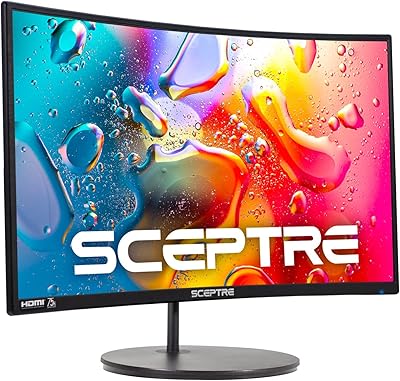
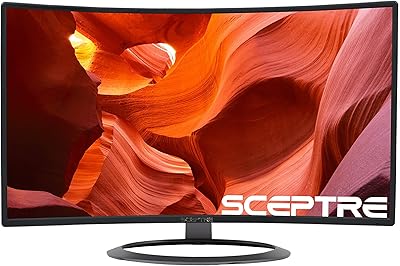
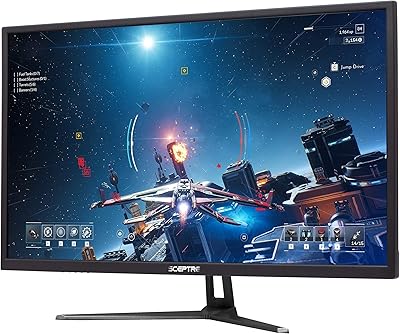
The Sceptre C275W-1920RN 27″ Curved LED Monitor enters a crowded budget market with a few genuine advantages over similarly priced flat panels. The 1500R curved display creates a noticeably more enveloping viewing experience without demanding a premium price, and the metal edge-less chassis looks considerably more refined than the plastic-heavy competition at this tier. Connectivity is straightforward: two HDMI ports, one VGA, and built-in speakers mean most users can be up and running without buying extra cables or audio gear. At 75Hz, this curved Sceptre is squarely aimed at everyday computing and casual use rather than competitive gaming.

Features & Benefits

The 1500R curvature genuinely reduces the eye travel needed to scan across a wide display, which makes longer work sessions feel less fatiguing. Adaptive Sync handles the most frustrating artifact in budget gaming — screen tearing — without requiring an expensive graphics card to activate it. The matte screen surface does a solid job managing reflections in typical home or office lighting, so you are not constantly fighting glare. Having two HDMI inputs is a practical touch; switching between a laptop and a console, for instance, takes seconds. The 99% sRGB coverage means colors are vivid enough for casual photo browsing and video streaming, though this is not a display built for color-critical work.

Best For

This budget curved display makes the most sense for someone stepping up from a smaller or older flat screen for the first time. Students setting up a dorm or apartment desk will find the combination of screen size, built-in speakers, and compact footprint genuinely practical. Casual gamers who want the curved experience without spending serious money will also find it fits their needs, as long as they are not expecting high refresh-rate performance. It works well as a secondary monitor in a multi-display setup, where pixel density matters less and desk space is at a premium. Home office users on tight budgets round out the ideal audience.

User Feedback

Buyers tend to praise the sheer size and curve for the price — that trade is hard to argue with at this level. Where opinion splits is on sharpness: 1080p across 27 inches is not razor-sharp, and users coming from smaller or higher-resolution screens do notice the difference up close. The built-in speakers earn mixed marks; they handle background audio or a video call adequately, but nobody is mistaking them for even a modest desktop speaker pair. A recurring gripe involves the stand, which offers little flexibility beyond basic tilt. Long-term owners generally report reasonable durability, though some flag backlight uniformity as worth monitoring over time.

Pros

  • The 27-inch curved screen delivers a genuinely immersive feel that flat panels at the same price simply cannot match.
  • Adaptive Sync keeps gameplay smooth without requiring a premium graphics card to activate it.
  • Dual HDMI inputs make switching between a PC and a console fast and cable-free.
  • The metal edge-less chassis looks considerably more premium than typical plastic budget monitors.
  • Built-in speakers handle video calls and background audio without needing any extra desk hardware.
  • The matte screen surface manages reflections well in standard home and office lighting conditions.
  • 99% sRGB color coverage keeps everyday media, streaming, and web content looking lively and well-saturated.
  • Setup is genuinely quick — most buyers are up and running in under ten minutes straight out of the box.
  • This budget curved display offers a rare mix of screen size, curve, and connectivity at its price tier.

Cons

  • 1080p resolution across 27 inches produces a noticeably soft image, especially for text-heavy work at close range.
  • The stand offers tilt only — no height adjustment, no swivel, no pivot whatsoever.
  • Built-in speaker audio is thin and lacks bass, making it a poor fit for anyone who cares about sound quality.
  • 75Hz refresh rate falls well short of what competitive or fast-paced gamers actually need.
  • Backlight uniformity issues appear in dark scenes and solid-color backgrounds, particularly near the panel edges.
  • VGA takes the place of a more useful DisplayPort, limiting connection options for modern GPU setups.
  • Color consistency shifts toward the panel edges, making it unreliable for any color-sensitive creative work.
  • Long-term warranty support from Sceptre has drawn mixed feedback, which is worth factoring into a multi-year ownership plan.
  • Maximum brightness is modest, meaning very bright or sunlit rooms can cause washout even with the matte coating.

Ratings

The Sceptre C275W-1920RN 27″ Curved LED Monitor has been scored by our AI system after analyzing thousands of verified global buyer reviews, with spam, incentivized posts, and bot-generated feedback actively filtered out before any scoring was applied. The ratings below reflect the honest consensus of real owners — the wins and the genuine frustrations alike — so you can make a confident call before spending your money.

Value for Money
88%
Most buyers feel this curved display punches well above its price bracket. Getting a 27-inch curved panel with a metal chassis, dual HDMI, and Adaptive Sync at this price tier is hard to match, and that perception drives a lot of the positive word-of-mouth around this monitor.
A handful of users who compared it directly to slightly pricier options felt the gap in panel quality was noticeable enough to question the savings. Those who needed sharper text for daily office work occasionally wished they had stretched the budget a little further.
Display Curvature & Immersion
83%
The 1500R curve is one of the most talked-about positives in buyer reviews. Users who moved from flat panels specifically mention how much more natural it feels to watch movies or browse for extended periods, with less of the eye-strain fatigue they experienced before.
A small segment of buyers, particularly those using it in a tight corner setup, found the curvature created minor distortion at the far edges when viewing spreadsheets or reading long documents. It is a subtle issue but worth knowing if precision line work matters to you.
Image Sharpness & Clarity
61%
39%
For casual media consumption — streaming shows, YouTube, general web browsing — most users find the picture perfectly adequate. Colors come through with decent saturation, and the matte coating keeps things looking clean without the washed-out effect some matte panels produce.
This is the most polarizing aspect in user feedback. At 27 inches, 1080p resolution produces a noticeably softer image than a QHD panel of the same size, and buyers who sit close to their monitor consistently flag it. Text rendering for long reading or coding sessions draws the most complaints.
Refresh Rate & Gaming Performance
69%
31%
For casual gaming — think single-player story games, older titles, or console gaming — the 75Hz refresh rate feels smooth enough that most users are satisfied. Adaptive Sync does meaningful work here, keeping tearing at bay even with mid-range graphics hardware.
Competitive gamers who looked at this display hoping for a budget edge came away disappointed. 75Hz is a noticeable step behind 144Hz or higher panels, and buyers who primarily play fast-paced shooters or racing games tend to recommend saving up for a higher refresh option instead.
Build Quality & Design
78%
22%
The metal chassis and edge-less bezel genuinely surprise buyers at this price point. Several reviewers note it looks considerably more premium on a desk than the all-plastic alternatives they considered, and the overall build feels solid rather than flimsy.
The stand is the weak point nearly everyone agrees on. It offers basic tilt adjustment and nothing else — no height, no swivel, no pivot. Users who want ergonomic flexibility end up buying a VESA arm separately, which adds to the total cost.
Built-in Speakers
53%
47%
For video calls, background music at low volume, or watching a quick YouTube clip without reaching for headphones, the speakers do the job. Students and home office users in particular appreciate not needing a separate audio device on an already crowded desk.
Audio quality is thin and lacks any real bass response. Buyers with even a modest external speaker setup quickly stop using them, and those who care about sound at all during gaming or movie watching find them underwhelming enough to consider them a non-feature.
Connectivity & Port Selection
81%
19%
Dual HDMI inputs are genuinely useful in practice. Buyers who switch between a desktop PC and a gaming console, or between a work laptop and a personal machine, appreciate being able to toggle inputs without unplugging cables constantly.
The inclusion of VGA instead of a third HDMI or a DisplayPort feels dated. Users with newer devices that lack VGA have no use for that port, and the omission of DisplayPort means some GPU setups require an adapter to get the best signal quality.
Color Accuracy & Vibrancy
72%
28%
The 99% sRGB coverage translates into colors that look lively for everyday content. Streaming services, photo albums, and general web content all render with enough richness that casual users rarely feel like they are missing anything.
Anyone doing even light photo editing or graphic design work will quickly notice the limitations. Color consistency shifts toward the panel edges, and out-of-the-box calibration tends to run slightly warm, which requires manual adjustment to get neutral whites.
Glare & Matte Coating
77%
23%
The matte surface handles typical indoor lighting conditions very well. Buyers working near windows or under overhead office lighting report far fewer distracting reflections compared to glossy-panel monitors they used previously.
In very bright or sunlit rooms the matte coating alone is not enough to fully combat washout, and brightness levels are modest enough that some users wish for a higher maximum nit rating. It is adequate for most spaces but not ideal for the brightest environments.
Setup & Out-of-Box Experience
84%
Assembly takes under ten minutes according to most reviewers, and the included cables mean the average buyer can have the monitor running right out of the box without a hardware store trip. The on-screen menu is straightforward and not buried in confusing submenus.
The manual is minimal, and a few buyers found the OSD navigation buttons on the back edge of the panel awkward to locate initially. Driver or software setup is non-existent, which is fine for most users but leaves advanced calibration options limited.
Eye Comfort & Fatigue
74%
26%
The combination of the 1500R curve and the matte panel coating does make a measurable difference for users who spend long hours in front of a screen. Several work-from-home reviewers specifically mention reduced end-of-day headaches compared to their previous flat monitors.
The display does not advertise flicker-free or low blue light certification, and buyers sensitive to these factors have flagged it. Those who use the monitor for six or more hours daily sometimes report more fatigue than expected, particularly at lower brightness settings.
Stand Ergonomics
44%
56%
The stand is stable enough that the panel does not wobble during normal use, and the footprint is compact enough to leave reasonable desk space on either side. For users who are happy with a fixed height, it is a non-issue.
The near-complete lack of ergonomic adjustment is a genuine shortcoming. No height, no pivot, no swivel means taller users or those with specific desk-and-chair combinations end up propping the monitor on books or investing in a monitor arm, adding friction to what should be a plug-and-play experience.
Backlight Uniformity
58%
42%
In typical daytime use with varied on-screen content, most buyers never notice any issues. The panel holds up well across the majority of the visible area, and for mixed-use computing the uniformity is acceptable.
Owners who watch a lot of dark-scene content or who leave solid-color backgrounds on screen for extended periods report visible brightness inconsistency toward the corners and lower edges. It is a known trade-off at this price tier but worth flagging for buyers sensitive to this kind of issue.
Longevity & Reliability
71%
29%
A good portion of longer-term owners report the monitor is still performing without major issues after one to two years of daily use. For a value-tier display, that consistency earns reasonable trust from buyers who do not expect the same lifespan guarantees as premium brands.
There are scattered reports of backlight degradation and color shift after extended use, and Sceptre's warranty support draws mixed reviews when issues do arise. Buyers who plan to use this as a primary monitor for three or more years may want to factor in the long-term support question.

Suitable for:

The Sceptre C275W-1920RN 27″ Curved LED Monitor is a strong fit for anyone who wants a noticeably larger, more immersive screen without committing serious money to get there. Students furnishing a dorm or first apartment will find the combination of screen size, built-in speakers, and straightforward setup genuinely practical — no extra gear required to get started. Home office workers who spend most of their day in a browser, document editor, or video call will find the display more than adequate for those tasks, and the matte coating handles typical indoor lighting without much fuss. Casual gamers who play at a relaxed pace — story-driven titles, older games, or console gaming via HDMI — will appreciate the Adaptive Sync keeping things smooth without needing a high-end GPU to activate it. It also earns a place as a capable secondary monitor in a dual-display setup, where raw pixel density matters far less than screen real estate and ease of connection.

Not suitable for:

The Sceptre C275W-1920RN 27″ Curved LED Monitor has real limitations that will frustrate certain buyers, and it is worth being honest about them upfront. Anyone who sits close to their screen and reads a lot of dense text — developers, writers, or data analysts — will likely find 1080p stretched across 27 inches noticeably soft, and no amount of adjusting settings changes that fundamental resolution trade-off. Competitive gamers who play fast-paced shooters or racing titles should look elsewhere; 75Hz is entry-level refresh territory, and the panel cannot keep up with the demands of high-frame-rate competitive play. Graphic designers, photographers, or anyone doing color-sensitive work will find the out-of-box calibration and edge color consistency insufficient for reliable results. The stand's lack of height or pivot adjustment is also a real ergonomic shortcoming for taller users or those with specific desk configurations who do not want to buy a separate monitor arm on top of everything else.

Specifications

  • Screen Size: The display measures 27 inches diagonally, providing a wide viewing area suited to multitasking and casual media consumption.
  • Panel Curvature: The screen uses a 1500R curvature radius, bending the display to more closely match the natural arc of human vision.
  • Resolution: Native resolution is 1920x1080 (Full HD), delivering standard 1080p image quality across the full panel area.
  • Refresh Rate: The panel runs at a native 75Hz refresh rate, offering a modest step up from the 60Hz found on most entry-level flat monitors.
  • Adaptive Sync: Adaptive Sync technology is supported to reduce screen tearing and stuttering when frame output from the GPU does not match the display's refresh rate.
  • Color Gamut: The monitor covers 99% of the sRGB color space, providing reasonably vivid and consistent color reproduction for everyday productivity and media use.
  • Screen Surface: A matte anti-glare coating is applied to the panel surface to reduce reflections in typical indoor lighting conditions.
  • Ports: Connectivity includes two HDMI ports and one VGA port, allowing connection to a range of devices including PCs, laptops, and older hardware.
  • Built-in Speakers: Two integrated speakers are built into the monitor chassis, providing basic audio output without requiring a separate external speaker or soundbar.
  • Aspect Ratio: The panel uses a standard 16:9 widescreen aspect ratio, compatible with virtually all modern video formats and desktop operating systems.
  • Dimensions: The monitor measures 15.09 x 19.93 x 7.02 inches with the stand attached, giving a reasonably compact footprint for a 27-inch curved display.
  • Weight: The complete unit including stand weighs 5.5 pounds, making it light enough to reposition on a desk without assistance.
  • Chassis Material: The outer shell is constructed from metal, which contributes to a more rigid and premium-feeling build compared to all-plastic budget alternatives.
  • Bezel Design: The monitor features an edge-less bezel design on three sides, minimizing the visual border around the active screen area.
  • VESA Compatibility: The display is VESA mount compatible, allowing the original stand to be replaced with a third-party monitor arm for improved ergonomic positioning.
  • Model Number: The official model designation is C275W-1920RN, which identifies this specific variant within Sceptre's curved monitor lineup.
  • Manufacturer: The monitor is designed and sold by Sceptre, a U.S.-based brand that focuses on delivering affordable display solutions for consumer and home office use.

Related Reviews
Sceptre C278W-1920R 27″ Curved Monitor
71%
91%
Value for Money
83%
Curvature & Immersion
67%
Image Quality
76%
Refresh Rate & Motion
71%
Build Quality
More
Sceptre C248W-1920RN 24-inch Curved Gaming Monitor
76%
91%
Value for Money
78%
Display Quality
83%
Curvature & Immersion
74%
Refresh Rate & Motion Clarity
67%
Build Quality & Design
More
Sceptre C275B-FWT240 27″ Curved Gaming Monitor
75%
91%
Refresh Rate Performance
88%
Value for Money
79%
Panel Contrast & Color
83%
Motion Clarity
61%
Build Quality
More
Sceptre C328W-1920R 32″ Curved LED Gaming Monitor
79%
89%
Value for Money
82%
Display Quality
91%
Immersion/Curvature
85%
Ease of Setup
77%
Build Quality
More
Sceptre E275W-19203R 27-inch 1080p LED Monitor
74%
93%
Value for Money
74%
Picture Quality
81%
Refresh Rate & Smoothness
88%
Connectivity
76%
Build Quality
More
Samsung CF391 27″ Curved Monitor
74%
88%
Value for Money
91%
Screen Size Impact
83%
Curve Effect
61%
Image Sharpness
69%
Refurbished Condition
More
ZZA Z27H1K280HZ 27″ Curved Gaming Monitor
70%
88%
Refresh Rate Performance
84%
Value for Money
76%
Image Quality & Color Accuracy
67%
Motion Clarity & Response
89%
Contrast & Black Levels
More
ZZA 27-inch Curved Monitor
86%
89%
Display Quality
92%
Color Accuracy
85%
Ergonomics
88%
Build Quality
90%
Ease of Setup
More
AOC C27G4H 27″ Curved Gaming Monitor
89%
93%
Performance
95%
Display Quality
87%
Ergonomics/Adjustability
91%
Value for Money
89%
Compatibility (Console)
More
Raywego Q270B13 27-inch Curved Monitor
70%
83%
Image Contrast & Depth
51%
Brightness & Visibility
76%
Color Accuracy
78%
Refresh Rate & Motion
63%
Gaming Performance
More

FAQ

This is the most important question to ask before buying this monitor. At 27 inches, 1080p works out to a relatively low pixel density, which means text and fine details will look noticeably softer than on a QHD or 4K panel of the same size. For streaming, casual gaming, and general browsing it is perfectly acceptable, but if you sit close to the screen and read a lot of text — code, documents, spreadsheets — you may find it bothers you over time.

Yes, the dual HDMI ports make it straightforward to connect a modern console. You can even keep a PC plugged into one HDMI port and a console into the other, then switch between them using the on-screen menu without touching any cables.

Adaptive Sync on this monitor is designed primarily for AMD FreeSync-compatible setups. Some NVIDIA cards support it via NVIDIA's G-Sync Compatible mode, but you should verify your specific GPU model supports that feature before assuming it will work without tearing.

Honest answer: they are convenient, not impressive. For video calls, background music at low volume, or a quick YouTube clip, they are fine. Anyone who wants decent audio for gaming, movies, or music will want to add even a modest external speaker or use headphones instead.

No. The stand that ships with the monitor supports tilt adjustment only — there is no height, swivel, or pivot functionality. If ergonomic positioning matters to you, the monitor is VESA compatible, so swapping in an aftermarket monitor arm is a practical solution.

Sceptre typically includes an HDMI cable in the box, which means most buyers can connect and start using the monitor immediately without a separate purchase. That said, it is worth confirming the contents of your specific shipment, as accessory bundles can vary.

Not ideally. While the 99% sRGB coverage is decent for casual use, the out-of-box color calibration and edge uniformity are not accurate enough to rely on for color-critical work. If your workflow depends on consistent, calibrated color, a more specialized panel would serve you better.

For standard home office tasks — video conferencing, document editing, email, and web research — it performs well. The matte coating handles window glare reasonably, and the screen size makes multitasking easier than a smaller monitor. Just set expectations appropriately around text sharpness if you read a lot on screen.

For most content the 1500R curve is subtle enough that you will not notice distortion during normal use. A small number of users who work with straight lines — architects or CAD users, for example — have mentioned slight perceived distortion at the panel edges, but for the typical user it is a non-issue.

Longer-term owners generally report reasonable durability for a value-tier display. The most common issues that surface over time are minor backlight inconsistency and some color shift, which are fairly typical for panels in this price range. Sceptre's warranty support experience varies, so it is worth keeping your proof of purchase organized just in case.

Where to Buy