
Overview

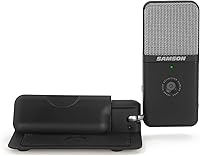
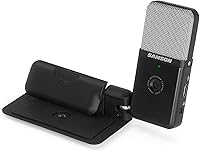
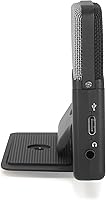
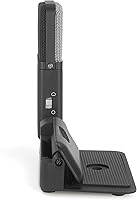
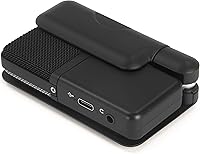
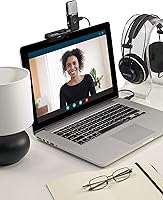
The Samson Go Mic Video is a compact 2-in-1 device that bundles a USB condenser microphone with a Full HD webcam into a single, travel-friendly unit. For anyone tired of juggling separate peripherals or relying on their laptop's hollow built-in hardware, this mic-and-webcam combo offers a genuinely practical upgrade. It clips onto a laptop lid, sits flat on a desk, or mounts to a tripod — giving you real placement flexibility without any complicated setup. Plug it into a USB Type-C port and it's ready to go, no drivers required. At its price point, it targets the accessible mid-range tier rather than positioning itself as a studio-grade solution.

Features & Benefits

The most immediately noticeable thing about this portable USB setup is the video quality. Full HD 1080p at 30fps is a real step up from the blurry, washed-out footage most integrated laptop cameras produce. On the audio side, you can switch between cardioid and omnidirectional pickup patterns depending on whether you're recording solo or capturing a group conversation around a table. There's also a zero-latency headphone jack — a 3.5mm output that lets you monitor your own voice in real time, which is genuinely useful during long calls or recording sessions. The body is a mix of metal and plastic that feels reasonably solid for its size, though the 30 dB signal-to-noise ratio is worth flagging: this is entry-level condenser performance, not broadcast quality.

Best For

This mic-and-webcam combo hits a sweet spot for a fairly specific type of user. Remote professionals who want noticeably better audio and video on calls without managing two separate devices will find it a natural fit. It's equally well-suited to entry-level streamers or podcasters who move between locations and need something that packs into a bag without fuss. Students doing recorded lectures, educators running live classes, and anyone working from home with a thin-bezel laptop lacking a decent built-in camera will all get real value here. That said, if you're already investing in a standalone condenser mic or a dedicated 4K webcam, this portable USB setup probably doesn't match what you need.

User Feedback

Across nearly 6,000 ratings and a 4.4-star average, the picture is fairly clear: most buyers are satisfied. The consistent praise centers on audio clarity — people who switched from a built-in laptop mic often say the improvement is immediately obvious. Video quality also draws compliments, though reviewers are realistic that it won't outperform a standalone webcam. The criticisms worth knowing: the omnidirectional mode is sensitive enough to pull in room noise, so a quiet workspace matters. The laptop clip works well on slim screens but can feel loose on thicker-bezel machines, which a handful of users found frustrating. A smaller group of experienced audio users also flagged background hiss from the modest signal-to-noise ratio — something worth considering if you have a trained ear.

Pros

  • Combines a condenser mic and HD webcam in one device, eliminating the need for two separate purchases.
  • Plug-and-play via USB Type-C — works immediately on Zoom, Teams, and Google Meet without any drivers.
  • 1080p at 30fps is a clear, visible improvement over the cameras built into most modern laptops.
  • Selectable cardioid and omnidirectional modes add flexibility for solo recording or group calls.
  • Weighs under 0.6 lbs and fits easily in a laptop bag for users who work from multiple locations.
  • Zero-latency headphone monitoring lets you catch audio issues in real time during calls or recordings.
  • Can clip to a laptop, sit on a desk, or mount to a tripod — genuinely versatile placement options.
  • Broad platform compatibility means it works out of the box with virtually every major video call app.
  • Bus-powered over USB, so there are no wall adapters or external power sources to manage.

Cons

  • The 30 dB signal-to-noise ratio produces audible background hiss in quiet recordings — noticeable to trained ears.
  • Omnidirectional mode picks up significant ambient noise, making it less reliable in open or acoustically live spaces.
  • The laptop clip feels insecure on thicker-bezel machines and can shift or wobble during longer sessions.
  • No onboard gain control or hardware mute button limits real-time adjustments during live calls.
  • Fixed cable length restricts desk placement flexibility when USB ports are not conveniently positioned.
  • Low-light video performance degrades noticeably — grainy output without a ring light or good natural lighting.
  • No companion software means zero access to EQ, noise gating, or pickup pattern switching from a computer.
  • Video quality, while solid for calls, falls short of what a same-price dedicated webcam can deliver.
  • The all-in-one design means a weakness in either the mic or camera component cannot be individually replaced or upgraded.

Ratings

The Samson Go Mic Video has been scored by our AI after analyzing thousands of verified global buyer reviews, with spam, bot activity, and incentivized feedback actively filtered out. The result is an honest picture of where this mic-and-webcam combo genuinely delivers and where it falls short — strengths and frustrations weighted equally.

Audio Clarity
78%
22%
For the overwhelming majority of buyers upgrading from a built-in laptop microphone, the jump in vocal clarity is immediately noticeable. Voices come through with more presence and less of that hollow, tunnel-like quality that plagues integrated mics during Zoom calls and recorded lectures.
The 30 dB signal-to-noise ratio is modest by condenser standards, and users with a trained ear will catch background hiss in quieter recordings. It is not a weakness that bothers casual users, but anyone coming from a dedicated USB condenser will notice the ceiling.
Video Quality
74%
26%
The 1080p at 30fps output looks clean and well-exposed in typical home office or desk lighting, which is a meaningful upgrade over the smeared, low-light-challenged cameras built into most laptops. Reviewers frequently describe it as more than adequate for professional video calls.
Up against a standalone 1080p or 4K webcam in the same price range, the image detail and color accuracy do not quite keep pace. Users who prioritize video over audio and are comparing this directly to a dedicated webcam may come away underwhelmed.
Ease of Setup
93%
Plug it into a USB Type-C port and it works — no drivers, no configuration panels, no restarting apps. Buyers consistently call out how effortlessly it paired with Zoom, Teams, and Google Meet on both Windows and Mac without any extra steps.
A small number of users reported that certain older operating systems or specific USB hubs caused recognition issues on first plug-in, requiring a port swap or system restart. These cases appear to be edge scenarios rather than a widespread pattern.
Portability & Form Factor
88%
At under 0.6 lbs and roughly the size of a thick deck of cards, this portable USB setup genuinely fits in a laptop bag side pocket. Streamers and remote workers who move between home, offices, and co-working spaces call out the compact footprint as a daily-use advantage.
The all-in-one design means that if either the mic or the camera element underperforms for your specific needs, you cannot swap out just one component. Users who travel frequently also noted the cable could be slightly longer for desk placement flexibility.
Mounting & Clip Mechanism
62%
38%
The clip-to-laptop-lid design is genuinely clever for slim, modern ultrabooks and works exactly as intended on thin-bezel screens. The option to also use it as a desk unit or mount it on a tripod gives users more flexibility than a single-mount device would.
On laptops with thicker bezels or older chassis designs, the clip feels noticeably loose and can wobble or shift during longer sessions. This is one of the most commonly mentioned frustrations in negative reviews, with some users resorting to tape or propping it against a stand.
Microphone Pickup Patterns
76%
24%
Having both cardioid and omnidirectional modes in a device this size is a practical advantage. The cardioid setting handles solo recording and focused voice capture well, while the omni mode is useful when multiple people are gathered around a single screen for a group call.
The omnidirectional mode is sensitive enough to pull in air conditioning hum, keyboard noise, and ambient room sound, which can distract listeners on calls. Users in open-plan spaces or acoustically live rooms found it less forgiving than expected.
Build Quality
71%
29%
The mixed metal and plastic construction feels more intentional than the flimsy all-plastic shells common at this price tier. Most buyers describe it as solid enough to handle daily packing and unpacking without feeling like it will crack under normal handling.
Some reviewers noted that the plastic components — particularly around the clip joint — show light scuff marks and minor flex after extended use. It is durable enough for careful everyday use but would not hold up well to being tossed loosely into a bag repeatedly.
Headphone Monitoring
81%
19%
The zero-latency 3.5mm headphone output is a feature that buyers consistently flag as more useful than they expected. Hearing your own voice in real time while recording a lecture or joining a call helps catch audio issues before they become a problem.
The headphone output volume is not adjustable directly on the hardware itself, which means users have to rely on system-level controls to dial in a comfortable listening level. A few users found the output slightly quiet when using higher-impedance headphones.
Platform Compatibility
91%
Across thousands of reviews, compatibility complaints are rare. The device works reliably with every major video call platform including Zoom, Microsoft Teams, Skype, and Google Meet, and is recognized correctly as both an audio and video input source simultaneously.
A handful of users encountered issues where certain apps defaulted back to the built-in mic or camera after updates, requiring a manual re-selection in settings. This is a platform-side behavior rather than a hardware flaw, but it catches some buyers off guard.
Value for Money
83%
Buying a decent standalone USB microphone and a separate 1080p webcam individually would cost considerably more than this combo. For users who want a meaningful upgrade from built-in hardware without piecing together a full peripheral setup, the combined value is hard to argue with.
Users who already own a solid webcam or microphone will find less value here, since they are effectively paying for a bundled component they do not need. The value proposition depends heavily on starting from zero rather than upgrading from existing gear.
Noise Handling
58%
42%
In a reasonably quiet room, the cardioid pickup pattern does a decent job of keeping the focus on the speaker and reducing side-pickup. Users recording in treated home offices or low-noise environments reported voice isolation good enough for professional-sounding calls.
In typical home environments with background noise — fans, street sounds, keyboard clicks — the mic captures more ambient sound than many buyers anticipated. There is no onboard noise gate or hardware muting button, which limits real-time control during live calls.
Low-Light Performance
63%
37%
In well-lit conditions, the webcam produces a clean, neutral image that holds up fine for daytime video calls. Users with a ring light or a window providing natural front light reported noticeably good results relative to the device's size.
In dim rooms or evening lighting, the image gets noticeably grainy and the auto-exposure struggles to find a stable setting. This is a hardware sensor limitation and is mentioned frequently enough in reviews to be a genuine consideration for users without supplemental lighting.
Cable & Connectivity
79%
21%
USB Type-C is the right choice for a modern portable device, and the plug-and-play nature means there is genuinely nothing to configure. Most current laptops and tablets have at least one Type-C port, making this broadly compatible without needing an adapter in most cases.
The attached cable length is fixed, which limits desk placement options if your USB port is not conveniently located. Users who prefer a detachable cable for easier storage and travel also noted there is no option to swap in a longer cord if needed.
Software & Driver Experience
86%
The complete absence of required drivers is a real-world convenience that buyers appreciate, especially those who manage locked-down work laptops where installing third-party software is restricted. It just appears as a standard audio and video device at the OS level.
Because there is no companion app, users have no access to EQ adjustments, gain control, or pattern switching from software — everything is hardware-only or managed through the OS. Power users who want fine-grained audio control will find this limiting.

Suitable for:

The Samson Go Mic Video is the kind of device that makes the most sense for people who are starting from zero and want a genuine, no-fuss upgrade over their laptop's built-in hardware. Remote workers who spend hours on daily video calls and are tired of colleagues asking them to speak up — or pointing out their blurry image — will get immediate, tangible value here. It's also a natural fit for students and educators who record lectures or run live online classes and need something compact enough to pack into a bag between sessions. Entry-level streamers and podcasters who move between locations and cannot justify a full peripheral setup will appreciate that this portable USB setup handles both audio and video input from a single device. If your current standard is a built-in laptop mic and camera, the step up in call quality will be noticeable enough to matter in everyday professional settings.

Not suitable for:

Anyone who already owns a dedicated condenser microphone or a standalone 1080p-plus webcam should think carefully before buying this mic-and-webcam combo, because the combined value only holds if you genuinely need both components. The 30 dB signal-to-noise ratio is an honest limitation — audiophiles, podcasters producing polished audio for distribution, or anyone recording in a noisy apartment will likely find the background hiss and room sensitivity frustrating over time. The clip mechanism is also worth considering carefully: if you use a laptop with a thick bezel, the mount can feel wobbly in practice, and a loose camera during a client call is not a minor inconvenience. Users who want software-level control over gain, EQ, or noise suppression will find nothing to work with here, since there is no companion app and no onboard controls beyond pattern selection. In short, the Samson Go Mic Video is a practical upgrade for casual and professional users starting from scratch — not a tool designed to satisfy anyone with established, higher-tier audio or video expectations.

Specifications

  • Device Type: Combination USB condenser microphone and Full HD webcam in a single compact unit.
  • Video Resolution: Records and streams at 1080p Full HD resolution at 30 frames per second.
  • Pickup Patterns: Offers two selectable polar patterns: cardioid for focused solo capture and omnidirectional for wider room coverage.
  • Connectivity: Connects via USB Type-C, functioning as a plug-and-play device on compatible computers and tablets.
  • Headphone Output: Features a 3.5mm headphone jack with zero-latency monitoring so users can hear their own audio in real time.
  • Signal-to-Noise Ratio: Rated at 30 dB, which reflects entry-level condenser microphone performance suitable for calls and casual recording.
  • Power Source: Fully bus-powered over USB, requiring no external power adapter or separate power cable.
  • Weight: Weighs 9.4 oz (0.59 lbs), making it light enough for daily packing in a standard laptop bag.
  • Dimensions: Measures 4.92″ x 4.72″ x 2.36″, giving it a compact footprint for desk, clip, or tripod use.
  • Materials: Constructed from a combination of metal and plastic for a balance of light weight and everyday durability.
  • Mounting Options: Supports three placement methods: clipping directly onto a laptop lid, resting on a desk surface, or attaching to a standard tripod mount.
  • Platform Support: Compatible out of the box with Zoom, Microsoft Teams, Skype, Google Meet, and other major video collaboration platforms.
  • Operating System: Works as a standard USB audio and video device on Windows and macOS without requiring driver installation.
  • Color: Available in black with a compact, understated design suited to professional desk setups.
  • Channels: Operates as a single-channel audio input device, capturing mono audio for calls and recordings.
  • Brand & Model: Manufactured by Samson under the Go Mic Video model line, first made available in November 2022.

Related Reviews
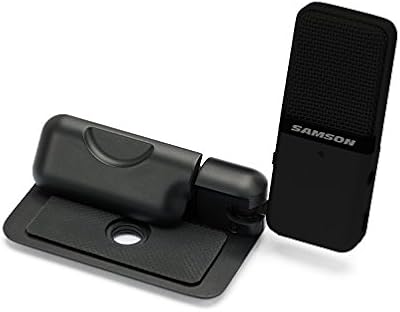
Samson Go Mic Portable USB Condenser Microphone
84%
92%
Value for Money
94%
Portability
78%
Sound Quality
90%
Ease of Use
85%
Build Quality
More
Deity V-Mic D4 Mini Video Microphone
86%
88%
Sound Quality
95%
Portability & Size
90%
Ease of Use
72%
Wind Protection
92%
Value for Money
More
Logitech MeetUp Conference Camera with Expansion Mic
81%
88%
Video Quality
91%
Audio Clarity
84%
Expansion Mic Performance
93%
Field of View
89%
Ease of Setup
More
Kat Von D Go Big or Go Home Mascara Trooper Black 10g
83%
92%
Volume and Length
90%
Waterproof Performance
85%
Brush Design and Application
88%
Vegan and Cruelty-Free Formula
87%
Lasting Wear/Smudge Resistance
More
JY360 Video Projector
84%
85%
Display Quality
92%
Ease of Setup
89%
Portability
87%
Connectivity (WiFi/Bluetooth)
91%
Streaming Support (Netflix, YouTube)
More
RØDE Lavalier GO
RØDE Lavalier GO
86%
92%
Audio Clarity
88%
Cable Durability
94%
Ease of Placement
89%
Broad Compatibility
76%
Wind & Pop Mitigation
More
Calibrite ColorChecker Video
88%
95%
Calibration Accuracy
91%
Ease of Use
89%
Portability
92%
Compatibility with Cameras
85%
Build Quality
More
SmallRig CT210 Video Tripod
85%
92%
Stability & Smoothness
75%
Portability & Transport
89%
Build Quality & Durability
87%
Ease of Setup & Use
90%
Height Adjustment Flexibility
More
ASUS RT-AX57 Go
ASUS RT-AX57 Go
86%
94%
Setup & Installation
91%
WiFi Performance
97%
Portability
89%
VPN & Security Features
88%
Connectivity Options
More
LitONES 618
LitONES 618
87%
92%
Build Quality
89%
Lighting Accuracy
91%
Mounting Stability
87%
Eye Comfort
93%
Adjustability & Reach
More

FAQ

No, you do not. The Samson Go Mic Video is fully plug-and-play — just connect it to a USB Type-C port and your computer will recognize it as both an audio and video input device automatically. No software downloads or driver installations are required on either Windows or macOS.

Yes, and that is one of its main practical advantages. Most video conferencing apps let you select your input devices separately, so you can set this combo unit as both your camera and your microphone simultaneously without any workarounds.

Cardioid is the better choice for solo calls and meetings — it focuses on what is directly in front of the mic and reduces pickup from the sides. Switch to omnidirectional only if you have multiple people gathered around the same screen and need the mic to capture a wider area.

This is worth thinking about carefully. The clip works well on slim, modern ultrabook-style laptops, but several users with thicker-bezel machines have reported that it feels loose and can shift during longer sessions. If your laptop lid is on the thicker side, you may be better off using it as a desk unit or on a small tripod.

Yes, the 3.5mm headphone jack on the device provides zero-latency monitoring, meaning you hear your own voice in real time with no noticeable delay. This is handy for catching audio issues like background noise or mic positioning problems before they disrupt a call or recording.

It holds up well for video calls and recorded lectures, especially if you have decent front-facing light. That said, a dedicated 1080p webcam at a similar price will generally produce slightly sharper detail and better low-light performance. For meetings and streaming, most people find it more than acceptable — just do not expect it to match a purpose-built camera.

The cardioid pattern does a reasonable job of rejecting sound from the sides, but this mic-and-webcam combo does not have any onboard noise gate or active noise cancellation. In a quiet home office it performs well, but in a noisier environment — fans, open windows, busy households — you will likely hear some ambient bleed, particularly if you accidentally switch to the omnidirectional mode.

It depends on the port and operating system support. If your tablet has a USB Type-C port and supports USB audio and video class devices — which many modern Android tablets and iPad Pros do — it should work. However, compatibility is less consistent on mobile devices than on laptops, so it is worth testing before committing to it as your primary tablet peripheral.

It includes the clip and the integrated desk-rest base, so you can place it on a flat surface without purchasing anything extra. If you want to mount it on a tripod for a better angle, you will need a small desktop tripod separately, but the mounting thread is standard and compatible with most basic options.

For casual YouTube content and informal podcast recordings, this portable USB setup will produce audio that sounds noticeably cleaner than a laptop's built-in mic. However, the 30 dB signal-to-noise ratio means there is a modest background hiss floor, and experienced listeners — especially in high-quality headphone listening environments — may find it falls short of what a dedicated USB condenser in the same category can deliver. It is a solid starting point, but not the tool for a polished studio-quality production.