Overview

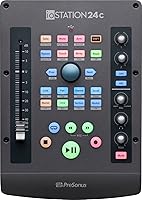
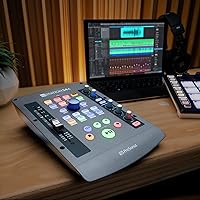
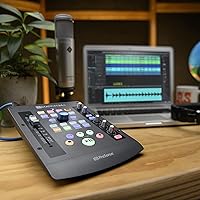
The PreSonus ioStation 24c attempts to solve a common desk clutter problem by merging two distinct devices into one footprint. Instead of wrestling with a separate interface and control surface, you get a clever hybrid design that handles both input and mixing. This compact desktop controller feels surprisingly sturdy right out of the box, offering a layout that prioritizes ergonomics without feeling cramped. Measuring just over nine by six inches, it easily slots into a tight home studio recording setup. The buttons have a satisfying, positive click, and the overall build quality inspires confidence for daily use. If you are tired of juggling multiple pieces of hardware on limited desk space, this hybrid audio interface provides a sensible, focused alternative that keeps your hands on the controls rather than the mouse.

Features & Benefits

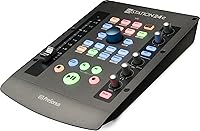
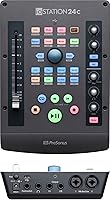
Ditching the mouse for a physical fader profoundly changes how you interact with a mix. The desktop controller features a single motorized fader that responds instantly to your touch, letting you ride vocal levels with genuine feeling. On the recording side, it includes two XMAX mic preamps that deliver exceptionally clear, low-noise results without requiring a degree in audio engineering to dial in. You can capture sound at a high-resolution 192 kHz sample rate, ensuring your tracks sound professional from the source. The real workflow magic comes from the dedicated transport and session navigation controls. Having physical buttons for play, record, solo, and mute means you spend less time clicking through menus and more time actually listening to the music you are making.

Best For

Solo musicians recording themselves will find this PreSonus unit particularly useful. When you are tracking your own guitar or vocals, having easy transport controls right next to your instrument is vastly superior to reaching for a keyboard. It is also an excellent choice for home studio producers who want the tactile experience of mixing on a console but lack the space or budget for a massive desk. Finally, podcasters and voiceover artists benefit significantly from having their mic inputs and headphone monitoring wrapped up in one all-in-one desktop hub. You get quick, physical access to gain levels and playback volume, making it the best desktop DAW controller for creators who need a streamlined, distraction-free environment to get their work done efficiently.

User Feedback

Buyers consistently praise the space-saving footprint, noting how much desk room they regain by combining two devices. Unsurprisingly, users report that integration with the included Studio One software is virtually instantaneous, functioning exactly as advertised right out of the box. However, owners running different recording software often mention a noticeable learning curve. While the device supports other platforms via Mackie Control protocols, mapping the buttons to a non-native DAW can require patience and manual configuration. Some users also wish it had an additional headphone jack for collaborative sessions. Despite these minor hurdles, the overall consensus is highly positive, with most creators agreeing that having an audio interface with a motorized fader genuinely improves their daily tracking and mixing workflow.

Pros

  • Combines an audio interface and production controller to save valuable desk space.
  • The 100mm touch-sensitive motorized fader makes volume automation incredibly smooth and intuitive.
  • Two XMAX microphone preamps deliver clear, low-noise recordings for professional-sounding vocals.
  • Dedicated transport controls drastically reduce the need to constantly use a computer mouse.
  • Flawless, plug-and-play integration right out of the box with Studio One software.
  • Supports high-resolution 24-bit/192 kHz audio conversion for pristine sound quality.
  • Includes valuable software bundles like Ableton Live Lite to get beginners started.

Cons

  • Setting up non-native DAWs involves a noticeable and sometimes frustrating learning curve.
  • The single headphone output makes monitoring difficult for two people in the same room.
  • Requires an external wall power supply for the motorized fader, limiting on-the-go portability.
  • Lacks a dedicated pad switch on the preamps for extremely loud audio sources.
  • Some function buttons are densely packed together, which can lead to accidental presses.
  • Does not include an integrated digital screen for quick parameter value verification.

Ratings

Our AI-driven analysis of verified global user reviews strips away spam and incentivized feedback to deliver an honest breakdown of the PreSonus ioStation 24c. We have synthesized thousands of real-world experiences to transparently highlight both the workflow-enhancing strengths and the software integration pain points of this hybrid audio interface. Whether you are building a home studio or a podcasting desk, these scores reflect what actual creators think.

Build Quality & Ergonomics
88%
The compact footprint of this desktop controller frees up valuable workspace, combining two essential devices into one sleek chassis. Users consistently note that the buttons and dials feel sturdy, offering satisfying tactile feedback during long mixing sessions.
A few users felt the exterior plastic could be slightly more premium given the overall price point. Additionally, the fixed angle of the faceplate might not suit every desk height, requiring some users to prop it up for better visibility.
Fader Responsiveness
91%
Ditching a mouse for the 100mm touch-sensitive motorized fader dramatically improves automation tasks and vocal riding. Reviewers love how smoothly it glides and snaps to position, providing an authentic console feel right on their home studio desk.
The motorized mechanism can produce a slight mechanical clicking noise during rapid automation playback, which might be picked up by sensitive microphones. A handful of buyers also wished for slightly heavier resistance on the fader track.
Preamp Audio Quality
89%
The dual XMAX microphone preamps deliver pristine, low-noise recordings that effortlessly rival more expensive standalone interfaces. Creators appreciate the crystal-clear headroom, making it incredibly easy to capture professional-sounding vocals and acoustic instruments without unwanted hiss.
While the preamps are highly capable, they lack built-in pad switches for extremely loud sound sources like aggressive snare drums. Some users also noted that driving the gain to its absolute maximum can introduce a faint noise floor.
Native DAW Integration
94%
Because it is designed natively for the included software, plugging in this hybrid audio interface yields instant, zero-configuration functionality. Users are thrilled by the seamless mapping of session navigation and transport controls, allowing them to start recording within minutes.
The tight integration means that transitioning away from Studio One can feel like losing some of the device's magic. A few buyers experienced minor software glitches that required a quick firmware update to resolve perfectly.
Third-Party DAW Compatibility
68%
32%
Using standard Mackie Control and HUI protocols, the unit successfully connects to popular alternatives like Ableton Live and Logic Pro. Patient users who map their controls manually find that it still serves as a highly effective centralized command hub.
Configuring the buttons for non-native software introduces a frustrating learning curve that interrupts the creative flow. Many buyers complain that some secondary buttons remain unmapped or perform confusing functions out of the box in other programs.
Ease of Use for Beginners
76%
24%
For solo musicians tracking their own parts, having dedicated record, mute, and solo buttons right next to their instrument is incredibly intuitive. The straightforward top-panel layout prevents new producers from getting lost in complicated software sub-menus.
The lack of an integrated display screen means you still have to look at your computer monitor to verify exact parameter values. Beginners attempting to use it outside its native ecosystem often find the setup documentation lacking in necessary detail.
Footprint & Portability
86%
Measuring roughly nine by six inches, this two-in-one powerhouse is a lifesaver for cramped bedrooms and small podcasting desks. It is light enough to easily toss into a backpack when traveling to collaborate at a friend's house.
Because it requires external power to drive the motorized fader, it is not fully bus-powered for on-the-go recording in a coffee shop. The external power brick adds annoying cable clutter that detracts from the otherwise clean studio aesthetic.
Transport & Session Controls
84%
The dedicated session navigation buttons make scrubbing through a timeline fast and tactile, drastically reducing repetitive mouse strain. Podcasters love the immediate access to physical mute and solo functions during live-to-tape recording scenarios.
A few of the function buttons are placed quite close together, leading to accidental presses if you are working quickly. Reviewers with larger hands sometimes find the dense cluster of navigation controls a bit tedious to operate blindly.
Value for Money
82%
18%
Buying a separate two-channel interface and a motorized fader controller would typically cost significantly more than this unified solution. Bundling robust software like Ableton Live Lite and Studio One Artist adds immense value for newcomers building their first setup.
Advanced users sometimes feel they are paying a premium for a single fader when they actually need eight full channels. If you already own a high-end interface, the cost of adding this primarily for its transport controls might be difficult to justify.
Connectivity & Latency
81%
19%
The modern USB-C connection ensures fast data transfer and reliably low latency when tracking vocals with software monitoring active. Users confidently record at high resolutions without experiencing distracting delay or audio dropouts during heavy sessions.
Including only one headphone output limits the device's utility for podcasts with a host and a guest in the same room. Some users also wish there were additional line outputs to feed a second pair of studio monitors for reference mixing.

Suitable for:

The PreSonus ioStation 24c is an excellent choice for solo musicians, podcasters, and voiceover artists who want to streamline their desktop setups. It is specifically tailored for creators who are tired of clicking a mouse to adjust levels and crave the tactile feedback of a physical fader. Home studio producers working with limited desk real estate will appreciate how it combines a high-quality audio interface with essential transport controls into a single compact footprint. Furthermore, users already working within the Studio One ecosystem will find the most value here, as the out-of-the-box integration allows you to start recording and mixing immediately without any tedious configuration.

Not suitable for:

Conversely, the PreSonus ioStation 24c is not the best fit for producers who require multiple inputs for tracking full bands or recording live drum kits. Because it only offers two mic preamps, anyone needing to simultaneously mic more than two sources will quickly outgrow this unit. It is also less than ideal for creators deeply embedded in non-native DAWs who lack the patience to manually map Mackie Control protocols. Furthermore, podcasters or collaborators who regularly need more than one headphone output for in-room monitoring will find the single headphone jack frustratingly limiting. If you already own a premium audio interface and just need a control surface, you are better off buying a dedicated standalone controller.

Specifications

  • Connectivity: It features a modern USB-C connection for high-speed data transfer and low latency.
  • Microphone Preamps: The device includes two pristine XMAX mic preamps for clear, low-noise audio capture.
  • Fader: It is equipped with a single 100mm touch-sensitive motorized fader for tactile mixing automation.
  • Audio Resolution: The interface supports high-resolution digital audio conversion up to 24-bit/192 kHz.
  • Transport Controls: Dedicated hardware buttons are provided for fast session navigation, play, stop, and record functions.
  • Included Software: It comes bundled with licenses for Studio One Artist and Ableton Live Lite.
  • OS Compatibility: The hardware is fully compatible with both macOS and Windows operating systems.
  • Dimensions: The physical footprint measures exactly 9.59 by 6.76 by 2.32 inches.
  • Weight: The unit weighs 2.19 pounds, making it suitably anchored for desktop use.
  • Power Requirement: An external 12V DC power supply is required to drive the motorized fader mechanism.
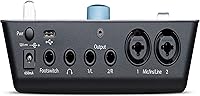
  • Analog Inputs: It features two combo XLR and quarter-inch inputs for connecting microphones and instruments.
  • Analog Outputs: The back panel includes two balanced quarter-inch line outputs for studio monitors.
  • Headphone Output: A single quarter-inch stereo headphone jack with independent volume control is built in.

Related Reviews
PreSonus Studio 24c
PreSonus Studio 24c
84%
92%
Build Quality & Durability
88%
Sound Quality & Resolution
86%
Preamp Performance (XMAX-L)
94%
Software Bundle Value
89%
Portability & Form Factor
More
PreSonus Studio 1824c
86%
91%
Preamplifier Clarity
88%
Chassis & Build Quality
84%
Low-Latency Performance
93%
Software Bundle Value
87%
Monitoring Flexibility
More
PreSonus HD5
PreSonus HD5
79%
83%
Sound Accuracy
87%
Comfort & Wearability
61%
Build Quality
91%
Value for Money
74%
Isolation & Bleed Control
More
PreSonus Studio 68c USB Audio Interface
84%
89%
Audio Quality
86%
Ease of Setup
91%
Software Bundle
88%
Latency Performance
84%
Connectivity
More
PreSonus Quantum 4848 Thunderbolt Audio Interface
86%
94%
Audio Performance
90%
Latency and Speed
87%
Build Quality
75%
Ease of Setup
92%
Expandability
More
PreSonus AudioBox USB 96 Audio Interface
87%
92%
Value for Money
88%
Sound Quality
94%
Ease of Use
91%
Portability
85%
Build Quality
More
PreSonus Quantum 2626 Thunderbolt Audio Interface
88%
96%
Latency
94%
Sound Quality
91%
Software Bundle
88%
Build Quality
87%
Expandability
More
PreSonus Studio 26c USB Audio Interface
86%
92%
Sound Quality
89%
Ease of Use
94%
Value for Money
85%
Software Bundle
88%
Build Quality
More
PreSonus Quantum 26x32 Thunderbolt Audio Interface
83%
91%
Performance
88%
Sound Quality
93%
Ease of Setup
90%
Latency
85%
Connectivity (Thunderbolt 2)
More
PreSonus Studio 1810c USB Audio Interface
86%
91%
Sound Quality
88%
Ease of Setup
85%
Software Integration
80%
Connectivity & Compatibility
89%
Value for Money
More

FAQ

No, you do not need to purchase anything extra to get started. It comes bundled with Studio One Artist and Ableton Live Lite right out of the box. Both are highly capable programs that will let you start recording and mixing immediately.

Yes, it works with most major digital audio workstations using standard Mackie Control or HUI protocols. However, setting it up in non-native software like Logic Pro involves a bit of a learning curve since you will need to map some of the controls manually.

Yes, because it is motorized, the fader will automatically slide up and down to reflect any volume automation you have written into your software. It is a fantastic visual aid that makes fine-tuning your vocal levels feel much more intuitive.

No, it cannot be fully bus-powered via USB alone. Because the motorized fader requires extra power to move physically, you must plug the unit into a wall outlet using the included power adapter.

Absolutely. There are two inputs on the back, allowing you to plug a microphone into channel one and an instrument cable into channel two simultaneously. This makes it perfect for singer-songwriters who want to capture live takes together.

Unfortunately, this unit only features a single headphone jack on the back. If you are recording a podcast with a guest in the same room, you will need to purchase a separate headphone splitter or a dedicated headphone amplifier.

Yes, the transport and session navigation buttons are illuminated with bright LEDs. This makes it very easy to operate your recording session even if your studio has dim, mood-setting lighting.

The two XMAX preamps are incredibly clean and quiet, providing plenty of headroom for your recordings. You can capture highly detailed audio without worrying about introducing a noticeable hiss into your tracks.

Yes, it features modern USB-C connectivity. It ships with both a USB-C to USB-C cable and a regular USB-C to USB-A cable, so you can connect it directly to newer laptops without needing a dongle.

The main body is constructed from durable, high-quality plastic with a metal faceplate for added rigidity. This combination keeps the unit relatively lightweight while still feeling sturdy enough to withstand daily studio use.