Overview

The PreSonus HP4 has been a quiet workhorse in recording studios since 2004 — and that kind of longevity doesn't happen by accident. Built around a compact 1/3U rack-mount chassis machined from solid metal, this headphone amp punches above its price tier in terms of build quality and practical utility. It's aimed squarely at recording engineers, musicians, and home studio owners who need a no-nonsense way to distribute headphone mixes during tracking sessions. Don't expect boutique features or flashy aesthetics — what you get instead is a professional-leaning feature set in a small, sturdy box that consistently gets the job done.

Features & Benefits

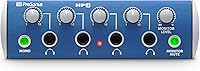
The four independent outputs are the core selling point here — each one has its own level knob, so every musician in a session can dial in their preferred headphone volume without bothering anyone else. The amp delivers roughly 130 milliwatts per channel, which in practical terms means it drives demanding full-size headphones cleanly and loudly without audible distortion. A mono summing switch lets engineers quickly check how a mix translates to a single channel without any additional patching. Balanced quarter-inch inputs and outputs keep the signal chain clean, and the daisy-chain outputs let you expand to additional units if your session grows beyond four people.

Best For

This studio monitoring unit earns its keep most in environments where multiple people need to hear themselves at the same time. A four-piece band tracking live in the same room is the obvious use case — each player gets their own volume level without anyone shouting over the talkback. Home studio producers recording guest vocalists or collaborators will appreciate the same flexibility. It also works well for podcast or voiceover setups where two or more hosts need separate headphone feeds. If you already run PreSonus gear and want something that slots cleanly into that ecosystem, this headphone amp is a natural, low-friction addition.

User Feedback

People who have spent real time with the HP4 tend to land in a pretty consistent place: they like how easy it is to set up and how it simply works without fuss. The output level headroom earns particular praise from users running power-hungry over-ear headphones. On the downside, some buyers point out that there is no way to blend different signal sources per output — everyone hears the same mix, just at different volumes. The industrial design also shows its age next to newer competitors. That said, long-term reliability keeps surfacing in reviews, with owners reporting years of trouble-free use in active studio environments.

Pros

  • Four independent volume controls let every musician dial in their own headphone level without disrupting others.
  • Output power is strong enough to drive demanding, full-size studio headphones cleanly at high levels.
  • Balanced inputs and outputs keep the signal clean and interference-free in real studio environments.
  • The mono summing switch lets engineers check mix compatibility instantly without any extra patching.
  • All-metal construction feels genuinely durable and holds up well under years of daily session use.
  • Setup takes minutes — plug in, connect headphones, and the HP4 is ready to go with zero configuration.
  • Daisy-chaining support allows expansion to more than four musicians without buying an entirely different unit.
  • Long-term owners consistently report years of trouble-free operation, which is rare at this price tier.
  • The compact 1/3U form factor saves valuable rack space in tightly packed studio setups.

Cons

  • No per-channel cue mixing means every performer hears the exact same signal blend.
  • The visual design looks noticeably dated compared to newer headphone distribution units available today.
  • A single mute button cuts all outputs simultaneously — there is no way to mute individual channels.
  • Users with high-sensitivity in-ear monitors may detect a low-level noise floor at high gain settings.
  • No support for balanced headphone outputs, which limits compatibility with higher-end headphone setups.
  • The 1/3U chassis requires an adapter panel for clean installation in a standard 1U rack slot.
  • No digital control, USB connectivity, or software integration of any kind for modern hybrid studio workflows.
  • Newer competitors offer more features at comparable prices, which weakens the value case for first-time buyers.

Ratings

The PreSonus HP4 has accumulated a substantial body of verified buyer feedback since its debut, and our AI rating system has analyzed that data globally — filtering out incentivized reviews and bot activity — to surface what real studio users and home recordists actually experience. Scores reflect both the genuine strengths and the honest limitations of this headphone amp, so you can make a confident, informed decision before committing.

Build Quality
88%
The all-metal chassis earns consistent praise from buyers who have run this unit in active studio environments for years. Unlike plastic-bodied competitors, it feels dense and solid in the rack, and the front-panel controls hold up well to repeated daily use without wobbling or loosening.
A few users note that the overall construction, while sturdy, feels utilitarian rather than refined — sharp edges and a no-frills finish that looks functional but not particularly premium next to newer boutique gear.
Output Power & Volume
91%
This is where the HP4 consistently gets called out positively. Users running demanding over-ear studio headphones — the kind that need real power to open up — report clean, loud monitoring levels without any audible strain or distortion at high volumes during long tracking sessions.
130 milliwatts per channel is solid for most use cases, but a small number of buyers with exceptionally low-sensitivity or high-impedance headphones felt the amp just barely kept pace, leaving less headroom than they would have liked.
Channel Independence
84%
Having four separate volume knobs — one per output — is the feature that makes this unit genuinely useful for live band tracking. Each musician can adjust their own level without affecting anyone else, which eliminates the constant back-and-forth interruptions that plague shared-mix setups.
The independence stops at volume. There is no per-channel EQ, no individual mix blending, and no way to send different signal content to different outputs. For simple monitoring this is fine, but more experienced engineers used to cue-mix systems will feel the constraint quickly.
Signal Clarity & Noise Floor
82%
18%
Most buyers report a clean, transparent signal path with no perceptible hiss or hum at normal monitoring levels. The balanced inputs and outputs contribute meaningfully here, keeping interference low even in project studios with less-than-ideal electrical environments.
At maximum gain with sensitive in-ear monitors, a small number of users detected a low-level noise floor. It is rarely a deal-breaker, but those using high-sensitivity IEMs for critical listening may notice it where they would not with standard studio headphones.
Ease of Setup
93%
Plug it in, connect your inputs, plug in headphones — there is genuinely nothing complicated about getting the HP4 running. First-time users and seasoned engineers alike describe the initial setup as taking under five minutes, which matters when you are preparing for a session under time pressure.
The simplicity is also a ceiling. There are no configuration options, no software integration, and no way to customize behavior beyond what the front-panel controls offer. Users expecting any kind of digital control or routing flexibility will hit a wall immediately.
Daisy-Chain Expandability
79%
21%
The monitor outputs double as a pass-through for linking multiple units together, which gives studios a practical way to scale headphone distribution beyond four channels without major investment. Several buyers use two units daisy-chained for larger ensemble recording sessions.
The daisy-chain implementation is functional but basic. Signal integrity can degrade slightly across multiple units in a chain, and there is no master level control that affects all connected units simultaneously, which creates an awkward management situation in larger setups.
Value for Money
77%
23%
For a studio tool that has held its own for over two decades, the pricing sits in a reasonable range for what it delivers. Buyers who need a straightforward, reliable headphone distribution box for tracking sessions generally feel they got solid utility for the spend.
The competitive landscape has shifted considerably since 2004. Several newer alternatives now offer per-channel cue mixing, more outputs, or USB connectivity at similar or lower prices, which makes the HP4 feel less compelling on pure value grounds for first-time buyers doing their research today.
Design & Aesthetics
58%
42%
The 1/3U rack-mount form factor is genuinely space-efficient, and for engineers with tightly packed racks, that compact footprint is a real practical advantage. The layout is clean and logically organized with no learning curve required.
The visual design is firmly rooted in early-2000s studio gear aesthetics and has not been updated since. Compared to the cleaner, more modern-looking headphone amps that have entered the market in recent years, it looks noticeably dated — a minor but recurring complaint.
Mono Summing Switch
74%
26%
Engineers who regularly check mixes for mono compatibility appreciate having this as a physical button rather than a software toggle. It is a small but genuinely useful workflow feature that saves patching time during mix-downs and reference checks.
The mono switch affects the entire output uniformly, so it functions more as a quick reference tool than a true production feature. Users hoping to route a mono feed to specific outputs while keeping others in stereo will find no such flexibility here.
Monitor Mute Function
71%
29%
The mute button provides a fast way to cut all headphone outputs simultaneously, which is useful during talkback or when the engineer needs to speak with musicians without the mix competing. It works reliably and responds instantly with no latency or pop on cut.
There is no individual output mute — it is all or nothing. In sessions where you want to cut one musician's feed without interrupting others, this becomes a limitation that forces awkward workarounds like manually turning down individual channel knobs.
Compatibility with Headphones
86%
The standard quarter-inch connectors and solid output power mean the HP4 works reliably with the vast majority of studio headphones in real-world use. Buyers running everything from lightweight tracking headphones to heavier closed-back models report consistent performance across the board.
Users with headphones requiring a 3.5mm connection will need an adapter, and those with balanced headphone cables will find no support for that wiring standard here. Neither is an unusual omission at this tier, but worth knowing before purchase.
Long-Term Reliability
92%
This is arguably the HP4's strongest endorsement: a significant number of reviewers have owned and actively used their units for five, eight, even ten or more years without hardware failures. For studio gear that sees daily use, that track record carries real weight.
Because the product design has not changed in years, there are no firmware updates or hardware revisions to address any known issues. Users who encounter problems are working with a static product, and sourcing replacement parts for aging units can become difficult over time.
Rack Integration
83%
The 1/3U chassis fits neatly into standard rack setups and takes up minimal space. Engineers who already manage full racks appreciate that it does not require a dedicated rack unit and can share space with other compact gear without any mounting complications.
The 1/3U format, while space-efficient, requires a rack panel adapter or creative mounting if the user wants to install it cleanly in a standard 1U slot. A handful of buyers flagged the mounting situation as mildly awkward without additional hardware.

Suitable for:

The PreSonus HP4 is a natural fit for anyone running a small recording studio or home setup where multiple people need to monitor through headphones at the same time. A band tracking a live session is the ideal scenario — drummers, guitarists, and vocalists each get their own output with an independent volume control, so no one is fighting over a shared level. Home studio producers who regularly record guest musicians or collaborators will find it equally useful, since the setup takes minutes and the operation requires no technical expertise from the performers. Podcasters and voiceover studios running two or more hosts simultaneously will appreciate having discrete, individually adjustable headphone feeds without any complex routing involved. Engineers who already work within the PreSonus ecosystem will find the HP4 integrates cleanly, and anyone prioritizing long-term reliability over cutting-edge features will be well served by a unit that has earned a strong track record over two decades of real studio use.

Not suitable for:

Buyers expecting individual cue mixing — where each performer hears a different blend of instruments — should look elsewhere, because the PreSonus HP4 sends the same signal to all four outputs with only volume adjustment per channel. Producers working in more advanced tracking environments, where artists typically need personalized in-ear mixes with their own reverb or level preferences per instrument, will hit the ceiling of this unit very quickly. It is also not the right call for anyone using high-sensitivity in-ear monitors in quiet recording environments, since some users report a detectable noise floor at high gain settings. Those shopping primarily on aesthetics or expecting a modern industrial design will be put off by a look that has not changed since the early 2000s. Finally, buyers in markets running on 220–240V should verify compatibility, as this unit is rated for 120V power only.

Specifications

  • Headphone Outputs: The unit provides four independent headphone outputs, each terminated with a standard quarter-inch jack connector.
  • Output Power: Each channel delivers up to 130 milliwatts, providing enough headroom to drive most full-size studio headphones at loud, clear monitoring levels.
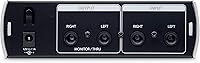
  • Line Inputs: Two balanced quarter-inch line inputs accept signals from mixers, audio interfaces, or other balanced sources in a standard studio chain.
  • Monitor Outputs: Two balanced quarter-inch monitor outputs allow the unit to pass signal downstream to speakers or additional headphone amplifier units.
  • Volume Controls: Each of the four headphone outputs has its own dedicated level knob, enabling independent volume adjustment per listener.
  • Mono Switch: A front-panel mono summing switch collapses the stereo input signal to mono across all outputs simultaneously for quick mix reference checks.
  • Mute Function: A Monitor Mute button cuts all headphone outputs at once, useful during talkback or when the engineer needs silence in all headphones simultaneously.
  • Expandability: The monitor outputs support daisy-chaining multiple units together, allowing sessions with more than four headphone listeners to be accommodated.
  • Form Factor: The chassis occupies a compact 1/3U rack-mount profile, designed to share a standard rack unit space with other similarly sized gear.
  • Dimensions: Physical dimensions measure 5.5″ wide by 5.5″ deep by 1.75″ tall, making it one of the smaller units in its category.
  • Weight: The unit weighs 2 pounds, kept low by its compact size while still feeling solid due to the all-metal enclosure.
  • Material: The enclosure is constructed entirely from metal, contributing to both its physical durability and its resistance to RF interference in studio environments.
  • Power Source: The unit operates on corded AC power at 120 volts and does not include any battery-powered or USB-powered operating mode.
  • Connector Type: All headphone outputs use 6.35mm quarter-inch jack connectors, compatible with the vast majority of professional and consumer studio headphones.
  • Compatibility: The amplifier is compatible with most standard headphones terminated with a quarter-inch plug, including both open-back and closed-back studio models.
  • Signal Path: Balanced inputs and outputs preserve signal integrity throughout the chain, minimizing noise pickup in longer cable runs or electrically noisy environments.
  • Color: The unit ships in a black finish that matches the aesthetic of most standard rack-mount studio equipment.
  • First Available: The product was first made available in April 2004, giving it one of the longer continuous production histories in its category.

Related Reviews
PreSonus Studio 1824c

86%
91%
Preamplifier Clarity
88%
Chassis & Build Quality
84%
Low-Latency Performance
93%
Software Bundle Value
87%
Monitoring Flexibility
More
PreSonus HD5
PreSonus HD5
79%
83%
Sound Accuracy
87%
Comfort & Wearability
61%
Build Quality
91%
Value for Money
74%
Isolation & Bleed Control
More
PreSonus Quantum 26x32 Thunderbolt Audio Interface
83%
91%
Performance
88%
Sound Quality
93%
Ease of Setup
90%
Latency
85%
Connectivity (Thunderbolt 2)
More
PreSonus Quantum 4848 Thunderbolt Audio Interface
86%
94%
Audio Performance
90%
Latency and Speed
87%
Build Quality
75%
Ease of Setup
92%
Expandability
More
PreSonus Studio 26c USB Audio Interface
86%
92%
Sound Quality
89%
Ease of Use
94%
Value for Money
85%
Software Bundle
88%
Build Quality
More
PreSonus Studio 68c USB Audio Interface
84%
89%
Audio Quality
86%
Ease of Setup
91%
Software Bundle
88%
Latency Performance
84%
Connectivity
More
PreSonus Studio 1810c USB Audio Interface
86%
91%
Sound Quality
88%
Ease of Setup
85%
Software Integration
80%
Connectivity & Compatibility
89%
Value for Money
More
PreSonus AudioBox USB 96 Audio Interface
87%
92%
Value for Money
88%
Sound Quality
94%
Ease of Use
91%
Portability
85%
Build Quality
More
PreSonus Quantum 2626 Thunderbolt Audio Interface

88%
96%
Latency
94%
Sound Quality
91%
Software Bundle
88%
Build Quality
87%
Expandability
More
PreSonus AudioBox iOne
75%
88%
Preamp Quality
83%
Build Quality
91%
Ease of Setup
61%
Direct Monitoring
86%
iPad Compatibility
More

FAQ

No, and this is worth understanding before you buy. The PreSonus HP4 sends the same stereo signal to all four outputs — the only thing each person can control independently is their own volume level. If you need true cue mixing where each performer hears a different blend of instruments, you would need a dedicated personal monitor mixing system instead.

For the vast majority of standard studio headphones, yes. The output per channel is strong enough to push most full-size closed-back or open-back headphones to comfortable and loud monitoring levels without distortion. Very high-impedance headphones in the 250–600 ohm range may get close to the amp's limits, so it is worth checking your specific headphone's sensitivity rating if you are working with demanding cans.

Run a balanced quarter-inch cable from one of your interface's outputs — or from your mixer's headphone send or aux output — into one of the two balanced line inputs on the back of the unit. The signal then distributes across all four headphone outputs simultaneously. The setup is genuinely straightforward and takes only a couple of minutes.

Yes, the monitor outputs on the back can feed a second unit in a daisy-chain configuration. You run a cable from the first unit's output to the input of the second, effectively giving you eight headphone feeds from two units. Signal quality holds up well for a single chained unit, though very long chains could introduce minor level degradation.

Not directly — the outputs are all quarter-inch jacks. You will need a 3.5mm to quarter-inch adapter, which is inexpensive and widely available. The adapter approach works fine for casual use, though for a permanent studio installation it is worth using headphones with native quarter-inch termination for a cleaner, more reliable connection.

The unit is rated for 120V operation, which covers the United States and a handful of other regions. If you are based in Europe, the UK, Australia, or anywhere else running on higher mains voltage, you would need a step-down voltage converter to use it safely. Always verify your local power standard before plugging it in.

It depends on your perspective. Functionally, this headphone amp does exactly what it always has, and the controls are logical and easy to use. Visually, the industrial aesthetic dates back to the early 2000s and has not been refreshed since launch. If your rack is filled with older gear, it blends right in. If you have a modern setup with sleek panels and clean lines, the contrast is noticeable.

Pressing the mute button cuts the signal to all four headphone outputs at once. It is useful when you need to speak to musicians in the room without the mix competing in their ears, or during a quick break. There is no way to mute individual channels separately — it is a global cut across all outputs simultaneously.

Based on long-term owner feedback, reliability is genuinely one of this studio monitoring unit's strongest suits. Many users report running the same unit for five to ten or more years without hardware issues. It is passive enough in design — no complex digital components or software — that there is relatively little that can go wrong with regular use.

When you are mixing, it is standard practice to check how your mix sounds when collapsed to a single channel — this catches phase issues, narrow panning that disappears in mono, and other compatibility problems. The mono switch does this instantly for everyone monitoring through the headphone amp at the same time, without any rewiring or changes to your DAW settings. It is a small but genuinely practical feature for mix engineers.