Overview

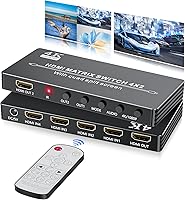
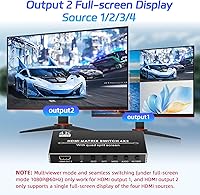
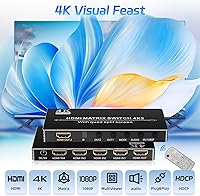
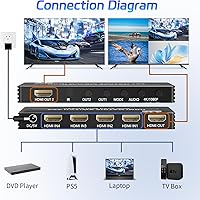
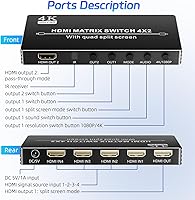
The BolAAzuL BO-02 4x2 HDMI Multiviewer is a compact, affordable way to wrangle four video sources across two displays without spending serious money or crawling behind your TV every time you need to swap inputs. It pulls double duty: on output 1, you can split the screen to show up to four sources simultaneously in various layouts, while output 2 is strictly limited to one full-screen source at a time. That limitation catches a lot of buyers off guard, so it is worth knowing upfront. Build-wise, this HDMI multiviewer is small enough to tuck behind a monitor, and setup takes just minutes with no software required.

Features & Benefits

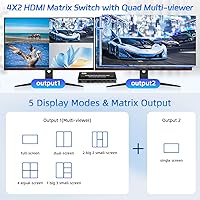
Where this quad matrix switch gets interesting is the layout flexibility. You get nine ways to arrange your sources on output 1, from a clean four-equal grid to a main-plus-three sidebar configuration. One important caveat: the advertised instant-switching only works in full-screen mode on output 1, and only when all four inputs are running at 1080p@60Hz. The unit also upscales lower-resolution signals to 4K@30Hz, but that is a compatibility feature, not a quality upgrade — your 1080p content does not suddenly look sharper. In multiviewer mode, the device compresses all four feeds into one image, so per-source sharpness takes a noticeable hit. The IR remote and front panel buttons handle input selection without requiring any software or configuration.

Best For

This HDMI multiviewer punches above its weight for a specific kind of buyer. If you run a small home office and need to keep an eye on a surveillance feed, a laptop, and a desktop all at once, a single-display multiview setup makes a real difference. Streamers and casual gamers will appreciate having a dedicated monitoring screen on output 1 while a second display runs a game or show in full screen on output 2. It also works well in small classrooms or meeting rooms where a presenter needs to flip between a few laptops quickly. What it is not built for is high-stakes production work or anyone expecting true 4K quality across all outputs. Think of it as practical, no-frills signal management at an accessible price.

User Feedback

With just over 100 ratings and a score sitting comfortably above 4 out of 5, the BolAAzuL switcher earns its marks mostly on ease of use and value. Buyers consistently note that the unit arrives ready to go — plug in your sources, connect your displays, and you are up and running in under five minutes. The build quality draws occasional compliments given the price. Where frustration creeps in is around unmet expectations: some users were surprised that instant-switching does not apply to all modes, and a handful found compatibility hiccups with certain 4K sources. Security and office users tend to leave more positive reviews than those hoping for broadcast-level output. Go in knowing what it can and cannot do, and the satisfaction rate climbs considerably.

Pros

  • Plug-and-play setup with no drivers or software needed means you are up and running in minutes.
  • Nine distinct layout modes on output 1 give genuine flexibility for monitoring multiple sources at once.
  • The included IR remote lets you switch inputs or change layouts from across the room without touching the unit.
  • Compact enough to sit behind a monitor or mount discreetly in a small AV rack without consuming much space.
  • Compatible with a wide range of devices including gaming consoles, security cameras, laptops, and DVD players.
  • Solid build quality relative to the price point, with front panel buttons as a reliable backup to the remote.
  • The upscaling function helps maintain display compatibility when mixing sources of different resolutions.
  • A practical entry point for anyone needing basic multi-source management without investing in professional hardware.

Cons

  • Output 2 cannot display a multiview layout under any setting — it is locked to a single full-screen source only.
  • Instant-switching is conditional: all four inputs must run at 1080p@60Hz simultaneously, or the feature simply does not activate.
  • In multiview mode, each source is compressed to fit the screen, so individual feed sharpness drops noticeably below 1080p.
  • The 4K@30Hz output is a scaler function, not a quality enhancer — source content does not look better than its native resolution.
  • Some users report compatibility hiccups with certain 4K sources or older devices using HDCP versions outside 1.3 and 1.4.
  • The instruction manual reportedly lacks clarity on mode-specific limitations, leading to avoidable confusion after purchase.
  • No audio matrix functionality — audio routing is tied directly to video source selection without independent control.
  • The remote control feels basic and may have limited range or responsiveness in larger or obstructed rooms.

Ratings

The scores below were produced by our AI system after analyzing verified buyer reviews for the BolAAzuL BO-02 4x2 HDMI Multiviewer across multiple global retail platforms, with incentivized, spam, and bot-generated feedback actively identified and excluded. Each category rating reflects a realistic synthesis of real user experiences, weighting both genuine praise and recurring frustrations with equal rigor. Where this quad matrix switch earns its marks and where it consistently lets buyers down are represented with full transparency.

Ease of Setup
91%
Buyers across all technical skill levels consistently describe getting this unit running in under five minutes with zero driver installation or software configuration required. The plug-and-play experience is especially praised by home office users who need a fast, reliable setup between back-to-back calls or presentations.
A handful of users note that when all four sources are powered on simultaneously, initial signal detection can take several seconds before every feed stabilizes on screen. It is a minor friction point, but it can feel disruptive the first few times in time-sensitive environments.
Value for Money
83%
For buyers who need basic multi-source management without investing in a professional matrix switch, this HDMI multiviewer hits a genuinely useful price-to-functionality ratio. Security hobbyists and small meeting room managers in particular describe it as money well spent for their straightforward monitoring needs.
Users who purchase expecting broadcast-quality signal routing or robust 4K performance often feel the value proposition breaks down quickly once they discover the output 2 limitations and multiviewer compression trade-offs. For those use cases, the price gap toward a more capable unit becomes hard to justify avoiding.
Multiview Image Quality
59%
41%
In split-screen layouts, the image is clear enough for monitoring tasks like tracking security camera feeds or keeping an eye on multiple streams at once. Users doing casual surveillance work or ambient content monitoring report that the quality is adequate for identifying activity across all four panels.
Because all four feeds are compressed into a single output frame, each source occupies only a fraction of the screen at noticeably reduced resolution — well below crisp full 1080p. Users who expected sharp, detailed images in multiview mode are consistently disappointed by the softness of individual panels.
Switching Performance
63%
37%
In full-screen mode on output 1 with all inputs running at 1080p@60Hz, the instant-switch function works as described — delivering clean, fast transitions without a black-screen flash. Streamers and gamers who happen to meet those specific conditions rate this feature as a genuinely useful differentiator.
The instant-switch feature carries strict prerequisites that many real-world setups cannot meet, requiring all four connected inputs to output at exactly 1080p@60Hz simultaneously. Users with mixed-resolution devices see only a standard black-flash transition instead, and a notable share feel the feature was positioned more prominently in marketing than its narrow availability warrants.
Output 2 Functionality
41%
59%
For users who simply need output 2 to route a single clean source to a second display — such as projecting one laptop feed in a meeting room — it performs that task reliably and without fuss. In that narrow, intended scenario, it delivers exactly what it promises.
Output 2 cannot display more than one source at a time under any mode or setting, which is a dealbreaker for buyers who assumed both outputs would support split-screen layouts. This hard limitation drives a disproportionate share of the negative reviews and return requests from users who encountered it after purchase.
Build Quality
76%
24%
For a device at this price tier, the physical construction feels more solid than most buyers anticipate. The chassis resists flex, and the front panel buttons have a reassuring click that suggests the unit can handle daily switching over extended periods without mechanical degradation.
The casing accumulates fingerprints and light surface scratches easily, and the IR receiver window has a plasticky finish that feels noticeably cheaper than the rest of the unit. It is a functional build rather than a premium one, which most buyers accept as a reasonable trade-off.
Layout Flexibility
79%
21%
Nine layout presets give users meaningful options for organizing their workspace, from a balanced four-equal grid to an asymmetric main-view-plus-three-thumbnail arrangement. Home office workers and classroom presenters especially appreciate being able to dedicate more screen space to a primary source without losing sight of secondary feeds.
The layouts are fixed presets with no customization — users cannot resize individual panels, reorder which source appears in which screen segment, or save a preferred configuration. Anyone wanting a tailored multi-source setup hits this ceiling quickly and finds the lack of layout configurability limiting.
Single-Source Picture Quality
81%
19%
When routing a single source to either output in full-screen mode, image quality is clean and accurate, with no visible artifacts or color distortion reported by the majority of users. Gaming and video playback at 1080p@60Hz in particular draws positive feedback about smooth, responsive, and faithful output.
Some users report minor signal inconsistencies when switching between sources, particularly with older HDCP 1.3 devices that require a moment to re-handshake and temporarily flash black. A smaller number also note a subtle softening when the internal scaler is active on a 4K-native display.
Device Compatibility
73%
27%
The BolAAzuL switcher connects reliably with a broad range of everyday consumer devices including PS4, Xbox One, laptops, desktop PCs, and standard security cameras. Most users report a clean, straightforward experience with typical 1080p HDMI sources right out of the box without any reconfiguration.
Compatibility issues surface with certain 4K source devices and HDCP 2.2-protected content, which the unit does not support. A segment of users also reports handshake delays or intermittent signal drops when mixing older and newer generation devices across the four input ports simultaneously.
4K Upscaling
53%
47%
The built-in scaler allows lower-resolution sources to be output as a 4K-formatted signal, which helps avoid compatibility or overscan problems when connecting legacy 1080p devices to modern 4K displays. In mixed-resolution home theater setups, this is a practical utility that prevents display negotiation headaches.
The scaler does not enhance the underlying image — a 1080p source scaled to 4K@30Hz still looks like 1080p content, and some users notice a slight softening introduced by the scaling process itself. Buyers expecting a visible improvement in sharpness or clarity from the upscaling function are routinely let down.
Remote Control
67%
33%
The included IR remote covers the essential functions — input selection and layout switching — without requiring the user to leave their seat or touch the unit directly. For small rooms where the unit is within a clear line of sight, it performs reliably across regular daily use.
The remote lacks dedicated shortcut buttons for jumping to a specific layout preset, forcing users to cycle through options sequentially rather than navigating directly to their preferred mode. IR range also proves inconsistent in larger or obstructed rooms, requiring users to point more precisely than expected.
Audio Passthrough
68%
32%
HDMI audio from each connected source passes through to the display without any additional configuration, keeping setups clean for users running soundbars or AV receivers through their TV. Gamers and media users consistently confirm that audio syncs correctly with video in full-screen mode.
There is no independent audio routing — audio always follows the selected video source, with no ability to send audio from one input to a display while video comes from another. Users expecting even basic audio matrix functionality will need a separate dedicated device to achieve that.
Portability
88%
At under 4 inches long and just over 11 ounces, this HDMI multiviewer is compact enough to mount behind a monitor arm, slot into a shallow AV cabinet, or drop into a laptop bag for portable presentation setups. Multiple users specifically highlight how little desk footprint it requires.
The closely spaced HDMI ports mean users with thick or right-angle cable heads sometimes struggle to seat all four inputs neatly side by side. A few users also note that without a rubber base or mounting bracket included, the unit slides on smooth surfaces during cable insertion.
Documentation
44%
56%
The physical setup is intuitive enough that most users manage to connect sources and get a working output without consulting the manual at all. For straightforward single-source-to-display routing, the port labeling on the unit itself provides enough guidance to proceed confidently.
The included documentation fails to clearly explain the conditional requirements for instant-switching or the hard limitations of output 2, which are the two features most likely to surprise buyers after purchase. A significant proportion of negative reviews trace back directly to expectation gaps that clearer documentation could have prevented.

Suitable for:

The BolAAzuL BO-02 4x2 HDMI Multiviewer is a strong fit for anyone who needs to monitor or present multiple video sources without constantly swapping cables or buying expensive professional gear. Home office workers juggling a laptop, desktop, and a secondary media source will find real value in being able to see all feeds at a glance on one display while routing a clean single source to a second screen. It is equally well-suited to small classrooms and meeting rooms where a presenter needs to quickly flip between a few connected laptops or media players without touching any cables. Security hobbyists who want to consolidate two to four camera feeds onto a single monitor will appreciate the multiview layouts and the simplicity of IR remote control. Casual gamers and streamers looking for a budget-conscious way to run a monitoring display alongside a main gaming output also land squarely in the target audience for this quad matrix switch.

Not suitable for:

Buyers who expect true 4K picture quality across all outputs will be disappointed — the BolAAzuL BO-02 4x2 HDMI Multiviewer includes a scaler that can output at 4K@30Hz, but that only means it adapts the signal format, not that it improves the actual visual quality of your source content. Anyone planning to use the multiview feature on output 2 should know upfront that this is simply not possible; that second output is hard-limited to one full-screen source at a time, and no setting changes that. The advertised instant-switching capability also comes with a strict condition that is easy to miss: it only activates in full-screen mode on output 1, and all four connected inputs must be running at 1080p@60Hz simultaneously — mixed resolutions break it entirely. Content creators, video professionals, or anyone running a production environment who needs low-latency, high-fidelity signal routing should look at purpose-built professional matrix switches instead. This is a budget-tier device with budget-tier trade-offs, and buyers who need enterprise reliability or pristine image fidelity in split-screen mode will find those limits frustrating quickly.

Specifications

  • HDMI Inputs: The unit accepts four separate HDMI source devices simultaneously via four full-size HDMI input ports.
  • HDMI Outputs: Two HDMI output ports are provided, each capable of driving an independent display such as a monitor, TV, or projector.
  • Max Resolution: The maximum output resolution supported is 4K at 30Hz, achieved through an internal scaler that adapts incoming signals to the display's requirements.
  • Supported Resolutions: Input and output resolutions supported include 4K@30Hz, 1080p@60Hz, and 720p.
  • HDCP Compatibility: The device is compliant with HDCP 1.3 and HDCP 1.4 copy-protection standards.
  • Viewing Modes: Nine distinct screen layout modes are available on output 1, including full-screen, two dual-screen variants, four-equal-split, four variants of a one-large-three-small arrangement, and a two-large-two-small configuration.
  • Seamless Switching: Instant input switching without a black screen is available exclusively in full-screen mode on output 1, and only when all four connected inputs are simultaneously running at 1080p@60Hz.
  • Output 2 Behavior: Output 2 is limited to displaying a single selected input source in full-screen mode at all times and does not support any multiview or split-screen layout.
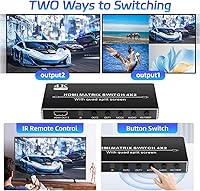
  • Control Methods: Input selection and layout changes can be made using the included IR remote control or the physical buttons on the front panel of the unit.
  • Driver Requirement: No software installation or device drivers are required; the unit operates as a true plug-and-play device on any compatible display.
  • Upscaling Behavior: The built-in scaler can upscale lower-resolution sources to 4K@30Hz for display compatibility, but this does not enhance or improve the original image quality of the source content.
  • Multiview Quality: When displaying multiple sources simultaneously in multiview mode, each source feed is compressed to fit within its allocated screen segment, reducing effective per-source detail below full 1080p.
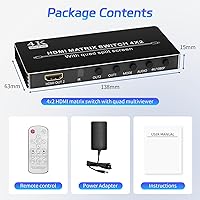
  • Dimensions: The unit measures 3.94 x 1.97 x 1.18 inches, making it small enough to place behind a display or on a compact AV shelf.
  • Weight: The device weighs 11.3 ounces, which is light enough to mount or reposition without additional hardware support.
  • Model Number: The official manufacturer model number for this unit is BO-02.
  • Brand: This device is manufactured and sold under the BolAAzuL brand.

Related Reviews
Portta N2MT42AX 4x2 HDMI Matrix
78%
83%
Signal Reliability
88%
4K & HDR Performance
86%
Audio Extraction Quality
91%
EDID Management
72%
ARC Functionality
More
OREI BK-402A 8K eARC HDMI Matrix Switch 4x2
80%
88%
Signal Reliability & Handshake
84%
Audio Extraction Quality
91%
Routing Flexibility
82%
EDID Management
89%
Value for Money
More
BolAAzuL 2-Port HDMI 2.1 KVM Switch
84%
91%
Value for Money
94%
Video Quality
88%
Ease of Setup
85%
Build Quality
80%
Usability and Controls
More
Mirabox HDMI Extender 400ft
85%
94%
Signal Quality
85%
Ease of Setup
90%
Build Quality
91%
Transmission Range
89%
Audio Performance
More
Arvitek AT-SP108-N 1x8 HDMI Splitter
78%
91%
Ease of Setup
78%
Signal Consistency
84%
Build Quality
72%
Resolution Performance
76%
Compatibility
More
MYPIN Mini 1080p HDMI Media Player
78%
91%
Ease of Setup
83%
Format Compatibility
78%
Build Quality & Portability
76%
Video Playback Quality
58%
Remote Control & Navigation
More
Narvitech NJ300
Narvitech NJ300
85%
94%
Initial Setup Ease
88%
Recording Stability
92%
Passthrough Latency
86%
Party Chat Integration
67%
Thermal Management
More
OREI EX-500IR HDMI Extender
88%
94%
Transmission Distance
92%
Signal Quality
89%
Ease of Installation
85%
Build Quality
88%
Power over Cable (PoC) Functionality
More
FxyxGyc 4K01 4K HDMI Media Player
82%
88%
4K Playback Performance
92%
File Format Compatibility
86%
External Storage Support
74%
Interface Navigation
91%
Digital Signage Reliability
More
DxInvb Wireless HDMI Transmitter and Receiver Kit
75%
91%
Ease of Setup
58%
Device Compatibility
74%
Wireless Range & Stability
69%
Video Quality
83%
Build Quality & Portability
More

FAQ

Not quite. The multiview layouts that let you see multiple sources at once are only available on output 1. Output 2 is hard-limited to showing a single source in full screen, regardless of what mode you select on output 1. So you can have a quad-split view on your first display and a dedicated full-screen feed on your second, but you cannot get split-screen on both outputs simultaneously.

There is an important condition to be aware of: the instant-switch function — where the display changes inputs without going black — only activates in full-screen mode on output 1, and all four connected inputs must be outputting at 1080p@60Hz at the same time. If even one input is running at a different resolution, the feature will not engage. For most home setups with mixed sources, standard switching with a brief black flash is what you should expect.

No, and this is worth being clear about. The BolAAzuL BO-02 4x2 HDMI Multiviewer includes a scaler that can output a 4K-resolution signal to your display, which helps with compatibility on 4K screens. However, scaling up a 1080p signal does not add detail that was never there — your content will not look sharper or more detailed than its original source quality. Think of it as a format adapter, not an image processor.

Yes, gaming consoles like the PS4, PS5, and Xbox One or Series X are compatible, provided your console is outputting at a resolution the unit supports, such as 1080p. Just keep in mind that if you are hoping to use the instant-switching feature, all four inputs need to match at 1080p@60Hz. For casual use — routing your console to one display while a PC feeds the other — it works without any fuss.

No setup software is required at all. You plug your source devices into the HDMI inputs, connect your displays to the two outputs, and the unit powers on ready to use. Layout modes and input selection are handled entirely through the IR remote or the front panel buttons. It is genuinely plug-and-play in the traditional sense.

You can cycle through the nine layout options using the included IR remote control or the buttons on the front panel of the unit. The remote is the more convenient option if your setup is across the room. The layouts are fixed presets — you select the arrangement that suits your workflow and the unit applies it to output 1 immediately.

It works well for that use case, as long as your cameras output a standard HDMI signal. You can display up to four camera feeds simultaneously on output 1 in a split-screen layout, which is exactly what most hobbyist surveillance setups need. Just be aware that the image for each camera feed will be compressed to fit its portion of the screen, so very fine detail may not be as crisp as it would on a dedicated single-camera display.

When an input loses signal, the unit typically shows a blank or black segment in that portion of the multiview layout. The other active inputs continue displaying normally. It does not crash or require a restart — it simply treats the inactive port as a no-signal source until the device reconnects.

Yes, audio is carried through the HDMI signal along with video, so whatever audio your source device outputs over HDMI will be passed to your connected display or AV receiver. However, there is no independent audio matrix control — audio always follows the video source you have selected and cannot be routed separately from the video output.

It supports HDCP 1.3 and HDCP 1.4, which covers a broad range of consumer devices including most Blu-ray players, streaming sticks, and set-top boxes. Devices or content that require HDCP 2.2 — which is common with 4K UHD Blu-ray and some newer streaming platforms — may encounter handshake issues. If your content library is primarily 1080p from standard streaming devices, you are unlikely to run into problems.