

Overview

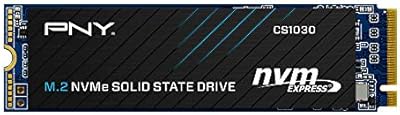
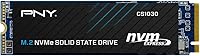
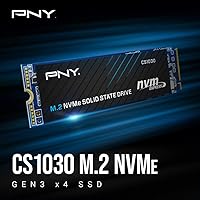
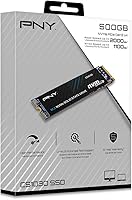
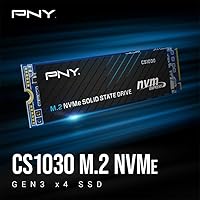
The PNY CS1030 500GB M.2 NVMe SSD entered the market in late 2020 as a straightforward answer to a common problem: aging laptops and desktops crawling along on spinning hard drives or older SATA SSDs. This M.2 upgrade slots into the standard 2280 form factor, fitting the vast majority of machines with an M.2 slot — no adapters, no fuss. What makes it stand out at this price point isn't raw benchmark dominance; it's the combination of real-world speed improvements and a 5-year warranty with US-based support backing it up. That kind of coverage is genuinely rare in the budget NVMe space.

Features & Benefits

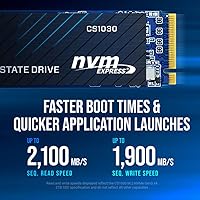
Running on a PCIe Gen3 x4 interface, the CS1030 delivers sequential read speeds of up to 2,000 MB/s — a significant jump from the roughly 550 MB/s ceiling of SATA drives. The NVMe protocol reduces command queue latency, which is what you actually feel day-to-day: faster boot times, snappier application launches, quicker file transfers. Sequential write tops out around 1,100 MB/s, adequate for most everyday tasks but worth noting if you do heavy video editing or frequent large file moves. Power consumption stays low, helping battery life in laptops. There is no heatsink included, so users in compact or poorly ventilated builds should keep thermals in mind.

Best For

This NVMe drive makes the most sense for someone pulling an old laptop out of retirement or squeezing more life out of a machine bogged down by a mechanical hard drive. Students, remote workers, and home office users will notice the difference immediately — faster boot times and quicker app loads have a real impact on daily productivity. It also works well as a secondary drive in a desktop build where top-tier Gen4 performance would simply go to waste. If your workload is mostly browsing, documents, light photo work, or everyday computing, the CS1030 covers all of it without requiring you to spend more than necessary.

User Feedback

With nearly 1,900 ratings and a 4.7-star average, the consensus around this M.2 upgrade is unusually strong for a budget drive. Most positive reviews center on the dramatic speed improvement over whatever was in the machine before — HDDs especially — and how straightforward installation was, even for first-timers. The 5-year warranty gets mentioned as a genuine confidence booster. On the flip side, a handful of buyers raise fair questions about long-term endurance under sustained heavy writes, which is a realistic concern for any entry-level NVMe. Also worth clarifying: the product listing mixes SATA and NVMe language confusingly, but this is firmly an NVMe drive, not a SATA unit.

Pros

  • Boot times drop dramatically when replacing a mechanical hard drive or older SATA SSD.
  • PCIe Gen3 x4 NVMe interface delivers read speeds up to 2,000 MB/s for noticeably snappier daily use.
  • Five-year warranty is genuinely rare at this price point and adds real long-term confidence.
  • 24/7 US-based technical support is a meaningful safety net for non-technical users.
  • Low power consumption helps preserve battery life in laptop upgrades.
  • Standard M.2 2280 form factor fits the vast majority of modern laptops and desktops.
  • Included Data Recovery Service provides an extra layer of protection for everyday files.
  • Installation is tool-free and straightforward, even for first-time upgraders.
  • Nearly 1,900 ratings averaging 4.7 out of 5 stars reflects unusually strong buyer consensus for a budget drive.
  • Solid value for secondary desktop storage where high-end NVMe performance would go unused.

Cons

  • Sequential write speeds around 1,100 MB/s lag behind mid-range competitors in the same category.
  • No heatsink included, which can be a concern in thermally tight or compact builds.
  • 500GB may feel limiting as a sole primary drive for users with growing media libraries.
  • The CS1030 does not support PCIe Gen4, so it will not future-proof machines with Gen4-capable slots.
  • Long-term endurance under sustained heavy workloads has been questioned by a portion of buyers.
  • The official product listing has mixed SATA and NVMe specs, which creates unnecessary confusion before purchase.
  • No included cloning software or migration tools, meaning OS transfers require third-party solutions.
  • Write performance may dip noticeably once the drive's cache is saturated during large file operations.
  • Not well-suited as the only drive for power users who regularly work with large video or RAW photo files.

Ratings

Our AI rating engine analyzed thousands of verified global purchases of the PNY CS1030 500GB M.2 NVMe SSD, actively filtering out incentivized, duplicate, and bot-generated submissions to surface what real buyers genuinely experienced. Scores reflect the full picture — where this drive punches above its weight class and where it falls short compared to expectations — so you can make an informed decision without the noise.

Real-World Speed
83%
Buyers upgrading from mechanical hard drives or older SATA SSDs consistently describe the difference as dramatic — Windows boots in seconds instead of minutes, and applications like Chrome or Office snap open without delay. For everyday computing, the read performance headroom feels noticeably more responsive than what most budget shoppers expected.
Users who benchmarked the drive found write speeds settle well below the read figures, and sustained write performance can dip once the cache fills during large file operations. For tasks like copying big folders or downloading game installs, some buyers noticed the pace trailing off mid-transfer.
Value for Money
91%
The combination of NVMe performance, a five-year warranty, and US-based technical support at an entry-level price is genuinely difficult to match in this segment. Buyers frequently noted they expected to pay more for the level of coverage and speed they received, making the CS1030 feel like a smart, low-risk purchase.
A handful of buyers who compared it against similarly priced competitors found marginally better write benchmarks elsewhere for the same spend. If raw sequential write throughput is your priority, the value calculation shifts slightly toward alternatives.
Installation Ease
93%
Non-technical users — including first-time upgraders replacing a laptop hard drive for the first time — repeatedly praised how straightforward the physical installation was. The standard M.2 2280 footprint meant it fit without adapters in virtually every machine buyers tried it in, and online guides made the process accessible even without prior experience.
PNY does not include cloning software or a migration guide in the box, which left some buyers scrambling to find third-party tools to transfer their existing OS. A few users were also initially confused by the contradictory SATA and NVMe language in the product listing, requiring extra research before committing to buy.
Compatibility
78%
22%
The M.2 2280 form factor slots cleanly into the overwhelming majority of laptops and desktop motherboards built in the last several years, and most buyers reported a plug-and-play experience with no driver headaches on Windows 10 and 11. Recognition on boot was immediate in nearly all cases.
Users with older systems that have only SATA-keyed M.2 slots discovered the hard way that this drive will not function in those slots, leading to returns. The ambiguous product listing language compounded this issue for buyers who were not already familiar with the NVMe versus SATA M.2 distinction.
Warranty & Support
88%
A five-year warranty is a genuine outlier for a budget NVMe drive, and buyers who contacted PNY support described the experience as responsive and based in the US — not routed overseas or handled through a slow email queue. The included Data Recovery Service added meaningful peace of mind for users without a backup routine.
A small number of buyers who needed warranty service noted that the RMA process required some back-and-forth documentation before a replacement was approved, which added frustration during an already stressful situation. The recovery service also comes with limitations that are not clearly spelled out upfront.
Thermal Performance
63%
37%
Under light daily workloads — browsing, documents, casual media playback — the drive runs at comfortable temperatures without any heatsink, and most laptop users reported no thermal throttling during normal use. Low idle power draw helps keep temps stable in slim notebooks.
During sustained sequential write tasks or in compact desktop cases with poor airflow, temperatures climbed enough to trigger throttling in some setups. The absence of a bundled heatsink is a real gap for mini-ITX builders or anyone running the drive hard for extended periods, and PNY does not sell a compatible heatsink accessory alongside it.
Write Endurance
61%
39%
For the target audience — students, home office users, and casual everyday computing — the drive handles typical daily write volumes without any issues. Users running standard workloads for a year or more reported no signs of degradation in responsiveness over time.
Buyers who pushed the drive with video editing projects, frequent large backups, or continuous game installs raised legitimate questions about long-term endurance under those conditions. Compared to mid-range drives with higher TBW (terabytes written) ratings, the CS1030 is conservatively rated and may not be the right long-term choice for write-heavy power users.
Sequential Read Performance
82%
18%
Hitting close to rated sequential read speeds in real-world benchmarks earned the drive solid marks from buyers who tested it with tools like CrystalDiskMark. OS responsiveness, application startup times, and file access all reflected the performance gains that PCIe Gen3 NVMe is known for.
The drive does not reach the upper tier of Gen3 performance — drives rated at 3,500 MB/s are available for only marginally more — meaning buyers with speed-sensitive workflows may find themselves wishing they stepped up. Read performance also tapers slightly under concurrent multi-queue loads.
Sequential Write Performance
59%
41%
For single-file transfers, saving documents, and general OS writes, the rated 1,100 MB/s ceiling is fast enough that most everyday users never notice a limitation. Light creative workloads like casual photo editing or small video projects handled without complaint.
Once the drive's write cache is exhausted, real-world throughput drops noticeably — a pattern that frustrated buyers who ran large backup jobs or tried to move multiple big files simultaneously. Content creators working with 4K footage found this a consistent bottleneck.
Power Efficiency
84%
Laptop users consistently reported that replacing an HDD or older SATA SSD with this M.2 upgrade produced a measurable improvement in battery life under typical workloads. The low idle power draw is well-suited for ultrabooks and thin-and-light machines where thermal and power budgets are tight.
While power draw is low at idle, under sustained sequential read or write loads the drive consumes more than some competing ultra-low-power NVMe options designed specifically for mobile use. Users in fanless or passively cooled laptops occasionally saw slight battery runtime trade-offs during extended file transfer sessions.
Physical Build
77%
23%
The drive is solidly constructed for its weight class, and buyers who handled it before installation noted it felt well-made rather than cheap or flimsy. At under 0.2 oz, it adds essentially no weight to any system, and the board dimensions are precise enough to fit snugly in tight M.2 slots.
There is no protective label or physical armor over the controller and NAND chips, which makes the bare PCB feel exposed compared to drives that include basic shielding. Buyers handling the drive in statically sensitive environments flagged this as a minor concern during installation.
Listing Clarity
44%
56%
Once buyers looked past the listing confusion and verified the drive was NVMe, the actual product delivered exactly what the informed spec sheet promised. Buyers who did their research reported no surprise gaps between what they expected and what arrived.
The product listing has been a consistent source of pre-purchase anxiety — mixing SATA and NVMe references, showing two different speed ratings in different sections, and leaving buyers unsure what they were actually ordering. This is one of the most frequently cited frustrations in reviews and led directly to unnecessary returns from otherwise satisfied users.
Packaging & Accessories
56%
44%
The drive arrives in clean, minimal retail packaging that adequately protects it during shipping, and buyers reported no DOA issues attributable to transit damage. The inclusion of the Data Recovery Service code in the box was a pleasant surprise for those who noticed it.
Beyond the drive itself and the recovery service documentation, the box is essentially bare — no mounting screw, no thermal pad, no installation guide, and no migration software. First-time installers had to source a compatible M.2 retention screw separately if their motherboard did not already have one.

Suitable for:

The PNY CS1030 500GB M.2 NVMe SSD is a strong fit for anyone whose laptop or desktop is still running on a mechanical hard drive or an older SATA SSD — the performance difference will feel dramatic from day one. Students who need their machine to boot fast between classes, remote workers tired of waiting on sluggish application loads, and casual home users doing everyday tasks like browsing, streaming, and document work will all get real, noticeable value here. It also makes sense as a secondary drive in a desktop build where you want more storage without spending on a premium Gen4 unit. First-time upgraders will appreciate how straightforward installation is — the standard M.2 2280 form factor fits most modern motherboards and laptops without adapters, and the five-year warranty provides genuine peace of mind that most budget drives simply do not offer.

Not suitable for:

If your workflow involves heavy sequential write demands — think 4K video editing, continuous large file transfers, or professional content creation — the CS1030 is not the right tool. Its sequential write ceiling around 1,100 MB/s is adequate for general use but will become a bottleneck in sustained write-intensive scenarios. Enthusiast builders chasing the highest throughput should look at PCIe Gen4 drives instead, as the CS1030 tops out at Gen3 speeds by design. Compact mini-PC users or those with thermally restricted builds should also note there is no heatsink included, which could be a concern under prolonged load in confined chassis. The PNY CS1030 500GB M.2 NVMe SSD is equally not a great match for anyone needing more than 500GB for a primary drive without planning to supplement it with additional storage.

Specifications

  • Brand: Manufactured by PNY, a US-based storage and memory brand with over three decades of consumer and professional product history.
  • Series: Part of the CS1030 lineup, PNY's entry-level NVMe product family targeting everyday performance upgrades.
  • Capacity: Offers 500GB of usable storage, suitable as a primary OS drive for most everyday users or as a secondary drive in a desktop build.
  • Form Factor: M.2 2280 format — 80mm in length — which is the most widely compatible size for consumer laptops and desktop motherboards.
  • Interface: Uses PCIe Gen3 x4 with NVMe protocol, which is a distinctly different and faster connection standard than SATA-based M.2 drives.
  • Sequential Read: Rated for sequential read speeds of up to 2,000 MB/s, which translates to noticeably faster file access and OS load times compared to SATA drives.
  • Sequential Write: Sequential write speeds reach up to 1,100 MB/s, adequate for general computing but not optimized for sustained large-file write workloads.
  • Dimensions: Measures 0.9 x 3.1 x 0.2 inches, making it one of the more compact internal storage options available for M.2-equipped systems.
  • Weight: Weighs approximately 0.16 oz, light enough to have no meaningful impact on laptop portability or system balance.
  • Power Draw: Operates at low power levels suited for mobile use, helping to preserve battery runtime in laptops compared to older mechanical or SATA drives.
  • Heatsink: No heatsink is included in the package; users in thermally constrained or fanless builds should plan for additional thermal management.
  • Warranty: Covered by a 5-year limited warranty, which is a notably generous coverage period for a drive in this price tier.
  • Support: PNY provides 24/7 technical support staffed in the US, accessible for warranty claims or installation questions.
  • Data Recovery: Includes access to PNY's Data Recovery Service, offering an additional safety net for buyers who store important personal or work files.
  • Installation: Designed for tool-free insertion into a standard M.2 slot; a single retention screw on the motherboard is typically the only hardware required.
  • Compatibility: Compatible with NVMe-enabled PCs and laptops; the host system must support NVMe over PCIe — pure SATA M.2 slots will not work with this drive.
  • Color: The drive board is black, though it is housed inside the machine and not visible during normal use.
  • Date Available: First listed for sale in October 2020, giving it a solid multi-year market track record with verified buyer feedback.

Related Reviews
PNY CS2230 500GB M.2 NVMe SSD
82%
93%
Value for Money
84%
Read/Write Performance
91%
Installation Ease
88%
Compatibility
89%
Warranty & Support
More
PNY CS1030 1TB M.2 NVMe SSD
81%
83%
Read & Write Performance
91%
Value for Money
94%
Installation Ease
88%
OS Boot & App Load Times
79%
Build & Reliability
More
PNY CS1030 2TB M.2 NVMe SSD
77%
91%
Value for Money
83%
Read Speed Performance
72%
Write Speed Performance
88%
Boot & Load Times
94%
Installation Ease
More
PNY CS2241 500GB M.2 NVMe Gen4 SSD
86%
91%
Performance
89%
Value for Money
94%
Ease of Installation
93%
Compatibility with Gen4 Systems
85%
Build Quality
More
SanDisk SSD Plus 500GB M.2 NVMe SSD
81%
83%
Read Performance
64%
Write Performance
96%
Installation Ease
88%
Value for Money
84%
Compatibility
More
PNY CS2230 1TB M.2 NVMe SSD
82%
83%
Read & Write Performance
91%
Value for Money
94%
Installation Ease
86%
Boot & Load Times
78%
Build Quality & Reliability
More
PNY CS2230 2TB M.2 NVMe Internal SSD
80%
88%
Read/Write Performance
91%
Value for Money
94%
Installation Ease
67%
Thermal Management
89%
Compatibility
More
Kingston NV3 500GB NVMe SSD
81%
91%
Read Performance
78%
Write Performance
94%
Value for Money
63%
Thermal Management
93%
Installation Ease
More
PNY CS2241 1TB NVMe SSD
81%
88%
Sequential Read Performance
74%
Sequential Write Performance
87%
Real-World Boot Speed
84%
Gaming Load Times
89%
Value for Money
More
Crucial P2 500GB NVMe PCIe M.2 SSD
87%
91%
Value for Money
88%
Performance
94%
Read Speed
78%
Write Speed
85%
Build Quality
More

FAQ

It is definitively an NVMe drive using the PCIe Gen3 x4 interface — not SATA. The product listing on Amazon has some inconsistent language that mixes in SATA references, which has caused genuine confusion among buyers. The PNY CS1030 500GB M.2 NVMe SSD is NVMe only, so your system needs an M.2 slot that supports NVMe over PCIe, not just a SATA M.2 slot.

Check your device's manual or manufacturer spec sheet and look for an M.2 slot labeled as PCIe or NVMe. If the M.2 slot is listed as SATA-only, this drive will not work in it. Most laptops and motherboards made after 2017 have at least one NVMe-capable M.2 slot, but it is worth verifying before purchasing.

Mostly no — the drive itself slides straight into the M.2 slot on your motherboard or laptop. You will typically need a small Phillips-head screwdriver to secure the single retention screw that holds the drive at the correct angle, but no special tools or brackets are required.

Not necessarily. If you want to keep your existing setup, you can clone your current drive to the CS1030 using free tools like Macrium Reflect or Samsung Data Migration before swapping. PNY does not bundle cloning software in the package, so you will need to grab a third-party option on your own.

For a lot of everyday users — students, remote workers, people using it as an OS and application drive — 500GB is workable. Where it gets tight is if you are storing a large media library, lots of games, or raw photo and video files directly on the drive. In those cases, pairing it with a secondary storage drive would be the smarter setup.

The difference is noticeable, especially in boot times and application launches. SATA SSDs top out around 550 MB/s read; this NVMe drive reaches up to 2,000 MB/s. For daily tasks like opening browsers, loading software, or waking from sleep, the CS1030 feels meaningfully snappier. For copying large files you will also see a clear improvement.

Yes, for most gaming use cases it performs well. Game load times and level streaming benefit from faster NVMe read speeds, and the CS1030 handles that comfortably. It is not a high-endurance write drive, so if you are constantly installing, uninstalling, and rewriting huge game libraries at high frequency, a higher-tier drive might serve you better long-term, but casual to moderate gaming is well within its range.

The warranty covers manufacturing defects and drive failures under normal use conditions for five years from purchase. To make a claim, you would contact PNY through their US-based support line or website and go through their standard RMA process. It does not cover data recovery on its own — that is what the included Data Recovery Service is meant to supplement.

Under light to moderate everyday workloads, thermal performance is generally fine without a heatsink. Where it can get warm is during sustained sequential writes — long file transfers, large downloads, or disk-intensive tasks. If your system has limited airflow or you are installing it in a very compact chassis, keeping an eye on temperatures with a tool like CrystalDiskInfo is a good habit.

It is a genuine service, not just a label — PNY partners with a data recovery provider to offer assistance in the event of drive failure. For everyday users who do not have a rigorous backup habit, having that option available can prevent a total loss situation. That said, it is not a substitute for keeping regular backups; no recovery service can guarantee results in every scenario.