Overview

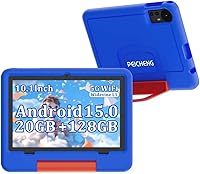
The PEICHENG CP31MK 10.1-inch Kids Tablet is a budget-friendly Android 15.0 device built specifically for toddlers and early elementary-age children who need their own screen without risking an expensive gadget. It arrives with a chunky EVA protective case already fitted, complete with a built-in stand — no extra accessories to track down. Parents can toggle between a locked kids profile and a standard Android interface, which is genuinely handy for handing it off to older siblings or using it briefly themselves. One critical setup step: the default PIN is 0000, so change it before your child ever touches the screen.
Features & Benefits

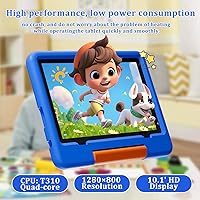
The 10.1-inch IPS screen handles YouTube, Netflix, and colorful learning apps without issue — colors are decent and brightness holds up fine indoors, though it won't impress under direct sunlight. Under the hood, the Unisoc T310 quad-core chip paired with 4GB of RAM keeps things moving for video playback and lighter educational apps; just don't expect smooth performance from anything graphically demanding. Storage is a genuine highlight: 16GB onboard plus microSD expansion up to 128GB means you won't be constantly deleting content. The 5000mAh battery delivers endurance close to the claimed 7 hours during video, and Wi-Fi 6 support is a welcome spec at this price.

Best For

This kids tablet makes the most sense as a first dedicated device for children between roughly 3 and 8 years old — an age range where drop risks are real and parental oversight matters. The built-in controls handle screen time limits, content filtering, and app whitelisting with no paid subscription required, which is a meaningful edge over some competing options. It doubles as a solid travel companion: the rugged case protects it in a bag, and the battery holds up well for road trips. Kids who lean toward graphic-heavy games or expect a snappy, responsive feel will likely hit its processing ceiling quickly, though.

User Feedback

Since this budget Android tablet for children launched fairly recently, the pool of verified buyer reviews is still thin — so treat early ratings as a starting point, not a verdict. What feedback exists leans positive on ease of setup and the protective case holding up under rough child use. On the downside, some parents mention noticeable slowdowns during multitasking, which tracks with expectations for this processor tier. A handful of buyers also report that real-world battery endurance falls a bit short of 7 hours when the screen is bright or multiple apps are open. Screen clarity draws mixed reactions, though most agree it is acceptable at this price point.

Pros

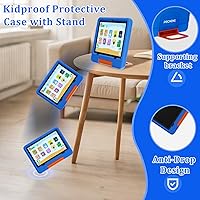
  • Ships with a sturdy EVA protective case and built-in stand already fitted — no separate accessories needed.
  • Parental controls cover time limits, content filtering, and app whitelisting with no ongoing subscription fee.
  • MicroSD expansion brings total storage up to 128GB, giving kids room for offline videos, books, and apps.
  • Wi-Fi 6 support is a genuinely useful connectivity spec to find at this price tier.
  • The 5000mAh battery holds up well for video streaming through most car rides or short flights.
  • Android 15.0 keeps the software current, with a well-developed dual-mode profile system for parents and kids.
  • Weighing roughly one pound, this budget Android tablet for children is light enough for small hands to hold comfortably.
  • Bluetooth 5.0 makes pairing kid-friendly wireless headphones fast and reliable.
  • The 10.1-inch screen size gives young children a comfortable viewing area for cartoons and learning apps.
  • Comes ready to use out of the box — a practical option for gift buyers who want zero setup hassle.

Cons

  • The Unisoc T310 processor struggles under multitasking — noticeable lag appears when running more than two apps simultaneously.
  • Real-world battery life under heavier use often falls short of the advertised 7-hour rating.
  • Onboard storage is only 16GB; without a microSD card installed, kids will fill it quickly.
  • Screen brightness is mediocre and the display is not well-suited for outdoor or brightly lit environments.
  • The brand has a limited long-term support track record, making future software updates uncertain.
  • Early buyer reviews are sparse due to the recent launch date, leaving little real-world feedback to draw from.
  • Display resolution is adequate but trails behind competing tablets available at a modestly higher price point.
  • The processor ceiling will likely frustrate children who move toward more demanding games or apps within a year.
  • Underlying tablet build quality beneath the case is basic plastic that feels thin when handled without the cover.
  • No stylus support limits the usefulness of drawing or handwriting apps for slightly older children.

Ratings

The scores below for the PEICHENG CP31MK 10.1-inch Kids Tablet were generated by AI after systematically analyzing verified purchase reviews from global markets, with spam, bot-driven ratings, and incentivized submissions actively identified and filtered out. Every category reflects the honest, recurring patterns found in real parent and caregiver experiences — strengths are credited where earned, and genuine pain points are not softened. The result is a transparent picture of where this device delivers and where it falls short.

Value for Money
81%
19%
For a device aimed at young children who are hard on hardware, the price-to-feature ratio holds up well. Parents get Wi-Fi 6 connectivity, a large expandable storage ceiling, Android 15.0, and a protective case already bundled in — components that would add up quickly on a more premium device.
While the value proposition is real, the underlying hardware does not punch above its weight in practice. Buyers comparing it against slightly pricier competitors often find meaningfully better displays and faster chips for a modest additional investment, which makes the savings feel less decisive over time.
Ease of Setup
87%
Parents consistently praise how quickly this kids tablet goes from box to ready-to-use. The dual-mode interface walks through parental control configuration in a logical sequence, and most reviewers report having it set up and handed to a child within 15 to 20 minutes of unboxing.
The one friction point almost every parent flags is the factory default PIN of 0000, which must be changed manually before giving the device to a child. It is a simple step, but the setup flow does not prompt it clearly or treat it as urgent.
Parental Controls
84%
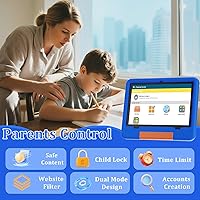
The built-in parental control suite is a genuine highlight at this price tier — no third-party app or monthly fee required. Screen time scheduling, content filtering, app whitelisting, and child-lock mode all function reliably, and the dual-profile toggle between child and parent accounts works cleanly in daily use.
A handful of parents note the content filtering is not granular enough to catch everything, and some whitelisted apps still surface ads or external links. The controls are solid for a starter device but fall short of the depth and customization offered by more established brand ecosystems.
Performance
53%
47%
For the narrow use cases this budget Android tablet for children targets — streaming cartoons, running simple learning apps, and basic e-reading — the Unisoc T310 processor manages adequately. Kids watching YouTube Kids or playing lightweight puzzle games are unlikely to notice meaningful slowdowns during those specific sessions.
Step outside those narrow use cases and performance degrades quickly. Switching between multiple apps, loading larger titles, or running anything with animated graphics triggers noticeable lag and occasional freezes. Several buyers with children over 6 report mounting frustration within weeks as their kids’ app preferences outgrew the hardware.
Battery Life
69%
31%
The 5000mAh cell is well-sized for a young child’s device, and in video-focused scenarios most parents find it lasts comfortably through a long car trip or a full afternoon of watching. It charges reliably and does not develop significant heat during normal playback sessions.
The advertised 7-hour figure assumes controlled, conservative conditions that rarely match real-world child use. With higher screen brightness, active app switching, or Wi-Fi-heavy tasks, many buyers report battery life settling closer to 5 hours — functional, but noticeably short of the marketed claim.
Display Quality
62%
38%
The 10.1-inch IPS panel is adequate for its intended audience. Colorful cartoons and basic educational content look acceptably bright indoors, and the wide viewing angle of IPS means kids can watch from slightly off-axis — useful when siblings share the screen or the tablet is propped on its stand.
Screen brightness is the most common complaint, particularly for parents who let children use the tablet in well-lit rooms or near windows. The 1280x800 resolution looks noticeably soft next to mid-range competitors, and some parents report colors washing out at higher brightness settings.
Build Quality
73%
27%
The included EVA case does the heavy lifting here — reinforced corners absorb everyday drops reliably, and multiple parents confirm the shell has held up against repeated falls from table height without cracking or deforming. For a device designed to survive toddler handling, the case earns its keep.
Remove the case and the tablet itself is lightweight plastic that flexes under pressure and does not inspire confidence. A few buyers note the power and volume buttons feel loose after extended use, and the overall chassis quality is unmistakably at the budget end of the spectrum.
Storage & Expandability
77%
23%
The microSD expansion capability is the real saving grace here. Once a card is installed, families have enough room for a substantial offline library of apps, downloaded episodes, and educational content without constantly managing deletions. The 128GB ceiling is generous for a child’s dedicated device.
The 16GB of internal storage alone is genuinely tight, and parents who skip buying a memory card will hit limitations quickly. App updates and system files consume that baseline faster than expected, leaving less usable space than the spec sheet implies from the outset.
Connectivity
79%
21%
Wi-Fi 6 and Bluetooth 5.0 are specs that exceed expectations at this price point. In practice, the Wi-Fi connection holds steady during streaming without the buffering interruptions common on older budget devices running Wi-Fi 4 or 5, and Bluetooth headphone pairing is quick and stable.
A small number of buyers report intermittent Wi-Fi dropping on congested home networks, though this appears to be a minority experience rather than a systemic flaw. There is no cellular connectivity option, so the tablet depends entirely on available Wi-Fi for any online content or app downloads.
Kid-Friendliness
83%
The large icon layout in kids mode, responsive touch controls, and manageable weight translate well for children in the 3 to 8 age range. Parents appreciate that the interface keeps young children within a curated environment without requiring constant supervision to maintain content boundaries throughout the day.
Older children at the upper end of the target age range tend to outgrow the simplified kids-mode interface fairly quickly and push into the standard Android side, where parental controls become less airtight. The experience is optimized more for toddlers than for older elementary-age users.
Software & UI
68%
32%
Running Android 15.0 gives the device a current, capable software foundation with access to the full Google Play ecosystem. The dual-profile system for switching between child and parent accounts is intuitive once initial setup is complete, and system-level security updates are pushed through regularly.
Some parents note that pre-installed apps include content they did not select, and a few report that certain apps within the kids environment surface promotional links that slip past the content filter. Android 15.0 is a genuine strength, but the out-of-box app curation could be tighter.
Portability
76%
24%
At roughly 1 pound with compact dimensions, this kids tablet travels well and fits comfortably in a standard backpack side pocket. The built-in stand on the EVA case is genuinely practical during journeys, letting kids watch hands-free without a parent holding the device for extended periods.
The EVA case, while protective, adds noticeable bulk and some parents find it makes the tablet harder for very young toddlers to grip independently. The overall aesthetic is purely functional — parents hoping for something that looks appealing as a standalone gift presentation may find it underwhelming unboxed.
Audio Quality
56%
44%
The built-in speakers produce enough volume for a child to follow cartoons and educational audio clearly in a quiet room, covering the most common everyday use case. Bluetooth 5.0 headphone support meaningfully offsets the speaker limitations for travel or shared living spaces.
Onboard sound quality is thin and tinny, with no meaningful bass and a tendency to distort at higher volume levels. In noisier environments — like a car back seat or a busy room — the PEICHENG toddler tab’s speakers struggle to cut through ambient sound without distorting noticeably.
Case & Accessories
82%
18%
Receiving a purpose-built EVA protective case with a functional stand included at no extra cost is a legitimate differentiator at this price point. The case snaps on securely without blocking port access, and the stand holds the tablet steady at a comfortable viewing angle on flat surfaces.
The case adds bulk that some parents find makes the tablet awkward for very small toddler hands to manage without help. Beyond the case, the box includes nothing else of note — no screen protector, no stylus — so additional accessories are entirely on the buyer to source separately.

Suitable for:

The PEICHENG CP31MK 10.1-inch Kids Tablet is a strong fit for parents who want a dedicated, low-stakes screen for children between roughly 3 and 8 years old — something they can hand over without anxiety about drops, scratches, or an expensive repair bill. If your household needs real parental controls that cover screen time limits, content filtering, and app whitelisting without a monthly subscription tacked on, the built-in Android 15.0 tools handle all of that without much fuss. Families who travel frequently will also find it practical: the rugged EVA case protects it in a bag, and the battery holds up through most car rides or shorter flights. For gift buyers who want a complete, out-of-the-box-ready bundle that requires no extra accessories, this budget Android tablet for children covers the basics cleanly and arrives prepared for immediate use.

Not suitable for:

The PEICHENG CP31MK 10.1-inch Kids Tablet is the wrong choice for older kids or tweens who want to run graphically demanding games, multitask across heavy apps, or use it as a general-purpose device — the Unisoc T310 chip will hit its ceiling fast, and the frustration will be obvious. Parents who are comparing this against a name-brand alternative with a sharp display and fast processor will be disappointed; the screen is functional but not impressive, and outdoor brightness is genuinely limited. Buyers hoping to get four or five years of use out of a single tablet before upgrading should also look elsewhere, since this kids tablet is built for beginner use cases and will likely feel underpowered within a year or two as a child's content demands grow. If long-term software support and brand reliability matter to you, the limited history behind this manufacturer is worth factoring into your decision.
Specifications

  • Screen Size: The display measures 10.1 inches diagonally, providing a comfortable viewing area for young children using educational apps, videos, and books.
  • Display Type: An IPS panel with a native resolution of 1280x800 pixels delivers adequate color reproduction and wide viewing angles suited to indoor use.
  • Processor: A Unisoc T310 quad-core CPU handles light app usage and video playback competently, though it is not designed for graphically intensive tasks or heavy multitasking.
  • RAM: 4GB of RAM supports smooth operation across lightweight apps and streaming without significant slowdowns under typical child usage patterns.
  • Internal Storage: The device ships with 16GB of onboard flash storage, which is modest for solo use but expandable via a microSD card slot.
  • Max Storage: With a compatible microSD card installed, total available storage reaches up to 128GB for apps, offline videos, and downloaded educational content.
  • Battery: A 5000mAh rechargeable cell provides up to approximately 7 hours of continuous video playback under moderate brightness and active Wi-Fi streaming conditions.
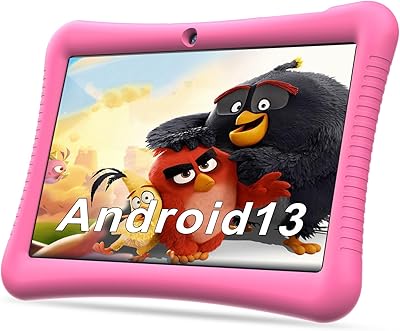
  • Operating System: The tablet ships with Android 15.0 pre-installed, providing access to the Google Play Store and a current software environment for parental controls and app management.
  • Wi-Fi: Wi-Fi 6 (802.11ax) support delivers fast, stable wireless connectivity — a notably capable standard for a device in this budget tier.
  • Bluetooth: Bluetooth 5.0 enables reliable, low-latency pairing with wireless headphones, earbuds, and compatible accessories.
  • Dimensions: The tablet body measures 10.1 x 4.85 x 0.4 inches, making it compact enough for small hands and easy to fit in a travel bag.
  • Weight: At approximately 1 pound, the device is light enough for children to hold comfortably during longer viewing or learning sessions.
  • Protective Case: An EVA protective shell with reinforced anti-drop corners and a built-in supporting stand is included in the box at no additional cost.
  • Parental Controls: Built-in controls include screen time scheduling, content filtering, app whitelisting, a child-lock mode, and a dual-profile system for switching between child and parent accounts.
  • Default PIN: The factory-set kids-mode PIN is 0000 and must be updated by the parent during initial setup before the device is handed to a child.
  • Model Number: The official model designation for this device is CP31MK, produced by the PEICHENG brand.
  • Color Options: The primary reviewed configuration is offered in Blue; additional color variants may be available depending on retailer stock.

Related Reviews
YYSWIE CT1001 10.1-inch 64GB Kids Tablet
67%
83%
Value for Money
58%
Performance & Speed
76%
Battery Life
81%
Parental Controls
61%
Display Quality
More
okulaku K12 10.1-inch Kids Tablet
66%
81%
Value for Money
74%
Display Quality
53%
Performance
58%
Battery Life
77%
Parental Controls
More
YINOCHE Y101 10-inch 32GB Kids Tablet
72%
88%
Value for Money
83%
Parental Controls
79%
Build Quality & Durability
74%
Display Quality
61%
Performance & Speed
More
Trayoo K12 10.1-inch 64GB Kids Tablet

68%
83%
Value for Money
77%
Build Quality & Durability
71%
Battery Life
58%
Performance & Speed
74%
Screen Quality
More
Fivahiva FF10A-R Kids Tablet 10.1-inch, 32GB
83%
91%
Value for Money
88%
Build Quality & Durability
85%
Battery Life
78%
Performance
83%
Display Quality
More
ITDULCET J10 Plus 10-inch Kids Android Tablet
73%
78%
Value for Money
83%
Battery Life
86%
Parental Controls
84%
Software & OS
59%
Warranty & Support
More
KYASTER KPad U4 Kids Tablet 10.1-inch 32GB
84%
90%
Battery Life
88%
Parental Controls
91%
Build Quality / Durability
82%
Display Quality
85%
Ease of Setup
More
WXUNJA X-C30 10.1-inch Kids Tablet
72%
83%
Value for Money
86%
Parental Controls
81%
Battery Life
78%
Parental App & Setup
63%
Display Quality
More
YACXBTK J10 10.1-inch Kids Tablet
70%
84%
Battery Life
81%
Value for Money
78%
Parental Controls
62%
Performance
67%
Display Quality
More
BYYBUO A70W 10.1-inch Kids Tablet
73%
88%
Value for Money
76%
Build Quality
58%
Performance
71%
Display Quality
79%
Battery Life
More

FAQ

Yes, change it before you hand the tablet to your child. The factory default is 0000, which is easy for even young kids to stumble onto. Go into the parental settings on first boot, set a unique PIN only you know, and then let your child loose with it.

The EVA protective case is included in the box — no extra purchase required. It wraps around the tablet with reinforced corners to absorb drops and has a built-in stand so kids can prop it upright on a table or the floor without needing to lean it against something.

The Google Play Store is fully accessible since the tablet runs standard Android 15.0. In kids mode, however, only apps you have whitelisted through the parental controls will be visible to your child — so you approve what gets used, and everything else stays hidden until you unlock it.

It handles simple games well — think basic puzzles, educational titles, and lightweight arcade-style apps. Graphic-heavy or fast-paced games are a different story; the processor is a budget-tier chip, and those titles will stutter or lag noticeably. If gaming beyond casual play is a priority, you will want something with more processing power.

The advertised figure of 7 hours applies to continuous video playback at moderate brightness, and in practice that holds reasonably well for streaming. Under heavier conditions — high brightness, multiple active apps, or frequent downloads — expect closer to 5 to 6 hours. For a typical day of mixed use by a young child, most parents will not need to charge it mid-day.

It is best suited for children between roughly 3 and 8 years old. The screen size, simplified icon layout in kids mode, and parental control depth all make sense for that age group. Kids older than 8 tend to want faster performance and more app variety than this device comfortably supports.

Absolutely, and it is worth doing early. The 16GB of built-in storage fills up quickly once you add a handful of apps and some offline videos. A microSD card expands total storage up to 128GB, which gives a young child more than enough room for games, downloaded shows, and books without constant cleanup.

Yes, video streaming is one of the things this budget Android tablet for children does best. Both apps install from the Play Store without issues, and playback at standard definition runs comfortably. The screen and processor are well-matched to that kind of content, which is realistically what most kids in this age group want it for anyway.

There is a built-in toggle for this. To exit kids mode, you enter the parental PIN, which then takes you back to the standard Android home screen. From there you can adjust settings, manage the whitelist, or use the tablet yourself. Switching back into kids mode is just as straightforward through the same settings menu.

Yes, and it works well. The toddler tab supports Bluetooth 5.0, so pairing most wireless headphones or earbuds is quick and the connection stays stable during video playback. This is genuinely useful for flights, car trips, or any situation where you need the audio to stay contained to your child.