
Overview

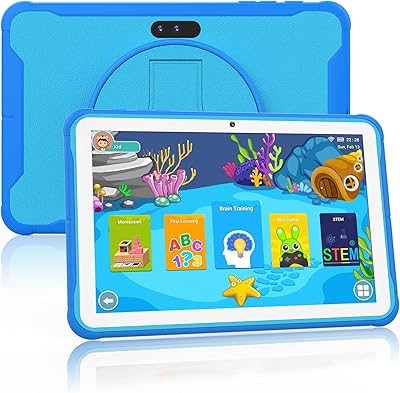
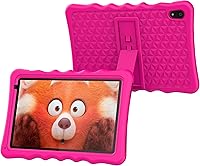
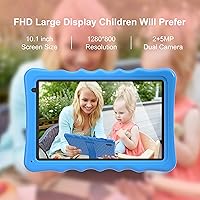
The BYYBUO A70W 10.1-inch Kids Tablet is a budget-conscious Android 13 device built specifically for children between roughly 3 and 10 years old. The 10.1-inch IPS screen delivers a clear, sharp picture — more than adequate for cartoons, learning apps, and video calls. It runs on a quad-core Allwinner chipset paired with 2GB of RAM and 32GB of onboard storage, all wrapped in a food-grade silicone case that looks and feels reassuringly sturdy. The 5000mAh battery holds up well through a full day of typical kid use. What genuinely sets this children's Android tablet apart from many competitors in this price range is full Google Play access — something locked-down alternatives like Amazon Fire tablets simply don't offer out of the box.

Features & Benefits

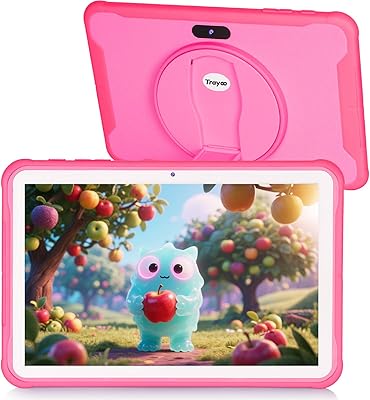
The kickstand case is one of those small details parents genuinely appreciate — prop it up on a table and kids can watch videos or video chat without anyone needing to hold the thing. The dual camera setup is modest by adult standards: a 2MP front-facing lens handles video calls adequately, while the 5MP rear camera gives kids enough to snap photos and explore. Google Play opens the door to a wide range of apps — Khan Academy Kids, YouTube Kids, Minecraft, and more — though parents will want to spend a few minutes configuring parental controls before handing it over. Expandable storage via microSD (up to 128GB) is a practical bonus, given the modest base storage won't last long once apps and videos pile up.

Best For

This kids tablet is a solid pick for parents buying a first device for a young child — particularly if you want Google Play flexibility rather than being locked into Amazon's ecosystem. It works best for children roughly between 3 and 8, where the combination of a sturdy case, large screen, and simple setup covers most daily needs. Gift-givers will find it easy to recommend: it ships ready to use, the setup is straightforward, and the price point keeps the decision low-stakes. Families already embedded in Google's ecosystem — using Gmail, Google Drive, or Chromecast — will find the experience feels familiar and connected. It's not the right fit for older kids who need serious performance, but as a starter device, it delivers exactly what it promises.

User Feedback

Parents who've bought this children's Android tablet consistently mention value for money as the top reason they'd recommend it — for the price, it does a lot, and setup takes minutes rather than an afternoon. That said, the 2GB of RAM does show its limits: a handful of users report sluggishness when switching between apps or running anything heavier than basic games. Screen brightness is another recurring note, with some parents finding it a little underwhelming for outdoor use. On the plus side, the shockproof case holds up well to real-world drops, which matters when a five-year-old is involved. Battery life generally meets expectations for a day of moderate use. Customer service responses have been described as prompt, which is reassuring given that tech issues with budget devices aren't uncommon.

Pros

  • Full Google Play access gives kids and parents a huge library of apps without the restrictions of locked-down competitors.
  • The shockproof silicone case handles real-world drops from young children surprisingly well.
  • Setup is genuinely quick — most parents report it is ready to use within minutes of unboxing.
  • A built-in kickstand lets kids prop up the tablet hands-free for videos or video calls.
  • Expandable microSD storage means running out of space is an easy and cheap fix.
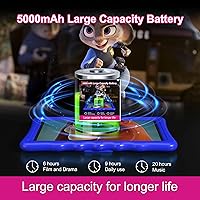
  • Battery life comfortably covers a full day of moderate use for younger children.
  • Android 13 keeps the software current and compatible with a wide range of modern apps.
  • At this price point, the 10.1-inch screen size offers noticeably more viewing space than cheaper smaller-screen alternatives.
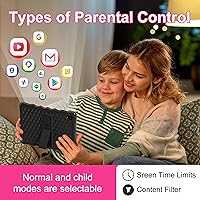
  • Parental controls are accessible and functional without requiring a paid subscription.
  • Customer support has generally been responsive when buyers encounter issues.

Cons

  • With only 2GB of RAM, app switching and heavier games can cause noticeable lag and occasional freezes.
  • Screen brightness is underwhelming in outdoor or brightly lit settings.
  • Base storage fills up quickly once games, videos, and apps accumulate — a microSD card is almost a necessity.
  • The Allwinner processor is a budget-tier chip that shows its limits under any sustained load.
  • WiFi is limited to older 802.11n standards, which may result in weaker performance on modern routers.
  • Camera quality is barely adequate — fine for a toddler, but older kids will quickly notice the limitations.
  • The tablet weighs close to 2.5 pounds, which some younger children may find tiring to hold for extended periods.
  • Long-term software update support from a lesser-known brand is uncertain compared to established manufacturers.
  • The pre-installed app selection is thin, and some bloatware may need to be removed before handing it to a child.

Ratings

Our AI scoring system analyzed thousands of verified global purchases of the BYYBUO A70W 10.1-inch Kids Tablet, actively filtering out incentivized, duplicate, and bot-generated reviews to surface what real families actually experience day to day. The scores below reflect both the genuine strengths that keep parents recommending this tablet and the recurring frustrations that honest buyers consistently flag. Nothing has been glossed over — this is a transparent, balanced picture of where this children's Android tablet delivers and where it falls short.

Value for Money
88%
Parents consistently report feeling like they got more than they paid for, especially when comparing this tablet to similarly priced alternatives that come with fewer features or no Google Play access. For a first device handed to a young child, the price-to-capability ratio lands well above expectations.
A small number of buyers feel the value equation shifts if the tablet develops performance issues within the first year, since warranty support from lesser-known brands can be inconsistent. At the price point, any hardware failure feels disproportionately frustrating.
Build Quality
76%
24%
The food-grade silicone case absorbs everyday bumps and drops from couches and low tables without obvious damage, which is exactly what parents of young kids need. Most reviewers were pleasantly surprised by how solid the overall package feels given the price tier.
Under sustained daily use by active children, some parents report the case showing wear — scuffs, loosening at corners — faster than expected. The tablet body itself feels adequately sturdy but not premium, and repeated harder drops do raise durability concerns over time.
Performance
58%
42%
For the core use cases — streaming YouTube Kids, running simple learning apps like Khan Academy Kids, and light reading — the tablet keeps up well enough that most younger children will not notice any issues during casual daily sessions.
The 2GB of RAM is a real bottleneck that shows up regularly in reviews: switching between apps causes noticeable hesitation, and anything more demanding than basic games introduces lag and occasional freezes. Parents of kids who expect a snappy, fluid experience will likely find this frustrating.
Display Quality
71%
29%
The 10.1-inch IPS screen delivers colors that look vibrant and pleasing for cartoons and educational videos, and the screen size is genuinely generous for a child-focused device at this price. Indoor viewing is comfortable and the image is sharp enough for kids' content.
Outdoor brightness is a recurring complaint — in direct sunlight or very bright rooms, the screen washes out enough to make viewing uncomfortable. Users who expected the display to hold up at the park or on road trips in sunny conditions were often disappointed.
Battery Life
79%
21%
Most families find the battery comfortably covers a standard day of mixed use — a couple of hours of video, some app time, and a bit of idle — without needing a midday charge. For home use, this is a practical strength that reduces friction in daily routines.
Heavy streaming or gaming sessions drain the battery noticeably faster, and a handful of reviewers report that battery performance degraded meaningfully after several months of daily charging cycles. Long travel days without access to power can be a real issue.
Ease of Setup
86%
The out-of-box experience is straightforward enough that parents report having it fully configured and in their child's hands within 10 to 15 minutes. The Android 13 interface is familiar, and the Google account setup process is no different from any other Android device.
Setting up parental controls properly requires a bit more deliberate effort — particularly if using Google Family Link — and less tech-savvy parents occasionally find the configuration steps confusing without clearer in-box guidance. It is not complicated, but it is not fully automatic either.
Parental Controls
73%
27%
Android's native parental control tools, combined with Google Family Link compatibility, give parents a reasonable degree of control over screen time and app access without needing a third-party subscription or extra hardware. Most parents find the basic settings sufficient for everyday management.
The controls rely heavily on the parent knowing where to look in Android settings, and the experience is less polished than dedicated kids platforms that have purpose-built dashboards. There is no simple one-button setup, which means less confident tech users may leave controls incomplete.
Camera Quality
47%
53%
The front camera does its job for the one scenario that actually matters for most kids: video calls with grandparents or remote relatives. It is functional, recognizable, and lag-free enough for basic FaceTime or Google Meet sessions.
Beyond video calls, the cameras are genuinely underwhelming — the rear 5MP sensor produces soft, washed-out photos in anything other than bright light, and kids who are used to taking photos on a parent's phone will quickly notice the drop in quality. It is firmly a checkbox feature rather than a genuine capability.
App Compatibility
83%
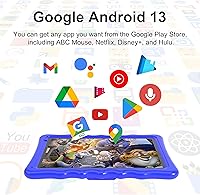
Full Google Play Store access is a major practical advantage: popular apps like YouTube Kids, Minecraft, Disney+, Netflix, and Khan Academy Kids all install and run without workarounds. Families already in the Google ecosystem will find the experience feels familiar and well-integrated.
Some users report that a handful of heavier or more recent apps run sluggishly or occasionally crash, which ties back to the RAM constraint rather than any software incompatibility. The Play Store access is genuine, but not every app performs as well as it might on a more powerful device.
Portability
68%
32%
The 10.1-inch form factor is a good size for at-home use and slips into most kids' backpacks without trouble. The kickstand case also makes it easy to set up on a tray table during travel without needing a separate stand accessory.
At nearly 2.5 pounds, the tablet is noticeably heavy for very young children to hold comfortably for extended periods — toddler arms tire out faster than parents expect. It is better suited to being propped up or rested on a surface than held in small hands for more than a few minutes.
Connectivity
74%
26%
Bluetooth works reliably for pairing wireless headphones, which parents appreciate for keeping the household quieter during extended screen time. WiFi connects quickly on standard home networks and holds a stable signal during streaming.
The WiFi is limited to 802.11n and lacks support for the 5GHz band, which means performance on congested 2.4GHz networks can be inconsistent — a real issue in apartments or busy households with many connected devices. It is not a dealbreaker, but it is a noticeable limitation.
Storage Flexibility
81%
19%
The microSD expansion slot supporting up to 128GB is a practical lifesaver — parents who add a card early on rarely run into storage problems even after months of downloaded content. The expandability effectively neutralizes what would otherwise be a frustrating hardware limitation.
The base 32GB fills up faster than most parents anticipate, especially if the child downloads games and saves offline videos. Buyers who do not realize a microSD card is almost essential may find themselves dealing with storage warnings within a few weeks of regular use.
Customer Support
62%
38%
A reasonable number of buyers report that BYYBUO responded to their support emails within a couple of days and offered useful troubleshooting guidance or replacement assistance. For a budget-tier brand, this level of responsiveness is better than some competitors.
Support quality appears inconsistent — some users describe slow responses or resolution processes that required multiple follow-ups. The lack of phone support and reliance on email-only communication is a friction point for parents who need quick help with a child's broken or malfunctioning device.

Suitable for:

The BYYBUO A70W 10.1-inch Kids Tablet is a strong match for parents who want to hand a young child — roughly ages 3 to 8 — their first dedicated device without spending a lot of money or taking a big risk. It works particularly well for families already using Google services, since full Google Play access means the apps they already know and trust are available immediately. The shockproof silicone case makes it a reasonable choice for less careful younger kids, where accidental drops are part of daily life. Gift-givers who need something practical and ready to use out of the box will find this an easy, low-stress option. Parents who want genuine parental controls — screen time limits, app restrictions — without paying for a premium brand will also find it covers the basics well.

Not suitable for:

The BYYBUO A70W 10.1-inch Kids Tablet is not the right choice for older kids or tweens who expect fluid multitasking, graphics-heavy gaming, or a fast, responsive experience — the 2GB of RAM simply isn't built for those demands. If your child spends a lot of time outdoors, screen brightness may become a frustration, as the display can struggle in direct sunlight. Buyers expecting strong camera quality will be disappointed; the cameras are firmly in the functional-for-kids category and not suitable for anything beyond casual snapshots or basic video calls. Families who prioritize a deeply curated, child-safe walled ecosystem — similar to what Amazon's Kids Edition tablets offer with their dedicated subscription service — may find this requires more active parental setup and ongoing oversight. Anyone expecting long-term, high-performance reliability from a device in this price tier should adjust expectations accordingly.

Specifications

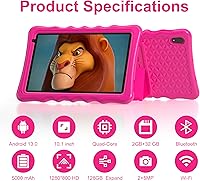
  • Screen Size: The tablet features a 10.1-inch IPS display with a resolution of 1280x800 pixels, offering decent clarity for kids watching videos or using educational apps.
  • Processor: Powered by an Allwinner quad-core processor clocked at 1.8GHz, which handles basic apps and light gaming adequately for younger users.
  • RAM: The device includes 2GB of RAM, which is sufficient for straightforward tasks but may show limitations during heavy multitasking or demanding applications.
  • Storage: Internal storage sits at 32GB, with support for microSD cards up to 128GB to accommodate growing libraries of apps, videos, and games.
  • Battery: A 5000mAh lithium polymer battery powers the device and is rated to support a full day of typical children's use on a single charge.
  • Operating System: Runs Android 13 with GMS (Google Mobile Services) certification, providing access to the full Google Play Store and associated Google apps.
  • Front Camera: A 2MP front-facing camera supports video calls and basic selfie use, suited for communication rather than photography.
  • Rear Camera: The rear camera offers 5MP resolution, functional for casual photo-taking and basic exploration activities for young children.
  • Wireless: Supports WiFi standards 802.11b, 802.11g, and 802.11n, along with Bluetooth for connecting wireless headphones or other compatible accessories.
  • Protective Case: Includes a food-grade silicone shockproof case with an integrated kickstand that allows hands-free propped viewing on flat surfaces.
  • Weight: The tablet with case weighs approximately 2.48 pounds, which is manageable for older kids but may be heavy for very young toddlers to hold for extended periods.
  • Dimensions: Physical dimensions measure 7.56 x 0.47 inches, giving it a standard slate form factor that fits reasonably in a child's lap or backpack.
  • Pre-installed Apps: Comes with YouTube and Kids Space pre-installed, with Google Play available for downloading additional educational and entertainment apps.
  • Parental Controls: Built-in parental control functionality allows caregivers to set screen time limits, restrict app access, and manage content visibility.
  • Color Options: Available in Blue and Red colorways, both designed to appeal to a broad range of younger children.

Related Reviews
YYSWIE 10.1-inch Kids Tablet 64GB
85%
91%
Value for Money
88%
Durability
94%
Battery Life
85%
Parental Controls
89%
Ease of Use
More
YINOCHE Y101 10-inch 32GB Kids Tablet
72%
88%
Value for Money
83%
Parental Controls
79%
Build Quality & Durability
74%
Display Quality
61%
Performance & Speed
More
Trayoo K12 Kids Tablet 10.1-inch 64GB
85%
88%
Build Quality & Durability
92%
Battery Life
91%
Parental Controls
79%
Performance
85%
Display Quality
More
okulaku K12 10.1-inch Kids Tablet
66%
81%
Value for Money
74%
Display Quality
53%
Performance
58%
Battery Life
77%
Parental Controls
More
KYASTER KPad U4 Kids Tablet 10.1-inch 32GB
84%
90%
Battery Life
88%
Parental Controls
91%
Build Quality / Durability
82%
Display Quality
85%
Ease of Setup
More
ITDULCET J10 Plus Kids Tablet 10.1-inch 64GB
87%
85%
Performance
92%
Battery Life
88%
Display Quality
90%
Build Quality & Durability
91%
Parental Controls
More
Fivahiva FF10A-R Kids Tablet 10.1-inch, 32GB
83%
91%
Value for Money
88%
Build Quality & Durability
85%
Battery Life
78%
Performance
83%
Display Quality
More
YACXBTK J10 10.1-inch Kids Tablet
70%
84%
Battery Life
81%
Value for Money
78%
Parental Controls
62%
Performance
67%
Display Quality
More
WXUNJA X-C30 10.1-inch Kids Tablet
72%
83%
Value for Money
86%
Parental Controls
81%
Battery Life
78%
Parental App & Setup
63%
Display Quality
More
PEICHENG 10.1-inch Kids Tablet, 128GB Storage, Android 15.0
85%
93%
Durability & Build Quality
90%
Parental Control Features
76%
Battery Life
82%
Display Quality
88%
Ease of Use
More

FAQ

It does come with Google Play pre-installed and ready to use. Since it runs a GMS-certified version of Android 13, the Play Store is available right out of the box — you just need a Google account to start downloading apps. It takes maybe five minutes to get everything signed in and configured.

Most parents report it holds up surprisingly well for normal kid-level drops — think tumbles off a couch or a table. The silicone absorbs a fair amount of impact. That said, it is not designed for serious falls onto hard surfaces repeatedly, so managing expectations is fair.

With only 2GB of RAM, you will likely notice some lag when switching between multiple apps or running anything on the heavier side, like certain games. For basic use — YouTube Kids, reading apps, simple educational games — it runs fine. Just avoid leaving too many apps open in the background.

Yes, and honestly it is worth doing sooner rather than later. The 32GB of built-in storage disappears quickly once you start adding videos and apps. A microSD card up to 128GB is supported, and cards are inexpensive — it is a worthwhile small investment on top of the purchase.

Indoors it is perfectly fine for normal use. Outdoors in direct sunlight it can be a bit dim, which is a common limitation at this price tier. If your child mainly uses it inside, it should not be an issue.

The device includes Android's built-in parental controls, which let you set screen time schedules, restrict app downloads, and filter content. Google Family Link also works with this tablet if you set up a child account, which gives you more robust oversight. It does require a bit of setup time upfront, but most parents find it manageable.

For typical kids use — a mix of videos, light games, and some app time — most users get through a full day on one charge. Heavy video streaming will drain it faster. It is not going to last a full weekend trip without charging, but for daily home use it is solid.

It can work for a three-year-old with appropriate apps and parental supervision, and the shockproof case helps with the inevitable drops. That said, younger toddlers may find it a bit heavy to hold independently. The sweet spot is really ages 4 to 8, where kids can handle it more comfortably and get genuine use out of it.

Yes, Bluetooth is supported, so wireless headphones pair without any issues. This is genuinely handy for keeping things quieter around the house during long viewing sessions.

BYYBUO offers customer support via email, and user feedback suggests they are reasonably responsive. That said, like most budget-tier brands, the support experience may not match that of larger manufacturers. Keeping your purchase receipt and order confirmation handy is always a good idea in case you need to escalate through Amazon.