Overview

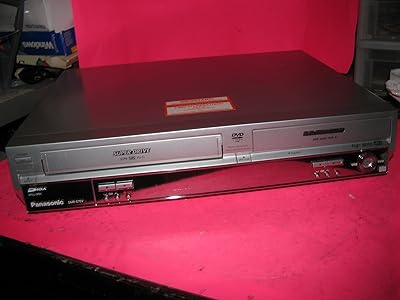
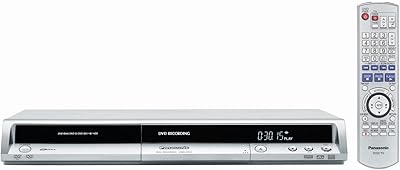
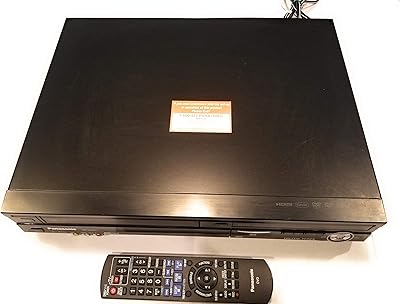
The Panasonic DMR-ES35VS DVD Recorder / VCR Combo is a versatile solution for those seeking to bridge the gap between old VHS tapes and modern digital formats. This combo unit offers both a DVD recorder and a VHS player/recorder in one device, making it ideal for archiving and preserving precious VHS collections. The compact design fits easily into most home entertainment setups, while the built-in surround sound output enhances your viewing experience. With support for a variety of disc formats like DVD-R/RW, DVD+R/RW, and DVD-RAM, it's a flexible option for digitizing your media.
Features & Benefits

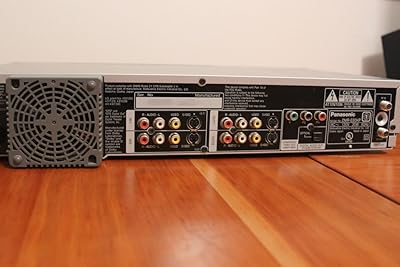
This DVD recorder/VCR combo offers a range of features that make it suitable for various home recording needs. With composite, S-Video, and component video inputs/outputs, it ensures versatile connectivity to other devices. The Firewire input allows for easy digital camcorder capture, while the ability to play dual-layer DVDs and CDs adds to its media versatility. Users can enjoy high-quality sound with support for Dolby Digital and DTS surround sound, alongside optical digital audio output for superior audio performance. This device is designed for users who want both DVD and VHS functionality in one unit.

Best For

This Panasonic combo unit is perfect for anyone looking to transfer old VHS tapes to DVDs for archiving or preservation. It is an excellent choice for those who don't want to deal with complicated setups but still want to preserve their VHS collection. The simple dubbing functionality makes it easy for home users to preserve memories, while the unit's compact form is well-suited for small home entertainment spaces. It’s also great for people who still enjoy VHS playback but want the convenience of modern DVD technology in one device.

User Feedback

Users generally praise this DVD recorder/VCR combo for its ease of use and reliable performance. Many appreciate the simplicity of dubbing VHS to DVD, which makes the process of archiving old tapes quick and straightforward. However, some users have noted that it struggles with certain copy-protected VHS tapes, limiting its versatility in some cases. On the positive side, the solid build quality ensures longevity, and its ability to handle both formats (VHS and DVD) offers great flexibility for users who still rely on both technologies. Overall, it's a highly rated option for home users.

Pros

  • This device is easy to use, making it a great choice for home users with limited technical expertise.
  • The ability to dub between VHS and DVD seamlessly is highly appreciated by users looking to preserve old media.
  • It supports a variety of disc formats, including DVD-R/RW, DVD+R/RW, and DVD-RAM, providing flexibility for different needs.
  • Multiple input/output options like composite, S-Video, and component make it versatile for various setups.
  • Firewire input allows easy video capture from digital camcorders, which is ideal for users transferring old footage.
  • The compact design is space-efficient and fits well into home entertainment setups without taking up much room.

Cons

  • Some users reported compatibility issues with copy-protected VHS tapes, which limits its usefulness for all types of media.
  • The lack of HDMI output may be a drawback for those who want to integrate it into modern high-definition setups.
  • Picture quality can be lacking when upscaling older VHS tapes, which may disappoint users seeking better visual output.
  • The device lacks advanced features like Wi-Fi streaming or smart functionality, which may be limiting for more tech-savvy users.
  • There is no way to record or play Blu-ray discs, which limits the device's functionality with newer formats.
  • A few users have pointed out that it can be a bit noisy during operation, which may be distracting in quiet environments.

Ratings

The ratings for the Panasonic DMR-ES35VS DVD Recorder / VCR Combo are based on verified user reviews collected from multiple platforms and languages worldwide. Only authentic, high-quality feedback was considered, with spam, bot-generated, and exaggerated reviews filtered out. Both the strengths and pain points highlighted by users have been reflected in these scores, offering a well-rounded view of the product's performance and value.

Ease of Use
88%
Many users find this device incredibly user-friendly, especially for those with limited tech knowledge. The simple interface and intuitive controls make it easy to set up and operate. Dubbing between VHS and DVD is straightforward, which is a huge benefit for home users looking to preserve old media.
Some users mentioned that the initial setup can take a bit longer than expected, especially if you're not familiar with connecting older devices. While the controls are simple, some may find the lack of advanced features limiting for more tech-savvy users.
Build Quality
85%
The build quality of this device is praised by users who appreciate its sturdy construction. It feels solid and reliable, ensuring long-term durability. Many have highlighted that it has held up well with frequent use, which is crucial for a device intended for archiving and long-term playback.
While durable, some buyers have noted that the unit is relatively bulky, which can make it harder to place in tight spaces. The plastic casing may feel a bit flimsy to those used to more premium materials in their electronics.
VHS to DVD Dubbing Quality
89%
Users consistently praise the quality of dubbing between VHS and DVD. The process is straightforward and works well with non-copy-protected content, producing excellent results for most users. Many have successfully archived old home movies without any issues, making it a great tool for preserving memories.
A common downside mentioned is that the device struggles with copy-protected VHS tapes. Some users found the dubbing process to be interrupted or blocked when trying to copy commercially protected content, limiting its use for certain tapes.
Compatibility with Formats
90%
This device is compatible with a wide variety of DVD formats, including DVD-R/RW, DVD+R/RW, and DVD-RAM, making it versatile for different media types. Users appreciate its ability to play and record in multiple formats, ensuring flexibility for both playback and archiving purposes.
While the device is versatile, a few users mentioned that it occasionally has trouble with some newer or obscure media formats. This can be a minor inconvenience for those looking for flawless compatibility with all DVD and CD types.
Connectivity Options
80%
20%
The array of connectivity options, including composite, S-Video, component video inputs/outputs, and Firewire input, is a major selling point. It provides great flexibility for users with various devices, such as camcorders or older TVs. These multiple ports allow for easy integration with other home entertainment equipment.
However, some users have pointed out that the lack of HDMI output is a drawback for those who prefer modern connections for higher-quality video. Additionally, the device may not be as intuitive to set up with certain connections for beginners.
Sound Quality
83%
The device supports Dolby Digital and DTS surround sound, which provides an improved audio experience for both DVD playback and VHS dubbing. Many users find the audio output clear and immersive, especially when using surround sound systems.
A few users feel that the audio quality could be improved when using the device with certain types of older equipment. While the surround sound support is appreciated, it's not a replacement for dedicated audio systems, which may disappoint those with high-end audio setups.
Picture Quality
78%
22%
Many users report that the picture quality is good, especially when converting VHS tapes to DVD. It provides a clear image for older tapes, which helps preserve video content without too much degradation. The device also handles DVD playback decently, offering decent quality for the price.
However, some users were less impressed with the video quality when using certain types of discs or older tapes. The upscaling process can cause a slight loss in clarity, and the output may not meet the standards of those accustomed to higher-definition video.
Compact Design
91%
The compact design of this device makes it easy to store and fits well into home entertainment setups without taking up too much space. Users love that it's lightweight and not too bulky, making it suitable for small or crowded media cabinets.
While the compact size is generally appreciated, some users feel that it compromises on features, especially when compared to larger, more expensive models. The smaller design may not accommodate users looking for a more robust set of inputs and outputs.
Performance with Copy-Protected Content
60%
40%
For non-copy-protected content, the device works flawlessly and provides a seamless experience for transferring tapes to DVDs. Many users find it reliable and efficient for archiving personal media without complications.
However, a significant drawback is its inability to handle copy-protected VHS tapes. Users have reported repeated failures when trying to copy commercially protected content, which limits the device's functionality for some users who have such tapes in their collection.
Value for Money
92%
This unit offers excellent value for money, especially for those looking to preserve older VHS tapes. The quality of the dubbing process, its compatibility with multiple formats, and its durability make it a great investment for home users on a budget.
Some users feel that while the device offers solid features, it's not the most feature-rich option in its category. Those looking for more advanced options or connectivity features may want to consider higher-end models, though the price point is generally seen as a strong benefit.
Reliability & Longevity
87%
Users have consistently praised the reliability of this device over time, noting its ability to handle heavy use without significant issues. Many mention that it has lasted several years without problems, making it a reliable choice for long-term use.
However, some users did report occasional glitches or issues after extended use, particularly with the DVD drive. These problems may not be widespread, but they have been noted by a few buyers who are looking for long-lasting, trouble-free performance.
Ease of Setup
82%
18%
The device is relatively easy to set up, especially for users familiar with basic home entertainment equipment. The clear instructions and straightforward design make the process manageable even for those who are not very tech-savvy.
Some users found the setup process a bit more complicated than expected, especially when connecting to multiple devices. A few mentioned that additional troubleshooting was required to make certain connections work properly, which could be frustrating for first-time users.

Suitable for:

The Panasonic DMR-ES35VS DVD Recorder / VCR Combo is ideal for users who need a simple solution to transfer VHS tapes to digital formats. It is particularly well-suited for home users looking to preserve old home videos or other VHS content. Those who have a collection of VHS tapes and want to archive them to DVD without complex technical setups will find this device highly beneficial. The easy dubbing functionality, combined with compatibility with multiple DVD formats, makes it a great choice for people with limited tech knowledge who just need a straightforward way to convert old media into digital formats. It's also a good option for anyone with older video equipment like camcorders, as it supports Firewire input for video capture.

Not suitable for:

However, this device may not be the best option for users looking for cutting-edge features or a higher level of media compatibility. The lack of HDMI output and limitations with copy-protected VHS tapes mean that it won't meet the needs of those who want seamless integration with modern AV setups or need to copy commercial VHS tapes. Additionally, users with high expectations for picture quality may find that the video output doesn't meet HD standards, particularly when upscaling older VHS content. Tech-savvy users looking for more advanced features, such as Wi-Fi streaming or higher-quality audio/video connections, may be disappointed by its basic setup and lack of some modern connectivity options.

Specifications

  • Type: Combo unit with DVD recorder and VHS player/recorder.
  • Supported Discs: Supports DVD-R/RW, DVD+R/RW, and DVD-RAM formats.
  • Dubbing: Enables dubbing between DVD and VHS (for non-copy protected content).
  • Video Inputs/Outputs: Composite, S-Video, and component video inputs/outputs for versatile connectivity.
  • Audio Outputs: Supports Dolby Digital and DTS surround sound for enhanced audio quality.
  • Digital Audio Out: Includes optical digital audio out for improved sound transmission.
  • Compatibility: Plays dual-layer DVDs and CDs for added media versatility.
  • Firewire Input: Equipped with Firewire input for digital camcorder video capture.
  • Design: Compact design, making it easy to integrate into home entertainment setups.
  • Surround Sound: Supports surround sound audio output for a more immersive viewing experience.
  • Weight: The unit weighs 15 lbs, making it relatively lightweight for its functionality.
  • Dimensions: Product dimensions: 16.9 x 3.3 x 13.9 inches, fitting comfortably in most media cabinets.
  • Batteries: Includes 2 AA batteries for remote control operation.
  • VHS Playback: Compatible with VHS tapes for playback and recording purposes.
  • Recording Formats: Records to DVD-R/RW, DVD+R/RW, and DVD-RAM media for different storage needs.
  • Copy Protection: Unable to transfer copy-protected VHS content to DVD.
  • Audio Features: Features advanced audio options with Dolby Digital and DTS support for cinematic sound.
  • DVD Playback: Plays standard DVDs and dual-layer DVDs, supporting longer disc storage.
  • Camcorder Support: Supports direct recording from digital camcorders via Firewire input.

FAQ

To transfer VHS tapes to DVD, simply insert a VHS tape in the VCR side and a blank DVD in the recorder side. Use the on-screen menu to select the dubbing option, ensuring that the VHS content isn't copy-protected. Then, press the record button to begin the transfer. The device will copy the content from VHS to DVD seamlessly.

The Panasonic DMR-ES35VS is designed specifically for DVDs and does not support Blu-ray discs. It is compatible with DVD-R/RW, DVD+R/RW, and DVD-RAM formats, but it will not play or record Blu-ray media.

Yes, this device features a Firewire input that allows you to capture video from a digital camcorder and record it directly to a DVD. This is an ideal option for users who want to preserve video footage from their camcorders onto physical media.

The Panasonic DMR-ES35VS offers multiple connection options, including composite, S-Video, and component video inputs and outputs. You can connect it to your TV or receiver using any of these options, depending on what your system supports. For the best quality, component video is recommended.

No, the Panasonic DMR-ES35VS is unable to copy VHS tapes that are copy-protected. If a VHS tape has a copy protection signal, it will prevent the device from transferring the content to DVD. However, non-copy-protected tapes can be easily copied.

Yes, the Panasonic DMR-ES35VS supports Dolby Digital and DTS surround sound, which provides enhanced audio quality. It also has an optical digital audio output for better sound transmission when connected to a compatible surround sound system.

To maintain this device, ensure that you regularly clean the heads and contacts using appropriate cleaning tapes. Keep the unit in a dry, well-ventilated area to avoid overheating. Additionally, ensure that the vents are not obstructed, and use high-quality media for both recording and playback.

When dubbing from VHS to DVD, the video quality will generally be limited to the original VHS tape quality, which may not be as sharp as modern digital content. While the device performs the transfer well, users should not expect a dramatic quality improvement from the VHS source, especially if the tape is old or damaged.

Yes, this Panasonic combo unit can play both standard CDs and dual-layer DVDs, providing more flexibility for media use. This makes it versatile for users who have a collection of CDs or want to play DVDs that have additional storage.

The Panasonic DMR-ES35VS does not have HDMI output, so it may not be the best option for users with modern TVs that only support HDMI. You can still use it with TVs that have composite, S-Video, or component inputs, but an HDMI adapter or alternative connection might be required for HDMI-only systems.