Overview

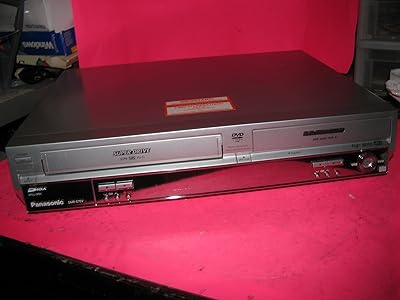
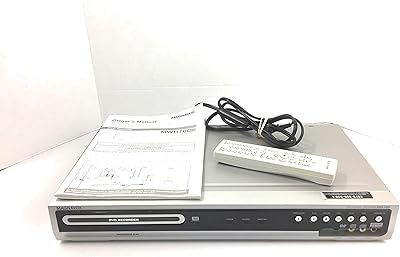
The Panasonic DMR-ES15S DVD Recorder is a slim, no-frills disc recorder built for one clear purpose: preserving and playing back home video without unnecessary complexity. It handles DVD-R/RW, DVD+R/RW, and DVD-RAM, so you're not locked into a single brand of media. The progressive scan output delivers a noticeably cleaner picture than older interlaced players — not HD, but a genuine step up on a compatible display. A FireWire port lets you pull footage directly from a compatible camcorder in digital form, skipping the quality hit that comes with analog dubbing. Optical digital audio output rounds out the connections, making it a capable addition to a basic home theater setup.
Features & Benefits

The standout capability here is the FireWire i.Link input, which allows direct digital transfer from compatible DV camcorders. That matters because analog dubbing through composite or S-Video always introduces some signal degradation — FireWire bypasses that entirely. This disc recorder also accepts a wide range of recordable formats, so you're not stuck hunting for one specific disc type. The progressive scan output runs at 480p, worth clarifying: it's sharper than standard interlaced playback, but it is not high definition. Dual-layer disc playback and the optical audio output supporting Dolby Digital and DTS round out a well-connected feature set that punches above entry-level for home archiving use.

Best For

This DVD recorder is a solid pick for anyone sitting on a collection of MiniDV or Digital8 tapes who wants to move that footage to disc without sacrificing quality. It also suits people working with older analog equipment — the dual composite and S-Video inputs let you connect a VCR or older camcorder without extra adapters. Home theater users wanting clean 480p playback paired with surround sound pass-through will appreciate the output options. If you prefer a direct disc workflow over a hard-drive-based recorder, this machine fits that preference well. It's a niche buy, but a well-matched one for the right person.

User Feedback

Owners who put the FireWire dubbing feature to work consistently call it the highlight of the unit — the transfer process is straightforward and output quality holds up well. On the downside, several buyers were caught off guard by the aspect ratio restriction: 16:9 recording only works with DVD-RAM, while everything else is locked to 4:3, a real limitation for widescreen content. Disc compatibility with certain off-brand media drew complaints too, with some users reporting inconsistent burns. The remote and menu system earned mixed marks — functional, but not particularly intuitive. Buyers who matched the Panasonic recorder to its intended use came away satisfied; those expecting broader flexibility were sometimes let down.

Pros

  • FireWire input enables lossless digital transfer directly from DV camcorders, preserving original footage quality.
  • Records across five disc formats, giving you genuine flexibility when shopping for media.
  • Progressive scan output at 480p is a clear, visible improvement over standard interlaced DVD playback.
  • Optical audio output passes full Dolby Digital and DTS bitstreams to a compatible AV receiver.
  • Dual composite and S-Video inputs let you connect a VCR and a camcorder simultaneously without cable swapping.
  • Dual-layer disc playback ensures broad compatibility with commercially pressed and home-burned discs.
  • Slim profile fits neatly into an existing AV rack without dominating shelf space.
  • Reliable performance over extended use when paired with name-brand disc media.
  • Standalone disc-based workflow suits users who want to skip hard-drive intermediaries entirely.

Cons

  • Widescreen 16:9 recording is limited to DVD-RAM only — all other formats are locked to 4:3.
  • Off-brand or budget disc media frequently causes finalization errors and unplayable discs.
  • FireWire connectivity is useless for anyone using a modern camcorder without an i.Link port.
  • On-screen menus are slow and non-intuitive, with a steep learning curve for first-time recorder users.
  • The remote control is cluttered and difficult to navigate in low-light living room conditions.
  • Disc tray mechanism showed durability concerns among users after moderate long-term use.
  • No HDMI or component video input means modern source devices simply cannot be connected for recording.
  • Output looks noticeably soft on current 1080p and 4K displays — there is no upscaling of any kind.
  • Disc compatibility issues with media burned on competing recorder brands caused intermittent playback problems.

Ratings

The Panasonic DMR-ES15S DVD Recorder earns its ratings from AI analysis of verified buyer reviews collected globally, with spam, bot-generated, and incentivized submissions actively filtered out before scoring. The results reflect a balanced picture — real strengths in camcorder archiving and format flexibility sit alongside genuine frustrations around aspect ratio restrictions and disc compatibility. Both sides of the ownership experience are represented honestly below.

FireWire Dubbing Performance
88%
Users who transferred MiniDV camcorder footage via FireWire consistently reported clean, artifact-free results that matched or closely approached the source quality. The direct digital pathway was praised for being far more reliable than routing through composite or S-Video cables, which introduced noise and color bleeding on aging tapes.
FireWire compatibility is limited to specific DV-format camcorders, so users with newer AVCHD or USB-only devices found this feature completely inaccessible. A handful of buyers also noted occasional handshake failures requiring cable reseating or unit restarts before the connection would stabilize.
Disc Format Compatibility
82%
18%
The ability to record across DVD-R, DVD-RW, DVD+R, DVD+RW, and DVD-RAM gave buyers real flexibility when shopping for media, especially useful when specific disc types were temporarily unavailable or priced differently. Playback of dual-layer burned discs was a welcome bonus that many competing units at the time lacked.
Third-party and off-brand disc media caused inconsistent burns for a notable portion of users, with some reporting finalization errors or discs that would not play back on other players. Sticking to name-brand media appeared to reduce these issues, but it added an ongoing cost consideration.
Aspect Ratio Flexibility
41%
59%
For users recording to DVD-RAM specifically, the 16:9 widescreen recording option worked reliably and produced correctly formatted output for widescreen televisions. This was sufficient for the small subset of buyers who used DVD-RAM as their primary archiving medium.
The limitation that restricts all other disc formats — DVD-R, DVD-RW, DVD+R, DVD+RW — to 4:3 recording only was a significant and recurring complaint. Users recording widescreen content from cable boxes or camcorders onto standard DVD-R found their footage letterboxed or cropped in ways they did not anticipate, and many felt this restriction was not clearly disclosed at purchase.
Video Output Quality
76%
24%
Progressive scan output at 480p produced a noticeably smoother and more stable picture compared to standard interlaced playback, particularly appreciated on larger CRT and early flat-panel displays. Buyers using this disc recorder as their primary player for a DVD library found the image quality satisfying for the format.
It is important to set realistic expectations: this is 480p progressive output, not upscaled HD, and on modern 1080p or 4K displays the limitations of the format become apparent. Users hoping for any form of high-definition enhancement were consistently disappointed, as the output simply reflects the native resolution of the DVD format.
Audio Output Quality
84%
The optical digital audio output passing full Dolby Digital and DTS bitstreams to an AV receiver was well-received by home theater users. Several buyers specifically mentioned that connecting this disc recorder to a mid-range surround sound system produced a noticeably richer audio experience compared to standard analog stereo connections.
The optical output only benefits users with a compatible AV receiver or soundbar — for those using basic TV speakers or older stereo systems, the advantage is entirely lost. A small number of users also reported that the optical port felt physically loose after extended use, raising durability questions.
Build Quality & Durability
67%
33%
The unit has a solid, no-frills construction that fits neatly into an AV rack or shelf without dominating the space. Long-term owners who used this disc recorder regularly over several years reported that the core recording and playback functions remained stable without mechanical failures.
The front panel and disc tray mechanism drew criticism for feeling less sturdy than the price point suggested. Some users reported disc tray issues after moderate use, and the overall plastic finish showed wear more visibly than competing units from the same era.
Remote Control Usability
58%
42%
The remote covers all essential functions and allows full control of recording, playback, and menu navigation without needing to touch the unit directly. Button layout follows a fairly standard Panasonic convention familiar to existing brand users.
New users found the remote cluttered and the labeling on secondary function buttons difficult to read in dim lighting — a common living room condition. Menu navigation required multiple button presses for tasks that buyers expected to be simpler, and the learning curve frustrated users who wanted a more intuitive setup experience.
On-Screen Menu Navigation
61%
39%
Once learned, the menu structure allowed access to recording settings, disc management, and input selection with reasonable consistency. Users who invested time in reading the manual generally reported fewer frustrations navigating the interface.
The menus feel dated and slow by contemporary standards, with response lag between button presses and on-screen changes drawing specific criticism. First-time DVD recorder users found the structure non-intuitive, particularly around disc formatting steps required before recording to DVD-RAM.
Input Connectivity Range
79%
21%
Having two composite inputs and two S-Video inputs made it practical to leave multiple source devices — a VCR and a camcorder, for example — connected simultaneously without constant cable swapping. This was particularly appreciated by users working through large tape archives over multiple sessions.
The absence of an HDMI input or any component video input for recording limits usefulness with modern source devices. Users with digital cable boxes or newer camcorders without analog outputs found the input options insufficient for their setup.
Setup & Installation Ease
72%
28%
Basic playback setup was straightforward for most buyers, requiring only a standard A/V or component connection to a television. Users familiar with DVD players from the same era found the initial hookup process familiar and quick.
Recording setup — particularly configuring inputs, selecting disc formats, and understanding the aspect ratio limitations — required careful reading of the manual. Several buyers described the initial recording configuration as unnecessarily complex for a consumer-facing product.
Value for Money
63%
37%
For buyers who specifically needed FireWire camcorder dubbing and multi-format recording in a single unit, the feature set justified the investment relative to simpler alternatives that lacked the i.Link port. The format flexibility also meant less repeat spending on a single type of disc media.
At its original price point, the aspect ratio restriction and disc compatibility issues felt like significant compromises that buyers at this tier should not have to accept. Users who discovered the 4:3 limitation post-purchase felt the value proposition was weakened considerably for widescreen recording needs.
Noise & Heat Management
74%
26%
The unit ran quietly during standard playback and recording sessions, which was noted positively by users operating it in living rooms or bedrooms where fan noise would be disruptive. Heat output during extended recording sessions was described as moderate and within normal expectations.
During prolonged recording sessions — particularly multi-hour archiving runs — a few users noted the unit became warm to the touch and recommended leaving ventilation clearance around it. This is not unusual for recorders of this class, but worth noting for users planning dense shelf installations.
Disc Finalization Reliability
66%
34%
When using recommended name-brand disc media, finalization completed without issue in the majority of reported cases, producing discs that played back correctly on other standalone players and computers. This reliability was important for users archiving irreplaceable home footage.
Finalization failures with off-brand media were a recurring complaint, with some users reporting discs that appeared to finalize but would not play back on other devices. Recovery from a failed finalization was not always possible, which created real anxiety for users archiving footage they could not re-capture.
Playback Compatibility
81%
19%
Playback of commercially pressed DVDs was smooth and consistent, and the dual-layer support meant compatibility with the majority of home-burned discs users already owned. CD-R and CD-RW playback also worked reliably for users with audio CD collections.
Playback of discs burned on other recorder brands occasionally produced freezing or audio sync issues, suggesting some compatibility sensitivity between manufacturers. Users with large existing disc libraries burned on competing recorders sometimes encountered more errors than expected.

Suitable for:

The Panasonic DMR-ES15S DVD Recorder is purpose-built for a specific kind of buyer, and it serves that buyer well. If you have a collection of MiniDV or Digital8 camcorder tapes sitting in a box and you want to transfer that footage to disc without sacrificing quality, this machine was designed with you in mind — the FireWire port handles that job cleanly and directly. It also makes sense for anyone still working with VHS or older analog equipment, since the dual composite and S-Video inputs let you connect legacy source devices without adapters or workarounds. Home theater users who want a dedicated disc player with progressive scan output and genuine surround sound pass-through will find the audio and video connections genuinely useful. And if you prefer a straightforward, hard-drive-free workflow where footage goes straight to disc without intermediate storage steps, this disc recorder fits that preference naturally.

Not suitable for:

The Panasonic DMR-ES15S DVD Recorder is a poor fit for anyone expecting modern recording flexibility or widescreen output across all disc formats. The 16:9 aspect ratio is only available when recording to DVD-RAM — every other disc type, including the far more common DVD-R and DVD+R, is locked to 4:3, which is a real problem if your source content is widescreen. Buyers with newer camcorders that connect via USB or HDMI will find the FireWire port useless to them, as there is no digital input for modern formats. If you are hoping for any form of HD upscaling or sharp output on a 4K display, this disc recorder cannot deliver that — 480p progressive is the ceiling. Users who record primarily off cable or satellite boxes with widescreen broadcasts, or anyone who needs intuitive plug-and-play menu navigation, are likely to find the experience frustrating relative to what the price demands.

Specifications

  • Brand & Model: Manufactured by Panasonic under the model designation DMR-ES15S, part of the company's consumer DVD recorder lineup.
  • Dimensions: The unit measures 16.9″ wide by 2.3″ tall by 9.8″ deep, fitting standard AV rack shelving without issue.
  • Weight: The recorder weighs 6 pounds, making it easy to position or reposition within an entertainment setup.
  • Color & Finish: Available in silver with a slim-profile front panel design typical of mid-2000s Panasonic consumer electronics.
  • Record Formats: Supports recording to DVD-R, DVD-RW, DVD+R, DVD+RW, and DVD-RAM disc formats.
  • Playback Formats: Plays back dual-layer DVD-R and DVD+R discs, standard single-layer DVDs, CD-R, and CD-RW media.
  • Video Output: Delivers progressive scan video output at 480p via the component output for compatible displays.
  • Aspect Ratio: Records in 16:9 widescreen only when using DVD-RAM; all other recordable formats are restricted to 4:3.
  • FireWire Port: Includes one i.Link (FireWire) port for direct digital dubbing from compatible DV-format camcorders.
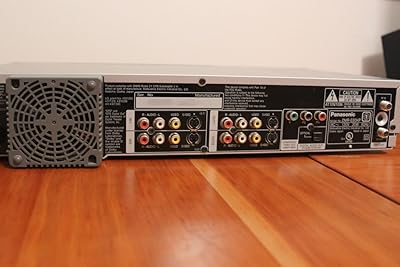
  • Composite I/O: Provides two composite video inputs and one composite video output for connecting legacy source devices or displays.
  • S-Video I/O: Includes two S-Video inputs and one S-Video output, supporting cleaner analog signal transfer than composite connections.
  • Component Output: Features one component video output for progressive scan connection to compatible televisions or displays.
  • RF Connectivity: Equipped with one RF input for antenna or cable signal reception and pass-through routing.
  • Audio Output: Optical digital audio output supports full Dolby Digital and DTS bitstream pass-through to compatible AV receivers.
  • Remote Power: The included remote control requires two AA batteries, which are included in the box at purchase.
  • Release Date: First made available for purchase on April 25, 2006, positioning it as a mid-2000s home recording device.

Related Reviews
Panasonic DMR-E75VS DVD Recorder/VCR Combo
84%
88%
Ease of Use
90%
Recording Quality
85%
Build Quality
62%
Compatibility with Media Formats
91%
Time-Slip Feature
More
Panasonic DMR-EZ485VK DVD Recorder with Digital Tuner
83%
88%
Video Quality
91%
Ease of Use
93%
Setup and Installation
85%
Performance and Reliability
87%
HDMI and USB Connectivity
More
Panasonic DMR-ES35VS DVD Recorder / VCR Combo
84%
88%
Ease of Use
85%
Build Quality
89%
VHS to DVD Dubbing Quality
90%
Compatibility with Formats
80%
Connectivity Options
More
Panasonic DMR-E80H DVD Player/Recorder with 80GB Hard Drive
84%
88%
Ease of Use
91%
Video Quality (Progressive Scan)
87%
Recording Functionality
85%
Audio Quality
89%
Storage Capacity (80GB Hard Drive)
More
Samsung DVD-VR375 DVD Recorder VHS Combo
84%
85%
Overall Performance
88%
Build Quality
91%
Ease of Use
80%
Recording Quality
87%
Compatibility with Media Formats
More
Panasonic DVD-S700P-K HDMI 1080P Up-Converting Multi Region DVD Player
84%
91%
Value for Money
94%
Picture Quality (Upscaling)
88%
Ease of Setup
93%
Multi-Region Playback
85%
Build Quality
More
Panasonic RN302 Microcassette Recorder
82%
93%
Portability & Size
90%
Ease of Use
85%
Audio Quality
70%
Voice Activation Sensitivity
88%
Battery Life
More
Toshiba DR420 DVD Recorder
72%
88%
Ease of Setup
74%
Disc Compatibility
71%
Recording Quality
67%
Upconversion Performance
58%
Remote Control & Navigation
More
Clariviews VHS to DVD Recorder with 4.3-inch LCD
83%
93%
Ease of Setup
88%
Interface Simplicity
86%
LCD Preview Quality
67%
Build Materials
91%
Media Compatibility
More
Toshiba DR430 DVD Recorder
70%
83%
Ease of Setup
76%
Recording Quality
71%
HDMI Upconversion
58%
Disc Compatibility
88%
One-Touch Recording
More

FAQ

Only if you use DVD-RAM discs. Every other recordable format — DVD-R, DVD-RW, DVD+R, and DVD+RW — is limited to 4:3 recording. This is a hardware-level restriction, not a setting you can change, so it is worth factoring in before you buy if widescreen recording matters to you.

Yes, provided your camcorder has an i.Link or FireWire output port. The connection transfers the footage digitally, which means no quality loss from analog conversion. Just connect the two devices with a FireWire cable, and the Panasonic DMR-ES15S DVD Recorder handles the rest through its direct dubbing interface.

No, it does not. The progressive scan output tops out at 480p, which is the native resolution of the DVD format. It will look noticeably cleaner than interlaced playback on a compatible display, but it is not HD upscaling in any form — manage expectations accordingly if you have a modern 4K television.

Name-brand media like Verbatim, Maxell, and Sony-branded discs tend to produce the most reliable burns and clean finalizations. Off-brand or budget discs from unfamiliar manufacturers have caused finalization errors and unplayable results for a significant number of users, so it is worth spending a little more on recognized media brands.

Yes. The disc recorder has two composite inputs and two S-Video inputs, which means you can leave both a VCR and a camcorder connected simultaneously and switch between them using the input selector. This is genuinely useful if you are working through a large archive of both tape formats.

No, it does not. This is a direct-to-disc recorder with no internal hard drive, which means footage goes straight to whatever blank disc you have loaded. Some buyers prefer this workflow for simplicity, but if you want to record first and edit later before burning, you would need a different type of unit.

Yes, you can connect a cable or satellite box via composite or S-Video and record to disc. Keep in mind that the recording will be in 4:3 unless you use DVD-RAM, so widescreen broadcasts will not be captured correctly in full 16:9 on standard DVD-R or DVD+R media.

Quite well, if you have a compatible AV receiver. The optical digital audio output passes full Dolby Digital and DTS bitstreams directly to a receiver, which means the audio quality is only limited by your downstream equipment. For basic TV speaker setups, you would connect via standard analog audio outputs instead.

Based on product listings, the manufacturer has indicated it is not discontinued, but this is a legacy product that has been on the market since 2006. Finding new units may require sourcing from third-party sellers, and availability of replacement parts or official support could be limited depending on your region.

Basic playback setup is straightforward — connect to your TV via component or composite cables and you are ready to go. Recording setup is more involved, particularly if you are configuring input sources, choosing disc formats, or preparing a DVD-RAM disc for widescreen use. Reading the manual before your first recording session is genuinely recommended, not just a formality.