Overview

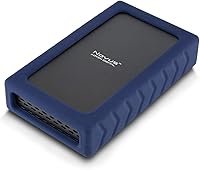
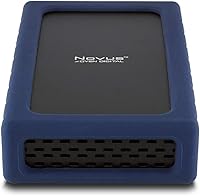
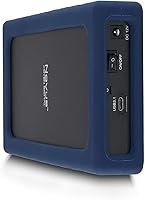
The Oyen Digital Novus 8TB External Hard Drive is built for users who need serious desktop storage — not a pocket-friendly travel companion, but a capable, always-on workstation drive. What separates it from the crowded field of consumer externals is the enterprise-grade 7200RPM spinning disk inside, which delivers sustained throughput that most budget drives at this capacity simply cannot match. The enclosure signals durability: vented aluminum keeps heat moving, and a silicone sleeve cushions the unit against everyday desk vibrations. It connects to Mac, Windows, Linux, and even the PS4 right out of the box — no drivers, no formatting headaches.

Features & Benefits

The USB 3.2 Gen2 connection tops out at 250 MB/s — worth clarifying that this is a theoretical ceiling; real-world transfers of large video files typically land in the 180–220 MB/s range depending on your host port. Still, that is a meaningful step up from the 5400RPM drives that dominate this storage tier. The ASMedia ASM235CM bridge chip is a known-reliable component that avoids the compatibility quirks some off-brand chipsets introduce. The drive ships formatted as exFAT, so it works across Mac and PC without touching Disk Utility or Disk Management. The vented aluminum body handles passive cooling well during extended copy sessions.

Best For

This desktop external drive makes the most sense for creative professionals — video editors archiving raw 4K footage, photographers managing large Lightroom catalogs, or audio engineers keeping project backups close. It also suits home or small office users who maintain a fixed workstation and want dependable high-capacity storage that stays plugged in. PS4 owners can expand their console storage with it, though the PS4 will reformat the drive to its own extended storage format during setup, so do not expect to keep files on it simultaneously. Anyone frustrated with sluggish 5400RPM transfer times will notice a real improvement switching to this Oyen Digital enclosure.

User Feedback

With a 4.1-star average across over 120 ratings, the Novus 8TB earns reasonable confidence — but it is not a unanimous hit. Most satisfied buyers praise how quickly it gets to work out of the box and note that transfer speeds hold up well for sustained bulk copying. Recurring gripes worth knowing: some users report audible clicking or vibration hum under heavy load, and a handful raised concerns about long-term reliability past the six-month mark. Oyen Digital does not disclose the internal drive manufacturer, which frustrates buyers who want to know what is spinning inside. Windows users should also expect the drive to display closer to 7.27TB rather than the full 8TB.

Pros

  • 7200RPM enterprise-grade internals deliver sustained transfer speeds that most consumer drives at this size cannot match.
  • USB 3.2 Gen2 interface supports real-world throughput that makes moving large video or photo archives noticeably faster.
  • Works with Mac, Windows, Linux, and PS4 out of the box — no driver installation required.
  • exFAT formatting means cross-platform compatibility from the first plug-in, no manual reformatting needed.
  • The vented aluminum enclosure handles heat passively, so the drive stays quiet and cool during long copy sessions.
  • Silicone sleeve adds a layer of vibration dampening and grip that feels purposeful rather than decorative.
  • The Novus 8TB ranks in the top 120 external drives on Amazon, reflecting genuine buyer interest at scale.
  • Reliable ASMedia USB chipset reduces the risk of compatibility hiccups with modern Mac and PC host ports.
  • Available in multiple capacities under the same Novus line, making it easy to scale up if needs grow.
  • Plug-and-play setup is genuinely straightforward — most users are transferring files within minutes of unboxing.

Cons

  • Oyen Digital does not disclose the internal drive brand, which makes long-term reliability harder to evaluate independently.
  • Windows users will see roughly 7.27TB of usable space, not the full 8TB shown in the product name.
  • Some users report audible clicking or low-frequency hum under heavy sustained load, which can be distracting in quiet workspaces.
  • Requires a separate power connection — there is no bus-powered option, limiting where it can be used.
  • At over 3.5 pounds, this is strictly a stationary desktop drive; it is not practical to carry between locations.
  • A handful of longer-term owners have raised reliability concerns past the six-month mark, though sample size is limited.
  • No built-in hardware encryption is available for users who need to protect sensitive data at the drive level.
  • The 4.1-star average, while decent, suggests a meaningful minority of buyers encountered issues worth weighing before purchasing.

Ratings

The scores below were generated by AI after analyzing verified buyer reviews for the Oyen Digital Novus 8TB External Hard Drive from across global marketplaces, with spam, incentivized, and bot-flagged submissions actively filtered out before scoring. Each category reflects the honest spread of user sentiment — where buyers are impressed and where they ran into friction. Both the strengths and the recurring pain points are represented here without softening.

Transfer Speed
84%
Users moving large RAW photo exports or multi-gigabyte video project folders consistently praised the speed difference over their previous 5400RPM drives. For video editors doing daily archive transfers, the 7200RPM internals and USB 3.2 Gen2 connection made a practical, time-saving difference.
A portion of buyers expected closer to the 250 MB/s ceiling in everyday use and found real-world speeds more modest depending on their host port. Users with older USB 3.0 ports reported being bottlenecked by their system rather than the drive itself.
Build Quality
81%
19%
The vented aluminum shell feels solid and purposeful, and most buyers noted it runs noticeably cooler during extended copy sessions than plastic-encased rivals. The silicone sleeve adds a practical grip quality that prevents the unit from sliding around on smooth desktops.
Some users found the overall assembly felt slightly less premium up close than the aluminum exterior suggests, with minor flex in the seams under pressure. A small number reported the silicone sleeve attracting dust and lint in ways that required regular cleaning to keep tidy.
Plug-and-Play Setup
91%
The vast majority of buyers — across Mac, Windows, and PS4 — reported the drive mounted and was ready to use within seconds of plugging in, with zero driver installation required. For less technical users or those switching between platforms frequently, this frictionless setup experience was a genuine highlight.
PS4 users discovered that the console requires an additional in-menu setup step that reformats the drive entirely before use, which surprised buyers expecting true plug-and-play on the console side. A small number of Linux users reported needing minor manual mounting steps depending on their distribution.
Cross-Platform Compatibility
88%
The exFAT out-of-box formatting is a smart default that lets Mac and Windows users share the same drive without any preparation, which creative professionals working across both platforms praised heavily. Linux compatibility added further utility for the niche of technical users who needed it.
Buyers who wanted to use the drive natively as a Time Machine volume had to reformat it themselves, which was an unexpected extra step for less experienced Mac users. The PS4 compatibility, while real, comes with the caveat that the console claims the drive exclusively once formatted.
Heat Management
76%
24%
During typical sustained transfers lasting 30 to 60 minutes, most users reported the enclosure staying warm but never uncomfortably hot to the touch. The vented aluminum design handles passive cooling better than sealed plastic enclosures at this capacity tier.
Users running the drive in always-on NAS-adjacent setups or poorly ventilated desk environments reported higher surface temperatures that raised some concern over time. A few buyers noted the drive felt warmer than expected after extended overnight backup jobs.
Noise Level
63%
37%
In typical desktop environments with ambient background noise — keyboards, fans, air conditioning — most buyers found the drive perfectly acceptable and reported it fading into the background of their workday. The silicone sleeve does meaningfully reduce the vibration buzz that transfers to the desk surface.
In quiet studios or bedrooms, several users flagged an audible 7200RPM hum and occasional seeking clicks that proved distracting during focused work or light-sleep hours. This is an inherent characteristic of high-speed spinning drives, but buyers expecting near-silence should be forewarned.
Long-Term Reliability
67%
33%
A meaningful portion of buyers reporting back after six or more months of regular use described the drive as still performing consistently, with no degradation in transfer speed or unexpected disconnects. For moderate daily-use archiving scenarios, the drive held up well within its first year.
A notable cluster of reviews flagged reliability concerns appearing between the six-month and one-year mark, including unexpected disconnects and one or two reported failures. Without knowing the internal drive manufacturer, buyers have limited ability to independently assess long-term failure rate expectations.
Internal Drive Transparency
44%
56%
Buyers who did not prioritize knowing the internals were generally satisfied with the drive's performance and had no complaints stemming from the undisclosed manufacturer. The enterprise-rated specification provides some baseline assurance of quality even without a named brand.
This was one of the most consistent buyer frustrations across the review base — users researching the internal disk brand to assess failure rates or warranty coverage found no official answer from Oyen Digital. For technically informed buyers, the opacity around the internal component felt like a gap in confidence.
Value for Money
74%
26%
Buyers who specifically needed 7200RPM performance in an external enclosure found the pricing reasonable compared to assembling a DIY equivalent with a separate enterprise drive and quality enclosure. The included USB-C cable and pre-formatted setup added small but appreciated convenience at this price tier.
Buyers comparing this against lower-cost 5400RPM options at similar capacities questioned whether the speed premium was worth it for casual document storage. A handful of users who encountered reliability issues relatively early felt the value proposition did not hold up over time.
Cable & Accessory Inclusion
79%
21%
The bundled USB-C cable was consistently described as adequate quality and the right length for a stationary desktop setup, meaning most buyers did not need to source a replacement immediately. Having the power adapter included also removed the guesswork of sourcing compatible power delivery.
Some users with USB-A only systems needed to source a separate USB-C to USB-A cable, since the included cable is USB-C on both ends. The power cable length received occasional criticism for being shorter than ideal in workstation setups where the power strip sits farther from the desk.
Capacity Accuracy
71%
29%
Mac users found the reported 8TB matched their expectations exactly, and those who read the product details carefully before purchasing understood the Windows reporting difference in advance. The raw capacity itself is genuine and not padded with recovery partition overheads that eat into usable space.
Windows users who did not read the fine print before purchasing were frequently surprised to see approximately 7.27TB reported in File Explorer rather than 8TB, generating confusion and some unnecessary return attempts. This is an industry-standard measurement difference, but the product listing could communicate it more prominently.
Portability
31%
69%
For buyers who understood upfront that this is a desktop unit and planned accordingly, the stationary form factor was exactly what they wanted — a permanent workstation fixture that never needed to move.
At 3.52 pounds with a required AC power brick, the Novus 8TB is not suitable for any mobile use case, and buyers who assumed large-capacity external drives could double as portable units were consistently disappointed. This is a by-design limitation, but it makes the drive a poor fit for anyone without a fixed desk setup.
PS4 Compatibility
77%
23%
PS4 users who followed the extended storage setup process found the drive worked reliably for storing and launching games, with load times that felt noticeably faster than running off the console's internal 5400RPM HDD. The drive capacity made a real difference for gamers with large libraries.
The in-console setup process reformats the drive completely and dedicates it to the PS4, which surprised buyers expecting to use it simultaneously for data storage. A minority of PS4 users reported initial detection issues that required a USB hub swap or direct connection to a different port to resolve.

Suitable for:

The Oyen Digital Novus 8TB External Hard Drive is a strong fit for anyone who needs high-capacity storage at a fixed desk and actually uses it hard. Video editors working with large raw files, photographers managing multi-year Lightroom libraries, and audio producers keeping project archives close will all benefit from the 7200RPM internals and USB 3.2 Gen2 throughput — this is a noticeably faster experience than the 5400RPM drives that dominate the consumer market at this capacity tier. Mac and PC users who share files across both platforms will appreciate the exFAT formatting right out of the box, since it removes any cross-compatibility friction from day one. PS4 owners wanting more than the console's internal storage can get there with this drive, provided they are ready to follow the in-console setup process that reformats it to extended storage. Small office teams archiving shared project files at a permanent workstation will also find it well-suited to that always-on, always-plugged-in role.

Not suitable for:

The Oyen Digital Novus 8TB External Hard Drive is the wrong tool if portability matters to you at all — at 3.52 pounds and nearly 8 inches long, it stays on a desk, and it requires its own power source, so it was never designed to travel with a laptop bag. Buyers who prioritize knowing exactly which internal drive manufacturer is inside may also feel uneasy here, since Oyen Digital does not publicly disclose that detail, which can matter for warranty planning and long-term reliability expectations. Windows users should know upfront that the drive will report closer to 7.27TB rather than the full 8TB shown on the box, which is standard across the industry but still catches people off guard. Anyone looking for a backup-first solution with onboard hardware encryption will need to look elsewhere, as this enclosure does not offer that feature. If your primary use case is casual document storage or occasional file transfers where speed is irrelevant, the premium for a 7200RPM enterprise drive is genuinely difficult to justify.

Specifications

  • Capacity: The drive offers 8TB of raw storage, which displays as 8TB on Mac OS and approximately 7.27TB on Windows due to differing decimal vs. binary capacity calculations.
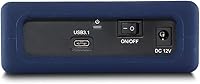
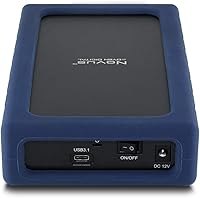
  • Interface: Connectivity is provided via a USB-C port running the USB 3.2 Gen2 standard, which is also backward compatible with USB-A ports and Thunderbolt 3 hosts using the appropriate cable or adapter.
  • Transfer Rate: Maximum rated transfer speed is 250 MB/s, though real-world sustained throughput will vary depending on host port generation, file size, and system load.
  • Spindle Speed: The internal hard disk spins at 7200RPM, which is enterprise-class and faster than the 5400RPM drives commonly found in consumer-grade external enclosures at this capacity.
  • Internal Protocol: The internal drive communicates over SATA 6Gbps, with the ASMedia ASM235CM chipset acting as the USB-to-SATA bridge inside the enclosure.
  • USB Chipset: The enclosure uses an ASMedia ASM235CM USB controller, a well-regarded bridge chip known for stable performance and broad host compatibility.
  • Default Format: The drive ships pre-formatted as exFAT, enabling immediate read and write access on both Mac and Windows systems without any manual reformatting.
  • Enclosure Material: The outer shell is constructed from vented aluminum for passive heat dissipation, wrapped in a silicone sleeve that reduces vibration transmission and surface slipping.
  • Dimensions: The unit measures 7.75 x 4.5 x 1.7 inches, consistent with a standard 3.5-inch desktop hard drive form factor housed in a full enclosure.
  • Weight: The Novus 8TB weighs 3.52 pounds, making it a stationary desktop device rather than a drive intended for travel or mobile use.
  • Operating Temp: The drive is rated to operate reliably between 32°F and 158°F, covering typical indoor desktop environments under normal workloads.
  • Compatibility: Out of the box, the drive works with Mac OS, Windows, Linux, and Sony PS4, with no driver installation required on any of these platforms.
  • Form Factor: This is a 3.5-inch desktop external hard drive and requires AC power to operate; it is not a bus-powered or portable device.
  • Installation: Setup is plug-and-play — connect the USB-C cable and the drive mounts automatically on supported operating systems without any software configuration.
  • Power Source: The drive requires an external AC power adapter for operation, which is included in the box; it cannot draw sufficient power over USB alone.
  • Internal Protocol Type: The internal disk uses a traditional magnetic spinning platter design over SATA rather than flash-based or hybrid storage technology.
  • Seller Rank: At the time of evaluation, this enclosure held the #111 position in the External Hard Drives category on Amazon based on sales performance.
  • Manufacturer: The drive is designed and sold by Oyen Digital, a US-based storage peripheral brand; the manufacturer of the internal disk itself is not publicly disclosed by Oyen Digital.

Related Reviews
Oyen Digital Novus 20TB External Hard Drive
74%
83%
Sequential Transfer Speed
92%
Storage Capacity
79%
Build & Enclosure Quality
91%
Setup & Compatibility
69%
Value for Money
More
Oyen Digital Novus 16TB External USB-C 7200RPM Hard Drive
86%
89%
Performance
91%
Transfer Speed
87%
Build Quality
93%
Ease of Setup
85%
Compatibility
More
Oyen Digital Novus 6TB External USB-C 7200RPM Hard Drive
85%
88%
Performance
90%
Build Quality
91%
Data Transfer Speed
85%
Noise Level
80%
Portability
More
Oyen Digital Novus 24TB External Hard Drive
79%
93%
Storage Capacity
86%
Transfer Speed
82%
Build Quality
71%
Value for Money
58%
Drive Noise
More
Oyen Digital Novus 30TB External Hard Drive

76%
86%
Transfer Speed
78%
Build Quality
93%
Compatibility & Setup
88%
Drive Reliability
61%
Noise & Vibration
More
Western Digital 8TB Elements Desktop External Hard Drive
82%
92%
Value for Money
95%
Setup & Installation
85%
Performance & Speed
88%
Build Quality & Durability
58%
Noise Levels Under Load
More
Oyen Digital U32 Shadow 1TB USB-C External Hard Drive

87%
88%
Performance & Speed
90%
Portability & Design
93%
Ease of Setup
85%
Build Quality
84%
Compatibility
More
SanDisk Professional 8TB G-Drive External Hard Drive

68%
83%
Transfer Speed
88%
Build Quality
58%
Reliability
91%
Mac Compatibility
41%
Windows Compatibility
More
Seagate Expansion 8TB External Hard Drive
71%
91%
Value for Money
93%
Ease of Setup
94%
Storage Capacity
67%
Transfer Speed
72%
Build Quality
More
Buffalo DriveStation Axis Velocity 8TB External Hard Drive
74%
83%
Transfer Speed
91%
Storage Capacity
88%
Setup & Ease of Use
58%
Noise Level
62%
Heat Management
More

FAQ

It works immediately on both without any reformatting. The Oyen Digital Novus 8TB External Hard Drive ships in exFAT format, which both Mac OS and Windows can read and write natively. Just plug it in and it shows up as a ready-to-use volume.

This is completely normal and has nothing to do with a defective drive. Mac OS measures storage in base-10 gigabytes, so it reports the full 8TB. Windows uses base-2 binary gigabytes, which means the same physical capacity shows up as roughly 7.27TB. You are not losing storage — it is just a difference in how the two operating systems count.

Oyen Digital does not publicly disclose the internal drive manufacturer for this product. The disk inside is enterprise-rated and spins at 7200RPM, but if knowing the specific brand matters to you — for warranty tracking or personal preference — this is worth factoring into your decision, since that information is not readily available.

Yes, the Novus 8TB is compatible with the PS4, but there is an important step involved. The PS4 will reformat the drive to its own extended storage format during setup, which erases any existing data on it. After that process, you can install and run games directly from the drive. Just be aware that once it is formatted for the PS4, you cannot simultaneously use it as a general-purpose storage drive for your computer.

The 7200RPM spinning disk is inherently a little louder than a 5400RPM drive or an SSD, and some users do report a low hum or occasional clicking sound during heavy sustained transfers. In a typical office environment with ambient noise, most people find it acceptable. In a very quiet room, it may be noticeable. The silicone sleeve does help dampen vibration from the desk surface.

A USB-C cable is included in the box, so you can connect it immediately. The port on the drive is USB-C, but it is backward compatible with USB-A ports using the right cable, and it also works with Thunderbolt 3 ports since those accept USB-C connectors.

You can, but you will need to reformat it first. Time Machine requires the drive to be formatted as Mac OS Extended (HFS+) or APFS, and the Novus 8TB ships as exFAT. Reformatting takes just a few minutes in Disk Utility, and after that it works perfectly as a Time Machine destination.

It is rated for desktop always-on use, and the vented aluminum enclosure is specifically designed to handle continuous operation by dissipating heat passively. That said, like any spinning hard drive, it will accumulate wear over time. For true 24/7 NAS-style workloads, a drive rated for NAS use would be a more appropriate long-term choice.

Most portable external drives at this capacity use 5400RPM mechanisms and a USB 3.0 connection, which typically tops out around 100–130 MB/s in real-world use. The Novus 8TB, with its 7200RPM disk and USB 3.2 Gen2 connection, can sustain speeds in the 180–220 MB/s range for large sequential transfers — a meaningful difference when you are moving tens or hundreds of gigabytes at a time.

Spinning hard drives are sensitive to impacts while the platters are in motion, and this one is no exception despite the silicone sleeve. The sleeve helps with minor desk vibrations and accidental nudges, but a significant drop while the drive is active could cause data loss or physical damage. It is best treated as a stationary device — set it up, leave it in place, and avoid moving it while it is powered on.