Overview

The Oyen Digital Novus 24TB External Hard Drive is built for people who have genuinely run out of storage room — photographers sitting on years of RAW files, video editors juggling multi-terabyte project folders, or anyone managing a serious offline backup archive. At 24TB, this high-capacity desktop drive offers enough headroom for roughly 4,800 hours of HD footage or millions of high-resolution images. Plug it in and it works across Mac, Windows, and Linux with no driver installation required. Thunderbolt 3 and 4 ports are supported too. This is a premium purchase, best suited for professional and power-user workflows rather than casual day-to-day storage needs.
Features & Benefits

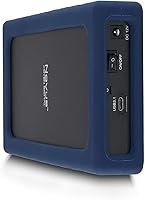
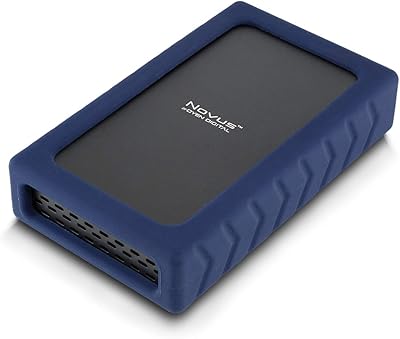
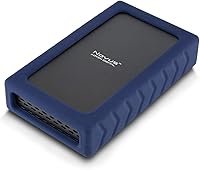
Inside the rugged enclosure sits an enterprise 7200 RPM mechanical drive, not the slower consumer-grade spindles you often find in externals at this price point. That translates to sequential transfer speeds of up to 270 MB/s — fast enough to move large video files or full project backups without watching a progress bar creep along for hours. The USB 3.2 Gen2 interface keeps those speeds from being bottlenecked at the connection level, and the ASMedia ASM235CM chipset contributes to throughput stability during long transfers. The drive ships formatted in exFAT, so it works cross-platform right away. Reformatting for a dedicated Mac or Windows environment takes minutes if needed. A silicone sleeve wraps the enclosure to absorb bumps and prevent desk sliding, and the 3-year warranty provides real assurance for a drive you will likely lean on heavily.

Best For

This rugged external drive makes the most sense for creative professionals — video editors, photographers, and motion graphics artists who need fast local storage that keeps up with large file workflows. It also fits well as a single-drive backup solution for a home office or small studio that wants the capacity of a NAS without the complexity of managing multiple disks. Anyone building a large Plex or media server library will appreciate having this much space in one enclosure. The Thunderbolt and USB-C compatibility makes it a natural fit for modern Mac setups. Buyers who specifically want an enterprise-class internal drive — rather than a cheap consumer disk — in their external will find the Novus 24TB worth the premium.

User Feedback

Sitting at 4.1 stars across over 120 ratings, the Novus 24TB earns consistent praise for its real-world transfer speeds and the relief of having this much capacity in a single external enclosure. Build quality and enterprise-grade internals come up regularly as reasons buyers feel the price is justified. That said, a 7200 RPM drive is audible — some users note a persistent hum during operation, and the enclosure can get noticeably warm during extended sessions. A handful of buyers using older USB-A ports via adapters reported occasional connection hiccups. One note worth flagging: Windows users will see approximately 21.8TB of available space rather than the full 24TB displayed on Mac, which is normal but can catch people off guard if they are not prepared for it.

Pros

  • Enterprise 7200 RPM internals deliver real-world transfer speeds up to 270 MB/s, meaningfully faster than typical consumer externals.
  • A genuine 24TB capacity gives creative professionals enough room to consolidate multiple smaller drives into one.
  • Plug-and-play compatibility across Mac, Windows, and Linux means zero driver headaches out of the box.
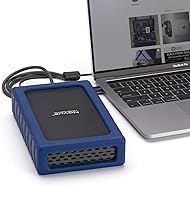
  • Full Thunderbolt 3 and 4 support makes this high-capacity desktop drive a natural fit for modern Mac workflows.
  • The exFAT default format allows immediate cross-platform use without reformatting.
  • A protective silicone sleeve reduces vibration and prevents the drive from sliding on a desk during use.
  • The ASMedia ASM235CM chipset contributes to stable, consistent throughput during long, sustained transfers.
  • A three-year manufacturer warranty provides meaningful coverage for a significant storage investment.
  • Verified buyers consistently praise the build quality and report that advertised speeds hold up in practice.

Cons

  • At 3.5 inches and 3.5 pounds, this drive is strictly a desktop unit — not remotely portable or travel-friendly.
  • The 7200 RPM mechanism produces an audible hum that some users find distracting in quiet work environments.
  • The enclosure can get noticeably warm during extended heavy-use sessions, which may concern users in poorly ventilated setups.
  • Windows users will see roughly 21.8TB of available space, not the full 24TB, which can feel misleading without prior knowledge.
  • Older USB-A setups require an adapter, and a handful of buyers reported occasional connection instability in that configuration.
  • As a mechanical hard drive, it is vulnerable to damage from drops or impacts in a way that solid-state alternatives are not.
  • The premium price tier puts it out of reach for casual users who simply do not need this level of capacity or performance.
  • No hardware encryption or bundled backup software is included, so data protection relies entirely on the user's own solution.

Ratings

The scores below were generated by our AI engine after analyzing verified buyer reviews for the Oyen Digital Novus 24TB External Hard Drive from multiple global marketplaces, with automated filters applied to remove incentivized, bot-generated, and duplicate feedback. Every category reflects the full spectrum of real user experiences — not just the highlights — so both genuine strengths and recurring pain points are accurately represented. From creative professionals praising its enterprise internals to buyers flagging heat and noise during heavy sessions, the ratings below give you an honest, data-driven picture of what owning this high-capacity desktop drive actually looks like.
Storage Capacity
93%
For professionals who have genuinely hit the ceiling on their existing drives, 24TB in a single enclosure is a meaningful relief. Video editors juggling multi-terabyte project folders and photographers archiving years of RAW files consistently highlight the capacity as the primary reason they chose this drive over smaller alternatives.
Windows users regularly report surprise when the OS shows approximately 21.8TB rather than the full 24TB, a common point of confusion that Oyen Digital does not prominently address in the packaging. For buyers unfamiliar with how operating systems calculate storage, this discrepancy can feel like a shortfall even though it is entirely normal.
Transfer Speed
86%
Buyers running large file transfers — whether moving 4K footage to an editing timeline or pushing full drive backups — consistently report that the Novus 24TB delivers speeds that feel noticeably faster than most consumer externals they have used before. The enterprise 7200 RPM internals and USB 3.2 Gen2 interface work together to keep sustained transfers from dragging.
The 270 MB/s ceiling is the physical limit of a spinning mechanical drive at this interface, and users coming from NVMe SSDs will find it significantly slower for random access tasks. A small number of buyers using USB-A adapters also reported that real-world speeds dropped noticeably compared to native USB-C connections.
Build Quality
82%
18%
The silicone sleeve wrapping the enclosure draws consistent positive feedback, with users noting it prevents the drive from sliding around on a desk and absorbs minor bumps during normal desktop use. The overall build feels solid and well-engineered, and the enclosure quality is regularly cited as evidence that this is not a cheaply assembled product.
The enclosure is not designed for any kind of portability — it is a desktop unit through and through, and users who misunderstood this were disappointed. A few buyers also noted that the silicone sleeve, while functional, attracts dust and lint over time, requiring occasional cleaning to keep it looking presentable.
Value for Money
71%
29%
Buyers who understand what they are paying for — an enterprise-class 7200 RPM drive inside a purpose-built enclosure — generally feel the price is defensible, especially compared to assembling an equivalent NAS setup. The three-year warranty adds meaningful value for an investment of this size, and that point comes up organically in positive reviews.
Buyers who prioritize price per terabyte over drive quality can find cheaper 24TB options on the market, which is a recurring tension in negative reviews. The premium is harder to justify for users who only need occasional file archiving rather than sustained, active workloads that actually benefit from enterprise-grade internals.
Drive Noise
58%
42%
Users who work in louder environments — next to a desktop tower, in a home studio with equipment running, or in a shared open-plan office — typically report that the 7200 RPM hum blends into the background and becomes a non-issue after the first day of use.
For users recording audio or video in the same room, or those working in very quiet home offices, the persistent mechanical hum is a real annoyance that comes up frequently in buyer reviews. This is a fundamental trade-off with any high-RPM spinning drive, and no amount of enclosure design fully eliminates it.
Compatibility
84%
Cross-platform compatibility is a genuine strong suit — Mac, Windows, and Linux all recognize this high-capacity desktop drive without any driver installation, and the exFAT default format means you can move it between machines on day one. Thunderbolt 3 and 4 support makes it especially convenient for users who regularly switch between Mac and PC workstations.
Older machines relying exclusively on USB-A ports are the compatibility weak point, with a handful of buyers reporting inconsistent behavior when using adapters. While the drive technically works via USB-A, the experience is not as reliable or fast as a native USB-C or Thunderbolt connection, and this setup is clearly not the intended use case.
Setup & Ease of Use
91%
Plug-and-play performance is one of the most frequently praised aspects of this drive, with buyers across all three major operating systems reporting that it mounted and was ready to use within seconds of connecting. The exFAT format out of the box eliminates the reformatting step that catches many users off guard with competing products.
There is virtually no negative feedback around setup — the drive simply works. The only friction point some buyers mention is the learning curve around reformatting to APFS or NTFS for dedicated single-OS use, which requires using Disk Utility or Windows Disk Management rather than any bundled tool.
Heat Management
63%
37%
For users running this rugged external drive in a well-ventilated workspace, heat is a manageable factor that does not interfere with normal day-to-day use. Many buyers running standard daily backup routines report that the drive stays warm but within comfortable operating limits throughout typical sessions.
During multi-hour sustained transfers — like a full drive backup or large media ingest — the enclosure becomes noticeably warm to the touch, which concerns some buyers about long-term thermal performance. Users with cramped desk setups or those who keep the drive in a cabinet report more significant warmth and advise leaving ventilation clearance around the unit.
Warranty & Support
88%
A three-year manufacturer warranty stands out clearly in buyer feedback as a deciding factor for many purchases, particularly given the premium price and the data-critical nature of a 24TB storage device. Buyers report that meaningful warranty coverage gives them confidence to actually rely on this drive as a primary working storage solution, not just a secondary backup.
Direct feedback on customer support response quality is limited in the review pool, making it difficult to assess how smoothly a warranty claim actually gets processed. Buyers hoping for proactive data recovery assistance in the event of a failure should note that the warranty covers hardware replacement, not the retrieval of lost data.
Long-Term Reliability
76%
24%
Buyers who have owned this high-capacity desktop drive for six months or more tend to report stable, consistent performance with no degradation in transfer speeds during regular use. The enterprise-grade internals are a meaningful differentiator here — enterprise HDDs are designed and tested for more demanding duty cycles than typical consumer desktop drives.
As with any mechanical hard drive regardless of quality tier, a single-drive setup carries inherent long-term risk, and buyers who store irreplaceable data without a secondary backup are taking on real exposure. The review pool does not yet have enough long-term feedback beyond 12 months to draw definitive conclusions about failure rates at scale.
Physical Design
77%
23%
The compact desktop footprint is well-regarded by buyers who need a lot of storage without a sprawling rack or multi-bay enclosure taking over their desk. The silicone sleeve gives the drive a clean, purposeful look that a number of buyers specifically call out as a step above the generic plastic shells that most external drives ship in.
The silicone sleeve, while appreciated for function, picks up dust and lint visibly over time and needs periodic wiping down to stay looking clean. A handful of buyers also noted that the drive depth makes cable management slightly awkward on tightly arranged desks, particularly when using shorter USB-C cables.
Cross-Platform Performance
83%
Buyers who actively switch between Mac and Windows setups appreciate that the exFAT default format allows both systems to read and write to the drive without any additional steps. The consistent recognition across Mac, Windows, and Linux without driver installation removes a genuine friction point that plagues some competitor products.
The capacity discrepancy between Mac and Windows — 24TB on Mac versus approximately 21.8TB on Windows — is a source of frequent confusion among buyers who use the drive across both platforms and notice the difference. While technically standard, the lack of upfront communication about this difference leaves some users feeling misled.

Suitable for:

The Oyen Digital Novus 24TB External Hard Drive is purpose-built for professionals and serious enthusiasts who live with large files every day — think video editors working in 4K or 8K, photographers managing decades of RAW archives, or small studios that need a single high-capacity drive rather than a complex multi-disk NAS setup. At 24TB, this high-capacity desktop drive gives creative workers genuine breathing room, eliminating the constant juggle of offloading projects to free up space. The enterprise-grade 7200 RPM internals make it a better fit for active, fast-access workflows rather than purely cold storage, and the USB-C interface with Thunderbolt 3 and 4 support means it slots naturally into modern Mac and PC setups without adapters or friction. Users building large local media server libraries — Plex collections, surveillance footage archives, or offline backup vaults — will find the capacity and transfer speeds genuinely useful in practice. The three-year warranty adds a layer of confidence that matters when you are trusting a single drive with this much irreplaceable data.
Not suitable for:

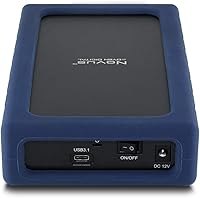
Buyers who need portable, pocket-sized storage should look elsewhere — this rugged external drive is a 3.5-inch desktop unit weighing 3.5 pounds, and it requires a power source, making it entirely unsuitable for on-the-go use. If your storage needs sit comfortably below 8TB or 10TB, the significant price investment here is hard to justify, and a smaller consumer-grade external would serve you just as well for far less money. Users on older machines relying exclusively on USB-A connections should also be cautious, as a few buyers have reported intermittent hiccups when using adapters rather than native USB-C or Thunderbolt ports. The Novus 24TB is also a mechanical spinning drive, so anyone prioritizing silence, shock resistance for transport, or the fastest possible random-access speeds would be better served by a solid-state option. Finally, buyers who expect Windows to report the full 24TB of usable space will be caught off guard — Windows shows approximately 21.8TB due to how it calculates storage, which is industry-standard but worth knowing upfront.

Specifications

  • Storage Capacity: The drive offers 24TB of total storage, which displays as 24TB on macOS and approximately 21.8TB on Windows due to differences in how each OS calculates storage capacity.
  • Drive Type: This is a 3.5-inch mechanical hard disk drive (HDD) using spinning platters rather than flash memory, making it well suited for high-capacity sequential read and write workloads.
  • Rotational Speed: The internal drive spins at 7200 RPM, an enterprise-class speed that contributes to faster data access compared to the 5400 RPM drives commonly found in consumer-grade externals.
  • Transfer Speed: Maximum sequential transfer speeds reach up to 270 MB/s, supported by the USB 3.2 Gen2 interface and a SATA 6Gbps internal protocol.
  • Interface: The external connection uses a USB-C port running USB 3.2 Gen2, with full backward compatibility for standard USB-A ports via adapter and native support for Thunderbolt 3 and 4 hosts.
  • USB Chipset: The enclosure uses an ASMedia ASM235CM USB-to-SATA bridge chipset, which is known for stable throughput and reliable long-duration transfer sessions.
  • Internal Protocol: The drive communicates internally via SATA 6Gbps (Serial ATA-600), the standard high-speed interface used in enterprise desktop hard drives.
  • Default Format: The drive ships pre-formatted in exFAT, allowing immediate plug-and-play use across Mac, Windows, and Linux without reformatting.
  • Compatibility: Fully compatible with macOS, Windows, and Linux operating systems, as well as any device equipped with a USB-C, USB-A (via adapter), Thunderbolt 3, or Thunderbolt 4 port.
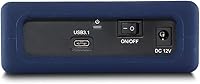
  • Form Factor: The enclosure follows a 3.5-inch desktop hard drive form factor and requires a stable surface and a power connection; it is not designed for portable or mobile use.
  • Dimensions: The unit measures 7.75 x 4.5 x 1.68 inches (length x width x height), making it compact enough to sit alongside a monitor or on a desk shelf.
  • Weight: The complete unit weighs 3.5 pounds, which is typical for a desktop 3.5-inch external drive enclosure with an enterprise-grade internal disk.
  • Operating Temperature: The drive is rated for safe operation between 32°F and 158°F (0°C to 70°C), covering normal indoor desktop environments without issue.
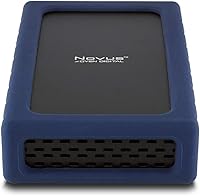
  • Protective Sleeve: A silicone rubber sleeve wraps the enclosure to reduce vibration transmission, provide a non-slip grip on desk surfaces, and offer a modest degree of physical protection against minor impacts.
  • Warranty: Oyen Digital backs this drive with a 3-year manufacturer warranty, which is above average for consumer external storage and reflects the enterprise-grade components inside.
  • Plug and Play: No driver installation or companion software is required; the drive mounts automatically on Mac, Windows, and Linux when connected via USB-C or Thunderbolt.

Related Reviews

Oyen Digital Novus 20TB External Hard Drive
74%
83%
Sequential Transfer Speed
92%
Storage Capacity
79%
Build & Enclosure Quality
91%
Setup & Compatibility
69%
Value for Money
More
Oyen Digital Novus 6TB External USB-C 7200RPM Hard Drive
85%
88%
Performance
90%
Build Quality
91%
Data Transfer Speed
85%
Noise Level
80%
Portability
More
Oyen Digital Novus 16TB External USB-C 7200RPM Hard Drive
86%
89%
Performance
91%
Transfer Speed
87%
Build Quality
93%
Ease of Setup
85%
Compatibility
More
Oyen Digital Novus 8TB External Hard Drive
71%
84%
Transfer Speed
81%
Build Quality
91%
Plug-and-Play Setup
88%
Cross-Platform Compatibility
76%
Heat Management
More
Oyen Digital Novus 30TB External Hard Drive
76%
86%
Transfer Speed
78%
Build Quality
93%
Compatibility & Setup
88%
Drive Reliability
61%
Noise & Vibration
More
Oyen Digital U32 Shadow 1TB USB-C External Hard Drive
87%
88%
Performance & Speed
90%
Portability & Design
93%
Ease of Setup
85%
Build Quality
84%
Compatibility
More
Seagate Expansion 24TB External Hard Drive
71%
93%
Value for Money
97%
Storage Capacity
91%
Ease of Setup
68%
Transfer Speed
72%
Build Quality
More
MAIWO 2.5/3.5 SATA Hard Drive Enclosure
76%
86%
Build Quality
74%
Transfer Speed
88%
Drive Compatibility
83%
USB Hub Utility
61%
Power Setup
More
WD 24TB My Book Desktop External Hard Drive
85%
95%
Storage Capacity
89%
Data Security
91%
Ease of Setup
87%
Build Quality
82%
Software Functionality
More
Western Digital Easystore 5TB Portable Hard Drive
75%
91%
Storage Value
88%
Ease of Setup
67%
Transfer Speed
72%
Portability
71%
Build Quality
More

FAQ

No software required at all. Plug it into any USB-C or Thunderbolt port and your Mac will recognize it immediately. The drive ships in exFAT format, which macOS reads and writes to natively, so you can start transferring files right away.

Windows will display approximately 21.8TB of usable space, not the full 24TB. This is not a defect — it is simply how Windows calculates storage using base-10 versus base-2 math. Mac reports the full 24TB. Either way, you are getting the same physical drive; the number on screen is just a display difference.

Absolutely. The drive ships in exFAT for cross-platform convenience, but you can reformat it to NTFS for Windows-only use or APFS for a Mac-only setup using your operating system's built-in disk utility. Just make sure to back up any existing data before reformatting.

Yes, fully compatible. The Oyen Digital Novus 24TB External Hard Drive works with Thunderbolt 3 and Thunderbolt 4 ports, as well as standard USB-C ports. You will not need an adapter if your machine has any of those connections.
It is audible. A 7200 RPM mechanical drive produces a noticeable hum and occasional read/write noise, especially during active transfers. If you work in a very quiet environment or share a small office, that is worth considering. It is not disruptively loud, but it is definitely not silent like an SSD.

It can get warm, particularly during sustained, hours-long transfers. The enclosure dissipates heat reasonably well, but if you are running it in a cramped or poorly ventilated space, you may notice the casing becoming noticeably warm to the touch. Most users running it in a normal desktop setup report no heat-related issues.

It will work with a USB-A to USB-C adapter, but a small number of users have reported occasional connection hiccups in that configuration. For best results and most stable performance, a native USB-C or Thunderbolt port is strongly recommended. If your machine only has USB-A, it is worth testing before committing to heavy use.

No single drive, regardless of quality, should ever be your only backup. Mechanical drives can fail, and at 24TB, losing the contents would be catastrophic. The smart approach is to treat this rugged external drive as one layer of a backup strategy — ideally alongside a cloud backup or a second physical copy of your most critical data.

Oyen Digital uses enterprise-grade 7200 RPM drives in this enclosure, which is one of the key reasons this high-capacity desktop drive sits at a premium price point compared to cheaper alternatives that often use slower 5400 RPM consumer disks inside. The enterprise internals are a genuine differentiator for buyers who need sustained performance.

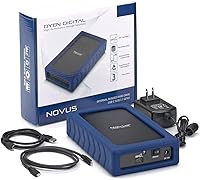
At 3.5 inches, this drive requires its own power supply and cannot run on bus power from a USB port alone. An appropriate power adapter is included in the box. This is standard for all 3.5-inch desktop drives, so make sure you have a free outlet near your workstation.