SanDisk Professional 8TB G-Drive External Hard Drive
SanDisk Professional 8TB G-Drive External Hard Drive — image 1
SanDisk Professional 8TB G-Drive External Hard Drive — image 2

SanDisk Professional 8TB G-Drive External Hard Drive — image 3
SanDisk Professional 8TB G-Drive External Hard Drive — image 4
SanDisk Professional 8TB G-Drive External Hard Drive — image 5
SanDisk Professional 8TB G-Drive External Hard Drive — image 6
68%
32%

Overview

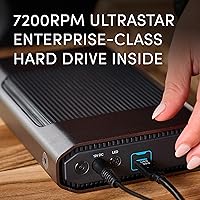
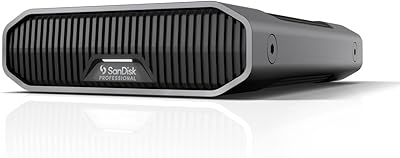
The SanDisk Professional 8TB G-Drive External Hard Drive is a desktop storage solution built squarely for Mac power users and creative professionals who need serious capacity without compromising on reliability. What sets this G-Drive apart from typical external drives is what's inside: a Western Digital Ultrastar HDD, the same enterprise-class hardware found in data centers, packaged in an anodized aluminum enclosure that feels genuinely premium in hand. It's heavy, deliberate, and clearly designed to sit on a desk rather than travel in a bag. If you're expecting a portable drive, look elsewhere. This is stationary backup infrastructure — the kind you build a workflow around.

Features & Benefits

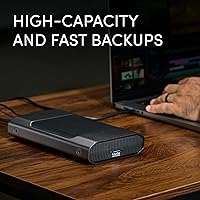
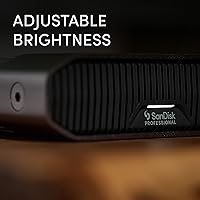
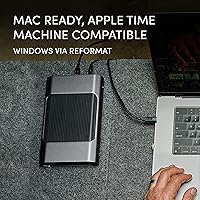
The USB-C connection runs at USB 3.2 Gen 2 speeds, pushing sustained read and write rates up to 260MB/s — fast enough that offloading a full day's 4K footage doesn't feel like a waiting game. That performance comes partly from the 7200RPM Ultrastar drive inside, which spins faster and more consistently than the 5400RPM drives you'll find in budget alternatives. The aluminum shell isn't just aesthetic; it helps dissipate heat passively, which matters during long backup sessions. Out of the box, it's formatted for Mac and works immediately with Apple Time Machine. The three-level LED indicator and stackable form factor are small touches, but they reflect a design that actually considered how people set up their workspaces.

Best For

This G-Drive is a natural fit for Mac-based creative professionals — video editors, photographers, and audio producers who regularly move large files and need local backup they can count on. If you're managing RAW photo libraries, multi-camera 4K project files, or running Time Machine across a studio environment, 8TB gives you meaningful breathing room. It also suits anyone upgrading from a slower, noisier external drive who wants something built to last. That said, Windows users should know going in that reformatting is required and driver hiccups have been reported. And if you need a drive you can toss in a bag, the SanDisk Professional desktop drive simply isn't designed for that — bus-powered portability is not in its vocabulary.

User Feedback

With a 3.7-star average across nearly 1,200 ratings, the feedback on this enterprise-grade external HDD is genuinely split. Satisfied users consistently praise the quiet, reliable operation and the real-world transfer speeds that hold up during demanding workflows. The build quality and desk-friendly stackable design earn repeated compliments. On the other side, a notable number of buyers have reported clicking sounds and early unit failures — not a majority experience, but frequent enough to take seriously. Windows users also flag the need to reformat and occasional compatibility headaches. Western Digital's warranty support draws mixed reactions, with some praising the response and others finding the process frustrating. For a drive at this price point, the risk-reward picture is real.

Pros

  • The 7200RPM Ultrastar HDD inside offers a meaningful reliability and speed advantage over typical 5400RPM consumer drives.
  • Sustained read and write speeds of up to 260MB/s hold up well during real-world large file transfers.
  • Mac users can plug in and start a Time Machine backup immediately — no reformatting or setup headaches.
  • The anodized aluminum enclosure feels premium and provides passive heat dissipation during extended use.
  • Stackable design makes multi-drive desk setups clean and organized without extra accessories.
  • Quiet operation is a recurring compliment from studio users who need a distraction-free environment.
  • USB-C with USB 3.2 Gen 2 (10Gbps) ensures the interface won't bottleneck the drive's performance.
  • The three-level LED brightness control is a small but thoughtful feature for darkroom or dim studio environments.
  • At 8TB, there is plenty of room to grow a photo or video library before needing to add another drive.
  • The enterprise Ultrastar lineage gives knowledgeable buyers genuine confidence in the drive's intended durability.

Cons

  • A 3.7-star average across nearly 1,200 ratings signals a reliability track record that falls short of the premium positioning.
  • Several buyers have reported clicking sounds and early drive failures, which is concerning for a professional-tier product.
  • Windows users must reformat the drive before use, and some have encountered driver issues during setup.
  • At over three pounds and requiring external power, this G-Drive is completely impractical for anyone who travels with their storage.
  • Western Digital customer support experiences are inconsistent, with some users reporting slow or unsatisfying warranty resolutions.
  • The price-per-terabyte is high compared to competing desktop drives that use similar or identical internal hardware.
  • No hardware encryption or built-in security features are included, which matters for professionals handling sensitive client files.
  • The APFS default format limits out-of-the-box compatibility with non-Apple ecosystems without additional steps.

Ratings

Our AI-generated scores for the SanDisk Professional 8TB G-Drive External Hard Drive were produced by analyzing verified global buyer reviews, with spam, bot-generated, and incentivized feedback actively filtered out before scoring. Each category reflects the honest distribution of real user experiences — including the frustrations — not just the highlights. Where buyers are divided, the scores say so plainly.

Transfer Speed
83%
Mac users regularly praised how quickly large video and RAW photo projects moved across the drive, with real-world speeds tracking close to the rated 260MB/s ceiling during sequential transfers. For daily 4K editing workflows, the 7200RPM internals make a tangible difference compared to slower desktop alternatives.
A handful of users noted that speeds felt inconsistent during mixed or random file workloads, which is expected behavior for spinning hard drives but disappointing for buyers assuming uniform performance. The rated speeds also require a compatible USB 3.2 Gen 2 host port, which not all older Macs provide.
Build Quality
88%
The anodized aluminum enclosure earned consistent praise from buyers who valued a drive that felt substantive and well-constructed on their desk. Studio professionals in particular appreciated that it didn't feel like an afterthought — it sits solid, runs cool, and holds up to daily handling without scuffs or flex.
A few users noted the enclosure runs noticeably warm during sustained heavy use, and while the aluminum helps manage this passively, there is no active airflow. The weight, over three pounds, also makes it feel immovable in a setup where occasional repositioning might be needed.
Reliability
58%
42%
When this G-Drive works as intended, buyers report years of consistent, trouble-free operation across demanding backup and archiving workflows. The Ultrastar HDD platform has a genuine enterprise pedigree, and many units have logged significant hours without incident in professional Mac environments.
The reliability story is where the 3.7-star average becomes hard to ignore. A meaningful proportion of buyers reported clicking sounds, read errors, or outright drive failure within months of purchase — a pattern that stands out for a product positioned at this price tier. This is the single biggest concern for prospective buyers.
Mac Compatibility
91%
Out-of-the-box Mac support is one of this drive's clearest strengths. It arrives APFS-formatted and pairs with Time Machine instantly, which means a photographer or editor can be fully backed up within minutes of unboxing. No drivers, no reformatting, no friction.
The APFS-only default format creates a hard wall for anyone working across Mac and Windows environments, requiring a reformat that wipes the drive before cross-platform use. Users who didn't realize this upfront were caught off guard, particularly in mixed-OS studio setups.
Windows Compatibility
41%
59%
The drive is physically compatible with Windows PCs once reformatted to NTFS or exFAT, and some users completed that process without major issues. The hardware itself is platform-agnostic once the file system is changed.
Windows users bear real friction here — reformatting is mandatory, some experienced driver recognition issues, and the out-of-box experience offers no Windows guidance at all. For anyone who primarily works on a PC, this enterprise-grade external HDD is not a natural fit and carries real setup risk.
Value for Money
54%
46%
The combination of an enterprise Ultrastar drive inside a premium aluminum enclosure does justify a higher price point for buyers who understand what they are getting. Creative professionals who have lost data on cheaper drives often regard the build and internal spec as worth the premium.
At this price, a 3.7-star average is a hard sell, especially when competing drives at lower price points use similar or identical internal hardware in less polished enclosures. Buyers focused purely on cost-per-terabyte will find the value proposition unconvincing given the documented reliability concerns.
Noise Level
79%
21%
The majority of buyers described day-to-day operation as quiet and unobtrusive, which matters in studio environments where background hum can become a real annoyance. The 7200RPM spin noise is present but generally falls below the threshold where most users noticed it during normal work sessions.
During intensive read or write operations, the drive produces audible seek sounds that some users in quiet editing suites found distracting. A smaller group reported louder-than-expected clicking that turned out to be a precursor to failure rather than normal operational noise.
Setup Experience
76%
24%
Mac users reported an effortless setup process — plug in, connect power, and the drive appears on the desktop ready to use. The included USB-C cable means there is nothing additional to source before getting started.
The experience diverges sharply depending on the operating system. Windows users often discovered the reformat requirement only after plugging in and finding the drive unreadable, which created frustration that could have been avoided with clearer out-of-box documentation.
Design & Aesthetics
84%
Studio and darkroom users gave the design consistent compliments, pointing to the dark grey aluminum finish and the adjustable LED as touches that integrate naturally into a professional workspace. The stackable form factor in particular won over users managing multiple drives on a single desk.
The enclosure's industrial aesthetic won't appeal to everyone, and the LED — while dimmable — cannot be fully disabled, which is a minor but recurring complaint from users who prefer a completely dark workspace during late-night sessions.
Thermal Management
72%
28%
The aluminum body handles heat dissipation reasonably well under moderate workloads, and most users running regular backup sessions reported no thermal throttling or heat-related slowdowns during typical day-to-day use.
Under continuous heavy load — such as multi-hour video renders or large archive migrations — the enclosure gets noticeably warm to the touch. There is no active cooling, and in warm ambient environments this could become a concern over extended high-demand sessions.
Customer Support
49%
51%
Some buyers who experienced early failures reported receiving replacement units through Western Digital's warranty process without excessive pushback, and a portion of those interactions were handled promptly through online channels.
The overall picture of WD customer support across this product's reviews is inconsistent at best. Slow response times, unclear warranty processes, and cases where users felt their legitimate failure claims were deprioritized are recurring themes that undercut confidence in post-purchase coverage.
Storage Capacity
87%
Eight terabytes is a genuinely practical ceiling for most professional Mac workflows today — enough to store multiple photography seasons, a full documentary project, or years of Time Machine history without constantly managing space. Buyers treating it as a primary local backup archive found the capacity well-matched to real creative workloads.
For large production studios or users managing uncompressed multi-camera 4K footage at high frame rates, 8TB can fill faster than expected. Buyers who anticipated long-term capacity headroom sometimes found themselves shopping for additional drives sooner than planned.
Portability
21%
79%
The drive is physically movable between desk setups, and some users appreciated being able to relocate it between a home office and a studio without complex reinstallation — as long as a power outlet was available at the destination.
This is fundamentally a stationary desktop drive, and judging it against portable standards is unfair — but buyers who overlooked that detail were consistently disappointed. It requires AC power, weighs over three pounds, and has no protective case or bus-power option.
Indicator & LED
73%
27%
The three-level brightness control is a practical touch that elevates this G-Drive above drives with fixed, blinding activity lights. Studio users and colorists working in calibrated low-light environments specifically mentioned this feature as a genuine day-to-day quality-of-life improvement.
The inability to fully power off the LED was flagged by multiple users as an annoyance during video playback or late-night work. It is a small issue in the grand scheme, but it recurs often enough in feedback to suggest it matters more to the target audience than the designers anticipated.

Suitable for:

The SanDisk Professional 8TB G-Drive External Hard Drive was built with a specific user in mind: the Mac-based creative professional who runs demanding workflows daily and can't afford to babysit unreliable storage. Video editors juggling multi-camera 4K projects, photographers archiving thousands of RAW files, and audio producers managing large session libraries will all find the 8TB capacity and 260MB/s transfer speeds genuinely useful rather than just impressive on paper. It connects and works immediately on any modern Mac, making Time Machine setup a matter of minutes rather than a technical project. Studios that need multiple drives on a single desk will appreciate the stackable form factor, which keeps things organized without requiring additional hardware. If you prioritize build quality, enterprise-grade internals, and a drive that feels like it belongs in a professional environment, this G-Drive delivers that experience convincingly.

Not suitable for:

The SanDisk Professional 8TB G-Drive External Hard Drive is not the right call for everyone, and it's worth being honest about where it falls short. Windows users face a mandatory reformat out of the box, and a subset of buyers have reported driver compatibility issues that add friction to an otherwise straightforward setup — if your workflow is Windows-first, there are better-matched options available. This is strictly a desktop drive: it requires its own power source, weighs over three pounds, and was never designed to travel. Anyone looking for a bus-powered, pocket-friendly backup solution will need to look elsewhere entirely. The mixed 3.7-star average also warrants attention — while many units perform well for years, the reported cases of clicking drives and early failures mean buyers should factor in a warranty plan and keep redundant backups rather than treating any single drive as a sole archive.

Specifications

  • Storage Capacity: This G-Drive provides 8TB of formatted storage capacity using a mechanical hard disk.
  • Interface: It connects via USB-C with USB 3.2 Gen 2 protocol, delivering up to 10Gbps theoretical bandwidth.
  • Read Speed: Sustained read speeds reach up to 260MB/s under optimal conditions with a compatible host device.
  • Write Speed: Sustained write speeds also reach up to 260MB/s, matching read performance for balanced transfer workflows.
  • Drive Type: The internal drive is a Western Digital Ultrastar 7200RPM mechanical hard disk, an enterprise-class HDD platform.
  • Form Factor: The drive uses a 3.5-inch internal HDD housed in a desktop enclosure requiring AC power to operate.
  • Enclosure Material: The outer shell is constructed from anodized aluminum, which aids passive cooling and provides a durable finish.
  • Dimensions: The enclosure measures 8.27 x 5.24 x 1.61 inches (length x width x height).
  • Weight: The unit weighs 3.02 pounds, consistent with a desktop-class aluminum enclosure and full-size 3.5-inch HDD.
  • Color: The enclosure ships in Dark Grey, consistent with SanDisk Professional's studio-oriented aesthetic lineup.
  • Mac Compatibility: The drive ships pre-formatted as APFS and is fully compatible with Apple Time Machine out of the box.
  • Windows Compatibility: Windows users must reformat the drive before use, as it does not ship in an NTFS or exFAT format.
  • LED Indicator: A front-facing LED activity light includes three user-selectable brightness modes for different lighting environments.
  • Stackable Design: The enclosure geometry supports stacking multiple units directly, allowing organized multi-drive desktop configurations.
  • Included Cable: A USB-C cable is included in the box, compatible with the drive's USB 3.2 Gen 2 interface.
  • Manufacturer: The product is designed and manufactured by Western Digital Technologies, Inc. under the SanDisk Professional brand.
  • Model Number: The official model identifier for this 8TB configuration is SDPHF1A-008T-NBAAD.
  • Release Date: This model was first made available for purchase on July 14, 2023.

Related Reviews
SanDisk Professional G-Drive 6TB
67%
84%
Build Quality
51%
Drive Reliability
76%
Transfer Speed
89%
Mac Compatibility
53%
Value for Money
More
SanDisk Professional G-Drive 22TB External Desktop Hard Drive
84%
89%
Performance
91%
Build Quality
96%
Capacity
72%
Ease of Setup
65%
Noise Level
More
G-Technology 2TB G-DRIVE Mobile USB-C Portable External Hard Drive
88%
91%
Portability
88%
Transfer Speed
89%
Build Quality
94%
Ease of Use (Plug-and-Play)
92%
Compatibility (Mac/Windows)
More
G-Technology G-DRIVE Mobile 4TB Portable Hard Drive
77%
93%
Build Quality
91%
Mac Compatibility
61%
Transfer Speed
88%
Portability
58%
Value for Money
More
SanDisk Professional G-Drive 12TB External Hard Drive
75%
88%
Build Quality
63%
Reliability & Longevity
82%
Transfer Speed
91%
Mac Compatibility
58%
Windows Compatibility
More
Seagate Expansion 8TB External Hard Drive
71%
91%
Value for Money
93%
Ease of Setup
94%
Storage Capacity
67%
Transfer Speed
72%
Build Quality
More
SanDisk Professional 2TB G-Drive ArmorATD Hard Drive
76%
93%
Build Quality
88%
Durability & Protection
61%
Transfer Speed
91%
Portability
94%
Mac Compatibility
More
SanDisk Professional G-DRIVE SSD 2TB

88%
94%
Performance
91%
Durability
87%
Ease of Use
92%
Transfer Speed
86%
Compatibility
More
SanDisk Professional G-Drive SSD 4TB External SSD
79%
93%
Transfer Speed
91%
Build Quality
88%
Durability & Ruggedness
94%
Mac Compatibility
52%
Windows Compatibility
More
SanDisk Professional G-Drive ArmorATD 6TB
83%
88%
Durability
82%
Performance Speed
85%
Portability
79%
Ease of Use
91%
Water & Dust Resistance
More

FAQ

Yes, it does. The SanDisk Professional 8TB G-Drive External Hard Drive ships formatted as APFS, so any modern Mac will recognize it immediately. If you want to use it with Time Machine, you can set that up in a couple of minutes without any reformatting or additional software.

You can, but not without some preparation. The drive ships in APFS format, which Windows cannot read natively, so you will need to reformat it to NTFS or exFAT before it will work. A small number of Windows users have also reported driver compatibility issues, so if your workflow is primarily Windows-based, it may be worth considering a drive that ships Windows-ready.

Inside is a Western Digital Ultrastar HDD spinning at 7200RPM. The Ultrastar line is WD's enterprise-grade platform, typically found in data centers and professional NAS systems rather than consumer products. It is a meaningful distinction from the 5400RPM drives you find in most budget external enclosures.

In most Mac workflows with a compatible USB 3.2 Gen 2 port, real-world speeds land close to the rated maximum. That said, actual performance depends on your host computer's USB controller, cable quality, and the types of files you are transferring. Large sequential files like video footage tend to see the best results.

It requires its own power source — a power adapter is included. This is a desktop drive through and through, so there is no bus-powered operation from your laptop's USB port. If you need something portable and self-powered, this G-Drive is not designed for that use case.

Most users describe it as quiet during normal use. It is not silent the way an SSD is, but the 7200RPM spin noise and occasional seek sounds are generally unobtrusive in a studio or home office environment. Several buyers specifically called out the low noise as a positive, particularly in shared workspaces.

Yes, the enclosure is designed with stacking in mind. The flat top and bottom surfaces allow multiple units to sit stably on top of one another, which is useful if you are building out a multi-drive backup or archive setup without a rack or shelf system.

Occasional soft clicking during seek operations is normal for mechanical drives, including enterprise-grade ones. However, a notable number of buyers have reported louder, repetitive clicking associated with drive errors or early failure. If you hear unusual clicking shortly after setup, back up your data immediately and contact Western Digital support about a warranty replacement.

It controls the brightness of the activity indicator light on the front of the enclosure. You can cycle through three brightness levels, which is handy if you work in a dark studio or editing suite where a bright blinking LED would be distracting. It is a small detail but one that shows some thoughtfulness in the design.

Western Digital typically covers this G-Drive with a limited warranty, though you should verify current terms on their website at time of purchase. User experiences with their support process are mixed — some buyers report smooth replacements, while others have found the process slower or more frustrating than expected. Registering your product with WD after purchase is a good first step to streamline any future claims.

Where to Buy