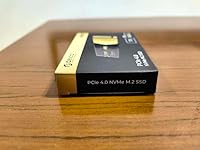
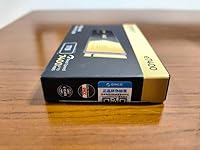
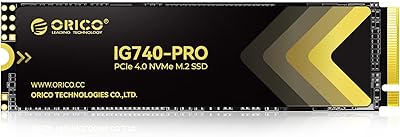
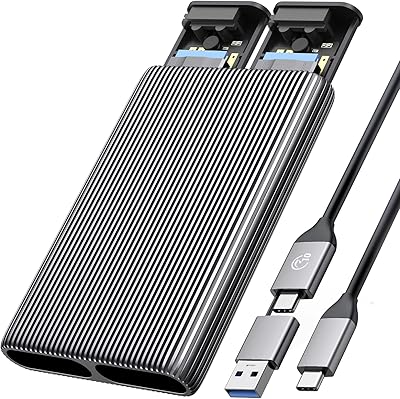
Overview

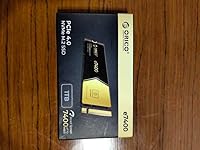
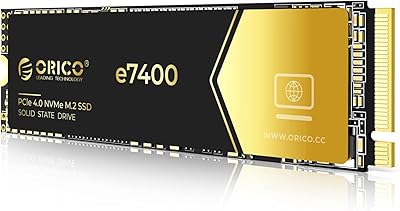
The ORICO e7400 2TB M.2 NVMe SSD arrived quietly in late 2024, but it has made enough noise to land at #250 in Amazon's Internal SSD category — no small feat for a brand that many Western buyers are only now discovering. ORICO has been building PC accessories and storage peripherals for years, primarily for Asian markets, and this drive represents a clear push for global relevance. The pitch is straightforward: PCIe Gen4 performance without the premium pricing that usually comes with it. For budget-conscious PC builders, PS5 upgraders, and creators who want fast storage without breaking the bank, that proposition is worth taking seriously.

Features & Benefits

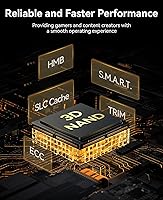
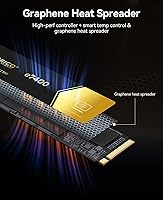
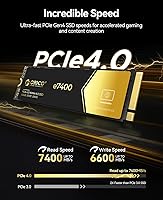
The headline numbers — 7400MB/s sequential read and 6600MB/s write — put this NVMe drive squarely in competitive Gen4 territory. For context, a typical SATA SSD tops out around 550MB/s, and even a solid Gen3 NVMe drive rarely exceeds 3500MB/s, so the real-world jump is meaningful for large file transfers and load times. Without dedicated DRAM, the ORICO e7400 relies on HMB and SLC caching to maintain responsiveness — a trade-off worth knowing. Under sustained heavy writes, throughput can dip once the SLC buffer fills, which is normal for this class but not something to hide. The graphene heat spreader handles thermals without adding thickness, a genuine plus for PS5 bays and slim laptops.

Best For

This M.2 SSD makes the most sense for a few specific types of buyers. PS5 owners are an obvious fit — the drive meets Sony's requirements for internal storage expansion, though you'll want to confirm your console firmware is updated and that you have a compatible heatsink if the graphene spreader alone isn't enough. Mid-range PC builders get Gen4 performance at a price that leaves room in the budget for other components. Content creators handling large video files or raw photo batches will notice a real difference over older SATA drives. If your motherboard slot has built-in cooling, the slim profile of this NVMe drive becomes an even easier choice.

User Feedback

With a 4.6-star average across more than 900 ratings, the ORICO e7400 has clearly resonated with buyers. Installation and speed gains dominate the positive reviews — users frequently mention noticeably faster boot times and game load screens compared to their previous drives. The price-to-performance ratio is the most common theme in praise. On the critical side, some reviewers raise valid questions about long-term endurance, particularly whether an HMB-based drive holds up as well as a DRAM-equipped alternative under years of heavy use. A few PS5 users flag the need to verify firmware compatibility before installing. No widespread pattern of overheating or firmware failures, which is encouraging for a drive that only launched in late 2024.

Pros

  • Gen4 sequential read speeds make a noticeable real-world difference over SATA and older Gen3 drives.
  • 2TB of capacity at this price tier offers excellent value for storage-hungry gamers and creators.
  • The slim graphene heat spreader handles thermals without adding bulk in tight PS5 or laptop bays.
  • PCIe 3.0 backward compatibility means it works in older motherboards if you upgrade your system later.
  • HMB technology keeps everyday latency low, so common tasks like booting and app launching feel snappy.
  • A 5-year warranty with TBW coverage provides meaningful long-term peace of mind for a budget-tier drive.
  • Over 900 Amazon ratings averaging 4.6 stars suggests the ORICO e7400 delivers on its core promises for most buyers.
  • Installation is straightforward with standard M.2 2280 fitment across desktops, laptops, and the PS5.
  • SMART and TRIM support means the drive works well with modern OS maintenance and monitoring tools.
  • Capacity options from 512GB to 4TB let buyers right-size their purchase without switching brands.

Cons

  • Sustained write speeds drop significantly once the SLC cache fills, which matters for heavy continuous workloads.
  • No dedicated DRAM cache makes this a weaker choice compared to DRAM-equipped rivals under prolonged stress.
  • ORICO has limited brand recognition in Western markets, making long-term firmware support harder to predict.
  • PS5 compatibility requires a firmware-updated console and potentially a separate heatsink, which adds friction.
  • Independent long-term endurance data is scarce given this is a late-2024 launch with limited field history.
  • Some buyers report uncertainty about actual NAND sourcing, since the specific flash supplier is not publicly disclosed.
  • 24-hour support sounds reassuring, but cross-timezone communication with a China-based team can slow issue resolution.
  • Performance under thermal throttling conditions in poorly ventilated cases has not been widely stress-tested publicly.

Ratings

The scores below were generated by AI after analyzing verified global user reviews for the ORICO e7400 2TB M.2 NVMe SSD, with filtering applied to remove incentivized, spam, and bot-driven submissions. Both what buyers love and what genuinely frustrates them are reflected here without cherry-picking. The result is an honest, category-by-category breakdown that helps you understand exactly where this NVMe drive excels and where it asks for a trade-off.

Read Speed Performance
91%
Users upgrading from SATA or Gen3 NVMe drives consistently report a dramatic difference in large file transfers and game loading times. Benchmarks from verified buyers regularly land close to the rated 7400MB/s ceiling under PCIe 4.0 conditions, which is not always guaranteed with budget-tier Gen4 drives.
A small number of users report that real-world sequential read speeds in mixed workloads fall a few percentage points short of peak rated figures, which is typical for the category but still worth noting for buyers expecting lab-exact numbers in daily use.
Write Speed Performance
78%
22%
For typical file operations — moving project folders, installing large game updates, transferring batches of raw photos — the dynamic SLC cache keeps write speeds feeling fast and responsive. Most buyers doing everyday creative or gaming workloads never run into any noticeable slowdown.
Once the SLC write cache is exhausted during sustained bulk transfers, write speeds drop noticeably to native NAND rates, which is a real limitation for anyone regularly moving hundreds of gigabytes in a single session. This is an architectural trade-off of HMB-based drives, not a defect, but it is a ceiling that exists.
Value for Money
94%
This is where the ORICO e7400 consistently wins over buyers — the combination of Gen4 interface speeds, 2TB capacity, and a 5-year warranty at this price point is difficult to match from better-known brands. Reviewers frequently describe it as the best storage dollar they have spent on a recent build.
A handful of buyers feel the value calculation shifts if you factor in the cost of a separate heatsink for PS5 installation or if you compare it against occasional sales pricing on DRAM-equipped competitors, where the gap narrows more than expected.
PS5 Compatibility
82%
18%
The vast majority of PS5 users who install this M.2 SSD report a smooth experience once the console firmware is up to date, with the drive recognized immediately and performing well for game storage expansion. The slim graphene spreader fits cleanly inside the PS5 bay without requiring significant effort.
Some PS5 buyers were caught off guard by the need for an additional heatsink solution, since the graphene layer alone sits at the lower end of Sony's thermal recommendations for that environment. Users who did not research compatibility requirements ahead of time found the setup process more involved than expected.
Thermal Management
79%
21%
The integrated graphene heat spreader does a solid job of keeping the drive within safe operating temperatures during typical desktop and laptop use. Buyers with good case airflow report consistently stable temperatures even during extended gaming sessions or large file operations.
In thermally constrained environments — particularly fanless mini-PCs or the PS5 under sustained load — a small number of buyers observed thermal throttling after extended periods. The graphene layer is functional but is not a substitute for an active or chunky passive heatsink in demanding setups.
Installation Experience
93%
Buyers across all experience levels — from first-time PC builders to seasoned enthusiasts — consistently praise how straightforward the physical installation process is. The standard M.2 2280 footprint means it drops into virtually any compatible slot without adapter hassle or clearance issues.
The included documentation is minimal, and a few less experienced users noted that ORICO does not include a mounting screw in the package, which can be an annoying surprise mid-build if you do not have spares on hand from a previous installation.
Sustained Workload Endurance
63%
37%
For moderate creative workloads like video editing timelines, multi-track audio sessions, or regular software development builds, this M.2 SSD handles sustained demand well enough that most users in these categories report no practical complaints.
Users who stress-test the drive with prolonged sequential writes — simulating database operations or continuous direct-to-drive video capture — document a significant and sustained speed drop once the cache layer is overwhelmed. For those specific use cases, the HMB architecture is a genuine limitation compared to DRAM-equipped alternatives.
Boot and App Load Times
89%
Day-to-day system responsiveness is one of the most praised aspects of this drive among verified buyers. Windows boots noticeably faster than on SATA predecessors, and application launch times — even for heavy creative software like Adobe Premiere or DaVinci Resolve — feel snappy and consistent.
A small subset of users on PCIe 3.0 systems note that the real-world boot time improvement over a good Gen3 NVMe drive is less dramatic than anticipated, which is an interface limitation rather than a drive defect but can lead to tempered expectations.
Build and Reliability
76%
24%
In the time since its late-2024 launch, no widespread pattern of early drive failures has emerged in verified user feedback, which is an encouraging early signal for a brand still establishing its reliability reputation in Western markets. The hardware feels solidly constructed for its weight class.
The honest caveat is that this drive simply has not been in the field long enough to produce meaningful long-term reliability data. Buyers who prioritize proven multi-year endurance records will find the evidence base here thinner than it is for established alternatives with years of real-world deployment history.
Backward Compatibility
87%
The ability to slot this drive into a PCIe 3.0 motherboard and have it work immediately without driver fuss is something multiple buyers specifically called out as a practical benefit when upgrading older systems incrementally. It makes the purchase feel future-proof in both directions.
A few buyers were disappointed to find that PCIe 3.0 host speeds cap real-world performance well below what the drive is capable of, and felt the marketing emphasis on Gen4 speeds was slightly misleading without clearer disclosure of how backward-compatible mode affects throughput.
Packaging and Unboxing
71%
29%
The drive arrives in protective packaging adequate for preventing physical damage in transit, and most buyers report receiving the hardware in perfect condition. The presentation is clean and unfussy, which fits the no-frills value positioning of the product.
Several buyers noted the accessory inclusion is bare-bones — no mounting screw, no installation guide worth referencing, and no diagnostic software bundle. For a buyer new to SSD upgrades, that absence makes the setup experience feel less supported than comparable offerings from more established brands.
Software and Monitoring Support
74%
26%
Because the drive supports S.M.A.R.T. and TRIM natively, buyers can use widely available third-party tools like CrystalDiskInfo to monitor drive health, temperature, and write endurance without needing any proprietary software. TRIM keeps long-term performance degradation in check automatically under modern operating systems.
ORICO does not offer a branded companion app or firmware update utility, which means buyers who want fine-grained control, firmware patches, or over-provisioning tools are dependent on generic solutions. For power users accustomed to Samsung Magician or WD Dashboard, that gap is noticeable.
Warranty and After-Sales Support
77%
23%
A 5-year limited warranty with TBW-based coverage is a genuinely strong commitment at this price tier, and it signals that ORICO is confident enough in the drive's longevity to back it with meaningful protection. The 24-hour support claim also adds a layer of reassurance for buyers outside Asia.
Real-world experiences with ORICO's warranty claim process are limited and mixed in Western markets, with some users reporting slow response times and communication friction stemming from cross-timezone support operations. The warranty terms are solid on paper, but the execution has room to improve.

Suitable for:

The ORICO e7400 2TB M.2 NVMe SSD is a strong fit for anyone who wants genuine PCIe Gen4 performance without paying the premium that established brands typically charge for it. PS5 owners with an available M.2 slot are a natural audience — provided their console firmware is current and they have a compatible heatsink solution, this drive meets Sony's internal expansion requirements at a fraction of what some branded alternatives cost. Budget-conscious PC builders putting together a mid-range gaming or productivity rig will find the performance-per-dollar ratio hard to argue with, especially when storage dollars saved can go toward a better GPU or more RAM. Content creators who regularly work with large video files, raw photo libraries, or multi-track audio sessions will notice a tangible difference over any SATA-based drive they might be replacing. Laptop upgraders with an open M.2 2280 slot also stand to benefit, particularly because the slim graphene heat spreader does not add meaningful thickness inside tight chassis bays.

Not suitable for:

Buyers with demanding, sustained write workloads — think frequent large database operations, continuous 4K video capture to drive, or heavy virtualization environments — should think carefully before committing to the ORICO e7400 2TB M.2 NVMe SSD, since the absence of dedicated DRAM means it relies on HMB and SLC caching to maintain performance. Once that SLC buffer is saturated under prolonged heavy writes, throughput will drop noticeably — a known limitation of this cache architecture, not a defect, but a real-world ceiling worth understanding. Users who prioritize brand trust and long-term support from an established Western manufacturer may also feel uneasy, since ORICO is still building its reputation outside Asian markets and its long-term firmware update cadence is relatively unproven. Anyone requiring the absolute fastest sustained write speeds — such as professional video editors capturing uncompressed footage directly to an internal drive — would be better served by a DRAM-equipped Gen4 drive, even at a higher cost. If your workload is light to moderate, this concern is largely academic, but for power users it is a meaningful distinction.

Specifications

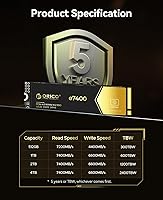
  • Capacity: This drive is available in a 2TB configuration, with the full product line ranging from 512GB up to 4TB to suit different storage needs.
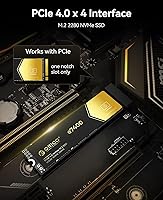
  • Interface: It uses an M.2 PCIe 4.0 x4 (NVMe) interface, delivering significantly higher bandwidth than PCIe 3.0 or SATA-based alternatives.
  • Form Factor: The drive follows the M.2 2280 standard, meaning it is 22mm wide and 80mm long — the most common size found in modern desktops, laptops, and the PS5.
  • Sequential Read: Maximum sequential read speed is rated at up to 7400MB/s under optimal PCIe 4.0 conditions.
  • Sequential Write: Maximum sequential write speed reaches up to 6600MB/s, placing it competitively among other Gen4 NVMe drives in this class.
  • Cache Architecture: The drive uses Host Memory Buffer (HMB) technology alongside a dynamic SLC cache layer, rather than a dedicated onboard DRAM chip.
  • Flash Type: Storage cells use 3D NAND flash technology, which stacks memory layers vertically to improve density and endurance compared to planar NAND.
  • Cooling Solution: A graphene heat spreader is integrated directly onto the drive to manage operating temperatures without adding meaningful thickness to the overall profile.
  • Compatible Devices: The drive is compatible with PCIe 4.0 and PCIe 3.0 desktops, laptops with an M.2 2280 slot, and PlayStation 5 consoles with updated firmware.
  • Backward Compatibility: The drive operates in PCIe 3.0 x4 slots, though maximum speeds will be limited by the host slot's available bandwidth in that configuration.
  • Warranty: ORICO provides a 5-year limited warranty or coverage up to the rated TBW (terabytes written) endurance threshold, whichever occurs first.
  • Support: ORICO offers 24-hour technical support access and claims lifetime assistance for product-related inquiries.
  • Weight: The drive weighs 0.704 ounces (approximately 20g), making it light enough to install without any mechanical strain on M.2 slot connectors.
  • Supported Features: The drive supports TRIM for ongoing performance maintenance and S.M.A.R.T. for health monitoring via compatible system utilities.
  • Installation Type: This is an internal drive only — it requires direct installation into an M.2 slot and is not designed for external enclosure use out of the box.

Related Reviews

ORICO IG740PRO 2TB NVMe SSD
83%
93%
Read & Write Speed
91%
Endurance & Longevity
84%
Thermal Management
88%
Data Security & Protection
92%
PS5 Compatibility & Installation
More
SanDisk 2TB SSD Plus M.2 NVMe SSD
86%
89%
Performance
92%
Ease of Installation
88%
Reliability
91%
Value for Money
90%
Capacity
More
ORICO Dual M.2 NVMe SSD Enclosure
79%
88%
Build Quality
84%
Thermal Management
82%
Transfer Speed
71%
Drive Compatibility
91%
Ease of Installation
More
ORICO e7400 2TB M.2 NVMe SSD
81%
91%
Sequential Speed
78%
Random Read/Write
86%
Thermal Management
83%
PS5 Compatibility
88%
Value for Money
More
Vansuny 2TB NVMe M.2 SSD
86%
95%
Performance
88%
Installation Ease
78%
Thermal Management
92%
Storage Capacity
94%
Speed for Gaming
More
GAMERKING 2TB M.2 NVMe SSD
85%
91%
Performance (Read/Write Speeds)
72%
Thermal Management
88%
Ease of Installation
94%
Compatibility with PS5
87%
Value for Money
More
fanxiang S770 2TB NVMe M.2 SSD
79%
88%
Sequential Read Speed
91%
PS5 Compatibility
86%
Value for Money
83%
Thermal Management
74%
Build Quality
More
Fikwot FX910 2TB M.2 NVMe SSD
90%
93%
Performance
89%
Ease of Installation
95%
Read Speed
91%
Write Speed
87%
Thermals/Cooling
More
ORICO M.2 NVMe SSD 512GB with Heatsink
86%
89%
Performance
92%
Cooling Efficiency
85%
Installation Ease
90%
Read/Write Speeds
88%
Capacity for Gaming & Everyday Use
More
Ediloca EN870 2TB NVMe M.2 SSD
86%
93%
Performance (Speed)
88%
Thermal Management
90%
Compatibility (PC & PS5)
89%
Endurance (4000TBW)
85%
Ease of Installation
More
PNY CS2230 2TB M.2 NVMe SSD
88%
94%
Performance
88%
Installation Ease
92%
Speed (Read/Write)
90%
Compatibility with PC and Mac
89%
Reliability
More

FAQ

Yes, the ORICO e7400 2TB M.2 NVMe SSD is compatible with the PS5's internal M.2 expansion slot. You will need to ensure your console is running the latest system firmware before installation, since Sony enabled M.2 support via a software update. You will also want a heatsink — either a third-party one or a PS5 chassis that provides its own cooling — since Sony recommends one for reliable long-term operation.
For most typical workloads — gaming, general file storage, booting your OS, running applications — you are unlikely to notice a meaningful difference between HMB-based and DRAM-equipped drives. The performance gap becomes more apparent during prolonged, heavy sequential writes, such as copying hundreds of gigabytes in a single session. If your workload is mixed and moderate, the HMB architecture handles daily tasks well.

Yes, it is backward compatible with PCIe 3.0 x4 slots. The drive will function normally, but your maximum speeds will be capped by the Gen3 interface — roughly 3500MB/s read rather than the full Gen4 ceiling. That is still a significant improvement over any SATA drive, so it remains a worthwhile upgrade even on older hardware.

The integrated graphene layer is designed to spread heat evenly and dissipate it passively without adding bulk. It works well in most desktop and laptop environments with reasonable airflow. For PS5 installations or fanless mini-PC builds with very limited airflow, adding a dedicated third-party heatsink on top is still a good idea for sustained workloads.

Once the dynamic SLC cache is saturated — which typically happens during very large, continuous write sessions — the drive falls back to writing directly to the 3D NAND at native speeds, which are lower than the rated peak figures. For reference, most users copying normal-sized files will never hit this ceiling during everyday use, but sustained bulk transfers of hundreds of gigabytes in one go may show a slowdown.

Technically, you can place any M.2 NVMe drive into a compatible NVMe-to-USB enclosure and it will function as an external drive. The ORICO e7400 is not sold or warranted for that use case, but the hardware itself does not prevent it. Just make sure the enclosure specifically supports NVMe, not just SATA M.2 drives.

The ORICO e7400 trades blows with premium Gen4 drives on peak sequential speeds on paper, but the Samsung and WD alternatives both carry dedicated DRAM caches, more established firmware ecosystems, and longer track records in demanding workstation environments. If you are a professional relying on this drive for mission-critical work, those brands offer a more proven long-term reliability case. For gaming and general use, the real-world performance difference is minor for most buyers.

ORICO has been manufacturing PC peripherals and storage accessories for over a decade, primarily for the Asian market, and is increasingly present in Western retail channels. Their products generally receive solid user feedback at the price points they target. Support is handled remotely and response times can vary depending on your time zone, but the 5-year warranty coverage is a meaningful commitment for a budget-tier drive.

Because this M.2 SSD supports S.M.A.R.T., you can monitor it with standard tools like CrystalDiskInfo on Windows or smartmontools on Linux and macOS. These will show you temperature readings, power-on hours, total bytes written, and any flagged errors, giving you an early warning system for potential issues before they become failures.

For most gamers, 2TB is a practical sweet spot — modern AAA titles average between 50GB and 100GB each, so you are looking at roughly 20 to 40 games depending on size, in addition to your OS and other files. If you frequently keep a large rotating library of installed games, the 4TB variant in the same lineup might be worth considering, though availability and pricing should factor into that decision.