Overview

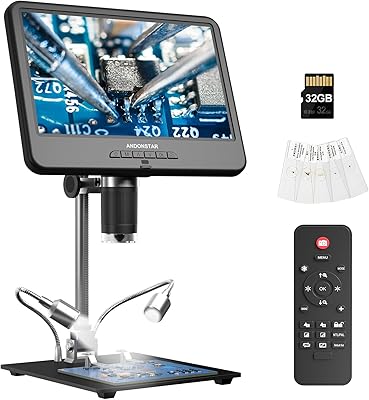
The Opqpq ODM702 Flex 10″ Digital Microscope occupies an interesting middle ground in the digital inspection market — it’s aimed squarely at electronics hobbyists doing PCB work and coin collectors who want more than a basic loupe, but it isn’t trying to replace professional lab equipment. The defining feature is the 10-inch built-in LCD screen, which sets it apart from camera-only models that depend entirely on a separate monitor. Paired with a four-joint flexible boom arm, it offers real ergonomic versatility at the bench. That said, it sits firmly in mid-range territory, and buyers expecting optical-microscope-grade optics or featherweight portability will need to reset their expectations before purchasing.
Features & Benefits

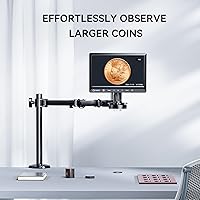
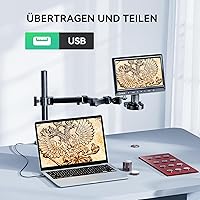
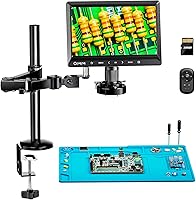
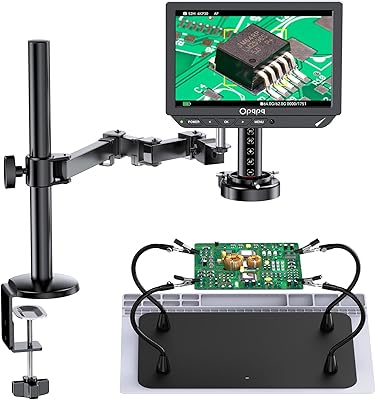
The screen alone changes how you work. At 10 inches with a near-full 178-degree viewing angle, it’s comfortable for extended sessions without hunching over an eyepiece. The flexible boom arm is the other headline feature — four adjustable joints plus integrated cable routing mean you can swing the head over a full-size motherboard and still have both hands free for soldering iron and tweezers. Illumination comes from a ring LED that wraps the lens, keeping shadows out of the frame regardless of component angle. For documentation, 12MP still capture and 1080p video write directly to the included 32GB SD card, and USB output lets you mirror to a laptop or stream live for teaching or remote collaboration.

Best For

This digital inspection microscope hits its stride on a stationary workbench rather than in a carry-on bag — at just over 10 pounds, it’s a dedicated station piece, not a portable tool. It makes the most sense for SMD soldering hobbyists who regularly deal with fine-pitch components and need both hands free while seeing clearly. Coin collectors benefit from the taller stand configuration, which frames an entire large silver dollar without awkward repositioning. Makers or educators who want to broadcast close-up work via USB will find the setup refreshingly uncomplicated. Where it falls short is for anyone needing a lightweight travel solution or the ultra-precise optics of a dedicated metallurgical or stereo microscope.

User Feedback

Electronics users tend to praise the arm’s rigidity once locked and the screen’s brightness at typical soldering distances — the consensus is that the display removes the eye strain that comes with optical eyepieces during long repair sessions. The more common frustration is the initial arm calibration; new users often spend time finding the right joint tension before the head holds position reliably. Coin collectors appreciate the tall post’s field of view but have occasionally noted that fine focus control takes patience at the highest magnification settings. A smaller number of long-term workshop users have raised questions about joint durability over months of daily repositioning. Setup is generally quick, and the bundled accessories add real out-of-box value.

Pros

  • The 10-inch built-in screen means you never need a separate monitor or laptop just to see what you are inspecting.
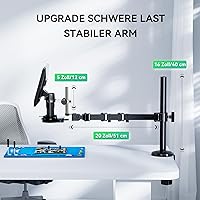
  • Four-joint boom arm holds position firmly once adjusted, keeping the head stable during detailed soldering work.
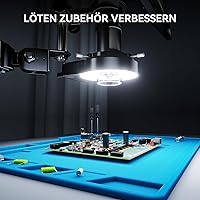
  • Ring LED illumination eliminates shadows across the full field of view, which matters a lot when examining coin surfaces or PCB traces.
  • Comes ready to use out of the box — the included SD card, soldering mat, and controller add genuine value without extra purchases.
  • USB output makes live-streaming or recording inspection sessions straightforward for educators and content creators.
  • The tall stand configuration captures full-coin images of large silver dollars without needing to reframe or reposition the specimen.
  • 1080p video and 12MP stills provide enough resolution for documentation, sharing findings, or archiving inspection records.
  • Integrated cable management keeps the arm tidy and prevents snagging during repositioning, a small but appreciated detail in a busy workspace.

Cons

  • Weighing over ten pounds, this boom-arm microscope is not practical to move between locations or use outside a fixed workstation.
  • Initial arm joint tension calibration has a learning curve — new users often struggle to get consistent hold before finding the right balance.
  • Long-term joint durability under daily heavy repositioning remains a concern reported by some workshop users over extended periods.
  • Maximum magnification performance at the highest settings requires steady hands and careful focus, which takes practice to get right.
  • The physical footprint of the stand and arm is substantial and may feel cramped on a small or cluttered workbench.
  • No wireless connectivity — PC integration relies entirely on a USB cable, which limits flexibility in certain workshop layouts.
  • The coin-collector and electronics use cases share the same hardware but are not equally optimized simultaneously — swapping configurations takes adjustment time.
  • Display quality, while sufficient for inspection work, does not match the sharpness of a dedicated external monitor at comparable screen sizes.

Ratings

The ratings below for the Opqpq ODM702 Flex 10″ Digital Microscope were generated by AI after systematically analyzing verified purchase reviews from buyers worldwide, with spam, bot-submitted, and incentivized feedback actively filtered out before scoring. Each category score reflects the honest balance of what real users praised and where they ran into frustration, without smoothing over the rough edges. Both the strengths that drove repeat recommendations and the pain points that generated hesitation are transparently represented in every scorecard.
Arm Stability & Rigidity
83%
Electronics users working on fine-pitch components consistently praise how firmly the four-joint arm holds its position once tension is set correctly. For soldering sessions that last an hour or more, not having to fight a drifting head makes a tangible difference to both precision and comfort.
The initial calibration process trips up a notable portion of new users, particularly those coming from simpler fixed-arm models. Finding the right joint tension is a trial-and-error process that can take several sessions before it feels intuitive.
Built-in Display Quality
88%
The 10-inch screen consistently earns strong approval from users who previously relied on a separate laptop or monitor to view camera output. Brightness levels hold up well under workshop lighting conditions, and the wide viewing angle means a second person can observe alongside without crowding the eyepiece.
At the highest magnification settings, some users notice that fine image detail softens slightly compared to what an external high-resolution monitor would show. The screen is more than adequate for practical inspection work, but it is not a substitute for a dedicated IPS display if pixel-level clarity is critical.
Magnification Performance
76%
24%
For everyday SMD soldering, PCB trace inspection, and coin surface examination, the working magnification range is genuinely useful and captures detail that naked-eye inspection simply cannot. Electronics hobbyists particularly appreciate how clearly individual solder joints and component markings become visible at mid-range zoom levels.
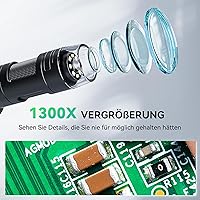
The advertised maximum of 1300x is a combined optical and digital figure, and real-world sharpness at the top end is limited. Users expecting laboratory-grade optical clarity at maximum zoom are routinely disappointed, and at high settings the image can appear soft or noisy under suboptimal lighting.
Boom Arm Flexibility
81%
19%
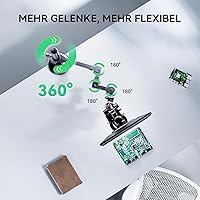
The four-joint design gives the arm a range of motion that rigid-column alternatives cannot match, which is especially appreciated when maneuvering over full-size motherboards or awkwardly shaped assemblies. Cable integration keeps the workspace tidy, which is a small but consistently mentioned detail among organized bench workers.
The arm’s reach has physical limits, and users working on unusually large or overhanging assemblies occasionally find that the positioning envelope is smaller than expected. A minority of long-term heavy users have also flagged that joint resistance gradually decreases with months of aggressive daily repositioning.
Coin Inspection Usability
79%
21%
Coin collectors upgrading from a handheld loupe or a basic clamp stand find the taller post height immediately useful for full-coin framing without repositioning. The ring LED is particularly well-suited to revealing surface texture and die details on both proof and circulated coins.
Switching the setup between coin inspection and soldering work requires repositioning and refocusing, which is not a fast transition. Dedicated numismatists who do not also do electronics work may find the overall form factor more than they need for a single-use case.
LED Ring Illumination
86%
Shadow-free lighting is one of the more quietly appreciated features among both buyer segments — the ring configuration eliminates the directional shadows that single-point light sources produce on reflective coin surfaces and on the metallic pads of circuit boards. Users doing detailed inspection over long sessions report noticeably less eye strain compared to working under bench lighting alone.
A small number of users working with highly reflective coin surfaces note occasional hot-spot glare from the ring LEDs at close working distances. The brightness is fixed rather than continuously adjustable in fine increments, which limits the ability to fine-tune illumination for specific materials.
Image & Video Capture
78%
22%
The combination of 12MP stills and 1080p video provides enough resolution for documentation, client-facing repair reports, and educational content. The included SD card means users can start capturing immediately without hunting for accessories, which consistently earns positive mentions in out-of-box reviews.
Video compression artifacts become visible when reviewing footage on a larger external monitor, and the file management interface via the onboard controller is not as intuitive as users familiar with smartphone cameras would expect. A few buyers noted that transferring files via USB cable is slower than using a card reader directly.
Build Quality & Materials
74%
26%
The overall construction feels solid and appropriately weighted for a bench-mounted tool, and the base provides enough stability that the unit does not rock or shift during normal use. The included soldering mat is a practical addition that protects the work surface and keeps components from sliding.
Some plastic components in the arm assembly feel less premium than the price point might suggest, and a handful of users have reported minor cosmetic inconsistencies on units received. Long-term workshop users have expressed uncertainty about whether the joint hardware will maintain its integrity under years of heavy professional use.
Ease of Setup
84%
The majority of buyers report a fast and uncomplicated initial assembly, with most of the unit arriving pre-assembled and requiring only stand attachment and SD card insertion before first use. Educators and hobbyists who are not technically inclined specifically mention that the process does not require reading through a complex manual.
The one setup step that generates consistent friction is calibrating the boom arm joint tension from scratch, which the manual addresses only briefly. Users coming from simpler fixed-post microscopes sometimes underestimate how much configuration the flexible arm requires before it behaves predictably.
PC Connectivity & Streaming
73%
27%
The USB output works without installing drivers on most modern operating systems, which makes connecting to a laptop for live streaming or screen sharing straightforward enough for non-technical users. Educators using the unit for demonstration purposes particularly appreciate that the live feed can be shared in video conferencing applications with minimal setup.
The unit lacks wireless connectivity entirely, meaning the USB cable tether limits how freely the arm can be repositioned when also connected to a PC. Some users working in tight bench configurations found cable management more complicated when both the power supply and USB data cable were connected simultaneously.
Value for Money
77%
23%
Buyers who compare the ODM702 Flex against camera-only microscopes at similar or lower prices consistently land on the conclusion that the built-in screen, flexible arm, and included accessories represent genuine value as a bundled package. For users who would otherwise need to buy a separate monitor, the all-in-one design justifies the cost difference clearly.
Users who primarily need a coin microscope without the soldering-specific accessories may feel they are paying for features they will not use. A segment of buyers comparing it against higher-end optical alternatives in a similar price range felt the image quality gap was narrower than the feature gap would imply.
Portability & Footprint
41%
59%
For users who intend to leave this digital inspection microscope permanently on a dedicated workbench, the weight and size are non-issues, and the stable base actually functions as an advantage by keeping the unit planted during active use.
At over ten pounds and with a stand configuration spanning more than 13 inches in its base dimension, this boom-arm microscope is genuinely impractical to move between locations. Buyers who need flexibility to work in different rooms, bring equipment to client sites, or store the unit between sessions will find it a poor fit for their workflow.
Controller & Interface
69%
31%
The included handheld remote controller handles the most common functions — capture, zoom adjustment, and playback — without requiring users to touch the microscope head and risk disturbing focus. For solo users doing documentation work, the remote is a practical convenience that removes a common frustration.
The controller interface is not particularly intuitive, and several buyers noted it takes time to memorize which buttons handle which functions without looking down. Menu navigation for settings like resolution and file format feels dated compared to the touchscreen interfaces users are accustomed to on modern devices.
Long-Term Durability
62%
38%
For home hobbyists using the ODM702 Flex a few times per week, the build holds up without reported issues across the review period examined. The ring LED shows no signs of degradation over normal-use timescales, and the display itself has not attracted durability complaints in the buyer feedback analyzed.
Professional repair technicians repositioning the arm dozens of times daily have flagged early-stage loosening of joint resistance as a genuine concern over a multi-month timeframe. The long-term mechanical durability of the flexible joints under heavy commercial use remains the single most cited uncertainty among power users who reviewed the unit.

Suitable for:

The Opqpq ODM702 Flex 10″ Digital Microscope is built for people who do serious close-up work at a fixed bench and want everything in one unit. Electronics hobbyists and repair technicians working with fine-pitch SMD components will get the most out of it — the flexible boom arm keeps both hands free while the built-in screen shows exactly what the soldering iron tip is touching. Coin collectors also fit squarely in the target audience, particularly those handling larger coins that smaller stands struggle to frame without awkward repositioning. Makers, educators, and content creators who want to live-stream or record detailed inspection work will appreciate how straightforward the USB output is to set up. If you are stepping up from a handheld loupe, a basic USB camera microscope, or a low-end model that requires a laptop to view anything, this boom-arm microscope represents a meaningful and practical upgrade.
Not suitable for:

The Opqpq ODM702 Flex 10″ Digital Microscope is not the right tool for everyone, and it is worth being honest about where it falls short. At over ten pounds, it is a permanent desk fixture — anyone expecting to pack it into a bag, move it between rooms regularly, or use it in the field will find the weight and footprint a real inconvenience. Buyers who need optically precise, distortion-free magnification for tasks like gemology, professional metallurgy, or scientific research should look at dedicated stereo or optical bench microscopes instead, as digital sensors at this price tier cannot replicate that level of clarity. The arm’s joint tension requires some patience to dial in, which may frustrate users who want something they can hand to a beginner and expect immediate reliable use. If desk space is limited, the unit’s physical footprint and tall stand configuration can feel imposing in a compact workspace.

Specifications

  • Display: Features a 10-inch built-in LCD screen with a 178-degree viewing angle, allowing comfortable inspection without an external monitor.
  • Magnification: Supports magnification up to 1300x, suitable for examining fine SMD components, PCB traces, and coin surface details.
  • Camera Resolution: Captures still images at 12MP and records video at 1080p full HD without noticeable lag during live viewing.
  • Arm Design: Uses a four-joint flexible boom arm with integrated cable management for stable, hands-free positioning over large work surfaces.
  • Stand Post: Includes a 16-inch primary post plus a 5-inch extension, giving enough height clearance to frame large coins and full-size circuit boards.
  • Light Source: Equipped with a ring LED light that wraps around the lens to provide even, shadow-free illumination across the entire field of view.
  • Storage: Comes with a 32GB SD card included in the box for direct on-device photo and video storage without requiring a connected computer.
  • Connectivity: USB output allows the unit to connect to a PC or laptop for live streaming, screen mirroring, and remote photo retrieval.
  • Power: Operates at 5 volts via USB, making it compatible with standard USB power adapters and powered USB hubs.
  • Weight: The complete unit weighs 10.23 lbs (4.65 kg), making it a fixed-station tool rather than a portable or travel-friendly device.
  • Dimensions: The assembled footprint measures 13.58 x 5.12 x 11.42 inches, requiring a dedicated section of a workbench or desk.
  • Compatible Devices: Works with Windows and Mac laptops and desktop PCs via USB; no proprietary software installation is required for basic connectivity.
  • Included Accessories: Ships with a soldering mat, 32GB SD card, a handheld remote controller, and a lithium-ion battery (pre-installed).
  • Brand and Model: Manufactured by Opqpq under the model designation ODM702 Flex, first made available in June 2024.
  • Viewing Angle: The LCD panel supports a 178-degree real angle of view, reducing color shift and distortion when viewed from off-center positions.

Related Reviews
Opqpq ODM802 Flex 10-inch Digital Microscope
79%
88%
Autofocus Performance
91%
Display Quality
83%
Image Clarity & Zoom Range
72%
Flexible Arm & Positioning
74%
Workstation Accessories
More
Andonstar AD210 10.1 Inch Digital Microscope
83%
91%
Image Quality & Magnification
82%
Usability & Ergonomics
95%
Display Clarity & Viewing Angle
88%
Value for Money
85%
Build Quality
More
LINKMICRO LM210 10.1″ LCD Digital Microscope
82%
89%
Value for Money
91%
Display Quality
85%
Ease of Use
87%
Magnification Performance
83%
Build Quality
More
National Geographic Kids Digital Handheld Microscope
81%
88%
Ease of Use for Kids
83%
Image & Screen Quality
71%
Magnification Performance
79%
Battery Life
91%
Kit Completeness & Value
More
Andonstar AD266S 7-Inch 5-Lens Digital Microscope
74%
83%
Image Clarity
88%
Lens Versatility
81%
Build Quality
79%
Value for Money
76%
LCD Display
More
Ahalfcit Digital Microscope 500X
83%
88%
Magnification Quality
91%
Ease of Use
92%
Portability
83%
Battery Life
89%
Display Quality
More
MAXLAPTER Pocket 100X Digital Microscope
74%
91%
Portability & Form Factor
88%
Ease of Use
63%
Image & Optical Quality
71%
Screen Quality
74%
UV Light Performance
More
TOMLOV DM702 Digital Coin Microscope 10-inch
78%
88%
Display Quality
74%
Magnification Performance
83%
Build Quality & Durability
86%
Lighting System
84%
Stand & Working Space
More
Ninyoon 4K Digital USB Microscope
83%
88%
Image Quality
85%
Ease of Use
90%
Cross-Device Compatibility
80%
Build Quality
91%
Stability of Stand
More
Ashfly 366C 1000x Digital Coin Microscope
75%
74%
Image Clarity at Practical Zoom
83%
Screen Quality
88%
Lighting System
91%
Ease of Setup and Use
61%
Build Quality and Materials
More

FAQ

It works completely on its own. The 10-inch screen is built in, so you can inspect, photograph, and record without ever connecting to a PC. The USB port and PC compatibility are there if you want to stream or pull images onto a larger display, but they are entirely optional.

Most users have it up and running within 15 to 20 minutes. The stand assembly is straightforward, and the included SD card means you can start capturing images right away. The one area that takes a little extra time is dialing in the arm joint tension to your preference, but that is a one-time adjustment.

Once the joints are properly tensioned, the arm holds position reliably during normal soldering and inspection work. The learning curve is in finding that sweet spot during initial setup — too loose and the head drifts, too tight and repositioning becomes effortful. After a session or two, most users find a setting that works well for them.

Yes, the taller stand configuration specifically accommodates larger specimens. The extended post height gives enough working distance to frame a full silver dollar in the field of view without needing to crop or reposition. Smaller coins like dimes naturally show more surrounding detail at that same height.

It is reasonably well-suited for that use case. The USB output lets you mirror the live view to a laptop or desktop, which you can then share via any standard screen-sharing or streaming application. The 1080p video output is clear enough for instructional purposes, though it is not a broadcast-grade solution.

The ring LED is positioned around the lens rather than projecting from a separate arm, so it does not physically obstruct tool access below the head. The even illumination it produces is one of the more practical features for soldering work, since it removes the harsh shadows that make fine-pitch components harder to distinguish.

The footprint is not compact — the base and arm take up a meaningful portion of a standard desk. If your workspace is already crowded with monitors, tools, and equipment, it is worth measuring before buying. Ideally, it performs best when given a dedicated section of a workbench where the arm can swing freely.

This is a genuine question among long-term users. The joints are well-built for casual to moderate daily use, but some heavy users working in professional repair shops have noted that joint tension can loosen over time with constant repositioning. For home hobby use, durability is generally not a concern; for high-volume daily workshop environments, it is worth keeping in mind.

Photos stored on the SD card can be transferred to any computer like a standard memory card — just remove the card and use a card reader, or use the USB cable to access files directly. No proprietary software is needed for basic file transfer, though Opqpq does provide optional PC software for more advanced controls.

Like most digital microscopes in this category, the maximum magnification figure combines optical zoom with digital interpolation. Real-world sharpness at the highest settings depends heavily on lighting, working distance, and how steady the arm is held. Practical, clear magnification for detailed PCB work tends to fall in a lower range where the image remains crisp and usable.