Overview

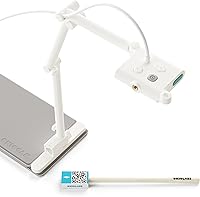
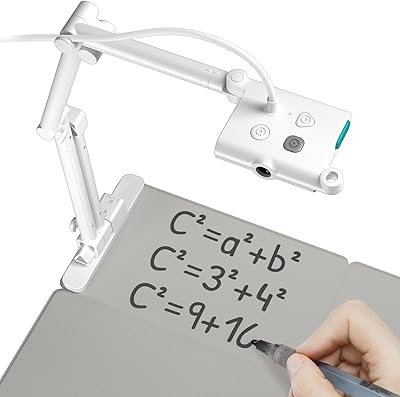
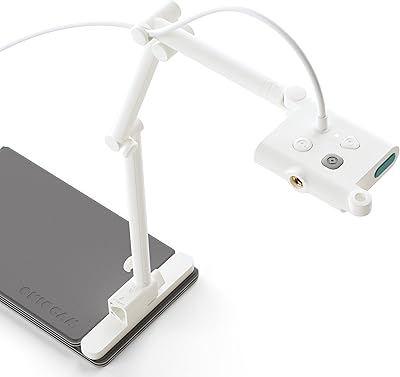
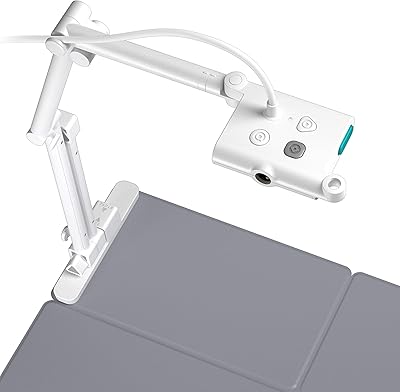
The OKIOLABS OKIOCAM S Plus is a mid-2024 release from a Taiwan-based peripheral maker that has carved out a niche in classroom technology. This document camera doubles as a full webcam, which makes it a practical pick for teachers and remote educators who regularly need to display physical materials — think textbooks, worksheets, or small objects — without juggling two separate devices. It plugs in via USB and works across Windows, Mac, and Chromebook with no driver installation required. The foldable magnetic base and reinforced arm are clearly built with daily classroom handling in mind, not just occasional desk use.

Features & Benefits

At its core, this document camera packs a 5-megapixel CMOS sensor capable of capturing a full Letter or A4 page in a single shot with sharp, readable detail. Video output runs at quad HD and a steady 30 frames per second, which keeps projected text looking crisp rather than blurry during fast page turns. The autofocus button is one of the more practical touches — press it once and the camera snaps to focus, whether you have just swapped a book for a worksheet. The standout software feature is OKIOPoint: it tracks wherever you physically point on the page and slowly zooms the camera to follow, which works better as a teaching aid than a gimmick. The Camera Control app adds manual adjustments for color and sharpness.

Best For

This classroom webcam makes the most sense for K-12 teachers who do a lot of read-alouds, show-and-tell style demonstrations, or any lesson where physical materials need to appear on a projector or shared screen. It is also a smart pick for remote instructors who want one device that handles both video calling and document display — switching between modes is just a matter of repositioning the arm. Chromebook-based schools benefit from the driver-free USB setup, since IT restrictions often make software installations tricky. That said, users who need a standalone microphone or built-in lighting for their setup will need to source those separately, which is worth factoring in before buying.

User Feedback

Buyers generally respond well to this document camera, with image clarity drawing the most consistent praise — several teachers specifically mention being surprised by how sharp the output looks given the price point. The arm and base hold up well in everyday use, according to multiple reviewers. On the flip side, the missing microphone comes up regularly as an inconvenience for teachers who work solo without a separate audio setup. A handful of Mac users on older systems ran into some friction getting the OKIOCAM Live software running smoothly. The OKIOPoint pointer earns genuine enthusiasm from classroom users, though a few note it takes some practice to use naturally. With roughly 97 ratings and a 4.2 average, it lands as a reliable but imperfect option.

Pros

  • Image sharpness on full-page documents is noticeably strong for a camera in this price range.
  • Plug-and-play USB setup works on Windows, Mac, and Chromebook with zero driver installation required.
  • The reinforced arm and foldable magnetic base hold up well under daily classroom use.
  • OKIOPoint tracking in the software adds genuine interactivity to live lessons without requiring extra hardware.
  • Quad HD video at 30fps keeps projected text and detail clear during live streaming or conferencing.
  • Button-triggered autofocus handles quick material swaps smoothly enough for most classroom pacing.
  • The multi-jointed arm offers enough positioning range for overhead document capture, object display, and webcam mode.
  • Bundled software includes annotation, recording, and image adjustment tools at no extra cost.
  • Driver-free operation makes deployment in locked-down school IT environments straightforward.
  • Folding design makes it portable enough to carry between classrooms or between home and school.

Cons

  • No built-in microphone forces solo presenters to buy and manage a separate audio device.
  • No integrated light source means image quality degrades significantly in dim or unevenly lit rooms.
  • OKIOCAM Live software has caused setup problems for users on older Mac operating systems.
  • Arm repositioning requires adjusting multiple joints individually, which can feel slow mid-lesson.
  • The arm can drift slightly at certain angles rather than holding its position firmly under camera weight.
  • OKIOPoint tracking misfires in variable lighting or when used with reflective printed materials.
  • White plastic housing picks up smudges and surface scuffs noticeably with regular handling.
  • Video recording through the software is unreliable on lower-spec machines, with occasional dropped frames reported.
  • Viewing area tops out at a standard Letter or A4 sheet, limiting use with larger format materials.
  • Continuous autofocus is not available — every refocus requires a manual button press during live use.

Ratings

The OKIOLABS OKIOCAM S Plus scores below are generated by AI after analyzing verified buyer reviews from multiple global sources, with spam, bot activity, and incentivized feedback actively filtered out. This classroom webcam earns genuinely strong marks in several key areas, but the analysis does not shy away from the real frustrations that a meaningful portion of buyers have reported. Both what works well and what falls short are reflected transparently in every category score.
Image Clarity
88%
Teachers and remote instructors consistently highlight how sharp and readable printed text appears when displayed on a projector or shared screen. Full-page capture without losing fine detail — such as small handwritten notes or diagram labels — is a recurring point of satisfaction among classroom users.
In lower ambient light conditions, some buyers report a noticeable drop in sharpness, particularly when capturing objects rather than flat documents. Without a built-in light source, the camera leans heavily on room lighting quality, which is not always reliable in real classroom environments.
Build Quality & Durability
84%
The glass-fiber reinforced arm and foldable magnetic base hold up well under the kind of daily handling that classroom gear endures — repeated folding, repositioning, and occasional knocks. Multiple reviewers specifically mention the arm feeling more solid than expected given the price point.
A small number of users note that the hinges feel slightly stiff right out of the box, requiring a break-in period before adjustments feel fluid. The white plastic housing, while clean-looking, shows smudges and minor scuffs more readily than darker alternatives might.
Ease of Setup
91%
Plug-and-play USB operation is genuinely simple — most users report being up and running within minutes on Windows, Mac, and Chromebook without touching a driver download page. This is a meaningful advantage in school environments where IT gatekeeping can delay new hardware deployments significantly.
The OKIOCAM Live companion software adds friction for a portion of users, particularly those on older Mac systems who encounter compatibility hiccups during initial configuration. The hardware works fine without the software, but users who want the full feature set may need some patience at first launch.
OKIOPoint Smart Pointer
73%
27%
Teachers who incorporate the OKIOPoint feature into live lessons report that it genuinely helps direct student attention — pointing at a section of a textbook and having the camera slowly zoom in is more engaging than simply gesturing off-screen. For classroom read-alouds, it adds a layer of interactivity that static cameras simply cannot offer.
The feature works best in well-lit, controlled environments; in variable lighting or when pointing at highly reflective materials, the tracking can lag or misfire. There is also a learning curve — users who do not watch the tutorial video first often find the behavior confusing during their first few sessions.
Autofocus Performance
82%
18%
The button-triggered autofocus is snappy enough to handle quick transitions between a printed worksheet and a physical object sitting on the desk without making the audience wait awkwardly. The AFC and AFS mode options give experienced users meaningful control over how the camera handles focus during movement.
Unlike cameras with continuous autofocus, this one requires a deliberate button press to refocus, which can feel disruptive mid-demonstration if you forget. In fast-paced live sessions, that half-second pause to press and refocus is occasionally noticeable on the audience end.
Software Experience
67%
33%
OKIOCAM Live bundles annotation tools, video recording, and the OKIOPoint pointer into a single free application, which removes the need to juggle third-party software for basic classroom presentation tasks. The Camera Control app gives users finer control over color temperature and contrast than most competing cameras at this tier allow.
The software interface feels dated compared to modern education tools, and the learning curve is steeper than the plug-and-play hardware experience would suggest. Older Mac users in particular report version compatibility issues that OKIOLABS has been slow to address through updates.
Webcam Functionality
76%
24%
As a standard webcam for video conferencing, this document camera performs solidly — quad HD video at a consistent 30 frames per second translates to a noticeably cleaner image on Zoom or Google Meet compared to most built-in laptop cameras. Remote instructors appreciate having one device that serves both document display and face-to-camera duties.
The lack of a built-in microphone is a real gap for users who want a single-device solution for remote teaching. Anyone running a solo setup will need a separate mic, which adds cost and desk clutter that somewhat undermines the appeal of a 2-in-1 device.
Compatibility
93%
Cross-platform USB compatibility with Windows, Mac, and Chrome OS works as advertised, with no reported issues on standard configurations across all three. For Chromebook-heavy school districts where software installation is often locked down, the driver-free operation is a practical necessity rather than a nice-to-have.
Compatibility is strong on current operating systems but thins out on legacy hardware, particularly older Mac models running pre-Monterey versions of macOS. Users pairing the camera with non-standard video conferencing platforms occasionally report needing manual resolution adjustments.
Viewing Area Coverage
86%
Capturing a full Letter or A4 page in a single frame without repositioning is something buyers returning from cheaper, narrower-angle cameras notice immediately. For teachers working with standard workbooks or printed handouts, this coverage means no awkward scrolling or cropping mid-lesson.
The maximum viewing area works well for standard documents but feels limiting when users try to capture larger format materials like poster boards or oversized reference sheets. Those expecting to display anything significantly larger than a standard sheet will need to pull the arm up and zoom out, sometimes at the cost of fine detail.
Value for Money
79%
21%
At its price point, the combination of quad HD capture, a functional companion software suite, and genuinely durable construction is competitive. Buyers comparing it against Ipevo or HUE options in the same range often note that the software features here are more developed than those bundled with similarly priced rivals.
The absence of a built-in microphone and light, features that some competing models include at similar prices, makes the value calculation less straightforward than it initially appears. Buyers who need those components are effectively paying extra on top of the purchase price to reach full functionality.
Portability & Storage
72%
28%
The foldable magnetic base collapses the unit down to a manageable footprint that fits in a teacher bag or laptop carry case without much trouble. Educators who move between classrooms or carry equipment between home and school find the fold-down design practical for everyday transport.
At nearly 15 ounces fully assembled, it is not the lightest option in the category, and the folded profile is still bulkier than compact competitors designed specifically for portability. The magnetic base, while clever, occasionally detaches unexpectedly during transport if the bag is handled roughly.
Arm Flexibility & Positioning
81%
19%
The multi-jointed arm gives users a wide range of positioning options — overhead document capture, angled object display, and forward-facing webcam mode are all achievable without tools or adapters. Teachers who regularly switch between display modes during a single lesson find this flexibility genuinely useful.
The arm requires deliberate adjustment at each joint rather than fluid repositioning, which can feel slow during a live lesson when you need to switch angles quickly. Some users also note that the arm does not lock perfectly at every angle, occasionally drifting slightly under the camera's own weight.
Video Recording Quality
74%
26%
Built-in MP4 recording through the OKIOCAM Live software is a handy feature for educators who record lessons for asynchronous viewing. The output quality is good enough for standard classroom use — text is legible and demonstrations are clear when played back on a standard monitor.
Recording quality is dependent on software stability, and users on older systems report occasional dropped frames or file corruption during longer recordings. There is also no onboard storage, meaning recording requires a live connection to a computer, which limits flexibility for fieldwork or offsite use.
Lighting Adaptability
58%
42%
The f/2.2 aperture provides reasonable light intake for a camera in this class, and in a well-lit room with natural or overhead fluorescent lighting it produces clean, bright images without exposure adjustment. Buyers in modern, well-windowed classrooms rarely report issues with the default exposure settings.
In dimly lit conference rooms, evening teaching setups, or spaces with overhead backlighting, the image degrades noticeably — and unlike some competitors, there is no built-in ring light to compensate. This is one of the more consistent buyer frustrations in the review pool, particularly from home office users who do not control their lighting environment.

Suitable for:

The OKIOLABS OKIOCAM S Plus is a strong fit for K-12 teachers who regularly need to display physical materials — textbooks, worksheets, student work samples — on a projector or shared screen during live lessons. Remote and hybrid instructors who want a single device that handles both document display and face-to-camera video calls will find the 2-in-1 setup genuinely practical rather than gimmicky. Schools running Chromebook fleets benefit particularly from the driver-free USB connection, since getting new hardware approved through IT can be a bureaucratic slog and plug-and-play devices sidestep that entirely. Professionals who walk clients or colleagues through printed materials, physical prototypes, or detailed reference documents during video conferences will also find the image quality more than adequate for that purpose. If you want functional presentation software included without paying extra, the bundled OKIOCAM Live and Camera Control apps cover annotation, recording, and color adjustments at no additional cost.
Not suitable for:

The OKIOLABS OKIOCAM S Plus is not the right pick for anyone expecting a fully self-contained streaming or teaching setup out of the box. There is no built-in microphone, so solo presenters and remote teachers who do not already own a separate audio solution will need to factor that additional purchase into their budget. There is also no integrated ring light, meaning anyone working in a dim home office, basement classroom, or poorly lit conference room will struggle with image quality unless they invest in supplementary lighting. Users on older Mac hardware should be aware that the companion software has caused friction for a portion of buyers during initial setup, and OKIOLABS has not been rapid with compatibility patches. Anyone looking to capture materials significantly larger than a standard sheet of paper — oversized prints, poster boards, or large engineering drawings — will find the viewing area restrictive. Finally, buyers who prioritize continuous autofocus for fast-moving demonstrations may find the button-triggered refocus system interruptive during high-tempo sessions.

Specifications

  • Sensor: The camera uses a 5-megapixel CMOS sensor capable of capturing fine printed detail across a full Letter or A4 page.
  • Max Resolution: Still image resolution reaches up to 2592x1944 pixels, providing clear capture of text, diagrams, and handwritten notes.
  • Video Output: Video streams at QHD 1944p resolution and a steady 30 frames per second, suitable for live projection and video conferencing.
  • Viewing Area: The maximum capture area covers a standard Letter or A4 sheet, measuring approximately 13.6″ x 11″ at full width.
  • Aperture: The lens aperture is f/2.2, allowing reasonable light intake in normally lit classroom and office environments.
  • Autofocus System: Focus is triggered manually via a dedicated button, with AFC (continuous) and AFS (single-shot) mode switching available.
  • Connectivity: The camera connects via USB and operates as a plug-and-play device requiring no driver installation on supported systems.
  • Compatibility: Fully compatible with Windows, macOS, and Chrome OS, as well as most interactive display operating systems used in schools.
  • Arm Material: The adjustable arm is constructed from glass-fiber reinforced material and has been lab-tested to endure over 10,000 hinge rotations.
  • Base Design: The base is foldable and uses a magnetic attachment mechanism, allowing quick setup and collapse for transport or storage.
  • Weight: The assembled unit weighs approximately 12.8 oz (363g), making it manageable for daily carry between classrooms.
  • Dimensions: When fully set up, the camera measures approximately 13.35 x 7.95 x 11.93 inches across its operating footprint.
  • Microphone: There is no built-in microphone; users requiring audio capture must connect a separate microphone or use their device's built-in mic.
  • Lighting: No integrated ring light or illumination source is included; adequate ambient or room lighting is required for optimal image quality.
  • Software Included: The camera ships with access to OKIOCAM Live for presentation and annotation, and OKIOLABS Camera Control for image adjustment settings.
  • OKIOPoint Feature: OKIOPoint is an AI-assisted pointer tool within OKIOCAM Live that zooms and tracks the camera feed based on where the user physically points.
  • Video Format: Recorded video output is saved in MP4 format when using the OKIOCAM Live software on a connected computer.
  • Release Date: The product became commercially available in July 2024, making it one of the more recent entries in the mid-range document camera segment.

Related Reviews

OKIOLABS OKIOCAM T Plus USB Camera
85%
88%
Ease of Setup
91%
Image Clarity
94%
Portability/Size
90%
Interactivity Features (Dry-Erase Board)
83%
Build Quality
More
OKIOCAM S-4K
OKIOCAM S-4K
77%
88%
Image Quality
93%
Portability & Design
94%
Ease of Setup
82%
OKIOPoint AI Pointer
71%
Software & Companion App
More
Fodsports M1-S Plus Motorcycle Bluetooth Headset
85%
88%
Sound Quality
91%
Noise Cancellation
89%
Battery Life
86%
Ease of Use
84%
Build Quality
More
Perspirex Plus Men’s Antiperspirant 0.88oz
85%
91%
Effectiveness for Sweat Control
88%
Skin Compatibility (Sensitive Skin)
90%
Longevity of Protection (Up to 5 Days)
85%
Ease of Application
87%
Non-Scented Formula Compatibility
More
OKIOLABS OKIOCAM T-4K
79%
91%
Image Quality
94%
Ease of Setup
88%
Portability & Design
89%
Viewing Area Coverage
83%
OKIOPoint AI Pointer
More
Gillette Sensor2 Plus Pivoting Head Men′s Disposable Razors 10 Count
89%
91%
Shaving Smoothness
88%
Irritation Reduction
93%
Grip Comfort
90%
Pivot Head Flexibility
76%
Blade Durability
More
S.M.S.L AD18 HiFi Stereo Amplifier
85%
91%
Sound Quality
88%
Ease of Use
92%
Bluetooth Performance
85%
Build Quality
90%
Size and Portability
More
S.M.S.L SA300 HiFi Digital Amplifier
85%
89%
Sound Quality
90%
Build Quality
75%
Bluetooth Connectivity
88%
Ease of Use
92%
Value for Money
More
G.B.S Complete Men’s Wood Shaving Set
82%
89%
Shaving Performance
74%
Ease of Use for Beginners
91%
Material Quality
88%
Durability of Razor & Strop
85%
Design & Aesthetics
More
S.M.S.L A50 PRO HiFi Power Amplifier
86%
91%
Sound Quality
89%
Build Quality
95%
Subwoofer Control
88%
Connectivity Options
84%
Ease of Use
More

FAQ

Yes, the hardware itself is fully plug-and-play on Chromebook — just connect via USB and it shows up as a camera source in Google Meet, Zoom, or any other web-based conferencing tool. The OKIOCAM Live software does have a Chrome-compatible version if you want the extra presentation features, but it is not required for basic use.

Absolutely. The camera switches between document display and forward-facing webcam mode simply by repositioning the arm. It shows up as a standard USB camera in any conferencing app, and the quad HD video quality is noticeably better than most built-in laptop cameras.

There is no built-in microphone, which is one of the more common buyer surprises with this unit. For remote teaching or conferencing, you will need to rely on your laptop or computer's built-in mic, or invest in a separate USB or Bluetooth microphone. It is worth factoring that into your setup cost upfront.

OKIOPoint works through the OKIOCAM Live software. When you physically point at a section of a document or book below the camera, the software detects your pointer and gradually zooms the camera feed to follow it. It is more of a teaching aid for drawing student attention than a fully autonomous tracking system — and it works best in steady, well-lit conditions.

The arm holds its position well for the majority of users, and the glass-fiber reinforced construction is more rigid than the plastic arms you find on cheaper alternatives. That said, a small number of users have noted slight drift at more extreme angles, particularly when the arm is extended fully. For standard overhead document capture, stability is generally not an issue.

The hardware itself will work fine as a plug-and-play USB camera on older Macs. The OKIOCAM Live software is where some users on pre-Monterey or older macOS versions have run into compatibility friction. If you are on an older system, it may be worth checking the OKIOLABS website for current software requirements before purchasing.

The OKIOLABS OKIOCAM S Plus captures up to a standard Letter or A4 page — roughly 13.6″ x 11″ — in a single frame at its widest setting. Anything larger than that, like a poster or oversized worksheet, will require you to either pull the arm higher or capture it in sections.
No proprietary software is required for basic camera operation. It works natively as a USB camera in Zoom, Teams, Google Meet, OBS, and other standard applications. The OKIOCAM Live and Camera Control apps are optional additions that unlock annotation, recording, and the OKIOPoint pointer feature.

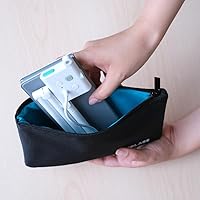
It is reasonably portable — the magnetic base folds flat and the arm collapses down to a manageable size that fits in a teacher bag alongside a laptop. At just under a pound, it is not as light as the most travel-focused document cameras on the market, but it is far from cumbersome for daily room-to-room movement.

There is no built-in light, so you will need an external solution if your room has poor or uneven lighting. A simple USB-powered LED desk lamp or a small ring light positioned near the document area works well. This is probably the most common workaround buyers use, and it adds only a modest cost to the overall setup.