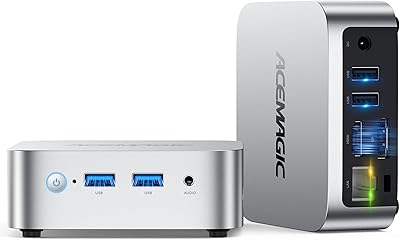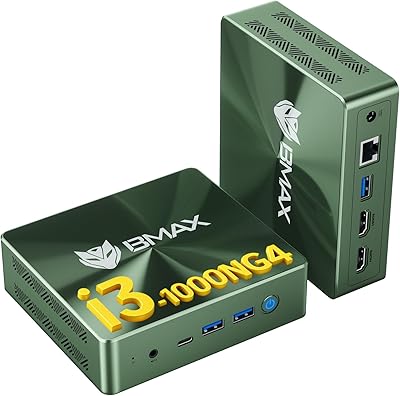


Overview

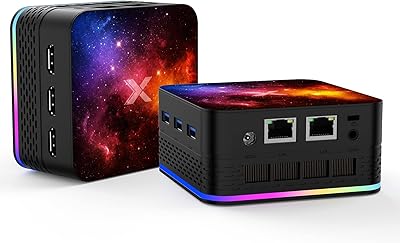
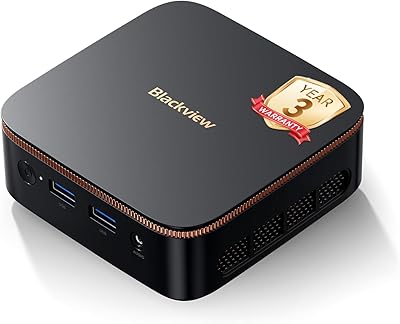
The Bmax B3 256GB Mini PC is a compact, no-frills desktop aimed squarely at budget-conscious users who want to reclaim desk space without sacrificing everyday functionality. Running on Intel's 11th Gen N5095 chip with 8GB DDR4 RAM and a genuine PCIe SSD, this mini PC sits in a crowded but practical segment of the market. It is not trying to compete with productivity powerhouses — it is built for light daily computing, whether that means browsing, video calls, or casual streaming. The inclusion of dual HDMI outputs supporting 4K resolution is a genuine differentiator at this tier, and the VESA mount option makes it easy to tuck the whole unit behind a monitor entirely.

Features & Benefits

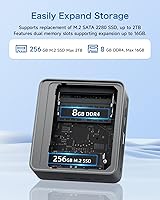
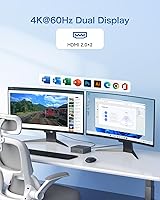
The N5095 processor is not a speed demon — but for what most people actually do on a computer day-to-day, it holds up well. Boot times are quick thanks to the PCIe SSD storage, which reads at over 500MB/s and feels noticeably snappier than the eMMC drives found in cheaper alternatives. Connecting two 4K monitors is genuinely plug-and-play via the two HDMI 2.0 ports, a feature that sets this compact desktop apart from many rivals in its class. The Auto Power On and Wake on LAN functions are useful for shared office environments or always-on setups. One practical bonus: the SSD can be swapped out for up to 2TB, giving this machine a longer useful life than its modest specs might initially suggest.

Best For

This mini PC hits its stride in roles where raw processing power is not the priority. It is an easy recommendation for home office workers who want a tidy, dual-monitor desk setup without the bulk of a tower. Students handling documents, video calls, and light research will find it more than adequate. The auto power-on feature makes it worth considering for digital signage or always-on kiosk deployments. It also works surprisingly well as a living room media player, quietly tucked behind a TV and capable of pushing 4K content without issue. Where it falls short is anywhere demanding — video editing, heavy multitasking, or resource-intensive software will quickly expose the processor's ceiling.

User Feedback

Buyers generally appreciate the quiet operation and the responsive feel of the SSD — first impressions tend to be positive, and the out-of-box Windows setup earns praise from users who wanted something simple to get running fast. On the critical side, some owners report that performance drops noticeably when several browser tabs, a video call, and background processes run simultaneously. Occasional concerns about long-term build quality and thermal throttling during extended sessions also surface in reviews. One detail worth flagging: the listing contradicts itself on Bluetooth version, claiming 5.0 in the title but 4.2 in the specs — something that has caught buyers off guard. The RAM also appears to be soldered, limiting future upgrade paths.

Pros

  • Dual 4K HDMI outputs are rare and genuinely useful at this price point.
  • The PCIe SSD makes boot times and app launches feel snappy compared to eMMC-based rivals.
  • Extremely compact form factor with VESA mount support keeps desks clean and uncluttered.
  • Auto Power On and Wake on LAN make it practical for shared office or always-on environments.
  • SSD is user-upgradeable up to 2TB, which meaningfully extends the machine's usable life.
  • WiFi 5 and Ethernet are both included, giving flexible connectivity options out of the box.
  • The fan runs quietly under typical loads, making it unobtrusive in living rooms or quiet offices.
  • Out-of-box Windows setup is straightforward, and most buyers report being up and running quickly.
  • At its price, offering a genuine PCIe SSD instead of slower flash storage is a real advantage.
  • The 12-month warranty and 30-day return window provide reasonable post-purchase protection.

Cons

  • Performance drops noticeably when multitasking beyond light workloads — the processor has a low ceiling.
  • RAM appears to be soldered, so 8GB is what you get for the life of the machine.
  • Bluetooth version is inconsistently listed as both 4.2 and 5.0 across the product page — a credibility issue.
  • Thermal throttling under sustained load has been reported by buyers running the unit for extended periods.
  • Build quality concerns have surfaced in longer-term owner reviews, suggesting durability may not be premium.
  • Only four USB ports total, split between USB 2.0 and 3.0, which can feel limiting with multiple peripherals.
  • No Thunderbolt or USB-C port, restricting connectivity options for modern accessories.
  • Intel UHD integrated graphics cap out quickly — anything beyond 4K video playback is off the table.
  • The Bmax brand has limited name recognition and independent repair or support options are scarce.
  • 256GB base storage fills up faster than expected once Windows, apps, and files accumulate.

Ratings

The Bmax B3 256GB Mini PC earned its scores through AI-driven analysis of verified global buyer reviews, with spam, bot activity, and incentivized feedback actively filtered out before any rating was calculated. The results reflect an honest picture of where this compact desktop genuinely delivers and where real buyers have run into friction — no cherry-picking, no inflated averages. Both the strengths that keep repeat customers satisfied and the pain points that generate negative follow-up reviews are transparently represented below.

Value for Money
78%
22%
For budget-conscious buyers, the combination of a PCIe SSD, dual 4K HDMI outputs, and a Windows license in a compact chassis represents strong purchasing power at this tier. Most owners feel they got more hardware than expected for what they paid, particularly when comparing it against similarly priced eMMC-based alternatives.
The value equation weakens for anyone who outgrows the fixed 8GB RAM, since that limitation cannot be resolved by spending more money later. Buyers who eventually need more performance have to replace the unit entirely rather than upgrade it, which can make the initial savings feel short-lived.
Everyday Performance
67%
33%
For the daily routine of browsing, video calls, streaming, and cloud-based apps, this mini PC holds its ground without obvious stuttering or delays. Boot times are genuinely quick thanks to the PCIe SSD, and light multitasking — say, a few browser tabs alongside a document — runs acceptably well for most users.
Stack more than four or five active browser tabs alongside a video call and background system processes, and the N5095 starts to feel its limits quite fast. Users doing anything moderately intensive — even just running antivirus scans in the background during normal work — report noticeable slowdowns that break the sense of smooth operation.
Build Quality
61%
39%
The chassis feels adequately solid for a budget device and does not flex or creak during normal handling. The compact plastic shell is light without feeling dangerously flimsy, and the overall construction is sufficient for a machine that mostly sits on a desk or mounts behind a monitor untouched.
Longer-term owner reviews paint a less optimistic picture, with some buyers noting that the unit shows wear faster than expected after six to twelve months of continuous use. A few reviewers have raised concerns about port tolerances and connector fit degrading over time, which is a reasonable worry for an always-on desktop.
Thermal Management
54%
46%
Under typical light workloads, the internal fan stays quiet and the chassis remains comfortable to the touch, which is all most users will ever experience during everyday use. For low-demand scenarios like media playback or document work, heat is simply not a noticeable factor.
Sustained heavier tasks — extended video encoding, prolonged high-tab browsing sessions, or leaving resource-intensive background processes running — can push the processor into thermal throttling, where the system intentionally slows itself down to prevent overheating. Several buyers have reported this behavior appearing sooner than expected, which compounds the existing performance limitations of the N5095 chip.
Connectivity
82%
18%
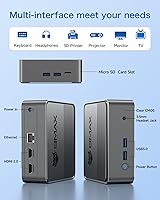
The port selection covers the essentials well for a machine this size: dual HDMI, four USB ports, Ethernet, audio jack, and built-in WiFi 5 all ship standard. Most users can set up a complete two-monitor workspace with keyboard, mouse, and headset without needing a single adapter or hub.
The four USB ports can feel limiting for power users who run a full peripheral ecosystem — a keyboard, mouse, webcam, external drive, and USB audio interface together exhaust the available slots quickly. There is no USB-C or Thunderbolt port, which increasingly feels like an omission as modern accessories migrate to that standard.
Display Output
86%
Dual 4K 60Hz output via two HDMI 2.0 ports is the standout hardware feature of this compact desktop, and it works reliably in practice. Home office users and students who run a two-monitor setup report that both displays connect and activate without driver fuss, which is not always the case at this price point.
The Intel UHD integrated graphics handle display output and basic video decoding well enough, but they offer no headroom for anything beyond that — color-graded video editing, even casual gaming above 1080p, or GPU-accelerated design tools all quickly hit a hard ceiling. Users expecting the 4K capability to extend into graphical work will be disappointed.
Wireless Performance
73%
27%
WiFi 5 delivers consistent, stable throughput for streaming, video calls, and general browsing in typical home and small office environments. The inclusion of both WiFi and Ethernet gives users flexibility depending on their setup, and the wireless connection stays reliable within normal range of a router.
WiFi 5 is not the newest standard, and in dense wireless environments with many competing devices, performance can become inconsistent. The Bluetooth version discrepancy in the listing — advertised as 5.0 in the title but documented as 4.2 in the specs — is an unresolved credibility issue that has frustrated buyers who specifically chose this unit for its wireless peripheral compatibility.
Setup Experience
81%
19%
Most buyers describe the out-of-box experience as straightforward: plug in the HDMI cables, connect power, and Windows guides you through the rest within a few minutes. The one-click recovery feature is a thoughtful inclusion that gives less technical users a safety net if something goes wrong down the line.
A handful of users report inconsistencies in the pre-installed Windows configuration — occasional bloatware, activation status questions, or initial driver issues that require a bit of troubleshooting. These are not universal complaints but appear often enough in reviews to suggest quality control is not perfectly consistent across units.
Noise Level
84%
During everyday use, the active cooling fan is barely perceptible — quiet enough that users in shared living spaces and open-plan offices consistently mention not noticing it. For living room media player use cases, the low ambient noise is a practical advantage over larger desktop systems.
Under heavier processor load the fan spins up audibly, which is expected behavior but can be jarring if you have come to rely on the quiet baseline. The transition from near-silent to noticeably louder happens relatively quickly once the system is under pressure, which can be distracting during sensitive audio work or late-night use.
Upgradeability
57%
43%
The PCIe SSD is user-replaceable and supports drives up to 2TB, which is a meaningful long-term option for users who need more storage and are comfortable with basic hardware work. That single upgrade path provides a reasonable way to extend the useful life of the machine without full replacement.
The RAM being soldered to the board is the most consequential design limitation for long-term owners — 8GB is the ceiling, full stop, with no workaround. Beyond the SSD, there are no practical internal upgrade paths, which means the machine's performance ceiling is permanently fixed from day one of ownership.
Software & OS
74%
26%
Windows comes pre-installed and functional, and the one-click OS recovery system is genuinely useful for non-technical users who want a fast reset option without reinstalling from scratch. The machine runs standard Windows applications without compatibility concerns, which makes onboarding easy for most buyers.
Some units have shipped with pre-installed software configurations that felt incomplete or inconsistently activated, raising questions among buyers about the legitimacy of the Windows license. This is not universal but appears periodically in reviews, and it is worth verifying activation status immediately after setup.
Portability & Form Factor
88%
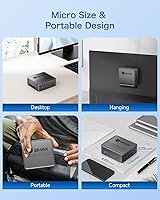
At just 1.37 pounds and with a footprint smaller than a hardcover book, this compact desktop can sit flat on a desk, stand vertically, or mount flush behind a monitor using the included VESA bracket. The form factor genuinely solves the desk clutter problem it was designed to address.
The very compact size does impose real thermal and upgradeability constraints that buyers should understand before purchasing. And while it is physically easy to move, it is still a desktop that requires power and cables — it is not a portable device in any practical sense, just a small one.
Warranty & Support
63%
37%
A 12-month manufacturer warranty and a 30-day no-questions-asked return window provide a reasonable safety net compared to some competitors in this price bracket. Buyers who purchase through major retail platforms gain an additional layer of protection through the platform's own return policies.
Bmax customer support is email-only with no phone or live chat option, and response quality appears inconsistent based on buyer reports. For a brand with limited independent repair infrastructure, this means any issue outside the return window can become a slow and frustrating resolution process.

Suitable for:

The Bmax B3 256GB Mini PC is a genuinely practical choice for anyone whose computing needs revolve around everyday tasks rather than demanding workloads. Home office workers who want a tidy, dual-monitor setup without a tower taking up half their desk will find a lot to like here — the dual 4K HDMI outputs alone make it stand out at this price tier. Students who primarily write papers, attend video lectures, or use cloud-based tools will get reliable daily performance without spending more than necessary. It also works well as a secondary household PC, a dedicated media player connected to a living room TV, or even a digital signage terminal where the auto power-on feature earns its keep. If your expectations are calibrated around light, consistent use rather than speed records, this compact desktop delivers solid value.

Not suitable for:

The Bmax B3 256GB Mini PC is not the right tool for anyone who pushes a computer hard. The N5095 processor is a budget-tier chip, and it will start to struggle visibly when you stack multiple demanding browser sessions, video editing software, or anything compute-intensive on top of each other — thermal throttling under sustained load has been flagged by real buyers. The RAM appears to be soldered to the board, which means you cannot upgrade memory later if 8GB starts feeling tight, and that is a meaningful long-term limitation. Creative professionals, developers running local environments, or gamers should look elsewhere entirely. There is also a credibility concern worth noting: the listing inconsistently advertises both Bluetooth 4.2 and 5.0 in different sections, which suggests the product documentation has not been carefully verified — a small but telling detail for buyers who care about accuracy.

Specifications

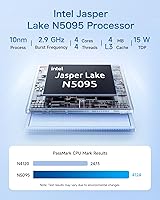
  • Processor: The Intel N5095 is a quad-core 11th Gen Jasper Lake chip running at up to 2.9GHz, suited for light to moderate everyday computing tasks.
  • RAM: 8GB of DDR4 memory is included and appears to be soldered to the board, meaning it cannot be upgraded after purchase.
  • Storage: A 256GB PCIe SSD with read speeds exceeding 500MB/s is installed, and the slot supports user-replaceable drives up to 2TB.
  • Graphics: Intel UHD integrated graphics handle everyday display output and 4K video playback, but are not suitable for gaming or GPU-accelerated work.
  • Display Output: Two HDMI 2.0 ports support simultaneous dual-monitor output at up to 4K 60Hz resolution.
  • USB Ports: Four USB ports are included: two USB 3.0 and two USB 2.0, providing basic peripheral connectivity.
  • Wireless: WiFi 5 (802.11ac) is built in, supporting dual-band wireless networking for reliable home and office connectivity.
  • Bluetooth: Bluetooth is included, though the version is inconsistently documented across the listing — 4.2 appears in the detailed specs while 5.0 is cited in the product title.
  • Ethernet: A single RJ45 Gigabit Ethernet port is included for wired network connections.
  • Audio: A 3.5mm stereo headset jack provides combined headphone and microphone connectivity.
  • Dimensions: The unit measures 9.09 x 5.59 x 2.6 inches, making it small enough to mount behind a monitor using the included VESA bracket.
  • Weight: The Bmax B3 weighs 1.37 pounds, light enough to be VESA-mounted without stressing a monitor arm.
  • Operating System: Windows comes pre-installed, and the machine supports a one-click recovery feature for restoring the OS to factory state.
  • Special Features: Auto Power On and Wake on LAN are supported, enabling scheduled startups and remote power management without manual intervention.
  • Cooling: An internal active fan provides cooling; under typical workloads the fan runs quietly and is unlikely to be noticeable in a quiet room.
  • Power Source: The unit is powered via a DC adapter and does not have an internal battery or UPS capability.
  • Warranty: Bmax provides a 12-month manufacturer warranty along with a 30-day no-questions-asked return window.
  • Form Factor: Classified as a mini PC desktop, the chassis is designed for desk placement or rear-monitor mounting via the VESA mount standard.

Related Reviews

Beelink Mini S12 Mini PC
78%
88%
Value for Money
82%
Performance for Daily Tasks
79%
Build Quality & Design
91%
Dual Monitor Support
84%
Thermal Management & Noise
More
KAMRUI E2 Mini PC, 16GB RAM, 256GB SSD
85%
87%
Performance
92%
Value for Money
84%
Build Quality
88%
Ease of Setup
80%
Connectivity
More
OASLOA T9PRO Mini PC 8GB RAM 256GB SSD
81%
86%
Performance
88%
Build Quality
92%
Energy Efficiency
83%
Display Quality (4K Support)
89%
Connectivity
More
HEIGAOLAPC Mini PC 12th Gen N100 16GB RAM 256GB Storage
85%
88%
Performance
92%
Value for Money
90%
Portability
87%
Connectivity
93%
Setup and Installation
More
MINISFORUM GK41 Mini PC Celeron J4125 8GB RAM 256GB SSD
85%
87%
Performance for Everyday Use
91%
Dual Display & Video Output
82%
Build Quality
75%
Storage Expansion Flexibility
94%
Size & Portability
More
Blackview MP20 Mini PC (Intel N150, 8GB RAM, 256GB SSD)
79%
78%
Everyday Performance
84%
Value for Money
61%
RAM Adequacy
73%
Storage & Expandability
81%
Build Quality & Design
More
GMKtec Nucbox G2 Plus Mini PC Intel N150 12GB RAM 256GB SSD
85%
88%
Performance for Everyday Use
91%
Connectivity Options
93%
Multi-Display Support
94%
Energy Efficiency
85%
Size & Portability
More
HIGOLEPC Mini PC Win 11 Pro Celeron N5095 16GB RAM 256GB Storage
83%
76%
Overall Performance
92%
Value for Money
94%
Compactness/Size
85%
Build Quality
90%
Noise Level
More
ACEMAGIC Vista Mini V1 (N150, 16GB/256GB)
78%
83%
Performance for Daily Tasks
81%
Build Quality & Design
62%
Storage Speed & Configuration
54%
RAM & Upgradeability
88%
Display & Multi-Monitor Support
More
Bmax B6 Plus 12GB/512GB
79%
88%
Value for Money
76%
Performance for Everyday Tasks
91%
Multi-Monitor Support
84%
Storage Speed & Capacity
69%
Thermal Management & Fan Noise
More

FAQ

Yes, this is one of the Bmax B3's strongest selling points at its price. Both HDMI ports can run simultaneously at up to 4K 60Hz, so a proper dual-monitor setup works right out of the box without any adapters.

Unfortunately, the RAM appears to be soldered directly to the motherboard in most units, which means 8GB is your permanent ceiling. If you anticipate needing more memory down the line, that is worth factoring into your decision before purchasing.

This is genuinely unclear from the listing itself. The product title advertises Bluetooth 5.0, but the detailed spec sheet says 4.2. Based on the hardware generation and chip, 4.2 is more likely accurate. Treat the 5.0 claim with skepticism until confirmed.

Yes, and that is one of the better long-term value arguments for this compact desktop. The PCIe SSD slot supports drives up to 2TB, so if 256GB starts feeling cramped after a year or two, swapping in a larger drive is a straightforward upgrade.

For most typical remote work tasks — video calls, document editing, spreadsheets, cloud apps, and browser-based tools — it handles the load without issue. Where it starts to feel sluggish is when you pile on many open tabs, a running video call, and background software simultaneously, so keep expectations realistic.

Yes, Windows comes pre-installed. Setup is relatively straightforward and most buyers report being up and running within minutes of unboxing. A one-click recovery option is also built in for restoring the OS if something goes wrong.

It works well in this role. The HDMI output handles 4K video playback cleanly, the fan is quiet enough not to be distracting in a living room, and the compact size means it tucks neatly behind or beside a television. It is a reasonable HTPC choice for streaming and local media.

Under typical workloads like browsing, video streaming, or light office work, the fan is very quiet — barely audible in a normal room. Under heavier sustained load it does spin up more noticeably, and some users have reported thermal throttling if the machine is pushed hard for extended periods.

Both features are supported. Auto Power On lets the machine boot automatically when power is supplied, which is handy for kiosk or signage setups. Wake on LAN allows you to power it on remotely over a network, useful if you want to manage it without being physically present.

Bmax is a Chinese PC manufacturer that has grown a presence in the budget mini PC market, but it does not have the same support infrastructure or brand reputation as established names. Independent repair options are limited, so the 12-month warranty is your main safety net. Customer service is email-based and response experiences appear mixed, so buying from a platform with solid return protections is wise.