
Overview

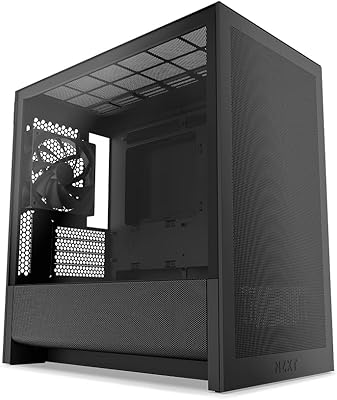
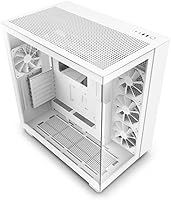
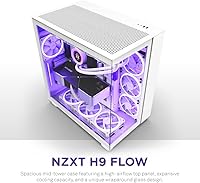
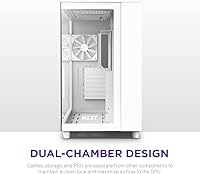
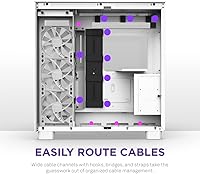
The NZXT H9 Flow ATX Mid-Tower Case is built for PC builders who refuse to choose between clean aesthetics and real thermal performance. What separates it from the crowd is the dual-chamber layout, which tucks cables, the PSU, and storage out of sight behind a dedicated wall panel — leaving the main bay looking deliberately uncluttered. Both the front and side panels are tempered glass, so your components are always on display. One thing worth flagging early: at 23 x 23 x 15 inches and 26.6 pounds, this is not a compact enclosure. If desk space is limited, factor that in before going further. The white colorway covered here shares the same internals as the black version.

Features & Benefits

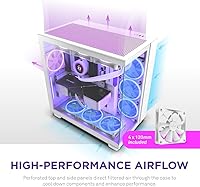
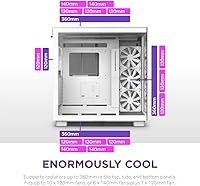
The H9 Flow's perforated top panel is doing real work here. Rather than relying on a mesh front that funnels air the long way around, the perforated top pulls filtered air directly over the GPU and CPU zones, which keeps things cooler under sustained load. 360mm radiator support is available in the top, side, and bottom positions, giving AIO builders plenty of mounting options. Fan capacity tops out at ten 120mm units, or a mixed configuration of 140mm and 120mm fans. The bottom-mount PSU keeps power supply heat well away from primary components, and the dedicated SSD wall panel means drives stay organized without eating into the main chamber.

Best For

This dual-chamber case is a strong match for builders who want a build that looks deliberate — not just functional. It particularly suits anyone planning a 360mm AIO loop, since the flexible radiator positions mean you are not forced into a single mounting compromise. Owners running mid-range to high-end GPUs will see the most benefit from the separated airflow path, which reduces recirculated warm air around the graphics card. The white finish makes it an obvious anchor for a white-themed build, and the glass panels ensure your components stay front and center. One honest caveat: the larger footprint and substantial weight mean you need a desk that can actually accommodate it.

User Feedback

With over 2,200 ratings and a 4.7-star average, owners of this NZXT enclosure are clearly satisfied. The dual-chamber concept earns consistent praise — builders note that cable management feels almost effortless compared to conventional designs. Thermal performance under load is another common highlight, with many users pointing to noticeably lower temperatures versus their previous cases. That said, the front I/O has a real limitation: only a single USB 3.0 port, which feels thin given the price. A smaller number of buyers mention the glass panels require careful handling during the build to avoid scratches. Size also comes up — 26.6 pounds and a wide footprint demand a solid desk setup.

Pros

  • The dual-chamber design makes cable management genuinely straightforward — owners consistently call it one of the cleanest builds they have done.
  • Perforated top panel pulls filtered air directly over the GPU and CPU, producing measurably lower temperatures under sustained load.
  • 360mm radiator support in three positions gives liquid-cooling enthusiasts real flexibility without forcing awkward mounting compromises.
  • Tempered glass on both the front and side panels delivers a showcase-quality view of components from multiple angles.
  • The dedicated SSD wall panel keeps storage drives organized and completely out of the main airflow chamber.
  • Bottom-mount PSU placement isolates power supply heat from primary components, which helps maintain stable thermals during long sessions.
  • Removable top and side mounting brackets make the building process noticeably less fiddly than competing designs in the same price range.
  • With a 4.7-star average across more than 2,200 ratings and a top-10 bestseller rank, owner satisfaction is consistently high.
  • Fan capacity of up to ten 120mm units gives enthusiasts plenty of room to build aggressive, highly customized airflow setups.
  • The white colorway is a genuine design choice, not just a paint swap — it anchors white-themed builds cohesively.

Cons

  • Only a single USB 3.0 front-panel port is included, which feels noticeably limited for a case at this price point.
  • The footprint is large — 23 x 23 x 15 inches means compact or cluttered desk setups will struggle to accommodate it comfortably.
  • At 26.6 pounds, this dual-chamber case is heavy enough that moving or repositioning it on a desk takes real effort.
  • Tempered glass panels on both sides increase the risk of micro-scratches during assembly if components are handled carelessly.
  • The premium pricing means buyers primarily focused on airflow performance alone can find competitive thermals in less expensive enclosures.
  • Micro ATX builders pay for interior space they will never fully use, since the large chamber is clearly optimized for full ATX layouts.
  • The perforated top panel, while effective for airflow, can accumulate dust faster than solid-panel designs and requires more frequent cleaning.

Ratings

The NZXT H9 Flow ATX Mid-Tower Case was scored by our AI rating engine after parsing thousands of verified owner reviews from global markets, with bot submissions, incentivized feedback, and duplicate entries actively filtered out before any score was calculated. The results reflect a genuine cross-section of real builder experiences — capturing both where this dual-chamber case consistently earns praise and where specific friction points hold it back from a clean sweep. Every category below is calibrated to give you an accurate, grounded picture of what living with the H9 Flow actually looks like.

Airflow Performance
88%
The perforated top panel and dual-chamber layout work together to direct filtered air over the GPU and CPU without routing it past cable clutter or the PSU heat zone. Owners running mid-to-high-end graphics cards consistently report lower sustained temperatures under gaming loads compared to the single-chamber cases they replaced.
The case ships with no fans included, so the thermal headroom the design promises requires an additional purchase before it is realized. Builders who populate the case with only two or three entry-level fans may not see a meaningful thermal improvement, since the dual-chamber advantage scales directly with airflow volume.
Build Quality
91%
The tempered glass panels feel dense and premium — no flex, no rattle — and the metal frame maintains consistent finish across all surfaces. Owners regularly note that the case feels more solidly constructed than comparable units at this price tier, particularly around the secondary chamber door and bracket hardware.
A small number of buyers received units with minor panel alignment issues out of the box, typically requiring a bracket adjustment during the build. At this price and weight, quality control consistency is an expectation rather than a bonus, making even occasional reports worth factoring into your decision.
Cable Management
93%
The dual-chamber wall removes cables, the PSU, and storage drives from the main bay entirely, leaving the interior looking clean without requiring any routing discipline or cable hiding tricks. First-time builders in particular describe this as the least stressful cable management experience they have had across multiple builds.
The secondary chamber is functional but not especially deep — builders with oversized PSUs or very thick modular cable bundles may find the rear panel slightly difficult to close cleanly. Velcro anchor points are present but limited for complex multi-drive or high-density wiring configurations.
Aesthetic Design
94%
Dual tempered glass panels — one front, one side — give components a genuinely open, showcase-quality presentation that highlights RGB lighting and premium coolers from two angles simultaneously. The white colorway in particular has been praised for making the interior feel brighter and more cohesive compared to the standard black variant.
Fingerprints and smudges are highly visible on both glass surfaces, especially on the front panel which sits within easy contact range during daily use. Keeping that clean aesthetic requires a microfiber cloth nearby at all times, which some buyers find unexpectedly high-maintenance for a case positioned as a display piece.
Ease of Assembly
84%
Removable top and side mounting brackets, a roomy interior, and clearly separated component zones make this a more approachable build experience than its size might suggest. Builders consistently note that fitting large CPU coolers and long graphics cards involves less awkward maneuvering than in competing mid-towers.
Both tempered glass panels must be removed and carefully reinstalled during the build process, which adds time and caution requirements — especially for solo builders. A few owners found the bracket removal system less intuitive than expected and needed to reference online guides before proceeding confidently.
Radiator & Cooling Flexibility
89%
Support for 360mm radiators across three positions — top, side, and bottom — is genuinely generous for a mid-tower and gives AIO builders real layout options without compromise. Custom loop enthusiasts have also noted that the chamber dimensions accommodate reservoir and pump combinations more comfortably than similarly priced competitors.
Installing radiators in both the top and side positions simultaneously can create clearance conflicts depending on radiator thickness and GPU size — a layout combination that requires careful component-level verification before committing. The bottom radiator position, while supported, is the least practical to access during maintenance or future upgrades.
Value for Money
74%
26%
For builders who will genuinely use the full feature set — dual-glass panels, multi-position 360mm radiator support, and the dual-chamber layout — the price holds up well against alternatives that offer only one or two of those characteristics. Owner satisfaction data supports this, with the majority of verified buyers describing the purchase as worthwhile.
Builders primarily after thermal performance alone can achieve competitive results in cases that cost meaningfully less. The premium is substantially tied to the aesthetic and interior organization experience, making the value proposition weaker for anyone indifferent to presentation or showcase-style builds.
Panel Quality
87%
Both glass panels produce no optical distortion and stay securely fitted during normal operation, with owners reporting zero panel vibration or resonance noise under fan load. The glass thickness is consistent with what a buyer should expect at this price tier, and clarity remains high even after extended use.
Micro-scratches during installation are the most commonly reported panel-related complaint, appearing across reviews from both careful and experienced builders. The glass handles daily use well but does not tolerate contact with tools or component edges during assembly, making protective handling a practical requirement rather than a cautious extra step.
Front I/O
52%
48%
The front I/O panel is ergonomically positioned and easy to reach without leaning around the case, and the audio jacks perform cleanly without reported interference or channel bleed. USB 2.0 port availability is sufficient for low-bandwidth peripherals like keyboards, mice, and basic device charging.
A single USB 3.0 port on the front panel is a genuine limitation at this price point — owners who regularly connect high-speed external drives or multiple USB 3.0 devices consistently fall back on rear motherboard ports instead. The absence of a USB-C front connector is a notable omission that comparably priced competitors have already begun addressing.
Interior Layout
88%
The interior offers comfortable working clearance around the motherboard tray, and the separation between the CPU cooler zone and the side panel comfortably accommodates tall tower coolers without forced compromise. The dedicated SSD wall panel keeps secondary storage completely separate from the main bay without consuming any primary chamber real estate.
Micro ATX builders effectively pay for interior space they will never fill, since the chamber dimensions are clearly optimized for full ATX configurations with large coolers and extended GPU lengths. The overall footprint required to deliver that spaciousness is on the larger side for a mid-tower classification.
Noise Dampening
63%
37%
The dual-chamber wall passively reduces low-frequency noise from the PSU fan reaching the main compartment, a subtle but real benefit during quiet work or late-night sessions. Owners with low-RPM fan configurations report that the case introduces no additional resonance or panel vibration of its own.
The perforated top panel and open-airflow design are fundamentally at odds with sound attenuation, so this is not a case built with quiet computing in mind. Builders running high-RPM fans or an air-cooled heatsink at full load will find sound output noticeably higher than foam-dampened alternatives at a similar price point.
Dust Filtration
77%
23%
Removable dust filters on the top panel and the bottom PSU intake cover the two highest-risk ingress points for a bottom-mount PSU layout, and both can be removed and cleaned without tools in under a minute. Owners on regular maintenance schedules report the filters are straightforward to keep clean.
The large perforated surface area means dust accumulates faster than on cases with tighter or fully filtered mesh panels, requiring more frequent cleaning cycles in environments with average household dust levels. Side panel intake areas have less filtration coverage, leaving some airflow ingress paths partially unprotected during normal operation.
Component Compatibility
86%
Full ATX and Micro ATX motherboards seat cleanly, and GPU clearance of approximately 435mm covers virtually every current consumer graphics card including the longest triple-fan designs currently available. The multi-position 360mm radiator support also means this enclosure is compatible with nearly every AIO unit on the market today.
E-ATX motherboards are not supported, which rules out high-end workstation or HEDT platform configurations entirely. Builders planning to combine a side-panel radiator with a large triple-fan GPU should verify component-specific clearance figures before purchasing, as that particular configuration can be tighter than the general spec sheet implies.
Portability
41%
59%
The bottom-mount PSU and wide base give the case a stable, low center of gravity when stationary on a desk, reducing any risk of tipping during cable swaps or peripheral management. The build feels settled and planted rather than top-heavy, which suits a permanently installed desktop setup well.
At 26.6 pounds empty and 23 x 23 x 15 inches, this enclosure becomes genuinely difficult to move once a full build is inside it — LAN party regulars or anyone who transports their PC frequently should look at a different case entirely. Even repositioning it on a desk requires two hands and a cleared surface.

Suitable for:

The NZXT H9 Flow ATX Mid-Tower Case is purpose-built for builders who want a high-performance system that also looks genuinely impressive — not as an afterthought, but as a core design goal. If you are planning a 360mm AIO liquid-cooling loop, the flexible radiator mounting across the top, side, and bottom panels means you are not locked into a single layout, which is a real advantage during the planning phase. Enthusiasts pairing this enclosure with a mid-range to high-end GPU will get the most out of the dual-chamber airflow separation, since keeping the PSU and cabling behind a dedicated wall directly reduces warm air recirculation near the graphics card. First-time builders benefit too — the spacious interior, removable mounting brackets, and dedicated SSD wall panel make the assembly process noticeably less frustrating than cramped conventional designs. Anyone building around a white color theme will find the glass-forward aesthetic ties a build together better than most cases at this price point.

Not suitable for:

Buyers working with a compact desk setup should think carefully before committing here — at 23 x 23 x 15 inches and 26.6 pounds, the NZXT H9 Flow ATX Mid-Tower Case occupies meaningful real estate and needs a sturdy, spacious surface to sit on comfortably. If your workflow demands multiple USB 3.0 connections at the front panel, the single USB 3.0 port will feel like a genuine limitation rather than a minor inconvenience, especially at this price tier. Budget-conscious builders looking for a functional enclosure without aesthetic priorities will find better value elsewhere, since a significant portion of what you are paying for here is the dual-glass panel presentation and the refined interior layout. Those planning a purely air-cooled budget build with a modest GPU will not extract the full thermal benefit of the dual-chamber design, making the premium harder to justify. Builders who handle components roughly or work in tight quarters should also note that the tempered glass panels require careful handling during installation to avoid micro-scratches.

Specifications

  • Case Type: The H9 Flow is a mid-tower enclosure supporting full ATX and Micro ATX motherboard form factors; E-ATX is not compatible.
  • Dimensions: The case measures 23 x 23 x 15 inches (L x W x H), which is noticeably larger than a typical mid-tower footprint.
  • Weight: At 26.6 pounds unloaded, this enclosure is on the heavier end for a mid-tower and requires a sturdy, flat desk surface.
  • Panel Material: Both the front-facing and left-side panels are constructed from tempered glass, providing a full, unobstructed view of internal components.
  • Top Panel: The top panel is perforated and fitted with a removable dust filter that channels filtered air directly over the GPU and CPU cooling zones.
  • Radiator Support: Supports radiators up to 360mm in the top, side, and bottom mounting positions, offering broad flexibility for AIO and custom liquid-cooling configurations.
  • Fan Capacity: Accommodates up to ten 120mm fans, or alternatively six 140mm fans combined with one additional 120mm fan for mixed configurations.
  • PSU Mount: The power supply is bottom-mounted inside the secondary chamber, physically isolating its heat output from the primary motherboard and GPU compartment.
  • Drive Storage: A dedicated SSD wall panel in the secondary chamber keeps storage drives organized and completely out of the main airflow bay.
  • Front I/O: The front panel provides two USB 2.0 ports, one USB 3.0 port, and standard 3.5mm audio input and output jacks.
  • Chamber Design: A dual-chamber layout separates the PSU, cabling, and storage from the main motherboard and GPU compartment behind a dedicated wall panel.
  • Cooling Method: Fully compatible with both air cooling and liquid cooling, including AIO units and custom hardline or soft-tube loops across three radiator positions.
  • GPU Clearance: Supports graphics cards up to approximately 435mm in length, covering virtually all current consumer GPU models including triple-fan designs.
  • Color Variant: This model is finished in white; it shares identical internal dimensions, mounting options, and hardware with the standard black version.
  • Release Date: First made available in January 2023, positioning it as a current-generation design within the upper-mid tier of the ATX mid-tower market.

Related Reviews
NZXT H7 Flow 2024 Mid-Tower ATX Case
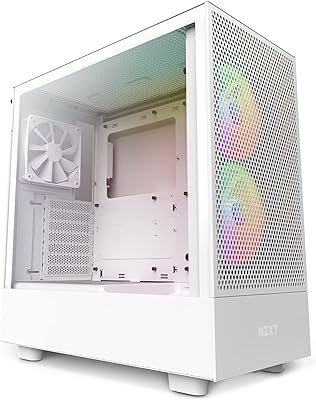
87%
92%
Cooling Performance
88%
Build Quality
91%
Airflow Optimization
85%
Ease of Installation
80%
Cable Management
More
NZXT H5 Flow RGB Mid-Tower PC Case
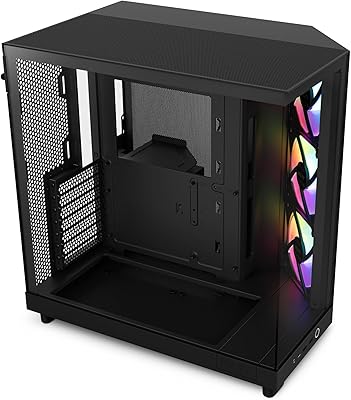
83%
93%
Airflow Performance
54%
Noise Level
82%
Build Quality
91%
Ease of Building
84%
Cable Management
More
NZXT H6 Flow RGB Mid-Tower Case
80%
88%
Build Quality & Materials
84%
Airflow Performance
91%
Cable Management
79%
Glass Panel Quality
82%
Included RGB Fans
More
Thermaltake Tower 600 Mid-Tower ATX Case
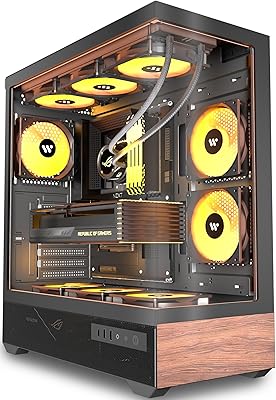
79%
91%
Build Quality
93%
Aesthetic Design
88%
Cable Management
94%
Cooling Capacity
71%
Installation Experience
More
HYTE Y40 Mid-Tower ATX Gaming Case
76%
94%
Aesthetics & Design
88%
Build Quality
62%
Cooling Performance
83%
Value for Money
81%
Cable Management
More
SAMA 3509 ATX Mid Tower PC Case
74%
88%
Value for Money
74%
Build Quality
81%
Airflow & Cooling Performance
67%
Pre-installed Fan Quality
86%
Tempered Glass Panel
More
KEDIERS P6 Mid Tower ATX PC Case
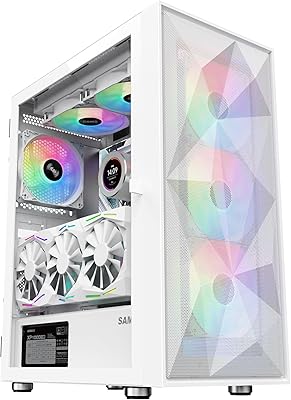
75%
88%
Aesthetic Design
71%
Build Quality
84%
Included Fans & Lighting
78%
Airflow & Thermal Performance
81%
Radiator & Cooling Support
More
NZXT H3 Flow Micro-ATX Case
86%
94%
Cooling Performance
88%
Build Quality
85%
Space Efficiency
90%
GPU Compatibility
82%
Ease of Setup
More
Zalman S4 Mid-Tower ATX PC Case
75%
72%
Build Quality
88%
Value for Money
91%
Ease of Assembly
67%
Airflow Performance
63%
Cable Management
More
Zalman S2 ATX Mid-Tower PC Case
76%
88%
Airflow Performance
63%
Build Quality
91%
Value for Money
86%
Ease of Assembly
84%
Cooling Expandability
More

FAQ

No, the H9 Flow ships without fans. That is standard practice at this price tier, and honestly it is the right call — it gives you full control over choosing fans suited to your specific cooling goals, whether that is high-static-pressure units for radiator mounting or high-airflow fans for case ventilation.

Full ATX motherboards fit without issue. The case is a genuine ATX mid-tower — the Micro ATX reference in some listings just confirms downward compatibility. Standard ATX boards at 305 x 244mm seat cleanly with plenty of clearance on all sides.

In most configurations, yes. A standard 360mm AIO with 25mm-thick fans in the top position clears the vast majority of current triple-fan GPUs. Where things get tight is with especially thick radiators — anything over 30mm combined with a blower-style cooler may need a clearance check before you commit to the build.

The main benefit is that your PSU exhaust and cable bulk no longer sit in the same airflow path as your CPU and GPU. By routing all of that behind the wall panel, the perforated top can pull cleaner, cooler air through the main bay without obstruction. Real-world results vary depending on your fan setup, but owners consistently report lower sustained temperatures compared to similarly priced single-chamber designs.

It depends on your workflow. For most gaming and general use, one USB 3.0 front port covers daily needs. However, if you frequently swap between a high-speed external drive, a wireless headset dongle, and other USB 3.0 devices simultaneously, you will notice the limitation quickly. A compact USB hub solves it, but it is a fair criticism at this price point and worth factoring in before purchasing.

Easier than most cases at this size. The interior is genuinely roomy, the removable top and side mounting brackets reduce awkward reach-ins, and the SSD wall panel keeps the secondary chamber tidy. Most first-time builders report the cable management step feeling straightforward rather than stressful, which is one of the most consistent compliments in owner reviews.

Yes, and the layout suits it well. The three-position 360mm radiator support, combined with the spacious main chamber, gives custom loop builders enough room to route tubing cleanly. The secondary chamber is also accessible enough to mount a small reservoir or DDC pump if your layout requires it.

A clean microfiber cloth with a small amount of glass cleaner is all you need for regular maintenance. The more important thing is being careful during the initial build — fingerprints are very visible on both panels, and sliding components against the glass during installation is how most micro-scratches happen. Keep a soft cloth nearby throughout your build session and handle the panels from the edges.

Not in any meaningful way for typical indoor PC setups. The internal hardware is identical between both colorways, so thermal performance is the same. Visually, the white interior tends to make RGB lighting appear slightly brighter and more diffused, which some builders actually prefer — but that is an aesthetic consideration rather than a functional one.

The H9 Flow supports tower-style CPU coolers up to approximately 165mm in height, which is enough for most high-end air coolers including popular 120mm and 140mm tower designs. If you are planning an especially large dual-tower air cooler, verify the specific clearance figure against your cooler's published height before purchasing.

Where to Buy