Overview

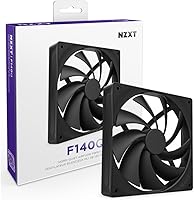
The NZXT F140Q 140mm Case Fan sits squarely in the mid-range quiet fan segment, targeting builders who want genuine noise reduction without sacrificing meaningful airflow. What separates it from budget alternatives is its fluid dynamic bearing, a design that runs quieter and lasts far longer than the sleeve bearings found in cheaper options — we're talking a rated lifespan that stretches well beyond a decade of continuous use. It's also PWM-controlled, meaning your motherboard can automatically ramp speed up or down based on real system temperatures. That said, keep expectations grounded: this is a single fan, and its full impact only becomes clear when it's part of a well-planned airflow setup.

Features & Benefits

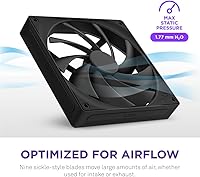
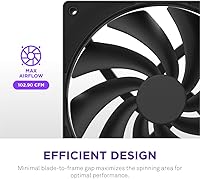
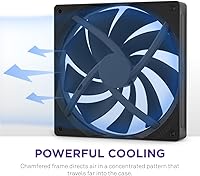
The nine sickle-style blades are the first thing worth understanding — their curved geometry is shaped to pull in more air per rotation while keeping turbulence low. Pairing that with a frame designed to minimize the gap between blade tip and housing means more of every spin actually moves air, rather than spilling around the edges. The chamfered frame then focuses that airflow into a tighter, more directed stream that reaches components deeper inside a case. At full speed, the F140Q peaks at 1,500 RPM with a noise ceiling under 30 dB — roughly comparable to a quiet library — and in practice, it rarely needs to run that high.

Best For

This NZXT airflow fan is a natural pick for anyone building or upgrading a near-silent PC. It fits mid-tower and full-tower cases with existing 140mm mounting points, whether configured as intake at the front, exhaust at the rear, or paired with a radiator. Builders replacing noisy stock fans — the kind that hum or rattle at moderate speeds — will notice an immediate improvement. Where it really shines is in multi-fan configurations where tonal consistency matters; mixing fans with different bearing types can create an uneven noise profile, and running matched units avoids that entirely. A 4-pin PWM header is a prerequisite to get the most from its automated speed curve.

User Feedback

Across a broad range of buyer experiences, the F140Q earns consistent marks for its quiet operation at mid-range speeds, and people frequently mention it runs noticeably calmer than the stock fans it replaced. Build quality also comes up regularly — the frame feels solid and the finish is clean. On the critical side, some users note that at lower RPM settings, airflow volume can feel modest compared to more aggressively tuned 140mm competitors, so it may not suit cases with poor natural ventilation. Value perception is generally positive, though a handful of buyers feel the per-fan cost becomes harder to justify when outfitting a full build with several units.

Pros

  • Fluid dynamic bearings deliver smooth, long-lasting operation with minimal noise degradation over years of use.
  • PWM support lets fan speed adjust automatically, staying quiet during light loads without any manual tuning.
  • The chamfered frame concentrates airflow into a directed stream, improving cooling reach deeper inside the case.
  • At mid-range speeds, the F140Q is impressively unobtrusive — most users say they barely notice it in a quiet room.
  • Nine sickle-style blades move a meaningful volume of air while keeping turbulence and tonal drone low.
  • Build quality feels solid and well-finished — the frame has no flex, rattle, or cheap feel to it.
  • Clean matte black aesthetic integrates into virtually any build without clashing or requiring color coordination.
  • Rated lifespan translates to well over six years of continuous around-the-clock use — it is built to outlast the system.
  • Equally effective as intake, exhaust, or radiator-mounted, giving builders real flexibility in placement decisions.

Cons

  • At lower RPM thresholds, airflow volume can feel underwhelming in cases with dense layouts or restricted front intake.
  • Sold individually, so equipping a full case with multiple fans means costs compound quickly.
  • Without a PWM-capable header or fan controller, the adaptive speed curve — its best feature — is completely inaccessible.
  • Competing 140mm options can deliver higher static pressure, making them more effective in tightly packed or obstructed mounts.
  • No RGB or lighting support, which is a real limitation for builders who want illuminated fans as part of their aesthetic.
  • Real-world noise performance depends heavily on case design — sealed or restrictive enclosures reduce the acoustic benefit noticeably.
  • No bundled accessories like anti-vibration pads or spare screws, which some rivals include at a similar price point.
  • Buyers expecting significant airflow gains over a well-maintained older fan may find the upgrade impact modest.

Ratings

The NZXT F140Q 140mm Case Fan scores here reflect AI-synthesized analysis of verified buyer reviews collected globally, with spam, bot submissions, and incentivized feedback actively filtered out. Ratings cover the full picture — where this quiet 140mm fan genuinely delivers and where real users have run into limitations — so you can make a confident, informed decision before buying.

Noise Performance
88%
At mid-range RPMs — where most systems spend the majority of their time — the F140Q is remarkably unobtrusive. Builders who work or game in the same room consistently report that it disappears into the background, with the fluid dynamic bearing contributing a smooth, tonally neutral sound rather than the faint whine older sleeve-bearing fans tend to develop.
At full speed, the fan becomes more noticeable in a quiet room, and results are heavily case-dependent — users in open-mesh cases report better outcomes than those in sealed enclosures where air turbulence amplifies perceived noise. A handful of buyers also noted that acoustic performance varies meaningfully depending on how aggressively the PWM curve is configured.
Airflow Efficiency
79%
21%
The sickle-blade geometry and tight blade-to-frame tolerance work together to move a solid volume of air without the fan needing to spin at its ceiling, which keeps noise in check during everyday use. Buyers replacing stock fans — particularly the bundled fans common in budget mid-towers — typically see measurable temperature drops across both CPU and GPU.
At lower RPM settings, airflow volume can feel modest compared to more aggressively designed 140mm competitors. Users with particularly dense internal layouts or poorly ventilated cases have noted that the F140Q's airflow-first rather than pressure-first design limits its effectiveness when air needs to be forced through resistance rather than simply moved.
Build Quality
86%
The frame feels noticeably more rigid than what you find on budget fans, with no flex or vibration rattle when handled. Multiple reviewers specifically called out how clean the finish looks close-up — the matte black surface is consistent and smooth, and the blade edges show no warping or uneven flash from the molding process.
A small number of users have flagged minor cosmetic inconsistencies between units purchased in multi-packs, suggesting slight batch variation in finishing. Nothing structurally significant has emerged as a recurring complaint, but buyers who are extremely detail-oriented about visual uniformity across a matched fan set may want to inspect units carefully.
Bearing Longevity
91%
Fluid dynamic bearings are genuinely a cut above what budget fans offer, and the rated lifespan translates into years of reliable daily operation without degradation. Early adopters who have been running the F140Q since launch report no audible change in bearing noise or smoothness, which aligns well with what this bearing type delivers in practice.
The long-term durability advantage is difficult to verify in real time since most reviewers have not owned the fan long enough to stress-test it across multiple years. Buyers who need proven multi-year field data before committing may find that the track record is still building compared to fans from older product lines.
PWM Control Response
83%
The fan responds cleanly to PWM signals from both motherboard headers and third-party fan controllers, ramping up and down smoothly without the hunting or micro-stuttering some cheaper fans exhibit at low duty cycles. Builders who have invested in software-driven fan curves report that the F140Q tracks target RPMs reliably across a range of temperature triggers.
Without a PWM-capable header, buyers lose the fan's most compelling feature entirely, since it defaults to running at a voltage-determined fixed speed. Some users have also noted that the minimum stable RPM is higher than they would like for ultra-low-noise passive-adjacent setups, which can be a limitation in near-silent builds targeting the lowest possible noise floor.
Static Pressure
62%
38%
For light radiator use — thin single-row rads with low fin density — the fan performs acceptably and does not represent a significant thermal compromise. Builders mounting it on a 240mm or 280mm radiator in an open-loop cooling setup with moderate heat loads have reported satisfactory results when fan curves are configured to push RPMs during peak load.
This is a clear weak point for buyers expecting strong pressure-focused performance. On thick, high-density radiators or in cases with obstructed front panels, this NZXT airflow fan simply cannot match dedicated static pressure fans in the same size class. Users who discover this mismatch after installation are among the most frequently disappointed reviewers.
Value for Money
74%
26%
For a single-fan purchase in a build where acoustics are genuinely prioritized, most buyers feel the quality-to-cost ratio is fair. The fluid dynamic bearing, clean build quality, and consistent PWM behavior all justify a premium over generic options, and buyers who need only one or two fans rarely express regret about the purchase.
Value perception drops noticeably when buyers need to outfit a full case with five or six fans. At that quantity, the cumulative cost becomes harder to justify against alternatives that offer similar acoustic performance at a lower per-unit price, and several multi-unit buyers explicitly flag this as a friction point in their reviews.
Installation Ease
89%
The fan slots into standard 140mm mounts without modification, and the 4-pin connector plugs in without ambiguity. Reviewers across skill levels — from first-time builders to experienced enthusiasts — consistently describe installation as effortless, and the cable is long enough to reach headers in most mid-tower layouts without needing an extension.
In very large full-tower cases where fan mounts are positioned far from motherboard headers, the stock cable length can come up short and require a PWM extension cable, which is sold separately. This is not unique to this fan, but it catches some buyers off guard when building in larger enclosures for the first time.
Vibration & Rattle
84%
The fluid dynamic bearing and well-balanced blade assembly result in very low vibration transfer to the case frame, which matters particularly in builds where the case acts as a resonant body. Builders running the fan on metal-framed cases with thin side panels have noted it stays mechanically quiet even when mounted without rubber anti-vibration grommets.
A small subset of reviews mention a faint vibration hum when the fan is mounted directly to a thin steel panel without any dampening material between the fan corners and the frame. This is intermittent and seems tied to specific case materials rather than a consistent defect, but it is worth using rubber washers if your build is acoustically sensitive.
Aesthetic & Design
77%
23%
The all-black matte finish is clean and understated, fitting naturally into dark-themed builds and avoiding the garish look that affects some performance-focused fan designs. Builders going for a monochrome or stealth aesthetic specifically seek this fan out, and its visual consistency across multi-unit setups is frequently praised.
There is no RGB option in this line, which is a genuine limitation for builders who want illuminated fans as part of a coordinated lighting setup. Buyers who discover this after purchase — having assumed an NZXT product would include lighting as standard — make up a noticeable share of the lower-star reviews for this particular SKU.
Compatibility
92%
Standard 140mm dimensions and a universal 4-pin PWM connector mean this fan works with virtually any desktop PC case, motherboard, or fan controller that supports the format. Buyers running mixed-brand systems, including ASUS, MSI, Gigabyte, and ASRock motherboards, all report clean plug-and-play compatibility without any driver or software dependency.
Compatibility is essentially limited only by form factor — buyers with cases that only support 120mm mounts have no path to using this fan without hardware modification. It is also desktop-exclusive by design, so anyone exploring it for small-form-factor or non-standard cooling applications will need to look elsewhere.
Acoustic Consistency Over Time
81%
19%
Unlike sleeve-bearing fans that commonly develop an audible hum or grind after 12 to 18 months of use, the F140Q maintains its initial acoustic character well into extended ownership based on reports from early buyers. The fluid dynamic bearing design is specifically chosen for this reason, and the real-world results appear to bear it out.
Long-term consistency data is still accumulating since the fan is relatively recent, and the extended lifespan claim cannot yet be independently validated through enough field reports to be definitive. Buyers who want a fan with a proven decade-long track record may prefer older, more established models from competing brands with longer market histories.
Packaging & Unboxing
71%
29%
The fan arrives securely packaged without excessive plastic waste, and the included hardware — while minimal — is neatly presented. Most buyers report the fan arriving in perfect condition, with no blade damage or connector issues attributable to transit, which is a basic but important baseline for a precision component.
Packaging is functional but spartan — there are no bonus accessories, no cable ties, and no anti-vibration mounts included, which some competing fans provide at a similar price point. Buyers who were expecting a more complete accessory kit based on the price tier tend to express mild disappointment upon unboxing.

Suitable for:

The NZXT F140Q 140mm Case Fan is built for PC builders who treat acoustic comfort as a genuine priority rather than an afterthought. It's a natural match for mid-tower and full-tower owners with existing 140mm mounting positions who want to retire loud or aging stock fans without compromising on build quality. Enthusiasts who have already invested in PWM fan headers or a dedicated fan controller will get the most out of it, since the automated speed curve is where the fan earns its keep in a quiet system. It's also an especially smart choice for multi-fan setups where keeping a consistent noise profile across the entire case matters — mismatched bearing types and blade geometries from different brands tend to create an uneven, distracting sound floor that matched units avoid. Home office users and content creators who work in the same room as their rig will appreciate how little attention this fan demands once it's configured and running.

Not suitable for:

The NZXT F140Q 140mm Case Fan is not the right tool for every build, and it's worth understanding where its design philosophy creates real trade-offs. If your priority is maximum raw static pressure rather than quiet operation — for instance, you're pushing air through a dense radiator or a case with heavily restricted ventilation — a fan tuned for pressure performance will likely serve you better. Builders working with cases that only have 120mm mounts will obviously need to look elsewhere, since the 140mm format is non-negotiable here. Those assembling a large system with six or more fans may find the per-unit cost difficult to justify at scale, especially when budget-oriented alternatives can offer competitive airflow at a lower price per fan. And without PWM support on the motherboard or a compatible fan controller, the adaptive speed feature that makes this fan most effective is simply unavailable — leaving it to run at a fixed speed that may not suit every system's cooling demands.

Specifications

  • Fan Size: Standard 140mm form factor, compatible with any case or radiator mount designed for 140mm fans.
  • Blade Count: Nine sickle-style blades engineered to maximize air volume moved per rotation while minimizing turbulent noise.
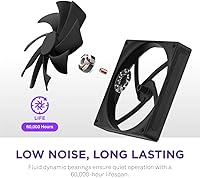
  • Bearing Type: Fluid dynamic bearing, which uses a thin film of fluid to reduce friction, vibration, and long-term wear.
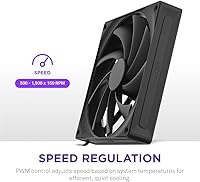
  • Max Speed: Spins up to 1,500 RPM at full load, with PWM control allowing the motherboard to set any speed below that threshold.
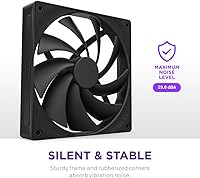
  • Noise Level: Rated at a maximum of 29.8 dB, measured at full speed — quieter than a typical library environment.
  • Connector: 4-pin PWM connector, compatible with standard motherboard fan headers and third-party PWM fan controllers.
  • Voltage: Operates at 12V DC, consistent with the standard power supplied by desktop PC motherboard fan headers.
  • Power Draw: Draws 3.84W at peak load, making it efficient enough to run multiple units without straining a typical PSU.
  • Rated Lifespan: Fluid dynamic bearing is rated for 60,000 hours of operation, which equates to roughly seven years of continuous 24/7 use.
  • Dimensions: Overall unit measures 5.63 x 1.06 x 6.3 inches, fitting standard 140mm fan mounts without modification.
  • Weight: Weighs 6.21 oz, light enough to mount in any orientation without stressing the case frame or mounting screws.
  • Frame Design: Chamfered inner frame edges direct airflow into a concentrated, forward-projecting stream for improved cooling depth inside the case.
  • Blade Clearance: Minimal gap between blade tips and the fan housing maximizes the effective spinning area to improve airflow efficiency.
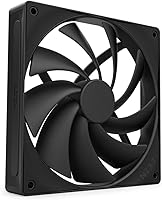
  • Color: Matte black finish on both the blades and frame, suited to dark-themed or neutral builds without color conflict.
  • Compatibility: Designed exclusively for desktop PC use, compatible with intake, exhaust, and liquid cooling radiator mounting positions.
  • Model Number: Official NZXT model designation is RF-Q14SF-B2, useful for warranty registration and sourcing replacement units.
  • Brand: Manufactured by NZXT, a PC hardware brand known primarily for cases, cooling, and system accessories.
  • Lighting: No RGB or integrated lighting — the fan is designed purely around acoustic and airflow performance.

Related Reviews
Asiahorse Dawn 120mm ARGB Case Fan
77%
91%
Cable Management
78%
Airflow Performance
84%
Noise Level
87%
RGB Lighting Quality
76%
Value for Money
More
NZXT H3 Flow Micro-ATX Case
86%
94%
Cooling Performance
88%
Build Quality
85%
Space Efficiency
90%
GPU Compatibility
82%
Ease of Setup
More
Asiahorse Nyota 120mm ARGB Case Fan
75%
88%
ARGB Lighting Quality
76%
Cooling Performance
71%
Noise Level
74%
Motherboard Sync Compatibility
61%
Bearing & Long-Term Durability
More
WDERAIR P1238 120mm PWM Computer Case Fan
70%
94%
Airflow Performance
31%
Noise Level
81%
Build Quality
83%
Durability & Longevity
76%
PWM Speed Control
More
Razer Kunai Hydraulic 140mm aRGB PC Fan
84%
88%
Cooling Performance
92%
Noise Level
85%
RGB Customization
90%
Build Quality
86%
Installation Ease
More
NZXT F360 RGB Core 360mm Fan Unit
80%
93%
Installation Ease
91%
Cable Management
78%
Cooling Performance
88%
RGB Lighting Quality
63%
Software & Ecosystem
More
NZXT H6 Flow RGB Mid-Tower Case
80%
88%
Build Quality & Materials
84%
Airflow Performance
91%
Cable Management
79%
Glass Panel Quality
82%
Included RGB Fans
More
NZXT H7 Flow 2024 Mid-Tower ATX Case
87%
92%
Cooling Performance
88%
Build Quality
91%
Airflow Optimization
85%
Ease of Installation
80%
Cable Management
More
Cooler Master SF240R ARGB 240mm Case Fan
77%
78%
Cooling Performance
74%
Noise Level
88%
Installation Ease
76%
ARGB Lighting Quality
71%
ARGB Compatibility
More
NZXT F120RGB Duo 120mm Dual-Sided RGB Fan
88%
88%
Performance
91%
RGB Lighting Quality
85%
Noise Level
87%
Airflow & Cooling Efficiency
89%
Build Quality
More

FAQ

It will physically connect to a 3-pin header using the first three pins of the 4-pin connector, but you lose PWM speed control entirely. The fan will run at a fixed voltage-determined speed, which is usually full or near-full speed depending on your motherboard. For the best experience, a 4-pin PWM header is strongly recommended.

It works in both roles, but it is worth noting that this fan is optimized for airflow rather than static pressure. For a thin radiator with low fin density, it performs well. On a thick, high-density radiator where you need stronger air-pushing force, a pressure-optimized fan may deliver better thermal results.

At mid-range speeds on a typical PWM curve, most people would describe it as barely audible when sitting at a desk. At full speed it is still relatively quiet, but becomes more perceptible in a silent room. Results do vary depending on your case design, how many other fans are running, and how you configure your speed curve.

A fluid dynamic bearing uses a thin layer of lubricating fluid between the shaft and housing instead of metal-on-metal contact or a simple sleeve. In practice, this means less friction, lower vibration, and a much longer operational lifespan compared to budget sleeve bearing fans. It also tends to stay quieter as the fan ages, rather than developing a gradual hum over time.

The F140Q responds to any standard PWM signal, so it works with BIOS-based fan curves, motherboard software like ASUS Fan Xpert or MSI Command Center, and dedicated fan controllers that support 4-pin PWM fans. You are not locked into NZXT's own ecosystem or software.

A single well-placed fan — particularly as a front intake or rear exhaust — can make a measurable difference in system temperatures, especially if you are replacing a stock fan that runs loud and inefficiently. That said, a balanced multi-fan setup will always outperform a single fan, and the F140Q is designed with that kind of configuration in mind.

The fan typically ships with standard fan mounting screws, but does not include extras like anti-vibration pads or cable management accessories. If your case does not already have spare fan screws, it is worth confirming before installation.

The cable is a standard length suited to most mid-tower builds without any issue. In very large full-tower cases where fan headers are far from front-panel mounts, you may occasionally need a PWM extension cable to reach comfortably. This is a common consideration with any single-unit 140mm fan, not unique to this one.

If you are running older NZXT fans from previous F-series generations, the F140Q will look consistent in terms of the matte black aesthetic. Acoustically, the F140Q is generally quieter and smoother than older bearing designs from the same brand, so mixing generations may actually improve your overall noise floor rather than disrupt it.

Fluid dynamic bearings are sealed and self-lubricating, so there is no user maintenance required during the fan's rated lifespan. The main upkeep is occasional dusting of the blades and frame to prevent airflow restriction, which applies to any case fan regardless of brand or bearing type. A can of compressed air every few months is typically all you need.