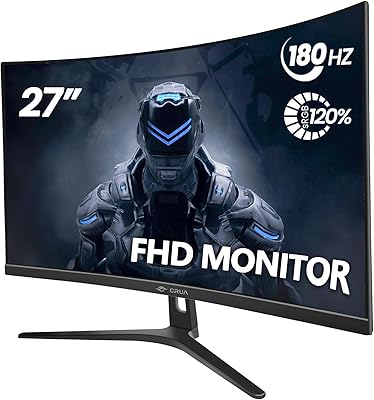
Overview

The Norcent MN27-F240GC 27-inch Curved Gaming Monitor is built squarely for buyers who want high-refresh-rate curved gaming without spending premium-monitor money. The 1500R curvature is the most immediately noticeable feature — it wraps the image around your peripheral vision in a way a flat 27-inch panel simply cannot. Norcent isn't a brand most buyers recognize, and that's a fair concern worth naming directly. At 27 inches, 1080p resolution shows its limits: text lacks the crispness of a QHD display, and up close that softness becomes apparent. Within its price class, though, the tradeoffs are honest and the strengths are concrete.
Features & Benefits

The 240Hz refresh rate is the real draw here, and it holds up under scrutiny — fast-paced games look genuinely smoother than on 144Hz or 60Hz panels. That 1ms spec is MPRT, not pixel-transition GtG time, which is worth understanding: it reflects how the monitor reduces motion blur rather than how fast individual pixels switch. The VA panel trades IPS-level viewing angles for deeper blacks and contrast, a worthwhile deal for single-viewer gaming setups. FreeSync Premium with G-Sync compatibility covers both major GPU brands. The Norcent 27-inch display also brings 98% sRGB coverage and VESA 75x75 mounting support — solid extras at this tier.

Best For

This curved gaming monitor makes the most sense for budget-conscious PC gamers chasing 240Hz without paying flagship prices. If you play FPS titles or racing games regularly, upgrading from 60Hz or 144Hz to 240Hz is something your hands and eyes will notice — not just a spec sheet number. The four input ports make this a natural fit for anyone juggling a PC and one or two consoles without wanting a separate switch. First-time curved monitor buyers will find the 1500R curvature moderate, not disorienting. That said, if fine-print sharpness or professional color work matters to you, this 240Hz VA panel was not built for that use case.

User Feedback

Most buyers report a painless out-of-box experience, and the step-up in motion smoothness earns consistent praise from people coming off slower displays. The curve tends to impress at first sight. On the flip side, factory color calibration commonly draws complaints — brightness and gamma need manual tweaking before the image looks its best. Backlight bleed in dark scenes is a recurring mention, which isn't unusual for VA panels in this price range. The built-in speakers work, but barely; most reviewers recommend ignoring them. Stand rigidity is another weak point, with some wobble under light desk contact. Norcent's support response is uneven — some buyers report quick resolution, others describe delays.

Pros

  • 240Hz refresh rate delivers noticeably smoother motion in fast-paced games compared to 144Hz or 60Hz panels.
  • FreeSync Premium and G-Sync compatibility means both AMD and Nvidia GPU owners get tear-free gaming without extra setup.
  • The 1500R curve creates genuine immersion at 27 inches that flat panels at this size simply cannot match.
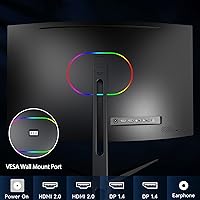
  • Four video inputs — two HDMI 2.0 and two DisplayPort 1.4 — make multi-device setups unusually flexible for the price.
  • VA panel delivers deep blacks and strong contrast that IPS monitors at this price point rarely achieve.
  • Out-of-box assembly is straightforward, with most buyers up and running without consulting the manual.
  • Rear RGB lighting and curved aesthetics give the desk setup a polished gaming look without a premium price tag.
  • VESA 75x75 mount compatibility opens up monitor arm and wall-mount options for buyers who want a cleaner desk.
  • 98% sRGB coverage is respectable for a value-tier gaming panel used primarily for entertainment and gameplay.

Cons

  • 1080p resolution across a 27-inch screen produces softer text and image detail than QHD panels at the same size.
  • Factory color calibration is often off out of the box — brightness, contrast, and gamma typically need manual adjustment.
  • Backlight bleed in dark scenes is a reported issue that is common with VA panels at this price tier.
  • The stand has a noticeable wobble under light desk contact, which can be distracting during longer sessions.
  • Built-in speakers are barely functional at best; this curved gaming monitor is not a substitute for even entry-level external audio.
  • VA panel viewing angles wash out colors and contrast when viewed from the side, limiting shared or angled viewing.
  • Norcent's customer support track record is inconsistent — response times and resolution quality vary significantly between buyers.
  • The 1ms spec is MPRT, not GtG, which can mislead buyers expecting the fastest possible pixel transition performance.
  • Cable management options on the stand are limited, which can result in a cluttered look with multiple devices connected.
  • Brand recognition and long-term reliability data are thin compared to established monitor manufacturers, adding some purchase risk.

Ratings

Our AI-generated scores for the Norcent MN27-F240GC 27-inch Curved Gaming Monitor are built on a thorough analysis of verified buyer reviews sourced from global markets, with spam, bot submissions, and incentivized feedback actively identified and excluded. The ratings reflect a genuine synthesis of consistent user sentiment — covering what real buyers praise, where frustrations repeatedly surface, and how this curved gaming monitor holds up against expectations set by its price tier. Every score is weighted by how frequently and independently that experience appeared across unfiltered purchaser accounts.
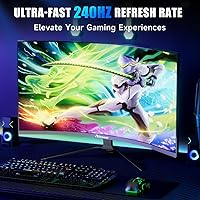
Gaming Performance
84%
At 240Hz, this curved gaming monitor delivers motion fluidity that genuinely changes how fast-paced titles feel — FPS and racing game players switching from 60Hz or 144Hz consistently describe the difference as immediately tangible. Adaptive sync support across both AMD and Nvidia removes screen tearing without complicated driver setup.
The 1080p resolution limits how sharp fine in-game details appear at 27 inches, and players running graphically rich titles at close range regularly flag the softness. The VA panel also loses color consistency at off-angles, which can subtly affect peripheral awareness in wider desk setups.
Display Quality
71%
29%
The VA panel produces deep, punchy blacks and strong contrast that most IPS monitors at this price cannot match — dark atmospheric games and cinematic scenes genuinely benefit from this. Colors look vibrant for casual gaming and streaming even before any manual calibration is applied.
At 27 inches, 1080p pixel density produces a noticeably softer image than QHD panels of the same size — text edges and fine textures reveal the gap up close. Factory calibration also ships with gamma and brightness settings that typically need manual adjustment before the image looks balanced.
Value for Money
83%
For buyers targeting high-refresh-rate curved gaming at a low entry cost, the Norcent 27-inch display covers the core requirements — 240Hz, adaptive sync, four video inputs, and a curved panel — without commanding a premium price. Comparable curved monitors from well-established brands typically cost considerably more for similar specifications.
The value case weakens for buyers who need accurate out-of-box color, a rigid stand, or reliable after-sales support — those needs push the real cost of ownership higher once calibration time and potential third-party accessories are factored in. Norcent's limited brand history also adds long-term uncertainty that established manufacturers do not carry.
Motion Handling
78%
22%
At 240Hz, perceived motion blur is reduced in a way that players coming from slower panels notice immediately — scrolling through game environments and tracking fast targets both feel meaningfully cleaner. The MPRT-based response time reflects a genuine improvement in moving image clarity during active gameplay.
VA panels are known for ghosting in dark transitions, and this 240Hz VA panel is not entirely exempt — fast dark-on-dark motion in shadowed game environments can show faint trailing under close inspection. It is less pronounced at 240Hz than at lower refresh rates, but visible to sensitive eyes.
Immersion & Curvature
82%
18%
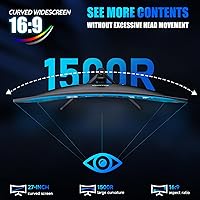
The 1500R curvature is approachable for first-time curved monitor users — it adds genuine depth to gaming environments without the disorienting effect that more aggressive curves produce. Buyers gaming for extended sessions particularly appreciate how the wraparound geometry reduces excessive head movement across the full screen width.
The immersion benefit is most apparent in gaming and widescreen video — for productivity tasks like document editing, the curve adds little and can make straight horizontal lines appear slightly bowed to some users. Those splitting time equally between gaming and office work may not find the curve universally beneficial.
Connectivity
88%
Four video inputs — two HDMI 2.0 and two DisplayPort 1.4 — give this display an unusually flexible port layout for its price tier, letting users keep a PC and multiple consoles connected simultaneously without manual cable swapping. This is a genuine differentiator compared to single or dual-input budget alternatives.
There is no built-in USB hub, a notable omission for users who want to share keyboard or peripheral connections across multiple sources through the monitor. Some buyers also find that switching inputs through the OSD menu is slower than a dedicated hardware input button would allow.
Color Accuracy
57%
43%
The 98% sRGB coverage means colors land in a broadly acceptable range for gaming and video streaming, and with manual calibration the image can be noticeably improved from factory defaults. For buyers gaming primarily in SDR environments, color rendition is workable once OSD settings are properly adjusted.
Factory calibration is a recurring complaint — out of the box, gamma feels off and colors appear either oversaturated or flat depending on the preset selected. This panel was not built for color-critical work, and achieving truly accurate results without hardware calibration tools requires patience and some prior technical familiarity.
Build Quality
61%
39%
The monitor chassis and rear panel feel adequately solid for a budget unit, and the V-shaped base keeps the display stable under normal desk use. Assembly is quick and clean, with most buyers reporting no missing components or obvious manufacturing defects on arrival.
The stand is a consistent weak point — buyers frequently describe noticeable wobble when the desk is bumped or the panel is touched directly, which undermines the otherwise acceptable chassis. Cable management behind the stand is minimal, creating a cluttered look when multiple devices are connected simultaneously.
Sync Performance
85%
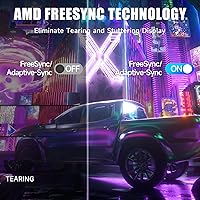
FreeSync Premium combined with G-Sync Compatible certification covers both major GPU platforms without requiring buyers to match a monitor brand to their graphics card. Real-world VRR performance is consistent — screen tearing disappears within the supported frame rate range, and most buyers report smooth activation after initial setup.
When frame rates drop below the panel's VRR floor during demanding scenes, the display briefly reverts to standard V-sync behavior — a limitation common at this price tier. Some Nvidia users also report needing to manually enable G-Sync Compatible mode in the control panel rather than it activating automatically on first connection.
Ergonomics
52%
48%
The -5° to +15° tilt range covers the basic adjustment most users need for a comfortable viewing angle, and VESA 75x75mm mount support means a monitor arm can replace the stand entirely for those who want full positional flexibility without paying extra for an upgraded stand.
Beyond tilt, there is no height adjustment, swivel, or pivot on the stand — a significant limitation for users needing to fine-tune their ergonomic setup. Taller users or those with non-standard desk heights will likely find the fixed stand height uncomfortable during extended sessions without a third-party arm.
Setup Ease
86%
Assembly is genuinely straightforward — the stand attaches with minimal steps, and most buyers report being fully up and running within 15 minutes of opening the box. The monitor is recognized automatically by Windows without additional driver installation, and input detection works reliably on first connection.
OSD navigation uses a single joystick-style button that feels unintuitive until users get familiar with the menu structure, and locating refresh rate or color settings the first time takes some trial and error. The included documentation is basic and assumes prior experience with monitor setup, which may frustrate first-time buyers.
Audio Quality
37%
63%
The built-in dual speakers are functional for basic system audio output — occasional video calls or low-volume background media can be handled without connecting external hardware. Their presence is a convenience, even if the ceiling for what they can deliver is low.
In any real listening context — games, music, or movies — the built-in speakers fall well short, with thin bass, a limited volume ceiling, and poor stereo separation. Nearly every buyer who comments on audio recommends ignoring them entirely and budgeting for a headset or external speakers instead.
Brand Reliability
55%
45%
A subset of buyers have reported positive service experiences when contacting Norcent directly — quick acknowledgment and replacement offers appear in a portion of reviews, suggesting the support infrastructure exists and functions in some cases. No widespread pattern of early hardware failure has emerged across reviewed units.
Norcent lacks the documented reliability history and support infrastructure of established monitor manufacturers, creating genuine uncertainty for buyers who value long-term ownership confidence. Customer service outcomes appear inconsistent — some buyers describe timely resolutions while others report slow or unresponsive follow-through, making the post-purchase experience difficult to predict.
Aesthetics & Design
76%
24%
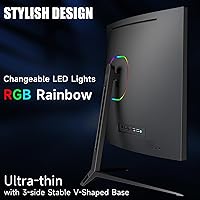
The rear RGB lighting creates an attractive ambient glow on walls and desk surfaces, and the ultra-thin panel profile with V-shaped base gives the setup a clean, modern look that fits gaming-focused environments well. The overall visual presentation punches above what this price point typically delivers.
RGB customization through the OSD is limited compared to monitors with dedicated software control, and buyers wanting fine-grained color zone options will find the choices restrictive. The stand's finish, while acceptable, lacks the premium texture that some competing budget monitors with removable RGB bases have introduced at similar prices.
Multi-Device Flexibility
84%
Four video inputs allow PC users, console players, and laptop owners to keep all their devices connected and switch between them without touching a cable — a practical advantage for anyone managing two or more sources at a single desk. Input switching through the OSD is reliable and consistent across connections.
The absence of a USB hub limits how cleanly multiple devices can be managed from a single position, requiring a separate hub for peripheral sharing between connected sources. There is also no picture-in-picture or picture-by-picture mode, so true simultaneous dual-source viewing is not possible on this display.

Suitable for:

The Norcent MN27-F240GC 27-inch Curved Gaming Monitor is a strong match for budget-conscious PC gamers who have outgrown 60Hz or 144Hz displays and want to experience 240Hz without committing to a premium-tier price. Competitive FPS and racing game players will feel the difference most acutely — at this refresh rate, movement genuinely looks and feels different, and the adaptive sync support means that benefit extends to both AMD and Nvidia GPU owners without extra configuration. The 1500R curve adds a layer of immersion that flat panels at this size cannot replicate, making it a sensible first step into curved monitor territory for buyers who are curious about the form factor but not ready to spend significantly more to test it. Anyone running a mixed setup — say, a PC alongside a PlayStation or Xbox — will appreciate having four video inputs that handle device switching without a hub or manual cable swapping. If your gaming sessions run long and you want a visually engaging desk setup with rear RGB lighting and a curved screen to match, this monitor covers that ground at a price that leaves room in the budget for other peripherals.
Not suitable for:

The Norcent MN27-F240GC 27-inch Curved Gaming Monitor is not the right call for anyone who values pixel-level sharpness, because 1080p spread across a 27-inch panel produces a noticeably softer image than QHD or 4K at the same size — close-up text, fine UI details, and high-resolution game assets will show that limitation plainly. Graphic designers, photo editors, or anyone doing color-sensitive creative work should also look elsewhere; the factory calibration tends to need adjustment out of the box, and even after tweaking, this is a gaming-oriented display rather than a color-accurate one. IPS devotees will likely find the VA panel's narrower viewing angles a frustration in shared or multi-seat viewing situations. Buyers who place a high premium on brand track record, robust warranty coverage, and reliable post-purchase support may find Norcent's limited brand history a genuine sticking point. Finally, if you already own a well-calibrated 144Hz display and aren't deep into competitive gaming, the jump to 240Hz at the cost of resolution and panel flexibility is probably not a worthwhile trade for your use case.
Specifications

  • Screen Size: The panel measures 27 inches diagonally, offering a wide viewing area suited to single-monitor desktop gaming setups.
  • Panel Type: Uses a Fast VA (Vertical Alignment) panel, which prioritizes deep contrast and black levels over the wide viewing angles typical of IPS panels.
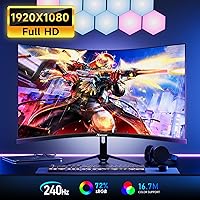
  • Resolution: Native resolution is 1920 x 1080 (Full HD), which at 27 inches yields a pixel density that some users may find softer than QHD or higher-resolution alternatives.
  • Refresh Rate: Supports a maximum refresh rate of 240Hz, enabling noticeably smoother motion rendering in fast-paced games compared to 60Hz or 144Hz displays.
  • Response Time: Rated at 1ms using the MPRT (Moving Picture Response Time) method, which measures motion blur reduction rather than the physical pixel transition speed (GtG).
  • Curvature: Features a 1500R curvature radius, meaning the screen curves to match a circle with a 1500mm radius, producing a moderate and approachable wraparound effect.
  • Sync Technology: Compatible with AMD FreeSync Premium and also certified as G-Sync Compatible, providing adaptive sync support for both major GPU platforms without additional configuration.
  • Color Gamut: Covers 98% of the sRGB color space, which is adequate for gaming and general media consumption but falls short of wide-gamut DCI-P3 coverage preferred for creative work.
  • Video Inputs: Includes two HDMI 2.0 ports and two DisplayPort 1.4 ports, allowing simultaneous connection of up to four video sources for flexible multi-device use.
  • Built-in Audio: Equipped with two built-in speakers for basic audio output; these are functional for system sounds and casual use but are not a replacement for dedicated speakers or headphones.
  • VESA Mounting: Supports the 75x75mm VESA mounting standard, making it compatible with most monitor arms and wall-mount brackets sold separately.
  • Tilt Adjustment: The stand allows tilt adjustment between -5° and +15°, providing a moderate range of ergonomic positioning for different desk heights and seating arrangements.
  • Rear Lighting: Features an RGB LED lighting strip on the rear panel, which projects ambient light onto the wall or desk surface and can be customized via the monitor’s OSD menu.
  • Aspect Ratio: Standard 16:9 widescreen aspect ratio, fully compatible with all modern gaming consoles, PC graphics cards, and streaming content.
  • Dimensions: The assembled monitor with stand measures approximately 21.13″ wide, 17.5″ tall, and 7.09″ deep, requiring a desk depth of at least 8 inches for comfortable placement.
  • Weight: The complete unit with stand weighs 14.97 pounds, which is typical for a 27-inch curved monitor and within the capacity range of most standard monitor arms.
  • Manufacturer: Produced by Norcent, a value-tier consumer electronics brand with a narrower retail footprint and support history compared to established monitor manufacturers.

Related Reviews

Skytech Gaming Moonshadow 27-inch Curved Gaming Monitor
83%
88%
Image Quality
91%
Refresh Rate Performance
86%
Adaptive-Sync
83%
VA Panel Contrast
84%
Stand & Ergonomics
More
Sealan 27-inch Curved Gaming Monitor
82%
85%
Display Quality
90%
Ease of Setup
91%
Value for Money
87%
Performance in Gaming
83%
Color Accuracy
More
Samsung S39C 27-Inch Curved Gaming Monitor
75%
83%
Picture Quality & Color Accuracy
88%
Curvature & Immersion
61%
Refresh Rate & Gaming Performance
86%
Eye Comfort & Long-Session Usability
79%
Build Quality & Aesthetics
More
GAMEPOWER T50 27-Inch Curved Gaming Monitor
66%
83%
Value for Money
79%
Gaming Performance
74%
Display Quality
61%
Pixel Density & Sharpness
62%
Build Quality
More
CRUA CR270C 27″ Curved Gaming Monitor
71%
83%
Value for Money
78%
Image Quality
81%
Refresh Rate Performance
86%
Panel Contrast & Blacks
67%
Build Quality
More
Great Voell 27-Inch Curved Gaming Monitor
86%
91%
Value for Money
89%
Display Quality
87%
Gaming Performance
84%
Eye Comfort
80%
Build Quality
More
DJiEX Q27P28 27-inch Curved Gaming Monitor
72%
88%
Value for Money
81%
Image Quality
86%
Gaming Performance
91%
Aesthetic Design
47%
Stand & Ergonomics
More
ArcticPro AD27EF4C 27-inch Curved Gaming Monitor
74%
88%
Value for Money
91%
Refresh Rate Performance
79%
Panel & Image Quality
76%
Motion Clarity
53%
Ergonomics & Adjustability
More
Gawfolk GF270C 27-Inch Curved Gaming Monitor
72%
83%
Value for Money
78%
Image Quality
81%
Refresh Rate Performance
74%
Response Time & Motion Clarity
62%
Build Quality
More
FYHXele 27-inch Curved Gaming Monitor
73%
84%
Gaming Performance
71%
Image Quality
88%
Value for Money
83%
Design & Aesthetics
62%
Build Quality
More

FAQ

You will need to use a DisplayPort 1.4 cable to reach 240Hz at 1080p — that is the connection that carries enough bandwidth for it. HDMI 2.0 on this monitor tops out at 144Hz at 1080p, so if you plug in via HDMI and wonder why you are not hitting 240Hz, swapping to DisplayPort will solve it. Make sure your graphics card also supports DisplayPort output, which most modern Nvidia and AMD cards do.

It works with Nvidia too. The Norcent MN27-F240GC 27-inch Curved Gaming Monitor carries G-Sync Compatible certification, which means Nvidia has validated that adaptive sync functions correctly on this panel. You will need to enable G-Sync Compatible mode in the Nvidia Control Panel, but once that is done, tear-free gaming works the same way it would on a native G-Sync display.
Blurry is a strong word, but softer is fair. At 27 inches, 1080p works out to around 82 pixels per inch, which is noticeably less sharp than a 1440p panel at the same size. You will likely notice it most in small text, fine UI elements, and detailed game textures at close viewing distances. If your desk setup keeps you about 24 to 30 inches from the screen, it is more forgiving. Competitive gamers who care about frame rate over visual fidelity tend to find it acceptable; people who do a lot of reading or content work often prefer to step up to QHD.

The 1ms figure is MPRT, which stands for Moving Picture Response Time — it is not the same as GtG (gray-to-gray). MPRT measures how long a moving image appears sharp to the human eye by using backlight strobing, whereas GtG measures how quickly individual pixels physically change color. In practice, MPRT numbers tend to look better on spec sheets than GtG figures, so keep that in mind when comparing monitors. The real-world motion performance of this 240Hz VA panel is still quite good, but the 1ms number alone is not a direct apples-to-apples comparison against a 1ms GtG IPS panel.

Yes, that is one of the more practical features of this curved gaming monitor. With two HDMI 2.0 ports and two DisplayPort 1.4 ports, you can keep up to four devices plugged in simultaneously and switch between them using the input source option in the on-screen menu. No need to unplug cables when switching between a console and a PC.

The stand is functional but not particularly rigid. Several buyers have noted that the screen wobbles noticeably if the desk gets bumped or if you tap the panel itself, which can be distracting during long gaming sessions. If stand stability matters to you, a VESA monitor arm is a straightforward fix since this panel supports 75x75mm mounting — and it will also free up desk space.

Not really, for most people. The two built-in speakers cover basic system audio and are fine for occasional video calls or background music at low volume, but they lack the depth and volume to make games or movies sound satisfying. If audio quality matters to you at all, budget for a headset or a small speaker bar — the speakers here are a convenience feature, not a selling point.

The 1500R curve is on the moderate end of the curved monitor spectrum, so it tends to feel natural rather than extreme. Most first-time curved monitor users adapt within a day or two and stop noticing it consciously. It is most noticeable — in a positive way — during immersive games or widescreen movies. For everyday tasks like browsing or document work, it is essentially a non-issue.

Norcent is not a brand with a long, well-documented support track record, which is a legitimate thing to weigh before buying. Buyer reports are mixed — some describe responsive and helpful service when issues arose, while others mention slow follow-through or difficulty reaching someone useful. If strong after-sales support is a priority for you, that uncertainty is worth factoring into your decision. Checking for current warranty terms directly with the seller before purchasing is advisable.

Yes, this panel supports VESA mounting with a 75x75mm hole pattern, which is one of the most common sizes. Most monitor arms in the budget to mid-range category support 75x75mm natively, so compatibility should not be an issue. Just confirm the arm you choose is rated for a weight of at least 15 pounds to safely support the panel.