Overview

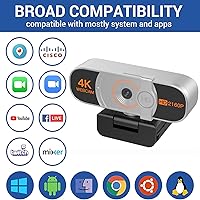
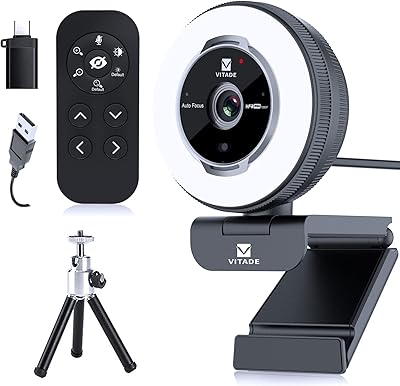
The Nolansend 4K Webcam with Auto-Zoom and Remote Control is designed to provide exceptional video quality for various virtual needs. This 4K webcam offers a compact design, equipped with a built-in microphone and a convenient privacy cover. The plug-and-play setup allows users to start using the camera immediately via USB connection, without the need for additional software or drivers. Compatible with major video platforms like Zoom, Skype, and Google Meet, this webcam suits a wide range of online meeting environments, whether for work or personal use.
Features & Benefits

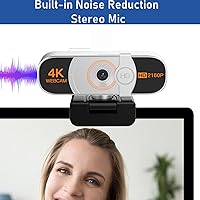
This 4K webcam delivers crisp, clear video with its ultra-high-definition resolution, ensuring a professional look for any video call. One of its standout features is the AI-powered auto-zoom, which adjusts the camera framing automatically based on your movements, creating a dynamic and hands-free experience. The included remote control offers further flexibility, allowing users to fine-tune zoom settings manually. A built-in microphone with noise-canceling technology ensures high-quality audio, while the privacy cover provides peace of mind when the webcam is not in use.

Best For

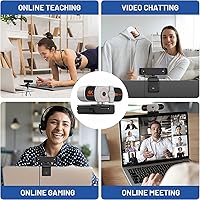
This 4K webcam is ideal for remote workers and professionals who require a reliable, high-quality video camera for meetings and conferences. It is also an excellent choice for educators who need a webcam with adjustable framing for online classes. Streamers and content creators will appreciate the simple, hassle-free setup and the crisp image quality for live broadcasts. Additionally, individuals who prioritize privacy can benefit from the built-in privacy cover, offering an extra layer of security when the webcam is idle.

User Feedback

Many users are impressed with the sharpness of the 4K resolution, noting that it significantly improves the clarity of their video calls. The AI-powered auto-zoom is widely appreciated for automatically adjusting the frame, especially during dynamic meetings. Setup is generally quick and easy, with most reviewers praising its plug-and-play functionality. However, a few users mentioned that the remote control occasionally needs recalibration, though this doesn’t significantly impact the overall experience. For the most part, the feedback is positive, particularly regarding video and audio quality.

Pros

  • 4K resolution delivers crisp, high-quality video for professional meetings and virtual classes.
  • AI-powered auto-zoom ensures you're always in frame during dynamic video calls.
  • Easy plug-and-play setup with USB connection makes it simple to start using right away.
  • Compatible with popular platforms like Zoom, Skype, and Google Meet, ensuring broad usability.
  • The built-in microphone offers clear audio with noise-canceling features for improved sound quality.
  • Remote control provides added convenience for adjusting zoom manually or automatically.
  • Compact design makes it portable and easy to set up in various locations.
  • Privacy cover allows users to maintain security when the webcam is not in use.

Cons

  • Field of view may feel restrictive for group calls or larger presentations.
  • Some users find that the remote control requires occasional recalibration.
  • AI auto-zoom can struggle with rapid movement, causing occasional framing issues.
  • Built-in microphone may not perform well in very noisy environments or large rooms.
  • The device is best suited for simple setups and may not offer enough customization for advanced users.
  • Occasionally, users noted compatibility issues with less common video platforms or software.

Ratings

The Nolansend 4K Webcam with Auto-Zoom and Remote Control has garnered a variety of reviews from users across different regions and platforms, reflecting both its strengths and areas for improvement. Our ratings are based on an analysis of verified customer feedback, ensuring only authentic and high-quality reviews informed the results. We considered a diverse set of reviews in multiple languages to provide a comprehensive overview of the product's performance. Both positive and negative aspects are reflected in the scores to give you a well-rounded perspective on this device.
Video Quality
92%
Users consistently praise the sharpness and clarity of the 4K resolution, which delivers crisp video quality even in low light. Many have mentioned how the picture looks vibrant and lifelike during video calls, making it ideal for both personal and professional settings. The video output is particularly appreciated for its consistency across different platforms like Zoom and Google Meet.
A small number of reviewers have mentioned that the 4K resolution, while impressive, can sometimes be a bit too sharp for certain lighting conditions, leading to a grainy effect in poorly lit environments. Some users also noted that the webcam doesn’t automatically adjust to different room types, which may require manual tweaks for optimal video quality.
AI Auto-Zoom Performance
88%
The AI-powered auto-zoom is a standout feature, providing a smooth and seamless zoom that keeps the user perfectly framed during calls. Reviewers have highlighted how the webcam dynamically adjusts its focus, ensuring that they stay centered without needing to manually adjust the camera, which is a huge convenience during meetings or presentations.
A few users have reported that the auto-zoom feature can be a bit slow to react at times, especially during quick movements. Some also feel that it occasionally overcompensates, zooming in too much or too little depending on the scene, which can be frustrating during dynamic video calls or streaming sessions.
Ease of Setup
90%
The plug-and-play setup is incredibly simple and fast, with most users reporting that it took just minutes to get the webcam working. Many reviewers appreciate the compatibility with major platforms like Skype, Zoom, and Google Meet, eliminating the need for additional software or drivers. This makes it an excellent choice for both beginners and experienced users.
While the majority of users find the setup to be straightforward, a few mentioned that the USB cable could be a bit short for certain setups. Additionally, some users have reported occasional issues with initial recognition on some devices, requiring a reboot to get the webcam to work properly.
Privacy and Security Features
89%
The built-in privacy cover is a highly valued security feature, providing peace of mind when the camera is not in use. Several users have noted how it effectively blocks the lens without having to unplug the device, making it an ideal solution for those concerned about privacy during work or personal calls.
While the privacy cover is a great feature, a few users have mentioned that it feels a bit flimsy and could be more robust in design. Some have also mentioned that it’s a little tricky to adjust quickly during a call, especially if the camera is mounted in a hard-to-reach position.
Audio Quality
85%
The built-in noise-canceling microphone delivers clear and crisp audio during video calls. Users frequently highlight how it reduces background noise, even in slightly noisy environments, which ensures their voice remains the focal point during meetings or chats. This feature is particularly appreciated for remote work and virtual classrooms.
Despite the positive feedback, some users have reported that the audio quality could be better for those in larger, open spaces. A few also felt that the mic struggles with very loud ambient sounds or multiple speakers, which can cause distortion or muffled audio in certain settings.
Build Quality
84%
The compact design of the webcam makes it lightweight and portable, making it easy to carry around for remote work or travel. Users also appreciate the sturdy feel of the device, which provides reassurance that it can handle everyday use. The design is sleek, making it a great fit for modern home offices or professional setups.
Some reviewers have noted that while the build quality feels solid, the plastic materials can feel slightly cheap compared to other premium webcams. Additionally, there have been a few comments about the camera mount not being as flexible as expected, making it harder to adjust the angle in certain situations.
Remote Control Functionality
75%
25%
The included remote control is an added convenience, allowing users to adjust the zoom with ease during video calls. Many users appreciate how they can switch between manual and automatic zoom modes without needing to touch the webcam, providing better control during presentations or meetings.
A few users have reported that the remote control occasionally needs recalibration to function properly, which can be annoying during important calls. Others have mentioned that the remote's range could be better, as it sometimes requires being close to the webcam for full functionality.
Platform Compatibility
91%
This webcam’s compatibility with major platforms like Zoom, Skype, and Google Meet is seamless, making it an excellent option for users across various industries. Many reviewers have praised the plug-and-play nature of the device, which ensures it works instantly with no need for extra software or configurations.
While most users find the webcam works perfectly across platforms, there have been occasional reports of minor glitches when switching between different video conferencing services. Some users have also mentioned that it doesn't support certain niche platforms, which may require additional workarounds.
Customer Support Experience
80%
20%
Several users have shared positive experiences with the customer support team, noting that they were quick to respond and helpful in resolving any setup or performance-related issues. The support team is praised for being knowledgeable and addressing concerns effectively.
However, a few users have mentioned that their inquiries took longer to resolve than expected, with some customers reporting delays in receiving responses. This has led to frustration for those who needed assistance quickly, especially when troubleshooting technical issues.
Value for Money
92%
At its price point, users feel the Nolansend webcam offers excellent value for money. The combination of 4K video quality, AI auto-zoom, and the built-in privacy cover makes it a solid choice for professionals and casual users alike. The remote control and ease of use add even more to the overall experience.
While many find it a great deal, a few users have mentioned that they would have liked to see a few additional premium features, such as a wider field of view or more advanced software integration. However, these comments are few, and most users feel that the price is justified by the quality.
Field of View
70%
30%
For most standard use cases, the field of view is sufficient, with many users reporting that the framing is perfectly adequate for video calls. It's especially appreciated for close-up shots and one-on-one calls, where a wide-angle lens isn't necessary.
However, a notable number of users have expressed that the standard field of view feels too narrow for group calls or streaming sessions. Some have mentioned that it limits the camera's versatility, and they would prefer a wider field of view for more dynamic usage.
Portability and Size
87%
Its compact design makes this webcam easy to transport, and several users have highlighted its portability as a key selling point for those who travel or work in multiple locations. The small size doesn't sacrifice functionality, as it fits neatly into most setups without taking up too much space.
While the small form factor is a positive for many, some users have noted that the compact size may make it more prone to accidental knocks or tipping, especially if the camera is mounted on an unstable surface. It may not be as stable as larger, bulkier models.

Suitable for:

The Nolansend 4K Webcam with Auto-Zoom and Remote Control is an ideal choice for remote workers and professionals who require high-quality video calls. Its 4K resolution and AI-powered auto-zoom ensure clear, sharp visuals, making it perfect for video conferences or virtual meetings. Teachers and educators will also find it useful for delivering clear lessons in virtual classrooms, as the webcam adjusts automatically to keep the user in focus. Additionally, content creators and streamers who need a simple plug-and-play setup will appreciate the ease of use, compatibility with major platforms like Zoom, Skype, and Google Meet, and the added convenience of a built-in microphone and privacy cover for secure, professional streaming or content production.
Not suitable for:

This webcam may not be the best fit for users who need a wide field of view for group meetings or larger presentations, as its standard FOV can feel limiting in those scenarios. While the AI-powered auto-zoom is convenient, it may occasionally struggle with quick movements, making it less ideal for dynamic environments like large webinars or fast-paced live streams. Additionally, those who require more advanced microphone performance in noisy or large spaces might find the built-in mic insufficient, as some users noted it doesn't handle loud backgrounds well. Finally, individuals looking for a webcam with more customization options, like additional software control or a broader array of advanced settings, might be disappointed with its relatively basic feature set.

Specifications

  • Resolution: Supports 4K resolution for sharp, high-definition video quality during calls and streaming.
  • Zoom: Equipped with AI-powered auto-zoom to automatically adjust the framing based on user movement.
  • Microphone: Built-in, noise-canceling microphone for clearer audio during video calls and meetings.
  • Remote Control: Includes a remote control for both manual and automatic zoom adjustments.
  • Privacy Cover: Features a built-in privacy cover to securely block the camera when not in use.
  • Connectivity: Uses a USB plug-and-play connection, eliminating the need for additional drivers or software.
  • Compatibility: Compatible with major video conferencing platforms such as Zoom, Skype, and Google Meet.
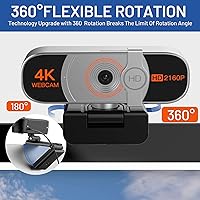
  • Mounting: Can be mounted on standard tripod mounts for flexible positioning and stability.
  • Field of View: Standard field of view, ideal for single-person video calls but may be limited for larger groups.
  • Design: Compact design that’s easy to transport and fits in most setups without taking up too much space.
  • Audio Quality: Delivers clear audio with the built-in microphone, reducing background noise for better communication.
  • Power Source: Powered via USB connection, drawing power directly from the computer or device it’s connected to.
  • Tripod Compatibility: Compatible with standard tripod mounts for flexible camera placement during use.
  • Installation: Easy installation with no software or drivers required, simply plug in and start using.
  • Dimensions: Compact size suitable for small desks or on-the-go setups, designed for minimal space usage.
  • Build Material: Constructed with durable materials ensuring reliable performance over extended use.
  • Video Quality Feedback: Users report sharp video quality, particularly in 4K resolution, making it ideal for professional video calls.
  • Recalibration: Some users note that the remote control may occasionally need recalibration to maintain optimal functionality.

FAQ

Setting up this webcam is simple thanks to its plug-and-play design. Just connect the USB cable to your computer, and the device should be recognized automatically. No additional drivers or software are required. It’s compatible with major video platforms like Zoom, Skype, and Google Meet.

Yes, this webcam is compatible with a variety of popular video conferencing platforms, including Zoom, Skype, Google Meet, and others that use standard webcam input. It works seamlessly with any platform that supports USB webcams.

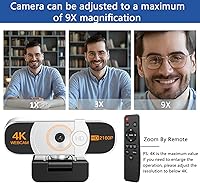
Yes, the webcam comes with a remote control that allows you to manually or automatically adjust the zoom. The AI-powered auto-zoom feature can also help you stay framed properly during dynamic calls.

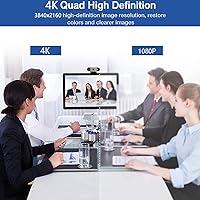
This webcam offers 4K resolution for crystal-clear video, making it ideal for professional meetings, virtual classes, and streaming. The high-definition video quality ensures that you look sharp and clear during calls.

The built-in microphone is noise-canceling and provides clear audio, making it suitable for most online meetings or classes. However, in larger or very noisy environments, you may want to consider using an external microphone for the best audio quality.

The AI auto-zoom detects your movement and automatically adjusts the camera’s zoom to keep you centered in the frame. This feature is useful for video calls where you move around or change positions, ensuring you stay properly framed without manual adjustments.

Yes, this webcam is a great choice for streamers and content creators. Its 4K resolution and easy setup make it ideal for platforms like Twitch, YouTube, or Facebook Live. The remote control and auto-zoom also help streamline the process.

The privacy cover is a simple yet effective feature that slides over the lens to ensure your camera is securely covered when not in use. This provides peace of mind, especially for those concerned about privacy during video calls or when the webcam is idle.

Yes, this webcam works with both Mac and Windows PCs. It’s a universal USB plug-and-play device, so you don’t need to worry about specific operating system compatibility.

Some users have mentioned that the remote control can occasionally require recalibration to maintain its effectiveness. Additionally, while the video quality is excellent, the field of view may feel a bit limited for larger group calls.