Overview

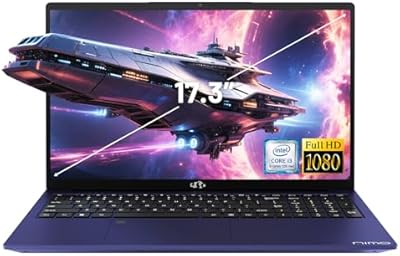
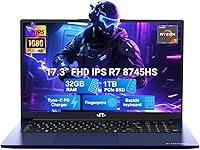
The NIMO N177B 17.3″ Gaming Laptop is an ambitious entry from a brand most buyers haven't heard of yet — and that's worth addressing upfront. NIMO is not Lenovo or ASUS, but this 17-inch AMD machine makes a case for itself with a large, immersive display, a powerful processor, and a 2-year warranty that few newcomers bother to offer. The 17.3-inch form factor is a deliberate choice — it's built for people who sit down and work, game, or create for hours at a stretch. Just temper expectations on graphics: the Radeon 780M is integrated, meaning light-to-moderate gaming only, not a substitute for a dedicated GPU.
Features & Benefits

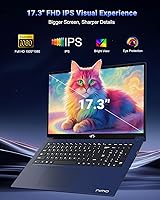
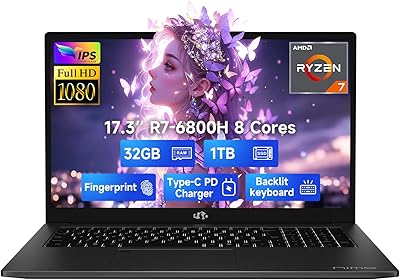
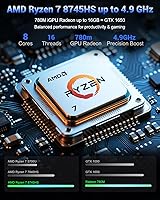
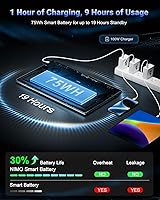
At the heart of the N177B sits AMD's Ryzen 7 8745HS — an 8-core chip that handles heavy multitasking, video rendering, and dozens of browser tabs without breaking a sweat. Paired with 32GB DDR5 RAM and a 1TB PCIe 4.0 SSD, the system feels genuinely fast in day-to-day use. The 17.3-inch IPS anti-glare panel is comfortable for long sessions, and the 100W USB-C charger included in the box is a practical highlight — 15 minutes of charging gets you roughly two hours of use. The metal lid adds a premium touch, and the fact that both RAM and storage are user-upgradeable gives this machine longevity that sealed competitors simply cannot match.

Best For

This 17-inch AMD machine fits a specific kind of buyer well. Remote workers and students who spend hours on a screen will appreciate the spacious display and comfortable backlit keyboard. If you play esports titles — Valorant, CS2, League of Legends — the Radeon 780M handles them fine at 1080p. Content creators doing photo editing or light video work will find the CPU and RAM more than capable. It's also a solid pick for anyone tired of juggling multiple chargers, since the USB-C brick works with phones and tablets too. That said, if your priority is AAA gaming performance, a machine with a dedicated GPU is the smarter call.

User Feedback

Early buyers of the N177B tend to praise build quality and the display more than they expected from a lesser-known brand, with keyboard feel and fast charging earning consistent mentions. On the flip side, some users note thermals can climb during sustained workloads, and a few have flagged that Wi-Fi tops out at 802.11ac — no Wi-Fi 6 — which stings a bit at this price tier. Brand trust is a genuine hesitation for some shoppers, but the 2-year warranty and reportedly responsive support team appear to ease that concern for most. A handful mention mild Windows 11 bloat out of the box, though nothing out of the ordinary. Overall, the consensus leans positive for buyers who go in with calibrated expectations.

Pros

  • The Ryzen 7 8745HS handles heavy multitasking and light creative workloads without breaking a sweat.
  • 32GB DDR5 RAM means you can run demanding applications simultaneously with zero compromise.
  • The 17.3-inch anti-glare IPS panel is genuinely comfortable for long work or study sessions.
  • User-upgradeable RAM and SSD slots give this machine a longer useful lifespan than sealed competitors.
  • The bundled 100W USB-C charger works across laptops, phones, and tablets — one brick replaces several.
  • A 2-year warranty from a newer brand is a meaningful confidence signal that most rivals at this tier skip.
  • The metal lid adds a premium, rigid feel that users consistently praise given the overall price point.
  • Esports titles at 1080p run smoothly on the Radeon 780M — Valorant and CS2 are genuinely playable.
  • The backlit keyboard and integrated fingerprint reader make daily productivity feel polished and considered.
  • A 90-day return window gives first-time NIMO buyers a low-risk way to evaluate the machine properly.

Cons

  • The Radeon 780M is integrated graphics — AAA gaming at acceptable settings is largely off the table.
  • Wi-Fi tops out at 802.11ac with no Wi-Fi 6 support, which stings at this price point.
  • Under sustained CPU load, fan noise rises noticeably and palm-rest temperatures become uncomfortable.
  • The 2MP webcam is below average for a machine at this tier — external camera likely needed for professional use.
  • Real-world battery life under mixed use falls well short of the claimed 15.5-hour figure.
  • NIMO is an unfamiliar brand, and independent repair resources or third-party support are currently limited.
  • Some pre-installed Windows 11 software requires manual cleanup before the system feels properly ready to use.
  • The 1080p resolution at 17.3 inches means pixel density is noticeably lower than smaller high-res displays.
  • The plastic underside and interior trim create a build inconsistency that clashes with the premium lid finish.

Ratings

The NIMO N177B 17.3″ Gaming Laptop has been put through the lens of verified buyer reviews collected globally, with our AI model actively filtering out incentivized, bot-generated, and duplicate feedback to surface what real users actually experience. Scores reflect both the genuine strengths this machine brings to the table and the friction points that repeatedly surfaced across independent buyer reports. Nothing here is padded — the highs and the frustrations are weighted equally.
Processing Performance
88%
The Ryzen 7 8745HS earns consistent praise from users juggling demanding workloads — think dozens of browser tabs open alongside video calls, spreadsheets, and background downloads without noticeable lag. Content creators doing photo batch editing or light video export report the 8-core chip handles tasks faster than they expected at this price tier.
Under extended, sustained CPU load — long rendering jobs or prolonged gaming sessions — some users notice the chassis gets warm and performance can throttle slightly. It's not severe, but buyers expecting desktop-class sustained output may find the thermal ceiling occasionally limiting.
RAM & Storage Speed
91%
Having 32GB of DDR5 running at 4800MHz means multitasking feels genuinely snappy — users switching between heavy applications report almost no perceptible delay. The PCIe 4.0 SSD adds to that responsiveness, with Windows boot times and large file transfers drawing repeated positive mentions.
A small number of users note that the memory speed, while listed at 4800MHz, may run at lower effective speeds depending on system configuration. Those doing benchmark comparisons against premium competitors occasionally flag a gap between advertised and real-world memory throughput.
Display Quality
84%
The 17.3-inch IPS anti-glare panel receives consistent praise for its comfort during long work or study sessions — users with desk setups particularly appreciate the reduced glare in bright rooms. Color accuracy gets positive remarks from photo editors doing casual work, and the wide screen-to-body ratio makes the display feel more expansive than the bezels suggest.
The panel tops out at 1080p, which at 17.3 inches means pixel density is noticeably lower than smaller high-res screens. Users coming from 1440p or OLED displays tend to find the image quality adequate but not impressive, and peak brightness could be higher for outdoor or very bright environments.
Gaming Capability
58%
42%
For esports titles — CS2, Valorant, League of Legends — the Radeon 780M holds up well at 1080p with settings adjusted, delivering playable frame rates that satisfied a clear segment of buyers who primarily play competitive games rather than cinematic ones. Older or less demanding titles also run without issue.
This is an integrated GPU, and buyers who expected dedicated-card performance from a machine marketed as a gaming laptop have expressed real disappointment. AAA titles at high settings are largely off the table, and users attempting to run graphically intensive games at native resolution report significant frame drops.
Build Quality & Design
79%
21%
The metal A-surface lid gives the N177B a more premium feel in hand than its price bracket typically delivers. Multiple users mention being pleasantly surprised by the chassis rigidity — there is minimal flex on the keyboard deck and the hinge feels solid through repeated open-and-close cycles.
The underside and interior trim are plastic, which creates a slight inconsistency between the premium lid and the rest of the build. A few buyers note that the blue colorway photographs better than it looks in person, with the finish attracting minor scuffs over time with regular bag use.
Keyboard & Typing Experience
82%
18%
The backlit keyboard gets strong marks from users who type for hours — the key travel feels substantial by thin-laptop standards, and the numeric keypad is a genuine bonus for users handling spreadsheets or data entry. Backlighting is even and works well in dim environments.
Key feedback is adequate but not exceptional — touch typists used to mechanical or high-end membrane keyboards may find the actuation slightly mushy. A few users also report that the keyboard layout takes some adjustment, particularly around the right-side modifier keys near the numpad.
Touchpad & Fingerprint Reader
76%
24%
The integrated fingerprint reader in the touchpad is one of the more convenient implementations buyers mention — unlocking Windows Hello without hunting for a separate sensor speeds up the daily login routine. Gesture support on the precision touchpad is generally accurate for scrolling and two-finger actions.
The touchpad size, while functional, feels constrained relative to the large chassis — users who do a lot of gesture-based navigation on premium ultrabooks notice the difference. A handful of buyers report occasional fingerprint recognition inconsistency, particularly right after setup before the scanner is well-trained.
Battery Life
67%
33%
Under light workloads — document editing, video calls, web browsing — several users report getting through most of a workday on a single charge, which is a reasonable result for a 17-inch machine. The claimed 15.5-hour figure resonates more with low-brightness, light-use scenarios that some remote workers genuinely match.
Under moderate to heavy load, battery life drops considerably shorter than the claimed figure, with several users reporting closer to 5 to 7 hours during actual mixed use. The large display and capable CPU draw more power than the battery comfortably sustains, making the included charger a frequent necessity.
Charging System
86%
The bundled 100W USB-C charger is a standout practical feature — users repeatedly praise the ability to use a single compact charger for their laptop, phone, and tablet while traveling. The fast-charge capability, which users confirm does deliver meaningful top-up speed in short breaks, reduces charging anxiety during busy days.
The 6.56-foot cable length works well at a desk but can feel restrictive in hotel rooms or offices where outlet placement is awkward. A small number of users also note the charger brick runs warm during sustained charging, which is worth monitoring in enclosed spaces.
Thermal Management
61%
39%
During everyday tasks — browsing, video streaming, light office work — the N177B runs quietly and stays cool enough to comfortably use on a lap or desk. Casual users who never push the machine hard report almost no fan noise in their day-to-day experience.
Under sustained CPU-heavy workloads, fan noise ramps up noticeably and surface temperatures rise to uncomfortable levels in the palm rest area. A portion of buyers flag that the thermal management feels tuned conservatively, with performance throttling kicking in before temperatures become dangerous — a trade-off that hurts productivity users doing long renders.
Wi-Fi & Connectivity
54%
46%
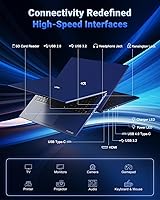
Port selection is a genuine positive — three USB 3.0 ports plus a USB-C 4.0 connection covers most real-world needs without requiring a hub for everyday use. Users who work with multiple peripherals appreciate not having to choose what stays connected.
The Wi-Fi spec — capped at 802.11ac with no Wi-Fi 6 — is a meaningful shortcoming at this price level and draws consistent criticism from technically aware buyers. In homes or offices with Wi-Fi 6 routers, users notice they cannot take full advantage of faster network speeds, which feels like a cost-cutting decision that does not match the rest of the spec sheet.
Software & Out-of-Box Experience
69%
31%
Windows 11 Home ships pre-installed and the initial setup process is straightforward for most users. A portion of buyers report the system feels clean enough out of the box that they were productive within an hour of first power-on.
Several early adopters flag a handful of pre-installed third-party applications that add noise to the taskbar and startup sequence. While the bloat level is not extreme by industry standards, buyers expecting a clean OS experience will likely spend 20 to 30 minutes removing unwanted software before settling in.
Webcam Quality
52%
48%
The 2MP webcam covers basic video call needs adequately in well-lit rooms — users doing standard business calls on Teams or Zoom report it is functional for that purpose and nothing more.
At this price and screen size, a 2MP webcam is below what buyers reasonably expect. Low-light performance is poor, and anyone doing regular content streaming, client-facing video calls, or recording will likely need an external camera — an added cost and inconvenience that multiple buyers explicitly mentioned.
Upgradeability & Longevity
87%
User-accessible RAM slots and an upgradeable SSD give the N177B a meaningful lifespan advantage over sealed competitors. Buyers who understand hardware appreciate the option to double down on memory or swap storage in two or three years without replacing the whole machine.
Documentation around the upgrade process is sparse from NIMO directly, meaning less technical users may feel uncertain about voiding their warranty or physically accessing components. A clearer upgrade guide or official support resource would make this feature more accessible to the average buyer.
Value for Money
63%
37%
For buyers who prioritize CPU power, DDR5 memory, a large display, and user upgradeability over raw GPU performance, the N177B does pack a lot into the configuration. The 2-year warranty and 90-day return window add practical value that softens the risk of buying from a lesser-known brand.
The price sits at a level where established brands offer systems with discrete graphics cards and Wi-Fi 6, making the value proposition harder to defend for buyers who game seriously or work in bandwidth-intensive environments. The integrated GPU in particular is the most cited reason buyers feel the machine does not fully justify its cost against the broader competitive landscape.

Suitable for:

The NIMO N177B 17.3″ Gaming Laptop is a strong match for buyers who spend long hours in front of a screen and want a machine that keeps up without constantly reaching for the charger. Remote workers and students will find the large IPS display genuinely comfortable for extended sessions, and the Ryzen 7 8745HS handles the kind of real-world multitasking — video calls, research tabs, document editing, light creative work — that defines a productive day. Esports players who stick to titles like Valorant or CS2 will get playable frame rates without needing a dedicated GPU. The user-upgradeable design makes it particularly appealing for budget-conscious buyers who want to extend the machine's life in a couple of years by swapping in more storage or RAM rather than replacing the whole system. The included 100W USB-C charger is a genuine convenience for anyone who travels frequently and wants one compact brick that handles multiple devices.
Not suitable for:

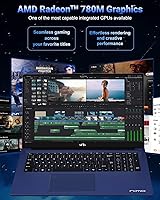
If your primary reason for buying a laptop labeled as a gaming machine is to play demanding, graphically intensive AAA titles at smooth frame rates, the NIMO N177B 17.3″ Gaming Laptop will disappoint — the Radeon 780M is an integrated GPU, and no amount of settings tweaking will make it a substitute for a discrete graphics card. Buyers who are loyal to established laptop brands and need the reassurance of a proven support network may also feel uneasy with NIMO, which is still building its reputation despite a reasonable warranty. Professionals who rely on fast, stable wireless connections — architects transferring large files, video editors pulling from cloud storage, or users in Wi-Fi 6 households — will hit a wall with the 802.11ac-only wireless chip, which is a genuine limitation at this price tier. The 2MP webcam is another sticking point for anyone doing regular client-facing video calls or content recording, as the image quality falls short of what the overall build suggests. And if portability is a priority — commuting daily with a bag, working from different rooms or cafes — the 17.3-inch footprint and relatively modest battery endurance under real-world load make this a desk-first machine, not a go-anywhere companion.
Specifications

  • Processor: AMD Ryzen 7 8745HS, 8-core and 16-thread architecture with a base clock that boosts up to 4.9GHz for demanding single and multi-threaded workloads.
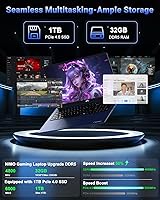
  • RAM: 32GB DDR5 SDRAM running at 4800MHz, installed in a user-accessible configuration that supports future memory expansion.
  • Storage: 1TB PCIe 4.0 NVMe SSD delivering fast read and write speeds suitable for large file transfers, application launches, and OS responsiveness.
  • Display: 17.3-inch FHD IPS anti-glare panel with a 1920x1080 resolution and an 85% screen-to-body ratio for an immersive, wide viewing experience.
  • Graphics: AMD Radeon 780M integrated graphics, sharing system memory and suited for esports titles, older games, and light creative tasks.
  • Operating System: Windows 11 Home comes pre-installed, ready for use out of the box with standard Microsoft setup.
  • Battery Life: Manufacturer-rated at up to 15.5 hours, with real-world endurance varying significantly based on workload intensity and display brightness.
  • Charger: 100W USB-C PD fast charger included with a 6.56ft cable, compatible with phones, tablets, and other USB-C powered devices.
  • Ports: Connectivity includes one USB 2.0 port, three USB 3.0 ports, and one USB-C 4.0 port for versatile peripheral and accessory support.
  • Wireless: Wi-Fi supports 802.11a/b/g/n/ac standards; Wi-Fi 6 (802.11ax) is not supported on this model.
  • Webcam: 2MP rear-facing camera positioned for standard video call use in adequately lit environments.
  • Weight: The laptop weighs 3.84 lbs, which is relatively manageable for a 17-inch class machine but still oriented toward desk-based use.
  • Dimensions: Physical footprint measures 15.66 x 9.99 x 0.74 inches, keeping the profile relatively slim despite the large display.
  • Chassis: The lid (A-surface) is constructed from metal for rigidity and a premium feel, while the interior panels use plastic construction.
  • Keyboard: Full-size backlit keyboard with a numeric keypad, designed for comfortable extended typing and low-light usability.
  • Biometrics: Fingerprint reader is integrated directly into the touchpad, enabling Windows Hello authentication without a separate dedicated sensor.
  • Audio: HD audio system built in, suitable for media playback, video calls, and general entertainment without external speakers.
  • Warranty: Backed by a 2-year manufacturer warranty and a 90-day hassle-free return policy, both serviced through NIMO Direct Inc.

Related Reviews

NIMO N174 17.3″ Gaming Laptop, AMD Ryzen 7 6800H, 32GB RAM, 1TB SSD
84%
89%
Gaming Performance
92%
Display Quality
63%
Battery Life
85%
Build Quality
80%
Portability
More
NIMO N171S 17.3″ Laptop, Intel Core i3-1215U, 16GB RAM, 512GB SSD
81%
85%
Performance
90%
Display Quality
65%
Battery Life
92%
Value for Money
80%
Build Quality
More
NIMO N171B 17.3-inch Laptop, Intel i3-1215U, 16GB RAM, 256GB SSD
82%
88%
Display Quality
85%
Performance (Multitasking)
63%
Battery Life
78%
Build Quality
90%
Keyboard Comfort
More
ASUS TUF F17 Gaming Laptop i7-13620H, 64GB RAM, 4TB SSD, RTX 4070, 17.3″ WQHD 240Hz
86%
94%
Gaming Performance
91%
Display Quality
89%
Multitasking & RAM
93%
Graphics Quality
60%
Battery Life
More
Alienware X17 R2 Gaming Laptop - 17.3-inch FHD, Core i7-12700H, 16GB RAM, 1TB SSD, RTX 3070Ti
84%
94%
Gaming Performance
92%
Display Quality
85%
Thermal Management
90%
Build Quality
60%
Portability
More
ASUS TUF Gaming A17 Laptop, Ryzen 7 4800H, GTX 1660 Ti, 16GB RAM, 1TB SSD, 17.3-inch
82%
88%
Gaming Performance
90%
Build Quality
85%
Multitasking Performance
82%
Display Quality
74%
Battery Life
More
GIGABYTE AORUS 17 RTX 4070 Gaming Laptop
73%
93%
Display Quality
88%
Gaming Performance
67%
Thermal Management
61%
Fan Noise
44%
Battery Life
More
HP 17 Essential 17.3-inch Laptop, Core i7, 64GB RAM, 1TB SSD
83%
92%
Performance
88%
Display Quality
80%
Battery Life
65%
Portability
95%
Multitasking Ability
More
HP Laptop 17-cp2199nr
70%
83%
Value for Money
61%
Display Quality
78%
Performance & Speed
87%
Storage Performance
84%
RAM & Multitasking
More
Tangcorle 17.3-inch 26L Travel Laptop Backpack
78%
91%
Value for Money
88%
Organizational Layout
86%
Laptop Protection
84%
Carry-On Compliance
67%
Build Quality
More

FAQ

It depends heavily on what you mean by gaming. The NIMO N177B 17.3″ Gaming Laptop uses AMD Radeon 780M integrated graphics — not a dedicated GPU — so competitive esports titles like Valorant, CS2, and League of Legends run well at 1080p with adjusted settings. Demanding AAA titles like Cyberpunk 2077 or Alan Wake 2 at playable frame rates are largely out of reach. If esports or older games are your focus, it delivers. If you want to run the latest graphically intensive releases, you will need a machine with a discrete graphics card.
According to NIMO, the memory is user-upgradeable and not soldered, which is a genuine advantage over many similarly priced competitors. That said, NIMO has not published a detailed upgrade guide publicly, so if you plan to add more RAM down the line, it is worth confirming the specific SO-DIMM slot configuration with their support team before purchasing. The 1TB SSD is also replaceable, giving you two paths for expanding the system over time.

Under light use — browsing, documents, video calls with the display at moderate brightness — many users report getting through six to eight hours comfortably. The manufacturer claims up to 15.5 hours, but that figure reflects very conservative usage scenarios. If you are running the CPU hard, streaming video at full brightness, or doing creative work, expect battery life to drop closer to five or six hours. The fast-charging USB-C system helps offset this, since a short plug-in break can meaningfully top up the battery.

The N177B tops out at 802.11ac (Wi-Fi 5) and does not support Wi-Fi 6. For most home and office environments, this is fine — you will still get solid wireless performance on any standard router. If you have a Wi-Fi 6 router and frequently transfer large files wirelessly or need consistently low latency for competitive online gaming, this is worth factoring into your decision. It is one of the few areas where the spec sheet does not keep pace with the price tier.

It is a fair question, and the honest answer is that NIMO is a newer brand without the track record of Lenovo, ASUS, or Dell. What they do offer — a 2-year warranty and 90-day returns — is more generous than many established brands provide at this price range, which suggests some confidence in the product. Their U.S.-based support team has received generally positive early feedback for responsiveness. That said, third-party repair options and community support resources are limited compared to major brands, so weigh that if long-term repairability matters to you.

The keyboard has been one of the more consistently praised aspects of this machine among early buyers. Key travel is on the deeper side for a modern laptop, which most touch typists find comfortable during extended writing or coding sessions. The backlit keys are evenly lit and work well in dim environments. The full numeric keypad on the right side is a bonus for anyone doing spreadsheet work or data entry, though it does push the main key cluster slightly left of center, which takes a short adjustment period.

A handful of third-party applications come pre-installed alongside Windows 11, which is typical for most OEM laptops regardless of brand. It is not excessive, but users who prefer a clean setup should expect to spend 20 to 30 minutes removing unwanted software before getting to work. Nothing reported so far is difficult to uninstall through standard Windows settings — it is more of a mild nuisance than a serious issue.

Yes, the N177B charges over USB-C using the Power Delivery standard, so any compatible USB-C PD charger should work. To charge at a reasonable rate, you will want a charger rated at 65W or higher — lower wattage chargers may charge slowly or only maintain battery level under load rather than topping it up. The included 100W charger is genuinely good, so most users will have no reason to replace it.

The 17.3-inch IPS panel is comfortable and anti-glare, which helps during long editing sessions, and color reproduction is adequate for casual creative work. It is not a factory-calibrated professional display, so color-critical work — print production, professional photography retouching — would benefit from external calibration or a dedicated monitor. For YouTube video editing, social media content, or casual photo sorting and adjustments, the screen performs well enough that most users in that category have not flagged it as a limitation.

Under everyday tasks the machine runs quietly. Push the CPU hard — sustained video rendering, long gaming sessions, or heavy multitasking — and the fans do ramp up to an audible level. The palm rest area can get noticeably warm during extended heavy workloads, which some users find uncomfortable. It is not an unusual thermal profile for a machine with this processing power in a relatively slim chassis, but buyers who frequently do sustained CPU-intensive work should be aware that the cooling system is tuned conservatively, occasionally leading to brief performance dips under extreme load.