Overview

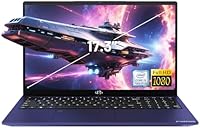
The NIMO N171B 17.3-inch Laptop comes from a brand most people haven't heard of, and that's worth addressing upfront. NIMO partially assembles units in the USA and backs this machine with a 2-year manufacturer warranty and a 90-day return window — a level of post-purchase support you don't always see at this price tier. At its core is Intel's 12th Gen i3-1215U, a six-core chip that holds its own against entry-level AMD Ryzen alternatives in everyday workloads. This isn't built for video editing or gaming. Think students, home users, and anyone who needs a dependable Windows 11 machine for daily tasks without overspending.
Features & Benefits

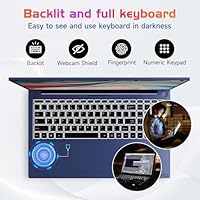
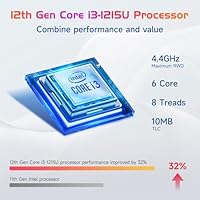
The Intel Core i3-1215U isn't a headline processor, but it's genuinely capable for the tasks this laptop is designed around. Paired with 16GB of DDR4 RAM, you can run a dozen browser tabs, a video call, and a document editor simultaneously without things grinding to a halt. The 256GB PCIe SSD keeps boot times short and apps snappy — a real upgrade over the slower storage options common in budget machines. That 17.3-inch IPS display is the standout hardware feature; anti-glare coating and slim bezels make extended study sessions far more comfortable. The backlit keyboard and fingerprint reader round things out nicely for everyday convenience.

Best For

This NIMO laptop makes the most sense for college students who want a large-screen Windows machine without spending a lot. The 17.3-inch display is genuinely useful for side-by-side windows, reading PDFs, or following lecture slides — much easier on the eyes than a compact 14-inch screen. Remote workers or home users who stay mostly at a desk will appreciate the screen size and the three USB 3.0 ports. Light office work — spreadsheets, email, video calls, casual browsing — is where the N171B lives comfortably. If you need a reliable everyday laptop with solid warranty coverage and you're not chasing raw power, this fits the bill.

User Feedback

Buyers who've used this 17.3-inch budget laptop tend to highlight the display as a genuine strength — bright and comfortable for long reading or streaming sessions. Build quality opinions are more mixed; the chassis is primarily plastic, which is expected at this price point but worth knowing if durability is a priority. The backlit keyboard draws positive mentions for comfort during extended typing. Battery life, however, is where honest feedback gets critical — roughly five hours of real-world use is limiting for all-day students. The fingerprint reader generally works reliably, and users appreciate the compact GaN charger. Overall sentiment leans positive, especially given the warranty and return flexibility.

Pros

  • Large 17.3-inch IPS display is bright, anti-glare, and noticeably comfortable during long study or work sessions.
  • 16GB of DDR4 RAM is generous for this price tier and handles browser-heavy multitasking without complaint.
  • PCIe SSD means fast boot times and snappy app launches compared to cheaper eMMC storage alternatives.
  • The 2-year manufacturer warranty and 90-day return window offer real peace of mind from a lesser-known brand.
  • Backlit keyboard makes low-light typing practical and comfortable for evening work or study sessions.
  • Fingerprint reader on the touchpad works reliably and makes Windows Hello login quick and convenient.
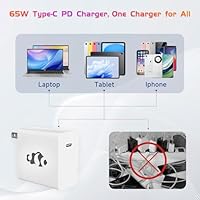
  • The compact 65W GaN Type-C charger is cross-device compatible and far easier to carry than a bulky traditional adapter.
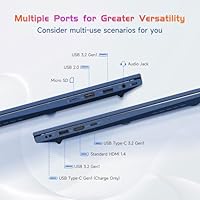
  • Three USB 3.0 ports and HDMI 2.1 give you solid connectivity options for peripherals and external displays.
  • Bluetooth 5.2 and Wi-Fi support cover all standard wireless needs without any additional dongles.
  • Numeric keypad is a practical bonus for users who work frequently with spreadsheets or financial data.

Cons

  • Battery life of roughly five hours falls short for all-day use, making the charger a constant travel companion.
  • NIMO is not a well-established brand, and long-term reliability data across a broad user base is still limited.
  • The plastic chassis feels functional rather than durable, and may show wear sooner than metal-body alternatives.
  • 256GB of storage fills up fast once Windows, updates, and a few applications are installed.
  • Integrated graphics rule out any meaningful gaming or GPU-accelerated creative work entirely.
  • The 2MP webcam produces mediocre video quality, which stands out during professional video calls.
  • Wi-Fi tops out at 802.11ac, missing the faster and more stable Wi-Fi 6 standard available on many rivals.
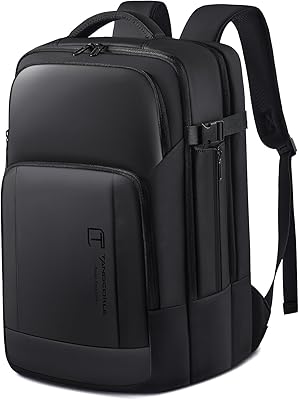
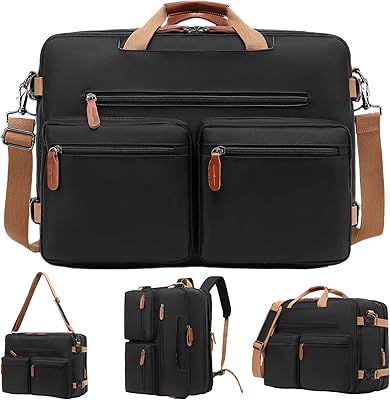
  • At over 15 inches wide, the footprint is large enough that it won't fit comfortably in smaller backpacks.
  • No optical drive and a single USB 2.0 port may require adapters depending on your peripheral setup.

Ratings

The NIMO N171B 17.3-inch Laptop has been evaluated by our AI rating system after analyzing verified purchase reviews from buyers worldwide, with spam, bot-generated, and incentivized feedback actively filtered out to ensure the scores reflect genuine user experiences. Across categories spanning everyday performance, display quality, and long-term ownership, both the strengths and the frustrations are reflected transparently so you can make a truly informed call.
Everyday Performance
74%
26%
For the tasks this machine is built around — browsing, document editing, video streaming, and light multitasking — buyers report a consistently smooth and responsive experience. The combination of the i3-1215U and 16GB of RAM means switching between a dozen tabs and a video call rarely causes noticeable slowdown.
Users who pushed the machine beyond its comfort zone — running multiple demanding applications simultaneously or working with large files — reported sluggishness. The processor is genuinely capable for light work but hits a ceiling quickly, and there is no upgrade path for integrated graphics performance.
Display Quality
83%
The 17.3-inch IPS panel consistently earns praise for its size and comfortable viewing experience during extended reading, streaming, and document work. The anti-glare coating is frequently mentioned as a practical benefit for users working near windows or in varied lighting conditions.
Some buyers noted the display brightness could be limiting in very bright environments, and color accuracy falls short of what a content creator or photographer would need. A few users also observed that the panel's color gamut feels conservative compared to premium IPS alternatives.
Build Quality
61%
39%
The chassis holds together well under normal desk-use conditions, and most buyers found the overall construction adequate for a home or student environment. The slim bezels and relatively thin profile give it a more modern look than many budget competitors at this screen size.
The all-plastic body is the most common point of criticism, with several users noting it feels noticeably lightweight in a way that reads as fragile rather than premium. Flex in the display lid and keyboard deck under pressure was mentioned by users who handle their machine more actively.
Battery Life
47%
53%
The included 65W GaN charger is compact and fast enough to recover a meaningful charge during a lunch break or class gap, which somewhat softens the battery limitation. Users who work primarily at a desk reported that the battery concern rarely affects them in practice.
Roughly five hours of real-world use is a persistent complaint, particularly from students who expected to get through a full day unplugged. Several buyers explicitly flagged that carrying the charger everywhere became a habit rather than an option, which undermines the portability of a student laptop.
Value for Money
79%
21%
Buyers consistently highlight the spec sheet relative to the price tier as the N171B's strongest selling point — 16GB of RAM and a PCIe SSD in a large-screen package is genuinely competitive at this level. The two-year warranty and 90-day return policy add meaningful financial protection that most budget rivals do not offer.
A handful of reviewers felt that the overall ownership experience — factoring in battery life, plastic build, and brand uncertainty — made the value proposition feel less clear-cut than the specs alone suggest. Competing machines from more established brands sometimes come close in price with stronger brand support infrastructure.
Keyboard & Typing Experience
77%
23%
The backlit keyboard receives consistent praise from users who type frequently, with feedback describing the key travel and spacing as comfortable for long writing or coding sessions. The inclusion of a numeric keypad is a genuine practical bonus for users working with spreadsheets or financial tools.
The keyboard backlight has a limited number of brightness levels, and a few users found the lowest setting still too bright in dark environments. Key wobble on certain keys was noted by detail-oriented typists, though it was not described as disruptive to daily use.
Fingerprint Reader
72%
28%
Most buyers report that the touchpad-integrated fingerprint sensor registers reliably and makes Windows Hello login fast enough that they stopped using a PIN entirely. Setup through Windows 11 security settings is straightforward and typically completed in under two minutes.
A minority of users found the sensor occasionally unresponsive, particularly with damp or slightly oily fingers, requiring a fallback to PIN entry. The sensor's placement on the touchpad, rather than on a dedicated key, took some users a short adjustment period to find consistently.
Port Selection
71%
29%
Three USB 3.0 ports cover the needs of most buyers comfortably, allowing simultaneous connection of a mouse, external drive, and peripheral without reaching for a hub. The HDMI 2.1 port supports clean external monitor connections that users working from a home desk rely on daily.
Having only a single USB 2.0 port alongside the three USB 3.0 options feels like an odd inclusion, and a few users flagged its slower transfer speed as a minor inconvenience. The absence of a Thunderbolt or USB4 port limits future-proofing for those who may eventually need higher-bandwidth connectivity.
Webcam Quality
43%
57%
The built-in 2MP webcam handles casual video calls adequately in well-lit rooms, and most users found it sufficient for occasional Zoom or Teams check-ins without needing an external device. It works reliably with Windows Hello facial recognition on supported configurations.
Low-light performance is consistently poor, with users reporting grainy, washed-out images during evening calls or in offices without strong overhead lighting. At this price point a 2MP sensor is expected, but it is a clear step behind what mid-range competitors now include as standard.
Wireless Connectivity
68%
32%
Wi-Fi 5 (802.11ac) handles typical home and campus network speeds reliably, and Bluetooth 5.2 pairs quickly with wireless peripherals like mice, headphones, and keyboards without dropout issues reported during daily use.
The absence of Wi-Fi 6 support is a forward-looking limitation, particularly for buyers on newer routers who expected to benefit from improved speeds and reduced network congestion. On busy shared networks — such as university Wi-Fi — the older standard can be a minor bottleneck.
Charger & Charging Speed
81%
19%
The bundled 65W GaN Type-C charger is one of the more practical inclusions at this tier — compact enough to fit in a small bag pocket and versatile enough to charge phones, tablets, and other USB-C devices. Charging speed is solid, recovering the battery noticeably faster than older brick-style adapters.
A small number of users noted that 65W, while adequate, does not deliver the rapid charge recovery that higher-wattage chargers on competing machines provide during short breaks. The Type-C charging port placement may also be inconvenient depending on desk setup and cable routing preference.
Software & Out-of-Box Setup
73%
27%
Windows 11 Home is pre-installed and the machine is generally reported to be ready to use within minutes of unboxing, with minimal bloatware compared to some budget competitors. Windows Hello integration with the fingerprint reader works out of the box without additional driver installation.
Some users noted a handful of pre-installed promotional applications that required manual removal, which is a common but mildly annoying experience at this price tier. Initial Windows Update on first boot can be time-consuming, particularly for buyers eager to get started quickly.
Storage Adequacy
59%
41%
The PCIe SSD delivers meaningfully faster boot and load times than the eMMC storage common in budget alternatives, and buyers noticed the difference when launching applications. For a machine used primarily for documents, light media, and browser work, 256GB covers the basics.
256GB fills up faster than many buyers anticipate once Windows, updates, applications, and personal files accumulate, and several users wished they had opted for a larger storage configuration. There is no cloud storage bundle included, so users who store photos, videos, or large project files will likely need an external drive or subscription.
Brand Trust & Support
66%
34%
The two-year manufacturer warranty and 90-day return window provide a reassurance layer that is rare among lesser-known budget brands, and several buyers noted that NIMO support was responsive when contacted. Partial USA assembly is a credibility signal that resonated with buyers skeptical of fully overseas budget brands.
NIMO lacks the established service network and track record of major brands, which means long-term reliability data is limited and repair options outside of warranty claims are less accessible. Buyers in markets outside the USA noted longer support response times and less clarity on regional warranty claim processes.

Suitable for:

The NIMO N171B 17.3-inch Laptop is a practical choice for college students who spend long hours reading, researching, and writing papers, and who want a large display without paying a premium price. The 17.3-inch IPS screen genuinely makes a difference when you are working across multiple windows or following along with lecture slides, and the 16GB of RAM means you won't hit a wall when juggling tabs and applications simultaneously. Home users who mostly work from a desk — handling emails, video calls, light document work, or casual streaming — will find this machine more than adequate for those daily routines. The fingerprint reader and backlit keyboard are small but meaningful quality-of-life additions that you don't always get at this price tier. Buyers who are cautious about purchasing from a lesser-known brand will likely find reassurance in the two-year warranty and 90-day return policy, which provide a genuine safety net that many budget competitors skip.
Not suitable for:

The NIMO N171B 17.3-inch Laptop is not the right tool for anyone expecting serious performance headroom. The Intel i3-1215U handles everyday workloads capably, but if your work involves video editing, 3D rendering, heavy multitasking across demanding applications, or any kind of gaming, this processor and its integrated graphics will become a bottleneck quickly. The roughly five-hour battery life is a meaningful limitation for students or professionals who need to work untethered from a power outlet for a full day — carrying the charger everywhere becomes a necessity rather than an option. At 3.84 pounds and with a 17.3-inch footprint, this is not a machine you will comfortably slip into a small bag for frequent commuting. Buyers who prioritize a premium build feel or a metal chassis will also find the plastic body underwhelming, and the 256GB SSD, while fast, fills up quickly if you store large media files or install many applications.
Specifications

  • Processor: The Intel Core i3-1215U is a 12th Gen chip with 6 cores, 8 threads, a base clock of 1.2GHz, and a Turbo Boost ceiling of 4.4GHz.
  • RAM: 16GB of DDR4 SDRAM runs at 3200MHz, providing sufficient headroom for everyday multitasking and browser-intensive workflows.
  • Storage: A 256GB PCIe SSD handles system and application storage, offering noticeably faster read and write speeds than eMMC or traditional SATA drives.
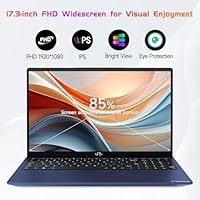
  • Display: The 17.3-inch IPS panel delivers a 1920x1080 FHD resolution with an anti-glare coating and an 85% screen-to-body ratio.
  • Graphics: Graphics are handled entirely by Intel Integrated Graphics built into the i3-1215U, with no dedicated GPU present.
  • Operating System: Windows 11 Home comes pre-installed, providing access to the full Microsoft software ecosystem out of the box.
  • Battery Life: The built-in lithium polymer battery provides approximately 5 hours of real-world use on a standard charge.
  • Charger: A compact 65W GaN Type-C PD charger is included, compatible with a range of USB-C powered devices beyond just this laptop.
  • Ports: Connectivity includes 3x USB 3.0, 1x USB 2.0, 1x HDMI 2.1, and 1x Type-C port for versatile peripheral and display connections.
  • Wireless: Wi-Fi support covers 802.11a/b/g/n/ac standards, and Bluetooth 5.2 is included for wireless peripheral pairing.
  • Webcam: A 2MP front-facing webcam is built in, suitable for standard video calls though limited in low-light performance.
  • Keyboard: The full-sized backlit keyboard includes a numeric keypad, making it practical for data entry and extended typing sessions.
  • Biometrics: A fingerprint reader is integrated into the touchpad, enabling Windows Hello biometric login without additional hardware.
  • Audio & Media: HD audio output is supported, and a memory card slot is included for direct file transfers from cameras or other devices.
  • Dimensions: The chassis measures 15.66 x 9.99 x 0.74 inches, reflecting the larger footprint typical of 17-inch class laptops.
  • Weight: At 3.84 pounds, this NIMO laptop sits within the expected weight range for a 17.3-inch consumer notebook.
  • Webcam Resolution: The rear-facing webcam is rated at 2MP, providing basic image capture capability.
  • Warranty: NIMO Direct Inc. provides a 2-year manufacturer warranty and a 90-day hassle-free return policy on this machine.
  • Battery Voltage: The integrated lithium polymer battery operates at 11.4 volts and is non-removable.
  • Assembly: Units are noted as partially assembled in the USA by NIMO Direct Inc., the manufacturer and warranty provider.

Related Reviews
HP Essential 17 Touchscreen Laptop
75%
88%
Performance & Speed
93%
RAM & Multitasking
61%
Display Quality
78%
Touchscreen Usability
91%
Storage & File Access
More
HP Laptop 17-cp2199nr
70%
83%
Value for Money
61%
Display Quality
78%
Performance & Speed
87%
Storage Performance
84%
RAM & Multitasking
More
Tangcorle 17.3-inch 26L Travel Laptop Backpack
78%
91%
Value for Money
88%
Organizational Layout
86%
Laptop Protection
84%
Carry-On Compliance
67%
Build Quality
More
Tzowla 17.3-inch Canvas Laptop Backpack
76%
88%
Build Quality
91%
Laptop Fit & Protection
86%
Organization & Storage
72%
Comfort & Ergonomics
23%
Water Resistance
More
LOVEVOOK 17.3″ Women's Laptop Backpack
78%
93%
Storage & Organization
88%
Laptop Protection
66%
Build Quality
81%
Comfort & Ergonomics
89%
Value for Money
More
Boavan Laptop Backpack for Men 17.3-inch
87%
89%
Build Quality
92%
Portability/Weight
88%
Comfort/Ergonomics
85%
Water-Resistance
90%
USB Charging Port
More
LIGSAN Rolling Backpack 17.3-inch Laptop
87%
86%
Overall Durability
88%
Ease of Use
83%
Comfort & Ergonomics
90%
Storage Capacity
87%
Build Quality
More
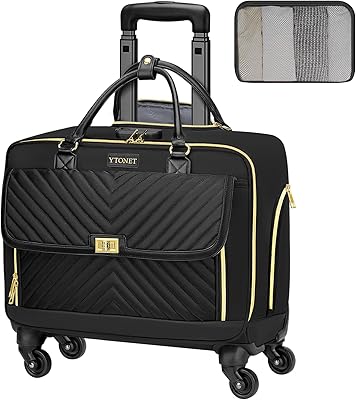
Ytonet 17.3-Inch Rolling Laptop Briefcase
76%
88%
Wheel Performance
83%
Storage & Organization
74%
Build Quality
86%
Handle & Mobility
89%
Laptop Protection
More
LIGHT FLIGHT 17.3-inch Laptop Backpack
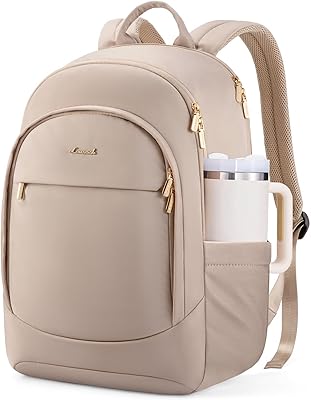
82%
93%
Storage Capacity
88%
Laptop Protection
79%
Comfort & Ergonomics
74%
Build Quality
81%
Water Resistance
More
MOLNIA Expandable 17.3″ 3-in-1 Laptop Backpack
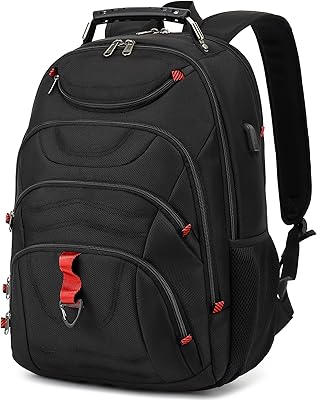
77%
88%
Versatility & Carry Modes
83%
Expansion Feature
86%
Laptop Protection
57%
Weight & Portability
62%
Shoulder Strap Comfort
More

FAQ

NIMO has not officially confirmed whether the RAM slots or SSD bay are user-accessible on this model. At this price tier, some laptops are soldered and others are not. If upgradability matters to you, it is worth reaching out to NIMO support directly before purchasing, since opening the chassis could also affect your warranty.

Yes, for standard video calls it performs reliably. The i3-1215U and 16GB of RAM are well within what Zoom, Teams, or Google Meet require, and the Wi-Fi and Bluetooth 5.2 connection keep things stable. The 2MP webcam is functional but won't produce sharp, high-definition video, so if your calls require a polished image, an external webcam would help.

Honestly, it depends on how you use it. Five hours is below average for a student laptop, and if your day runs longer than that without access to an outlet, you will need to carry the charger. The good news is the included 65W GaN charger is compact and easy to pack. Plan to plug in during breaks and it becomes much more manageable.

No, Microsoft Office is not included. The laptop ships with Windows 11 Home, but Office requires a separate purchase or a Microsoft 365 subscription. Students can often access Microsoft 365 for free through their school, so it is worth checking before buying a standalone license.

It uses Windows Hello, so setup is straightforward through the Windows security settings. Most users report it registers quickly and works consistently in daily use. Like any fingerprint sensor, it can occasionally require a second attempt if your finger is damp or at an unusual angle, but it is generally dependable for a budget-tier machine.

Yes, the HDMI 2.1 port supports external display output, so you can connect it to a monitor or TV without any adapter. You can also mirror or extend your desktop, which is useful if you use the laptop at a desk regularly. The Type-C port may also support display output, though confirming DisplayPort Alt Mode support with NIMO directly is advisable.

For very basic adjustments on a small catalog, it can get by, but it is not really suited for sustained photo editing work. The integrated graphics and i3 processor handle simple tasks, but larger catalogs, batch exports, or anything involving RAW files at scale will be noticeably slow. For occasional hobbyist edits it is usable; for serious workflow it will frustrate you.

The chassis is plastic, which is standard at this price point, but it does mean the machine has a lighter, less premium feel compared to metal-body alternatives. It does not feel flimsy, but it also does not feel like a business-grade notebook. For home or student use where it mostly sits on a desk, the build is adequate.

NIMO Direct Inc. handles warranty claims directly through their support team. The 2-year coverage is above average for budget laptops, and the 90-day return window gives you a solid trial period. Having your purchase information handy when contacting support will speed things up, and their team is reported to be responsive for replacements and troubleshooting.

This NIMO laptop supports up to Wi-Fi 5 (802.11ac), not Wi-Fi 6. For most home and campus networks, that is perfectly sufficient and you are unlikely to notice the difference in everyday use. However, if you are on a Wi-Fi 6 network and want to take full advantage of its speed and efficiency improvements, this machine will not support that.