Overview

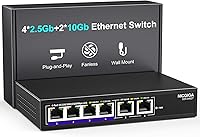
The NICGIGA S25-0402T 6-Port 10GbE Network Switch sits at an interesting crossroads in the home lab and prosumer networking space — it is not a full 10G switch, but that is actually the point. You get two 10Gb RJ45 ports for your highest-demand devices, paired with four 2.5Gb ports for everything else, all in a compact metal box that sits quietly on a desk. No software to install, no configuration screens to navigate. For anyone tired of Gigabit bottlenecks but not ready to rewire an entire setup around 10G hardware, this multi-speed desktop switch hits a practical sweet spot.
Features & Benefits

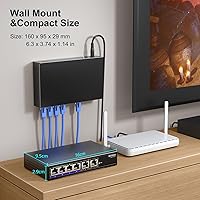
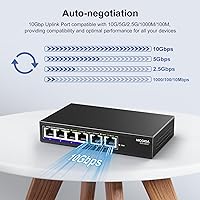
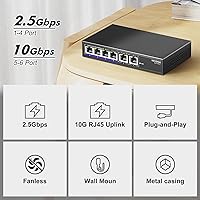
The 60Gbps non-blocking fabric means every port can push data simultaneously without any port starving for bandwidth — a meaningful spec when you have a NAS transfer and a Wi-Fi 7 uplink running at the same time. All six ports auto-negotiate from 100Mbps up through 10Gbps, so older devices need no adapters or workarounds. The fanless design keeps things completely silent, with dual-side vents handling the thermal work passively — useful in any room where fan noise would be noticeable. 6KV surge protection is a nice inclusion that many switches skip at this tier. You can also wall-mount it to keep cable runs clean if desk space is tight.

Best For

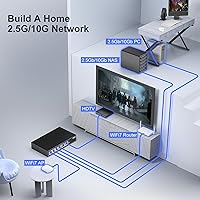
This 10G switch makes the most sense for home lab builders who have a 10G-capable NAS and want to connect it directly to one or two fast machines without bottlenecking the link. Wi-Fi 7 router owners will also appreciate having a proper wired backbone behind the access point — four 2.5Gb ports handle most client devices comfortably. Video editors regularly shuffling large files between local machines will notice a real difference from standard Gigabit. That said, only two ports reach 10Gbps. If your setup demands 10G on four or more devices simultaneously, the NICGIGA 6-port switch will fall short, and a full 10G switch would be the better call.

User Feedback

Buyers consistently highlight how quickly this multi-speed desktop switch gets a network running — most report it working within minutes of unboxing, no configuration headaches at all. Real-world NAS transfer speeds draw positive mentions, particularly from users upgrading from Gigabit who see an immediate difference. On the downside, a handful of buyers have noted heat under load in warm or enclosed spaces, which is worth monitoring. A few compatibility notes appear around certain third-party NICs, though these seem isolated cases. NICGIGA is not a household name, and some buyers admit initial hesitation — but the solid metal chassis tends to win skeptics over once the unit arrives. Comparisons to TP-Link equivalents come up often, generally landing close on performance.

Pros

  • Plug-and-play setup means most buyers are running at full speed within minutes of unboxing.
  • The mixed 2.5G and 10G port layout covers the most common home lab upgrade scenarios without overbuying.
  • A fully non-blocking 60Gbps switching fabric keeps simultaneous transfers from interfering with each other.
  • Fanless operation makes this 10G switch genuinely viable in noise-sensitive rooms like bedrooms or living rooms.
  • The all-metal chassis feels more premium than the price point suggests and holds up well physically.
  • 6KV surge protection is a rare inclusion at this tier and adds real peace of mind in storm-prone areas.
  • Auto-negotiation across all ports means legacy devices at 100Mbps or 1G connect without any manual configuration.
  • Wall-mount support gives the NICGIGA 6-port switch flexibility for tidier installs in space-constrained setups.
  • Real-world NAS transfer speeds consistently exceed what any Gigabit switch can deliver, according to buyer reports.
  • Lifetime technical support backing a one-year warranty provides a reasonable safety net for a lesser-known brand.

Cons

  • Only two ports run at 10Gbps, which becomes a hard ceiling fast as high-speed device counts grow.
  • The brand lacks the track record of established networking names, and long-term reliability remains unproven.
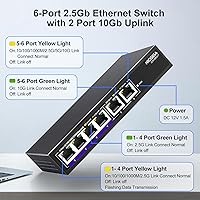
  • LED indicators do not clearly distinguish between negotiated link speeds, forcing OS-level checks for confirmation.
  • Sustained heavy workloads in enclosed or warm spaces can push the chassis to uncomfortable temperatures.
  • Occasional link negotiation failures with certain third-party 10G NICs have been reported by a consistent minority of buyers.
  • The one-year warranty feels short for always-on networking hardware expected to run continuously for several years.
  • Minimal documentation leaves less experienced buyers on their own when troubleshooting speed or compatibility questions.
  • Tight port spacing can make cable management awkward when using bulkier RJ45 connectors side by side.

Ratings

The NICGIGA S25-0402T 6-Port 10GbE Network Switch scores below are generated by AI after analyzing verified buyer reviews worldwide, with spam, bot activity, and incentivized feedback actively filtered out. The ratings reflect a genuine cross-section of real user experiences — from home lab enthusiasts to small office upgrades — covering both what this multi-speed desktop switch does well and where it falls short. Strengths and frustrations are weighted equally so you can make a confident, informed decision.
Ease of Setup
94%
Buyers across skill levels consistently report having this 10G switch running within minutes of unboxing. There are no drivers to install, no web interface to configure, and no VLAN headaches — you plug in cables and the LEDs tell you everything is working. For users who just want faster local transfers without a networking degree, this is a genuine relief.
The total lack of management features is a double-edged sword. Power users who eventually want to segment traffic, set up port-based VLANs, or monitor bandwidth have zero options here. If your needs grow beyond basic connectivity, you will outgrow this switch quickly.
Port Configuration & Flexibility
81%
19%
The mixed 2.5G and 10G port layout is genuinely well thought out for most home lab scenarios. Connecting a 10G NAS to one high-speed port while feeding several 2.5G-capable PCs or a Wi-Fi 7 router through the remaining ports covers the majority of real-world upgrade paths without overbuying.
Only two ports reach 10Gbps, which becomes a constraint fast if you add a second NAS, a 10G server, or a second high-speed workstation. Buyers who discovered this limitation after purchase mention feeling misled by the product name, even though the specs are clearly listed.
Real-World Throughput
88%
Users transferring large video files or backup archives to a 10G NAS report speeds that clearly outpace anything a Gigabit switch can deliver. The non-blocking switching fabric means simultaneous transfers across multiple ports do not visibly degrade each other, which holds up in practice according to home lab testers.
A small number of buyers note that hitting sustained near-line-rate speeds requires compatible NICs on both ends. If one device in the chain caps at 2.5G, the bottleneck shifts there immediately — something a few buyers overlooked when expecting full 10G end-to-end throughput on every device.
Build Quality
83%
The all-metal chassis feels noticeably more substantial than plastic alternatives at a similar price point. Several buyers admit they expected a lightweight, hollow box based on the brand name, but report being pleasantly surprised when the unit arrived. The weight and finish give it a credibility that cheaper switches lack.
NICGIGA is not an established networking brand, and that skepticism lingers even after the unboxing. A handful of buyers mention minor inconsistencies in port alignment or labeling, and there are occasional questions about long-term durability that simply cannot be answered from a product released in early 2025.
Thermal Management & Noise
79%
21%
The fanless design is one of the most appreciated aspects for buyers placing this switch in living rooms, bedrooms, or quiet offices. Under typical mixed workloads — a few simultaneous transfers, background NAS activity — the chassis stays warm but manageable, and the silence is consistently praised.
Under sustained heavy load, particularly in warm or enclosed spaces, heat becomes a legitimate concern. A subset of buyers in poorly ventilated setups report the chassis getting uncomfortably warm. The dual-side cooling vents need airflow to function effectively, which is easy to forget when tucking the switch behind a desk.
Compatibility
76%
24%
Auto-negotiation handles the vast majority of device combinations smoothly, and buyers connecting a range of hardware — older laptops, NAS units, gaming PCs, and Wi-Fi 7 access points — generally report clean link establishment without manual speed-setting. The auto MDI/MDIX support removes the need for crossover cables entirely.
A recurring thread in buyer feedback involves compatibility issues with specific third-party 10G NICs, where links occasionally fail to negotiate at full speed or drop intermittently. These cases appear to be minority experiences, but they are consistent enough to be worth noting if you are using less common network adapters.
Value for Money
86%
For a fanless metal switch offering two true 10Gbps ports and four 2.5Gbps ports with 6KV surge protection, the pricing sits comfortably in a range that buyers across forums and reviews describe as fair to strong. Comparable port configurations from more established brands tend to cost noticeably more for equivalent specs.
Buyers who needed more than two 10G ports feel the value proposition weakens at scale — adding a second similar switch or stepping up to a full 10G model changes the math. A few reviewers also note that the one-year warranty feels thin relative to networking hardware they expect to run continuously for years.
LED Indicators & Diagnostics
72%
28%
The per-port LED indicators do their basic job well — confirming link status and giving a rough sense of activity. For plug-and-play users who just want to verify a connection is live, this is all they need and it works reliably.
The LEDs do not differentiate clearly between link speeds, which makes it impossible to confirm at a glance whether a port has negotiated at 2.5G or 10G. Several buyers had to rely on their OS network settings to verify actual negotiated speeds, which is a minor but recurring frustration.
Mounting & Form Factor
78%
22%
The wall-mount option is a practical inclusion that many buyers in this price range do not expect. Buyers with tidy home lab setups or server-adjacent installs appreciate being able to free up shelf space while keeping cable runs short and organized.
The included mounting hardware gets mixed reviews. Some buyers report the wall-mount bracket feeling less secure than expected, and the compact footprint, while generally praised, makes cable management tighter than it would be on a slightly wider unit with more port spacing.
Surge & Lightning Protection
84%
The 6KV lightning protection spec is something buyers in storm-prone regions specifically call out as a purchasing factor. At this price tier, dedicated surge protection is uncommon in unmanaged switches, and buyers who have lost networking equipment to power events view it as meaningful insurance.
There is no way to independently verify the protection rating without lab testing, and a small number of skeptical buyers question whether the 6KV claim holds under real conditions. No documented field reports of surge-related damage or protection events exist in current buyer feedback, leaving the spec unconfirmed in practice.
Brand Trust & Support
68%
32%
Buyers who have engaged with NICGIGA support report relatively prompt responses, and the lifetime technical support promise does appear to be honored in practice based on feedback threads. The one-year warranty is actively used by buyers who received defective units, with replacements dispatched without significant friction.
NICGIGA lacks the brand recognition of TP-Link, Netgear, or even newer players like TRENDnet, which creates a trust gap that documentation and specs alone cannot fully close. Buyers making a first purchase from an unfamiliar networking brand report needing to do extra research just to feel comfortable, which is a real friction point.
Documentation & Packaging
71%
29%
The packaging is clean and protective, and the included quick-start materials are sufficient for the plug-and-play use case the switch is designed for. Most buyers do not need documentation, but for those who do, the basics are covered.
The documentation is minimal, and buyers who wanted to understand port behavior nuances — like exactly how speed negotiation works across the mixed-speed ports — found the included materials lacking. Several had to look up technical details independently, which is a gap for less experienced buyers.
Desktop Footprint
82%
18%
The compact dimensions make it a natural fit on a crowded desk without dominating workspace. Buyers consistently note that the physical size is well matched to the typical home lab or small office environment where it is being deployed alongside routers and NAS boxes.
The compact size does compress the port spacing in a way that makes inserting wider RJ45 connectors or thick cables slightly awkward on adjacent ports. It is a minor physical annoyance, but a handful of buyers with bulky patch cables mention it.

Suitable for:

The NICGIGA S25-0402T 6-Port 10GbE Network Switch is a natural fit for home lab enthusiasts who have already invested in a 10G-capable NAS and want to connect it directly to one or two fast workstations without paying for a full 10G port on every device. Wi-Fi 7 router owners will find real value here too — the four 2.5Gb ports handle most modern client devices comfortably, while the two 10Gb ports give the router uplink or NAS connection room to breathe. Content creators and video editors who regularly move large files between local machines will notice a meaningful jump in transfer speeds compared to a standard Gigabit switch. The fanless, silent operation makes it equally at home in a living room media setup or a quiet home office where fan noise would be a constant irritant. Small business owners or prosumers who want faster local networking without the complexity of managed switches will appreciate that setup is genuinely as simple as plugging in cables and watching the LEDs confirm the connections.
Not suitable for:

Anyone who needs more than two devices running at full 10Gbps simultaneously should look elsewhere — the NICGIGA S25-0402T 6-Port 10GbE Network Switch simply does not have the port count to support that kind of multi-device 10G topology. Network administrators or power users who rely on VLANs, port mirroring, traffic monitoring, or any form of managed switching will find this unit completely unsuitable, as it offers zero configuration options by design. Buyers in warm or poorly ventilated environments should also think carefully before committing, since the fanless chassis depends on passive airflow and can run uncomfortably hot under sustained heavy loads with no ventilation nearby. Those who need long-term brand assurance, enterprise-level support contracts, or the kind of firmware update cadence that established players like Netgear or TP-Link provide may find the relative novelty of the NICGIGA brand a harder pill to swallow. Finally, users with non-standard or less common 10G NICs should verify compatibility before buying, as a subset of buyers have reported occasional link negotiation issues with certain third-party adapters.
Specifications

  • Model Number: The official model identifier for this switch is S25-0402T, as designated by NICGIGA.
  • Port Layout: The switch includes 4 x 2.5Gb RJ45 ports and 2 x 10Gb RJ45 ports, giving six total copper Ethernet connections.
  • Port Auto-Negotiation: All ports support automatic speed negotiation across 100Mbps, 1G, 2.5G, 5G, and 10G depending on the connected device's capability.
  • Switching Capacity: The internal switching fabric operates at a non-blocking 60Gbps, allowing all ports to transmit simultaneously without throughput degradation.
  • Chassis Material: The outer enclosure is constructed from metal, providing a more rigid and heat-dissipating build compared to standard plastic desktop switches.
  • Cooling Design: The switch uses a fully fanless passive cooling design with dual-side ventilation holes, producing zero fan noise during operation.
  • Surge Protection: Built-in 6KV lightning surge protection is present on all ports to help guard connected equipment against electrical transient events.
  • Mounting Options: The unit supports both flat desktop placement and wall mounting, with the necessary hardware included for wall-mount installation.
  • Dimensions: The switch measures 7.09 x 6.22 x 2.83 inches, making it compact enough to fit in most desktop or shelf networking setups.
  • Weight: The unit weighs 1.28 pounds (0.58 kg), which is light enough for wall mounting without requiring heavy-duty anchor hardware.
  • Operating Temperature: The switch is rated to operate reliably within an ambient temperature range of -10°C to 50°C.
  • MDI/MDIX Support: All ports include automatic MDI/MDIX detection, eliminating the need for crossover cables in any connection scenario.
  • LED Indicators: Each port has a dedicated LED indicator that illuminates to show link status and network activity at a glance.
  • Management Type: This is a fully unmanaged switch with no software interface, web GUI, or CLI — configuration is not required or possible.
  • Warranty: NICGIGA provides a one-year limited hardware warranty alongside a lifetime technical support commitment for the product.
  • Manufacturer: The switch is designed and sold by NICGIGA, a networking hardware brand focused on multi-gigabit desktop switching solutions.
  • UPC: The registered UPC code for this product is 790885828614.
  • Included Contents: The package contains the switch unit, power adapter, and mounting hardware under the component code S25-0402T.

Related Reviews

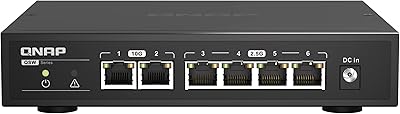
QNAP QSW-2104-2T Unmanaged Network Switch
84%
96%
Ease of Setup
88%
Port Configuration & Versatility
97%
Noise Level
63%
Thermal Performance
84%
Build Quality
More
VIMIN 6-Port 2.5G Unmanaged Network Switch
83%
88%
Throughput Performance
84%
Build Quality
93%
Setup & Ease of Use
67%
SFP+ Port Usability
96%
Fanless Noise Level
More
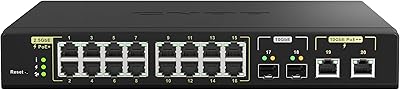
QNAP QSW-M2116P-2T2S 20-Port 10GbE PoE++ Managed Network Switch
86%
93%
Performance & Speed
89%
PoE Support
91%
Ease of Setup
88%
Build Quality & Durability
90%
Management Interface (QSS)
More
YuLinca 6-Port Gigabit PoE Switch with 4 PoE+ Ports
87%
95%
Ease of Installation
88%
PoE Functionality
91%
Build Quality
87%
Performance and Speed
94%
Fanless Operation (Noise)
More
ienRon 6-Port 2.5Gb PoE Switch with 2-Port 10Gb SFP+
85%
86%
Performance
91%
Ease of Setup
88%
PoE Power Delivery
84%
Build Quality
93%
Fanless Operation
More
MokerLink 6-Port 78W PoE+ Network Switch
83%
96%
Ease of Setup
78%
PoE Compatibility
88%
Build Quality
93%
Value for Money
61%
Port Speed & Throughput
More
BV-Tech 6-Port PoE+ Network Switch
81%
94%
Ease of Setup
91%
Value for Money
78%
PoE Power Delivery
52%
Network Speed Performance
88%
Build Quality
More
NICGIGA S100-0500T 5-Port 10G Ethernet Switch
82%
96%
Ease of Setup
91%
Link Stability
88%
10G Throughput Performance
58%
Fan Noise
84%
Build Quality
More
NICGIGA NIC-AI-FS1621GP 16-Port Unmanaged PoE Switch
76%
88%
Value for Money
93%
Ease of Setup
54%
PoE Port Speed
84%
PoE Power Delivery
79%
AI Watchdog Reliability
More
NICGIGA NOS-FS0820GP 10-Port Outdoor PoE Switch
77%
93%
Ease of Setup
87%
Weatherproofing
84%
PoE Reliability
79%
Build Quality
82%
Lightning Protection
More

FAQ

No, there is nothing to install or configure. You plug in the power, connect your devices with standard RJ45 cables, and the switch handles everything automatically. The LEDs will confirm each link is active, and that is genuinely all there is to it.

Only two ports — ports 5 and 6 — operate at full 10Gbps. The remaining four ports top out at 2.5Gbps. If you need more than two devices connected at 10G simultaneously, this switch will not cover that scenario and you should look at a full 10G switch instead.

Yes, all six ports auto-negotiate down to 1G or 100Mbps as needed, so older devices connect without any manual configuration. The NICGIGA S25-0402T 6-Port 10GbE Network Switch is designed to accommodate mixed-speed environments where not every device is 2.5G or 10G capable.
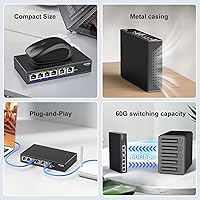
It produces no noise at all — there is no fan inside. Passive cooling vents on both sides handle heat dissipation silently. Buyers consistently mention this as one of the main reasons they chose it over alternatives for noise-sensitive environments.

You can do both. The unit ships with wall-mount hardware, and the metal chassis is solid enough to hang securely. Just make sure wherever you mount it has reasonable airflow around the sides since the cooling is entirely passive.

Yes, that is actually one of the strongest use cases for this multi-speed desktop switch. You connect the router to one of the 2.5G ports, your NAS or fastest workstation to one of the 10G ports, and the remaining 2.5G ports handle other wired clients. The 60Gbps internal fabric means none of those connections interfere with each other under normal load.

Under typical workloads it stays warm but within normal operating range. The concern buyers raise is around sustained heavy transfers in warm or enclosed spaces — tucked inside a cabinet with no airflow, it can get uncomfortably hot. As long as the ventilation slots on both sides have a few inches of clearance, most users report no issues running it continuously.

It should in most cases, but a small number of buyers have reported link negotiation issues with certain non-mainstream 10G network cards. If you are using a common Intel or Aquantia-based NIC, compatibility is generally reliable. For obscure or older 10G adapters, it is worth checking buyer forums for your specific card before committing.

The all-metal chassis compares favorably to plastic-bodied alternatives from larger brands in the same price range. Several buyers who initially hesitated due to the NICGIGA brand name reported being genuinely impressed by the physical quality once the unit arrived. That said, NICGIGA does not have the same track record, so long-term reliability is harder to predict with confidence.

Based on buyer feedback, NICGIGA does appear to honor warranty claims with replacement units dispatched without significant friction. The one-year warranty covers hardware defects, and lifetime technical support is available beyond that window. For always-on networking hardware, a one-year warranty is on the shorter side, which is worth factoring into your decision.