Overview

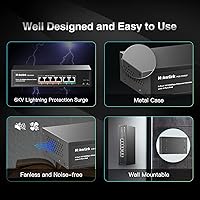
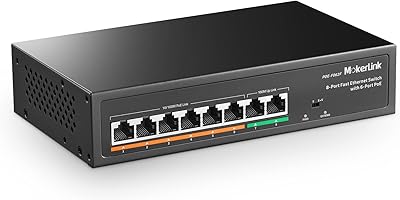
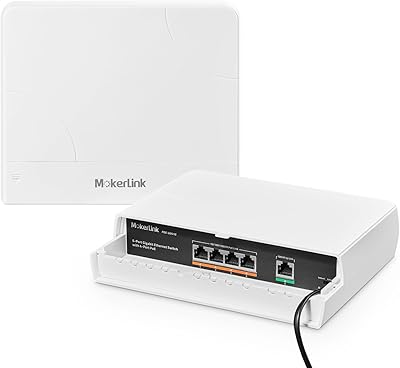
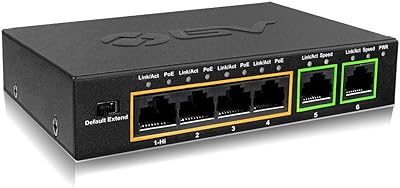
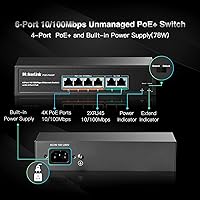
The MokerLink 6-Port 78W PoE+ Network Switch is a compact, no-fuss option for anyone who needs to power a handful of IP cameras or access points without a large budget or an IT professional on call. Six ports total — four PoE+ and two fast Ethernet uplinks — fit into a chassis barely eight inches wide, easy to tuck into a network closet or mount on a wall. The housing is solid metal and completely fanless, meaning no noise and no fan bearing to wear out over time. With over 760 ratings averaging 4.4 stars and a rank of #106 in its category, this little switch has clearly found a loyal audience.
Features & Benefits

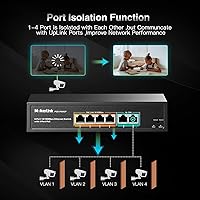
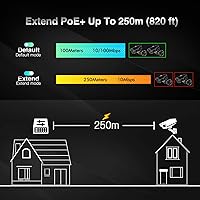
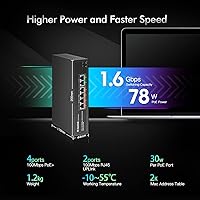
The total PoE budget is 78W shared across all four ports, with each port capable of delivering up to 30W under IEEE 802.3af/at — enough for most standard IP cameras and access points, though running four high-draw devices simultaneously will approach that ceiling fast. One genuinely useful feature is extend mode, which pushes the signal out to 250 meters at 10Mbps, handy for cameras mounted far from the head-end closet. In that mode, ports are also isolated from each other, giving you basic traffic separation without a managed switch. Keep in mind that all ports are capped at 100Mbps — sufficient for camera streams today, but not future-proof for demanding workloads. Also worth noting: passive 24V PoE is not supported.

Best For

This PoE switch fits best in home security setups, small offices running three or four IP cameras, and single access-point deployments where gigabit speed between devices is not a priority. Installers doing quick, repeatable camera jobs will appreciate the zero configuration required — cable up the cameras and you are done. The 250-meter extend mode makes it particularly practical for sites where cameras are mounted far from the equipment closet. If your current cameras are 1080p and your runs are long, this little switch covers you well. Planning to scale up to high-bitrate 4K cameras or need true gigabit throughput across the board? You will want to budget for a gigabit model instead.

User Feedback

Buyers consistently highlight setup simplicity as the standout quality — unbox it, plug in the cameras, and everything powers up. Owners running Hikvision and Reolink cameras report solid long-term reliability with no port failures after years of continuous use. On the critical side, a handful of users encountered PoE negotiation problems with certain third-party cameras, so checking device compatibility before purchasing is a smart move. Others mention that the 100Mbps ceiling starts to feel limiting once higher-resolution cameras enter the picture. The fanless metal chassis earns consistent praise for quiet operation inside closets and small enclosures — a practical benefit that goes beyond aesthetics.

Pros

  • Genuinely plug-and-play — connect power and cables and devices start working immediately, no setup required.
  • Solid all-metal chassis with no fan means quiet operation and one less mechanical part to fail over time.
  • Built-in power supply keeps the install clean, with no separate power brick to find shelf space for.
  • The 250-meter extend mode is a real differentiator for long cable runs to distant cameras.
  • Port isolation in extend mode gives basic traffic separation without the cost of a managed switch.
  • LED indicators on every port let you spot a dead connection at a glance without any software.
  • Verified multi-year reliability reported by long-term owners with no port failures under continuous operation.
  • Compact footprint fits easily in a wall-mount enclosure, network closet shelf, or small rack.
  • Strong community of real-world camera users confirms compatibility with the most popular IP camera brands.
  • Priced low enough to be a low-risk purchase for a simple, dedicated camera network segment.

Cons

  • All ports are capped at 100Mbps, which may limit usefulness as higher-resolution cameras become standard.
  • The 78W power budget is shared; running four high-draw devices simultaneously can push the switch to its limit.
  • Passive 24V PoE devices are completely unsupported, which is a hard incompatibility for some Ubiquiti legacy hardware.
  • A small but consistent number of buyers report PoE negotiation failures with certain third-party camera brands.
  • No management interface whatsoever means zero visibility into traffic, port utilization, or error counts.
  • Only four PoE ports available — growing beyond four powered devices requires purchasing an additional switch.
  • No gigabit uplink port, which can become a throughput constraint when connecting to a faster upstream router or NVR.
  • No QoS or bandwidth controls, so a misbehaving device can affect the entire switch without any way to intervene.

Ratings

Our AI-generated scores for the MokerLink 6-Port 78W PoE+ Network Switch are produced by analyzing thousands of verified global buyer reviews, with spam, bot-driven, and incentivized submissions actively filtered out before scoring. Each category reflects what real installers, homeowners, and small-business owners actually experienced — strengths and frustrations weighted equally. The result is an honest, data-grounded snapshot of where this switch excels and where it falls short.
Ease of Setup
96%
Buyers across skill levels consistently report that getting up and running takes under five minutes — plug in the power cable, connect the cameras, and everything negotiates automatically. There is no app to download, no web interface to navigate, and no configuration decisions to make, which is exactly what most home installers need.
The total lack of configuration is also a ceiling: if a device does not connect cleanly on the first try, there are no diagnostic tools or settings to adjust. Troubleshooting requires external tools or process-of-elimination cable swapping, which can be frustrating for less experienced users.
PoE Compatibility
78%
22%
For the mainstream use case — IEEE 802.3af and 802.3at cameras from Hikvision, Reolink, Dahua, and similar brands — compatibility is consistently solid. Most buyers report that standard surveillance cameras power on immediately without any handshake issues.
A meaningful minority of buyers encountered failed PoE negotiation with certain lesser-known or third-party camera brands, and passive 24V PoE devices are completely unsupported. This is a hard incompatibility that catches some Ubiquiti legacy hardware owners off guard before they read the fine print.
Build Quality
88%
The all-metal chassis feels noticeably more substantial than plastic alternatives at this price point, and long-term owners frequently cite it as a reason for their confidence in the unit. The fanless design is a genuine durability advantage — no spinning bearings means one less failure point in a device that runs continuously.
The metal body does retain some heat under sustained full-port PoE loads, and there is no ventilation beyond passive dissipation. In very tight, poorly ventilated enclosures in warm climates, this can become a concern over multi-year operation.
Value for Money
93%
At its price point, this little switch delivers a built-in power supply, metal housing, extend mode, and four PoE+ ports in a package that undercuts comparable options from more established brands significantly. For a dedicated camera switch in a home or small office, it is hard to argue against the cost-to-function ratio.
The value calculus shifts if your device requirements grow: a future camera upgrade to high-bitrate 4K or a need for more than four PoE ports means buying a second unit. Spending slightly more upfront on a gigabit model may be smarter for buyers who anticipate growth within two to three years.
Port Speed & Throughput
61%
39%
For its intended purpose — streaming 1080p IP camera feeds to a local NVR — 100Mbps is functionally adequate and most users in standard surveillance setups never notice the throughput ceiling during normal operation. Cameras drawing between 2Mbps and 8Mbps per stream have plenty of headroom on a shared 100Mbps network.
The 100Mbps cap is a real architectural limitation that becomes visible the moment any user tries to upgrade cameras to high-bitrate 4K or run bandwidth-heavy applications alongside surveillance. There is no upgrade path — the hardware simply cannot go faster, and buyers who underestimate future bandwidth needs will outgrow the switch.
Power Budget Management
71%
29%
The 78W total budget is sufficient for two to four typical surveillance cameras without any power management concerns, and the switch handles automatic device detection and power negotiation cleanly in normal conditions. Most real-world camera deployments land well within safe operating range.
The budget is shared and fixed, and there is no per-port power display or management capability to monitor draw in real time. Running four devices with higher power requirements simultaneously can push the switch toward its limits invisibly, with no warning indicators to tell you when you are close to the ceiling.
Extend Mode Performance
82%
18%
The 250-meter extend mode works reliably for distant camera runs where standard Ethernet reach falls short, and buyers who specifically needed long-run capability report it performs exactly as advertised. Port isolation in this mode is a useful bonus for keeping camera traffic separated without a managed switch.
Switching to extend mode drops all affected ports to 10Mbps, which is a significant speed reduction that limits this feature to lower-bitrate camera streams only. There is also no per-port granularity — enabling extend mode affects the entire PoE port group rather than individual ports.
Reliability & Longevity
89%
Multiple long-term owners report continuous 24/7 operation spanning two or more years with no port failures or hardware degradation, which is a meaningful data point for a device in this price category. The fanless metal construction appears to genuinely contribute to this durability in real installations.
The sample of long-term reviews is still relatively limited given the product age, and a small but present group of buyers report early failures or inconsistent port behavior within the first year. It is not a widespread pattern, but it is enough to suggest some unit-to-unit variability in manufacturing consistency.
Status Indicators
74%
26%
Per-port LED indicators give a fast, readable overview of link status and activity without needing to access any interface — useful for a quick health check when walking past an equipment closet. For an unmanaged switch, this is about the best visual feedback you can reasonably expect.
The LEDs offer only basic link and activity information, with no differentiation between PoE negotiation status, speed mode, or power delivery state. If a camera is connected but not powering on, the LED alone gives you very little diagnostic information about why.
Installation Flexibility
86%
The included wall-mount hangers, compact footprint, and built-in power supply make this one of the cleaner installs among small PoE switches, fitting naturally into network closets, outdoor enclosures, and under-desk setups without requiring a separate shelf for a power brick.
The two uplink ports, while useful for connecting to routers or NVRs, are still limited to 100Mbps, which constrains overall network throughput in scenarios where the uplink is a bottleneck. There is no SFP or gigabit uplink option regardless of how you configure the rest of the install.
Noise Level
97%
The completely fanless design means absolute silence in operation, which is meaningful for installations in living spaces, quiet offices, or bedrooms where even a low-level fan hum would be noticeable. Buyers who previously used fan-cooled switches specifically mention the silence as a welcomed improvement.
There is genuinely little to criticize here for the intended use case — the only theoretical downside is that passive cooling has physical limits in extremely hot environments, but under normal indoor conditions this is a non-issue for the vast majority of users.
Compatibility Range
67%
33%
Standard IEEE 802.3af and 802.3at devices from major surveillance brands connect and power without any issues, covering the most common use cases this switch is purchased for. Non-PoE devices connected to the PoE ports also receive data connectivity normally, adding a layer of flexibility.
The hard exclusion of passive 24V PoE and the reported negotiation inconsistencies with certain third-party cameras narrow the effective compatibility range more than the specs alone suggest. Buyers with a mixed or non-standard device pool should verify compatibility before purchasing rather than assuming broad support.
Physical Size & Portability
91%
At under eight inches long and weighing less than two pounds, this little switch fits into spots where larger switches simply will not, and its low weight makes wall-mounting secure with minimal hardware. For tight installs, the compact form factor is a practical advantage over similarly priced but bulkier alternatives.
The small footprint means only six ports total, which is a hard limit for anyone whose setup grows beyond four powered devices. There is no physical expansion option, so outgrowing the port count means replacing the unit entirely rather than just adding onto it.

Suitable for:

The MokerLink 6-Port 78W PoE+ Network Switch is a practical fit for homeowners and small-business owners who want to run a basic IP camera system without touching a configuration interface. If you have two to four standard PoE cameras from brands like Hikvision, Reolink, or similar, this switch will power and connect them reliably right out of the box. It also works well for installers who repeat the same simple camera-plus-NVR job across multiple sites and need a dependable, low-cost unit that requires zero setup time. The 250-meter extend mode is a genuine advantage for properties where cameras are mounted far from the central closet or utility room. Anyone replacing a failed switch in an existing 100Mbps surveillance setup will find this little switch a capable, affordable drop-in replacement.
Not suitable for:

Buyers with more demanding networking needs should think carefully before purchasing the MokerLink 6-Port 78W PoE+ Network Switch, because there are real ceilings here that matter. All six ports run at 100Mbps only — if you are planning to deploy high-bitrate 4K cameras that push significant throughput, that cap will eventually become a bottleneck. The 78W total power budget sounds generous, but it is shared across four ports, and running multiple 25W to 30W devices simultaneously will push you right to the edge; plan your device power draw carefully before committing. Users with older Ubiquiti hardware or any device that relies on passive 24V PoE will find no compatibility here — this unit strictly supports IEEE 802.3af and 802.3at only. Anyone who needs VLANs, port mirroring, traffic prioritization, or any form of remote management will need to step up to a managed switch entirely.

Specifications

  • Total Ports: The switch provides six RJ45 ports in total: four PoE+ ports and two fast Ethernet uplink ports.
  • Port Speed: All six ports operate at 10/100Mbps; no gigabit speeds are available on any port.
  • PoE Standard: Supports IEEE 802.3af and IEEE 802.3at; passive 24V PoE is explicitly not supported.
  • PoE Power Budget: The total shared PoE output capacity is 78W across all four powered ports simultaneously.
  • Per-Port Power: Each individual PoE port can deliver a maximum of 30W to a connected device.
  • Switch Capacity: The internal switching fabric capacity is 1.6Gbps in standard operating mode.
  • Extend Mode: When extend mode is enabled, PoE signal reaches up to 250 meters at a reduced speed of 10Mbps.
  • Port Isolation: In extend mode, all PoE ports are isolated from each other, preventing inter-port traffic without a managed switch.
  • Configuration: The switch is fully unmanaged and plug-and-play; no software, web interface, or app is required or available.
  • Housing Material: The outer enclosure is a fanless all-metal chassis with no internal cooling fan or moving mechanical parts.
  • Dimensions: Physical dimensions measure 7.87 inches long by 4.65 inches wide by 1.73 inches tall.
  • Weight: The unit weighs 1.89 pounds, making it practical for wall-mount or enclosure installations.
  • Power Supply: A 24V power supply is built directly into the unit; no external power adapter or brick is needed.
  • Max Temperature: The switch is rated for continuous operation at ambient temperatures up to 55 degrees Celsius.
  • Status Indicators: Individual LED indicator lights are present on each port to show link status and activity at a glance.
  • Compatible Devices: Designed for use with IEEE 802.3af/at compliant IP cameras, wireless access points, and network video recorders.
  • Interface Type: All ports use standard RJ45 connectors compatible with Cat5e and Cat6 Ethernet cabling.
  • In the Box: Package includes the switch unit, one AC power cable, four screws with nuts, two wall-mount hangers, and a user manual.

Related Reviews

YuLinca 6-Port Gigabit PoE Switch with 4 PoE+ Ports
87%
95%
Ease of Installation
88%
PoE Functionality
91%
Build Quality
87%
Performance and Speed
94%
Fanless Operation (Noise)
More
MokerLink POE-F062F 8-Port PoE Switch
86%
91%
Value for Money
88%
Performance Stability
95%
Ease of Installation
85%
PoE Power Output
82%
Build Quality
More
MokerLink POE-F1602G 16-Port PoE Switch
88%
91%
Setup and Installation
93%
Power Output Reliability
88%
Build Quality
87%
Network Stability
90%
Performance for Surveillance Systems
More
MokerLink POE-G082G 10-Port Gigabit PoE Switch
78%
94%
Ease of Setup
88%
PoE Reliability
83%
Build Quality
91%
Value for Money
71%
Thermal Management
More
MokerLink POE-G1604GS 20-Port Gigabit PoE Switch
85%
88%
Performance
93%
Ease of Setup
90%
Build Quality
89%
PoE Power Budget (200W)
91%
Noise Level
More
MokerLink POE-G041GO Outdoor Gigabit PoE Switch
81%
93%
Ease of Setup
84%
PoE Power Delivery
78%
Build Quality
76%
Weather Resistance
88%
Value for Money
More
ienRon 6-Port 2.5Gb PoE Switch with 2-Port 10Gb SFP+
85%
86%
Performance
91%
Ease of Setup
88%
PoE Power Delivery
84%
Build Quality
93%
Fanless Operation
More
MokerLink POE-F092F 11-Port PoE+ Network Switch
79%
93%
Ease of Setup
89%
PoE Reliability
84%
Build Quality
91%
Value for Money
58%
Port Speed & Throughput
More
MokerLink POE-G162G 18-Port Gigabit PoE Switch
77%
88%
Value for Money
93%
Port Density
94%
Ease of Setup
79%
Build Quality
76%
PoE Reliability
More
MokerLink 12-Port Gigabit PoE+ Unmanaged Switch
74%
93%
Ease of Setup
86%
PoE Reliability
88%
Build Quality
91%
Value for Money
94%
Fanless & Noise
More

FAQ

No, there is nothing to configure at all. Plug in the power cable, connect your cameras or other PoE devices with Ethernet cables, and the switch handles everything automatically. It detects what is connected and supplies power accordingly.

Yes, but you need to watch the total power draw. The shared budget across all four PoE ports is 78W, and each port maxes out at 30W. If all four cameras are high-draw devices pulling close to 25W each, you will be right at the limit. Most standard 1080p IP cameras draw between 7W and 15W, so four of those run comfortably within the budget.

Unfortunately, no. The MokerLink 6-Port 78W PoE+ Network Switch only supports active PoE under IEEE 802.3af and 802.3at standards. Passive 24V PoE devices — which some older Ubiquiti hardware relies on — are not compatible and could potentially be damaged if connected. Check your device specs before plugging it in.
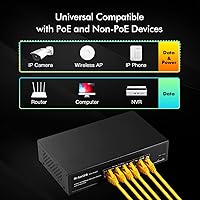
Extend mode lets you push a PoE signal up to 250 meters over a single cable run, well beyond the standard 100-meter Ethernet limit. The trade-off is that port speed drops to 10Mbps and ports become isolated from each other. It is best used when a camera is mounted far from your equipment closet and lower bandwidth is acceptable for that feed.

First confirm the camera supports IEEE 802.3af or 802.3at — passive PoE devices will not work here. Next, check the LED on the port; if it is not lit, try a different cable or port. Also verify your total connected power draw is not exceeding 78W across all four ports, as the switch may throttle or drop a port if overloaded.

Yes, the two uplink ports are designed exactly for that. Connect one uplink port to your router or main network switch with a standard Ethernet cable, and the PoE ports handle your cameras or access points on the same network segment. Both uplink ports run at 100Mbps, so keep that ceiling in mind for combined traffic.

It is a genuine practical benefit. Metal dissipates heat better than plastic, which matters for a device running 24 hours a day. Combined with the fanless design, there are no moving parts to wear out, and the unit runs silently — useful in any installation where noise would be noticeable, like a home office closet.

It depends on your camera's bitrate settings. Many 4K cameras can be configured to stream at lower bitrates that fit within 100Mbps easily, especially at standard frame rates. However, if you are running multiple high-bitrate 4K streams simultaneously on a shared 100Mbps network, you may encounter congestion. For future-proofing with 4K, a gigabit PoE switch is a safer long-term choice.

Yes, the package includes two wall-mount hangers and screws for exactly that purpose. The metal chassis handles heat reasonably well, and the rated upper temperature of 55 degrees Celsius gives it some tolerance for warm enclosures. Just make sure the enclosure does not trap excessive heat, especially in direct sunlight environments.

Each port has its own LED indicator that lights up when a device is connected and active. If the LED is on, the link is established. If a PoE device is not powering up but the LED is lit, the issue is likely a compatibility problem with the PoE standard rather than a physical connection fault. There is no software dashboard or detailed power readout available since this is an unmanaged unit.