Overview

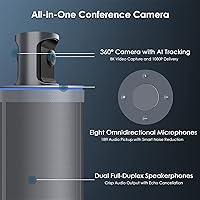
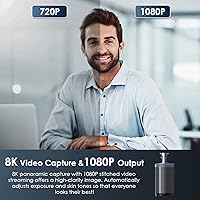
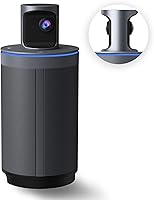
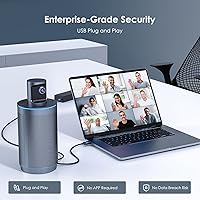
The NexiGo Meeting 360 Gen 2 Conference Camera is a premium all-in-one solution designed for mid-to-large conference rooms that need serious audio and video coverage without the IT headache. Plug it into a USB port, open Zoom, Teams, Webex, or Skype, and you're instantly ready — no drivers, no software to install, no configuration menus to navigate. One thing worth clarifying upfront: the 8K in the marketing refers to the panoramic capture resolution used internally for processing, while the actual video output is crisp 1080p. All AI runs on-device via edge computing, meaning no cloud dependency and no data leaving your room.
Features & Benefits

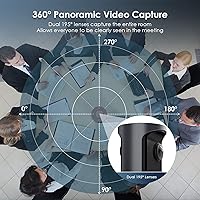
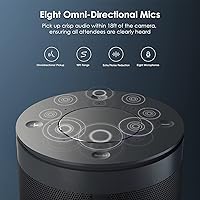
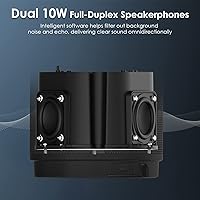
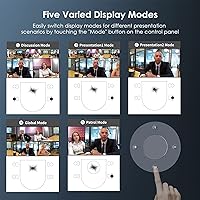
The dual 195-degree wide-angle lenses work together to cover a full 360-degree room view, and the AI speaker tracking is where things get genuinely interesting — the camera identifies whoever is actively talking and switches to a focused, close-up framing automatically. Eight omnidirectional microphones pick up voices clearly from across a large room, filtering out background noise and echo without manual adjustment. Dual 10-watt full-duplex speakerphones handle the outgoing audio side, so remote participants hear the room without distortion. Add five configurable video output modes and a physical privacy shutter you can close when the call ends, and this is a thorough hardware package.

Best For

This 360-degree conference camera earns its place in rooms where multiple people share one table and a fixed-angle webcam simply cannot do the job. It is a strong fit for organizations where IT involvement needs to be minimal — the plug-and-play approach means non-technical staff can set it up and start a call without any training. Teams with strict data privacy requirements will appreciate that there is no Wi-Fi or Bluetooth involved, eliminating a whole category of wireless security concern. It also suits hybrid teams where in-room participants tend to rotate who is speaking, keeping remote colleagues engaged with whoever holds the floor.

User Feedback

Buyers consistently mention how fast the NexiGo Meeting 360 is to get running — open a box, plug in a USB cable, and the camera is recognized immediately. Audio quality gets frequent praise, particularly the mic range in larger rooms where participants sit farther from the device. The main sticking point for some is the 1080p output ceiling: given the premium price positioning, a handful of reviewers expected higher-resolution video output. AI tracking accuracy is generally rated well for single speakers, though a few users note it can hesitate when two people speak simultaneously. Build quality is described as solid, though the unit's footprint is notable in tighter meeting spaces.

Pros

  • Truly plug-and-play — recognized instantly by Zoom, Teams, Webex, and Skype with zero driver setup.
  • Full 360-degree room coverage from a single device eliminates the need for multiple cameras or microphone pods.
  • AI speaker tracking keeps remote participants focused on the active presenter without any manual camera adjustment.
  • Eight omnidirectional microphones handle large rooms well, picking up voices clearly even from across the table.
  • Dual 10W full-duplex speakerphones deliver clean outgoing audio without the echo and feedback common in cheaper units.
  • Physical privacy shutter provides a tangible, trustworthy way to block the lens when the meeting ends.
  • All AI processing runs on-device, meaning no cloud dependency and no user data transmitted externally.
  • Five video output modes give teams flexibility to adapt the view based on room size and meeting format.
  • Wired USB-only connectivity removes wireless security concerns entirely — a genuine advantage in regulated industries.
  • Solid build quality with a footprint that stays stable on a conference table without additional mounting hardware.

Cons

  • Video output is capped at 1080p, which may disappoint buyers drawn in by the 8K marketing language.
  • At 7.19 pounds and over 11 inches long, this all-in-one conferencing device is bulky for smaller or shared spaces.
  • AI tracking can hesitate or cut awkwardly when two participants speak at the same time.
  • No remote control included, so adjusting volume or muting requires physically reaching the camera panel.
  • Premium pricing puts it out of reach for teams who only need basic conferencing in a small room.
  • USB-only connectivity means room setups with a distant or fixed PC may require long cable runs.
  • No built-in wireless option limits flexibility in rooms where cable management is a practical challenge.
  • No standalone operation — the device requires a connected host computer to function at all.

Ratings

The scores below reflect AI-synthesized analysis of verified global user reviews for the NexiGo Meeting 360 Gen 2 Conference Camera, with spam, bot-submitted, and incentivized feedback actively filtered out before scoring. Each category captures both what buyers genuinely appreciated and where real frustrations emerged — nothing has been smoothed over to flatter the product. If a category scored lower, there is a concrete reason grounded in repeated user experience patterns.

Ease of Setup
94%
Users across industries consistently described setup as one of the fastest they had experienced with any conference room hardware. Plug the USB cable in, select the device in Zoom or Teams, and the room is ready — no IT ticket, no driver download, no configuration wizard. For non-technical office managers, this was frequently cited as a genuine relief.
A small number of users on older Windows machines reported a brief delay before the device was fully recognized, requiring a USB re-plug. There were also isolated mentions of the USB cable being shorter than expected for certain room PC placements, forcing buyers to source an extension separately.
Audio Quality
88%
The eight-microphone array earned strong praise in rooms where participants sit spread around a large table. Reviewers noted that colleagues at the far end of the room were picked up clearly without needing to raise their voices, and background noise like HVAC hum was largely filtered out in practice.
In highly reverberant rooms with hard floors and bare walls, some users found the echo cancellation was not quite enough to prevent occasional feedback artifacts. A few reviewers also noted that when two people spoke simultaneously, the audio processing occasionally struggled to cleanly separate both voices.
AI Speaker Tracking
79%
21%
For single-speaker presentations and structured roundtable discussions, the auto-framing drew consistent praise — remote participants reported feeling more engaged because the camera kept the active speaker centered rather than showing an empty wide room shot. The transition speed when switching between speakers was described as smooth in most cases.
Multi-speaker scenarios exposed the main limitation: when two participants talk over each other, the AI can stall or produce a jarring cut between frames. Several users in open-format brainstorming sessions found themselves disabling tracking and defaulting to a static wide view to avoid the distraction.
Video Output Quality
71%
29%
At 1080p output, the image is clean and well-exposed, with auto white balance handling mixed office lighting — fluorescent overhead with window daylight — noticeably better than lower-tier webcams. Participants on the remote end generally described the picture as clear and professional-looking.
The 8K marketing language created genuine disappointment for buyers who expected 8K video delivery to their meeting platforms. When they discovered the output is 1080p, some felt misled — and in a premium price bracket, a 1080p ceiling is a legitimate sticking point compared to high-end competitors beginning to offer 4K output.
Microphone Range
86%
In real conference room conditions, the 18-foot pickup claim held up well for most buyers. Reviewers running all-hands sessions in larger boardrooms noted that participants near the walls were still intelligibly captured without needing to lean toward the device.
At the outer edges of the pickup range, voice clarity dropped noticeably if there was competing ambient noise in the room. A handful of users in open-plan offices separated by glass partitions found that external conversations bled into the pickup area more than expected.
Speaker Volume & Clarity
82%
18%
The dual 10W speakerphones surprised a number of reviewers who expected built-in speakers to be a weak point. In medium-sized rooms, volume was sufficient without distortion, and the full-duplex operation meant in-room participants could speak without cutting off the remote audio feed.
In larger rooms seating more than twelve people, a few users found the maximum volume fell short of filling the space comfortably — particularly when a remote participant had a quiet speaking voice. The speakers perform well for their size, but they are not a substitute for a dedicated room speaker system in truly large spaces.
Privacy & Security
93%
The combination of USB-only connectivity and on-device AI processing resonated strongly with enterprise buyers in regulated sectors. Legal, finance, and healthcare teams specifically mentioned that having no wireless radio in the device removed a compliance conversation they would otherwise need to have with their IT security teams.
The physical privacy shutter works as intended, but a few users noted the pop-up mechanism felt slightly loose over time with repeated use. There were no reports of it failing outright, but buyers expecting a more robust locking shutter may notice the lighter-duty feel of the mechanism.
Build Quality
77%
23%
The unit feels substantial on the table — at just over seven pounds, it does not shift around during meetings, and the housing materials conveyed a professional-grade impression to most buyers. The Space Gray finish was noted as appropriately neutral for corporate environments.
Some reviewers observed that the plastic panel around the control buttons showed minor scuffing after a few months of regular use in busy meeting rooms. A handful of users also flagged that the pop-up privacy shutter, while functional, felt like a slight step down in material quality compared to the rest of the chassis.
Value for Money
63%
37%
For organizations that would otherwise need to purchase a separate conferencing camera, a speakerphone bar, and a microphone array, this all-in-one conferencing device consolidates three hardware purchases into one. Buyers who ran that comparison frequently concluded the bundled value was defensible.
As a standalone purchase without the multi-device comparison context, the price is a hard sell — particularly for smaller teams or budget-constrained departments. Buyers who discovered the 1080p output ceiling after purchase felt the value proposition weakened considerably relative to expectations set by the marketing.
Compatibility
91%
Across hundreds of reviews, there were virtually no reports of compatibility failures with major platforms. Zoom, Teams, Webex, and Skype all recognized the device without any manual configuration, and several users confirmed it worked equally well on both Windows and macOS machines.
Compatibility with less common or enterprise-custom platforms was not widely tested in user feedback, leaving some uncertainty for organizations running niche conferencing software. A small number of Linux users noted the device worked but required manual audio source selection rather than being auto-detected.
Physical Footprint
66%
34%
For the rooms this device is designed for — medium to large conference tables — the footprint is proportional and the cylindrical form sits naturally at the center of a table without obstructing sight lines for in-room participants.
Users who attempted to use it in compact huddle rooms or smaller meeting pods found it noticeably oversized, both physically and conceptually. Cable management also surfaced as a friction point, with the USB cable routing across the table drawing comments about aesthetics in more design-conscious office environments.
AI Framing Accuracy
74%
26%
When the room dynamic was orderly — one person presenting, others listening — the auto-framing was described as genuinely impressive, providing close-up shots that made remote participants feel like they had a front-row view without any manual camera operator.
In less structured meetings where conversation moved rapidly between multiple participants, the framing logic sometimes selected the wrong person or lagged behind the conversation pace. A few users with strong regional accents also anecdotally reported the voice detection triggering on non-speaking participants more often than expected.
Control Panel Usability
81%
19%
Having dedicated hardware buttons for mute, volume up, and volume down on the device itself proved genuinely useful in practice — meeting facilitators could mute the room audio instantly without touching a laptop, which several reviewers flagged as a small but appreciated workflow improvement.
The buttons are positioned on the top panel of the unit, which can make them awkward to locate quickly by feel alone during an active call. A few users also wished for a dedicated button to switch between the five video output modes without opening the companion app.
Noise Cancellation
83%
Background noise filtering held up well in typical office conditions — keyboard clicks, air conditioning, and hallway conversation were effectively suppressed in most user accounts. Remote participants frequently commented that the audio sounded noticeably cleaner than calls from rooms using cheaper conferencing hardware.
The noise cancellation algorithm was occasionally too aggressive in some reviewers' experience, briefly clipping the beginning of a soft-spoken sentence as it distinguished speech from background sound. In very loud environments, such as rooms adjacent to construction, the filtering reached its limits and some noise bleed-through was reported.
Long-Term Reliability
72%
28%
Most reviewers writing several months after purchase reported no hardware failures or software degradation, and the absence of drivers or cloud connectivity meant there were no firmware update interruptions to navigate. The device continued working as expected without any maintenance intervention.
The relatively recent market availability of this generation means long-term durability data is still limited — most reviews cover three to nine months of use rather than multi-year deployments. A small cluster of reviews mentioned the USB connection becoming intermittently loose after repeated plug-unplug cycles, suggesting the port may not be rated for frequent hot-swapping.

Suitable for:

The NexiGo Meeting 360 Gen 2 Conference Camera is purpose-built for organizations that need a single device to handle a full conference room — no separate speakerbar, no external microphone array, no complicated AV setup. It makes the most sense in medium-to-large rooms where participants are spread around a table and a traditional fixed-angle camera would leave half the group out of frame. IT-lean teams will appreciate that there is genuinely nothing to configure: plug it into a laptop or room PC via USB and every major conferencing platform recognizes it instantly. Hybrid teams where the in-room roster changes frequently will find the AI speaker tracking particularly useful, since it keeps remote participants visually connected to whoever is speaking rather than showing an empty wide shot. Companies with strict data governance policies will also value the wired-only USB connection and on-device AI processing, which removes the wireless attack surface and keeps all meeting data within the room.
Not suitable for:

The NexiGo Meeting 360 Gen 2 Conference Camera is not the right call for buyers expecting 4K or higher video output — the 8K figure in the marketing describes internal panoramic capture for processing purposes, and the actual stream delivered to your meeting platform is 1080p. Solo users or small two-person setups will find the form factor oversized and the feature set far beyond what they need, making the premium investment hard to justify. Budget-conscious buyers should be clear-eyed: this sits at the higher end of the conferencing hardware market, and there are capable fixed-angle options available at a fraction of the cost for simpler rooms. Organizations that rely on wireless room kits or Bluetooth peripherals as part of their AV stack may find the USB-only approach limiting if their room PC is not conveniently located near the table. Finally, anyone hoping for remote control functionality or a built-in Android system for standalone operation will need to look elsewhere, as this device depends entirely on a connected host computer.

Specifications

  • Video Capture: The camera captures a full 360-degree panoramic view at 8K resolution internally, then outputs crisp video at 1080p to the connected conferencing platform.
  • Lenses: Two 195-degree wide-angle CMOS lenses work together to achieve complete 360-degree room coverage without any blind spots.
  • Microphones: Eight built-in omnidirectional microphones are arranged to capture voices from all directions around the device.
  • Mic Range: The microphone array picks up speech clearly at distances of up to 18 feet from the camera unit.
  • Speakers: Dual 10W full-duplex speakerphones provide two-way audio output with active echo and interference cancellation.
  • Connectivity: The device connects exclusively via USB and does not include any Wi-Fi or Bluetooth radio, by design.
  • AI Features: On-device AI handles automatic speaker tracking and dynamic framing, identifying the active speaker and adjusting the output view in real time.
  • Video Modes: Five selectable video output modes allow teams to choose from different room visualization layouts depending on meeting format and participant count.
  • Privacy Shutter: A physical pop-up shutter can be manually closed to block both camera lenses when the device is not in use.
  • Setup: No driver installation or software configuration is required — the device is recognized as a standard USB audio and video peripheral by the host computer.
  • Compatibility: Works out of the box with Zoom, Microsoft Teams, Webex, Skype, and most other major video conferencing platforms.
  • Processing: All AI computation runs locally on the device using edge computing, with no data transmitted to external servers or cloud services.
  • Dimensions: The unit measures 11.22 x 4.96 x 4.96 inches, making it a substantial tabletop presence suited to larger conference tables.
  • Weight: The device weighs 7.19 pounds, reflecting a solid, stable construction intended for permanent or semi-permanent room placement.
  • Color: Available in Space Gray, a neutral finish that blends into most professional meeting room environments.
  • Audio Controls: Physical Volume Up, Volume Down, and Mute buttons are located on the camera panel for quick in-meeting audio adjustments.
  • Sensor Type: Both lenses use CMOS image sensors, which provide reliable light sensitivity and color accuracy across varying room lighting conditions.
  • Audio Formats: The device supports AAC, MP3, and PCM audio formats for broad compatibility with conferencing and recording applications.
  • Video Format: Video is captured and output in MP4 format, compatible with standard recording and playback workflows.
  • Storage: Internal flash memory is included for firmware and algorithm storage, keeping all processing self-contained within the hardware.

Related Reviews

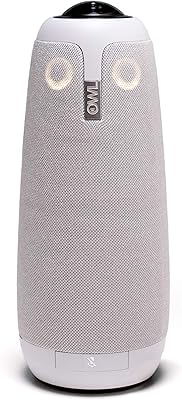
Owl Labs Meeting Owl Pro Conference Camera
79%
93%
Ease of Setup
78%
Speaker Tracking Accuracy
84%
Audio Quality
81%
Video Clarity
96%
Platform Compatibility
More
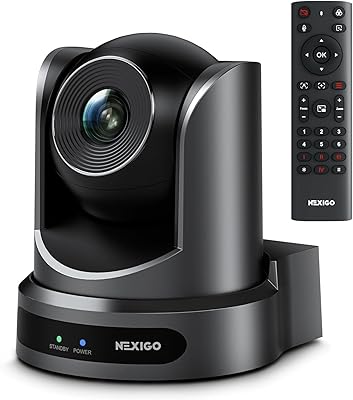
NexiGo P610 Conference Room PTZ Camera
86%
87%
Video Quality
91%
Ease of Setup
85%
Pan and Tilt Range
90%
Remote Control Functionality
88%
Build Quality
More
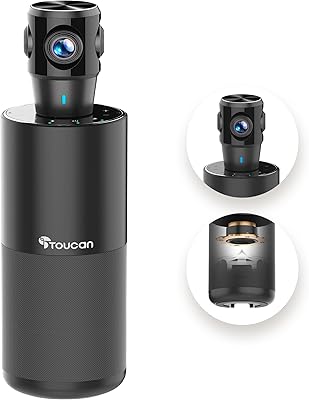
TOUCAN SC360 360-Degree Conference Camera
77%
88%
360-Degree Coverage
84%
Microphone Performance
67%
AI Speaker Tracking
63%
Video Resolution & Clarity
93%
Ease of Setup
More
j5create JVU368 360° Conference Camera
74%
93%
Ease of Setup
86%
360° Coverage
74%
AI Tracking Accuracy
67%
Video Clarity
82%
Microphone Quality
More
COOLPO AI Huddle Pana
78%
88%
360-Degree Coverage
79%
AI Speaker Tracking
83%
Audio Quality
81%
Video Resolution & Clarity
93%
Setup & Ease of Use
More
dockteck DH0002 M.2 NVMe/SATA SSD Enclosure
84%
88%
Transfer Speed (NVMe)
76%
SATA Drive Performance
83%
Build Quality
93%
Ease of Setup
79%
Thermal Management
More
myFirst Camera 2 Kids Waterproof Camera
76%
83%
Waterproof Performance
79%
Build & Durability
91%
Ease of Use for Kids
72%
Photo Quality
61%
Video Quality
More
SSK 512GB USB 3.2 Gen 2 Flash Drive
84%
91%
Performance & Speed
88%
Build Quality & Durability
95%
Ease of Use (Plug-and-Play)
87%
Compatibility (USB-A & USB-C)
80%
Portability & Size
More
THKAILAR T7 256GB Dual-Port USB Flash Drive
78%
91%
Dual-Port Design
72%
Transfer Speed
88%
Build Quality
83%
iPhone Compatibility
67%
Android OTG Performance
More
Timetec 1TB Pro Portable USB 3.2 Gen 2 SSD
88%
93%
Performance
90%
Portability/Size/Weight
92%
Compatibility/Connectivity
95%
Speed (Read/Write)
85%
Value for Money
More

FAQ

No, nothing to install. The device identifies itself as a standard USB camera and microphone to your computer, so Windows, macOS, and most Linux distributions recognize it automatically. Just plug it in, open your meeting app, select it as your audio and video source, and you are ready to go.

Not exactly, and it is worth understanding this before buying. The 8K refers to the internal panoramic capture resolution the camera uses to process the full 360-degree room view. What actually gets sent to your meeting platform is a 1080p stream. The high internal resolution helps the AI cropping and tracking look sharper, but your call participants will see 1080p video, not 8K.

When someone in the room starts speaking, the camera detects who is talking and automatically shifts the output view to frame that person more closely. It works well for single active speakers and roundtable discussions where one person speaks at a time. If two people talk simultaneously, there can be a brief moment of hesitation before the camera settles on a framing — something a handful of users have noted in real-world use.

Technically yes, but it is genuinely overkill for a small space. The NexiGo Meeting 360 Gen 2 Conference Camera is engineered for mid-to-large rooms where a fixed-angle webcam cannot cover everyone. For a solo user or a two-person huddle room, a standard webcam would serve the same purpose at a fraction of the investment.
No. All AI processing happens on the device itself using edge computing, and the connection is USB-only with no Wi-Fi or Bluetooth. There is no pathway for data to leave the room wirelessly, and nothing is transmitted to NexiGo servers during a meeting. For organizations with strict data governance requirements, this is a meaningful architectural choice.

It works with all the major ones — Zoom, Microsoft Teams, Webex, and Skype are explicitly supported, and because the device presents itself as a standard USB audio and video peripheral, it will work with virtually any platform that lets you select a camera and microphone source.

Yes. There are physical buttons directly on the camera panel for volume up, volume down, and microphone mute. This is genuinely useful in a meeting room where your laptop might be at one end of the table and the camera is in the center.

There is a physical pop-up cover built into the housing that you can manually close over both lenses. When it is closed, the camera cannot see anything in the room regardless of whether the device is plugged in. It is a simple, reliable mechanism that does not depend on software settings.

It runs off the USB connection to your host computer or room PC, so no separate power adapter is needed for standard operation. That said, given the built-in speakers and microphone array, you will want to confirm your USB port can supply adequate power — a powered USB hub is worth considering if you are connecting through a dock.

At just over 7 pounds and roughly 11 inches long, this all-in-one conferencing device is not something you would carry between rooms daily. It is better suited as a permanent or semi-permanent installation on a conference table. If you need something portable that travels with you, this form factor is probably not the right fit.